
Cómo el filtrado DNS reduce el consumo de ancho de banda de la red
Esta guía detalla cómo la implementación del filtrado DNS en redes WiFi empresariales bloquea el tráfico de publicidad, seguimiento y telemetría antes de que consuma ancho de banda. Para los gerentes de TI y operadores de recintos, esto se traduce en reducciones inmediatas en los costos de ISP, un mejor rendimiento de la red y una postura de seguridad mejorada.
Video overview
Escucha esta guía
Ver transcripción del podcast
Parte de nuestra serie principal: Guía de Seguridad para WiFi Empresarial →
Resumen ejecutivo
La gestión del ancho de banda es un desafío operativo constante para los gerentes de TI y arquitectos de red empresariales que operan entornos de alta densidad - como hospitality, retail, transport y recintos a gran escala. A pesar de las continuas actualizaciones en las conexiones de los ISP y la densidad de los puntos de acceso, una parte significativa del rendimiento disponible suele ser consumida por tráfico no iniciado por el usuario. Las redes de publicidad, los beacons de telemetría, los píxeles de seguimiento y las actualizaciones de fondo del sistema operativo degradan silenciosamente el rendimiento de la red e inflan artificialmente los costos de infraestructura.
Esta guía de referencia técnica detalla cómo la implementación del filtrado de DNS en el borde de la red aborda directamente estas ineficiencias. Al interceptar y bloquear las solicitudes de resolución para dominios conocidos de publicidad, seguimiento y malware, los operadores de red pueden evitar que se establezcan conexiones TCP innecesarias. Este enfoque reduce el consumo de ancho de banda de la red en entornos de alta densidad hasta en un 35%, lo que mejora la experiencia del usuario final además de mitigar los riesgos de seguridad. Exploraremos la arquitectura técnica, los modelos de implementación y el ROI medible del filtrado de DNS, proporcionando orientación práctica para profesionales senior de TI.
Análisis técnico profundo
Mecánica de la resolución de DNS y el desperdicio de ancho de banda
El Sistema de Nombres de Dominio (DNS) sirve como una capa de enrutamiento fundamental para todo el tráfico de internet. Cuando un dispositivo cliente se conecta a una red de guest WiFi, lo primero que hace antes de establecer cualquier conexión HTTP/HTTPS es realizar una consulta DNS para resolver un nombre de host a una dirección IP.
En las aplicaciones web y móviles modernas, una sola acción del usuario (como cargar un sitio web de noticias o abrir una aplicación de redes sociales) desencadena una cascada de consultas DNS secundarias y terciarias. Estas consultas se dirigen a servidores de anuncios, plataformas de analítica y endpoints de telemetría.

Cuando estas consultas se resuelven con éxito, el dispositivo establece una conexión y descarga la carga útil - que a menudo consiste en archivos multimedia pesados para anuncios o flujos de datos continuos para telemetría. Este tráfico consume un valioso ancho de banda, tiempo de aire de radio en los puntos de acceso (APs) y límites de conexiones concurrentes en los routers de puerta de enlace.
Cómo el filtrado de DNS recupera ancho de banda
El filtrado de DNS intercepta este proceso en la etapa de resolución. Cuando un dispositivo consulta un dominio, el solucionador de DNS verifica el nombre de host con una lista de bloqueo actualizada (o un flujo de inteligencia de amenazas). Si el dominio está marcado como una red de anuncios, rastreador o entidad maliciosa conocida, el solucionador devuelve una respuesta nula (como 0.0.0.0 o NXDOMAIN) en lugar de la dirección IP real.
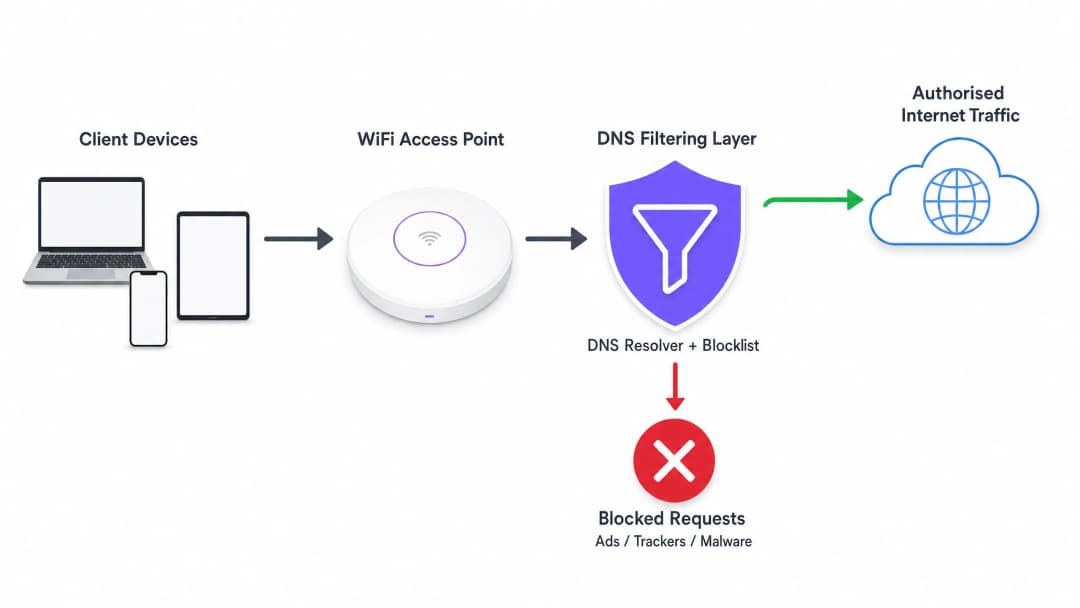
La ganancia de eficiencia más crítica aquí es que la transacción se interrumpe antes de que ocurra un saludo de manos TCP. No se lleva a cabo ninguna negociación TLS y no se descarga ningún payload. El ancho de banda que habrían consumido los anuncios o los scripts de seguimiento se conserva por completo.
Arquitecturas de Implementación
Existen tres modelos arquitectónicos principales para implementar el filtrado de DNS en entornos empresariales:
- Solucionadores basados en la nube: El servidor DHCP local se configura para asignar las direcciones IP de un servicio de filtrado de DNS en la nube (como Cisco Umbrella o Cloudflare Gateway) a los dispositivos de los clientes. Esta es la implementación con menor fricción, ya que no requiere cambios de hardware en las instalaciones. Sin embargo, depende totalmente de la latencia del proveedor de la nube.
- Dispositivos locales (On-premises): Se implementa un solucionador de DNS dedicado (físico o virtual) dentro de la infraestructura de la red local. Esto proporciona la latencia más baja para la resolución de DNS y garantiza que todos los registros de consultas de DNS permanezcan en el sitio, lo que puede simplificar el cumplimiento de las regulaciones de soberanía de datos.
- Plataformas de gestión de WiFi integradas: Para los operadores de múltiples sitios, el modelo más eficiente es integrar el filtrado de DNS directamente en la capa de gestión de red o de Captive Portal. Las plataformas que ofrecen WiFi analytics integrales a menudo incluyen filtrado de DNS basado en políticas que se pueden aplicar por SSID, por sitio o por grupo de usuarios.
¿Tiene preguntas sobre su configuración específica?
Nuestro equipo trabaja con gestores de espacios, responsables de TI e ingenieros de redes en 80 000 establecimientos. Reserve una llamada de 20 minutos y le mostraremos cómo lo resolvieron otros profesionales como usted.
Guía de Implementación
La implementación del filtrado de DNS requiere un enfoque estructurado para evitar interrumpir el tráfico legítimo de los usuarios o afectar los servicios esenciales.
Paso 1: Establecer una línea base
Antes de aplicar cualquier regla de bloqueo, configure sus solucionadores de DNS actuales para registrar todas las consultas. Ejecute esto en un modo de auditoría durante al menos 14 días para capturar una muestra representativa del tráfico en todos los sitios. Analice estos registros para identificar los dominios más consultados y calcular el porcentaje de consultas dirigidas a redes de anuncios y rastreadores conocidos. Esta línea base es esencial para medir el ROI posterior a la implementación.
Paso 2: Definir políticas de filtrado por segmento de red
Las políticas de filtrado monolíticas rara vez son efectivas en un entorno empresarial. Debe segmentar sus políticas según el propósito de la red:
- Guest WiFi: Aplique un bloqueo estricto de redes de anuncios, rastreadores, contenido para adultos y dominios conocidos de malware para maximizar el ahorro de ancho de banda y proteger la reputación del establecimiento.
- Redes Corporativas y de Personal: Aplique un filtrado moderado. Mientras que los dominios de phishing y malware deben bloquearse, un bloqueo de anuncios demasiado estricto puede interferir con los equipos de marketing o aplicaciones SaaS específicas. Revise las Políticas seguras de BYOD para redes de WiFi para el personal para obtener orientación sobre cómo equilibrar la seguridad y el acceso.
- Redes de IoT y Operativas: Aplique una lista de permitidos estricta (denegación por defecto). Los dispositivos IoT (como termostatos inteligentes o terminales de punto de venta) solo deben poder resolver dominios específicos necesarios para su funcionamiento.
Paso 3: Seleccionar y probar las listas de bloqueo
La efectividad de su filtrado de DNS depende completamente de la calidad de sus listas de bloqueo. Confiar en una sola fuente es riesgoso. Combine fuentes comerciales de inteligencia de amenazas con listas acreditadas mantenidas por la comunidad (como OISD).
Lo más importante es ejecutar primero las listas de bloqueo seleccionadas en un modo de simulación o monitoreo. Analice los registros para identificar falsos positivos - dominios legítimos que podrían bloquearse. Por ejemplo, bloquear una CDN importante podría, sin querer, impedir la carga de aplicaciones empresariales críticas.
Paso 4: Abordar el DNS sobre HTTPS (DoH)
Los navegadores modernos (Chrome, Firefox, Edge) utilizan cada vez más de forma predeterminada DNS sobre HTTPS (DoH), que cifra las consultas DNS y evita los servidores DNS asignados por DHCP de su red local para enviarlos directamente a solucionadores en la nube (como Google o Cloudflare). Si DoH está activo, se omitirá su filtrado de DNS.
Para mitigar esto, debe configurar sus firewalls perimetrales para bloquear el tráfico saliente hacia proveedores de DoH conocidos en el puerto 443, lo que obligará a los navegadores a recurrir a los solucionadores de DNS locales sin cifrar donde se aplican sus políticas de filtrado.
Mejores prácticas
- Automatizar las actualizaciones de las listas de bloqueo: El panorama de amenazas y los dominios que sirven anuncios cambian a diario. Asegúrese de que su solución de filtrado de DNS obtenga automáticamente actualizaciones de sus fuentes de inteligencia de amenazas seleccionadas al menos cada 24 horas.
- Implementar un caché local: Para minimizar la latencia, asegúrese de que su solucionador de DNS local almacene en caché las consultas frecuentes. Incluso si utiliza un servicio de filtrado basado en la nube, un reenviador de caché local reduce los tiempos de ida y vuelta para las solicitudes comunes.
- Mantener una lista de permitidos accesible: Los falsos positivos ocurrirán. Cuando un servicio legítimo se bloquee sin querer, establezca un proceso claro y rápido para que el equipo de soporte de TI agregue dominios específicos a una lista de permitidos.
- Garantizar el cumplimiento: Los registros de consultas DNS contienen información sobre el comportamiento de navegación de los usuarios, que puede estar sujeta a regulaciones como GDPR o CCPA. Asegúrese de que sus prácticas de registro se alineen con la política de privacidad de su organización. Para obtener más información sobre cómo mantener registros seguros, consulte Explicar qué es una pista de auditoría para la seguridad de TI en 2026.
Resolución de problemas y mitigación de riesgos
Modos comunes de falla
- Ruptura de Captive Portal: El filtrado DNS agresivo a veces puede bloquear los dominios requeridos para la detección del Captive Portal del sistema operativo del dispositivo (como
captive.apple.com). Asegúrese de que estos dominios esenciales estén explícitamente en la lista de permitidos. - Mal funcionamiento de la aplicación: Algunas aplicaciones móviles no se cargarán o fallarán si no se puede acceder a sus dominios de telemetría o de publicación de anuncios. Si una aplicación crítica utilizada por su personal o invitados falla, revise los registros de DNS para ver las consultas bloqueadas que se originan en esos dispositivos y ajuste la lista de permitidos en consecuencia.
- Cuellos de botella en el rendimiento: Si implementa un dispositivo local, asegúrese de que esté adecuadamente aprovisionado para manejar el pico de consultas por segundo (QPS) de su red. Un solucionador de DNS con recursos insuficientes introducirá una latencia significativa, lo que degradará la experiencia del usuario mucho más de lo que lo harían los anuncios.
ROI e impacto empresarial
La implementación del filtrado DNS ofrece retornos medibles en tres áreas clave:
- Reducción del consumo de ancho de banda: Al eliminar del 15% al 35% del tráfico no esencial, las organizaciones a menudo pueden posponer las costosas actualizaciones de los circuitos de ISP. En entornos con conexiones medidas o enlace de retorno satelital, los ahorros de costos son inmediatos y significativos.
- Rendimiento de red mejorado: Reducir el volumen de conexiones concurrentes y el tiempo de uso del aire consumido por el tráfico en segundo plano mejora directamente el rendimiento y la latencia para la actividad legítima del usuario. Esto se traduce en menos tickets de soporte técnico relacionados con "WiFi lento" y puntajes más altos de satisfacción del usuario.
- Postura de seguridad mejorada: Bloquear los dominios de comando y control (C2) de malware y los sitios de phishing en la capa DNS reduce significativamente el riesgo de violaciones de seguridad exitosas originadas en dispositivos comprometidos en las redes de invitados o del personal.
A medida que las iniciativas del sector público y de las ciudades inteligentes se expanden - como se promovió en nuestro anuncio reciente, Purple nombra a Iain Fox como VP de Crecimiento - Sector Público para impulsar la inclusión digital y la innovación en ciudades inteligentes - la utilización eficiente del ancho de banda se vuelve crítica para ofrecer una conectividad equitativa y de alto rendimiento a escala. Además, funciones como Purple lanza el modo de mapas sin conexión para una navegación segura y sin interrupciones en puntos de acceso WiFi demuestran cómo la optimización de los recursos de la red puede mejorar la experiencia general del usuario.
Definiciones clave
Resolución DNS
El proceso de traducir un nombre de dominio legible por humanos (por ejemplo, example.com) en una dirección IP legible por máquinas.
Este es el paso prerrequisito para casi todo el tráfico de red; interceptarlo aquí es la forma más eficiente de bloquear conexiones no deseadas.
DNS sobre HTTPS (DoH)
Un protocolo para realizar la resolución DNS remota a través del protocolo HTTPS, cifrando la consulta.
DoH evita que los administradores de red local vean o filtren las solicitudes DNS, lo que requiere reglas de firewall específicas para mitigarlo.
Tráfico de telemetría
Comunicaciones automatizadas enviadas por sistemas operativos o aplicaciones a sus proveedores, reportando datos de uso, diagnósticos o estado.
Aunque individualmente es pequeño, el tráfico de telemetría agregado de cientos de dispositivos en una red WiFi pública consume un ancho de banda significativo.
NXDOMAIN
Una respuesta DNS que indica que el nombre de dominio solicitado no existe.
Los filtros DNS a menudo devuelven una respuesta NXDOMAIN para los dominios bloqueados, terminando de inmediato el intento de conexión del cliente.
Feed de inteligencia de amenazas
Un flujo de datos continuamente actualizado que proporciona información sobre dominios, direcciones IP y URL maliciosas conocidas.
Se utiliza para actualizar dinámicamente las listas de bloqueo de DNS para proteger las redes contra el malware y la infraestructura de phishing recientemente identificados.
Falso positivo
En el filtrado de DNS, cuando un dominio legítimo y necesario se categoriza y bloquea de manera incorrecta.
Los falsos positivos causan fallas en las aplicaciones y requieren un proceso rápido de lista de permitidos para resolver las quejas de los usuarios.
Lista de permitidos (Denegación predeterminada)
Una postura de seguridad donde todo el tráfico se bloquea de forma predeterminada, y solo se permite resolver a los dominios explícitamente aprobados.
La mejor práctica para redes altamente seguras u operativas (como sistemas IoT o POS) donde los dominios requeridos son conocidos y limitados.
Detección de Captive Portal
El mecanismo mediante el cual un sistema operativo determina si está detrás de un Captive Portal, generalmente al intentar acceder a un dominio específico del proveedor.
Si el filtrado de DNS bloquea estos dominios específicos, los dispositivos no podrán mostrar la página de inicio de sesión de WiFi, lo que impedirá que los usuarios se conecten.
Ejemplos resueltos
Un hotel de 400 habitaciones está experimentando una congestión de red severa durante las horas pico de la tarde (7 PM - 10 PM). La conexión ISP de 1Gbps está saturada y los huéspedes se quejan de la lentitud en la transmisión de video. Actualizar el circuito a 2Gbps costará un adicional de £1,500 al mes. ¿Cómo puede el Director de TI usar el filtrado DNS para solucionar esto?
- Implementar una solución de filtrado DNS basada en la nube y configurar el alcance DHCP del router principal para asignar los nuevos servidores de resolución a la VLAN de invitados.
- Habilitar una lista de bloqueo integral dirigida a redes de anuncios, píxeles de seguimiento y endpoints de telemetría conocidos por consumir mucho ancho de banda.
- Configurar el firewall perimetral para bloquear el tráfico DoH (DNS sobre HTTPS) saliente para garantizar que todos los dispositivos de los huéspedes utilicen los servidores de resolución filtrados.
- Monitorear la utilización del ancho de banda durante la siguiente hora pico de la tarde.
Una gran cadena de tiendas de retail ofrece WiFi para invitados gratuito en sus 50 ubicaciones. Han notado un alto volumen de tráfico de fondo procedente de dispositivos Android, principalmente telemetría de Google Play Services, lo que está degradando el rendimiento de las tabletas de punto de venta (POS) de la tienda que comparten el mismo enlace WAN.
- Implementar el filtrado DNS basado en políticas a través de la plataforma de gestión central de WiFi.
- Crear dos políticas distintas: una para el SSID de invitados y otra para el SSID de POS.
- En la política del SSID de invitados, aplicar el bloqueo estándar de anuncios y malware, además de reglas específicas para limitar el ancho de banda o bloquear dominios de telemetría no esenciales del sistema operativo.
- En la política del SSID de POS, implementar una lista de permitidos estricta, autorizando únicamente la resolución DNS para la pasarela de pago, el sistema de gestión de inventario y los endpoints esenciales de MDM (Mobile Device Management).
Preguntas de práctica
Q1. Está implementando el filtrado de DNS en la red de un campus universitario. Durante la fase piloto, los estudiantes informan que no pueden acceder a la página de inicio de sesión del WiFi del campus. ¿Cuál es la causa más probable y cómo la resuelve?
Sugerencia: Piense en cómo los sistemas operativos determinan si necesitan mostrar una pantalla de inicio de sesión.
Ver respuesta modelo
Es probable que el filtro de DNS esté bloqueando los dominios específicos utilizados por Apple, Android y Windows para la detección de Captive Portal (por ejemplo, captive.apple.com, connectivitycheck.gstatic.com). La solución es agregar de inmediato estos dominios de Captive Portal específicos del proveedor a la lista de permitidos global.
Q2. El director de TI de un estadio desea implementar el filtrado de DNS para ahorrar ancho de banda durante los días de partido. Sin embargo, le preocupa la latencia introducida al enrutar todas las consultas de DNS a un proveedor de la nube. ¿Qué enfoque arquitectónico debería recomendar?
Sugerencia: Considere dónde se lleva a cabo físicamente el proceso de resolución de DNS.
Ver respuesta modelo
Recomiende implementar un dispositivo DNS local (On-Premises) o un reenviador de caché local. Esto mantiene la resolución de DNS inicial a nivel local en la infraestructura del estadio, proporcionando tiempos de respuesta de menos de un milisegundo, al mismo tiempo que utiliza flujos de inteligencia de amenazas basados en la nube para actualizar las listas de bloqueo locales de forma asíncrona.
Q3. Después de implementar el filtrado de DNS, el panel muestra una reducción del 25% en las consultas de DNS, pero la utilización general del ancho de banda de la WAN solo ha disminuido un 5%. ¿Cuál es la razón más probable de esta discrepancia?
Sugerencia: ¿Qué protocolo evade por completo los resolutores de DNS locales?
Ver respuesta modelo
Los dispositivos cliente (específicamente los navegadores modernos) probablemente estén utilizando DNS sobre HTTPS (DoH) para evadir los resolutores de DNS locales. Mientras que el filtro local captura parte del tráfico en segundo plano del sistema operativo (la reducción de consultas del 25%), el tráfico pesado del navegador está cifrado y evade el filtro. El firewall debe configurarse para bloquear el tráfico DoH saliente para obligar a los navegadores a recurrir al resolutor local.
Continúe leyendo esta serie
Cyber Essentials y WiFi para empleados: Cómo cumplir los cinco controles en su red inalámbrica
Podrá mapear cada uno de los cinco controles de Cyber Essentials a su WiFi para empleados y resolver las brechas que identifican los evaluadores. Luego podrá elegir entre 802.1X, iPSK y una red WPA2-PSK segregada para cada clase de dispositivo. Finalmente, sabrá cómo preparar los puntos de acceso, controladores y BYOD para una auditoría de Cyber Essentials Plus.
Analíticas de presencia de HPE Aruba Central: configuración, exportaciones y límites
Podrá habilitar las analíticas de presencia de Aruba Central por sitio, calibrar el umbral de RSSI y los límites de permanencia frente a un conteo real, y exportar agregados a nivel de sitio a través de la REST API de Central. También sabrá dónde se detienen las analíticas de presencia nativas y cuándo una capa de plataforma independiente del hardware como Purple se gana su lugar en sus puntos de acceso Aruba existentes.
Cumplimiento de CIPA: lista de verificación de cumplimiento para operadores de establecimientos
Podrá decidir si CIPA vincula su WiFi, luego segmentar redes, enrutar el DNS a través de Purple Shield y cerrar rutas de bypass. También sabrá qué evidencia conservar para la certificación del Form 486 o Form 479. La lista de verificación asigna un responsable a cada requisito, para que no falte nada en la certificación de su próximo año de financiamiento.
¿Tiene preguntas sobre su configuración específica?
Nuestro equipo trabaja con gestores de espacios, responsables de TI e ingenieros de redes en 80 000 establecimientos. Reserve una llamada de 20 minutos y le mostraremos cómo lo resolvieron otros profesionales como usted.