
eduroam y 802.1X: Autenticación de WiFi segura para la educación superior
Esta guía de referencia técnica autorizada explica la arquitectura, el despliegue y la seguridad de la autenticación eduroam y 802.1X. Diseñada para administradores de TI y arquitectos de red, cubre los pasos prácticos de implementación, la selección del método EAP y cómo los operadores de recintos pueden admitir de forma segura el roaming académico.
Escucha esta guía
Ver transcripción del podcast
Parte de nuestra serie principal: Enterprise WiFi Security Guide →

Resumen Ejecutivo
Para las instituciones de educación superior y para los espacios que atienden a su personal y estudiantes, ofrecer una conectividad inalámbrica segura y fluida ya no es un lujo, es un requisito operativo. El estándar para esta conectividad es eduroam, un servicio de roaming global basado en el marco IEEE 802.1X.
Esta guía proporciona a los gerentes de TI, arquitectos de red y directores de operaciones de instalaciones una referencia completa y neutral respecto al proveedor para comprender, implementar y solucionar problemas de 802.1X y eduroam. Vamos más allá de los modelos teóricos básicos para examinar cómo funciona en la práctica el WiFi para campus de nivel empresarial, incluyendo la gestión de certificados, la arquitectura de proxy RADIUS y la integración con una estrategia de red de invitados más amplia.
Ya sea que esté actualizando una red universitaria antigua o configurando un centro de conferencias para dar soporte a visitantes académicos, implementar 802.1X correctamente reduce significativamente el riesgo de seguridad - particularmente el robo de credenciales - al tiempo que disminuye drásticamente los costos de soporte. Para los espacios fuera de la educación superior tradicional, comprender estos estándares es esencial para evaluar las federaciones de roaming comercial como OpenRoaming, que comparten la misma arquitectura subyacente.
Análisis Técnico Detallado: Arquitectura de 802.1X y eduroam
En su núcleo, eduroam es una implementación de IEEE 802.1X, el estándar de control de acceso a la red basado en puertos. 802.1X se diseñó originalmente para redes cableadas, pero constituye la base de la seguridad WPA2 y WPA3 para empresas.
El Modelo de Triángulo de 802.1X
El marco 802.1X se basa en la interacción de tres componentes distintos para autorizar el acceso:
- Suplicante (Supplicant): El dispositivo cliente que solicita acceso a la red (por ejemplo, la laptop o el smartphone de un estudiante).
- Autenticador (Authenticator): El dispositivo de acceso a la red (por ejemplo, un punto de acceso inalámbrico o un switch administrado). Actúa como un guardián, bloqueando todo el tráfico excepto los mensajes de autenticación hasta que el dispositivo esté autorizado.
- Servidor de Autenticación (Authentication Server): El sistema backend que valida las credenciales, casi universalmente un servidor RADIUS (Remote Authentication Dial-In User Service).
Cuando un dispositivo se conecta, el autenticador establece un puerto controlado. Este transmite mensajes del Protocolo de Autenticación Extensible (EAP) entre el suplicante y el servidor de autenticación. Si las credenciales son válidas, el servidor devuelve un mensaje Access-Accept de RADIUS y el autenticador abre el puerto para permitir el paso del tráfico IP estándar.

Jerarquía de Proxies RADIUS de eduroam
Lo que hace único a eduroam es su arquitectura federada. Permite a los usuarios autenticarse en cualquier institución participante utilizando las credenciales de su hogar, sin que la institución hospedadora tenga una copia de esas credenciales.
Esto se logra a través de una cadena jerárquica de proxies RADIUS. Cuando un usuario de username@university.ac.uk se conecta al SSID de eduroam en un sitio hospedador:
- El dispositivo del usuario envía una solicitud de autenticación con el formato
username@university.ac.uk. - El servidor RADIUS del sitio hospedador inspecciona el dominio (la parte posterior al símbolo
@). Al reconocerlo como un dominio externo, reenvía la solicitud al servidor RADIUS nacional de nivel superior (operado por la Red Nacional de Investigación y Educación, o NREN). - El servidor nacional encamina la solicitud al servidor RADIUS de la institución de origen (
university.ac.uk). - La institución de origen valida las credenciales y devuelve un mensaje
Access-AcceptoAccess-Rejectde vuelta a lo largo de la cadena.
Todo el proceso normalmente se completa en menos de dos segundos. De manera crucial, la contraseña del usuario nunca se expone a la institución hospedadora ni a los servidores proxy intermediarios; está protegida dentro de un túnel EAP cifrado establecido directamente entre el suplicante y el servidor RADIUS de origen.
Métodos EAP: El equilibrio entre seguridad y viabilidad de implementación
La elección del método EAP determina cómo se forma el túnel cifrado y cómo se intercambian las credenciales. La definición del servicio de políticas de eduroam limita estrictamente los métodos permitidos para garantizar la seguridad.
- PEAP (Protected EAP): El método de implementación más común. Utiliza un certificado del lado del servidor en el servidor RADIUS para establecer un túnel TLS. Luego, el cliente se autentica dentro de ese túnel, normalmente utilizando MSCHAPv2 (usuario y contraseña). Es relativamente fácil de implementar, pero es vulnerable a ataques de puntos de acceso no autorizados si los clientes no están configurados para validar estrictamente el certificado del servidor.
- EAP-TLS: El estándar de oro para la seguridad. Requiere autenticación mutua, lo que significa que tanto el servidor RADIUS como el dispositivo cliente deben presentar certificados válidos. Aunque es inmune al phishing de credenciales, requiere una infraestructura de clave pública (PKI) robusta para emitir y administrar certificados de cliente, lo que hace que la implementación a gran escala sea más compleja.
¿Tiene preguntas sobre su configuración específica?
Nuestro equipo trabaja con gestores de espacios, responsables de TI e ingenieros de redes en 80 000 establecimientos. Reserve una llamada de 20 minutos y le mostraremos cómo lo resolvieron otros profesionales como usted.
Guía de implementación
La implementación de 802.1X y eduroam requiere una coordinación cuidadosa entre la infraestructura de red, la gestión de identidades y la configuración de los clientes.
1. Preparación de la infraestructura
Asegúrese de que sus puntos de acceso inalámbrico y controladores sean compatibles con WPA2-Enterprise/WPA3-Enterprise y 802.1X. Cualquier hardware moderno de nivel empresarial (Cisco, Aruba, Juniper, entre otros) cumplirá con este requisito. También debe implementar una infraestructura RADIUS robusta (como FreeRADIUS, Cisco ISE o Aruba ClearPass) que sea capaz de gestionar la carga de autenticación esperada y el direccionamiento de solicitudes de proxy.
2. Gestión de certificados
Para las implementaciones PEAP, su servidor RADIUS necesita un certificado TLS emitido por una autoridad de certificación (CA) en la que confíen sus clientes. Nunca use certificados autofirmados en una implementación de eduroam de producción. Los certificados se deben renovar periódicamente para evitar interrupciones en la autenticación.
3. Configuración del cliente (la herramienta CAT)
El punto de falla más común en las implementaciones de eduroam es la configuración incorrecta del cliente. Cuando los usuarios se conectan de forma manual, a menudo no configuran la validación del certificado, lo que los deja expuestos a ataques de robo de credenciales.
Para mitigar este riesgo, las instituciones deben utilizar la herramienta de asistente de configuración de eduroam (CAT) o una solución MDM para distribuir perfiles preconfigurados. Estos perfiles configuran automáticamente el método EAP correcto, vinculan el certificado del servidor RADIUS esperado y establecen el protocolo de autenticación interna adecuado.
4. Asignación y segmentación de VLAN
Una implementación madura utiliza atributos RADIUS para asignar VLAN de forma dinámica según la identidad del usuario.
- Usuarios internos: Asignados a VLAN internas con el acceso adecuado a los recursos del campus.
- Usuarios visitantes: Asignados a una VLAN de invitados restringida que ofrece solo acceso a internet.
Esta segmentación es fundamental para la seguridad y el cumplimiento, lo que garantiza que los dispositivos de los visitantes no puedan acceder a redes internas confidenciales.
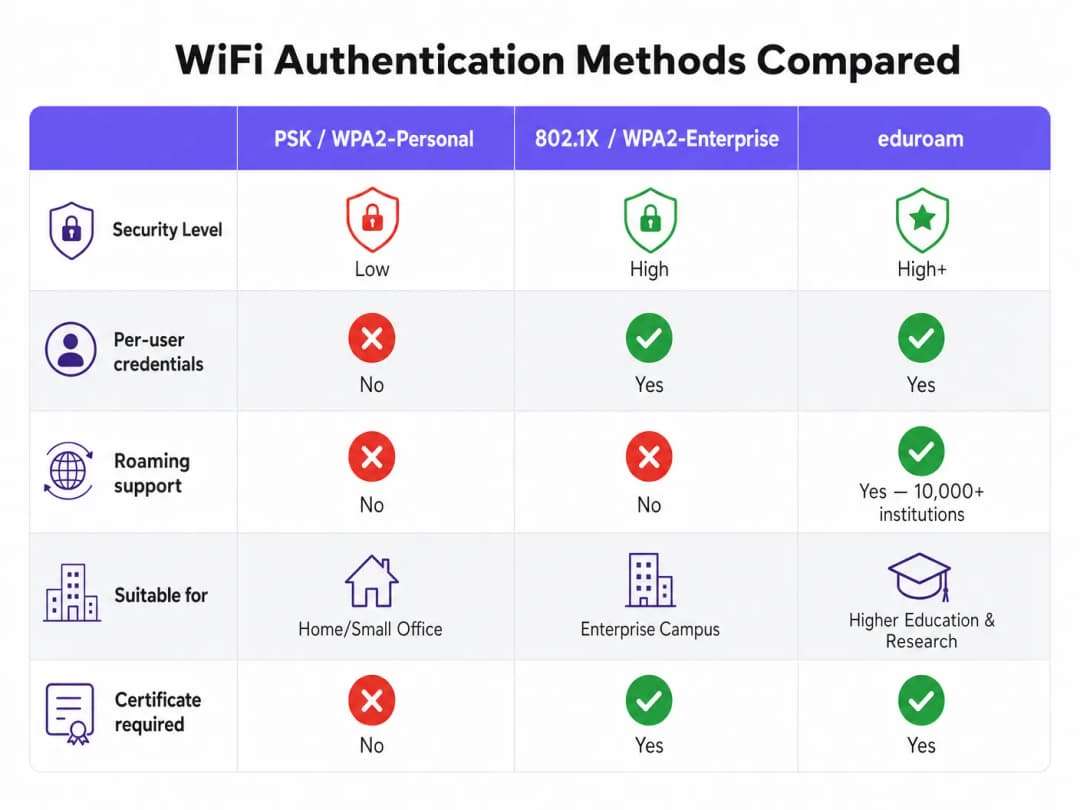
Mejores prácticas y recomendaciones independientes del proveedor
- Priorice WPA3: Para nuevas implementaciones, habilite WPA3-Enterprise para obtener el cifrado obligatorio de 192 bits y una mejor protección contra ataques de diccionario fuera de línea.
- Exija la validación de certificados: Requiera el uso de perfiles de configuración (a través de CAT o MDM) para garantizar que el suplicante valide estrictamente el certificado del servidor RADIUS antes de transmitir las credenciales.
- Use RadSec: Al configurar conexiones proxy RADIUS a la federación nacional, use RadSec (RADIUS sobre TLS) en lugar de UDP simple. Esto cifra el tráfico de proxy y mejora la confiabilidad en enlaces de red de área amplia.
- Integre con una solución para invitados: eduroam solo atiende a usuarios con credenciales académicas. Debe mantener una solución de Guest WiFi segura y separada para contratistas, público en general y asistentes a eventos.
- Revise la infraestructura relacionada: Asegúrese de que su red subyacente sea segura. Lea nuestra guía Cómo proteger su red con DNS robustos y seguridad para obtener más detalles. Si va a implementar infraestructura temporal para eventos universitarios, consulte WiFi para eventos: Planificación e implementación de redes inalámbricas temporales o la versión en portugués Event WiFi: Planeamento e Implementação de Redes Sem Fios Temporárias.
Resolución de problemas y mitigación de riesgos
Cuando falla la autenticación, es esencial realizar una resolución de problemas sistemática.
- Aísle el dominio de la falla: Determine si la falla es local (afecta a los usuarios de su propia red), remota (afecta a sus usuarios en otros lugares) o entrante (afecta a los visitantes de su red).
- Verifique los registros de RADIUS: Los registros del servidor RADIUS son la fuente de información autorizada. Busque mensajes
Access-Reject(que indican credenciales incorrectas o violaciones de políticas) o tiempos de espera agotados (que indican problemas de conectividad del proxy). - Verifique la validez del certificado: Asegúrese de que el certificado del servidor RADIUS no haya expirado y de que se esté presentando la cadena de certificados completa a los clientes.
- Monitoree la latencia ascendente: Una latencia alta hacia el proxy RADIUS nacional puede provocar tiempos de espera agotados en el cliente, lo que resulta en conexiones fallidas incluso cuando las credenciales son correctas.
ROI e impacto empresarial
Para las instituciones de educación superior, el retorno de una implementación de eduroam correctamente desplegada se traduce en una reducción drástica de los tickets de soporte. Al eliminar los Captive Portals y la introducción manual de contraseñas, los departamentos de soporte de TI experimentan una disminución significativa de las llamadas relacionadas con la conectividad (el compromiso de Purple con este sector es claro; consulte Purple nombra a Tim Peers como vicepresidente de Educación, subrayando sus ambiciones en educación superior).
Para los establecimientos comerciales - como hotelería, retail, atención médica o transporte - la compatibilidad con eduroam Visitor Access (eVA) o federaciones similares como OpenRoaming proporciona una experiencia sin fricciones para un grupo demográfico de alto valor. Garantiza que los visitantes académicos se conecten de forma automática y segura, mejorando la satisfacción y permitiendo que el establecimiento mantenga una segmentación de red estricta. Si su establecimiento necesita un ancho de banda dedicado para soportar esta demanda, considere leer ¿Qué es una línea arrendada? Internet diseñada para empresas.
Al planificar las actualizaciones de la red, la integración de la capacidad 802.1X garantiza que su infraestructura esté lista para las redes modernas basadas en la identidad, sentando las bases para servicios avanzados de WiFi Analytics y basados en la ubicación.
Definiciones clave
802.1X
Un estándar IEEE para el Control de Acceso a Redes basado en puertos (PNAC). Proporciona un mecanismo de autenticación para los dispositivos que desean conectarse a una LAN o WLAN.
El protocolo fundamental para la seguridad WiFi de nivel empresarial, que reemplaza las contraseñas compartidas (PSK) con una autenticación individualizada.
RADIUS (Remote Authentication Dial-In User Service)
Un protocolo de red que proporciona una gestión centralizada de Autenticación, Autorización y Contabilidad (AAA) para los usuarios que se conectan y utilizan un servicio de red.
El servidor backend en una implementación de 802.1X que realmente verifica las credenciales del usuario con un directorio (como Active Directory).
EAP (Extensible Authentication Protocol)
Un marco de autenticación frecuentemente utilizado en redes inalámbricas y conexiones de punto a punto. Proporciona el transporte y uso de varios mecanismos de autenticación.
El lenguaje hablado entre el dispositivo cliente y el servidor RADIUS durante el saludo de 802.1X.
Supplicant
El dispositivo cliente (por ejemplo, laptop, smartphone) o el software en ese dispositivo que intenta autenticarse en una red utilizando 802.1X.
La entidad que solicita el acceso. Su configuración (especialmente en lo que respecta a la validación de certificados) es fundamental para la seguridad.
Authenticator
El dispositivo de red (por ejemplo, punto de acceso inalámbrico, switch Ethernet) que facilita el proceso de autenticación 802.1X al transmitir mensajes entre el Supplicant y el Servidor de Autenticación.
El guardián que bloquea el tráfico de red hasta que el servidor RADIUS da luz verde.
PEAP (Protected Extensible Authentication Protocol)
Un método EAP que encapsula la transacción EAP dentro de un túnel TLS establecido mediante un certificado del lado del servidor, protegiendo la autenticación interna (generalmente una contraseña).
El método de autenticación más común para eduroam, que equilibra la seguridad con la facilidad de implementación.
RadSec
Un protocolo para transmitir datos RADIUS a través de TCP y TLS, en lugar del tradicional UDP.
Recomendado para asegurar las conexiones proxy entre las instituciones y la federación nacional de eduroam, evitando la interceptación del tráfico de autenticación.
Realm
La parte de la identidad de un usuario que sigue al símbolo '@' (por ejemplo, 'university.ac.uk' en 'user@university.ac.uk').
Utilizado por los servidores proxy RADIUS para determinar a dónde enrutar la solicitud de autenticación en un entorno federado como eduroam.
Ejemplos resueltos
Un hotel de conferencias de 400 habitaciones adyacente a una universidad importante organiza con frecuencia simposios académicos. El Director de TI desea permitir que los académicos visitantes se conecten automáticamente sin utilizar el Captive Portal estándar del hotel, pero debe garantizar que estos visitantes no puedan acceder a la red corporativa del hotel ni a la VLAN de la red de invitados estándar.
El hotel debe implementar eduroam Visitor Access (eVA) o unirse a una federación comercial como OpenRoaming.
- El hotel configura un nuevo SSID ('eduroam' o 'OpenRoaming') en sus puntos de acceso empresariales.
- Los AP se configuran para utilizar WPA2-Enterprise/802.1X.
- El hotel despliega un servidor RADIUS local configurado para actuar como proxy de las solicitudes de autenticación de dominios externos hacia la federación nacional (para eduroam) o el hub de OpenRoaming.
- Crucialmente, el servidor RADIUS local se configura para devolver un atributo de ID de VLAN específico en el mensaje
Access-Acceptpara todas las autenticaciones con proxy. - Los puntos de acceso colocan a estos usuarios autenticados en una VLAN aislada, exclusiva para internet, completamente segmentada del tráfico corporativo y de invitados estándar del hotel.
Un equipo de TI universitario nota un pico en las cuentas de estudiantes comprometidas. La investigación revela que los estudiantes se están conectando a un punto de acceso no autorizado que transmite el SSID 'eduroam' en una cafetería local. El AP no autorizado utiliza un certificado autofirmado para recopilar credenciales a través de PEAP.
El equipo de TI debe aplicar de inmediato una validación estricta de certificados en todos los dispositivos cliente.
- Deben dejar de recomendar a los estudiantes que se conecten manualmente al SSID y 'acepten la advertencia del certificado'.
- Despliegan la herramienta eduroam Configuration Assistant Tool (CAT) para dispositivos BYOD y actualizan los perfiles MDM para los dispositivos gestionados.
- Estos perfiles configuran el suplicante para que solo confíe en la Autoridad de Certificación (CA) específica que emitió el certificado del servidor RADIUS de la universidad, y para verificar el Common Name (CN) del servidor.
- Una vez configurado, si el dispositivo de un estudiante detecta el AP no autorizado, el establecimiento del túnel EAP fallará porque el certificado no autorizado no coincide con la CA/CN fijada, lo que evita la transmisión de credenciales.
Una cadena de retail desea ofrecer OpenRoaming en 50 ubicaciones utilizando su infraestructura de WiFi de invitados existente, que actualmente depende de un SSID abierto con un Captive Portal.
La cadena de retail debe actualizar su red para admitir 802.1X y el proxying de RADIUS.
- El equipo de red habilita un nuevo SSID que transmite el OpenRoaming Consortium OI (Identificador de Organización).
- Configuran los puntos de acceso para autenticarse a través de 802.1X.
- Configuran su servidor RADIUS central para enviar solicitudes de proxy al hub de la federación OpenRoaming.
- Se aseguran de que su red de transporte de internet pueda soportar el aumento previsto de conexiones automatizadas, actualizando potencialmente a líneas dedicadas si es necesario.
Preguntas de práctica
Q1. Su universidad está implementando una nueva red inalámbrica. El CISO exige que el phishing de credenciales a través de puntos de acceso no autorizados sea matemáticamente imposible. ¿Qué método EAP debe seleccionar?
Sugerencia: Considere qué método se basa en contraseñas frente a cuál se basa completamente en claves criptográficas.
Ver respuesta modelo
Debe seleccionar EAP-TLS. A diferencia de PEAP, que se basa en una contraseña dentro de un túnel TLS, EAP-TLS requiere autenticación mutua de certificados. Debido a que el dispositivo cliente se autentica mediante un certificado criptográfico en lugar de una contraseña, no hay credenciales para que un punto de acceso no autorizado realice phishing.
Q2. Un investigador visitante de otra universidad se queja de que no puede conectarse a su red eduroam. Sus usuarios locales se están conectando sin problemas. Revisa los registros de su servidor RADIUS local y ve que la solicitud llega, pero se agota el tiempo de espera antes de recibir un Access-Accept. ¿Cuál es la causa más probable?
Sugerencia: Piense en la ruta que toma la solicitud de autenticación para un usuario visitante frente a un usuario local.
Ver respuesta modelo
La causa más probable es un problema de conectividad o latencia entre su servidor RADIUS local y el proxy RADIUS nacional de NREN. Debido a que los usuarios locales se autentican directamente en su servidor, no se ven afectados. La solicitud del usuario visitante debe enviarse por proxy en sentido ascendente, y un tiempo de espera agotado indica que la respuesta de la institución de origen no está regresando a tiempo.
Q3. Usted es un arquitecto de red para una cadena minorista ubicada cerca de una gran universidad. Desea ofrecer WiFi sin complicaciones a los estudiantes que utilizan eduroam Visitor Access (eVA), pero debe cumplir con PCI-DSS para sus terminales de punto de venta. ¿Cómo integra eVA de forma segura?
Sugerencia: ¿Cómo permite 802.1X que el punto de acceso de red diferencie el tráfico después de la autenticación?
Ver respuesta modelo
La integración de eVA se realiza configurando el servidor RADIUS para asignar todas las autenticaciones de eVA exitosas a una VLAN de invitados exclusiva y dedicada únicamente a internet. El mensaje Access-Accept del servidor RADIUS debe incluir el ID de VLAN específico. Esto garantiza que los dispositivos de los estudiantes estén completamente segmentados de la VLAN compatible con PCI utilizada por las terminales de punto de venta, cumpliendo así con los requisitos de cumplimiento.
Continúe leyendo esta serie
Una guía para administradores de red sobre la configuración de autenticación RADIUS para WiFi de invitados
Una referencia técnica completa para administradores de red sobre la implementación de la autenticación RADIUS para WiFi de invitados. Cubre la arquitectura, los pasos de configuración independientes del proveedor, las mejores prácticas de seguridad y la solución de problemas de fallas comunes en la implementación.
Implementación de SCEP para WiFi 802.1X y BYOD Seguro en la Educación Superior
Esta guía técnica detalla cómo los equipos de TI de educación superior pueden automatizar el registro de certificados 802.1X para miles de dispositivos BYOD usando SCEP. Cubre la arquitectura, los beneficios de seguridad y los pasos prácticos de implementación para reemplazar el onboarding manual con un modelo de acceso a la red seguro y sin intervención.
Configuring RADIUS Authentication for Guest and Staff WiFi Networks
Esta guía de referencia técnica describe la arquitectura, configuración e implementación de la autenticación RADIUS para redes WiFi empresariales de invitados y empleados. Proporciona a los arquitectos de red y gerentes de TI los protocolos exactos, los estándares de seguridad y las metodologías de solución de problemas requeridas para crear sistemas de control de acceso inalámbrico seguros y escalables.
¿Tiene preguntas sobre su configuración específica?
Nuestro equipo trabaja con gestores de espacios, responsables de TI e ingenieros de redes en 80 000 establecimientos. Reserve una llamada de 20 minutos y le mostraremos cómo lo resolvieron otros profesionales como usted.