

¿Es seguro iniciar sesión en un Captive Portal? Riesgos de seguridad y cómo mitigarlos
Esta guía de referencia técnica ofrece a gerentes de TI, arquitectos de redes y directores de operaciones de recintos un análisis exhaustivo de los riesgos de seguridad de los Captive Portal, incluyendo ataques Man-in-the-Middle, puntos de acceso no autorizados Evil Twin y exposición al cumplimiento de GDPR. Proporciona estrategias de mitigación prácticas y neutrales respecto al proveedor, alineadas con los estándares IEEE 802.1X, WPA3 y PCI DSS, y explica cómo la plataforma de guest WiFi de Purple permite implementaciones de redes de invitados seguras, conformes y comercialmente valiosas a escala.
🎧 Escucha esta guía
Ver transcripción
Resumen Ejecutivo
Para gerentes de TI, arquitectos de redes y directores de operaciones de recintos, la pregunta de si un inicio de sesión en un Captive Portal es seguro no es meramente académica, es una preocupación operativa y comercial crítica. A medida que las redes WiFi públicas y de invitados se convierten en infraestructura esencial en los sectores de Retail , Hospitality , Healthcare y Transport , la seguridad del punto de conexión inicial —el Captive Portal— dicta la integridad general de la red y la seguridad de los datos del usuario.
Las redes abiertas tradicionales con Captive Portal básicos exponen a los usuarios a riesgos significativos, incluyendo ataques Man-in-the-Middle (MitM), puntos de acceso no autorizados (Evil Twins), suplantación de MAC e intercepción de datos no cifrados. Esta guía ofrece un análisis técnico profundo de estas vulnerabilidades y describe estrategias de mitigación prácticas y neutrales respecto al proveedor. Al implementar estándares modernos como WPA3, autenticación IEEE 802.1X y una estricta aplicación de HTTPS —y al desplegar una plataforma como el Guest WiFi de Purple— las organizaciones pueden asegurar sus redes de invitados, garantizar el cumplimiento de GDPR y PCI DSS, y proteger la reputación de la marca mientras convierten la conexión WiFi de invitados en un activo estratégico de datos y marketing.
Análisis Técnico Detallado
La Arquitectura de un Captive Portal
Un Captive Portal es una página web que un usuario de una red de acceso público está obligado a ver e interactuar antes de que se le conceda acceso a internet. El flujo de autenticación típico implica que un usuario se asocie con un SSID, reciba una dirección IP a través de DHCP y que sus solicitudes HTTP o HTTPS iniciales sean interceptadas y redirigidas a un servidor de autenticación o página de bienvenida. El controlador de red o punto de acceso (AP) aplica esta redirección colocando al cliente no autenticado en un estado de red restringido, permitiendo solo la resolución DNS y el tráfico al servidor del portal.
Si bien este mecanismo es eficaz para el control de acceso, la aplicación de los términos de servicio y la recopilación de datos de primera parte, la arquitectura subyacente se ha basado históricamente en conexiones 802.11 abiertas y sin cifrar. Esta falta fundamental de cifrado de Capa 2 es la causa raíz de las vulnerabilidades de seguridad más graves de los Captive Portal.
Riesgos de Seguridad Principales
1. Ataques Man-in-the-Middle (MitM)
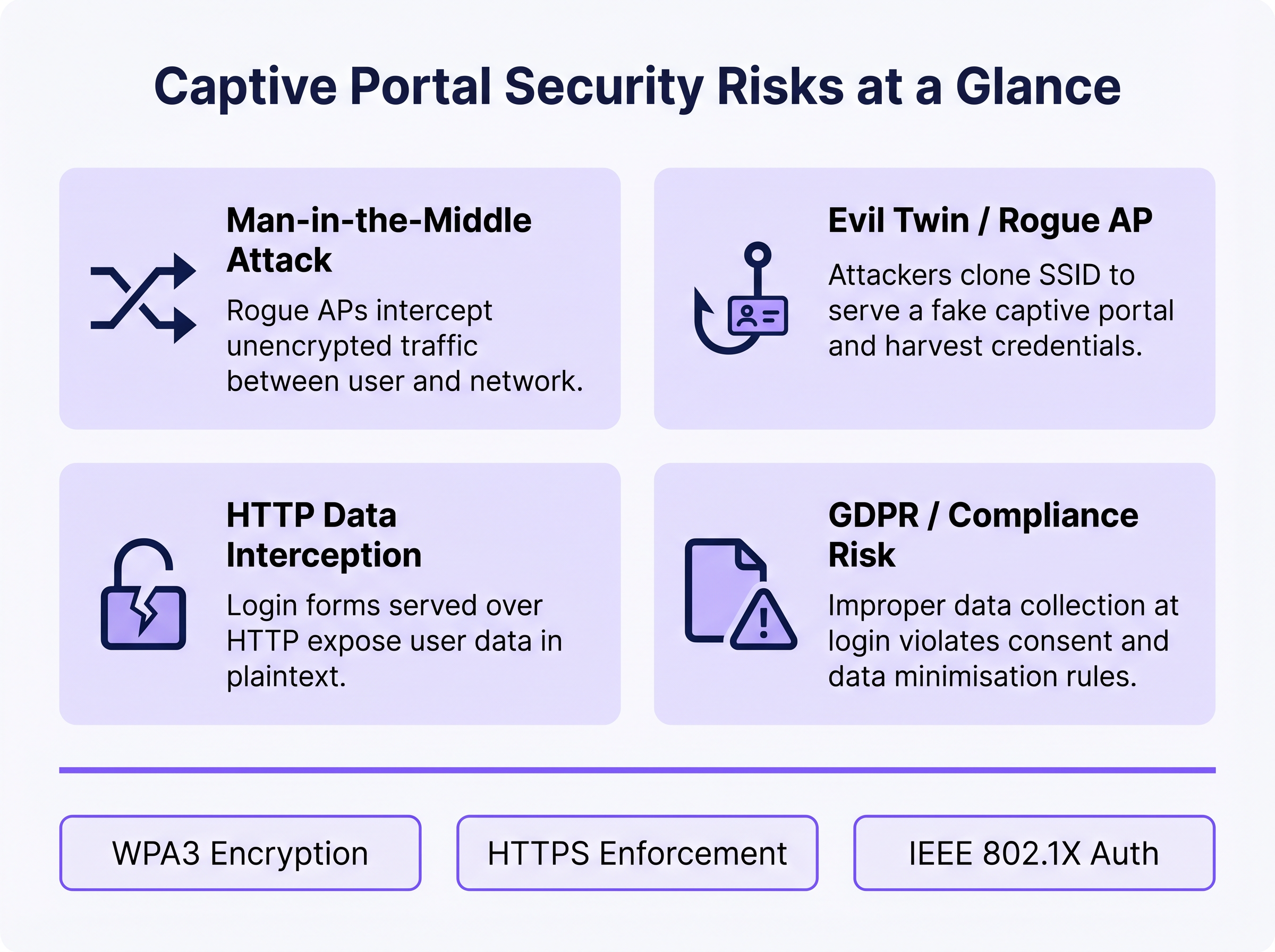
En un entorno WiFi abierto, todo el tráfico entre el dispositivo del usuario y el punto de acceso se transmite en texto plano en la capa de radiofrecuencia. Cualquier dispositivo dentro del alcance de la radio puede capturar pasivamente estos marcos utilizando herramientas de captura de paquetes disponibles gratuitamente. Si la página de inicio de sesión del Captive Portal se sirve a través de HTTP en lugar de HTTPS, cualquier credencial, dirección de correo electrónico o dato personal introducido por el usuario es visible para cualquier observador pasivo en la red. Incluso después de la autenticación, si la red permanece abierta (sin cifrado WPA2/WPA3), todo el tráfico de navegación posterior queda igualmente expuesto.
2. Evil Twin y Puntos de Acceso Maliciosos
Un atacante configura un AP malicioso que emite el mismo SSID que la red legítima, a menudo con una mayor potencia de transmisión para atraer conexiones. Los dispositivos pueden asociarse automáticamente con el AP malicioso. El atacante luego sirve una página de Captive Portal clonada, recolectando credenciales, tokens OAuth de redes sociales o información de pago. Este ataque es particularmente efectivo en entornos donde los usuarios esperan que aparezca un portal —centros de transporte, tiendas minoristas y lugares de conferencias. La detección requiere una monitorización activa del Sistema de Prevención de Intrusiones Inalámbricas (WIPS).
3. Suplantación de MAC y Secuestro de Sesiones
Una vez que un usuario legítimo se autentica a través del Captive Portal, la red generalmente rastrea su sesión utilizando la dirección MAC de su dispositivo. Un atacante que observa pasivamente la red puede identificar direcciones MAC autenticadas y suplantarlas para eludir el portal, obteniendo acceso no autorizado a la red. Esta es una debilidad estructural del seguimiento de sesiones basado en MAC y solo se mitiga al pasar a métodos de autenticación criptográfica.
4. Exposición al Cumplimiento de GDPR y Datos
Los Captive Portal que recopilan datos personales —nombres, direcciones de correo electrónico, perfiles de redes sociales— en el punto de inicio de sesión crean una exposición regulatoria significativa si esos datos se recopilan de forma insegura, sin consentimiento explícito o se retienen más allá de su propósito declarado. Bajo GDPR, el controlador de datos (el operador del recinto) asume la responsabilidad de la legalidad y seguridad del procesamiento. La recopilación inadecuada de datos a nivel del portal puede constituir una violación de los principios de minimización e integridad de datos según el Artículo 5.
Guía de Implementación
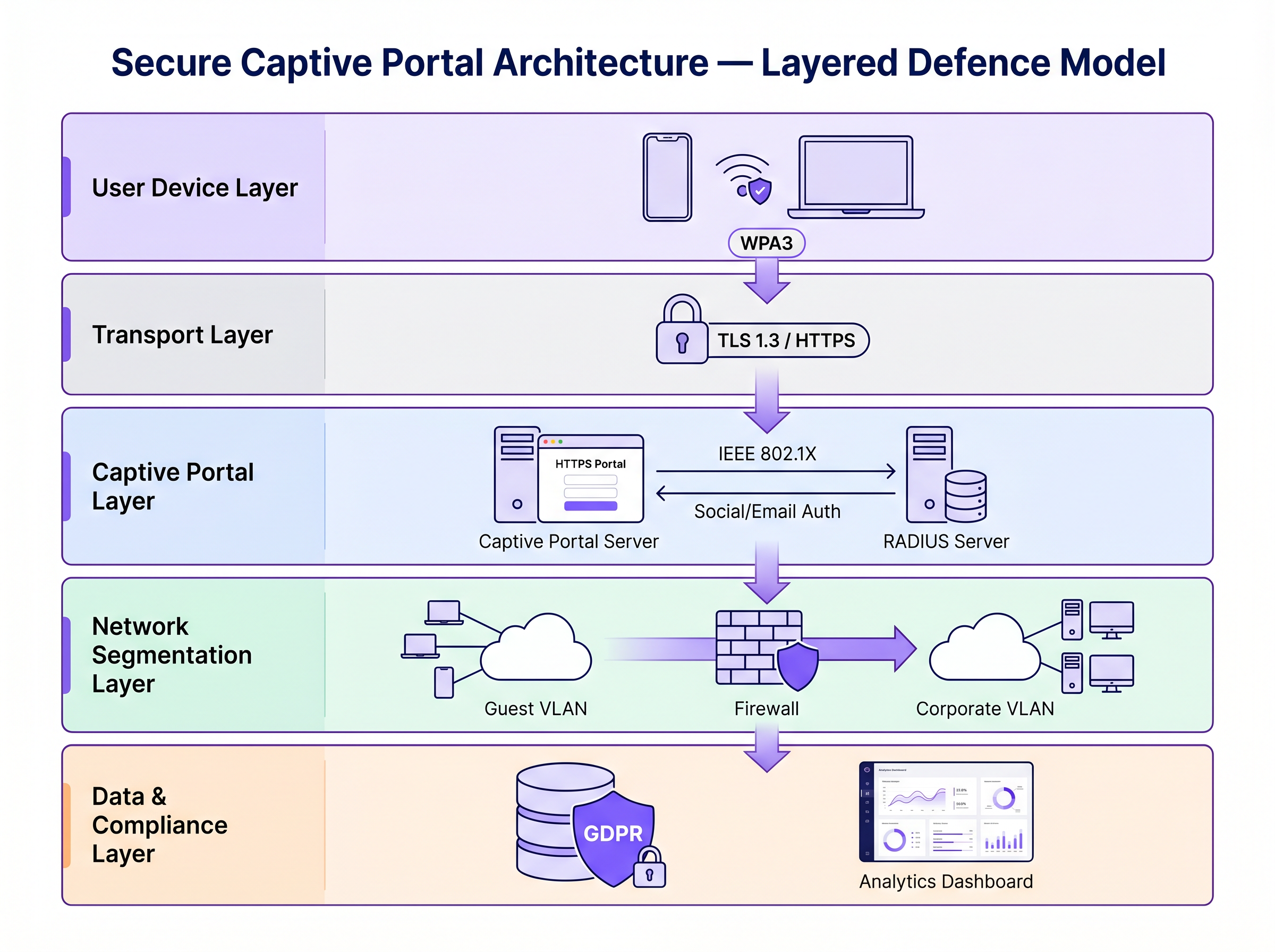
Asegurar un Captive Portal requiere una estrategia de defensa en capas. Los siguientes pasos van desde la seguridad mínima viable hasta una arquitectura de nivel empresarial.
Paso 1: Aplicar HTTPS y HSTS en el Portal
La base absoluta es servir el Captive Portal a través de HTTPS con un certificado SSL/TLS válido de una Autoridad de Certificación (CA) de confianza. Esto cifra los datos enviados a través del formulario del portal y evita la intercepción pasiva de credenciales. La implementación de HTTP Strict Transport Security (HSTS) garantiza que los navegadores solo interactúen con el portal a través de conexiones seguras, mitigando los ataques de degradación. Utilice herramientas automatizadas de gestión de certificados como Let's Encrypt con integración del protocolo ACME para evitar la caducidad del certificado.
Paso 2: Implementar WPA3 y Cifrado Inalámbrico Oportunista (OWE)
WPA3-Personal proporciona un cifrado robusto para redes que utilizan una clave precompartida (PSK). Para redes públicas de invitados donde un PSK es poco práctico, el Cifrado Inalámbrico Oportunista (OWE), definido en RFC 8110 "y IEEE 802.11-2020, proporciona cifrado individualizado para redes abiertas sin requerir autenticación de usuario. OWE realiza un intercambio de claves Diffie-Hellman durante el proceso de asociación, estableciendo una clave de sesión única por cliente. Esto protege contra la escucha pasiva sin cambiar la experiencia del usuario.
Paso 3: Transición a IEEE 802.1X y Passpoint (Hotspot 2.0)
Para una seguridad de nivel empresarial, la transición de un Captive Portal tradicional basado en web a un control de acceso a la red basado en puertos IEEE 802.1X es el estándar de oro. Tecnologías como Passpoint (Wi-Fi CERTIFIED Passpoint, basado en IEEE 802.11u) permiten que los dispositivos se autentiquen de forma automática y segura utilizando credenciales como tarjetas SIM (EAP-SIM/AKA), certificados empresariales (EAP-TLS) o nombre de usuario/contraseña (EAP-TTLS/PEAP). Purple actúa como un proveedor de identidad gratuito para servicios como OpenRoaming bajo la licencia Connect, facilitando una incorporación segura y sin interrupciones, sin la fricción de un Captive Portal tradicional.
Paso 4: Segmentación de Red y Aislamiento de Clientes
Siempre aísle el tráfico WiFi de invitados de las redes corporativas utilizando VLANs y reglas estrictas de firewall con estado. La VLAN de invitados debe permitir solo el tráfico con destino a internet, bloqueando el acceso al espacio de direcciones RFC 1918 y a todos los recursos internos. Habilite el aislamiento de clientes (también llamado aislamiento de AP o bloqueo peer-to-peer) en el controlador inalámbrico para evitar que los dispositivos en la red de invitados se comuniquen directamente entre sí. Esto limita el radio de impacto de cualquier dispositivo comprometido.
Mejores Prácticas
La siguiente tabla resume los controles de seguridad clave, los estándares a los que se alinean y su prioridad de implementación.
| Control | Estándar / Marco | Prioridad | Impacto |
|---|---|---|---|
| Aplicación de HTTPS en el portal | TLS 1.3, HSTS | Crítico | Cifra las credenciales de inicio de sesión |
| WPA3 o OWE en SSID | IEEE 802.11-2020 | Alto | Cifra todo el tráfico inalámbrico |
| Aislamiento de clientes | Específico del proveedor | Crítico | Previene el movimiento lateral |
| Segmentación de VLAN | IEEE 802.1Q | Crítico | Aísla a los invitados de la red corporativa |
| Autenticación RADIUS | IEEE 802.1X | Alto | Reemplaza el seguimiento basado en MAC |
| Detección de AP no autorizados (WIPS) | Específico del proveedor | Alto | Detecta ataques Evil Twin |
| Minimización de datos en el portal | GDPR Artículo 5 | Alto | Reduce la exposición al cumplimiento |
| Automatización de certificados | ACME / Let's Encrypt | Medio | Previene la caducidad de certificados |
Para una comparación exhaustiva de soluciones de portal, consulte El Mejor Software de Captive Portal en 2026: Una Guía Comparativa .
Solución de Problemas y Mitigación de Riesgos
Modos de Falla Comunes
Captive Portal No Aparece: Los sistemas operativos modernos utilizan Asistentes de Red Cautiva (CNA) —sondas HTTP ligeras a puntos finales específicos (por ejemplo, captive.apple.com de Apple, connectivitycheck.gstatic.com de Google)— para detectar Captive Portals. Si la resolución DNS está bloqueada, la sonda falla y el CNA podría no activarse. Asegúrese de que la red de invitados permita las consultas DNS y de que el mecanismo de redirección del portal intercepte correctamente la sonda del CNA.
Errores de Certificado Bloqueando el Acceso: Un certificado SSL caducado, autofirmado o con un dominio no coincidente hará que los navegadores muestren advertencias de seguridad. Los usuarios que hacen clic para ignorar estas advertencias están siendo entrenados para ignorar las alertas de seguridad, un precedente peligroso. Implemente la renovación automática de certificados y monitoree las fechas de caducidad con alertas.
Cuellos de Botella de Rendimiento a Escala: En entornos de alta densidad, como estadios o centros de conferencias, el servidor RADIUS y la infraestructura del portal pueden convertirse en cuellos de botella durante los eventos de asociación pico (por ejemplo, horas de inicio de eventos). Implemente RADIUS en un clúster de alta disponibilidad con balanceo de carga y considere el pre-aprovisionamiento de sesiones para eventos con boleto utilizando perfiles Passpoint.
Aleatorización de MAC Rompiendo el Seguimiento de Sesiones: Los dispositivos iOS y Android modernos aleatorizan sus direcciones MAC por SSID, lo que puede romper la persistencia de sesiones basada en MAC. Este es otro motivo para migrar a 802.1X, donde la autenticación está vinculada a la identidad criptográfica en lugar de la dirección de hardware.
ROI e Impacto Comercial
Invertir en una infraestructura segura de Captive Portal no es puramente un ejercicio de mitigación de riesgos, es un facilitador de negocios medible.
Protección de Marca y Confianza del Cliente: Una brecha de seguridad en una red pública causa un daño reputacional severo y erosiona la confianza del cliente que el WiFi de invitados está diseñado para construir. Un WiFi seguro es un diferenciador de marca, particularmente en Hospitalidad y Retail donde la experiencia del invitado es una ventaja competitiva.
Cumplimiento Normativo: Las multas de GDPR por violaciones de datos pueden alcanzar el 4% de la facturación anual global. El incumplimiento de PCI DSS puede resultar en multas de esquemas de tarjetas y la pérdida de la capacidad de procesamiento de pagos. Una arquitectura de WiFi de invitados segura y conforme elimina estas exposiciones.
Eficiencia Operativa: Los métodos de autenticación modernos como Passpoint reducen la carga de soporte asociada con problemas de inicio de sesión del Captive Portal —advertencias de certificado, portal que no carga, caídas de sesión— que se encuentran entre los tickets de soporte de WiFi de invitados más comunes.
Valor de Datos y Análisis: La recopilación de datos de primera parte segura y conforme en el portal alimenta potentes WiFi Analytics , permitiendo a los operadores de recintos comprender el tiempo de permanencia, la frecuencia de visitas repetidas y los patrones de comportamiento del cliente. Estos datos impulsan campañas de marketing dirigidas y decisiones operativas con un ROI medible. De manera similar a cómo la modernización de la red impulsa la eficiencia en la WAN (consulte Los Beneficios Clave de SD WAN para Empresas Modernas ), la actualización de la infraestructura de WiFi de invitados ofrece retornos compuestos en seguridad, cumplimiento y coresultados comerciales.
Para obtener más orientación sobre la selección de plataformas de Captive Portal, consulte El Mejor Software de Captive Portal en 2026: Una Guía Comparativa .
Términos clave y definiciones
Man-in-the-Middle (MitM) Attack
An attack in which a malicious actor secretly intercepts and potentially alters communications between two parties who believe they are communicating directly with each other.
The primary risk on open guest networks where Layer 2 traffic is unencrypted, allowing attackers to steal credentials, inject malware into HTTP responses, or alter data in transit.
Evil Twin
A rogue wireless access point that masquerades as a legitimate hotspot by broadcasting the same SSID, designed to deceive users into connecting and submitting credentials to a fake captive portal.
Particularly dangerous in public venues where users expect a captive portal to appear. Mitigated by WIPS deployment and Passpoint authentication.
Opportunistic Wireless Encryption (OWE)
An IEEE 802.11 standard (RFC 8110) that provides individualised data encryption for open WiFi networks using a Diffie-Hellman key exchange during the association process, without requiring user authentication or a pre-shared key.
The recommended replacement for legacy open networks. Protects against passive eavesdropping without changing the user experience or requiring a password.
Passpoint (Hotspot 2.0)
A Wi-Fi Alliance certification programme based on IEEE 802.11u that enables devices to automatically discover, select, and authenticate to WiFi networks using existing credentials (SIM, certificate, username/password) without manual intervention.
The modern architectural replacement for traditional captive portals in enterprise deployments. Eliminates the open network vulnerability and provides a seamless user experience.
IEEE 802.1X
An IEEE standard for port-based Network Access Control (PNAC) that provides an authentication mechanism for devices wishing to attach to a LAN or WLAN, using the Extensible Authentication Protocol (EAP) framework.
The authentication backbone of enterprise WiFi security. Requires a RADIUS server and replaces MAC-based session tracking with cryptographic identity verification.
Client Isolation
A wireless network security feature that prevents devices connected to the same SSID from communicating directly with each other at Layer 2, routing all traffic through the AP or gateway instead.
Essential for guest networks to prevent a compromised or malicious device from scanning, attacking, or infecting other users' devices on the same network.
HTTP Strict Transport Security (HSTS)
A web security policy mechanism (RFC 6797) that instructs browsers to only interact with a web server over HTTPS, preventing protocol downgrade attacks and cookie hijacking.
Must be implemented on captive portal servers to prevent attackers from forcing the browser to connect over insecure HTTP.
MAC Spoofing
The technique of altering the Media Access Control (MAC) address of a network interface controller to impersonate another device on the network.
Used by attackers to bypass captive portal authentication by cloning the MAC address of a legitimately authenticated user, gaining unauthorised network access.
Wireless Intrusion Prevention System (WIPS)
A network security system that monitors the radio frequency spectrum for the presence of unauthorised access points and takes automated countermeasures to contain them.
The primary operational control for detecting and containing Evil Twin attacks and rogue AP deployments.
Casos de éxito
A 200-room hotel is experiencing guest complaints about WiFi security warnings and frequent disconnections. They currently operate an open SSID with a basic HTTP captive portal. The IT manager needs to remediate the security posture without replacing the existing AP infrastructure.
Phase 1 (Immediate — within 2 weeks): Migrate the captive portal to HTTPS by provisioning a valid TLS certificate from a trusted CA. Enable HSTS. Enable client isolation on the wireless controller. Verify VLAN segmentation between guest and corporate networks. Phase 2 (Short-term — within 3 months): Enable WPA3 Transition Mode on the SSID to support both WPA2 and WPA3 clients simultaneously. Enable OWE on a separate SSID for devices that support it. Phase 3 (Medium-term — within 12 months): Deploy Passpoint (Hotspot 2.0) profiles, allowing returning guests to authenticate automatically using a profile downloaded during their first visit. Integrate with Purple's platform for compliant data collection and analytics.
A national retail chain with 300 stores wants to deploy a guest WiFi captive portal to collect email addresses for marketing. The legal team has flagged GDPR compliance concerns, and the security team is worried about data interception and rogue AP attacks.
Architecture: Deploy Purple's guest WiFi platform with HTTPS-enforced portals across all sites. The portal collects only email address and explicit consent (separate checkboxes for terms of service and marketing consent — not bundled). Data is transmitted over TLS 1.3 and stored encrypted at rest. Network: Enable WPA3 or OWE on the guest SSID. Enable client isolation. Segment guest traffic into a dedicated VLAN with no access to the corporate network or POS systems. Security Operations: Deploy WIPS on all APs to detect rogue devices broadcasting the store's SSID. Configure automated alerts for Evil Twin detection. Compliance: Implement data retention policies aligned to GDPR — purge inactive records after 24 months. Provide users with a clear, accessible privacy policy linked from the portal. Conduct annual penetration testing of the wireless environment.
Análisis de escenarios
Q1. You are deploying a guest WiFi network in a large conference centre hosting 5,000 attendees. The marketing team requires a customised captive portal to collect email addresses. The security team is concerned about data interception and rogue AP attacks. What architecture do you recommend, and what is the minimum security baseline?
💡 Sugerencia:Consider both the portal-level security (how data is transmitted) and the network-level security (how the wireless connection is encrypted). Also consider the scale of the deployment and peak association events.
Mostrar enfoque recomendado
Minimum baseline: HTTPS-enforced captive portal with a valid CA certificate, client isolation enabled, guest traffic segmented into a dedicated VLAN, and WPA3 or OWE enabled on the SSID. For the rogue AP threat at this scale, deploy WIPS on all APs with automated alerting. For performance at 5,000 concurrent users, deploy RADIUS in a high-availability cluster. Longer-term, consider Passpoint profiles for returning attendees to eliminate the open network vulnerability entirely.
Q2. During a wireless penetration test at a retail site, the auditor successfully bypasses the captive portal by spoofing the MAC address of an authenticated device. The site manager asks what architectural change would prevent this. What is your recommendation?
💡 Sugerencia:Consider what property of the authenticated session the attacker is exploiting, and what alternative authentication mechanisms do not rely on that property.
Mostrar enfoque recomendado
The vulnerability is that MAC-based session tracking uses a hardware identifier that can be trivially cloned. The fix is to migrate to IEEE 802.1X authentication, which establishes a cryptographic identity binding using EAP. The session is tied to a certificate or credential, not a MAC address. Passpoint (Hotspot 2.0) implements this transparently for end users. As an interim measure, reducing session timeout values and implementing per-session re-authentication reduces the window of opportunity for MAC spoofing attacks.
Q3. A hotel's IT manager reports that guests are seeing 'Your connection is not private' errors when trying to access the captive portal. The portal was working correctly last month. What is the most likely cause, and how do you resolve it?
💡 Sugerencia:Think about what changes over time that affects the validity of an HTTPS connection.
Mostrar enfoque recomendado
The most likely cause is an expired SSL/TLS certificate on the captive portal server. Certificates have a fixed validity period (typically 90 days for Let's Encrypt, up to 1 year for commercial CAs). Resolution: renew the certificate immediately. Prevention: implement automated certificate renewal using the ACME protocol (Let's Encrypt) with monitoring and alerting for certificates expiring within 30 days. A secondary cause could be a domain name mismatch if the portal URL was recently changed.
Q4. A retail client wants to collect email addresses via their captive portal for marketing purposes. Their legal team has raised GDPR concerns. What specific design decisions must be made at the portal level to ensure compliance?
💡 Sugerencia:Consider the GDPR principles of lawfulness, data minimisation, and transparency. Think about how consent must be structured.
Mostrar enfoque recomendado
Key design decisions: (1) Separate consent checkboxes — terms of service acceptance must be separate from marketing consent; bundling them is non-compliant. (2) Marketing consent must be opt-in, not pre-ticked. (3) The portal must link to a clear, accessible privacy policy explaining what data is collected, how it is used, and how long it is retained. (4) Collect only the data necessary for the stated purpose (data minimisation) — do not request date of birth or phone number if only email is needed for marketing. (5) Provide a mechanism for users to withdraw consent and request deletion of their data.




