

Une connexion Captive Portal est-elle sûre ? Risques de sécurité et comment les atténuer
Ce guide de référence technique fournit aux responsables informatiques, aux architectes réseau et aux directeurs des opérations de sites une analyse complète des risques de sécurité liés aux Captive Portal — y compris les attaques de l'homme du milieu (Man-in-the-Middle), les points d'accès non autorisés de type Evil Twin et l'exposition à la conformité GDPR. Il propose des stratégies d'atténuation exploitables et neutres vis-à-vis des fournisseurs, alignées sur les normes IEEE 802.1X, WPA3 et PCI DSS, et explique comment la plateforme de WiFi invité de Purple permet des déploiements de réseaux invités sécurisés, conformes et commercialement avantageux à grande échelle.
🎧 Écouter ce guide
Voir la transcription
Résumé Exécutif
Pour les responsables informatiques, les architectes réseau et les directeurs des opérations de sites, la question de savoir si une connexion Captive Portal est sûre n'est pas seulement académique — c'est une préoccupation opérationnelle et commerciale essentielle. Alors que les réseaux WiFi publics et invités deviennent une infrastructure essentielle dans les secteurs du Commerce de détail , de l' Hôtellerie , de la Santé et des Transports , la sécurité du point de connexion initial — le Captive Portal — dicte l'intégrité globale du réseau et la sécurité des données utilisateur.
Les réseaux ouverts traditionnels avec des Captive Portal basiques exposent les utilisateurs à des risques significatifs, notamment les attaques de l'homme du milieu (MitM), les points d'accès non autorisés (Evil Twins), l'usurpation d'adresse MAC (MAC spoofing) et l'interception de données non chiffrées. Ce guide offre une analyse technique approfondie de ces vulnérabilités et décrit des stratégies d'atténuation exploitables et neutres vis-à-vis des fournisseurs. En mettant en œuvre des normes modernes telles que WPA3, l'authentification IEEE 802.1X et l'application stricte du HTTPS — et en déployant une plateforme comme le WiFi invité de Purple — les organisations peuvent sécuriser leurs réseaux invités, assurer la conformité avec le GDPR et le PCI DSS, et protéger la réputation de leur marque tout en transformant la connexion WiFi invité en un atout stratégique de données et de marketing.
Analyse Technique Approfondie
L'Architecture d'un Captive Portal
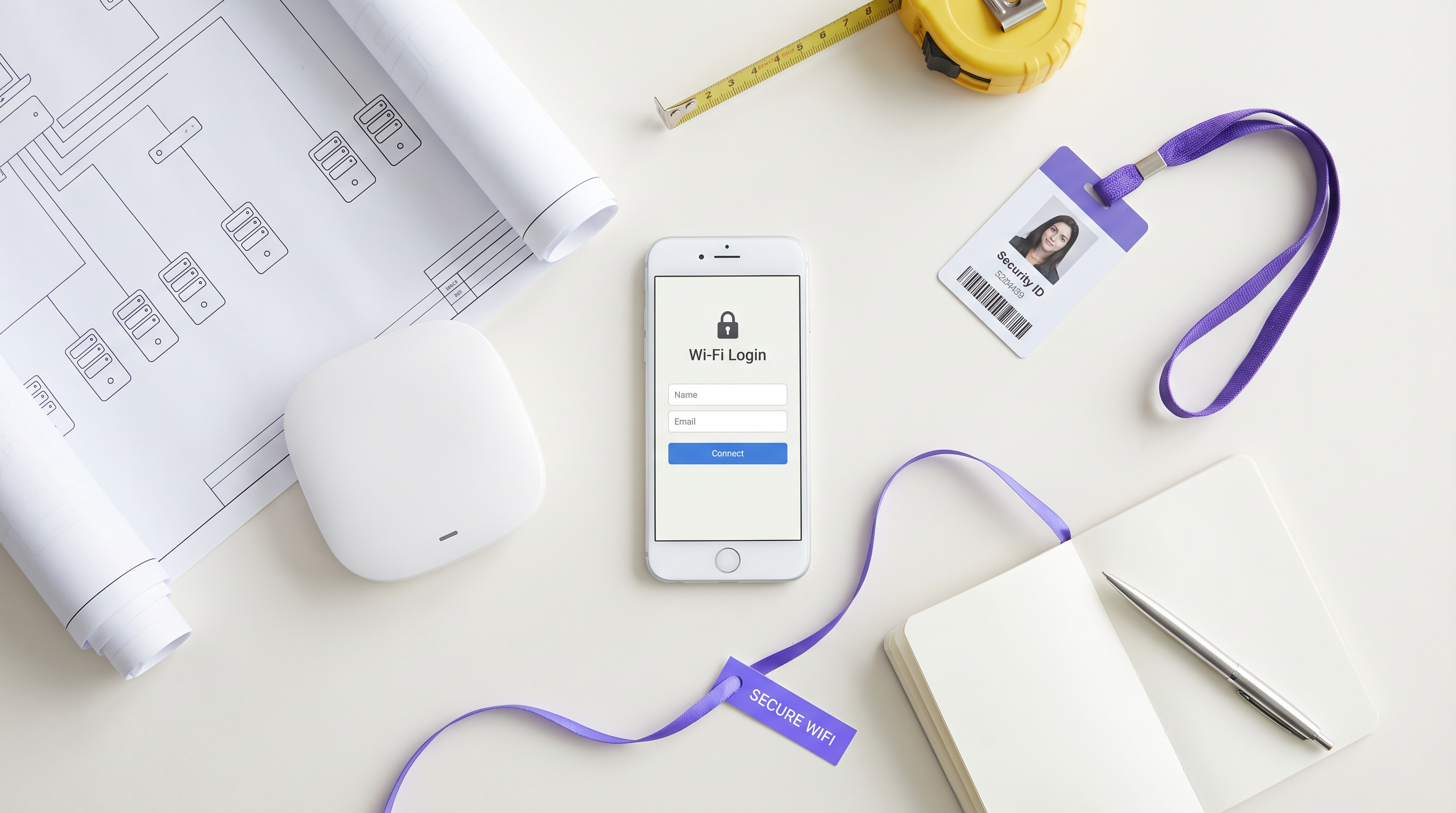
Un Captive Portal est une page web qu'un utilisateur d'un réseau d'accès public est obligé de consulter et d'interagir avec avant que l'accès à internet ne lui soit accordé. Le flux d'authentification typique implique qu'un utilisateur s'associe à un SSID, reçoive une adresse IP via DHCP, et que ses requêtes HTTP ou HTTPS initiales soient interceptées et redirigées vers un serveur de page d'authentification ou de bienvenue. Le contrôleur réseau ou le point d'accès (AP) applique cette redirection en plaçant le client non authentifié dans un état de réseau restreint, n'autorisant que la résolution DNS et le trafic vers le serveur du portail.
Bien que ce mécanisme soit efficace pour le contrôle d'accès, l'application des conditions de service et la collecte de données de première partie, l'architecture sous-jacente a historiquement reposé sur des connexions 802.11 ouvertes et non chiffrées.
Ce manque fondamental de chiffrement de la couche 2 est la cause profonde des vulnérabilités de sécurité les plus graves des Captive Portal.
Risques de Sécurité Principaux
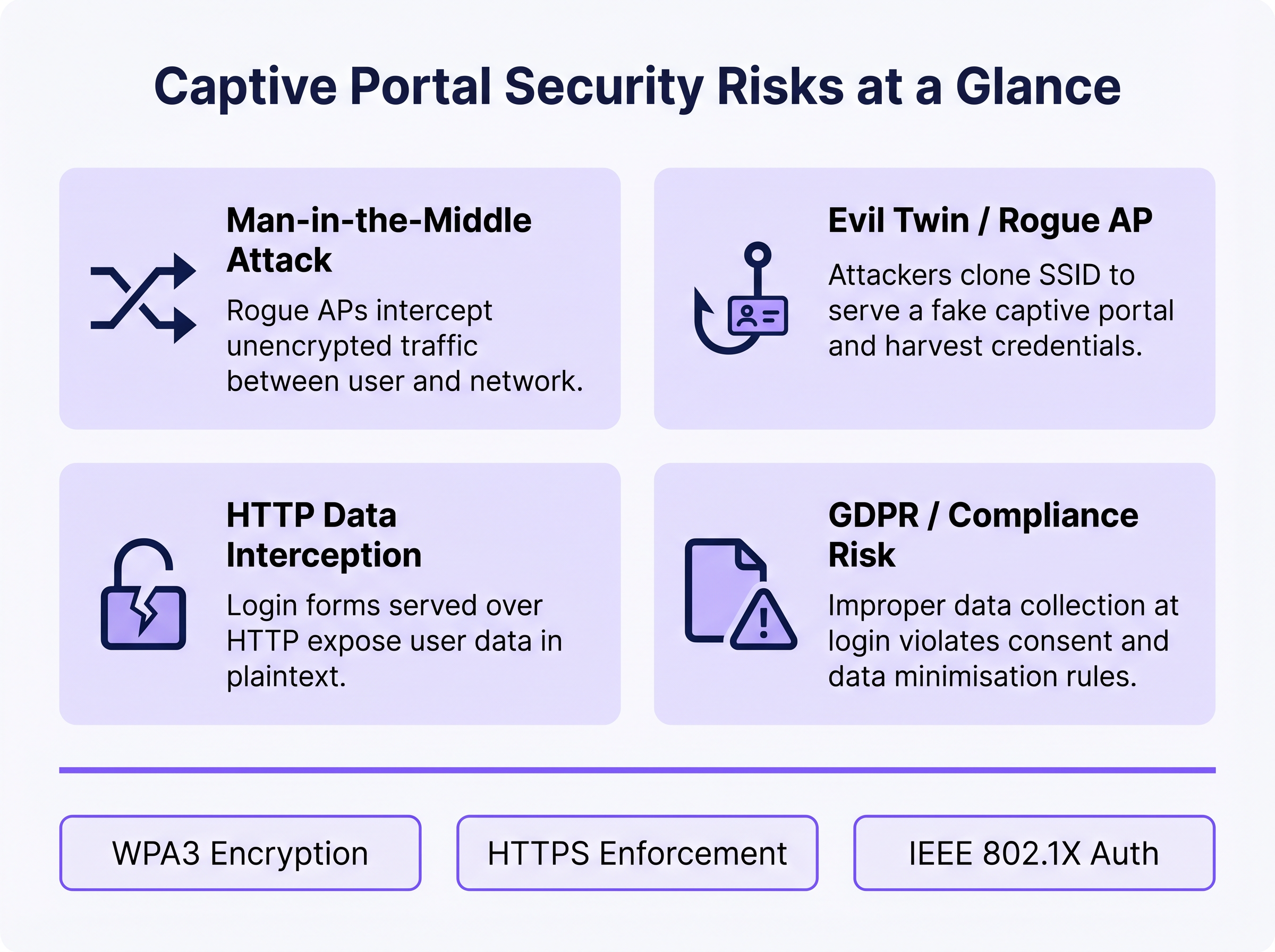
1. Attaques de l'homme du milieu (Man-in-the-Middle - MitM)
Dans un environnement WiFi ouvert, tout le trafic entre l'appareil de l'utilisateur et le point d'accès est transmis en clair au niveau de la couche de radiofréquence. Tout appareil à portée radio peut capturer passivement ces trames à l'aide d'outils de capture de paquets disponibles gratuitement. Si la page de connexion du Captive Portal est servie via HTTP plutôt que HTTPS, toutes les informations d'identification, adresses e-mail ou données personnelles saisies par l'utilisateur sont visibles par tout observateur passif sur le réseau. Même après l'authentification, si le réseau reste ouvert (pas de chiffrement WPA2/WPA3), tout le trafic de navigation ultérieur est également exposé.
2. Evil Twin et Points d'Accès Non Autorisés
Un attaquant configure un AP malveillant diffusant le même SSID que le réseau légitime, souvent avec une puissance de transmission plus élevée pour attirer les connexions. Les appareils peuvent s'associer automatiquement à l'AP non autorisé. L'attaquant sert ensuite une page de Captive Portal clonée, collectant des informations d'identification, des jetons OAuth de médias sociaux ou des informations de paiement. Cette attaque est particulièrement efficace dans les environnements où les utilisateurs s'attendent à voir un portail apparaître — pôles de transport, magasins de détail et lieux de conférence. La détection nécessite une surveillance active par un système de prévention des intrusions sans fil (WIPS).
3. Usurpation d'Adresse MAC (MAC Spoofing) et Détournement de Session
Une fois qu'un utilisateur légitime s'authentifie via le Captive Portal, le réseau suit généralement sa session en utilisant l'adresse MAC de son appareil. Un attaquant qui observe passivement le réseau peut identifier les adresses MAC authentifiées et les usurper pour contourner le portail, obtenant ainsi un accès réseau non autorisé. C'est une faiblesse structurelle du suivi de session basé sur les adresses MAC et elle n'est atténuée qu'en passant à des méthodes d'authentification cryptographiques.
4. Exposition à la Conformité GDPR et aux Données
Les Captive Portal qui collectent des données personnelles — noms, adresses e-mail, profils de médias sociaux — au moment de la connexion créent une exposition réglementaire significative si ces données sont collectées de manière non sécurisée, sans consentement explicite, ou conservées au-delà de leur objectif déclaré. En vertu du GDPR, le responsable du traitement des données (l'opérateur du site) est responsable de la légalité et de la sécurité du traitement. Une collecte de données inappropriée au niveau du portail peut constituer une violation des principes de minimisation et d'intégrité des données en vertu de l'Article 5.
Guide d'Implémentation
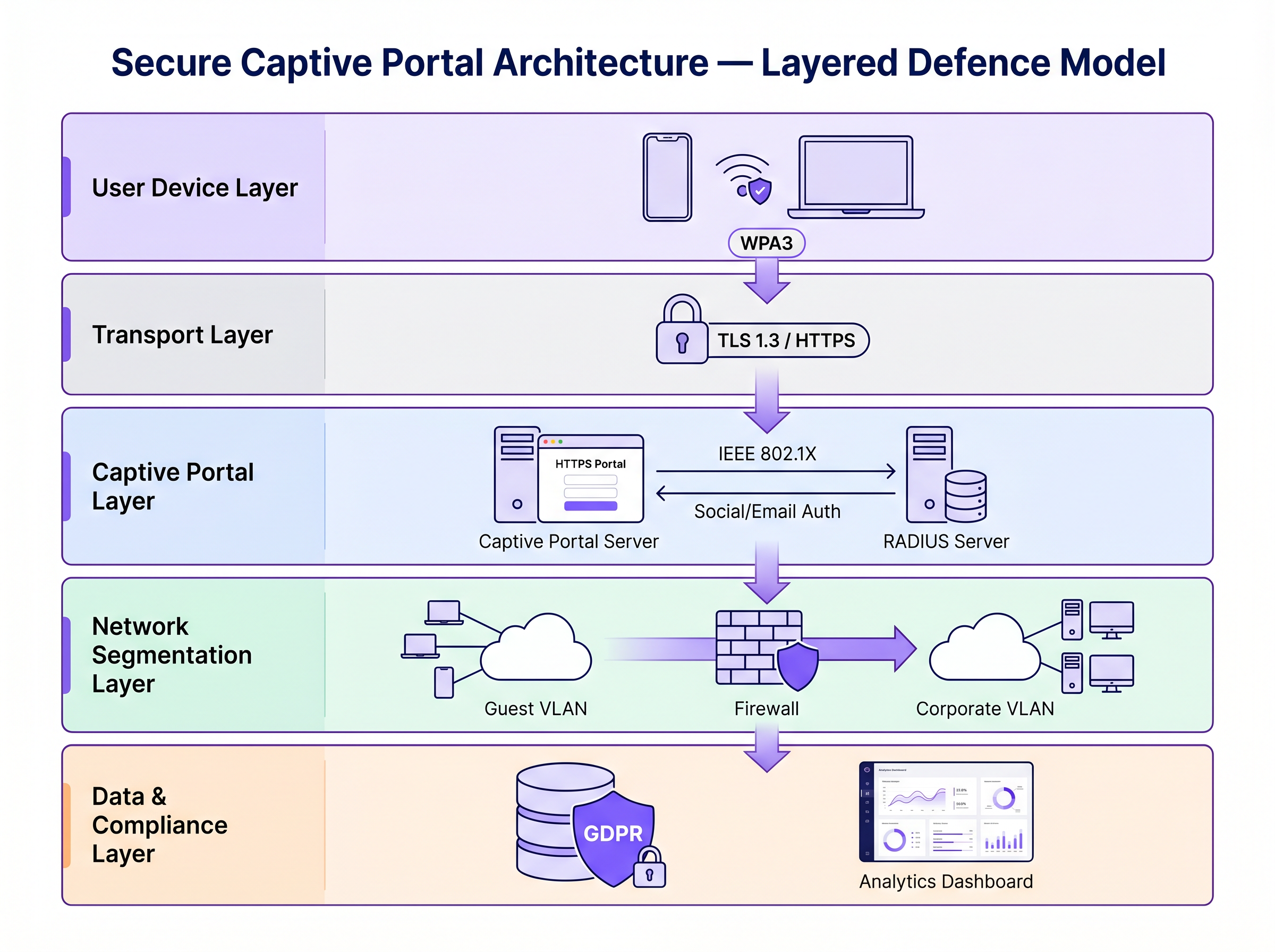
Sécuriser un Captive Portal nécessite une stratégie de défense en couches. Les étapes suivantes vont de la sécurité minimale viable à une architecture de niveau entreprise.
Étape 1 : Appliquer HTTPS et HSTS sur le Portail
La base absolue est de servir le Captive Portal via HTTPS avec un certificat SSL/TLS valide d'une autorité de certification (CA) de confiance. Cela chiffre les données soumises via le formulaire du portail et empêche l'interception passive des informations d'identification. La mise en œuvre de HTTP Strict Transport Security (HSTS) garantit que les navigateurs n'interagissent avec le portail que via des connexions sécurisées, atténuant ainsi les attaques par rétrogradation. Utilisez des outils de gestion de certificats automatisés tels que Let's Encrypt avec l'intégration du protocole ACME pour éviter l'expiration des certificats.
Étape 2 : Implémenter WPA3 et l'Opportunistic Wireless Encryption (OWE)
WPA3-Personal offre un chiffrement robuste pour les réseaux utilisant une clé pré-partagée (PSK). Pour les réseaux invités publics où une PSK est peu pratique, l'Opportunistic Wireless Encryption (OWE), définie dans le RFC 8110 "et IEEE 802.11-2020, fournit un chiffrement individualisé pour les réseaux ouverts sans nécessiter d'authentification utilisateur. OWE effectue un échange de clés Diffie-Hellman pendant le processus d'association, établissant une clé de session unique par client. Cela protège contre l'écoute passive sans modifier l'expérience utilisateur.
Étape 3 : Transition vers IEEE 802.1X et Passpoint (Hotspot 2.0)
Pour une sécurité de niveau entreprise, la transition d'un Captive Portal web traditionnel vers un contrôle d'accès réseau basé sur les ports IEEE 802.1X est la norme d'or. Des technologies comme Passpoint (Wi-Fi CERTIFIED Passpoint, basé sur IEEE 802.11u) permettent aux appareils de s'authentifier automatiquement et en toute sécurité à l'aide de justificatifs tels que des cartes SIM (EAP-SIM/AKA), des certificats d'entreprise (EAP-TLS) ou un nom d'utilisateur/mot de passe (EAP-TTLS/PEAP). Purple agit comme un fournisseur d'identité gratuit pour des services comme OpenRoaming sous la licence Connect, facilitant un onboarding fluide et sécurisé sans la friction d'un Captive Portal traditionnel.
Étape 4 : Segmentation du réseau et isolation des clients
Isolez toujours le trafic WiFi invité des réseaux d'entreprise à l'aide de VLANs et de règles de pare-feu strictes avec état. Le VLAN invité ne doit autoriser que le trafic destiné à Internet, bloquant l'accès à l'espace d'adressage RFC 1918 et à toutes les ressources internes. Activez l'isolation des clients (également appelée isolation AP ou blocage pair-à-pair) sur le contrôleur sans fil pour empêcher les appareils du réseau invité de communiquer directement entre eux. Cela limite le rayon d'impact de tout appareil compromis.
Bonnes pratiques
Le tableau suivant résume les principaux contrôles de sécurité, les normes auxquelles ils s'alignent et leur priorité de mise en œuvre.
| Contrôle | Norme / Cadre | Priorité | Impact |
|---|---|---|---|
| Application HTTPS sur le portail | TLS 1.3, HSTS | Critique | Chiffre les identifiants de connexion |
| WPA3 ou OWE sur SSID | IEEE 802.11-2020 | Élevée | Chiffre tout le trafic sans fil |
| Isolation des clients | Spécifique au fournisseur | Critique | Prévient les mouvements latéraux |
| Segmentation VLAN | IEEE 802.1Q | Critique | Isole l'invité du réseau d'entreprise |
| Authentification RADIUS | IEEE 802.1X | Élevée | Remplace le suivi basé sur les adresses MAC |
| Détection d'AP malveillants (WIPS) | Spécifique au fournisseur | Élevée | Détecte les attaques Evil Twin |
| Minimisation des données sur le portail | GDPR Article 5 | Élevée | Réduit l'exposition à la conformité |
| Automatisation des certificats | ACME / Let's Encrypt | Moyenne | Prévient l'expiration des certificats |
Pour une comparaison complète des solutions de portail, consultez Le meilleur logiciel de Captive Portal en 2026 : Un guide comparatif .
Dépannage et atténuation des risques
Modes de défaillance courants
Le Captive Portal n'apparaît pas : Les systèmes d'exploitation modernes utilisent des assistants de réseau captif (CNA) — des sondes HTTP légères vers des points de terminaison spécifiques (par exemple, captive.apple.com d'Apple, connectivitycheck.gstatic.com de Google) — pour détecter les Captive Portals. Si la résolution DNS est bloquée, la sonde échoue et le CNA peut ne pas se déclencher. Assurez-vous que le réseau invité autorise les requêtes DNS et que le mécanisme de redirection du portail intercepte correctement la sonde CNA.
Erreurs de certificat bloquant l'accès : Un certificat SSL expiré, auto-signé ou dont le domaine ne correspond pas entraînera l'affichage d'avertissements de sécurité par les navigateurs. Les utilisateurs qui ignorent ces avertissements sont habitués à ignorer les alertes de sécurité — un précédent dangereux. Mettez en œuvre le renouvellement automatique des certificats et surveillez les dates d'expiration avec des alertes.
Goulots d'étranglement de performance à grande échelle : Dans les environnements à haute densité tels que les stades ou les centres de conférence, le serveur RADIUS et l'infrastructure du portail peuvent devenir des goulots d'étranglement lors des événements d'association de pointe (par exemple, les heures de début d'événement). Déployez RADIUS dans un cluster haute disponibilité avec équilibrage de charge, et envisagez le pré-provisionnement de sessions pour les événements avec billetterie à l'aide de profils Passpoint.
La randomisation MAC interrompt le suivi de session : Les appareils iOS et Android modernes randomisent leurs adresses MAC par SSID, ce qui peut rompre la persistance de session basée sur l'adresse MAC. C'est un autre facteur de migration vers le 802.1X, où l'authentification est liée à l'identité cryptographique plutôt qu'à l'adresse matérielle.
ROI et impact commercial
Investir dans une infrastructure de Captive Portal sécurisée n'est pas purement un exercice d'atténuation des risques — c'est un levier commercial mesurable.
Protection de la marque et confiance des clients : Une faille de sécurité sur un réseau public cause de graves dommages à la réputation et érode la confiance des clients que le WiFi invité est censé bâtir. Un WiFi sécurisé est un facteur de différenciation de la marque, en particulier dans l' Hôtellerie et le Commerce de détail où l'expérience client est un avantage concurrentiel.
Conformité réglementaire : Les amendes GDPR pour les violations de données peuvent atteindre 4 % du chiffre d'affaires annuel mondial. La non-conformité PCI DSS peut entraîner des amendes de la part des systèmes de cartes et la perte de la capacité de traitement des paiements. Une architecture WiFi invité sécurisée et conforme élimine ces expositions.
Efficacité opérationnelle : Les méthodes d'authentification modernes comme Passpoint réduisent la charge de support associée aux problèmes de connexion au Captive Portal — avertissements de certificat, portail ne se chargeant pas, déconnexions de session — qui sont parmi les tickets de support WiFi invité les plus courants.
Valeur des données et analyses : La collecte de données de première partie sécurisée et conforme au niveau du portail alimente de puissantes WiFi Analytics , permettant aux opérateurs de sites de comprendre le temps de présence, la fréquence des visites répétées et les modèles de comportement des clients. Ces données alimentent des campagnes marketing ciblées et des décisions opérationnelles avec un ROI mesurable. De même que la modernisation du réseau améliore l'efficacité à travers le WAN (voir Les principaux avantages du SD WAN pour les entreprises modernes ), la mise à niveau de l'infrastructure WiFi invité génère des retours cumulatifs en matière de sécurité, de conformité et de corésultats commerciaux.
Pour plus de conseils sur la sélection d'une plateforme de Captive Portal, consultez Le Meilleur Logiciel de Captive Portal en 2026 : Un Guide Comparatif .
Termes clés et définitions
Man-in-the-Middle (MitM) Attack
An attack in which a malicious actor secretly intercepts and potentially alters communications between two parties who believe they are communicating directly with each other.
The primary risk on open guest networks where Layer 2 traffic is unencrypted, allowing attackers to steal credentials, inject malware into HTTP responses, or alter data in transit.
Evil Twin
A rogue wireless access point that masquerades as a legitimate hotspot by broadcasting the same SSID, designed to deceive users into connecting and submitting credentials to a fake captive portal.
Particularly dangerous in public venues where users expect a captive portal to appear. Mitigated by WIPS deployment and Passpoint authentication.
Opportunistic Wireless Encryption (OWE)
An IEEE 802.11 standard (RFC 8110) that provides individualised data encryption for open WiFi networks using a Diffie-Hellman key exchange during the association process, without requiring user authentication or a pre-shared key.
The recommended replacement for legacy open networks. Protects against passive eavesdropping without changing the user experience or requiring a password.
Passpoint (Hotspot 2.0)
A Wi-Fi Alliance certification programme based on IEEE 802.11u that enables devices to automatically discover, select, and authenticate to WiFi networks using existing credentials (SIM, certificate, username/password) without manual intervention.
The modern architectural replacement for traditional captive portals in enterprise deployments. Eliminates the open network vulnerability and provides a seamless user experience.
IEEE 802.1X
An IEEE standard for port-based Network Access Control (PNAC) that provides an authentication mechanism for devices wishing to attach to a LAN or WLAN, using the Extensible Authentication Protocol (EAP) framework.
The authentication backbone of enterprise WiFi security. Requires a RADIUS server and replaces MAC-based session tracking with cryptographic identity verification.
Client Isolation
A wireless network security feature that prevents devices connected to the same SSID from communicating directly with each other at Layer 2, routing all traffic through the AP or gateway instead.
Essential for guest networks to prevent a compromised or malicious device from scanning, attacking, or infecting other users' devices on the same network.
HTTP Strict Transport Security (HSTS)
A web security policy mechanism (RFC 6797) that instructs browsers to only interact with a web server over HTTPS, preventing protocol downgrade attacks and cookie hijacking.
Must be implemented on captive portal servers to prevent attackers from forcing the browser to connect over insecure HTTP.
MAC Spoofing
The technique of altering the Media Access Control (MAC) address of a network interface controller to impersonate another device on the network.
Used by attackers to bypass captive portal authentication by cloning the MAC address of a legitimately authenticated user, gaining unauthorised network access.
Wireless Intrusion Prevention System (WIPS)
A network security system that monitors the radio frequency spectrum for the presence of unauthorised access points and takes automated countermeasures to contain them.
The primary operational control for detecting and containing Evil Twin attacks and rogue AP deployments.
Études de cas
A 200-room hotel is experiencing guest complaints about WiFi security warnings and frequent disconnections. They currently operate an open SSID with a basic HTTP captive portal. The IT manager needs to remediate the security posture without replacing the existing AP infrastructure.
Phase 1 (Immediate — within 2 weeks): Migrate the captive portal to HTTPS by provisioning a valid TLS certificate from a trusted CA. Enable HSTS. Enable client isolation on the wireless controller. Verify VLAN segmentation between guest and corporate networks. Phase 2 (Short-term — within 3 months): Enable WPA3 Transition Mode on the SSID to support both WPA2 and WPA3 clients simultaneously. Enable OWE on a separate SSID for devices that support it. Phase 3 (Medium-term — within 12 months): Deploy Passpoint (Hotspot 2.0) profiles, allowing returning guests to authenticate automatically using a profile downloaded during their first visit. Integrate with Purple's platform for compliant data collection and analytics.
A national retail chain with 300 stores wants to deploy a guest WiFi captive portal to collect email addresses for marketing. The legal team has flagged GDPR compliance concerns, and the security team is worried about data interception and rogue AP attacks.
Architecture: Deploy Purple's guest WiFi platform with HTTPS-enforced portals across all sites. The portal collects only email address and explicit consent (separate checkboxes for terms of service and marketing consent — not bundled). Data is transmitted over TLS 1.3 and stored encrypted at rest. Network: Enable WPA3 or OWE on the guest SSID. Enable client isolation. Segment guest traffic into a dedicated VLAN with no access to the corporate network or POS systems. Security Operations: Deploy WIPS on all APs to detect rogue devices broadcasting the store's SSID. Configure automated alerts for Evil Twin detection. Compliance: Implement data retention policies aligned to GDPR — purge inactive records after 24 months. Provide users with a clear, accessible privacy policy linked from the portal. Conduct annual penetration testing of the wireless environment.
Analyse de scénario
Q1. You are deploying a guest WiFi network in a large conference centre hosting 5,000 attendees. The marketing team requires a customised captive portal to collect email addresses. The security team is concerned about data interception and rogue AP attacks. What architecture do you recommend, and what is the minimum security baseline?
💡 Astuce :Consider both the portal-level security (how data is transmitted) and the network-level security (how the wireless connection is encrypted). Also consider the scale of the deployment and peak association events.
Afficher l'approche recommandée
Minimum baseline: HTTPS-enforced captive portal with a valid CA certificate, client isolation enabled, guest traffic segmented into a dedicated VLAN, and WPA3 or OWE enabled on the SSID. For the rogue AP threat at this scale, deploy WIPS on all APs with automated alerting. For performance at 5,000 concurrent users, deploy RADIUS in a high-availability cluster. Longer-term, consider Passpoint profiles for returning attendees to eliminate the open network vulnerability entirely.
Q2. During a wireless penetration test at a retail site, the auditor successfully bypasses the captive portal by spoofing the MAC address of an authenticated device. The site manager asks what architectural change would prevent this. What is your recommendation?
💡 Astuce :Consider what property of the authenticated session the attacker is exploiting, and what alternative authentication mechanisms do not rely on that property.
Afficher l'approche recommandée
The vulnerability is that MAC-based session tracking uses a hardware identifier that can be trivially cloned. The fix is to migrate to IEEE 802.1X authentication, which establishes a cryptographic identity binding using EAP. The session is tied to a certificate or credential, not a MAC address. Passpoint (Hotspot 2.0) implements this transparently for end users. As an interim measure, reducing session timeout values and implementing per-session re-authentication reduces the window of opportunity for MAC spoofing attacks.
Q3. A hotel's IT manager reports that guests are seeing 'Your connection is not private' errors when trying to access the captive portal. The portal was working correctly last month. What is the most likely cause, and how do you resolve it?
💡 Astuce :Think about what changes over time that affects the validity of an HTTPS connection.
Afficher l'approche recommandée
The most likely cause is an expired SSL/TLS certificate on the captive portal server. Certificates have a fixed validity period (typically 90 days for Let's Encrypt, up to 1 year for commercial CAs). Resolution: renew the certificate immediately. Prevention: implement automated certificate renewal using the ACME protocol (Let's Encrypt) with monitoring and alerting for certificates expiring within 30 days. A secondary cause could be a domain name mismatch if the portal URL was recently changed.
Q4. A retail client wants to collect email addresses via their captive portal for marketing purposes. Their legal team has raised GDPR concerns. What specific design decisions must be made at the portal level to ensure compliance?
💡 Astuce :Consider the GDPR principles of lawfulness, data minimisation, and transparency. Think about how consent must be structured.
Afficher l'approche recommandée
Key design decisions: (1) Separate consent checkboxes — terms of service acceptance must be separate from marketing consent; bundling them is non-compliant. (2) Marketing consent must be opt-in, not pre-ticked. (3) The portal must link to a clear, accessible privacy policy explaining what data is collected, how it is used, and how long it is retained. (4) Collect only the data necessary for the stated purpose (data minimisation) — do not request date of birth or phone number if only email is needed for marketing. (5) Provide a mechanism for users to withdraw consent and request deletion of their data.




