

O login do Captive Portal é seguro? Riscos de Segurança e Como Mitigá-los
Este guia de referência técnica fornece a gestores de TI, arquitetos de rede e diretores de operações de espaços uma análise abrangente dos riscos de segurança do Captive Portal — incluindo ataques Man-in-the-Middle, pontos de acesso não autorizados Evil Twin e exposição à conformidade com o GDPR. Oferece estratégias de mitigação acionáveis e neutras em relação ao fornecedor, alinhadas com os padrões IEEE 802.1X, WPA3 e PCI DSS, e explica como a plataforma de guest WiFi da Purple permite implementações de rede de convidados seguras, conformes e comercialmente valiosas em escala.
🎧 Ouça este Guia
Ver Transcrição
Resumo Executivo
Para gestores de TI, arquitetos de rede e diretores de operações de espaços, a questão de saber se um login de Captive Portal é seguro não é meramente académica — é uma preocupação operacional e comercial crítica. À medida que as redes WiFi públicas e de convidados se tornam infraestruturas essenciais nos setores de Retalho , Hotelaria , Saúde e Transportes , a segurança do ponto de conexão inicial — o Captive Portal — dita a integridade geral da rede e a segurança dos dados do utilizador.
Redes abertas tradicionais com Captive Portals básicos expõem os utilizadores a riscos significativos, incluindo ataques Man-in-the-Middle (MitM), pontos de acesso não autorizados (Evil Twins), spoofing de MAC e interceção de dados não encriptados. Este guia fornece uma análise técnica aprofundada destas vulnerabilidades e descreve estratégias de mitigação acionáveis e neutras em relação ao fornecedor. Ao implementar padrões modernos como WPA3, autenticação IEEE 802.1X e aplicação rigorosa de HTTPS — e ao implementar uma plataforma como o Guest WiFi da Purple — as organizações podem proteger as suas redes de convidados, garantir a conformidade com o GDPR e PCI DSS, e proteger a reputação da marca, transformando a conexão WiFi de convidados num ativo estratégico de dados e marketing.
Análise Técnica Aprofundada
A Arquitetura de um Captive Portal
Um Captive Portal é uma página web que um utilizador de uma rede de acesso público é obrigado a visualizar e interagir antes que o acesso à internet seja concedido. O fluxo de autenticação típico envolve um utilizador a associar-se a um SSID, a receber um endereço IP via DHCP e a ter os seus pedidos HTTP ou HTTPS iniciais intercetados e redirecionados para um servidor de autenticação ou página de apresentação. O controlador de rede ou ponto de acesso (AP) impõe este redirecionamento, colocando o cliente não autenticado num estado de rede restrito, permitindo apenas a resolução de DNS e o tráfego para o servidor do portal.
Embora este mecanismo seja eficaz para controlo de acesso, aplicação de termos de serviço e recolha de dados primários, a arquitetura subjacente tem historicamente dependido de conexões 802.11 abertas e não encriptadas. Esta falta fundamental de encriptação da Camada 2 é a causa raiz das vulnerabilidades de segurança mais graves do Captive Portal.
Principais Riscos de Segurança
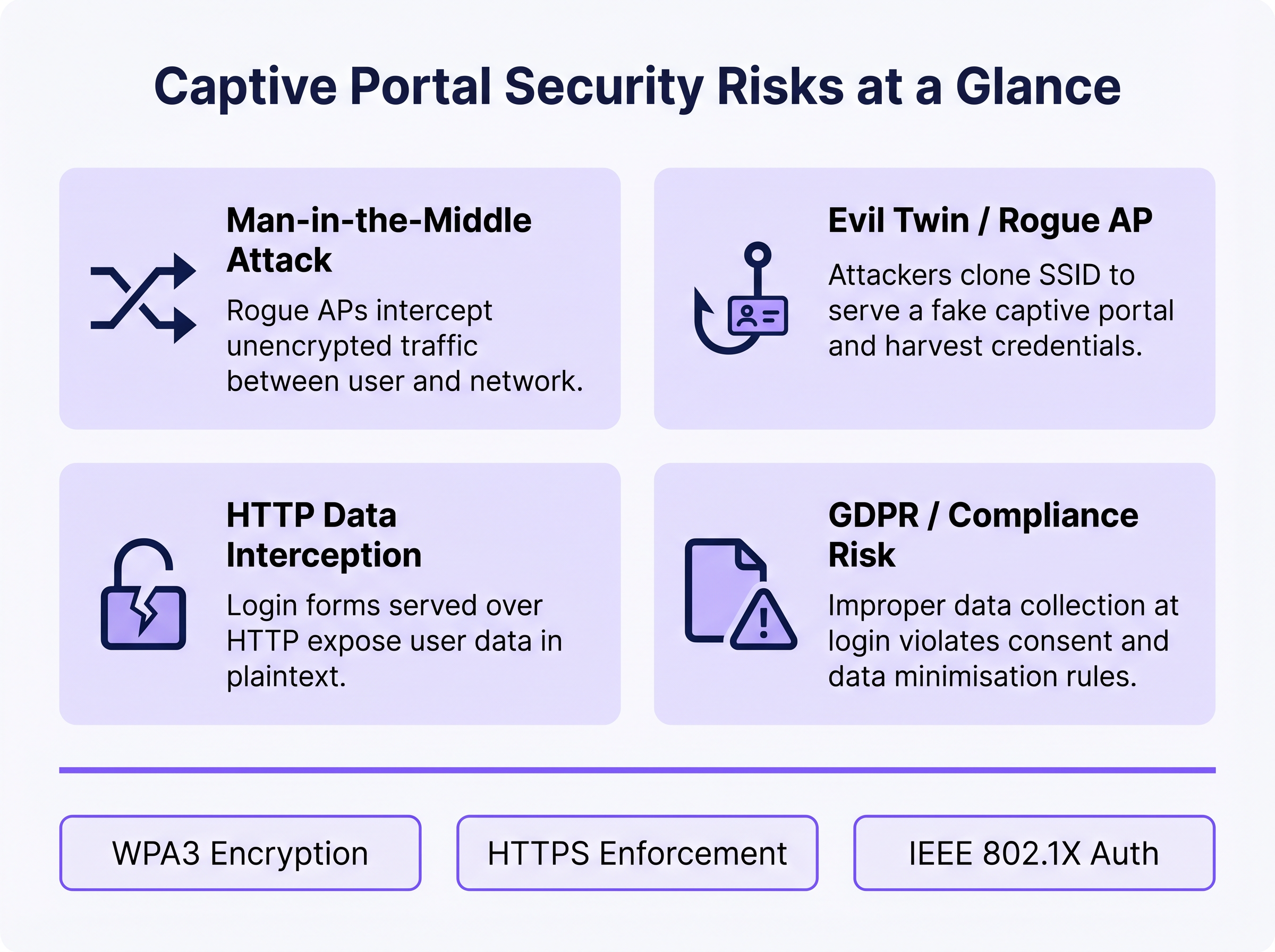
1. Ataques Man-in-the-Middle (MitM)
Num ambiente WiFi aberto, todo o tráfego entre o dispositivo do utilizador e o ponto de acesso é transmitido em texto simples na camada de radiofrequência. Qualquer dispositivo dentro do alcance de rádio pode capturar passivamente estes frames usando ferramentas de captura de pacotes disponíveis gratuitamente. Se a página de login do Captive Portal for servida via HTTP em vez de HTTPS, quaisquer credenciais, endereços de e-mail ou dados pessoais inseridos pelo utilizador são visíveis para qualquer observador passivo na rede. Mesmo após a autenticação, se a rede permanecer aberta (sem encriptação WPA2/WPA3), todo o tráfego de navegação subsequente fica igualmente exposto.
2. Evil Twin e Pontos de Acesso Não Autorizados
Um atacante configura um AP malicioso a difundir o mesmo SSID da rede legítima, muitas vezes com uma potência de transmissão mais alta para atrair conexões. Os dispositivos podem associar-se automaticamente ao AP não autorizado. O atacante serve então uma página de Captive Portal clonada, recolhendo credenciais, tokens OAuth de redes sociais ou informações de pagamento. Este ataque é particularmente eficaz em ambientes onde os utilizadores esperam que um portal apareça — centros de transporte, lojas de retalho e locais de conferências. A deteção requer monitorização ativa de um Sistema de Prevenção de Intrusões Sem Fios (WIPS).
3. Spoofing de MAC e Sequestro de Sessão
Uma vez que um utilizador legítimo se autentica através do Captive Portal, a rede geralmente rastreia a sua sessão usando o endereço MAC do seu dispositivo. Um atacante que observa passivamente a rede pode identificar endereços MAC autenticados e falsificá-los para contornar o portal, obtendo acesso não autorizado à rede. Esta é uma fraqueza estrutural do rastreamento de sessão baseado em MAC e é mitigada apenas pela transição para métodos de autenticação criptográfica.
4. Exposição à Conformidade com o GDPR e Dados
Captive Portals que recolhem dados pessoais — nomes, endereços de e-mail, perfis de redes sociais — no ponto de login criam uma exposição regulatória significativa se esses dados forem recolhidos de forma insegura, sem consentimento explícito, ou retidos para além do seu propósito declarado. Ao abrigo do GDPR, o responsável pelo tratamento de dados (o operador do espaço) assume a responsabilidade pela legalidade e segurança do processamento. A recolha inadequada de dados ao nível do portal pode constituir uma violação dos princípios de minimização e integridade dos dados ao abrigo do Artigo 5.
Guia de Implementação
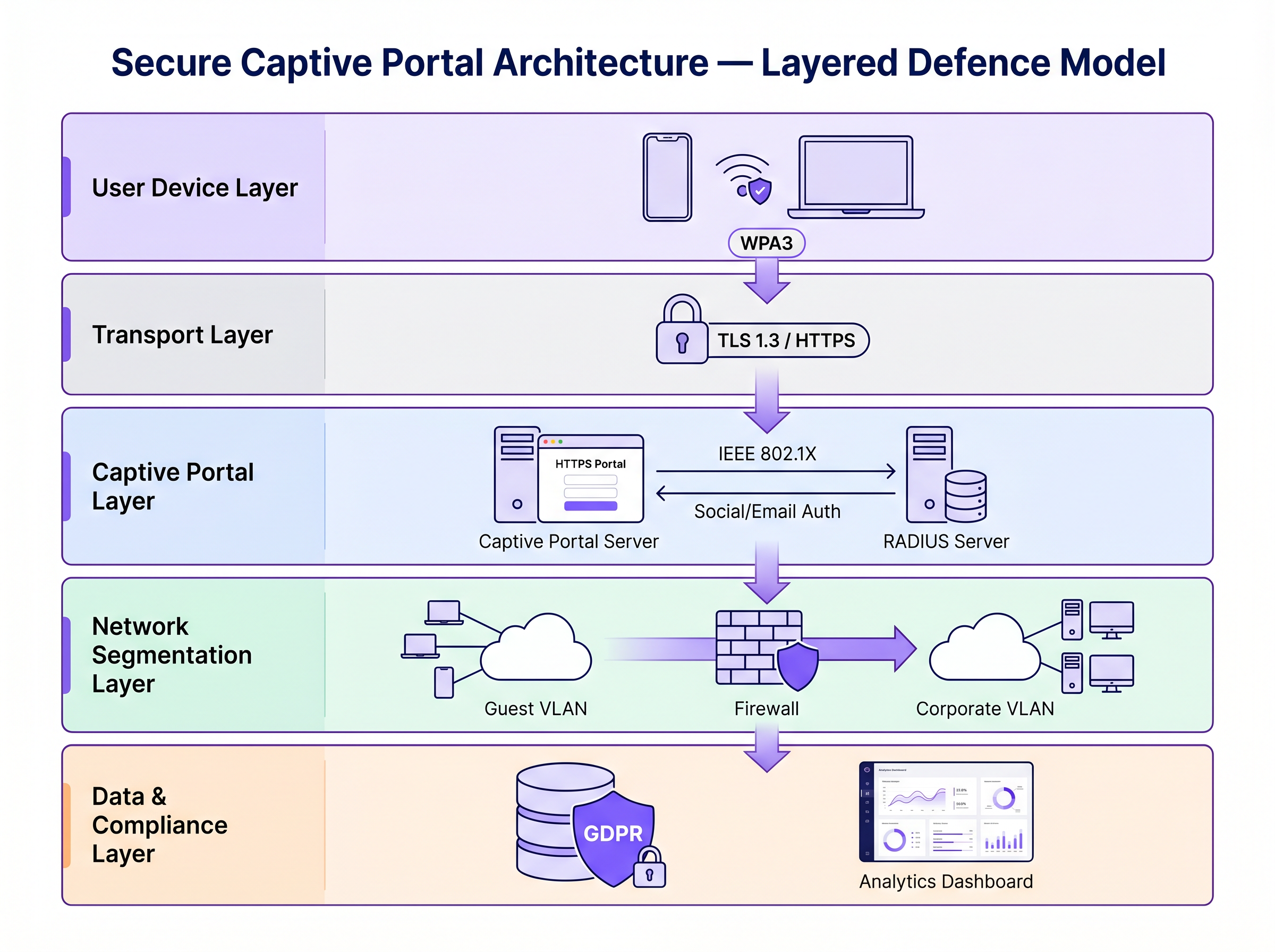
Proteger um Captive Portal requer uma estratégia de defesa em camadas. Os passos seguintes passam da segurança mínima viável para uma arquitetura de nível empresarial.
Passo 1: Impor HTTPS e HSTS no Portal
A base absoluta é servir o Captive Portal via HTTPS com um certificado SSL/TLS válido de uma Autoridade de Certificação (CA) fidedigna. Isto encripta os dados submetidos através do formulário do portal e impede a interceção passiva de credenciais. A implementação de HTTP Strict Transport Security (HSTS) garante que os navegadores interagem com o portal apenas através de conexões seguras, mitigando ataques de downgrade. Utilize ferramentas automatizadas de gestão de certificados, como o Let's Encrypt com integração de protocolo ACME, para evitar a expiração de certificados.
Passo 2: Implementar WPA3 e Encriptação Sem Fios Oportunista (OWE)
O WPA3-Personal oferece encriptação robusta para redes que utilizam uma chave pré-partilhada (PSK). Para redes de convidados públicas onde uma PSK é impraticável, a Encriptação Sem Fios Oportunista (OWE), definida no RFC 8110 e IEEE 802.11-2020, fornece encriptação individualizada para redes abertas sem exigir autenticação do utilizador. O OWE realiza uma troca de chaves Diffie-Hellman durante o processo de associação, estabelecendo uma chave de sessão única por cliente. Isto protege contra a escuta passiva sem alterar a experiência do utilizador.
Passo 3: Transição para IEEE 802.1X e Passpoint (Hotspot 2.0)
Para segurança de nível empresarial, a transição de um captive portal tradicional baseado na web para o controlo de acesso à rede baseado em porta IEEE 802.1X é o padrão ouro. Tecnologias como Passpoint (Wi-Fi CERTIFIED Passpoint, baseado em IEEE 802.11u) permitem que os dispositivos se autentiquem automaticamente e de forma segura usando credenciais como cartões SIM (EAP-SIM/AKA), certificados empresariais (EAP-TLS), ou nome de utilizador/palavra-passe (EAP-TTLS/PEAP). Purple atua como um fornecedor de identidade gratuito para serviços como OpenRoaming sob a licença Connect, facilitando um onboarding contínuo e seguro sem o atrito de um captive portal tradicional.
Passo 4: Segmentação de Rede e Isolamento de Cliente
Sempre isole o tráfego WiFi de convidados das redes corporativas usando VLANs e regras de firewall stateful rigorosas. A VLAN de convidados deve permitir apenas tráfego com destino à internet, bloqueando o acesso ao espaço de endereços RFC 1918 e a todos os recursos internos. Ative o isolamento de cliente (também chamado isolamento de AP ou bloqueio peer-to-peer) no controlador wireless para evitar que os dispositivos na rede de convidados comuniquem diretamente entre si. Isto limita o raio de impacto de qualquer dispositivo comprometido.
Melhores Práticas
A tabela seguinte resume os principais controlos de segurança, os padrões a que se alinham e a sua prioridade de implementação.
| Controlo | Padrão / Framework | Prioridade | Impacto |
|---|---|---|---|
| Imposição de HTTPS no portal | TLS 1.3, HSTS | Crítico | Encripta credenciais de login |
| WPA3 ou OWE no SSID | IEEE 802.11-2020 | Alta | Encripta todo o tráfego over-the-air |
| Isolamento de cliente | Específico do fornecedor | Crítico | Previne movimento lateral |
| Segmentação de VLAN | IEEE 802.1Q | Crítico | Isola convidados da rede corporativa |
| Autenticação RADIUS | IEEE 802.1X | Alta | Substitui o rastreamento baseado em MAC |
| Deteção de APs não autorizados (WIPS) | Específico do fornecedor | Alta | Deteta ataques Evil Twin |
| Minimização de dados no portal | GDPR Artigo 5 | Alta | Reduz a exposição à conformidade |
| Automação de certificados | ACME / Let's Encrypt | Média | Previne a expiração de certificados |
Para uma comparação abrangente de soluções de portal, consulte O Melhor Software de Captive Portal em 2026: Um Guia de Comparação .
Resolução de Problemas e Mitigação de Riscos
Modos de Falha Comuns
Captive Portal Não Aparece: Os sistemas operativos modernos usam Assistentes de Rede Cativa (CNA) — sondas HTTP leves para endpoints específicos (por exemplo, captive.apple.com da Apple, connectivitycheck.gstatic.com da Google) — para detetar captive portals. Se a resolução de DNS for bloqueada, a sonda falha e o CNA pode não ser acionado. Garanta que a rede de convidados permite consultas DNS e que o mecanismo de redirecionamento do portal interceta a sonda CNA corretamente.
Erros de Certificado a Bloquear o Acesso: Um certificado SSL expirado, autoassinado ou com domínio incompatível fará com que os navegadores exibam avisos de segurança. Os utilizadores que ignoram estes avisos estão a ser treinados para ignorar alertas de segurança — um precedente perigoso. Implemente a renovação automática de certificados e monitorize as datas de expiração com alertas.
Estrangulamentos de Desempenho em Escala: Em ambientes de alta densidade, como estádios ou centros de conferências, o servidor RADIUS e a infraestrutura do portal podem tornar-se estrangulamentos durante eventos de pico de associação (por exemplo, horários de início de eventos). Implemente o RADIUS num cluster de alta disponibilidade com balanceamento de carga e considere o pré-aprovisionamento de sessões para eventos com bilhete usando perfis Passpoint.
Aleatorização de MAC a Quebrar o Rastreamento de Sessões: Dispositivos iOS e Android modernos aleatorizam os seus endereços MAC por SSID, o que pode quebrar a persistência de sessão baseada em MAC. Este é outro fator para migrar para 802.1X, onde a autenticação está ligada à identidade criptográfica em vez do endereço de hardware.
ROI e Impacto no Negócio
Investir em infraestrutura segura de captive portal não é puramente um exercício de mitigação de riscos — é um facilitador de negócios mensurável.
Proteção da Marca e Confiança do Cliente: Uma falha de segurança numa rede pública causa danos graves à reputação e erode a confiança do cliente que o WiFi de convidados foi projetado para construir. O WiFi seguro é um diferenciador de marca, particularmente em Hotelaria e Retalho onde a experiência do convidado é uma vantagem competitiva.
Conformidade Regulatória: As multas do GDPR por violações de dados podem atingir 4% do volume de negócios anual global. A não conformidade com o PCI DSS pode resultar em multas de esquemas de cartões e perda da capacidade de processamento de pagamentos. A arquitetura de WiFi de convidados segura e em conformidade elimina estas exposições.
Eficiência Operacional: Métodos de autenticação modernos como o Passpoint reduzem a carga de suporte associada a problemas de login em captive portal — avisos de certificado, portal não a carregar, quedas de sessão — que estão entre os tickets de suporte de WiFi de convidados mais comuns.
Valor dos Dados e Análise: A recolha de dados primários segura e em conformidade no portal alimenta poderosas Análises de WiFi , permitindo que os operadores de locais compreendam o tempo de permanência, a frequência de visitas repetidas e os padrões de comportamento do cliente. Estes dados impulsionam campanhas de marketing direcionadas e decisões operacionais com ROI mensurável. Semelhante à forma como a modernização da rede impulsiona a eficiência em toda a WAN (ver Os Principais Benefícios do SD WAN para Empresas Modernas ), a atualização da infraestrutura de WiFi de convidados oferece retornos compostos em segurança, conformidade e coresultados comerciais.
Para mais orientações sobre a seleção de plataforma Captive Portal, consulte O Melhor Software Captive Portal em 2026: Um Guia de Comparação .
Termos-Chave e Definições
Man-in-the-Middle (MitM) Attack
An attack in which a malicious actor secretly intercepts and potentially alters communications between two parties who believe they are communicating directly with each other.
The primary risk on open guest networks where Layer 2 traffic is unencrypted, allowing attackers to steal credentials, inject malware into HTTP responses, or alter data in transit.
Evil Twin
A rogue wireless access point that masquerades as a legitimate hotspot by broadcasting the same SSID, designed to deceive users into connecting and submitting credentials to a fake captive portal.
Particularly dangerous in public venues where users expect a captive portal to appear. Mitigated by WIPS deployment and Passpoint authentication.
Opportunistic Wireless Encryption (OWE)
An IEEE 802.11 standard (RFC 8110) that provides individualised data encryption for open WiFi networks using a Diffie-Hellman key exchange during the association process, without requiring user authentication or a pre-shared key.
The recommended replacement for legacy open networks. Protects against passive eavesdropping without changing the user experience or requiring a password.
Passpoint (Hotspot 2.0)
A Wi-Fi Alliance certification programme based on IEEE 802.11u that enables devices to automatically discover, select, and authenticate to WiFi networks using existing credentials (SIM, certificate, username/password) without manual intervention.
The modern architectural replacement for traditional captive portals in enterprise deployments. Eliminates the open network vulnerability and provides a seamless user experience.
IEEE 802.1X
An IEEE standard for port-based Network Access Control (PNAC) that provides an authentication mechanism for devices wishing to attach to a LAN or WLAN, using the Extensible Authentication Protocol (EAP) framework.
The authentication backbone of enterprise WiFi security. Requires a RADIUS server and replaces MAC-based session tracking with cryptographic identity verification.
Client Isolation
A wireless network security feature that prevents devices connected to the same SSID from communicating directly with each other at Layer 2, routing all traffic through the AP or gateway instead.
Essential for guest networks to prevent a compromised or malicious device from scanning, attacking, or infecting other users' devices on the same network.
HTTP Strict Transport Security (HSTS)
A web security policy mechanism (RFC 6797) that instructs browsers to only interact with a web server over HTTPS, preventing protocol downgrade attacks and cookie hijacking.
Must be implemented on captive portal servers to prevent attackers from forcing the browser to connect over insecure HTTP.
MAC Spoofing
The technique of altering the Media Access Control (MAC) address of a network interface controller to impersonate another device on the network.
Used by attackers to bypass captive portal authentication by cloning the MAC address of a legitimately authenticated user, gaining unauthorised network access.
Wireless Intrusion Prevention System (WIPS)
A network security system that monitors the radio frequency spectrum for the presence of unauthorised access points and takes automated countermeasures to contain them.
The primary operational control for detecting and containing Evil Twin attacks and rogue AP deployments.
Estudos de Caso
A 200-room hotel is experiencing guest complaints about WiFi security warnings and frequent disconnections. They currently operate an open SSID with a basic HTTP captive portal. The IT manager needs to remediate the security posture without replacing the existing AP infrastructure.
Phase 1 (Immediate — within 2 weeks): Migrate the captive portal to HTTPS by provisioning a valid TLS certificate from a trusted CA. Enable HSTS. Enable client isolation on the wireless controller. Verify VLAN segmentation between guest and corporate networks. Phase 2 (Short-term — within 3 months): Enable WPA3 Transition Mode on the SSID to support both WPA2 and WPA3 clients simultaneously. Enable OWE on a separate SSID for devices that support it. Phase 3 (Medium-term — within 12 months): Deploy Passpoint (Hotspot 2.0) profiles, allowing returning guests to authenticate automatically using a profile downloaded during their first visit. Integrate with Purple's platform for compliant data collection and analytics.
A national retail chain with 300 stores wants to deploy a guest WiFi captive portal to collect email addresses for marketing. The legal team has flagged GDPR compliance concerns, and the security team is worried about data interception and rogue AP attacks.
Architecture: Deploy Purple's guest WiFi platform with HTTPS-enforced portals across all sites. The portal collects only email address and explicit consent (separate checkboxes for terms of service and marketing consent — not bundled). Data is transmitted over TLS 1.3 and stored encrypted at rest. Network: Enable WPA3 or OWE on the guest SSID. Enable client isolation. Segment guest traffic into a dedicated VLAN with no access to the corporate network or POS systems. Security Operations: Deploy WIPS on all APs to detect rogue devices broadcasting the store's SSID. Configure automated alerts for Evil Twin detection. Compliance: Implement data retention policies aligned to GDPR — purge inactive records after 24 months. Provide users with a clear, accessible privacy policy linked from the portal. Conduct annual penetration testing of the wireless environment.
Análise de Cenários
Q1. You are deploying a guest WiFi network in a large conference centre hosting 5,000 attendees. The marketing team requires a customised captive portal to collect email addresses. The security team is concerned about data interception and rogue AP attacks. What architecture do you recommend, and what is the minimum security baseline?
💡 Dica:Consider both the portal-level security (how data is transmitted) and the network-level security (how the wireless connection is encrypted). Also consider the scale of the deployment and peak association events.
Mostrar Abordagem Recomendada
Minimum baseline: HTTPS-enforced captive portal with a valid CA certificate, client isolation enabled, guest traffic segmented into a dedicated VLAN, and WPA3 or OWE enabled on the SSID. For the rogue AP threat at this scale, deploy WIPS on all APs with automated alerting. For performance at 5,000 concurrent users, deploy RADIUS in a high-availability cluster. Longer-term, consider Passpoint profiles for returning attendees to eliminate the open network vulnerability entirely.
Q2. During a wireless penetration test at a retail site, the auditor successfully bypasses the captive portal by spoofing the MAC address of an authenticated device. The site manager asks what architectural change would prevent this. What is your recommendation?
💡 Dica:Consider what property of the authenticated session the attacker is exploiting, and what alternative authentication mechanisms do not rely on that property.
Mostrar Abordagem Recomendada
The vulnerability is that MAC-based session tracking uses a hardware identifier that can be trivially cloned. The fix is to migrate to IEEE 802.1X authentication, which establishes a cryptographic identity binding using EAP. The session is tied to a certificate or credential, not a MAC address. Passpoint (Hotspot 2.0) implements this transparently for end users. As an interim measure, reducing session timeout values and implementing per-session re-authentication reduces the window of opportunity for MAC spoofing attacks.
Q3. A hotel's IT manager reports that guests are seeing 'Your connection is not private' errors when trying to access the captive portal. The portal was working correctly last month. What is the most likely cause, and how do you resolve it?
💡 Dica:Think about what changes over time that affects the validity of an HTTPS connection.
Mostrar Abordagem Recomendada
The most likely cause is an expired SSL/TLS certificate on the captive portal server. Certificates have a fixed validity period (typically 90 days for Let's Encrypt, up to 1 year for commercial CAs). Resolution: renew the certificate immediately. Prevention: implement automated certificate renewal using the ACME protocol (Let's Encrypt) with monitoring and alerting for certificates expiring within 30 days. A secondary cause could be a domain name mismatch if the portal URL was recently changed.
Q4. A retail client wants to collect email addresses via their captive portal for marketing purposes. Their legal team has raised GDPR concerns. What specific design decisions must be made at the portal level to ensure compliance?
💡 Dica:Consider the GDPR principles of lawfulness, data minimisation, and transparency. Think about how consent must be structured.
Mostrar Abordagem Recomendada
Key design decisions: (1) Separate consent checkboxes — terms of service acceptance must be separate from marketing consent; bundling them is non-compliant. (2) Marketing consent must be opt-in, not pre-ticked. (3) The portal must link to a clear, accessible privacy policy explaining what data is collected, how it is used, and how long it is retained. (4) Collect only the data necessary for the stated purpose (data minimisation) — do not request date of birth or phone number if only email is needed for marketing. (5) Provide a mechanism for users to withdraw consent and request deletion of their data.




