

Is a Captive Portal Login Safe? Security Risks and How to Mitigate Them
This technical reference guide provides IT managers, network architects, and venue operations directors with a comprehensive analysis of captive portal security risks — including Man-in-the-Middle attacks, Evil Twin rogue access points, and GDPR compliance exposure. It delivers actionable, vendor-neutral mitigation strategies aligned to IEEE 802.1X, WPA3, and PCI DSS standards, and explains how Purple's guest WiFi platform enables secure, compliant, and commercially valuable guest network deployments at scale.
🎧 Listen to this Guide
View Transcript
Executive Summary
For IT managers, network architects, and venue operations directors, the question of whether a captive portal login is safe is not merely academic — it is a critical operational and commercial concern. As public and guest WiFi networks become essential infrastructure across Retail , Hospitality , Healthcare , and Transport sectors, the security of the initial connection point — the captive portal — dictates the overall integrity of the network and the safety of user data.
Traditional open networks with basic captive portals expose users to significant risks, including Man-in-the-Middle (MitM) attacks, rogue access points (Evil Twins), MAC spoofing, and unencrypted data interception. This guide provides a technical deep-dive into these vulnerabilities and outlines actionable, vendor-neutral mitigation strategies. By implementing modern standards such as WPA3, IEEE 802.1X authentication, and strict HTTPS enforcement — and by deploying a platform like Purple's Guest WiFi — organisations can secure their guest networks, ensure compliance with GDPR and PCI DSS, and protect brand reputation while turning the guest WiFi connection into a strategic data and marketing asset.
Technical Deep-Dive
The Architecture of a Captive Portal
A captive portal is a web page that a user of a public access network is obliged to view and interact with before internet access is granted. The typical authentication flow involves a user associating with an SSID, receiving an IP address via DHCP, and having their initial HTTP or HTTPS requests intercepted and redirected to an authentication or splash page server. The network controller or access point (AP) enforces this redirect by placing the unauthenticated client in a restricted network state, permitting only DNS resolution and traffic to the portal server.
While this mechanism is effective for access control, terms of service enforcement, and first-party data collection, the underlying architecture has historically relied on open, unencrypted 802.11 connections. This fundamental lack of Layer 2 encryption is the root cause of the most serious captive portal security vulnerabilities.
Core Security Risks
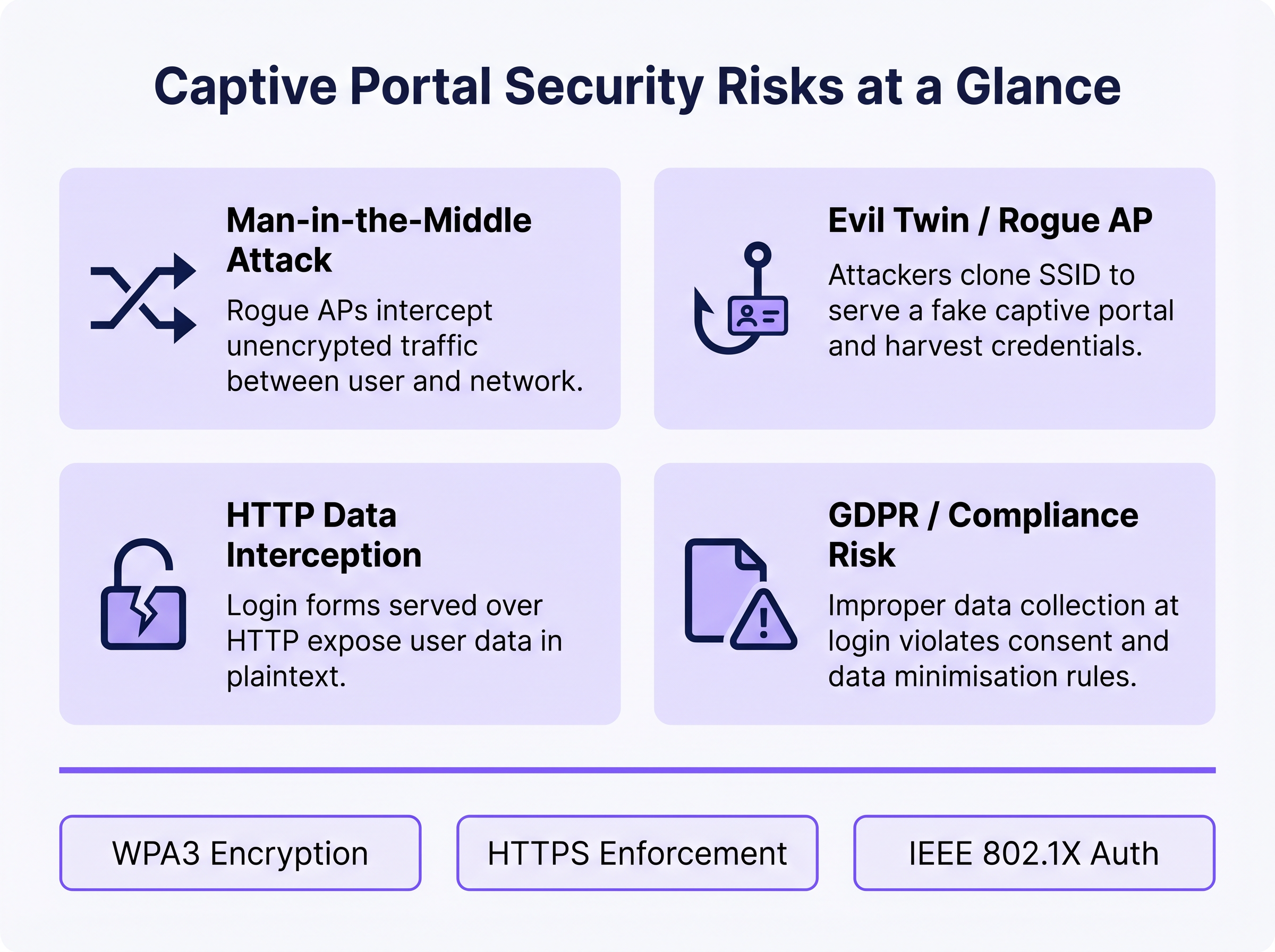
1. Man-in-the-Middle (MitM) Attacks
In an open WiFi environment, all traffic between the user's device and the access point is transmitted in plaintext at the radio frequency layer. Any device within radio range can passively capture these frames using freely available packet capture tools. If the captive portal login page is served over HTTP rather than HTTPS, any credentials, email addresses, or personal data entered by the user are visible to any passive observer on the network. Even after authentication, if the network remains open (no WPA2/WPA3 encryption), all subsequent browsing traffic is equally exposed.
2. Evil Twin and Rogue Access Points
An attacker sets up a malicious AP broadcasting the same SSID as the legitimate network, often with a higher transmit power to attract connections. Devices may automatically associate with the rogue AP. The attacker then serves a cloned captive portal page, harvesting credentials, social media OAuth tokens, or payment information. This attack is particularly effective in environments where users expect a portal to appear — transport hubs, retail stores, and conference venues. Detection requires active Wireless Intrusion Prevention System (WIPS) monitoring.
3. MAC Spoofing and Session Hijacking
Once a legitimate user authenticates through the captive portal, the network typically tracks their session using their device's MAC address. An attacker who passively observes the network can identify authenticated MAC addresses and spoof them to bypass the portal, gaining unauthorised network access. This is a structural weakness of MAC-based session tracking and is mitigated only by moving to cryptographic authentication methods.
4. GDPR and Data Compliance Exposure
Captive portals that collect personal data — names, email addresses, social media profiles — at the point of login create a significant regulatory exposure if that data is collected insecurely, without explicit consent, or retained beyond its stated purpose. Under GDPR, the data controller (the venue operator) bears responsibility for the lawfulness and security of processing. Improper data collection at the portal level can constitute a breach of the data minimisation and integrity principles under Article 5.
Implementation Guide
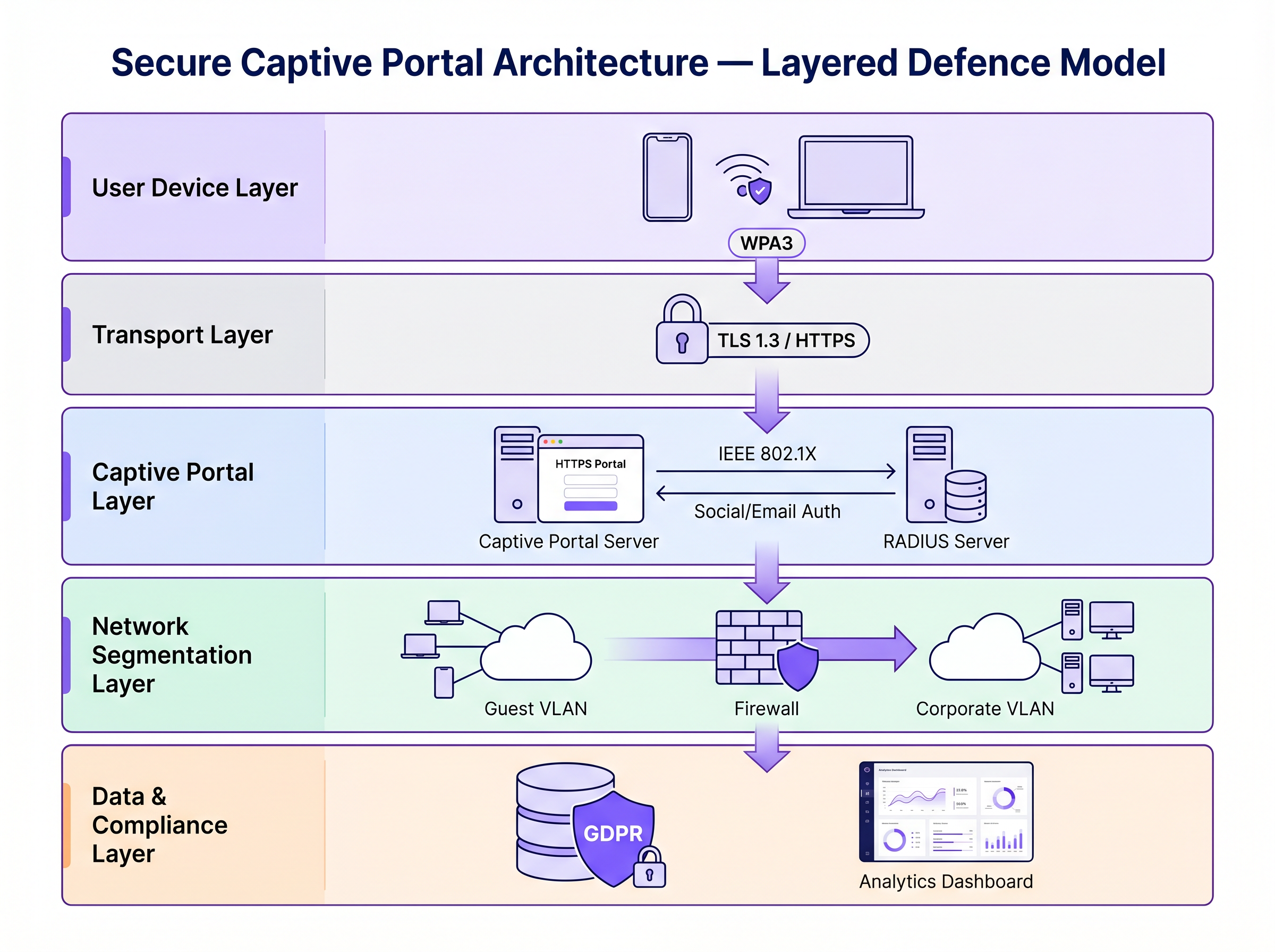
Securing a captive portal requires a layered defence strategy. The following steps move from minimum viable security to enterprise-grade architecture.
Step 1: Enforce HTTPS and HSTS on the Portal
The absolute baseline is serving the captive portal over HTTPS with a valid SSL/TLS certificate from a trusted Certificate Authority (CA). This encrypts the data submitted through the portal form and prevents passive interception of credentials. Implementing HTTP Strict Transport Security (HSTS) ensures that browsers only interact with the portal over secure connections, mitigating downgrade attacks. Use automated certificate management tools such as Let's Encrypt with ACME protocol integration to prevent certificate expiry.
Step 2: Implement WPA3 and Opportunistic Wireless Encryption (OWE)
WPA3-Personal provides robust encryption for networks using a pre-shared key (PSK). For public guest networks where a PSK is impractical, Opportunistic Wireless Encryption (OWE), defined in RFC 8110 and IEEE 802.11-2020, provides individualised encryption for open networks without requiring user authentication. OWE performs a Diffie-Hellman key exchange during the association process, establishing a unique session key per client. This protects against passive eavesdropping without changing the user experience.
Step 3: Transition to IEEE 802.1X and Passpoint (Hotspot 2.0)
For enterprise-grade security, transitioning from a traditional web-based captive portal to IEEE 802.1X port-based network access control is the gold standard. Technologies like Passpoint (Wi-Fi CERTIFIED Passpoint, based on IEEE 802.11u) allow devices to automatically and securely authenticate using credentials such as SIM cards (EAP-SIM/AKA), enterprise certificates (EAP-TLS), or username/password (EAP-TTLS/PEAP). Purple acts as a free identity provider for services like OpenRoaming under the Connect licence, facilitating seamless, secure onboarding without the friction of a traditional captive portal.
Step 4: Network Segmentation and Client Isolation
Always isolate guest WiFi traffic from corporate networks using VLANs and strict stateful firewall rules. The guest VLAN should permit only internet-bound traffic, blocking access to RFC 1918 address space and all internal resources. Enable client isolation (also called AP isolation or peer-to-peer blocking) on the wireless controller to prevent devices on the guest network from communicating directly with each other. This limits the blast radius of any compromised device.
Best Practices
The following table summarises the key security controls, the standards they align to, and their implementation priority.
| Control | Standard / Framework | Priority | Impact |
|---|---|---|---|
| HTTPS enforcement on portal | TLS 1.3, HSTS | Critical | Encrypts login credentials |
| WPA3 or OWE on SSID | IEEE 802.11-2020 | High | Encrypts all over-the-air traffic |
| Client isolation | Vendor-specific | Critical | Prevents lateral movement |
| VLAN segmentation | IEEE 802.1Q | Critical | Isolates guest from corporate |
| RADIUS authentication | IEEE 802.1X | High | Replaces MAC-based tracking |
| Rogue AP detection (WIPS) | Vendor-specific | High | Detects Evil Twin attacks |
| Data minimisation at portal | GDPR Article 5 | High | Reduces compliance exposure |
| Certificate automation | ACME / Let's Encrypt | Medium | Prevents certificate expiry |
For a comprehensive comparison of portal solutions, refer to The Best Captive Portal Software in 2026: A Comparison Guide .
Troubleshooting & Risk Mitigation
Common Failure Modes
Captive Portal Not Appearing: Modern operating systems use Captive Network Assistants (CNA) — lightweight HTTP probes to specific endpoints (e.g., Apple's captive.apple.com, Google's connectivitycheck.gstatic.com) — to detect captive portals. If DNS resolution is blocked, the probe fails, and the CNA may not trigger. Ensure the guest network permits DNS queries and that the portal redirect mechanism intercepts the CNA probe correctly.
Certificate Errors Blocking Access: An expired, self-signed, or domain-mismatched SSL certificate will cause browsers to display security warnings. Users who click through these warnings are being trained to ignore security alerts — a dangerous precedent. Implement automated certificate renewal and monitor expiry dates with alerting.
Performance Bottlenecks at Scale: In high-density environments such as stadiums or conference centres, the RADIUS server and portal infrastructure can become bottlenecks during peak association events (e.g., event start times). Deploy RADIUS in a high-availability cluster with load balancing, and consider pre-provisioning sessions for ticketed events using Passpoint profiles.
MAC Randomisation Breaking Session Tracking: Modern iOS and Android devices randomise their MAC addresses per SSID, which can break MAC-based session persistence. This is another driver for migrating to 802.1X, where authentication is tied to cryptographic identity rather than hardware address.
ROI & Business Impact
Investing in secure captive portal infrastructure is not purely a risk mitigation exercise — it is a measurable business enabler.
Brand Protection and Customer Trust: A security breach on a public network causes severe reputational damage and erodes the customer trust that guest WiFi is designed to build. Secure WiFi is a brand differentiator, particularly in Hospitality and Retail where the guest experience is a competitive advantage.
Regulatory Compliance: GDPR fines for data breaches can reach 4% of global annual turnover. PCI DSS non-compliance can result in card scheme fines and loss of payment processing capability. Secure, compliant guest WiFi architecture eliminates these exposures.
Operational Efficiency: Modern authentication methods like Passpoint reduce the support burden associated with captive portal login issues — certificate warnings, portal not loading, session drops — which are among the most common guest WiFi support tickets.
Data Value and Analytics: Secure, compliant first-party data collection at the portal feeds into powerful WiFi Analytics , enabling venue operators to understand dwell time, repeat visit frequency, and customer behaviour patterns. This data drives targeted marketing campaigns and operational decisions with measurable ROI. Similar to how network modernisation drives efficiency across the WAN (see The Core SD WAN Benefits for Modern Businesses ), upgrading guest WiFi infrastructure delivers compounding returns across security, compliance, and cocommercial outcomes.
For further guidance on Captive Portal platform selection, see The Best Captive Portal Software in 2026: A Comparison Guide .
Key Terms & Definitions
Man-in-the-Middle (MitM) Attack
An attack in which a malicious actor secretly intercepts and potentially alters communications between two parties who believe they are communicating directly with each other.
The primary risk on open guest networks where Layer 2 traffic is unencrypted, allowing attackers to steal credentials, inject malware into HTTP responses, or alter data in transit.
Evil Twin
A rogue wireless access point that masquerades as a legitimate hotspot by broadcasting the same SSID, designed to deceive users into connecting and submitting credentials to a fake captive portal.
Particularly dangerous in public venues where users expect a captive portal to appear. Mitigated by WIPS deployment and Passpoint authentication.
Opportunistic Wireless Encryption (OWE)
An IEEE 802.11 standard (RFC 8110) that provides individualised data encryption for open WiFi networks using a Diffie-Hellman key exchange during the association process, without requiring user authentication or a pre-shared key.
The recommended replacement for legacy open networks. Protects against passive eavesdropping without changing the user experience or requiring a password.
Passpoint (Hotspot 2.0)
A Wi-Fi Alliance certification programme based on IEEE 802.11u that enables devices to automatically discover, select, and authenticate to WiFi networks using existing credentials (SIM, certificate, username/password) without manual intervention.
The modern architectural replacement for traditional captive portals in enterprise deployments. Eliminates the open network vulnerability and provides a seamless user experience.
IEEE 802.1X
An IEEE standard for port-based Network Access Control (PNAC) that provides an authentication mechanism for devices wishing to attach to a LAN or WLAN, using the Extensible Authentication Protocol (EAP) framework.
The authentication backbone of enterprise WiFi security. Requires a RADIUS server and replaces MAC-based session tracking with cryptographic identity verification.
Client Isolation
A wireless network security feature that prevents devices connected to the same SSID from communicating directly with each other at Layer 2, routing all traffic through the AP or gateway instead.
Essential for guest networks to prevent a compromised or malicious device from scanning, attacking, or infecting other users' devices on the same network.
HTTP Strict Transport Security (HSTS)
A web security policy mechanism (RFC 6797) that instructs browsers to only interact with a web server over HTTPS, preventing protocol downgrade attacks and cookie hijacking.
Must be implemented on captive portal servers to prevent attackers from forcing the browser to connect over insecure HTTP.
MAC Spoofing
The technique of altering the Media Access Control (MAC) address of a network interface controller to impersonate another device on the network.
Used by attackers to bypass captive portal authentication by cloning the MAC address of a legitimately authenticated user, gaining unauthorised network access.
Wireless Intrusion Prevention System (WIPS)
A network security system that monitors the radio frequency spectrum for the presence of unauthorised access points and takes automated countermeasures to contain them.
The primary operational control for detecting and containing Evil Twin attacks and rogue AP deployments.
Case Studies
A 200-room hotel is experiencing guest complaints about WiFi security warnings and frequent disconnections. They currently operate an open SSID with a basic HTTP captive portal. The IT manager needs to remediate the security posture without replacing the existing AP infrastructure.
Phase 1 (Immediate — within 2 weeks): Migrate the captive portal to HTTPS by provisioning a valid TLS certificate from a trusted CA. Enable HSTS. Enable client isolation on the wireless controller. Verify VLAN segmentation between guest and corporate networks. Phase 2 (Short-term — within 3 months): Enable WPA3 Transition Mode on the SSID to support both WPA2 and WPA3 clients simultaneously. Enable OWE on a separate SSID for devices that support it. Phase 3 (Medium-term — within 12 months): Deploy Passpoint (Hotspot 2.0) profiles, allowing returning guests to authenticate automatically using a profile downloaded during their first visit. Integrate with Purple's platform for compliant data collection and analytics.
A national retail chain with 300 stores wants to deploy a guest WiFi captive portal to collect email addresses for marketing. The legal team has flagged GDPR compliance concerns, and the security team is worried about data interception and rogue AP attacks.
Architecture: Deploy Purple's guest WiFi platform with HTTPS-enforced portals across all sites. The portal collects only email address and explicit consent (separate checkboxes for terms of service and marketing consent — not bundled). Data is transmitted over TLS 1.3 and stored encrypted at rest. Network: Enable WPA3 or OWE on the guest SSID. Enable client isolation. Segment guest traffic into a dedicated VLAN with no access to the corporate network or POS systems. Security Operations: Deploy WIPS on all APs to detect rogue devices broadcasting the store's SSID. Configure automated alerts for Evil Twin detection. Compliance: Implement data retention policies aligned to GDPR — purge inactive records after 24 months. Provide users with a clear, accessible privacy policy linked from the portal. Conduct annual penetration testing of the wireless environment.
Scenario Analysis
Q1. You are deploying a guest WiFi network in a large conference centre hosting 5,000 attendees. The marketing team requires a customised captive portal to collect email addresses. The security team is concerned about data interception and rogue AP attacks. What architecture do you recommend, and what is the minimum security baseline?
💡 Hint:Consider both the portal-level security (how data is transmitted) and the network-level security (how the wireless connection is encrypted). Also consider the scale of the deployment and peak association events.
Show Recommended Approach
Minimum baseline: HTTPS-enforced captive portal with a valid CA certificate, client isolation enabled, guest traffic segmented into a dedicated VLAN, and WPA3 or OWE enabled on the SSID. For the rogue AP threat at this scale, deploy WIPS on all APs with automated alerting. For performance at 5,000 concurrent users, deploy RADIUS in a high-availability cluster. Longer-term, consider Passpoint profiles for returning attendees to eliminate the open network vulnerability entirely.
Q2. During a wireless penetration test at a retail site, the auditor successfully bypasses the captive portal by spoofing the MAC address of an authenticated device. The site manager asks what architectural change would prevent this. What is your recommendation?
💡 Hint:Consider what property of the authenticated session the attacker is exploiting, and what alternative authentication mechanisms do not rely on that property.
Show Recommended Approach
The vulnerability is that MAC-based session tracking uses a hardware identifier that can be trivially cloned. The fix is to migrate to IEEE 802.1X authentication, which establishes a cryptographic identity binding using EAP. The session is tied to a certificate or credential, not a MAC address. Passpoint (Hotspot 2.0) implements this transparently for end users. As an interim measure, reducing session timeout values and implementing per-session re-authentication reduces the window of opportunity for MAC spoofing attacks.
Q3. A hotel's IT manager reports that guests are seeing 'Your connection is not private' errors when trying to access the captive portal. The portal was working correctly last month. What is the most likely cause, and how do you resolve it?
💡 Hint:Think about what changes over time that affects the validity of an HTTPS connection.
Show Recommended Approach
The most likely cause is an expired SSL/TLS certificate on the captive portal server. Certificates have a fixed validity period (typically 90 days for Let's Encrypt, up to 1 year for commercial CAs). Resolution: renew the certificate immediately. Prevention: implement automated certificate renewal using the ACME protocol (Let's Encrypt) with monitoring and alerting for certificates expiring within 30 days. A secondary cause could be a domain name mismatch if the portal URL was recently changed.
Q4. A retail client wants to collect email addresses via their captive portal for marketing purposes. Their legal team has raised GDPR concerns. What specific design decisions must be made at the portal level to ensure compliance?
💡 Hint:Consider the GDPR principles of lawfulness, data minimisation, and transparency. Think about how consent must be structured.
Show Recommended Approach
Key design decisions: (1) Separate consent checkboxes — terms of service acceptance must be separate from marketing consent; bundling them is non-compliant. (2) Marketing consent must be opt-in, not pre-ticked. (3) The portal must link to a clear, accessible privacy policy explaining what data is collected, how it is used, and how long it is retained. (4) Collect only the data necessary for the stated purpose (data minimisation) — do not request date of birth or phone number if only email is needed for marketing. (5) Provide a mechanism for users to withdraw consent and request deletion of their data.




