

Ist ein Captive Portal Login sicher? Sicherheitsrisiken und wie man sie mindert
Dieser technische Leitfaden bietet IT-Managern, Netzwerkarchitekten und Direktoren für Veranstaltungsbetrieb eine umfassende Analyse der Sicherheitsrisiken von Captive Portals – einschließlich Man-in-the-Middle-Angriffen, bösartigen Evil Twin Access Points und GDPR-Compliance-Risiken. Er liefert umsetzbare, herstellerneutrale Minderungsstrategien, die auf IEEE 802.1X-, WPA3- und PCI DSS-Standards abgestimmt sind, und erklärt, wie die Gast-WiFi-Plattform von Purple sichere, konforme und kommerziell wertvolle Gastnetzwerkbereitstellungen in großem Maßstab ermöglicht.
🎧 Diesen Leitfaden anhören
Transkript anzeigen
Zusammenfassung für die Geschäftsleitung
Für IT-Manager, Netzwerkarchitekten und Direktoren für Veranstaltungsbetrieb ist die Frage, ob ein Captive Portal Login sicher ist, nicht nur akademisch – sie ist ein kritisches operatives und kommerzielles Anliegen. Da öffentliche und Gast-WiFi-Netzwerke in den Sektoren Einzelhandel , Gastgewerbe , Gesundheitswesen und Transport zu einer wesentlichen Infrastruktur werden, bestimmt die Sicherheit des anfänglichen Verbindungspunkts – des Captive Portals – die Gesamtintegrität des Netzwerks und die Sicherheit der Benutzerdaten.
Traditionelle offene Netzwerke mit einfachen Captive Portals setzen Benutzer erheblichen Risiken aus, darunter Man-in-the-Middle (MitM)-Angriffe, bösartige Access Points (Evil Twins), MAC Spoofing und die Abfangen unverschlüsselter Daten. Dieser Leitfaden bietet einen technischen Tiefenblick in diese Schwachstellen und skizziert umsetzbare, herstellerneutrale Minderungsstrategien. Durch die Implementierung moderner Standards wie WPA3, IEEE 802.1X-Authentifizierung und strikte HTTPS-Erzwingung – und durch den Einsatz einer Plattform wie Purple's Gast-WiFi – können Organisationen ihre Gastnetzwerke sichern, die Einhaltung von GDPR und PCI DSS gewährleisten und den Markenruf schützen, während sie die Gast-WiFi-Verbindung in ein strategisches Daten- und Marketing-Asset verwandeln.
Technischer Tiefenblick
Die Architektur eines Captive Portals
Ein Captive Portal ist eine Webseite, die ein Benutzer eines öffentlichen Zugangsnetzwerks ansehen und mit der er interagieren muss, bevor der Internetzugang gewährt wird. Der typische Authentifizierungsablauf beinhaltet, dass ein Benutzer sich mit einer SSID verbindet, eine IP-Adresse über DHCP erhält und seine anfänglichen HTTP- oder HTTPS-Anfragen abgefangen und zu einem Authentifizierungs- oder Splash-Page-Server umgeleitet werden. Der Netzwerk-Controller oder Access Point (AP) erzwingt diese Umleitung, indem er den nicht authentifizierten Client in einen eingeschränkten Netzwerkzustand versetzt, der nur die DNS-Auflösung und den Datenverkehr zum Portal-Server zulässt.
Obwohl dieser Mechanismus für die Zugangskontrolle, die Durchsetzung von Nutzungsbedingungen und die Erfassung von Erstanbieterdaten wirksam ist, basierte die zugrunde liegende Architektur historisch auf offenen, unverschlüsselten 802.11-Verbindungen. Dieser grundlegende Mangel an Layer-2-Verschlüsselung ist die Ursache der schwerwiegendsten Sicherheitslücken von Captive Portals.
Zentrale Sicherheitsrisiken
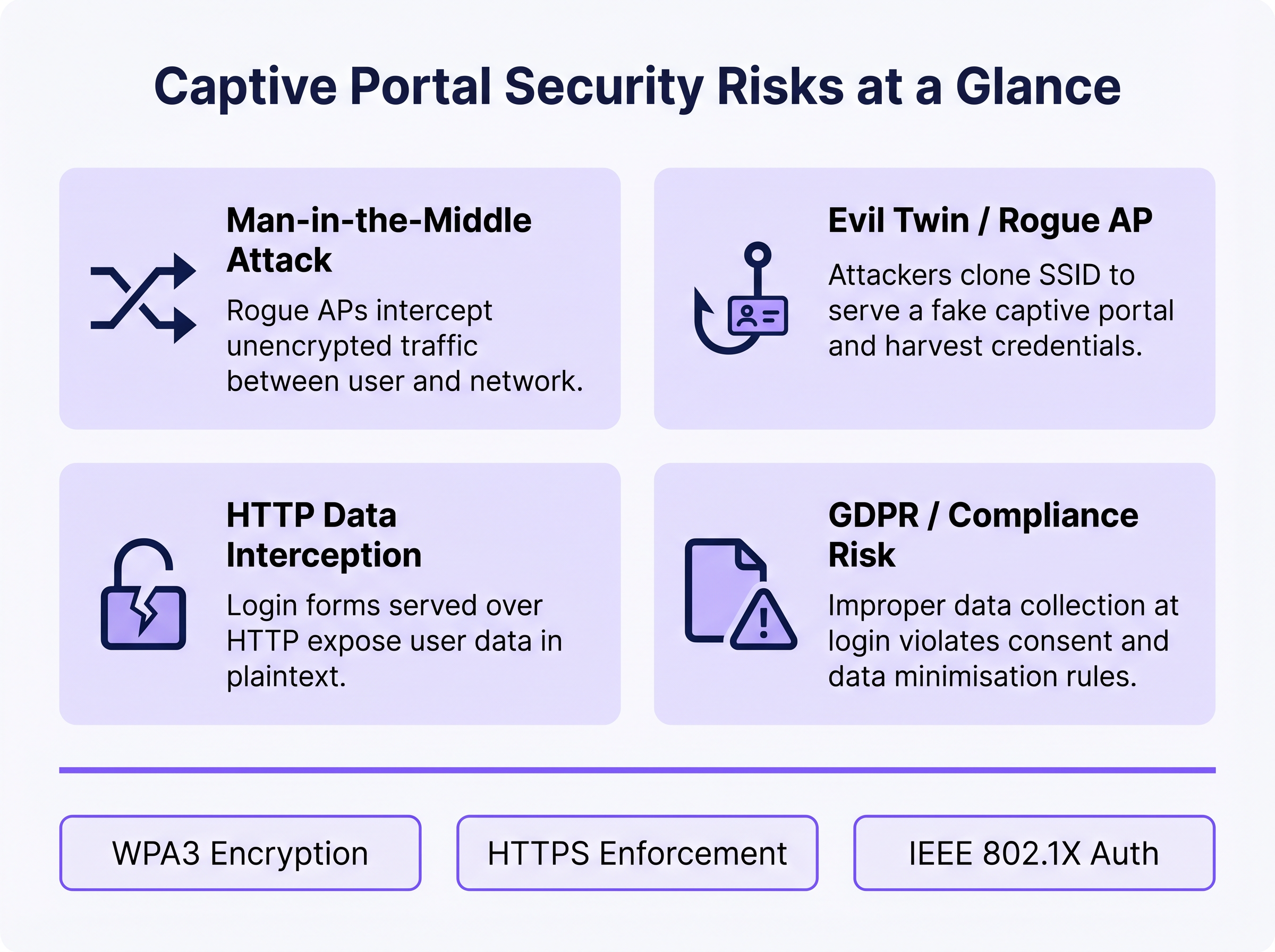
1. Man-in-the-Middle (MitM)-Angriffe
In einer offenen WiFi-Umgebung wird der gesamte Datenverkehr zwischen dem Gerät des Benutzers und dem Access Point auf der Funkfrequenzebene im Klartext übertragen. Jedes Gerät innerhalb der Funkreichweite kann diese Frames passiv mit frei verfügbaren Paket-Capture-Tools erfassen. Wenn die Captive Portal Login-Seite über HTTP statt HTTPS bereitgestellt wird, sind alle vom Benutzer eingegebenen Anmeldeinformationen, E-Mail-Adressen oder persönlichen Daten für jeden passiven Beobachter im Netzwerk sichtbar. Selbst nach der Authentifizierung, wenn das Netzwerk offen bleibt (keine WPA2/WPA3-Verschlüsselung), ist der gesamte nachfolgende Browsing-Verkehr gleichermaßen exponiert.
2. Evil Twin und bösartige Access Points
Ein Angreifer richtet einen bösartigen AP ein, der dieselbe SSID wie das legitime Netzwerk sendet, oft mit einer höheren Sendeleistung, um Verbindungen anzuziehen. Geräte können sich automatisch mit dem bösartigen AP verbinden. Der Angreifer stellt dann eine geklonte Captive Portal-Seite bereit, um Anmeldeinformationen, Social Media OAuth-Tokens oder Zahlungsinformationen zu sammeln. Dieser Angriff ist besonders effektiv in Umgebungen, in denen Benutzer erwarten, dass ein Portal erscheint – Verkehrsknotenpunkte, Einzelhandelsgeschäfte und Konferenzorte. Die Erkennung erfordert eine aktive Überwachung durch ein Wireless Intrusion Prevention System (WIPS).
3. MAC Spoofing und Session Hijacking
Sobald sich ein legitimer Benutzer über das Captive Portal authentifiziert, verfolgt das Netzwerk seine Sitzung typischerweise anhand der MAC address seines Geräts. Ein Angreifer, der das Netzwerk passiv beobachtet, kann authentifizierte MAC addresses identifizieren und diese spoofen, um das Portal zu umgehen und unbefugten Netzwerkzugriff zu erhalten. Dies ist eine strukturelle Schwäche der MAC-basierten Sitzungsverfolgung und wird nur durch den Übergang zu kryptografischen Authentifizierungsmethoden gemindert.
4. GDPR und Daten-Compliance-Risiko
Captive Portals, die persönliche Daten – Namen, E-Mail-Adressen, Social-Media-Profile – zum Zeitpunkt des Logins erfassen, schaffen ein erhebliches regulatorisches Risiko, wenn diese Daten unsicher, ohne ausdrückliche Zustimmung oder über ihren angegebenen Zweck hinaus gesammelt oder aufbewahrt werden. Gemäß GDPR trägt der Datenverantwortliche (der Betreiber des Veranstaltungsortes) die Verantwortung für die Rechtmäßigkeit und Sicherheit der Verarbeitung. Eine unsachgemäße Datenerfassung auf Portal-Ebene kann einen Verstoß gegen die Grundsätze der Datenminimierung und -integrität gemäß Article 5 darstellen.
Implementierungsleitfaden
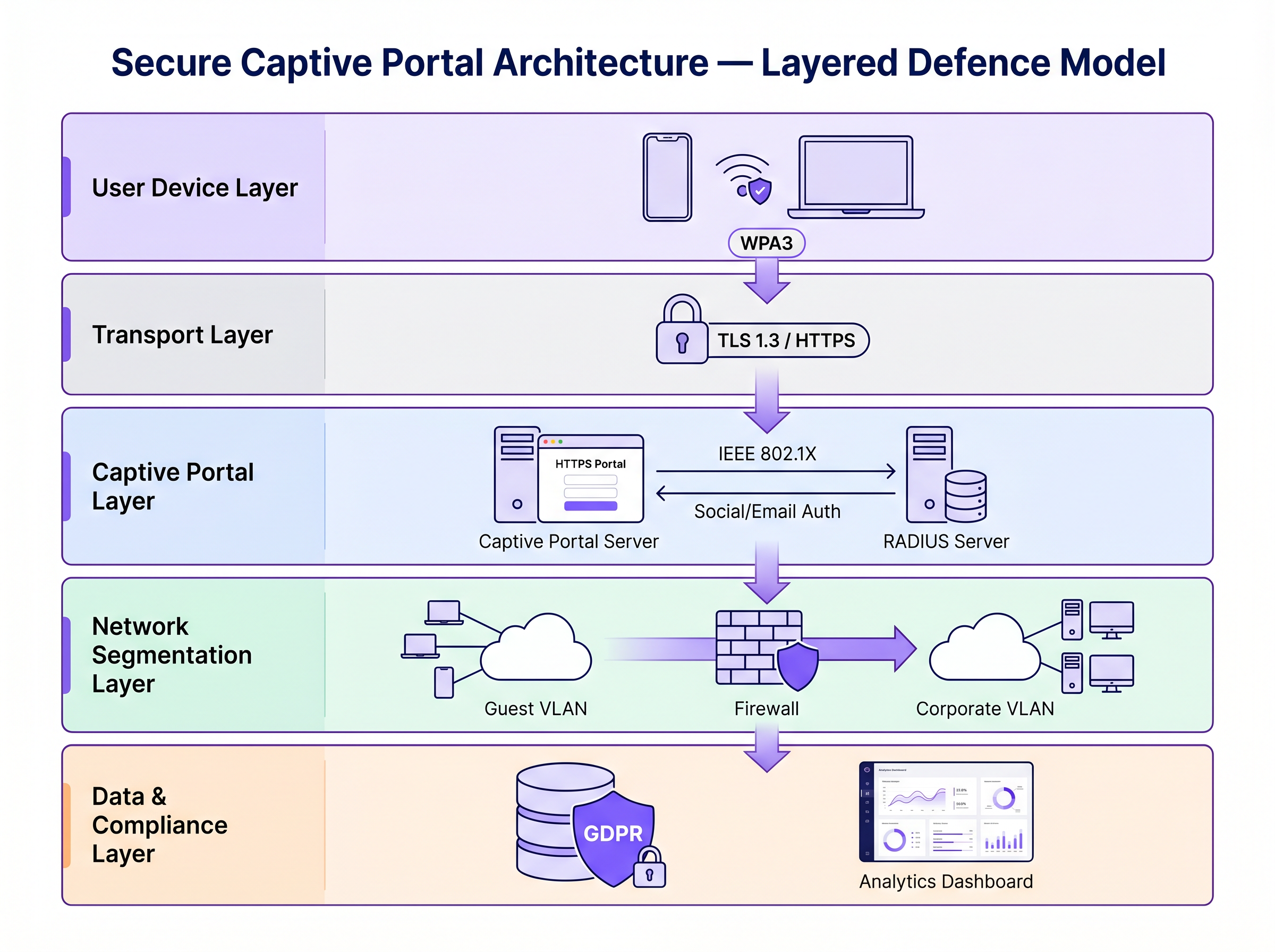
Die Sicherung eines Captive Portals erfordert eine mehrschichtige Verteidigungsstrategie. Die folgenden Schritte reichen von der minimalen praktikablen Sicherheit bis zur Architektur auf Unternehmensniveau.
Schritt 1: HTTPS und HSTS auf dem Portal erzwingen
Die absolute Grundlage ist die Bereitstellung des Captive Portals über HTTPS mit einem gültigen SSL/TLS-Zertifikat einer vertrauenswürdigen Certificate Authority (CA). Dies verschlüsselt die über das Portalformular übermittelten Daten und verhindert das passive Abfangen von Anmeldeinformationen. Die Implementierung von HTTP Strict Transport Security (HSTS) stellt sicher, dass Browser nur über sichere Verbindungen mit dem Portal interagieren, wodurch Downgrade-Angriffe gemindert werden. Verwenden Sie automatisierte Zertifikatsverwaltungstools wie Let's Encrypt mit ACME-Protokollintegration, um das Ablaufen von Zertifikaten zu verhindern.
Schritt 2: WPA3 und Opportunistic Wireless Encryption (OWE) implementieren
WPA3-Personal bietet robuste Verschlüsselung für Netzwerke, die einen Pre-Shared Key (PSK) verwenden. Für öffentliche Gastnetzwerke, bei denen ein PSK unpraktisch ist, ist Opportunistic Wireless Encryption (OWE), definiert in RFC 8110 und IEEE 802.11-2020, bietet eine individualisierte Verschlüsselung für offene Netzwerke, ohne eine Benutzerauthentifizierung zu erfordern. OWE führt während des Assoziierungsprozesses einen Diffie-Hellman-Schlüsselaustausch durch und etabliert einen einzigartigen Sitzungsschlüssel pro Client. Dies schützt vor passivem Abhören, ohne die Benutzererfahrung zu beeinträchtigen.
Schritt 3: Übergang zu IEEE 802.1X und Passpoint (Hotspot 2.0)
Für Sicherheit auf Unternehmensniveau ist der Übergang von einem traditionellen webbasierten Captive Portal zur portbasierten Netzwerkzugriffskontrolle nach IEEE 802.1X der Goldstandard. Technologien wie Passpoint (Wi-Fi CERTIFIED Passpoint, basierend auf IEEE 802.11u) ermöglichen Geräten eine automatische und sichere Authentifizierung mittels Anmeldeinformationen wie SIM-Karten (EAP-SIM/AKA), Unternehmenszertifikaten (EAP-TLS) oder Benutzername/Passwort (EAP-TTLS/PEAP). Purple fungiert als kostenloser Identitätsanbieter für Dienste wie OpenRoaming unter der Connect-Lizenz und ermöglicht ein nahtloses, sicheres Onboarding ohne die Reibung eines traditionellen Captive Portal.
Schritt 4: Netzwerksegmentierung und Client-Isolation
Isolieren Sie den Gast-WiFi-Verkehr stets von Unternehmensnetzwerken mithilfe von VLANs und strengen Stateful-Firewall-Regeln. Das Gast-VLAN sollte nur internetgebundenen Verkehr zulassen und den Zugriff auf den RFC 1918-Adressraum sowie alle internen Ressourcen blockieren. Aktivieren Sie die Client-Isolation (auch AP-Isolation oder Peer-to-Peer-Blocking genannt) auf dem Wireless Controller, um zu verhindern, dass Geräte im Gastnetzwerk direkt miteinander kommunizieren. Dies begrenzt den potenziellen Schaden eines kompromittierten Geräts.
Best Practices
Die folgende Tabelle fasst die wichtigsten Sicherheitskontrollen, die Standards, denen sie entsprechen, und ihre Implementierungspriorität zusammen.
| Kontrolle | Standard / Framework | Priorität | Auswirkung |
|---|---|---|---|
| HTTPS-Erzwingung auf dem Portal | TLS 1.3, HSTS | Kritisch | Verschlüsselt Anmeldeinformationen |
| WPA3 oder OWE auf SSID | IEEE 802.11-2020 | Hoch | Verschlüsselt den gesamten Over-the-Air-Verkehr |
| Client-Isolation | Herstellerspezifisch | Kritisch | Verhindert laterale Bewegung |
| VLAN-Segmentierung | IEEE 802.1Q | Kritisch | Isoliert Gäste vom Unternehmensnetzwerk |
| RADIUS-Authentifizierung | IEEE 802.1X | Hoch | Ersetzt MAC-basiertes Tracking |
| Erkennung von Rogue APs (WIPS) | Herstellerspezifisch | Hoch | Erkennt Evil Twin-Angriffe |
| Datenminimierung am Portal | GDPR Artikel 5 | Hoch | Reduziert Compliance-Risiken |
| Zertifikatsautomatisierung | ACME / Let's Encrypt | Mittel | Verhindert den Ablauf von Zertifikaten |
Für einen umfassenden Vergleich von Portallösungen siehe Die beste Captive Portal Software 2026: Ein Vergleichsleitfaden .
Fehlerbehebung & Risikominderung
Häufige Fehlerursachen
Captive Portal wird nicht angezeigt: Moderne Betriebssysteme verwenden Captive Network Assistants (CNA) – leichte HTTP-Probes zu spezifischen Endpunkten (z.B. Apple's captive.apple.com, Google's connectivitycheck.gstatic.com) – um Captive Portals zu erkennen. Wenn die DNS-Auflösung blockiert ist, schlägt die Probe fehl, und der CNA wird möglicherweise nicht ausgelöst. Stellen Sie sicher, dass das Gastnetzwerk DNS-Abfragen zulässt und dass der Portal-Umleitungsmechanismus die CNA-Probe korrekt abfängt.
Zertifikatsfehler blockieren den Zugriff: Ein abgelaufenes, selbstsigniertes oder domain-inkonsistentes SSL-Zertifikat führt dazu, dass Browser Sicherheitswarnungen anzeigen. Benutzer, die diese Warnungen wegklicken, werden dazu erzogen, Sicherheitswarnungen zu ignorieren – ein gefährlicher Präzedenzfall. Implementieren Sie eine automatisierte Zertifikatserneuerung und überwachen Sie Ablaufdaten mit Benachrichtigungen.
Leistungsengpässe bei Skalierung: In Umgebungen mit hoher Dichte, wie Stadien oder Konferenzzentren, können der RADIUS-Server und die Portal-Infrastruktur während Spitzenereignissen (z.B. Veranstaltungsbeginn) zu Engpässen werden. Implementieren Sie RADIUS in einem Hochverfügbarkeitscluster mit Lastausgleich und erwägen Sie die Vorab-Bereitstellung von Sitzungen für Veranstaltungen mit Tickets mithilfe von Passpoint-Profilen.
MAC-Randomisierung unterbricht Sitzungsverfolgung: Moderne iOS- und Android-Geräte randomisieren ihre MAC-Adressen pro SSID, was die MAC-basierte Sitzungspersistenz unterbrechen kann. Dies ist ein weiterer Grund für die Migration zu 802.1X, wo die Authentifizierung an eine kryptografische Identität statt an eine Hardwareadresse gebunden ist.
ROI & Geschäftsauswirkungen
Die Investition in eine sichere Captive Portal-Infrastruktur ist nicht nur eine Risikominderungsmaßnahme – sie ist ein messbarer Geschäftsförderer.
Markenschutz und Kundenvertrauen: Eine Sicherheitsverletzung in einem öffentlichen Netzwerk verursacht erheblichen Reputationsschaden und untergräbt das Kundenvertrauen, das Gast-WiFi aufbauen soll. Sicheres WiFi ist ein Marken-Differenzierungsmerkmal, insbesondere in der Hotellerie und im Einzelhandel , wo das Gästeerlebnis ein Wettbewerbsvorteil ist.
Regulatorische Compliance: GDPR-Bußgelder für Datenschutzverletzungen können 4% des weltweiten Jahresumsatzes erreichen. PCI DSS-Nichteinhaltung kann zu Bußgeldern der Kartensysteme und dem Verlust der Zahlungsabwicklungsfähigkeit führen. Eine sichere, konforme Gast-WiFi-Architektur eliminiert diese Risiken.
Operative Effizienz: Moderne Authentifizierungsmethoden wie Passpoint reduzieren den Supportaufwand, der mit Captive Portal-Anmeldeproblemen verbunden ist – Zertifikatswarnungen, Portal lädt nicht, Sitzungsabbrüche – die zu den häufigsten Support-Tickets für Gast-WiFi gehören.
Datenwert und Analysen: Die sichere, konforme Erfassung von Erstanbieterdaten am Portal speist sich in leistungsstarke WiFi Analytics ein und ermöglicht es Betreibern von Veranstaltungsorten, Verweildauer, Häufigkeit wiederholter Besuche und Kundenverhaltensmuster zu verstehen. Diese Daten treiben gezielte Marketingkampagnen und operative Entscheidungen mit messbarem ROI voran. Ähnlich wie die Netzwerkmodernisierung die Effizienz über das WAN steigert (siehe Die zentralen SD WAN Vorteile für moderne Unternehmen ), liefert die Aufrüstung der Gast-WiFi-Infrastruktur kumulative Erträge in Bezug auf Sicherheit, Compliance und Kogeschäftliche Ergebnisse.
Für weitere Anleitungen zur Auswahl einer Captive Portal-Plattform siehe Die beste Captive Portal Software im Jahr 2026: Ein Vergleichsleitfaden .
Schlüsselbegriffe & Definitionen
Man-in-the-Middle (MitM) Attack
An attack in which a malicious actor secretly intercepts and potentially alters communications between two parties who believe they are communicating directly with each other.
The primary risk on open guest networks where Layer 2 traffic is unencrypted, allowing attackers to steal credentials, inject malware into HTTP responses, or alter data in transit.
Evil Twin
A rogue wireless access point that masquerades as a legitimate hotspot by broadcasting the same SSID, designed to deceive users into connecting and submitting credentials to a fake captive portal.
Particularly dangerous in public venues where users expect a captive portal to appear. Mitigated by WIPS deployment and Passpoint authentication.
Opportunistic Wireless Encryption (OWE)
An IEEE 802.11 standard (RFC 8110) that provides individualised data encryption for open WiFi networks using a Diffie-Hellman key exchange during the association process, without requiring user authentication or a pre-shared key.
The recommended replacement for legacy open networks. Protects against passive eavesdropping without changing the user experience or requiring a password.
Passpoint (Hotspot 2.0)
A Wi-Fi Alliance certification programme based on IEEE 802.11u that enables devices to automatically discover, select, and authenticate to WiFi networks using existing credentials (SIM, certificate, username/password) without manual intervention.
The modern architectural replacement for traditional captive portals in enterprise deployments. Eliminates the open network vulnerability and provides a seamless user experience.
IEEE 802.1X
An IEEE standard for port-based Network Access Control (PNAC) that provides an authentication mechanism for devices wishing to attach to a LAN or WLAN, using the Extensible Authentication Protocol (EAP) framework.
The authentication backbone of enterprise WiFi security. Requires a RADIUS server and replaces MAC-based session tracking with cryptographic identity verification.
Client Isolation
A wireless network security feature that prevents devices connected to the same SSID from communicating directly with each other at Layer 2, routing all traffic through the AP or gateway instead.
Essential for guest networks to prevent a compromised or malicious device from scanning, attacking, or infecting other users' devices on the same network.
HTTP Strict Transport Security (HSTS)
A web security policy mechanism (RFC 6797) that instructs browsers to only interact with a web server over HTTPS, preventing protocol downgrade attacks and cookie hijacking.
Must be implemented on captive portal servers to prevent attackers from forcing the browser to connect over insecure HTTP.
MAC Spoofing
The technique of altering the Media Access Control (MAC) address of a network interface controller to impersonate another device on the network.
Used by attackers to bypass captive portal authentication by cloning the MAC address of a legitimately authenticated user, gaining unauthorised network access.
Wireless Intrusion Prevention System (WIPS)
A network security system that monitors the radio frequency spectrum for the presence of unauthorised access points and takes automated countermeasures to contain them.
The primary operational control for detecting and containing Evil Twin attacks and rogue AP deployments.
Fallstudien
A 200-room hotel is experiencing guest complaints about WiFi security warnings and frequent disconnections. They currently operate an open SSID with a basic HTTP captive portal. The IT manager needs to remediate the security posture without replacing the existing AP infrastructure.
Phase 1 (Immediate — within 2 weeks): Migrate the captive portal to HTTPS by provisioning a valid TLS certificate from a trusted CA. Enable HSTS. Enable client isolation on the wireless controller. Verify VLAN segmentation between guest and corporate networks. Phase 2 (Short-term — within 3 months): Enable WPA3 Transition Mode on the SSID to support both WPA2 and WPA3 clients simultaneously. Enable OWE on a separate SSID for devices that support it. Phase 3 (Medium-term — within 12 months): Deploy Passpoint (Hotspot 2.0) profiles, allowing returning guests to authenticate automatically using a profile downloaded during their first visit. Integrate with Purple's platform for compliant data collection and analytics.
A national retail chain with 300 stores wants to deploy a guest WiFi captive portal to collect email addresses for marketing. The legal team has flagged GDPR compliance concerns, and the security team is worried about data interception and rogue AP attacks.
Architecture: Deploy Purple's guest WiFi platform with HTTPS-enforced portals across all sites. The portal collects only email address and explicit consent (separate checkboxes for terms of service and marketing consent — not bundled). Data is transmitted over TLS 1.3 and stored encrypted at rest. Network: Enable WPA3 or OWE on the guest SSID. Enable client isolation. Segment guest traffic into a dedicated VLAN with no access to the corporate network or POS systems. Security Operations: Deploy WIPS on all APs to detect rogue devices broadcasting the store's SSID. Configure automated alerts for Evil Twin detection. Compliance: Implement data retention policies aligned to GDPR — purge inactive records after 24 months. Provide users with a clear, accessible privacy policy linked from the portal. Conduct annual penetration testing of the wireless environment.
Szenarioanalyse
Q1. You are deploying a guest WiFi network in a large conference centre hosting 5,000 attendees. The marketing team requires a customised captive portal to collect email addresses. The security team is concerned about data interception and rogue AP attacks. What architecture do you recommend, and what is the minimum security baseline?
💡 Hinweis:Consider both the portal-level security (how data is transmitted) and the network-level security (how the wireless connection is encrypted). Also consider the scale of the deployment and peak association events.
Empfohlenen Ansatz anzeigen
Minimum baseline: HTTPS-enforced captive portal with a valid CA certificate, client isolation enabled, guest traffic segmented into a dedicated VLAN, and WPA3 or OWE enabled on the SSID. For the rogue AP threat at this scale, deploy WIPS on all APs with automated alerting. For performance at 5,000 concurrent users, deploy RADIUS in a high-availability cluster. Longer-term, consider Passpoint profiles for returning attendees to eliminate the open network vulnerability entirely.
Q2. During a wireless penetration test at a retail site, the auditor successfully bypasses the captive portal by spoofing the MAC address of an authenticated device. The site manager asks what architectural change would prevent this. What is your recommendation?
💡 Hinweis:Consider what property of the authenticated session the attacker is exploiting, and what alternative authentication mechanisms do not rely on that property.
Empfohlenen Ansatz anzeigen
The vulnerability is that MAC-based session tracking uses a hardware identifier that can be trivially cloned. The fix is to migrate to IEEE 802.1X authentication, which establishes a cryptographic identity binding using EAP. The session is tied to a certificate or credential, not a MAC address. Passpoint (Hotspot 2.0) implements this transparently for end users. As an interim measure, reducing session timeout values and implementing per-session re-authentication reduces the window of opportunity for MAC spoofing attacks.
Q3. A hotel's IT manager reports that guests are seeing 'Your connection is not private' errors when trying to access the captive portal. The portal was working correctly last month. What is the most likely cause, and how do you resolve it?
💡 Hinweis:Think about what changes over time that affects the validity of an HTTPS connection.
Empfohlenen Ansatz anzeigen
The most likely cause is an expired SSL/TLS certificate on the captive portal server. Certificates have a fixed validity period (typically 90 days for Let's Encrypt, up to 1 year for commercial CAs). Resolution: renew the certificate immediately. Prevention: implement automated certificate renewal using the ACME protocol (Let's Encrypt) with monitoring and alerting for certificates expiring within 30 days. A secondary cause could be a domain name mismatch if the portal URL was recently changed.
Q4. A retail client wants to collect email addresses via their captive portal for marketing purposes. Their legal team has raised GDPR concerns. What specific design decisions must be made at the portal level to ensure compliance?
💡 Hinweis:Consider the GDPR principles of lawfulness, data minimisation, and transparency. Think about how consent must be structured.
Empfohlenen Ansatz anzeigen
Key design decisions: (1) Separate consent checkboxes — terms of service acceptance must be separate from marketing consent; bundling them is non-compliant. (2) Marketing consent must be opt-in, not pre-ticked. (3) The portal must link to a clear, accessible privacy policy explaining what data is collected, how it is used, and how long it is retained. (4) Collect only the data necessary for the stated purpose (data minimisation) — do not request date of birth or phone number if only email is needed for marketing. (5) Provide a mechanism for users to withdraw consent and request deletion of their data.




