

L'accesso a un Captive Portal è sicuro? Rischi per la sicurezza e come mitigarli
Questa guida di riferimento tecnica fornisce a manager IT, architetti di rete e direttori delle operazioni di sede un'analisi completa dei rischi per la sicurezza dei Captive Portal — inclusi attacchi Man-in-the-Middle, punti di accesso non autorizzati Evil Twin e esposizione alla conformità GDPR. Fornisce strategie di mitigazione attuabili e neutrali rispetto al fornitore, allineate agli standard IEEE 802.1X, WPA3 e PCI DSS, e spiega come la piattaforma guest WiFi di Purple consenta implementazioni di reti guest sicure, conformi e commercialmente valide su larga scala.
🎧 Ascolta questa guida
Visualizza trascrizione
Riepilogo Esecutivo
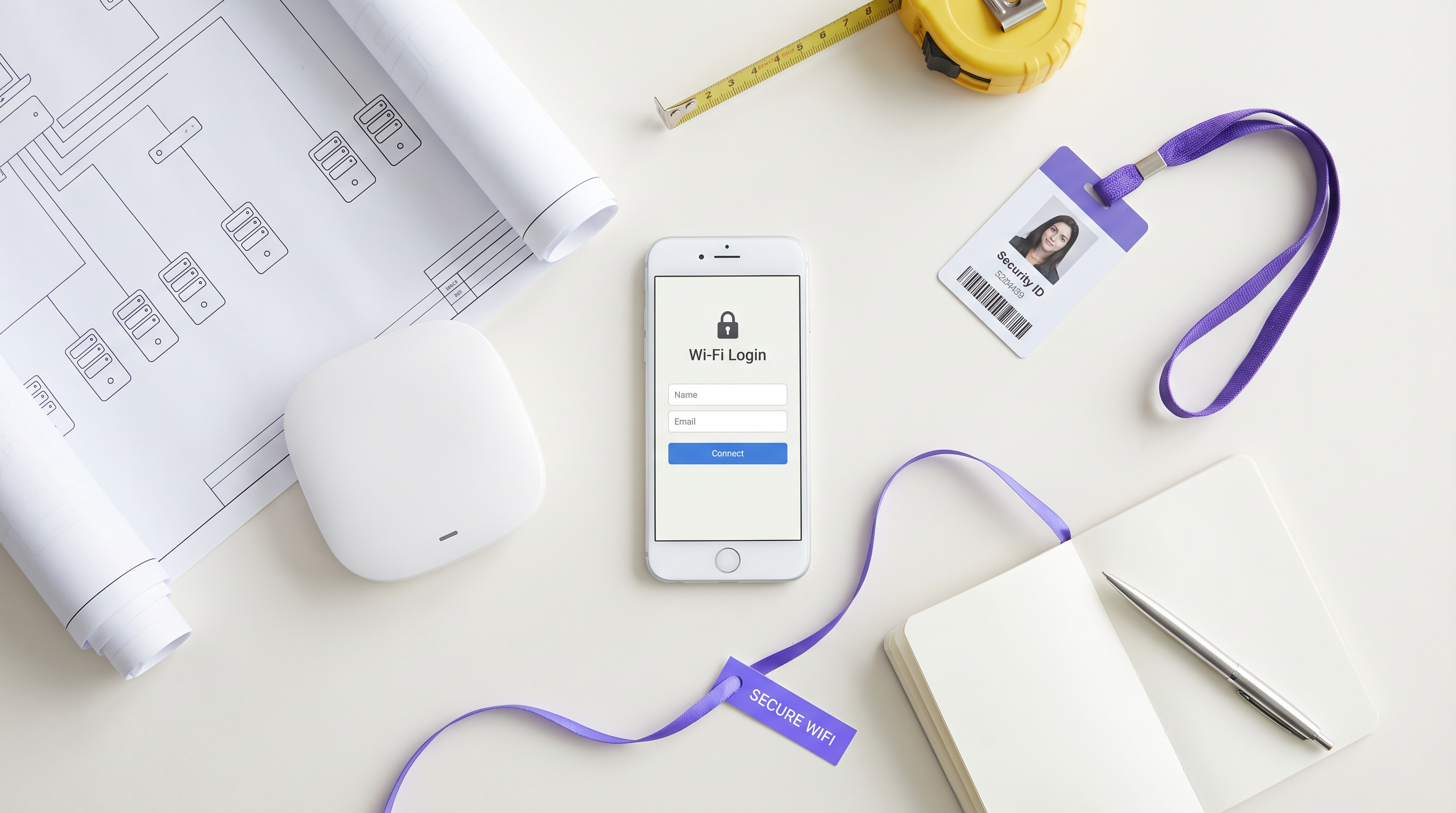
Per i manager IT, gli architetti di rete e i direttori delle operazioni di sede, la questione se l'accesso a un Captive Portal sia sicuro non è meramente accademica — è una preoccupazione operativa e commerciale critica. Poiché le reti WiFi pubbliche e guest diventano infrastrutture essenziali nei settori Retail , Hospitality , Healthcare e Transport , la sicurezza del punto di connessione iniziale — il Captive Portal — determina l'integrità complessiva della rete e la sicurezza dei dati degli utenti.
Le reti aperte tradizionali con Captive Portal di base espongono gli utenti a rischi significativi, inclusi attacchi Man-in-the-Middle (MitM), punti di accesso non autorizzati (Evil Twins), spoofing MAC e intercettazione di dati non crittografati. Questa guida fornisce un'analisi tecnica approfondita di queste vulnerabilità e delinea strategie di mitigazione attuabili e neutrali rispetto al fornitore. Implementando standard moderni come WPA3, l'autenticazione IEEE 802.1X e l'applicazione rigorosa di HTTPS — e implementando una piattaforma come il Guest WiFi di Purple — le organizzazioni possono proteggere le loro reti guest, garantire la conformità con GDPR e PCI DSS e proteggere la reputazione del marchio, trasformando al contempo la connessione guest WiFi in una risorsa strategica per dati e marketing.
Analisi Tecnica Approfondita
L'Architettura di un Captive Portal
Un Captive Portal è una pagina web che un utente di una rete ad accesso pubblico è obbligato a visualizzare e con cui interagire prima che venga concesso l'accesso a internet. Il tipico flusso di autenticazione prevede che un utente si associ a un SSID, riceva un indirizzo IP tramite DHCP e che le sue richieste HTTP o HTTPS iniziali vengano intercettate e reindirizzate a un server di autenticazione o splash page. Il controller di rete o il punto di accesso (AP) applica questo reindirizzamento ponendo il client non autenticato in uno stato di rete ristretto, consentendo solo la risoluzione DNS e il traffico verso il server del portale.
Sebbene questo meccanismo sia efficace per il controllo degli accessi, l'applicazione dei termini di servizio e la raccolta di dati di prima parte, l'architettura sottostante si è storicamente basata su connessioni 802.11 aperte e non crittografate. Questa fondamentale mancanza di crittografia di Livello 2 è la causa principale delle più gravi vulnerabilità di sicurezza dei Captive Portal.
Rischi di Sicurezza Fondamentali
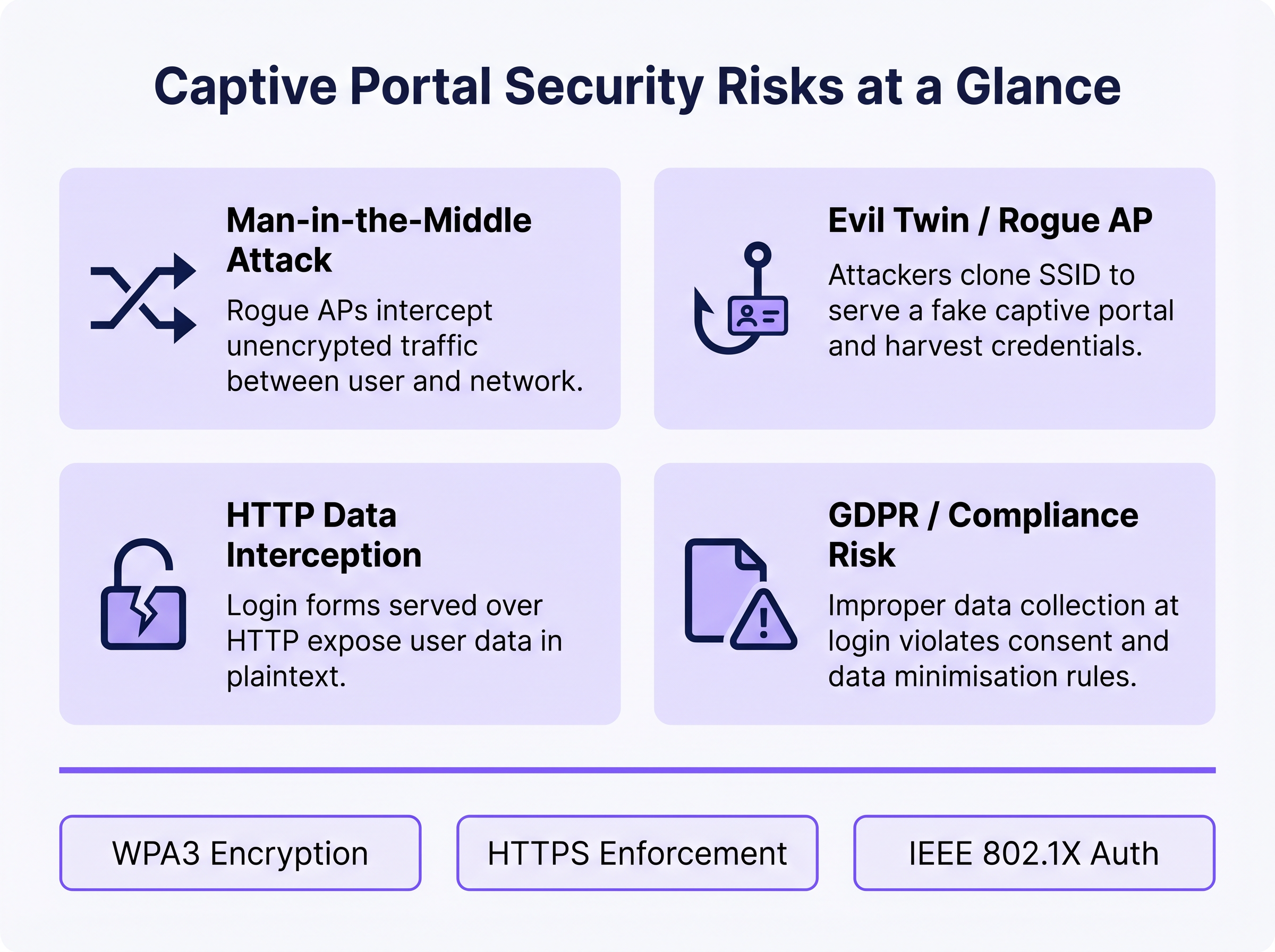
1. Attacchi Man-in-the-Middle (MitM)
In un ambiente WiFi aperto, tutto il traffico tra il dispositivo dell'utente e il punto di accesso viene trasmesso in chiaro a livello di radiofrequenza. Qualsiasi dispositivo nel raggio radio può catturare passivamente questi frame utilizzando strumenti di cattura pacchetti liberamente disponibili. Se la pagina di accesso del Captive Portal viene servita tramite HTTP anziché HTTPS, qualsiasi credenziale, indirizzo email o dato personale inserito dall'utente è visibile a qualsiasi osservatore passivo sulla rete. Anche dopo l'autenticazione, se la rete rimane aperta (senza crittografia WPA2/WPA3), tutto il traffico di navigazione successivo è ugualmente esposto.
2. Evil Twin e Punti di Accesso Non Autorizzati
Un attaccante configura un AP malevolo che trasmette lo stesso SSID della rete legittima, spesso con una potenza di trasmissione più elevata per attirare le connessioni. I dispositivi possono associarsi automaticamente all'AP non autorizzato. L'attaccante serve quindi una pagina Captive Portal clonata, raccogliendo credenziali, token OAuth dei social media o informazioni di pagamento. Questo attacco è particolarmente efficace in ambienti in cui gli utenti si aspettano la comparsa di un portale — hub di trasporto, negozi al dettaglio e sedi di conferenze. Il rilevamento richiede il monitoraggio attivo di un sistema di prevenzione delle intrusioni wireless (WIPS).
3. Spoofing MAC e Hijacking di Sessione
Una volta che un utente legittimo si autentica tramite il Captive Portal, la rete di solito traccia la sua sessione utilizzando l'indirizzo MAC del suo dispositivo. Un attaccante che osserva passivamente la rete può identificare gli indirizzi MAC autenticati e falsificarli per bypassare il portale, ottenendo un accesso non autorizzato alla rete. Questa è una debolezza strutturale del tracciamento delle sessioni basato su MAC ed è mitigata solo passando a metodi di autenticazione crittografici.
4. Esposizione alla Conformità GDPR e ai Dati
I Captive Portal che raccolgono dati personali — nomi, indirizzi email, profili di social media — al momento dell'accesso creano una significativa esposizione normativa se tali dati vengono raccolti in modo insicuro, senza consenso esplicito o conservati oltre lo scopo dichiarato. Secondo il GDPR, il titolare del trattamento dei dati (l'operatore della sede) è responsabile della liceità e della sicurezza del trattamento. La raccolta impropria di dati a livello di portale può costituire una violazione dei principi di minimizzazione e integrità dei dati ai sensi dell'Articolo 5.
Guida all'Implementazione
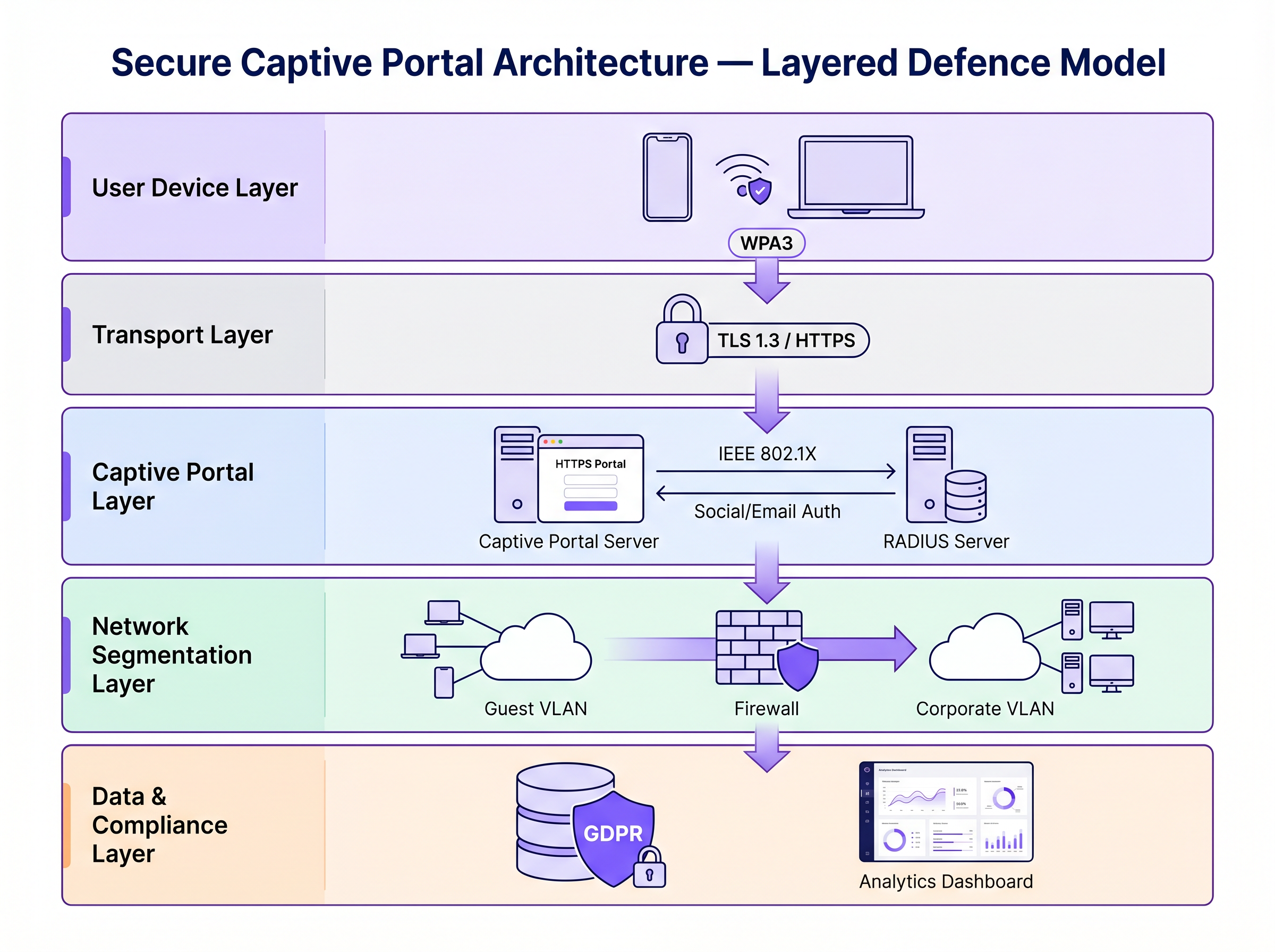
La messa in sicurezza di un Captive Portal richiede una strategia di difesa a più livelli. I seguenti passaggi vanno dalla sicurezza minima praticabile all'architettura di livello enterprise.
Passaggio 1: Applicare HTTPS e HSTS sul Portale
La base assoluta è servire il Captive Portal tramite HTTPS con un certificato SSL/TLS valido da un'Autorità di Certificazione (CA) fidata. Questo crittografa i dati inviati tramite il modulo del portale e previene l'intercettazione passiva delle credenziali. L'implementazione di HTTP Strict Transport Security (HSTS) garantisce che i browser interagiscano con il portale solo tramite connessioni sicure, mitigando gli attacchi di downgrade. Utilizzare strumenti di gestione automatizzata dei certificati come Let's Encrypt con integrazione del protocollo ACME per prevenire la scadenza dei certificati.
Passaggio 2: Implementare WPA3 e Opportunistic Wireless Encryption (OWE)
WPA3-Personal fornisce una crittografia robusta per le reti che utilizzano una chiave pre-condivisa (PSK). Per le reti guest pubbliche dove una PSK è impraticabile, Opportunistic Wireless Encryption (OWE), definita in RFC 8110 "e IEEE 802.11-2020, fornisce crittografia individualizzata per reti aperte senza richiedere autenticazione utente. OWE esegue uno scambio di chiavi Diffie-Hellman durante il processo di associazione, stabilendo una chiave di sessione unica per client. Ciò protegge contro l'intercettazione passiva senza alterare l'esperienza utente.
Fase 3: Transizione a IEEE 802.1X e Passpoint (Hotspot 2.0)
Per una sicurezza di livello enterprise, la transizione da un tradizionale Captive Portal basato sul web al controllo degli accessi di rete basato su porta IEEE 802.1X è lo standard di riferimento. Tecnologie come Passpoint (Wi-Fi CERTIFIED Passpoint, basato su IEEE 802.11u) consentono ai dispositivi di autenticarsi automaticamente e in modo sicuro utilizzando credenziali come schede SIM (EAP-SIM/AKA), certificati aziendali (EAP-TLS) o nome utente/password (EAP-TTLS/PEAP). Purple funge da provider di identità gratuito per servizi come OpenRoaming con licenza Connect, facilitando un onboarding sicuro e senza interruzioni, eliminando l'attrito di un tradizionale Captive Portal.
Fase 4: Segmentazione della Rete e Isolamento del Client
Isolare sempre il traffico WiFi degli ospiti dalle reti aziendali utilizzando VLAN e regole firewall stateful rigorose. La VLAN ospite dovrebbe consentire solo il traffico diretto verso Internet, bloccando l'accesso allo spazio di indirizzi RFC 1918 e a tutte le risorse interne. Abilitare l'isolamento del client (chiamato anche isolamento AP o blocco peer-to-peer) sul controller wireless per impedire ai dispositivi sulla rete ospite di comunicare direttamente tra loro. Ciò limita il raggio d'azione di qualsiasi dispositivo compromesso.
Migliori Pratiche
La seguente tabella riassume i controlli di sicurezza chiave, gli standard a cui si allineano e la loro priorità di implementazione.
| Controllo | Standard / Framework | Priorità | Impatto |
|---|---|---|---|
| Applicazione HTTPS sul portale | TLS 1.3, HSTS | Critico | Cripta le credenziali di accesso |
| WPA3 o OWE su SSID | IEEE 802.11-2020 | Alta | Cripta tutto il traffico over-the-air |
| Isolamento del client | Specifico del fornitore | Critico | Previene il movimento laterale |
| Segmentazione VLAN | IEEE 802.1Q | Critico | Isola l'ospite dalla rete aziendale |
| Autenticazione RADIUS | IEEE 802.1X | Alta | Sostituisce il tracciamento basato su MAC |
| Rilevamento AP non autorizzati (WIPS) | Specifico del fornitore | Alta | Rileva attacchi Evil Twin |
| Minimizzazione dei dati sul portale | GDPR Articolo 5 | Alta | Riduce l'esposizione alla conformità |
| Automazione dei certificati | ACME / Let's Encrypt | Media | Previene la scadenza dei certificati |
Per un confronto completo delle soluzioni di portale, fare riferimento a Il Miglior Software Captive Portal nel 2026: Una Guida al Confronto .
Risoluzione dei Problemi e Mitigazione del Rischio
Modalità di Guasto Comuni
Captive Portal Non Visualizzato: I sistemi operativi moderni utilizzano i Captive Network Assistants (CNA) — probe HTTP leggere verso endpoint specifici (es. captive.apple.com di Apple, connectivitycheck.gstatic.com di Google) — per rilevare i Captive Portal. Se la risoluzione DNS è bloccata, la probe fallisce e il CNA potrebbe non attivarsi. Assicurarsi che la rete ospite consenta le query DNS e che il meccanismo di reindirizzamento del portale intercetti correttamente la probe CNA.
Errori del Certificato che Bloccano l'Accesso: Un certificato SSL scaduto, auto-firmato o con dominio non corrispondente farà sì che i browser visualizzino avvisi di sicurezza. Gli utenti che ignorano questi avvisi vengono abituati a ignorare gli avvisi di sicurezza — un precedente pericoloso. Implementare il rinnovo automatico dei certificati e monitorare le date di scadenza con avvisi.
Colli di Bottiglia delle Prestazioni su Larga Scala: In ambienti ad alta densità come stadi o centri congressi, il server RADIUS e l'infrastruttura del portale possono diventare colli di bottiglia durante gli eventi di associazione di picco (es. orari di inizio eventi). Implementare RADIUS in un cluster ad alta disponibilità con bilanciamento del carico e considerare il pre-provisioning delle sessioni per eventi con biglietto utilizzando profili Passpoint.
Randomizzazione MAC che Interrompe il Tracciamento della Sessione: I moderni dispositivi iOS e Android randomizzano i loro indirizzi MAC per SSID, il che può interrompere la persistenza della sessione basata su MAC. Questo è un altro motivo per migrare a 802.1X, dove l'autenticazione è legata all'identità crittografica piuttosto che all'indirizzo hardware.
ROI e Impatto Commerciale
Investire in un'infrastruttura Captive Portal sicura non è puramente un esercizio di mitigazione del rischio — è un fattore abilitante di business misurabile.
Protezione del Brand e Fiducia del Cliente: Una violazione della sicurezza su una rete pubblica causa gravi danni alla reputazione ed erode la fiducia del cliente che il WiFi ospite è progettato per costruire. Il WiFi sicuro è un elemento distintivo del brand, in particolare in Ospitalità e Retail dove l'esperienza dell'ospite è un vantaggio competitivo.
Conformità Normativa: Le multe GDPR per violazioni dei dati possono raggiungere il 4% del fatturato annuo globale. La non conformità PCI DSS può comportare multe da parte dei circuiti di carte e la perdita della capacità di elaborazione dei pagamenti. Un'architettura WiFi ospite sicura e conforme elimina queste esposizioni.
Efficienza Operativa: Metodi di autenticazione moderni come Passpoint riducono l'onere di supporto associato ai problemi di accesso al Captive Portal — avvisi di certificato, portale non caricato, interruzioni di sessione — che sono tra i ticket di supporto WiFi ospite più comuni.
Valore dei Dati e Analisi: La raccolta di dati di prima parte sicura e conforme al portale alimenta potenti WiFi Analytics , consentendo agli operatori delle sedi di comprendere il tempo di permanenza, la frequenza delle visite ripetute e i modelli di comportamento dei clienti. Questi dati guidano campagne di marketing mirate e decisioni operative con un ROI misurabile. Similmente a come la modernizzazione della rete guida l'efficienza attraverso la WAN (vedi I Vantaggi Chiave di SD WAN per le Aziende Moderne ), l'aggiornamento dell'infrastruttura WiFi ospite offre rendimenti composti in termini di sicurezza, conformità e corisultati commerciali.
Per ulteriori indicazioni sulla selezione della piattaforma Captive Portal, consulta Il Miglior Software Captive Portal nel 2026: Una Guida Comparativa .
Termini chiave e definizioni
Man-in-the-Middle (MitM) Attack
An attack in which a malicious actor secretly intercepts and potentially alters communications between two parties who believe they are communicating directly with each other.
The primary risk on open guest networks where Layer 2 traffic is unencrypted, allowing attackers to steal credentials, inject malware into HTTP responses, or alter data in transit.
Evil Twin
A rogue wireless access point that masquerades as a legitimate hotspot by broadcasting the same SSID, designed to deceive users into connecting and submitting credentials to a fake captive portal.
Particularly dangerous in public venues where users expect a captive portal to appear. Mitigated by WIPS deployment and Passpoint authentication.
Opportunistic Wireless Encryption (OWE)
An IEEE 802.11 standard (RFC 8110) that provides individualised data encryption for open WiFi networks using a Diffie-Hellman key exchange during the association process, without requiring user authentication or a pre-shared key.
The recommended replacement for legacy open networks. Protects against passive eavesdropping without changing the user experience or requiring a password.
Passpoint (Hotspot 2.0)
A Wi-Fi Alliance certification programme based on IEEE 802.11u that enables devices to automatically discover, select, and authenticate to WiFi networks using existing credentials (SIM, certificate, username/password) without manual intervention.
The modern architectural replacement for traditional captive portals in enterprise deployments. Eliminates the open network vulnerability and provides a seamless user experience.
IEEE 802.1X
An IEEE standard for port-based Network Access Control (PNAC) that provides an authentication mechanism for devices wishing to attach to a LAN or WLAN, using the Extensible Authentication Protocol (EAP) framework.
The authentication backbone of enterprise WiFi security. Requires a RADIUS server and replaces MAC-based session tracking with cryptographic identity verification.
Client Isolation
A wireless network security feature that prevents devices connected to the same SSID from communicating directly with each other at Layer 2, routing all traffic through the AP or gateway instead.
Essential for guest networks to prevent a compromised or malicious device from scanning, attacking, or infecting other users' devices on the same network.
HTTP Strict Transport Security (HSTS)
A web security policy mechanism (RFC 6797) that instructs browsers to only interact with a web server over HTTPS, preventing protocol downgrade attacks and cookie hijacking.
Must be implemented on captive portal servers to prevent attackers from forcing the browser to connect over insecure HTTP.
MAC Spoofing
The technique of altering the Media Access Control (MAC) address of a network interface controller to impersonate another device on the network.
Used by attackers to bypass captive portal authentication by cloning the MAC address of a legitimately authenticated user, gaining unauthorised network access.
Wireless Intrusion Prevention System (WIPS)
A network security system that monitors the radio frequency spectrum for the presence of unauthorised access points and takes automated countermeasures to contain them.
The primary operational control for detecting and containing Evil Twin attacks and rogue AP deployments.
Casi di studio
A 200-room hotel is experiencing guest complaints about WiFi security warnings and frequent disconnections. They currently operate an open SSID with a basic HTTP captive portal. The IT manager needs to remediate the security posture without replacing the existing AP infrastructure.
Phase 1 (Immediate — within 2 weeks): Migrate the captive portal to HTTPS by provisioning a valid TLS certificate from a trusted CA. Enable HSTS. Enable client isolation on the wireless controller. Verify VLAN segmentation between guest and corporate networks. Phase 2 (Short-term — within 3 months): Enable WPA3 Transition Mode on the SSID to support both WPA2 and WPA3 clients simultaneously. Enable OWE on a separate SSID for devices that support it. Phase 3 (Medium-term — within 12 months): Deploy Passpoint (Hotspot 2.0) profiles, allowing returning guests to authenticate automatically using a profile downloaded during their first visit. Integrate with Purple's platform for compliant data collection and analytics.
A national retail chain with 300 stores wants to deploy a guest WiFi captive portal to collect email addresses for marketing. The legal team has flagged GDPR compliance concerns, and the security team is worried about data interception and rogue AP attacks.
Architecture: Deploy Purple's guest WiFi platform with HTTPS-enforced portals across all sites. The portal collects only email address and explicit consent (separate checkboxes for terms of service and marketing consent — not bundled). Data is transmitted over TLS 1.3 and stored encrypted at rest. Network: Enable WPA3 or OWE on the guest SSID. Enable client isolation. Segment guest traffic into a dedicated VLAN with no access to the corporate network or POS systems. Security Operations: Deploy WIPS on all APs to detect rogue devices broadcasting the store's SSID. Configure automated alerts for Evil Twin detection. Compliance: Implement data retention policies aligned to GDPR — purge inactive records after 24 months. Provide users with a clear, accessible privacy policy linked from the portal. Conduct annual penetration testing of the wireless environment.
Analisi degli scenari
Q1. You are deploying a guest WiFi network in a large conference centre hosting 5,000 attendees. The marketing team requires a customised captive portal to collect email addresses. The security team is concerned about data interception and rogue AP attacks. What architecture do you recommend, and what is the minimum security baseline?
💡 Suggerimento:Consider both the portal-level security (how data is transmitted) and the network-level security (how the wireless connection is encrypted). Also consider the scale of the deployment and peak association events.
Mostra l'approccio consigliato
Minimum baseline: HTTPS-enforced captive portal with a valid CA certificate, client isolation enabled, guest traffic segmented into a dedicated VLAN, and WPA3 or OWE enabled on the SSID. For the rogue AP threat at this scale, deploy WIPS on all APs with automated alerting. For performance at 5,000 concurrent users, deploy RADIUS in a high-availability cluster. Longer-term, consider Passpoint profiles for returning attendees to eliminate the open network vulnerability entirely.
Q2. During a wireless penetration test at a retail site, the auditor successfully bypasses the captive portal by spoofing the MAC address of an authenticated device. The site manager asks what architectural change would prevent this. What is your recommendation?
💡 Suggerimento:Consider what property of the authenticated session the attacker is exploiting, and what alternative authentication mechanisms do not rely on that property.
Mostra l'approccio consigliato
The vulnerability is that MAC-based session tracking uses a hardware identifier that can be trivially cloned. The fix is to migrate to IEEE 802.1X authentication, which establishes a cryptographic identity binding using EAP. The session is tied to a certificate or credential, not a MAC address. Passpoint (Hotspot 2.0) implements this transparently for end users. As an interim measure, reducing session timeout values and implementing per-session re-authentication reduces the window of opportunity for MAC spoofing attacks.
Q3. A hotel's IT manager reports that guests are seeing 'Your connection is not private' errors when trying to access the captive portal. The portal was working correctly last month. What is the most likely cause, and how do you resolve it?
💡 Suggerimento:Think about what changes over time that affects the validity of an HTTPS connection.
Mostra l'approccio consigliato
The most likely cause is an expired SSL/TLS certificate on the captive portal server. Certificates have a fixed validity period (typically 90 days for Let's Encrypt, up to 1 year for commercial CAs). Resolution: renew the certificate immediately. Prevention: implement automated certificate renewal using the ACME protocol (Let's Encrypt) with monitoring and alerting for certificates expiring within 30 days. A secondary cause could be a domain name mismatch if the portal URL was recently changed.
Q4. A retail client wants to collect email addresses via their captive portal for marketing purposes. Their legal team has raised GDPR concerns. What specific design decisions must be made at the portal level to ensure compliance?
💡 Suggerimento:Consider the GDPR principles of lawfulness, data minimisation, and transparency. Think about how consent must be structured.
Mostra l'approccio consigliato
Key design decisions: (1) Separate consent checkboxes — terms of service acceptance must be separate from marketing consent; bundling them is non-compliant. (2) Marketing consent must be opt-in, not pre-ticked. (3) The portal must link to a clear, accessible privacy policy explaining what data is collected, how it is used, and how long it is retained. (4) Collect only the data necessary for the stated purpose (data minimisation) — do not request date of birth or phone number if only email is needed for marketing. (5) Provide a mechanism for users to withdraw consent and request deletion of their data.




