

Mailchimp Plus Purple: Marketing por correo electrónico automatizado a partir de registros de WiFi
Esta guía autorizada detalla cómo integrar la plataforma de WiFi para invitados de Purple con Mailchimp para automatizar el marketing por correo electrónico a partir de los registros de WiFi. Cubre la configuración arquitectónica, las estrategias de etiquetado de segmentación y la implementación de recorridos de bienvenida automatizados para convertir el tráfico presencial en audiencias digitales comprometidas.
🎧 Escucha esta guía
Ver transcripción

Resumen Ejecutivo
Para los operadores empresariales que gestionan recintos con gran afluencia de público, el WiFi para invitados es fundamentalmente un canal de adquisición de datos. Cada vez que un usuario se conecta a la red de un recinto a través de un captive portal, proporciona su consentimiento explícito y datos de contacto. La integración entre Purple y Mailchimp transforma esta recopilación pasiva de datos en un motor de ingresos activo. Al establecer una conexión API directa, los operadores de recintos pueden canalizar automáticamente los registros compatibles con GDPR a audiencias específicas de Mailchimp, aplicar etiquetas de segmentación conductual y activar automatizaciones de bienvenida en tiempo real. Esta guía proporciona la arquitectura técnica y los marcos de implementación estratégica necesarios para construir un pipeline de marketing por correo electrónico automatizado a partir de su infraestructura de WiFi para invitados .
Análisis Técnico Detallado
La Arquitectura de la Sincronización
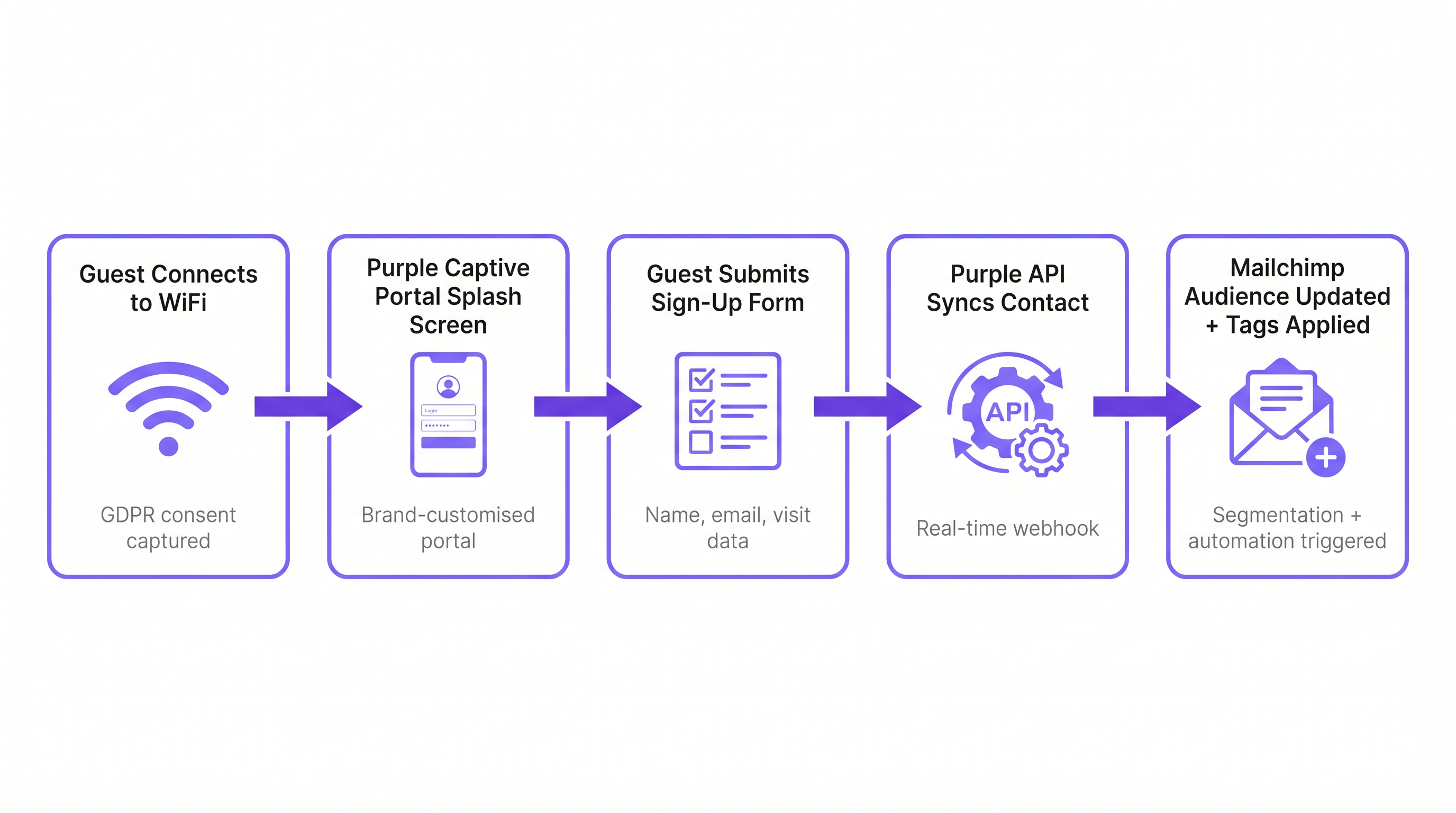
La integración se basa en una arquitectura de webhook en tiempo real entre el entorno en la nube de Purple y la API de Mailchimp. Cuando un invitado se autentica con éxito a través del captive portal de Purple, la plataforma captura los datos del formulario enviado junto con metadatos sobre el evento de conexión (ID del recinto, dirección MAC, marca de tiempo).
Si el invitado proporciona su consentimiento explícito para marketing, Purple activa inmediatamente una llamada API autenticada por OAuth a Mailchimp. Esta llamada realiza una operación de 'upsert': si la dirección de correo electrónico no existe en la Audiencia de Mailchimp designada, se crea un nuevo contacto. Si el contacto ya existe, su perfil se actualiza y se añaden nuevas etiquetas sin sobrescribir los datos existentes. Esto asegura que un invitado que visita múltiples propiedades dentro de una propiedad mantenga un perfil único y unificado que refleje su historial de visitas completo.
Cumplimiento y la Puerta de Enlace de Consentimiento
La base de cualquier estrategia de marketing por correo electrónico es el cumplimiento. Según el Artículo 6 de GDPR, las organizaciones deben establecer una base legal para el procesamiento de datos personales. El captive portal de Purple actúa como la puerta de enlace de consentimiento. Es fundamental que la opción de suscripción a marketing esté desvinculada de los términos de servicio generales. Un usuario debe poder acceder al WiFi sin suscribirse a comunicaciones de marketing. La integración respeta este límite; solo los contactos que marcan explícitamente la casilla de suscripción a marketing se sincronizan con Mailchimp. Esta estricta adhesión a los protocolos de cumplimiento mitiga el riesgo y asegura que la audiencia resultante esté altamente comprometida.
Guía de Implementación
Paso 1: Establecer la Taxonomía de Etiquetado
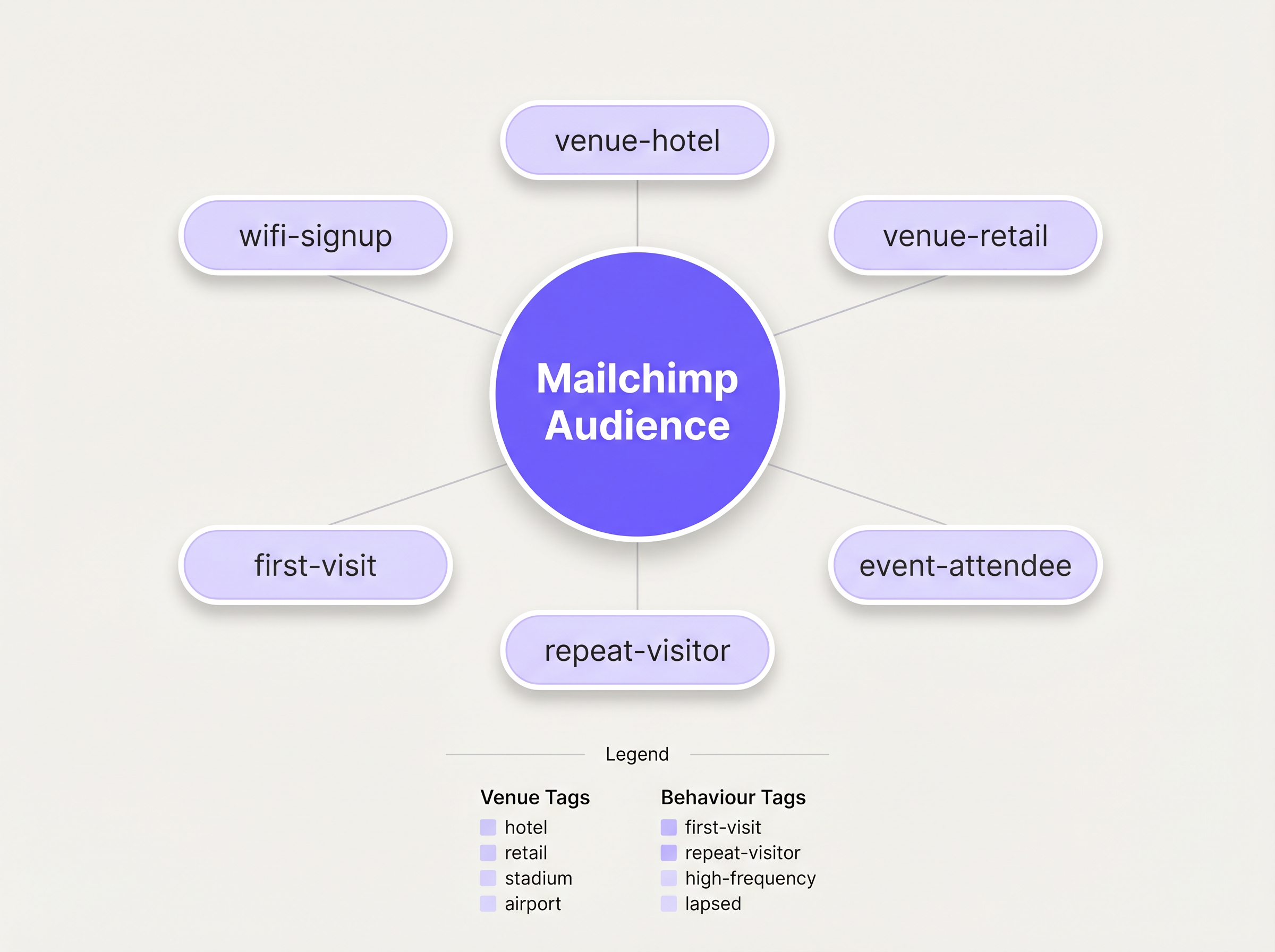
Antes de habilitar la sincronización, debe definir una taxonomía de etiquetado estructurada. Una lista plana de contactos es prácticamente inútil para el marketing dirigido. La mejor práctica dicta un enfoque de etiquetado multidimensional:
- Etiquetado de Fuente: Identifique el canal de adquisición (p. ej.,
wifi-signup). - Etiquetado de Recinto: Identifique la ubicación específica o el tipo de propiedad (p. ej.,
venue-hotel,location-london). - Etiquetado Conductual: Identifique la naturaleza de la visita, a menudo aprovechando las capacidades de WiFi Analytics de Purple (p. ej.,
first-visit,repeat-visitor).
Paso 2: Configurar la Integración
La configuración se gestiona dentro del panel de Purple. Navegue a la configuración del recinto y seleccione la integración de Mailchimp. Se le pedirá que se autentique a través de OAuth. Una vez conectado, asigne el recinto específico de Purple a la Audiencia de Mailchimp de destino. Aplique las etiquetas predefinidas en la configuración. Para implementaciones complejas que requieren enrutamiento a múltiples plataformas, considere aprovechar el conector de Zapier, como se detalla en nuestra guía sobre Conexión de eventos WiFi a más de 1,500 aplicaciones con Zapier y Purple .
Paso 3: Construir la Automatización de Bienvenida
La actividad de mayor ROI en este flujo de trabajo es el correo electrónico de bienvenida inmediato. En Mailchimp, construya un Recorrido del Cliente activado por la adición de la etiqueta wifi-signup. El correo electrónico inicial debe enviarse inmediatamente, aprovechando la presencia física del invitado en el recinto. Para recintos de Hostelería , esto podría incluir un descuento en comidas; para entornos de Venta al por menor , un código promocional por tiempo limitado.
Mejores Prácticas
La Regla de los 15 Minutos
La relevancia contextual de un correo electrónico de bienvenida disminuye rápidamente. Asegúrese de que la automatización inicial esté configurada para activarse sin demora. Un mensaje recibido mientras el invitado aún está en el recinto logra tasas de engagement significativamente más altas que uno recibido 24 horas después.
Perfilado Progresivo
Evite sobrecargar el formulario inicial del captive portal. Solicite solo los datos esenciales: Nombre y Correo electrónico. Una vez que el contacto esté en Mailchimp, utilice campañas de correo electrónico posteriores para perfilar progresivamente al usuario, solicitando preferencias adicionales o información demográfica para enriquecer el perfil con el tiempo.
Aprovechar Analytics para la Re-engagement
Integre los conocimientos de WiFi Analytics de Purple para identificar visitantes inactivos. Si un visitante previamente frecuente no se ha autenticado en la red durante 90 días, active una campaña de re-engagement específica en Mailchimp ofreciendo un incentivo para que regrese.
Resolución de Problemas y Mitigación de Riesgos
El Problema de la Audiencia Única
Riesgo: Volcar todos los contactos de múltiples recintos en una única Audiencia de Mailchimp sin un etiquetado adecuado, destruyendo la capacidad de segmentar por ubicación. Mitigación: Aplique una política estricta de etiquetado a nivel de recinto antes de que la integración entre en funcionamiento. Cada sincronización debe llevar un identificador de ubicación.
El Conflicto de Anulación de Suscripción
Riesk: Un usuario se da de baja a través de Mailchimp, pero se reconecta al WiFi en una visita posterior. Purple intenta volver a sincronizar el contacto. Mitigación: La API de Mailchimp maneja esto con elegancia al rechazar la sincronización de contactos dados de baja. Asegúrese de que su equipo de operaciones de TI comprenda este comportamiento esperado y no marque estos rechazos como errores del sistema.
ROI e Impacto Comercial
La métrica principal para evaluar esta integración es el Costo de Adquisición de Suscriptores (SAC) en comparación con los canales digitales tradicionales. Los registros de WiFi suelen representar un costo marginal de adquisición cercano a cero. Las métricas secundarias incluyen las tasas de apertura y clics de la serie de bienvenida automatizada, que superan consistentemente a las campañas de difusión estándar debido a su alta relevancia contextual. En última instancia, el éxito de la integración se mide por la tasa de conversión de estas campañas automatizadas que impulsan visitas repetidas o gastos en el lugar.
Escuche la Sesión Informativa
Para una inmersión más profunda en la arquitectura y los errores comunes de implementación, escuche nuestra sesión informativa técnica de 10 minutos:
Términos clave y definiciones
Captive Portal
A web page that a user is forced to view and interact with before access is granted to a public WiFi network.
This is the primary interface for capturing user data and marketing consent in the Purple ecosystem.
Webhook
An automated message sent from one application to another when a specific event occurs.
Purple uses webhooks to instantly transmit the guest's contact data to Mailchimp the moment they submit the sign-up form.
OAuth
An open standard for access delegation, commonly used as a way for Internet users to grant websites or applications access to their information on other websites but without giving them the passwords.
This is the secure authentication method used to connect the Purple platform to a Mailchimp account.
Upsert
A database operation that updates an existing record if a specified value already exists, or inserts a new record if the specified value doesn't exist.
When Purple syncs data, it performs an upsert on the email address, ensuring existing Mailchimp profiles are updated with new tags rather than duplicated.
Segmentation
The practice of dividing an email subscriber list into smaller groups based on specific criteria, such as location or behaviour.
Effective segmentation, driven by Purple's tagging, is essential for delivering relevant campaigns rather than generic broadcasts.
Customer Journey
Mailchimp's visual automation builder that allows marketers to create automated workflows based on specific triggers and conditions.
This tool is used to build the automated welcome emails triggered by the `wifi-signup` tag.
GDPR Article 6
The section of the General Data Protection Regulation that outlines the lawful bases for processing personal data.
Venue operators must ensure their captive portal splash screens explicitly capture consent for email marketing to comply with this regulation.
Subscriber Acquisition Cost (SAC)
The total cost associated with acquiring a new email subscriber.
Guest WiFi represents a highly efficient acquisition channel, significantly lowering the overall SAC compared to paid digital advertising.
Casos de éxito
A 200-room hotel needs to differentiate between overnight guests and attendees of a day conference in their Mailchimp marketing.
The hotel configures two separate SSIDs or captive portal splash pages within Purple. The overnight guest portal applies the tags wifi-signup, venue-hotel, and guest-overnight. The conference portal applies the tags wifi-signup, venue-hotel, and guest-conference. In Mailchimp, two distinct Customer Journeys are created. The overnight journey triggers a welcome email highlighting room service and spa facilities. The conference journey triggers an email with the day's agenda and directions to the breakout rooms.
Análisis de escenarios
Q1. A retail chain with 50 locations has successfully integrated Purple and Mailchimp. They want to send a targeted campaign only to customers who visited their flagship London store in the last 30 days. How should they structure this segment in Mailchimp?
💡 Sugerencia:Consider both the location tag applied at sign-up and the dynamic data regarding recent activity.
Mostrar enfoque recomendado
They should create a segment in Mailchimp with two conditions: 1) Tag includes location-london-flagship AND 2) Campaign activity or date added is within the last 30 days. This relies on Purple having correctly applied the location-specific tag during the initial sync.
Q2. During user acceptance testing, an IT manager notices that a test user who previously unsubscribed from the Mailchimp list is not being re-added when they log back into the guest WiFi. Is this a bug in the integration?
💡 Sugerencia:Review how Mailchimp handles unsubscribed contacts via API.
Mostrar enfoque recomendado
No, this is the expected and correct behaviour. Mailchimp's API actively prevents the re-subscription of contacts who have previously opted out, ensuring compliance. The Purple webhook fires, but Mailchimp rejects the upsert for that specific record.
Q3. A venue operator wants to use the Purple captive portal to collect a guest's date of birth for age-gated marketing. How is this data passed to Mailchimp?
💡 Sugerencia:Look beyond standard tags to the advanced integration settings.
Mostrar enfoque recomendado
The operator must configure a custom field on the Purple splash screen for 'Date of Birth'. In the Purple integration settings, this custom field must be mapped to a corresponding 'Merge Field' (e.g., DOB) within the target Mailchimp Audience. This allows Mailchimp to store the data as a specific attribute rather than a generic tag.




