

Mailchimp Plus Purple: Marketing par E-mail Automatisé à partir des Inscriptions WiFi
Ce guide faisant autorité détaille comment intégrer la plateforme WiFi invité de Purple à Mailchimp pour automatiser le marketing par e-mail à partir des inscriptions WiFi. Il couvre la configuration architecturale, les stratégies de balisage de segmentation et la mise en œuvre de parcours de bienvenue automatisés pour convertir l'affluence sur site en audiences numériques engagées.
🎧 Écouter ce guide
Voir la transcription

Résumé Exécutif
Pour les opérateurs d'entreprise gérant des lieux à forte affluence, le WiFi invité est fondamentalement un canal d'acquisition de données. Chaque fois qu'un utilisateur se connecte au réseau d'un lieu via un Captive Portal, il fournit un consentement explicite et des données de contact. L'intégration entre Purple et Mailchimp transforme cette collecte de données passive en un moteur de revenus actif. En établissant une connexion API directe, les opérateurs de lieux peuvent automatiquement acheminer les inscriptions conformes au GDPR vers des audiences Mailchimp ciblées, appliquer des balises de segmentation comportementale et déclencher des automatisations de bienvenue en temps réel. Ce guide fournit l'architecture technique et les cadres de déploiement stratégiques nécessaires pour construire un pipeline de marketing par e-mail automatisé à partir de votre infrastructure Guest WiFi .
Approfondissement Technique
L'Architecture de la Synchronisation
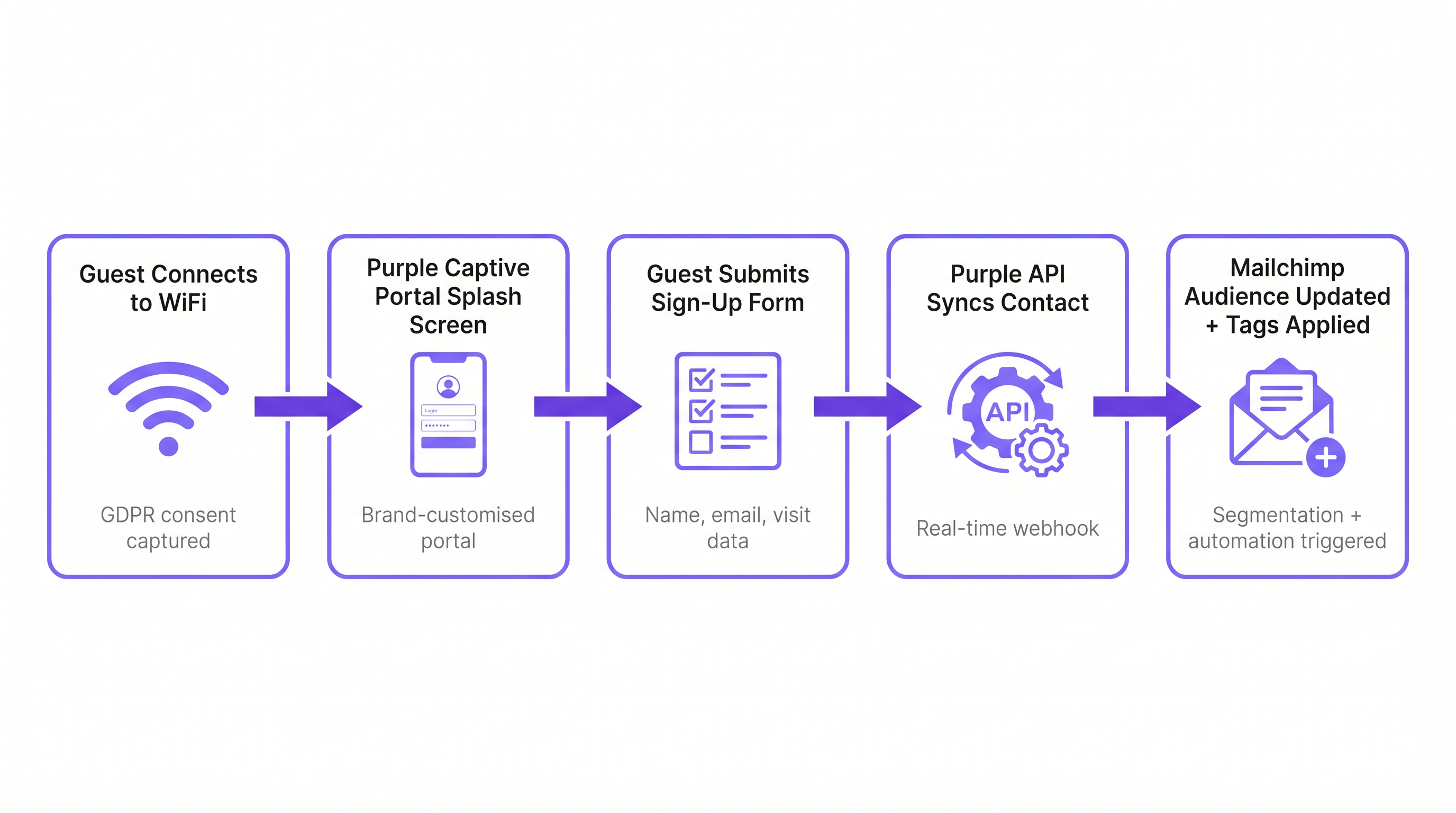
L'intégration repose sur une architecture de webhook en temps réel entre l'environnement cloud de Purple et l'API Mailchimp. Lorsqu'un invité s'authentifie avec succès via le Captive Portal Purple, la plateforme capture les données du formulaire soumises ainsi que les métadonnées de l'événement de connexion (ID du lieu, adresse MAC, horodatage).
Si l'invité donne un consentement marketing explicite, Purple déclenche immédiatement un appel API authentifié par OAuth vers Mailchimp. Cet appel effectue une opération d'« upsert » : si l'adresse e-mail n'existe pas dans l'Audience Mailchimp désignée, un nouveau contact est créé. Si le contact existe déjà, son profil est mis à jour et de nouvelles balises sont ajoutées sans écraser les données existantes. Cela garantit qu'un invité qui visite plusieurs propriétés au sein d'un domaine conserve un profil unique et unifié reflétant son historique de visites complet.
Conformité et la Passerelle de Consentement
La base de toute stratégie de marketing par e-mail est la conformité. En vertu de l'Article 6 du GDPR, les organisations doivent établir une base légale pour le traitement des données personnelles. Le Captive Portal Purple agit comme la passerelle de consentement. Il est essentiel que l'option d'adhésion au marketing soit dissociée des conditions générales de service. Un utilisateur doit pouvoir accéder au WiFi sans s'abonner aux communications marketing. L'intégration respecte cette limite ; seuls les contacts qui cochent explicitement la case d'option marketing sont synchronisés avec Mailchimp. Cette stricte adhésion aux protocoles de conformité atténue les risques et garantit que l'audience résultante est très engagée.
Guide d'Implémentation
Étape 1 : Établir la Taxonomie de Balisage
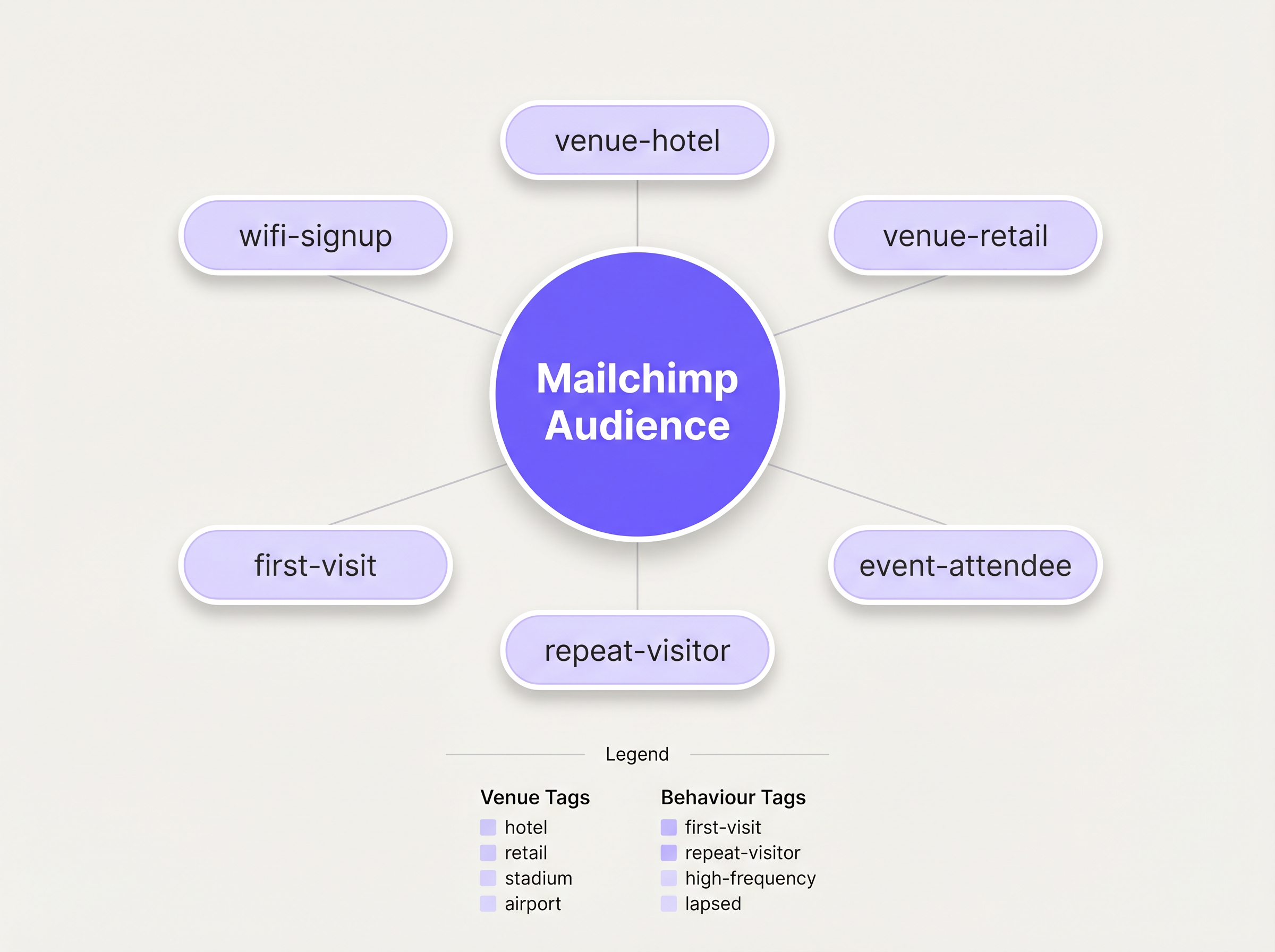
Avant d'activer la synchronisation, vous devez définir une taxonomie de balisage structurée. Une liste plate de contacts est pratiquement inutile pour le marketing ciblé. Les meilleures pratiques dictent une approche de balisage multidimensionnelle :
- Balisage de Source : Identifier le canal d'acquisition (par exemple,
wifi-signup). - Balisage de Lieu : Identifier l'emplacement spécifique ou le type de propriété (par exemple,
venue-hotel,location-london). - Balisage Comportemental : Identifier la nature de la visite, souvent en tirant parti des capacités de WiFi Analytics de Purple (par exemple,
first-visit,repeat-visitor).
Étape 2 : Configurer l'Intégration
La configuration est gérée dans le tableau de bord Purple. Accédez aux paramètres du lieu et sélectionnez l'intégration Mailchimp. Il vous sera demandé de vous authentifier via OAuth. Une fois connecté, mappez le lieu Purple spécifique à l'Audience Mailchimp cible. Appliquez les balises prédéfinies dans les paramètres de configuration. Pour les déploiements complexes nécessitant un routage vers plusieurs plateformes, envisagez d'utiliser le connecteur Zapier, comme détaillé dans notre guide sur Connecter les Événements WiFi à plus de 1 500 Applications avec Zapier et Purple .
Étape 3 : Construire l'Automatisation de Bienvenue
L'activité au ROI le plus élevé dans ce flux de travail est l'e-mail de bienvenue immédiat. Dans Mailchimp, construisez un Parcours Client déclenché par l'ajout de la balise wifi-signup. L'e-mail initial doit être envoyé immédiatement, capitalisant sur la présence physique de l'invité dans le lieu. Pour les lieux d' Hospitality , cela pourrait inclure une réduction sur les repas ; pour les environnements de Retail , un code promotionnel à durée limitée.
Bonnes Pratiques
La Règle des 15 Minutes
La pertinence contextuelle d'un e-mail de bienvenue diminue rapidement. Assurez-vous que l'automatisation initiale est configurée pour se déclencher sans délai. Un message reçu pendant que l'invité est encore sur place atteint des taux d'engagement significativement plus élevés qu'un message reçu 24 heures plus tard.
Profilage Progressif
Évitez de surcharger le formulaire initial du Captive Portal. Demandez uniquement les données essentielles : Nom et E-mail. Une fois le contact dans Mailchimp, utilisez les campagnes d'e-mails ultérieures pour profiler progressivement l'utilisateur, en demandant des préférences supplémentaires ou des informations démographiques pour enrichir le profil au fil du temps.
Tirer Parti de l'Analyse pour le Réengagement
Intégrez les informations de WiFi Analytics de Purple pour identifier les visiteurs inactifs. Si un visiteur auparavant fréquent ne s'est pas authentifié sur le réseau depuis 90 jours, déclenchez une campagne de réengagement spécifique dans Mailchimp offrant une incitation à revenir.
Dépannage et Atténuation des Risques
Le Problème de l'Audience Unique
Risque : Déverser tous les contacts de plusieurs lieux dans une seule Audience Mailchimp sans balisage adéquat, détruisant la capacité de segmenter par emplacement. Atténuation : Appliquer une politique de balisage stricte au niveau du lieu avant la mise en service de l'intégration. Chaque synchronisation doit comporter un identifiant de lieu.
Le Conflit de Désabonnement
Risk: Un utilisateur se désabonne via Mailchimp, mais se reconnecte au WiFi lors d'une visite ultérieure. Purple tente de resynchroniser le contact. Atténuation : L'API de Mailchimp gère cela avec élégance en rejetant la synchronisation pour les contacts désabonnés. Assurez-vous que votre équipe des opérations informatiques comprend ce comportement attendu et ne signale pas ces rejets comme des erreurs système.
ROI et impact commercial
La métrique principale pour évaluer cette intégration est le Coût d'Acquisition d'Abonnés (CAA) comparé aux canaux numériques traditionnels. Les inscriptions au WiFi représentent généralement un coût marginal d'acquisition quasi nul. Les métriques secondaires incluent les taux d'ouverture et de clics des séries de bienvenue automatisées, qui surpassent constamment les campagnes de diffusion standard en raison de leur forte pertinence contextuelle. En fin de compte, le succès de l'intégration est mesuré par le taux de conversion de ces campagnes automatisées générant des visites répétées ou des dépenses sur place.
Écoutez le briefing
Pour une exploration plus approfondie de l'architecture et des pièges courants de l'implémentation, écoutez notre briefing technique de 10 minutes :
Termes clés et définitions
Captive Portal
A web page that a user is forced to view and interact with before access is granted to a public WiFi network.
This is the primary interface for capturing user data and marketing consent in the Purple ecosystem.
Webhook
An automated message sent from one application to another when a specific event occurs.
Purple uses webhooks to instantly transmit the guest's contact data to Mailchimp the moment they submit the sign-up form.
OAuth
An open standard for access delegation, commonly used as a way for Internet users to grant websites or applications access to their information on other websites but without giving them the passwords.
This is the secure authentication method used to connect the Purple platform to a Mailchimp account.
Upsert
A database operation that updates an existing record if a specified value already exists, or inserts a new record if the specified value doesn't exist.
When Purple syncs data, it performs an upsert on the email address, ensuring existing Mailchimp profiles are updated with new tags rather than duplicated.
Segmentation
The practice of dividing an email subscriber list into smaller groups based on specific criteria, such as location or behaviour.
Effective segmentation, driven by Purple's tagging, is essential for delivering relevant campaigns rather than generic broadcasts.
Customer Journey
Mailchimp's visual automation builder that allows marketers to create automated workflows based on specific triggers and conditions.
This tool is used to build the automated welcome emails triggered by the `wifi-signup` tag.
GDPR Article 6
The section of the General Data Protection Regulation that outlines the lawful bases for processing personal data.
Venue operators must ensure their captive portal splash screens explicitly capture consent for email marketing to comply with this regulation.
Subscriber Acquisition Cost (SAC)
The total cost associated with acquiring a new email subscriber.
Guest WiFi represents a highly efficient acquisition channel, significantly lowering the overall SAC compared to paid digital advertising.
Études de cas
A 200-room hotel needs to differentiate between overnight guests and attendees of a day conference in their Mailchimp marketing.
The hotel configures two separate SSIDs or captive portal splash pages within Purple. The overnight guest portal applies the tags wifi-signup, venue-hotel, and guest-overnight. The conference portal applies the tags wifi-signup, venue-hotel, and guest-conference. In Mailchimp, two distinct Customer Journeys are created. The overnight journey triggers a welcome email highlighting room service and spa facilities. The conference journey triggers an email with the day's agenda and directions to the breakout rooms.
Analyse de scénario
Q1. A retail chain with 50 locations has successfully integrated Purple and Mailchimp. They want to send a targeted campaign only to customers who visited their flagship London store in the last 30 days. How should they structure this segment in Mailchimp?
💡 Astuce :Consider both the location tag applied at sign-up and the dynamic data regarding recent activity.
Afficher l'approche recommandée
They should create a segment in Mailchimp with two conditions: 1) Tag includes location-london-flagship AND 2) Campaign activity or date added is within the last 30 days. This relies on Purple having correctly applied the location-specific tag during the initial sync.
Q2. During user acceptance testing, an IT manager notices that a test user who previously unsubscribed from the Mailchimp list is not being re-added when they log back into the guest WiFi. Is this a bug in the integration?
💡 Astuce :Review how Mailchimp handles unsubscribed contacts via API.
Afficher l'approche recommandée
No, this is the expected and correct behaviour. Mailchimp's API actively prevents the re-subscription of contacts who have previously opted out, ensuring compliance. The Purple webhook fires, but Mailchimp rejects the upsert for that specific record.
Q3. A venue operator wants to use the Purple captive portal to collect a guest's date of birth for age-gated marketing. How is this data passed to Mailchimp?
💡 Astuce :Look beyond standard tags to the advanced integration settings.
Afficher l'approche recommandée
The operator must configure a custom field on the Purple splash screen for 'Date of Birth'. In the Purple integration settings, this custom field must be mapped to a corresponding 'Merge Field' (e.g., DOB) within the target Mailchimp Audience. This allows Mailchimp to store the data as a specific attribute rather than a generic tag.




