

Mailchimp Plus Purple: Marketing via email automatizzato dalle iscrizioni WiFi
Questa guida autorevole descrive come integrare la piattaforma guest WiFi di Purple con Mailchimp per automatizzare il marketing via email dalle iscrizioni WiFi. Copre la configurazione architetturale, le strategie di tagging per la segmentazione e l'implementazione di percorsi di benvenuto automatizzati per convertire il traffico pedonale in loco in un pubblico digitale coinvolto.
🎧 Ascolta questa guida
Visualizza trascrizione

Riepilogo Esecutivo
Per gli operatori aziendali che gestiscono sedi ad alto traffico, il guest WiFi è fondamentalmente un canale di acquisizione dati. Ogni volta che un utente si connette alla rete di una sede tramite un captive portal, fornisce il consenso esplicito e i dati di contatto. L'integrazione tra Purple e Mailchimp trasforma questa raccolta dati passiva in un motore di entrate attivo. Stabilendo una connessione API diretta, gli operatori delle sedi possono convogliare automaticamente le iscrizioni conformi al GDPR in audience Mailchimp mirate, applicare tag di segmentazione comportamentale e attivare automazioni di benvenuto in tempo reale. Questa guida fornisce l'architettura tecnica e i framework di implementazione strategica necessari per costruire una pipeline di marketing via email automatizzata dalla tua infrastruttura Guest WiFi .
Approfondimento Tecnico
L'Architettura della Sincronizzazione
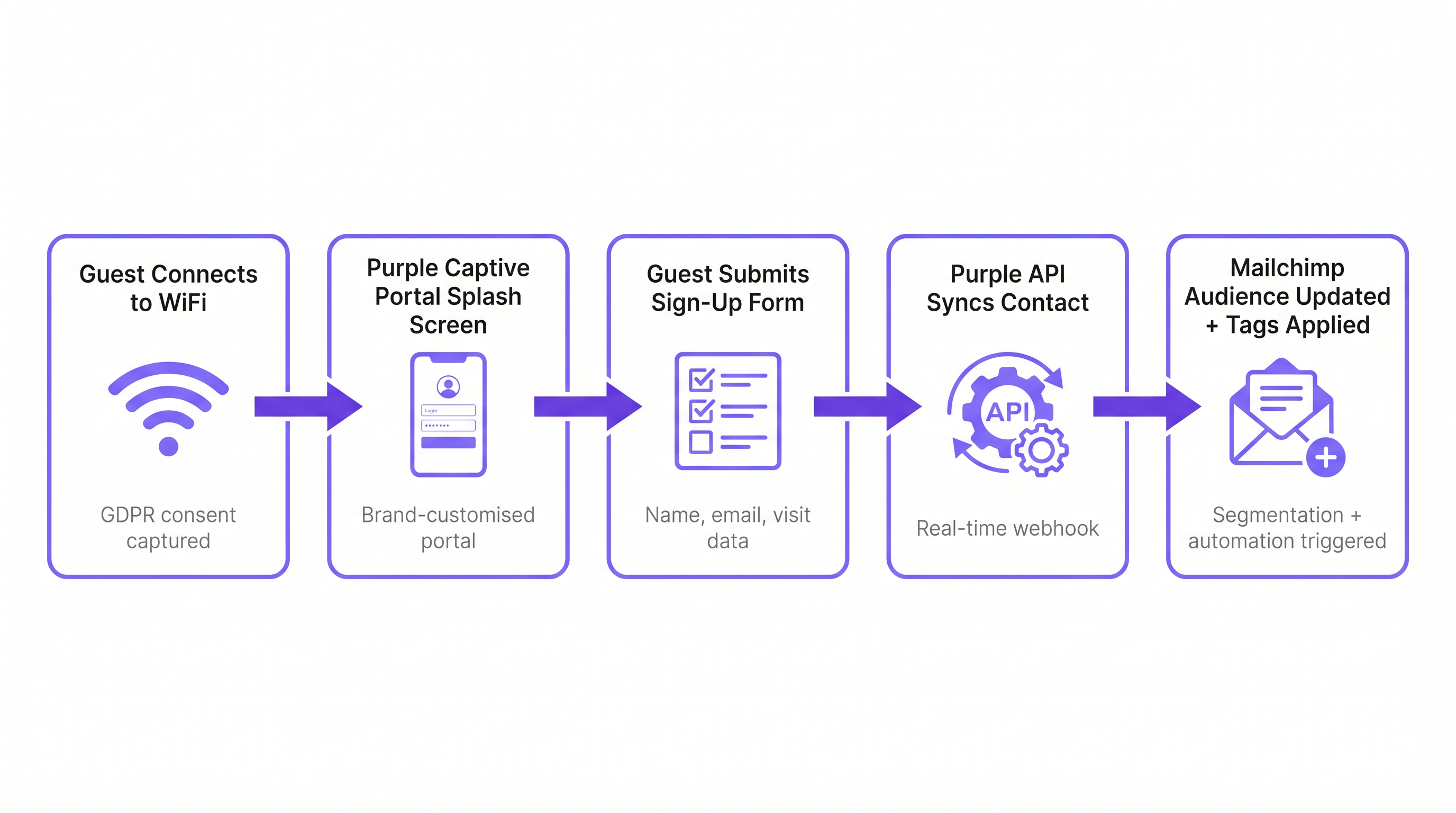
L'integrazione si basa su un'architettura webhook in tempo reale tra l'ambiente cloud di Purple e l'API di Mailchimp. Quando un ospite si autentica con successo tramite il captive portal di Purple, la piattaforma acquisisce i dati del modulo inviato insieme ai metadati sull'evento di connessione (ID sede, indirizzo MAC, timestamp).
Se l'ospite fornisce il consenso esplicito al marketing, Purple attiva immediatamente una chiamata API autenticata tramite OAuth a Mailchimp. Questa chiamata esegue un'operazione di 'upsert': se l'indirizzo email non esiste nell'Audience Mailchimp designata, viene creato un nuovo contatto. Se il contatto esiste già, il suo profilo viene aggiornato e vengono aggiunti nuovi tag senza sovrascrivere i dati esistenti. Ciò garantisce che un ospite che visita più proprietà all'interno di una tenuta mantenga un profilo unico e unificato che riflette la sua cronologia completa delle visite.
Conformità e il Gateway del Consenso
La base di qualsiasi strategia di marketing via email è la conformità. Ai sensi dell'Articolo 6 del GDPR, le organizzazioni devono stabilire una base giuridica per il trattamento dei dati personali. Il captive portal di Purple funge da gateway del consenso. È fondamentale che l'opt-in per il marketing sia disaccoppiato dai termini di servizio generali. Un utente deve poter accedere al WiFi senza iscriversi alle comunicazioni di marketing. L'integrazione rispetta questo confine; solo i contatti che spuntano esplicitamente la casella di opt-in per il marketing vengono sincronizzati con Mailchimp. Questa stretta aderenza ai protocolli di conformità mitiga il rischio e garantisce che l'audience risultante sia altamente coinvolta.
Guida all'Implementazione
Passaggio 1: Stabilire la Tassonomia dei Tag
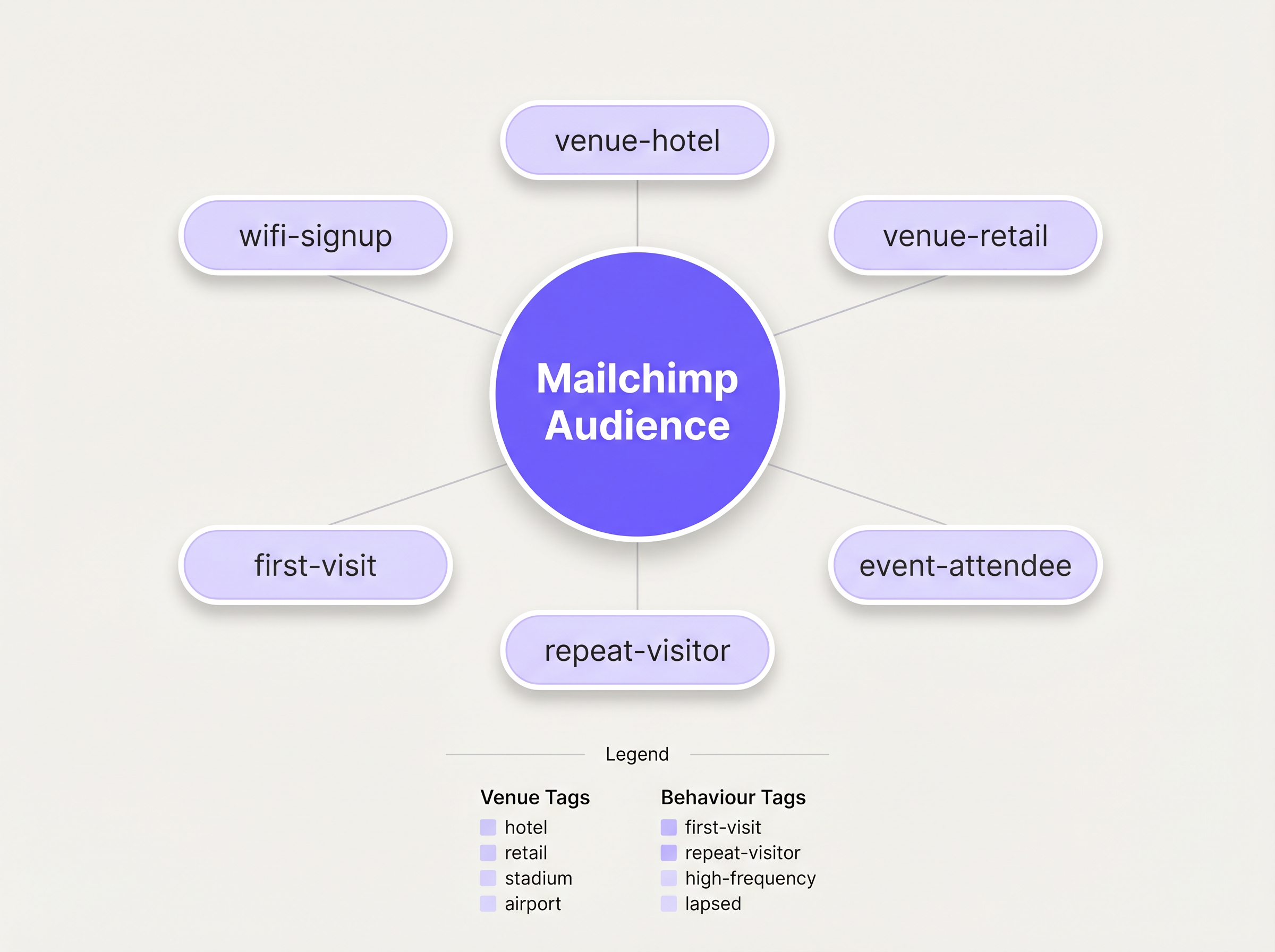
Prima di abilitare la sincronizzazione, è necessario definire una tassonomia di tagging strutturata. Un elenco piatto di contatti è praticamente inutile per il marketing mirato. La best practice prevede un approccio di tagging multidimensionale:
- Tagging della Fonte: Identificare il canale di acquisizione (es.
wifi-signup). - Tagging della Sede: Identificare la posizione specifica o il tipo di proprietà (es.
venue-hotel,location-london). - Tagging Comportamentale: Identificare la natura della visita, spesso sfruttando le capacità di WiFi Analytics di Purple (es.
first-visit,repeat-visitor).
Passaggio 2: Configurare l'Integrazione
La configurazione è gestita all'interno della dashboard di Purple. Navigare alle impostazioni della sede e selezionare l'integrazione Mailchimp. Verrà richiesto di autenticarsi tramite OAuth. Una volta connesso, mappare la specifica sede Purple all'Audience Mailchimp di destinazione. Applicare i tag predefiniti nelle impostazioni di configurazione. Per implementazioni complesse che richiedono il routing a più piattaforme, considerare di sfruttare il connettore Zapier, come dettagliato nella nostra guida su Connettere Eventi WiFi a oltre 1.500 App con Zapier e Purple .
Passaggio 3: Costruire l'Automazione di Benvenuto
L'attività con il ROI più alto in questo flusso di lavoro è l'email di benvenuto immediata. In Mailchimp, costruire un Customer Journey attivato dall'aggiunta del tag wifi-signup. L'email iniziale dovrebbe essere inviata immediatamente, capitalizzando sulla presenza fisica dell'ospite nella sede. Per le sedi Hospitality , questo potrebbe includere uno sconto per la ristorazione; per gli ambienti Retail , un codice promozionale a tempo limitato.
Migliori Pratiche
La Regola dei 15 Minuti
La rilevanza contestuale di un'email di benvenuto decade rapidamente. Assicurarsi che l'automazione iniziale sia configurata per attivarsi senza ritardo. Un messaggio ricevuto mentre l'ospite è ancora in loco ottiene tassi di coinvolgimento significativamente più alti rispetto a uno ricevuto 24 ore dopo.
Profilazione Progressiva
Evitare di sovraccaricare il modulo iniziale del captive portal. Richiedere solo i dati essenziali: Nome ed Email. Una volta che il contatto è in Mailchimp, utilizzare campagne email successive per profilare progressivamente l'utente, richiedendo preferenze aggiuntive o informazioni demografiche per arricchire il profilo nel tempo.
Sfruttare gli Analytics per il Re-engagement
Integrare gli insight dai WiFi Analytics di Purple per identificare i visitatori inattivi. Se un visitatore precedentemente frequente non si è autenticato sulla rete per 90 giorni, attivare una specifica campagna di re-engagement in Mailchimp offrendo un incentivo a tornare.
Risoluzione dei Problemi e Mitigazione del Rischio
Il Problema della Singola Audience
Rischio: riversare tutti i contatti da più sedi in una singola Audience Mailchimp senza un tagging adeguato, distruggendo la capacità di segmentare per posizione. Mitigazione: Applicare una rigorosa politica di tagging a livello di sede prima che l'integrazione diventi operativa. Ogni sincronizzazione deve includere un identificatore di posizione.
Il Conflitto di Disiscrizione
Risk: Un utente si disiscrive tramite Mailchimp, ma si riconnette al WiFi durante una visita successiva. Purple tenta di risincronizzare il contatto. Mitigazione: l'API di Mailchimp gestisce elegantemente questa situazione rifiutando la sincronizzazione per i contatti disiscritti. Assicurati che il tuo team operativo IT comprenda questo comportamento atteso e non segnali questi rifiuti come errori di sistema.
ROI e Impatto sul Business
La metrica principale per valutare questa integrazione è il Costo di Acquisizione Abbonati (SAC) rispetto ai canali digitali tradizionali. Le iscrizioni tramite WiFi rappresentano tipicamente un costo marginale di acquisizione prossimo allo zero. Le metriche secondarie includono i tassi di apertura e di clic della serie di benvenuto automatizzata, che superano costantemente le campagne broadcast standard grazie alla loro elevata rilevanza contestuale. In definitiva, il successo dell'integrazione è misurato dal tasso di conversione di queste campagne automatizzate che generano visite ripetute o spese in loco.
Ascolta il Briefing
Per un approfondimento sull'architettura e sulle comuni insidie di implementazione, ascolta il nostro briefing tecnico di 10 minuti:
Termini chiave e definizioni
Captive Portal
A web page that a user is forced to view and interact with before access is granted to a public WiFi network.
This is the primary interface for capturing user data and marketing consent in the Purple ecosystem.
Webhook
An automated message sent from one application to another when a specific event occurs.
Purple uses webhooks to instantly transmit the guest's contact data to Mailchimp the moment they submit the sign-up form.
OAuth
An open standard for access delegation, commonly used as a way for Internet users to grant websites or applications access to their information on other websites but without giving them the passwords.
This is the secure authentication method used to connect the Purple platform to a Mailchimp account.
Upsert
A database operation that updates an existing record if a specified value already exists, or inserts a new record if the specified value doesn't exist.
When Purple syncs data, it performs an upsert on the email address, ensuring existing Mailchimp profiles are updated with new tags rather than duplicated.
Segmentation
The practice of dividing an email subscriber list into smaller groups based on specific criteria, such as location or behaviour.
Effective segmentation, driven by Purple's tagging, is essential for delivering relevant campaigns rather than generic broadcasts.
Customer Journey
Mailchimp's visual automation builder that allows marketers to create automated workflows based on specific triggers and conditions.
This tool is used to build the automated welcome emails triggered by the `wifi-signup` tag.
GDPR Article 6
The section of the General Data Protection Regulation that outlines the lawful bases for processing personal data.
Venue operators must ensure their captive portal splash screens explicitly capture consent for email marketing to comply with this regulation.
Subscriber Acquisition Cost (SAC)
The total cost associated with acquiring a new email subscriber.
Guest WiFi represents a highly efficient acquisition channel, significantly lowering the overall SAC compared to paid digital advertising.
Casi di studio
A 200-room hotel needs to differentiate between overnight guests and attendees of a day conference in their Mailchimp marketing.
The hotel configures two separate SSIDs or captive portal splash pages within Purple. The overnight guest portal applies the tags wifi-signup, venue-hotel, and guest-overnight. The conference portal applies the tags wifi-signup, venue-hotel, and guest-conference. In Mailchimp, two distinct Customer Journeys are created. The overnight journey triggers a welcome email highlighting room service and spa facilities. The conference journey triggers an email with the day's agenda and directions to the breakout rooms.
Analisi degli scenari
Q1. A retail chain with 50 locations has successfully integrated Purple and Mailchimp. They want to send a targeted campaign only to customers who visited their flagship London store in the last 30 days. How should they structure this segment in Mailchimp?
💡 Suggerimento:Consider both the location tag applied at sign-up and the dynamic data regarding recent activity.
Mostra l'approccio consigliato
They should create a segment in Mailchimp with two conditions: 1) Tag includes location-london-flagship AND 2) Campaign activity or date added is within the last 30 days. This relies on Purple having correctly applied the location-specific tag during the initial sync.
Q2. During user acceptance testing, an IT manager notices that a test user who previously unsubscribed from the Mailchimp list is not being re-added when they log back into the guest WiFi. Is this a bug in the integration?
💡 Suggerimento:Review how Mailchimp handles unsubscribed contacts via API.
Mostra l'approccio consigliato
No, this is the expected and correct behaviour. Mailchimp's API actively prevents the re-subscription of contacts who have previously opted out, ensuring compliance. The Purple webhook fires, but Mailchimp rejects the upsert for that specific record.
Q3. A venue operator wants to use the Purple captive portal to collect a guest's date of birth for age-gated marketing. How is this data passed to Mailchimp?
💡 Suggerimento:Look beyond standard tags to the advanced integration settings.
Mostra l'approccio consigliato
The operator must configure a custom field on the Purple splash screen for 'Date of Birth'. In the Purple integration settings, this custom field must be mapped to a corresponding 'Merge Field' (e.g., DOB) within the target Mailchimp Audience. This allows Mailchimp to store the data as a specific attribute rather than a generic tag.




