

Mailchimp Plus Purple: Automatisiertes E-Mail-Marketing aus WiFi-Anmeldungen
Dieser maßgebliche Leitfaden beschreibt, wie die Gast-WiFi-Plattform von Purple mit Mailchimp integriert wird, um E-Mail-Marketing aus WiFi-Anmeldungen zu automatisieren. Er behandelt den architektonischen Aufbau, Strategien zur Segmentierung und die Implementierung automatisierter Willkommens-Journeys, um Besucher vor Ort in engagierte digitale Zielgruppen zu verwandeln.
🎧 Diesen Leitfaden anhören
Transkript anzeigen

Executive Summary
Für Unternehmensbetreiber, die stark frequentierte Veranstaltungsorte verwalten, ist Gast-WiFi im Grunde ein Datenerfassungskanal. Jedes Mal, wenn ein Benutzer sich über ein Captive Portal mit dem Netzwerk eines Veranstaltungsortes verbindet, gibt er seine ausdrückliche Zustimmung und Kontaktdaten. Die Integration zwischen Purple und Mailchimp verwandelt diese passive Datenerfassung in eine aktive Einnahmequelle. Durch die Einrichtung einer direkten API-Verbindung können Betreiber von Veranstaltungsorten GDPR-konforme Anmeldungen automatisch in gezielte Mailchimp-Zielgruppen einspeisen, Verhaltenssegmentierungs-Tags anwenden und Willkommens-Automatisierungen in Echtzeit auslösen. Dieser Leitfaden bietet die technische Architektur und die strategischen Bereitstellungs-Frameworks, die erforderlich sind, um eine automatisierte E-Mail-Marketing-Pipeline aus Ihrer Guest WiFi -Infrastruktur aufzubauen.
Technical Deep-Dive
Die Architektur der Synchronisierung
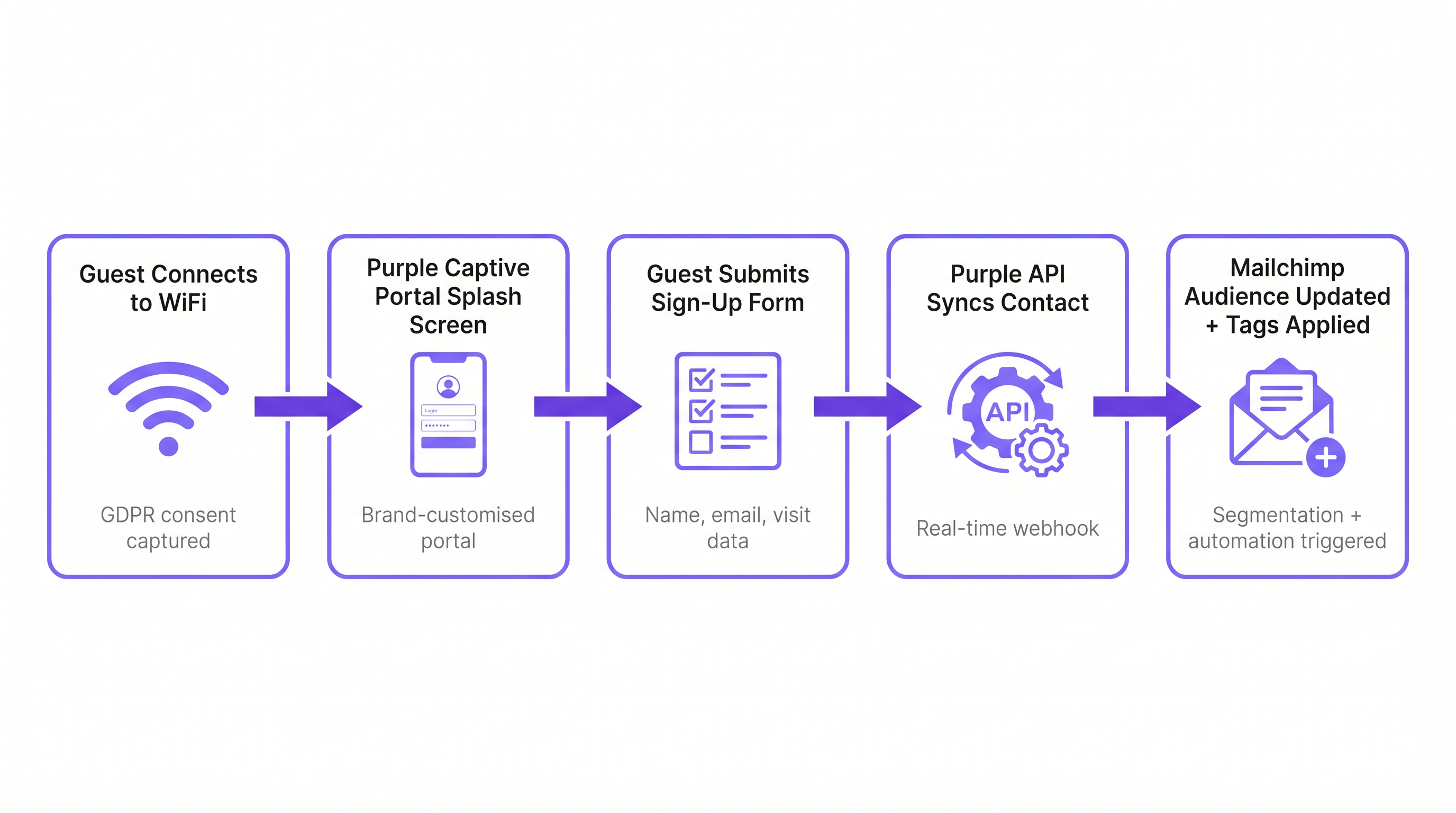
Die Integration basiert auf einer Echtzeit-Webhook-Architektur zwischen der Cloud-Umgebung von Purple und der Mailchimp API. Wenn sich ein Gast erfolgreich über das Purple Captive Portal authentifiziert, erfasst die Plattform die übermittelten Formulardaten zusammen mit Metadaten über das Verbindungsereignis (Venue ID, MAC-Adresse, Zeitstempel).
Wenn der Gast eine ausdrückliche Marketing-Zustimmung erteilt, löst Purple sofort einen OAuth-authentifizierten API-Aufruf an Mailchimp aus. Dieser Aufruf führt eine 'Upsert'-Operation durch: Wenn die E-Mail-Adresse in der vorgesehenen Mailchimp Audience nicht existiert, wird ein neuer Kontakt erstellt. Wenn der Kontakt bereits existiert, wird sein Profil aktualisiert und neue Tags werden hinzugefügt, ohne vorhandene Daten zu überschreiben. Dies stellt sicher, dass ein Gast, der mehrere Objekte innerhalb eines Anwesens besucht, ein einziges, einheitliches Profil behält, das seine vollständige Besuchshistorie widerspiegelt.
Compliance und das Zustimmungs-Gateway
Die Grundlage jeder E-Mail-Marketingstrategie ist die Compliance. Gemäß GDPR Artikel 6 müssen Organisationen eine rechtmäßige Grundlage für die Verarbeitung personenbezogener Daten schaffen. Das Purple Captive Portal fungiert als Zustimmungs-Gateway. Es ist entscheidend, dass das Marketing-Opt-in von den allgemeinen Nutzungsbedingungen entkoppelt ist. Ein Benutzer muss in der Lage sein, auf das WiFi zuzugreifen, ohne Marketingmitteilungen abonnieren zu müssen. Die Integration respektiert diese Grenze; nur Kontakte, die das Marketing-Opt-in-Feld ausdrücklich ankreuzen, werden mit Mailchimp synchronisiert. Diese strikte Einhaltung der Compliance-Protokolle mindert Risiken und stellt sicher, dass die resultierende Zielgruppe hoch engagiert ist.
Implementierungsleitfaden
Schritt 1: Die Tagging-Taxonomie festlegen
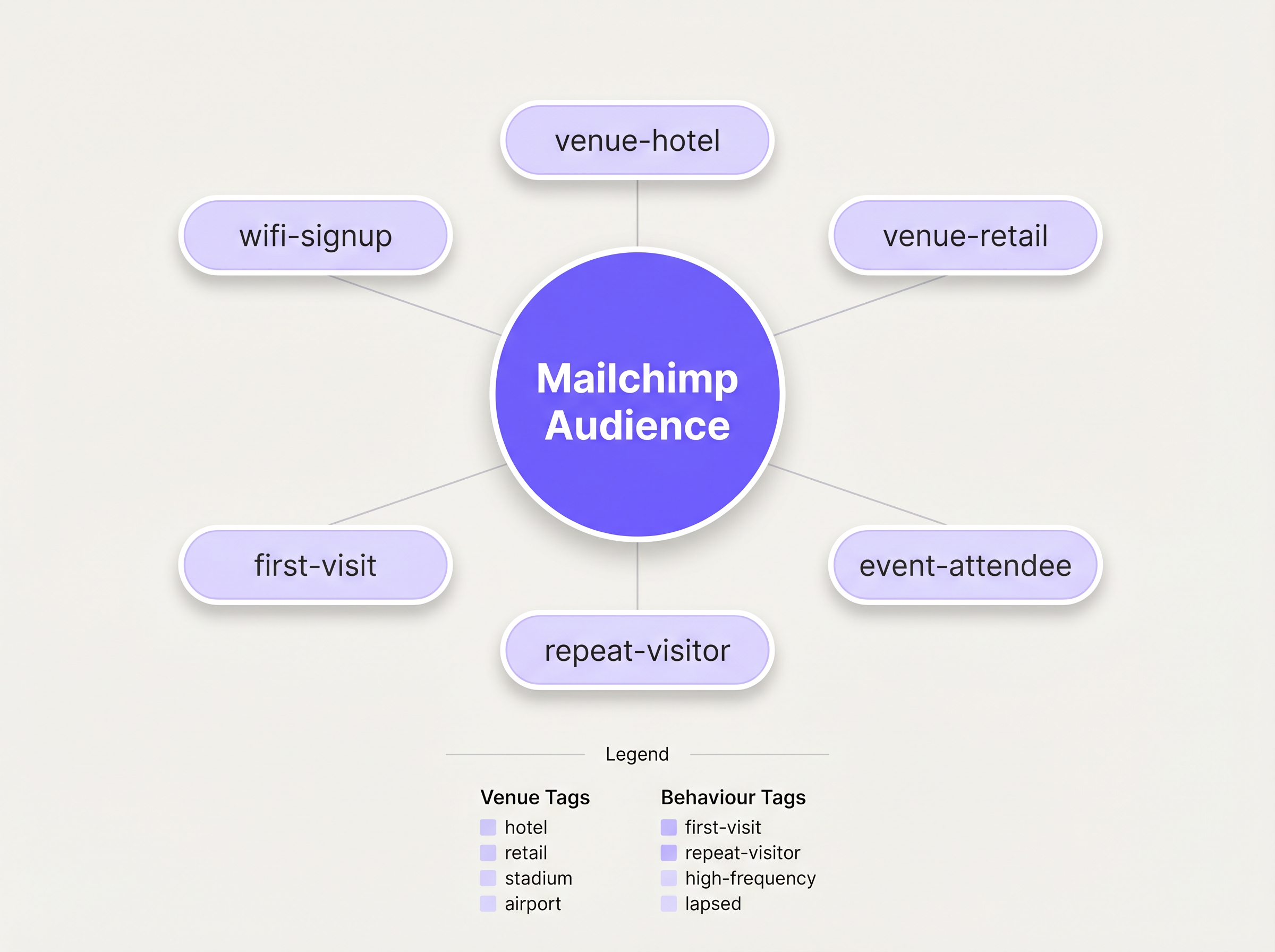
Bevor Sie die Synchronisierung aktivieren, müssen Sie eine strukturierte Tagging-Taxonomie definieren. Eine flache Liste von Kontakten ist für gezieltes Marketing praktisch nutzlos. Best Practice schreibt einen mehrdimensionalen Tagging-Ansatz vor:
- Quellen-Tagging: Identifizieren Sie den Akquisitionskanal (z.B.
wifi-signup). - Standort-Tagging: Identifizieren Sie den spezifischen Standort oder den Objekttyp (z.B.
venue-hotel,location-london). - Verhaltens-Tagging: Identifizieren Sie die Art des Besuchs, oft unter Nutzung der WiFi Analytics -Funktionen von Purple (z.B.
first-visit,repeat-visitor).
Schritt 2: Die Integration konfigurieren
Die Konfiguration wird im Purple Dashboard verwaltet. Navigieren Sie zu den Veranstaltungsort-Einstellungen und wählen Sie die Mailchimp-Integration aus. Sie werden aufgefordert, sich über OAuth zu authentifizieren. Nach der Verbindung ordnen Sie den spezifischen Purple-Veranstaltungsort der Ziel-Mailchimp Audience zu. Wenden Sie die vordefinierten Tags in den Konfigurationseinstellungen an. Für komplexe Bereitstellungen, die ein Routing zu mehreren Plattformen erfordern, sollten Sie den Zapier-Konnektor nutzen, wie in unserem Leitfaden zum Verbinden von WiFi-Ereignissen mit über 1.500 Apps mit Zapier und Purple beschrieben.
Schritt 3: Die Willkommens-Automatisierung erstellen
Die Aktivität mit dem höchsten ROI in diesem Workflow ist die sofortige Willkommens-E-Mail. Erstellen Sie in Mailchimp eine Customer Journey, die durch das Hinzufügen des Tags wifi-signup ausgelöst wird. Die erste E-Mail sollte sofort versendet werden, um die physische Präsenz des Gastes am Veranstaltungsort zu nutzen. Für Hospitality -Veranstaltungsorte könnte dies einen Essensrabatt beinhalten; für Retail -Umgebungen einen zeitlich begrenzten Aktionscode.
Best Practices
Die 15-Minuten-Regel
Die kontextuelle Relevanz einer Willkommens-E-Mail nimmt schnell ab. Stellen Sie sicher, dass die anfängliche Automatisierung so konfiguriert ist, dass sie ohne Verzögerung ausgelöst wird. Eine Nachricht, die empfangen wird, während der Gast noch vor Ort ist, erzielt deutlich höhere Engagement-Raten als eine, die 24 Stunden später empfangen wird.
Progressives Profiling
Vermeiden Sie es, das anfängliche Captive Portal-Formular zu überladen. Fordern Sie nur die wesentlichen Daten an: Name und E-Mail. Sobald der Kontakt in Mailchimp ist, verwenden Sie nachfolgende E-Mail-Kampagnen, um den Benutzer progressiv zu profilieren und zusätzliche Präferenzen oder demografische Informationen anzufordern, um das Profil im Laufe der Zeit anzureichern.
Analysen für die Re-Engagement nutzen
Integrieren Sie Erkenntnisse aus den WiFi Analytics von Purple, um inaktive Besucher zu identifizieren. Wenn ein zuvor häufiger Besucher sich seit 90 Tagen nicht mehr im Netzwerk authentifiziert hat, lösen Sie eine spezifische Re-Engagement-Kampagne in Mailchimp aus, die einen Anreiz zur Rückkehr bietet.
Fehlerbehebung & Risikominderung
Das Single-Audience-Problem
Risiko: Das Abladen aller Kontakte von mehreren Veranstaltungsorten in eine einzige Mailchimp Audience ohne ausreichende Kennzeichnung, wodurch die Möglichkeit der Segmentierung nach Standort zerstört wird. Minderung: Erzwingen Sie eine strikte Tagging-Richtlinie auf Veranstaltungsort-Ebene, bevor die Integration live geht. Jede Synchronisierung muss einen Standort-Identifikator enthalten.
Der Abmeldekonflikt
Risk: Ein Benutzer meldet sich über Mailchimp ab, verbindet sich aber bei einem späteren Besuch erneut mit dem WiFi. Purple versucht, den Kontakt erneut zu synchronisieren. Abhilfe: Die API von Mailchimp handhabt dies elegant, indem sie die Synchronisierung für abgemeldete Kontakte ablehnt. Stellen Sie sicher, dass Ihr IT-Betriebsteam dieses erwartete Verhalten versteht und diese Ablehnungen nicht als Systemfehler kennzeichnet.
ROI & Geschäftlicher Nutzen
Die primäre Metrik zur Bewertung dieser Integration sind die Kosten für die Abonnentenakquise (SAC) im Vergleich zu traditionellen digitalen Kanälen. WiFi-Anmeldungen stellen typischerweise nahezu keine Grenzkosten für die Akquise dar. Sekundäre Metriken umfassen die Öffnungs- und Klickraten der automatisierten Willkommensserie, die aufgrund ihrer hohen kontextuellen Relevanz stets besser abschneiden als Standard-Broadcast-Kampagnen. Letztendlich wird der Erfolg der Integration an der Konversionsrate dieser automatisierten Kampagnen gemessen, die wiederholte Besuche oder Ausgaben vor Ort fördern.
Hören Sie das Briefing
Für einen tieferen Einblick in die Architektur und häufige Implementierungsfallen hören Sie sich unser 10-minütiges technisches Briefing an:
Schlüsselbegriffe & Definitionen
Captive Portal
A web page that a user is forced to view and interact with before access is granted to a public WiFi network.
This is the primary interface for capturing user data and marketing consent in the Purple ecosystem.
Webhook
An automated message sent from one application to another when a specific event occurs.
Purple uses webhooks to instantly transmit the guest's contact data to Mailchimp the moment they submit the sign-up form.
OAuth
An open standard for access delegation, commonly used as a way for Internet users to grant websites or applications access to their information on other websites but without giving them the passwords.
This is the secure authentication method used to connect the Purple platform to a Mailchimp account.
Upsert
A database operation that updates an existing record if a specified value already exists, or inserts a new record if the specified value doesn't exist.
When Purple syncs data, it performs an upsert on the email address, ensuring existing Mailchimp profiles are updated with new tags rather than duplicated.
Segmentation
The practice of dividing an email subscriber list into smaller groups based on specific criteria, such as location or behaviour.
Effective segmentation, driven by Purple's tagging, is essential for delivering relevant campaigns rather than generic broadcasts.
Customer Journey
Mailchimp's visual automation builder that allows marketers to create automated workflows based on specific triggers and conditions.
This tool is used to build the automated welcome emails triggered by the `wifi-signup` tag.
GDPR Article 6
The section of the General Data Protection Regulation that outlines the lawful bases for processing personal data.
Venue operators must ensure their captive portal splash screens explicitly capture consent for email marketing to comply with this regulation.
Subscriber Acquisition Cost (SAC)
The total cost associated with acquiring a new email subscriber.
Guest WiFi represents a highly efficient acquisition channel, significantly lowering the overall SAC compared to paid digital advertising.
Fallstudien
A 200-room hotel needs to differentiate between overnight guests and attendees of a day conference in their Mailchimp marketing.
The hotel configures two separate SSIDs or captive portal splash pages within Purple. The overnight guest portal applies the tags wifi-signup, venue-hotel, and guest-overnight. The conference portal applies the tags wifi-signup, venue-hotel, and guest-conference. In Mailchimp, two distinct Customer Journeys are created. The overnight journey triggers a welcome email highlighting room service and spa facilities. The conference journey triggers an email with the day's agenda and directions to the breakout rooms.
Szenarioanalyse
Q1. A retail chain with 50 locations has successfully integrated Purple and Mailchimp. They want to send a targeted campaign only to customers who visited their flagship London store in the last 30 days. How should they structure this segment in Mailchimp?
💡 Hinweis:Consider both the location tag applied at sign-up and the dynamic data regarding recent activity.
Empfohlenen Ansatz anzeigen
They should create a segment in Mailchimp with two conditions: 1) Tag includes location-london-flagship AND 2) Campaign activity or date added is within the last 30 days. This relies on Purple having correctly applied the location-specific tag during the initial sync.
Q2. During user acceptance testing, an IT manager notices that a test user who previously unsubscribed from the Mailchimp list is not being re-added when they log back into the guest WiFi. Is this a bug in the integration?
💡 Hinweis:Review how Mailchimp handles unsubscribed contacts via API.
Empfohlenen Ansatz anzeigen
No, this is the expected and correct behaviour. Mailchimp's API actively prevents the re-subscription of contacts who have previously opted out, ensuring compliance. The Purple webhook fires, but Mailchimp rejects the upsert for that specific record.
Q3. A venue operator wants to use the Purple captive portal to collect a guest's date of birth for age-gated marketing. How is this data passed to Mailchimp?
💡 Hinweis:Look beyond standard tags to the advanced integration settings.
Empfohlenen Ansatz anzeigen
The operator must configure a custom field on the Purple splash screen for 'Date of Birth'. In the Purple integration settings, this custom field must be mapped to a corresponding 'Merge Field' (e.g., DOB) within the target Mailchimp Audience. This allows Mailchimp to store the data as a specific attribute rather than a generic tag.




