

Mailchimp Plus Purple: Marketing por E-mail Automatizado a partir de Registos WiFi
Este guia detalhado explica como integrar a plataforma de Guest WiFi da Purple com o Mailchimp para automatizar o marketing por e-mail a partir dos registos WiFi. Abrange a configuração arquitetónica, estratégias de etiquetagem de segmentação e a implementação de jornadas de boas-vindas automatizadas para converter o tráfego presencial em audiências digitais envolvidas.
🎧 Ouça este Guia
Ver Transcrição

Resumo Executivo
Para operadores empresariais que gerem locais com grande afluência, o Guest WiFi é fundamentalmente um canal de aquisição de dados. Sempre que um utilizador se conecta à rede de um local através de um Captive Portal, este fornece consentimento explícito e dados de contacto. A integração entre a Purple e o Mailchimp transforma esta recolha passiva de dados num motor de receita ativo. Ao estabelecer uma conexão direta via API, os operadores de locais podem encaminhar automaticamente registos compatíveis com o GDPR para audiências segmentadas do Mailchimp, aplicar etiquetas de segmentação comportamental e acionar automações de boas-vindas em tempo real. Este guia fornece a arquitetura técnica e os frameworks de implementação estratégica necessários para construir um pipeline de marketing por e-mail automatizado a partir da sua infraestrutura de Guest WiFi .
Análise Técnica Detalhada
A Arquitetura da Sincronização
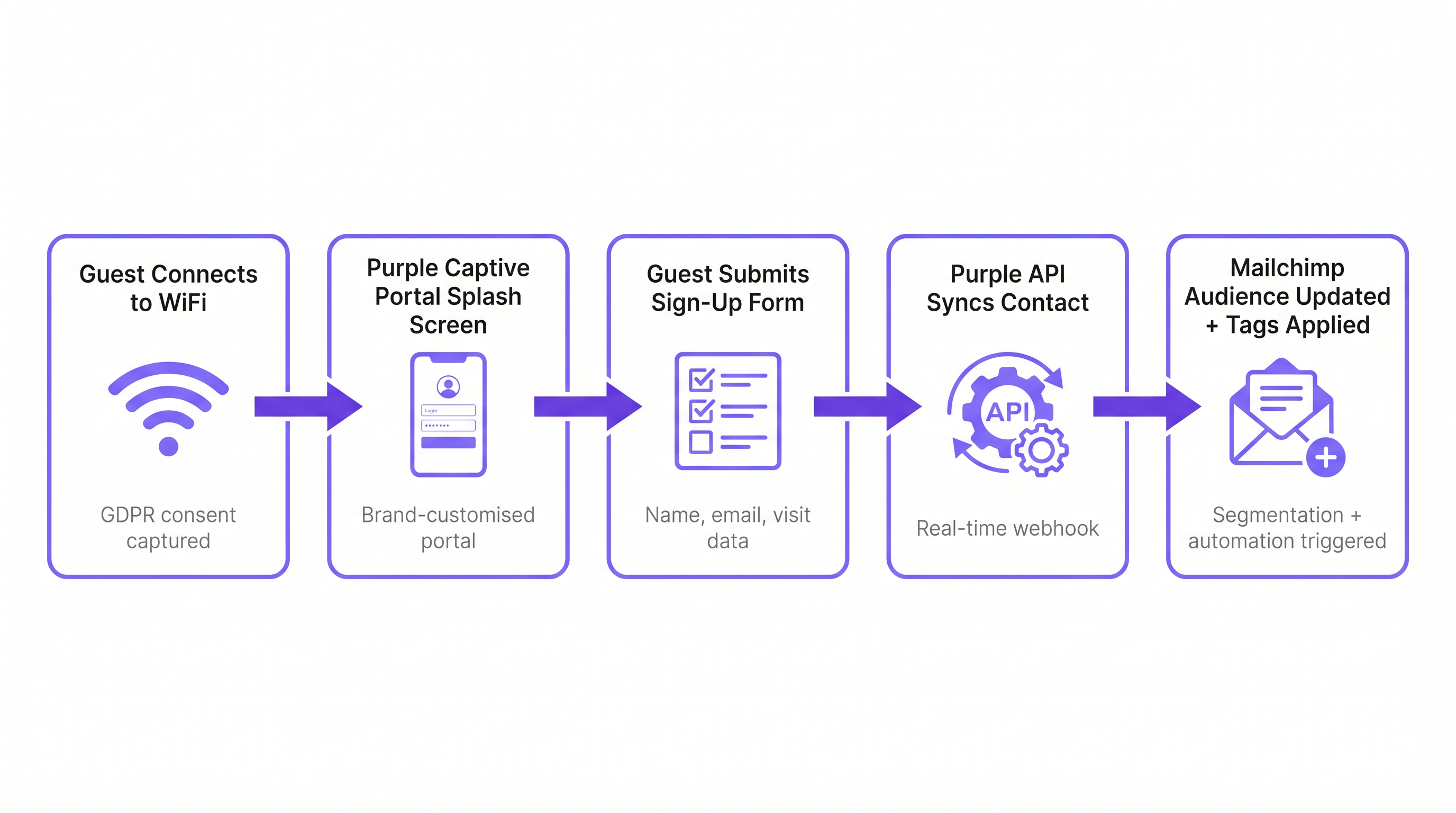
A integração baseia-se numa arquitetura de webhook em tempo real entre o ambiente cloud da Purple e a API do Mailchimp. Quando um convidado se autentica com sucesso através do Captive Portal da Purple, a plataforma capta os dados do formulário submetido juntamente com metadados sobre o evento de conexão (ID do local, endereço MAC, carimbo de data/hora).
Se o convidado fornecer consentimento explícito para marketing, a Purple aciona imediatamente uma chamada de API autenticada por OAuth para o Mailchimp. Esta chamada executa uma operação de 'upsert': se o endereço de e-mail não existir na Audiência designada do Mailchimp, um novo contacto é criado. Se o contacto já existir, o seu perfil é atualizado e novas etiquetas são anexadas sem sobrescrever os dados existentes. Isto garante que um convidado que visita várias propriedades dentro de um património mantém um perfil único e unificado que reflete o seu histórico completo de visitas.
Conformidade e o Portal de Consentimento
A base de qualquer estratégia de marketing por e-mail é a conformidade. De acordo com o Artigo 6 do GDPR, as organizações devem estabelecer uma base legal para o tratamento de dados pessoais. O Captive Portal da Purple atua como o portal de consentimento. É fundamental que a opção de marketing seja desvinculada dos termos de serviço gerais. Um utilizador deve poder aceder ao WiFi sem subscrever comunicações de marketing. A integração respeita este limite; apenas os contactos que marcam explicitamente a caixa de opção de marketing são sincronizados com o Mailchimp. Esta estrita adesão aos protocolos de conformidade mitiga o risco e garante que a audiência resultante esteja altamente envolvida.
Guia de Implementação
Passo 1: Estabelecer a Taxonomia de Etiquetagem
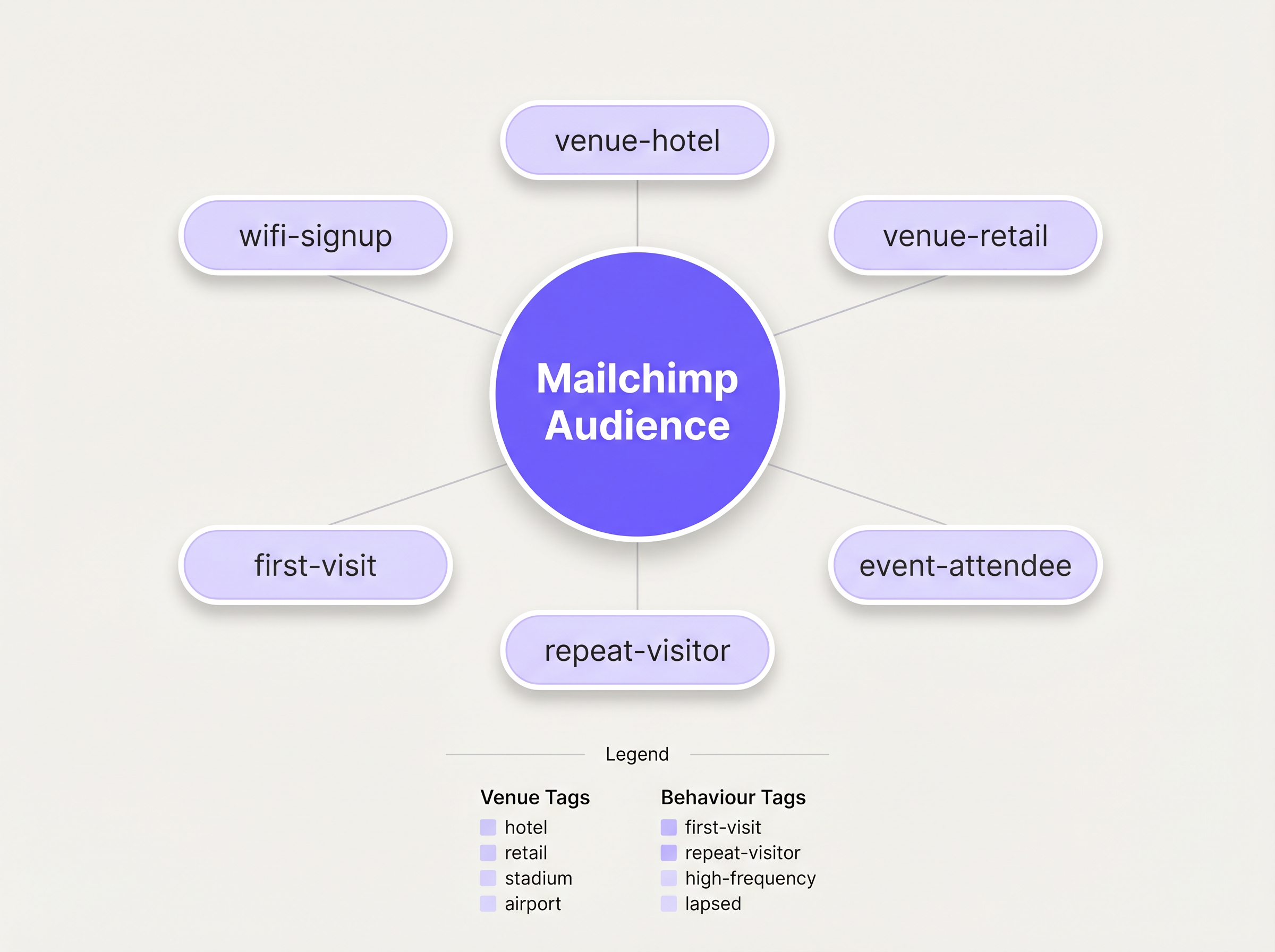
Antes de ativar a sincronização, deve definir uma taxonomia de etiquetagem estruturada. Uma lista simples de contactos é praticamente inútil para marketing direcionado. A melhor prática dita uma abordagem de etiquetagem multidimensional:
- Etiquetagem de Origem: Identificar o canal de aquisição (p. ex.,
wifi-signup). - Etiquetagem de Local: Identificar a localização específica ou tipo de propriedade (p. ex.,
venue-hotel,location-london). - Etiquetagem Comportamental: Identificar a natureza da visita, muitas vezes aproveitando as capacidades de WiFi Analytics da Purple (p. ex.,
first-visit,repeat-visitor).
Passo 2: Configurar a Integração
A configuração é gerida dentro do dashboard da Purple. Navegue até às definições do local e selecione a integração com o Mailchimp. Será solicitado a autenticar via OAuth. Uma vez conectado, mapeie o local específico da Purple para a Audiência alvo do Mailchimp. Aplique as etiquetas predefinidas nas definições de configuração. Para implementações complexas que exigem encaminhamento para múltiplas plataformas, considere aproveitar o conector Zapier, conforme detalhado no nosso guia sobre Conectar Eventos WiFi a Mais de 1.500 Aplicações com Zapier e Purple .
Passo 3: Construir a Automação de Boas-Vindas
A atividade com maior ROI neste fluxo de trabalho é o e-mail de boas-vindas imediato. No Mailchimp, construa uma Jornada do Cliente acionada pela adição da etiqueta wifi-signup. O e-mail inicial deve ser enviado imediatamente, capitalizando a presença física do convidado no local. Para locais de Hotelaria , isto pode incluir um desconto em refeições; para ambientes de Retalho , um código promocional por tempo limitado.
Melhores Práticas
A Regra dos 15 Minutos
A relevância contextual de um e-mail de boas-vindas decai rapidamente. Garanta que a automação inicial está configurada para ser acionada sem demora. Uma mensagem recebida enquanto o convidado ainda está no local alcança taxas de envolvimento significativamente mais altas do que uma recebida 24 horas depois.
Criação de Perfil Progressiva
Evite sobrecarregar o formulário inicial do Captive Portal. Solicite apenas os dados essenciais: Nome e E-mail. Uma vez que o contacto esteja no Mailchimp, use campanhas de e-mail subsequentes para perfilar progressivamente o utilizador, solicitando preferências adicionais ou informações demográficas para enriquecer o perfil ao longo do tempo.
Aproveitar a Análise para Reengajamento
Integre insights dos WiFi Analytics da Purple para identificar visitantes inativos. Se um visitante anteriormente frequente não se autenticou na rede por 90 dias, acione uma campanha de reengajamento específica no Mailchimp oferecendo um incentivo para regressar.
Resolução de Problemas e Mitigação de Riscos
O Problema da Audiência Única
Risco: Despejar todos os contactos de múltiplos locais numa única Audiência do Mailchimp sem etiquetagem adequada, destruindo a capacidade de segmentar por localização. Mitigação: Impor uma política rigorosa de etiquetagem ao nível do local antes de a integração entrar em funcionamento. Cada sincronização deve conter um identificador de localização.
O Conflito de Anulação de Subscrição
Risk: Um utilizador anula a subscrição via Mailchimp, mas volta a ligar-se ao WiFi numa visita subsequente. A Purple tenta ressincronizar o contacto. Mitigação: A API do Mailchimp gere isto de forma elegante, rejeitando a sincronização para contactos com subscrição anulada. Certifique-se de que a sua equipa de operações de TI compreende este comportamento esperado e não sinaliza estas rejeições como erros de sistema.
ROI e Impacto no Negócio
A métrica principal para avaliar esta integração é o Custo de Aquisição de Subscritores (SAC) em comparação com os canais digitais tradicionais. Os registos de WiFi representam tipicamente um custo marginal de aquisição próximo de zero. As métricas secundárias incluem as taxas de abertura e de cliques da série de boas-vindas automatizada, que superam consistentemente as campanhas de difusão padrão devido à sua elevada relevância contextual. Em última análise, o sucesso da integração é medido pela taxa de conversão destas campanhas automatizadas que impulsionam visitas repetidas ou gastos no local.
Ouça o Briefing
Para uma análise mais aprofundada da arquitetura e dos erros comuns de implementação, ouça o nosso briefing técnico de 10 minutos:
Termos-Chave e Definições
Captive Portal
A web page that a user is forced to view and interact with before access is granted to a public WiFi network.
This is the primary interface for capturing user data and marketing consent in the Purple ecosystem.
Webhook
An automated message sent from one application to another when a specific event occurs.
Purple uses webhooks to instantly transmit the guest's contact data to Mailchimp the moment they submit the sign-up form.
OAuth
An open standard for access delegation, commonly used as a way for Internet users to grant websites or applications access to their information on other websites but without giving them the passwords.
This is the secure authentication method used to connect the Purple platform to a Mailchimp account.
Upsert
A database operation that updates an existing record if a specified value already exists, or inserts a new record if the specified value doesn't exist.
When Purple syncs data, it performs an upsert on the email address, ensuring existing Mailchimp profiles are updated with new tags rather than duplicated.
Segmentation
The practice of dividing an email subscriber list into smaller groups based on specific criteria, such as location or behaviour.
Effective segmentation, driven by Purple's tagging, is essential for delivering relevant campaigns rather than generic broadcasts.
Customer Journey
Mailchimp's visual automation builder that allows marketers to create automated workflows based on specific triggers and conditions.
This tool is used to build the automated welcome emails triggered by the `wifi-signup` tag.
GDPR Article 6
The section of the General Data Protection Regulation that outlines the lawful bases for processing personal data.
Venue operators must ensure their captive portal splash screens explicitly capture consent for email marketing to comply with this regulation.
Subscriber Acquisition Cost (SAC)
The total cost associated with acquiring a new email subscriber.
Guest WiFi represents a highly efficient acquisition channel, significantly lowering the overall SAC compared to paid digital advertising.
Estudos de Caso
A 200-room hotel needs to differentiate between overnight guests and attendees of a day conference in their Mailchimp marketing.
The hotel configures two separate SSIDs or captive portal splash pages within Purple. The overnight guest portal applies the tags wifi-signup, venue-hotel, and guest-overnight. The conference portal applies the tags wifi-signup, venue-hotel, and guest-conference. In Mailchimp, two distinct Customer Journeys are created. The overnight journey triggers a welcome email highlighting room service and spa facilities. The conference journey triggers an email with the day's agenda and directions to the breakout rooms.
Análise de Cenários
Q1. A retail chain with 50 locations has successfully integrated Purple and Mailchimp. They want to send a targeted campaign only to customers who visited their flagship London store in the last 30 days. How should they structure this segment in Mailchimp?
💡 Dica:Consider both the location tag applied at sign-up and the dynamic data regarding recent activity.
Mostrar Abordagem Recomendada
They should create a segment in Mailchimp with two conditions: 1) Tag includes location-london-flagship AND 2) Campaign activity or date added is within the last 30 days. This relies on Purple having correctly applied the location-specific tag during the initial sync.
Q2. During user acceptance testing, an IT manager notices that a test user who previously unsubscribed from the Mailchimp list is not being re-added when they log back into the guest WiFi. Is this a bug in the integration?
💡 Dica:Review how Mailchimp handles unsubscribed contacts via API.
Mostrar Abordagem Recomendada
No, this is the expected and correct behaviour. Mailchimp's API actively prevents the re-subscription of contacts who have previously opted out, ensuring compliance. The Purple webhook fires, but Mailchimp rejects the upsert for that specific record.
Q3. A venue operator wants to use the Purple captive portal to collect a guest's date of birth for age-gated marketing. How is this data passed to Mailchimp?
💡 Dica:Look beyond standard tags to the advanced integration settings.
Mostrar Abordagem Recomendada
The operator must configure a custom field on the Purple splash screen for 'Date of Birth'. In the Purple integration settings, this custom field must be mapped to a corresponding 'Merge Field' (e.g., DOB) within the target Mailchimp Audience. This allows Mailchimp to store the data as a specific attribute rather than a generic tag.




