
¿Qué es EAP-TLS? Autenticación WiFi Basada en Certificados Explicada
Esta guía proporciona una referencia técnica completa sobre EAP-TLS (Extensible Authentication Protocol with Transport Layer Security), el método de autenticación 802.1X más seguro disponible para WiFi empresarial. Cubre la infraestructura de certificados X.509 requerida, el handshake de autenticación mutua y los patrones de implementación prácticos para entornos de hostelería, comercio minorista, atención médica y sector público. Los gerentes de TI, arquitectos de red y CTOs encontrarán orientación práctica sobre el diseño de PKI, el aprovisionamiento de certificados integrado con MDM, la configuración de RADIUS y la alineación de cumplimiento con PCI DSS y GDPR.
Escucha esta guía
Ver transcripción del podcast
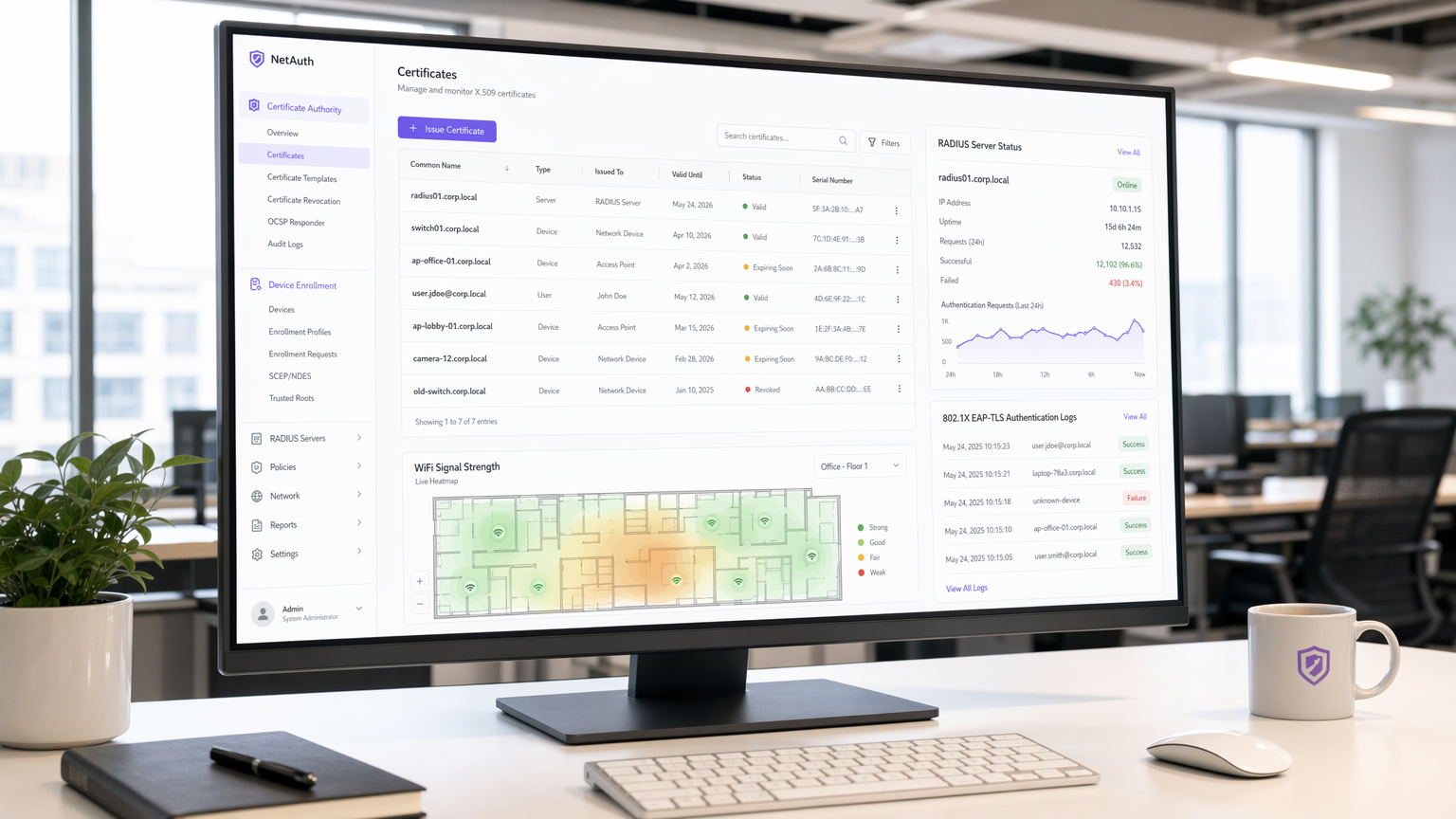
Resumen Ejecutivo
EAP-TLS (Extensible Authentication Protocol – Transport Layer Security) es el método de autenticación IEEE 802.1X que elimina por completo las credenciales compartidas de su cadena de autenticación inalámbrica. Mientras que PEAP y EAP-TTLS dependen de nombres de usuario y contraseñas transmitidos a través de un túnel cifrado, EAP-TLS requiere que tanto el dispositivo cliente como el servidor RADIUS presenten certificados X.509 válidos emitidos por una Autoridad de Certificación (CA) de confianza. Este modelo de autenticación mutua significa que una contraseña robada es irrelevante: sin un certificado válido y no revocado, un dispositivo no puede unirse a la red.
Para los operadores de recintos que gestionan Guest WiFi en hoteles, propiedades minoristas o centros de conferencias, y para los equipos de TI responsables de las redes de personal y dispositivos IoT, EAP-TLS representa el nivel más alto actual de seguridad en la autenticación inalámbrica. Es obligatorio o fuertemente recomendado por PCI DSS 4.0 para entornos de datos de titulares de tarjetas, por HIPAA para redes inalámbricas de atención médica, y es el método requerido para implementaciones WPA3 Enterprise de 192 bits (Suite B).
La sobrecarga de implementación es real —la gestión del ciclo de vida de los certificados, la infraestructura PKI y la integración con MDM no son triviales— pero el retorno de la inversión (ROI) en seguridad es sustancial. Esta guía detalla la arquitectura, el handshake, los patrones de implementación y las prácticas operativas que determinan si un despliegue de EAP-TLS tiene éxito o se estanca.
Análisis Técnico Detallado
Qué Hace Realmente EAP-TLS
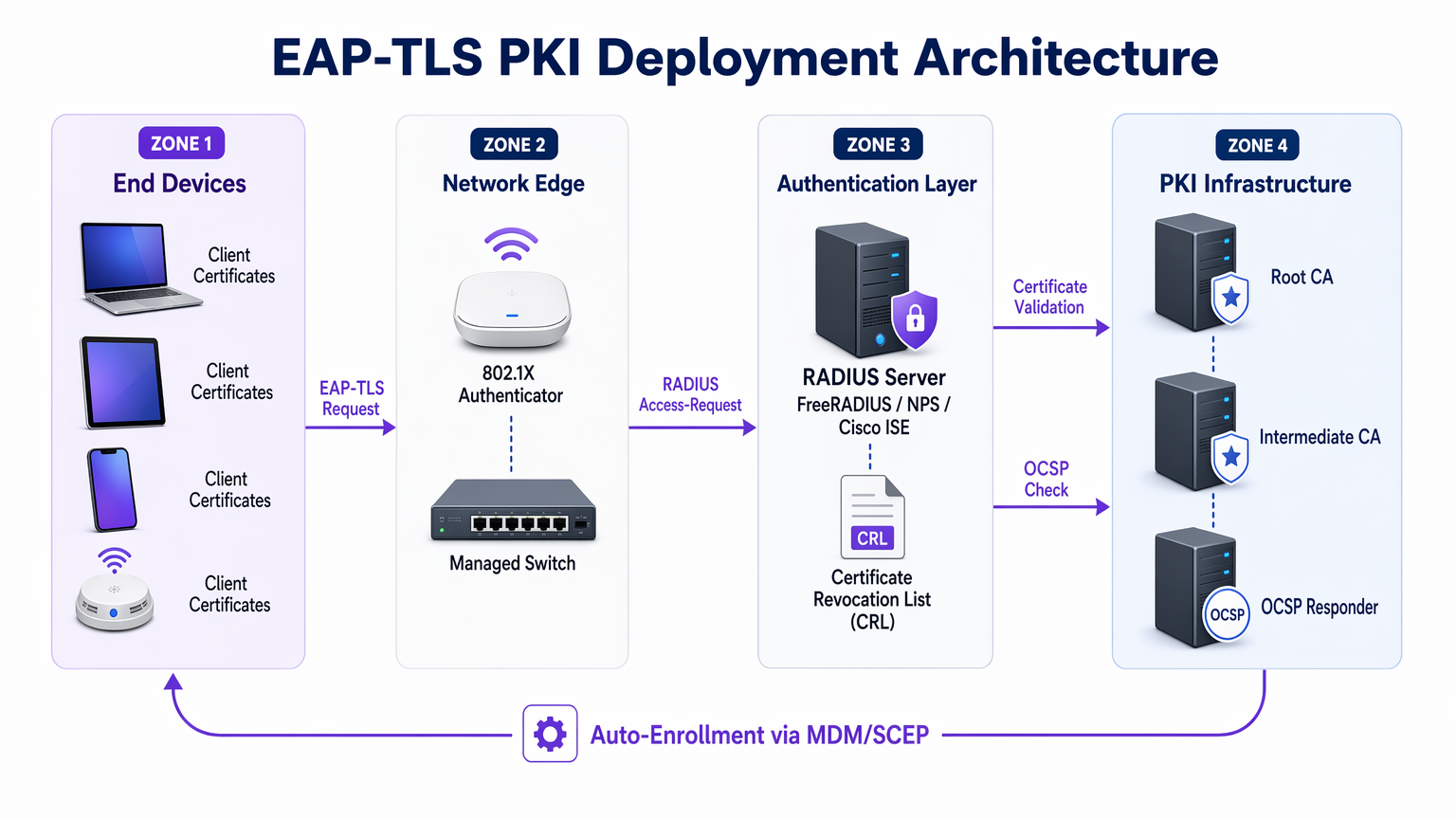
EAP-TLS opera dentro del marco de control de acceso basado en puertos 802.1X. Los tres actores en cada intercambio de autenticación son el solicitante (el dispositivo cliente), el autenticador (el punto de acceso inalámbrico o switch gestionado) y el servidor de autenticación (típicamente un servidor RADIUS como FreeRADIUS, Microsoft NPS o Cisco ISE). El punto de acceso no toma decisiones de autenticación por sí mismo, sino que actúa como un relé transparente, encapsulando mensajes EAP en paquetes RADIUS y reenviándolos al servidor de autenticación.
Para una comprensión más profunda de cómo RADIUS sustenta esta arquitectura, consulte ¿Qué es RADIUS? Cómo los Servidores RADIUS Protegen las Redes WiFi .
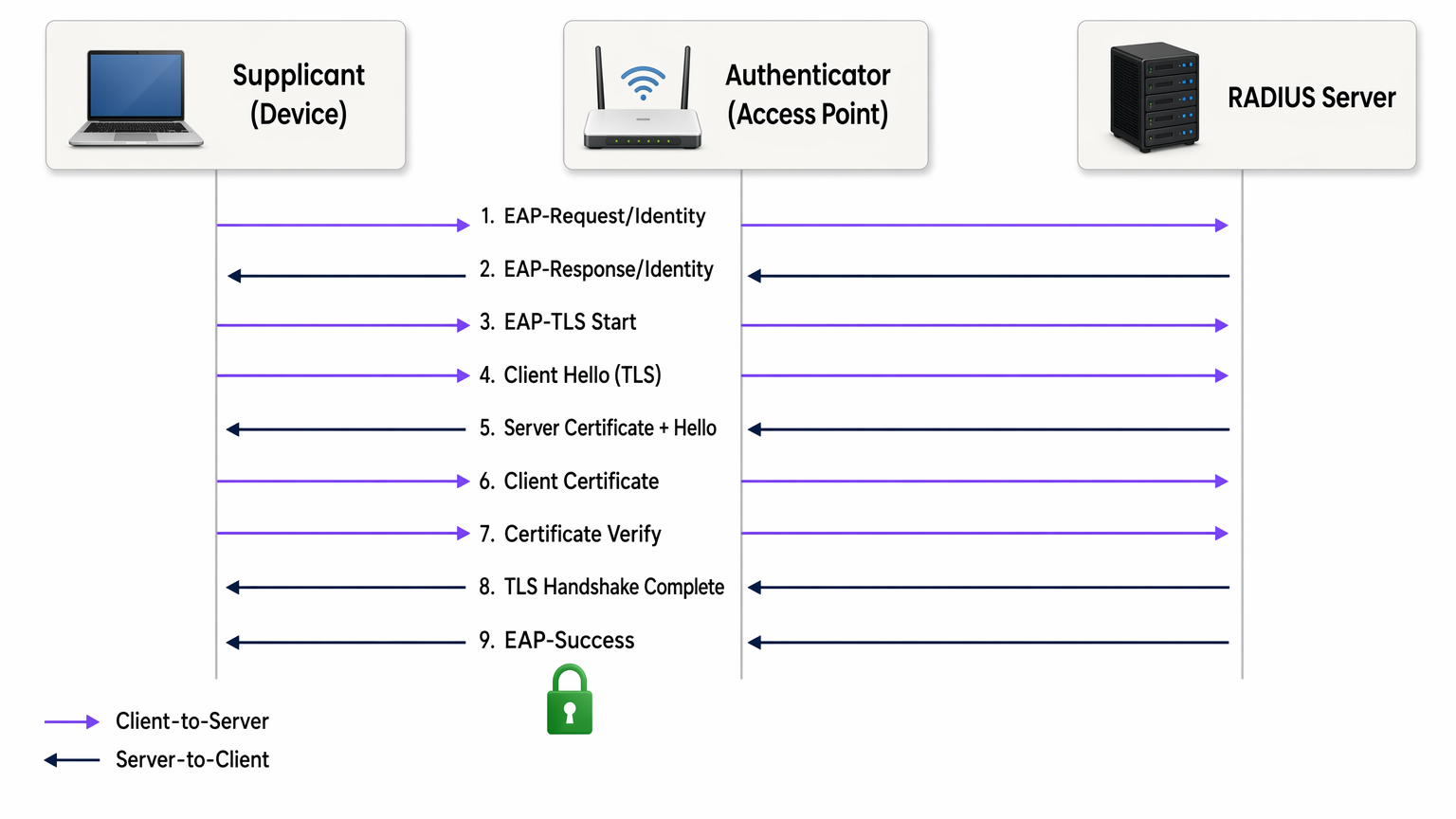
El handshake de EAP-TLS procede de la siguiente manera:
- El punto de acceso envía un EAP-Request/Identity al dispositivo que se conecta.
- El dispositivo responde con su identidad (comúnmente una identidad externa anónima para proteger el nombre de usuario de la escucha).
- El servidor RADIUS inicia el handshake TLS con un mensaje EAP-TLS/Start.
- El cliente envía un ClientHello, anunciando sus suites de cifrado TLS compatibles.
- El servidor RADIUS responde con ServerHello, su certificado de servidor X.509 y una solicitud de certificado.
- El cliente valida el certificado del servidor contra su almacén de CA raíz de confianza. Si la validación falla, el handshake termina, protegiendo contra puntos de acceso no autorizados.
- El cliente presenta su propio certificado de cliente X.509.
- El servidor RADIUS valida el certificado del cliente: verifica la cadena de firma hasta la CA raíz de confianza, comprueba que el certificado no ha caducado y consulta la Lista de Revocación de Certificados (CRL) o el respondedor OCSP para confirmar que el certificado no ha sido revocado.
- Ambas partes derivan claves de sesión del secreto maestro TLS. El servidor RADIUS envía un EAP-Success y el punto de acceso abre el puerto controlado.
Todo el intercambio tiene lugar antes de que se le conceda acceso a la red al dispositivo. No se transmite ninguna contraseña en ningún momento. Las claves de sesión derivadas son únicas por sesión, proporcionando secreto hacia adelante perfecto al usar suites de cifrado ECDHE, lo que significa que el tráfico histórico no puede ser descifrado incluso si un certificado es comprometido posteriormente.
Certificados X.509 y Arquitectura PKI
La seguridad de EAP-TLS depende completamente de la integridad de la PKI subyacente. Una PKI empresarial típica para EAP-TLS consta de tres niveles:
| Tier | Component | Role |
|---|---|---|
| CA Raíz | Autoridad de certificación raíz fuera de línea | Firma certificados de CA intermedios; se mantiene aislada |
| CA Intermedia | CA emisora en línea | Emite certificados de servidor y cliente; gestiona la publicación de CRL |
| Entidades Finales | Certificado de servidor RADIUS + certificados de cliente | Utilizados en el handshake de autenticación en vivo |
La CA raíz debe mantenerse fuera de línea y aislada. Su clave privada, si se ve comprometida, invalida toda su jerarquía de certificados. La CA intermedia gestiona la emisión diaria y publica la CRL. Los certificados de cliente se emiten a dispositivos individuales (no a usuarios), típicamente con un Nombre Alternativo del Sujeto (SAN) que contiene la dirección MAC del dispositivo o un identificador de dispositivo de su MDM.
EAP-TLS vs. Otros Métodos 802.1X
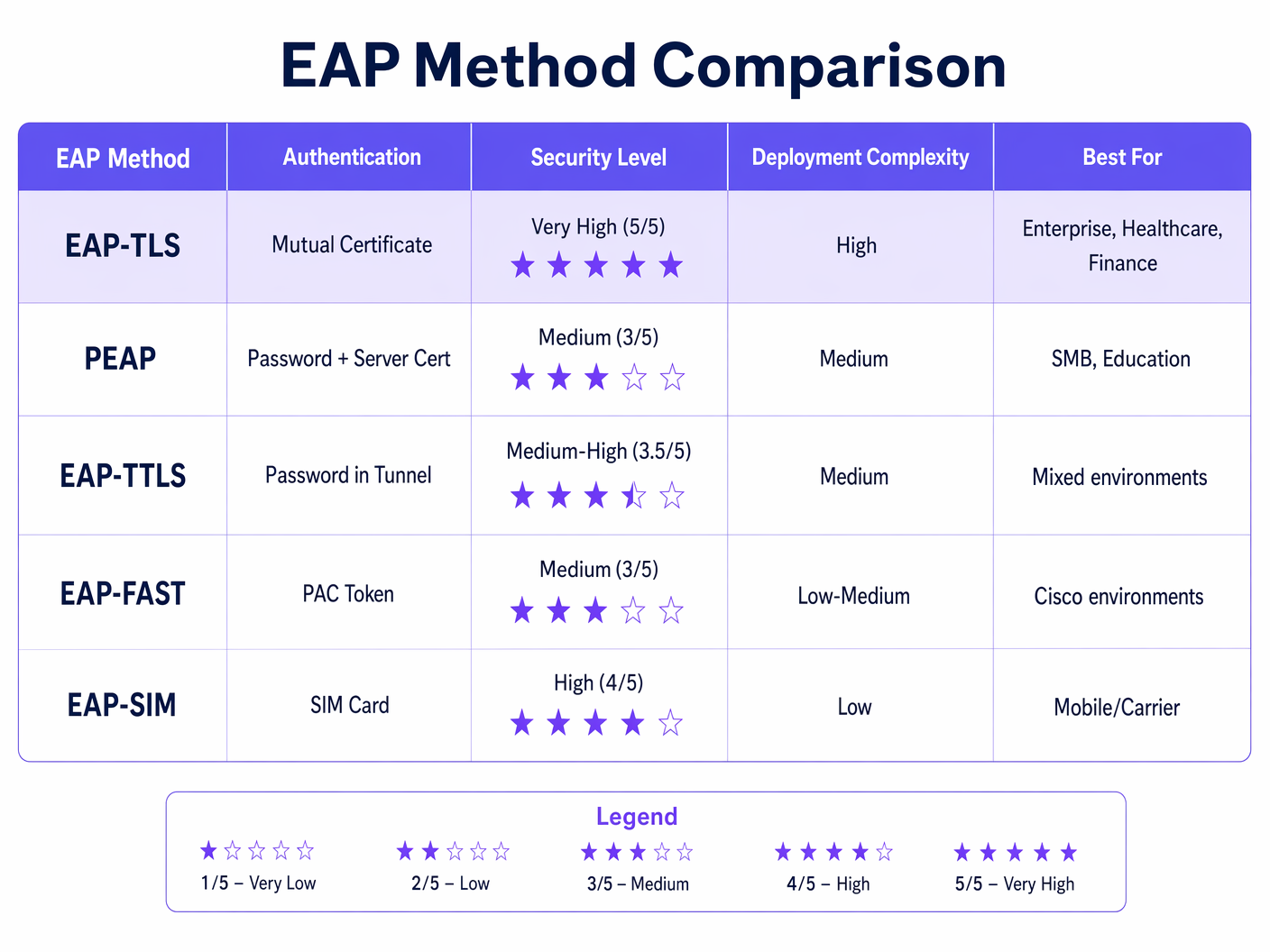
La tabla anterior ilustra por qué EAP-TLS es la opción recomendada para entornos regulados. PEAP-MSCHAPv2, todavía el método 802.1X más ampliamente implementado, tiene vulnerabilidades conocidas: el certificado del servidor con frecuencia no es validado por los clientes (una mala configuración que permite ataques de AP maliciosos), y MSCHAPv2 en sí mismo ha sido criptográficamente roto desde 2012. EAP-TLS elimina ambas superficies de ataque.
WPA2 Enterprise y WPA3 Enterprise
EAP-TLS opera de forma idéntica tanto en WPA2 Enterprise (IEEE 802.11i) como en WPA3 Enterprise (IEEE 802.11ax). La distinción radica en la suite de cifrado negociada para la capa de cifrado de datos inalámbricos. WPA3 Enterprise exige los Marcos de Gestión Protegidos (PMF) y ofrece un modo de seguridad opcional de 192 bits (Suite B) que requiere EAP-TLS con suites de cifrado de curva elíptica específicas (ECDHE + ECDSA o RSA-3072). Para la mayoría de las implementaciones empresariales, WPA3 Enterprise con EAP-TLS y suites de cifrado AES-256 estándar es el estado objetivo apropiado.
Guía de Implementación
Fase 1: Diseño e Implementación de PKI
Antes de configurar un solo punto de acceso, la PKI debe estar en su lugar. Para organizaciones sin una CA interna existente, Microsoft Active Directory Certificate Services (AD CS) es la opción más común en entornos Windows. Para implementaciones multiplataforma o nativas de la nube, HashiCorp Vault PKI, EJBCA o un servicio PKI gestionado como AWS Private CA son alternativas viables.
Decisiones clave en esta etapa:
- Período de validez del certificado: Los certificados de cliente de 1 a 2 años equilibran la seguridad y la sobrecarga operativa. Períodos más cortos aumentan los eventos de revocación; períodos más largos aumentan la ventana de exposición para un certificado comprometido.
- Algoritmo de clave: RSA-2048 sigue siendo ampliamente compatible. ECDSA P-256 ofrece seguridad equivalente con tamaños de certificado más pequeños y handshakes más rápidos — recomendado para nuevas implementaciones.
- CRL vs. OCSP: La distribución de CRL es más sencilla de implementar pero introduce latencia y problemas de caché. OCSP proporciona el estado de revocación en tiempo real. Para entornos de alta seguridad, el OCSP stapling en el servidor RADIUS es el enfoque preferido.
Fase 2: Configuración del Servidor RADIUS
Su servidor RADIUS debe configurarse para:
- Presentar su certificado de servidor (emitido por su CA interna) a los clientes que se conectan.
- Confiar solo en sus CA raíz e intermedias internas para la validación de certificados de cliente — no confíe en CA públicas para la autenticación de clientes.
- Realizar verificaciones de CRL u OCSP en cada certificado de cliente presentado.
- Mapear atributos de certificado (Nombre Común, SAN o extensiones OID) a reglas de política de red — por ejemplo, asignar dispositivos a VLAN específicas basándose en atributos de certificado.
Para una descripción detallada de la arquitectura y configuración del servidor RADIUS, consulte ¿Qué es RADIUS? Cómo los servidores RADIUS aseguran las redes WiFi .
Fase 3: Distribución de Certificados a través de MDM/SCEP
La instalación manual de certificados no escala. Para cualquier implementación más allá de un puñado de dispositivos, el aprovisionamiento de certificados debe automatizarse. El enfoque estándar es:
- Dispositivos corporativos gestionados: Integre su PKI con su plataforma MDM (Microsoft Intune, Jamf, VMware Workspace ONE). Configure un perfil SCEP o EST que solicite e instale automáticamente un certificado de cliente cuando un dispositivo se inscribe. El certificado se vincula al TPM o Secure Enclave del dispositivo donde sea compatible, evitando la exportación del certificado.
- Dispositivos BYOD y de contratistas: Implemente un portal de incorporación (como el portal de invitados de Cisco ISE o una solución BYOD dedicada) que guíe al usuario a través de un proceso de instalación de certificado único. Emita certificados con períodos de validez más cortos y restrinja el acceso a la red a través de la política de VLAN.
- Dispositivos IoT y sin cabeza: Utilice SCEP con contraseñas de desafío precompartidas o EST con credenciales de arranque. La renovación de certificados debe automatizarse a través del mismo protocolo antes de su vencimiento.
Fase 4: Configuración del Punto de Acceso y SSID
Configure el SSID corporativo con:
- Seguridad: WPA2 Enterprise o WPA3 Enterprise (802.1X)
- Tipo de EAP: EAP-TLS
- Servidor RADIUS: Apunte a su servidor de autenticación con secreto compartido
- Asignación de VLAN: Habilite la asignación dinámica de VLAN a través de atributos RADIUS (Tunnel-Type, Tunnel-Medium-Type, Tunnel-Private-Group-ID)
- PMF: Obligatorio para WPA3; muy recomendado para WPA2
Fase 5: Configuración del Solicitante Cliente
Para dispositivos Windows gestionados a través de Directiva de Grupo o Intune, implemente una Política de Red Cableada/Inalámbrica que especifique EAP-TLS, la CA raíz de confianza y los criterios de selección de certificados. En macOS y iOS, implemente un perfil de configuración. En Android, utilice el perfil WiFi gestionado por MDM. Críticamente, aplique la validación del certificado del servidor — especifique la CA y el nombre del servidor exactos. Dejar esto sin marcar es la única configuración errónea más común en las implementaciones 802.1X.
Mejores Prácticas
Aplique la validación del certificado del servidor en todos los solicitantes. La configuración errónea más explotable en las implementaciones 802.1X son los clientes que aceptan cualquier certificado de servidor, lo que permite ataques de puntos de acceso no autorizados. Cada perfil WiFi implementado por MDM debe especificar la CA de confianza y el nombre de servidor esperado (CN o SAN).
Automatice la renovación de certificados antes de su vencimiento. Configure la monitorización para alertar cuando los certificados estén a 30 días de vencer. Configure la renovación automática de SCEP o EST para que los dispositivos renueven los certificados sin intervención del usuario. Un evento de vencimiento masivo de certificados es uno de los incidentes más disruptivos que un equipo de red empresarial puede enfrentar.
Implemente OCSP sobre CRL siempre que sea posible. Los archivos CRL pueden crecer mucho y son almacenados en caché por los clientes, lo que significa que un certificado revocado recientemente aún puede ser aceptado hasta que expire la caché. OCSP proporciona el estado en tiempo real y es el mecanismo de revocación preferido para entornos de alta seguridad.
Segmente su PKI. Utilice CA intermedias separadas para diferentes clases de certificados: una para certificados de servidor RADIUS, una para certificados de dispositivos cliente, una para certificados de usuario. Esto limita el radio de impacto de un compromiso de CA y simplifica la política de revocación.
Registre y supervise los eventos de autenticación. Su servidor RADIUS genera un registro de autenticación para cada intento de conexión. Alimente estos registros en su SIEM. Patrones como fallos de autenticación repetidos, errores de validación de certificados o conexiones desde direcciones MAC inesperadas son indicadores tempranos de configuración errónea o ataque.
Alinéese con PCI DSS 4.0. El requisito 8.6 exige una autenticación fuerte para los componentes del sistema. Para redes inalámbricas dentro del alcance de PCI DSS, EAP-TLS con autenticación basada en certificadostificación satisface el requisito de autenticación multifactor en la capa de red, ya que el certificado (algo que tienes) combinado con la clave privada vinculada al TPM del dispositivo (algo que eres) constituye dos factores.
Solución de Problemas y Mitigación de Riesgos
Modos de Falla Comunes
| Modo de Falla | Síntoma | Causa Raíz | Resolución |
|---|---|---|---|
| Falla en la validación de la cadena de certificados | Falla de EAP después del intercambio de certificados del servidor | El cliente no confía en la CA del servidor RADIUS | Enviar certificado raíz de CA al almacén de confianza del dispositivo a través de MDM |
| Certificado de cliente no presentado | La autenticación se detiene después del certificado del servidor | No hay certificado de cliente instalado o se seleccionó el certificado incorrecto | Verificar que la inscripción SCEP se haya completado; revisar el perfil MDM |
| OCSP/CRL inaccesible | Fallos de autenticación intermitentes | El servidor RADIUS no puede alcanzar el punto final de revocación | Asegurar que las URL de OCSP/CRL sean accesibles desde el servidor RADIUS; implementar caché local de CRL |
| Certificado caducado | Todos los dispositivos fallan la autenticación simultáneamente | Automatización de renovación no configurada | Implementar alertas de caducidad de 30 días; configurar auto-renovación SCEP |
| Ataque de AP malicioso | Los usuarios se conectan a un AP malicioso | Validación de certificado de servidor deshabilitada en el suplicante | Aplicar la validación de certificados de servidor en todos los perfiles MDM WiFi |
| Falla en la asignación de VLAN | El dispositivo se conecta pero obtiene el segmento de red incorrecto | Atributos RADIUS mal configurados | Verificar Tunnel-Type (13=VLAN), Tunnel-Medium-Type (6=802), Tunnel-Private-Group-ID (VLAN ID) |
Mitigación de Riesgos para Implementaciones a Gran Escala
Para entornos de hospitalidad con cientos de puntos de acceso en múltiples propiedades, y para cadenas de retail con sitios distribuidos, el principal riesgo operativo es un evento de caducidad de certificados sincronizado. Escalonar las fechas de emisión de certificados entre los grupos de dispositivos para que las renovaciones se distribuyan a lo largo del tiempo en lugar de ocurrir simultáneamente. Mantener un inventario de certificados en su MDM y ejecutar informes semanales sobre los certificados que caducan en un plazo de 60 días.
Para entornos de salud , el riesgo adicional es la latencia de autenticación que afecta los flujos de trabajo clínicos. Optimice la ubicación de su servidor RADIUS para minimizar el tiempo de ida y vuelta. Considere implementar servidores proxy RADIUS en cada sitio para reducir la dependencia de la WAN para la autenticación.
ROI e Impacto Comercial
Cuantificando la Inversión en Seguridad
El caso de negocio para EAP-TLS sobre 802.1X basado en contraseñas es sencillo cuando se compara con los costos de las brechas. El costo promedio de una brecha de datos en el Reino Unido en 2024 fue de £3.58 millones (Informe de IBM Costo de una Brecha de Datos). Una proporción significativa de las brechas empresariales se originan a partir de credenciales comprometidas. EAP-TLS elimina por completo el vector de robo de credenciales para el acceso a la red.
Para las organizaciones sujetas a PCI DSS, una brecha en la red inalámbrica que resulte en la exposición de datos de titulares de tarjetas conlleva multas, costos de investigación forense y posibles sanciones del esquema de tarjetas que empequeñecen el costo de una implementación de PKI. La alineación con el cumplimiento por sí sola justifica la inversión para cualquier organización que procese pagos con tarjeta a través de infraestructura inalámbrica.
Ganancias en Eficiencia Operativa
Contrariamente a la intuición, una implementación de EAP-TLS bien ejecutada con aprovisionamiento de certificados integrado con MDM puede reducir la carga del servicio de asistencia en comparación con 802.1X basado en contraseñas. Se eliminan los restablecimientos de contraseñas, la gestión de credenciales compartidas y los tickets de "por qué no puedo conectarme a WiFi". El esfuerzo de implementación inicial es mayor al principio, pero las operaciones en estado estable requieren menos intervención.
Para los operadores de recintos que implementan WiFi Analytics junto con redes seguras para el personal, la segmentación habilitada por EAP-TLS y la asignación dinámica de VLAN significa que el tráfico de invitados, el tráfico del personal y el tráfico de dispositivos IoT pueden separarse limpiamente en la misma infraestructura física, lo que reduce los costos de hardware y mejora la postura de seguridad.
El Rol de Purple en la Seguridad de WiFi Empresarial
La plataforma de Purple opera en la intersección de Guest WiFi y la inteligencia de red empresarial. Para las redes de personal y dispositivos corporativos, EAP-TLS proporciona la capa de autenticación. La plataforma WiFi Analytics de Purple se sitúa por encima de esto, proporcionando visibilidad sobre los patrones de uso de la red, los tiempos de permanencia de los dispositivos y la afluencia de visitantes al recinto, datos que solo son significativos cuando la red subyacente está correctamente segmentada y autenticada.
Para las organizaciones que exploran la conectividad fluida basada en OpenRoaming y Passpoint en diferentes recintos, Purple actúa como un proveedor de identidad gratuito bajo la licencia Connect, aprovechando los mismos marcos de identidad basados en 802.1X y certificados que sustentan EAP-TLS. Esto posiciona a EAP-TLS no solo como un control de seguridad, sino como la base para servicios de conectividad avanzados en centros de transporte , propiedades minoristas y recintos de hospitalidad.
Para los arquitectos de red que evalúan cómo se cruzan la seguridad de SD-WAN y WiFi empresarial, Los Beneficios Clave de SD-WAN para Empresas Modernas proporciona un contexto complementario sobre cómo la autenticación segura se integra con las arquitecturas WAN modernas.
Definiciones clave
EAP-TLS (Extensible Authentication Protocol – Transport Layer Security)
An 802.1X authentication method defined in RFC 5216 that uses mutual X.509 certificate authentication between the client device and the RADIUS server. Neither side gains network access without presenting a valid, non-revoked certificate signed by a trusted Certificate Authority.
IT teams encounter EAP-TLS when evaluating 802.1X authentication methods for WPA2 Enterprise or WPA3 Enterprise deployments. It is the recommended method for regulated environments (PCI DSS, HIPAA, ISO 27001) and the required method for WPA3 Enterprise 192-bit (Suite B).
X.509 Certificate
A digital certificate standard (defined in ITU-T X.509 and RFC 5280) that binds a public key to an identity (device, server, or user). It contains the subject's identity, the public key, the issuing CA's digital signature, and validity dates. In EAP-TLS, both the RADIUS server and the client device present X.509 certificates during the authentication handshake.
IT teams encounter X.509 certificates when configuring RADIUS servers (server certificate), enrolling devices via MDM (client certificate), and managing PKI infrastructure. Certificate expiry and revocation are the primary operational concerns.
PKI (Public Key Infrastructure)
The combination of hardware, software, policies, and procedures required to create, manage, distribute, store, and revoke digital certificates. In an EAP-TLS deployment, the PKI consists of at minimum a root CA and an issuing CA, plus the CRL/OCSP infrastructure for revocation.
PKI is the foundational dependency for any EAP-TLS deployment. IT teams must design and operate a PKI before EAP-TLS can be deployed. Common PKI platforms include Microsoft AD CS, EJBCA, HashiCorp Vault PKI, and managed services such as AWS Private CA.
RADIUS (Remote Authentication Dial-In User Service)
A networking protocol (RFC 2865) providing centralised authentication, authorisation, and accounting (AAA) for network access. In 802.1X/EAP-TLS deployments, the RADIUS server validates client certificates, enforces network policy, and returns VLAN assignment attributes to the access point.
RADIUS is the authentication server component in every 802.1X deployment. Common implementations include Microsoft NPS, FreeRADIUS, Cisco ISE, and Aruba ClearPass. The RADIUS server must be configured to trust the internal CA and perform certificate revocation checks.
Mutual Authentication
An authentication process in which both communicating parties verify each other's identity before establishing a connection. In EAP-TLS, the client validates the RADIUS server's certificate (protecting against rogue APs) and the RADIUS server validates the client's certificate (protecting against unauthorised device access).
Mutual authentication is the key differentiator of EAP-TLS over PEAP and EAP-TTLS. IT teams should emphasise mutual authentication when justifying EAP-TLS to security auditors and compliance teams, as it directly addresses the rogue AP and credential theft threat vectors.
SCEP (Simple Certificate Enrollment Protocol)
A protocol (originally defined by Cisco, standardised in RFC 8894) that enables automated certificate requests and issuance between a client device and a Certificate Authority. In EAP-TLS deployments, SCEP is used by MDM platforms to automatically provision client certificates to managed devices without user intervention.
SCEP is the standard mechanism for zero-touch certificate provisioning in enterprise MDM environments. IT teams configure SCEP profiles in Intune, Jamf, or Workspace ONE to automate client certificate deployment and renewal.
CRL (Certificate Revocation List)
A periodically published list of certificate serial numbers that have been revoked by the issuing CA before their expiry date. RADIUS servers check the CRL to ensure a client certificate presented during EAP-TLS authentication has not been revoked (e.g., due to device theft or employee departure).
CRL management is a critical operational consideration in EAP-TLS deployments. IT teams must ensure the CRL distribution point is accessible from RADIUS servers, that CRLs are published frequently enough to reflect recent revocations, and that RADIUS servers are configured to reject authentication if the CRL cannot be retrieved.
OCSP (Online Certificate Status Protocol)
A real-time certificate revocation checking protocol (RFC 6960) that allows a RADIUS server to query the CA's OCSP responder for the current status of a specific certificate, rather than downloading and parsing a full CRL. OCSP provides lower latency and more current revocation information than CRL-based checking.
IT teams should prefer OCSP over CRL for high-security environments where real-time revocation is important (e.g., immediately revoking a certificate when a device is reported stolen). OCSP stapling, where the RADIUS server caches and presents the OCSP response, reduces latency and eliminates dependency on the OCSP responder being reachable during every authentication.
802.1X (Port-Based Network Access Control)
An IEEE standard that provides an authentication framework for devices attempting to connect to a LAN or WLAN. It defines three roles: supplicant (the connecting device), authenticator (the access point or switch), and authentication server (RADIUS). EAP-TLS is one of several EAP methods that can be used within the 802.1X framework.
802.1X is the overarching framework within which EAP-TLS operates. IT teams encounter 802.1X when configuring WPA2 Enterprise or WPA3 Enterprise SSIDs, and when configuring wired port authentication on managed switches. Understanding 802.1X is a prerequisite for deploying EAP-TLS.
Perfect Forward Secrecy (PFS)
A cryptographic property of key exchange protocols that ensures session keys cannot be derived from the long-term private key. In EAP-TLS with ECDHE cipher suites, each session generates a unique ephemeral key pair, meaning that compromise of the certificate's private key does not expose historical session traffic.
IT teams should specify ECDHE-based cipher suites when configuring EAP-TLS to ensure PFS. This is particularly important in environments where network traffic is recorded and could be subject to future decryption attempts (a 'harvest now, decrypt later' attack scenario).
Ejemplos resueltos
A 450-room hotel group with 12 properties needs to migrate its staff WiFi from PEAP-MSCHAPv2 to EAP-TLS. The group runs Windows 10/11 laptops managed via Microsoft Intune, plus approximately 200 Android tablets used by housekeeping staff. The IT team has no existing internal PKI. What is the recommended deployment approach?
Step 1 — PKI Deployment (Weeks 1–3): Deploy Microsoft AD CS with a two-tier hierarchy. Stand up an offline root CA on a dedicated server that will be powered down after initial setup. Deploy an online issuing CA (intermediate CA) on a Windows Server VM. Configure the issuing CA to publish CRLs to an internal web server accessible from all RADIUS servers across the 12 properties. Enable the OCSP responder role on the issuing CA server.
Step 2 — RADIUS Infrastructure (Weeks 2–4): Deploy Microsoft NPS (Network Policy Server) at each property, or centralise with NPS proxy servers at each site pointing to a central NPS cluster. Issue a RADIUS server certificate from the internal CA to each NPS instance. Configure NPS network policy: authentication method = EAP-TLS, trusted root CA = internal root CA, certificate validation = enabled, VLAN assignment via RADIUS attributes.
Step 3 — Intune Certificate Profiles (Weeks 3–5): In Microsoft Intune, create a Trusted Certificate profile to push the root CA certificate to all managed devices. Create a SCEP Certificate profile targeting the issuing CA, with subject name format CN={{DeviceId}}, key usage = Digital Signature, extended key usage = Client Authentication. Create a WiFi profile specifying EAP-TLS, the SCEP certificate profile as the client certificate, and the root CA as the trusted server certificate authority.
Step 4 — Android Tablet Enrolment (Weeks 4–6): Enrol Android tablets into Intune via Android Enterprise (Dedicated Device mode). Deploy equivalent Trusted Certificate, SCEP Certificate, and WiFi configuration profiles. Verify certificate installation on a pilot group of 10 tablets before full rollout.
Step 5 — Pilot and Cutover (Weeks 6–8): Run EAP-TLS in parallel with PEAP on a separate SSID at one pilot property. Validate authentication success rates, VLAN assignment, and certificate renewal behaviour. Roll out property by property. Decommission PEAP SSID after 30-day parallel run at each site.
A national retail chain with 280 stores needs to secure its point-of-sale WiFi network to meet PCI DSS 4.0 requirements. Each store has 8–15 Windows-based POS terminals, a mix of managed and unmanaged devices, and a single IT administrator who manages all stores remotely. The chain currently uses a shared WPA2-PSK password across all stores. What is the migration path to EAP-TLS?
Assessment and Scoping: First, define the PCI DSS cardholder data environment (CDE) scope. POS terminals processing card data are in scope; staff break-room devices are not. Segment the network so that only POS terminals are on the EAP-TLS secured SSID. This limits the certificate deployment scope to a known, managed device population.
Centralised PKI and RADIUS: Deploy a cloud-hosted RADIUS service (e.g., Cisco ISE in the cloud, or JumpCloud RADIUS) to eliminate the need for on-premise RADIUS hardware at each store. This is critical for a distributed retail estate where local server management is not feasible. The cloud RADIUS service connects to the internal PKI via a secure tunnel.
MDM-Driven Certificate Deployment: All POS terminals must be enrolled in an MDM (Microsoft Intune or equivalent). Deploy the root CA trust anchor and SCEP certificate profile via MDM policy. The certificate subject should include the store number and terminal ID (e.g., CN=POS-STORE042-TERM003) to enable granular RADIUS policy and audit logging.
SSID Configuration: Configure a dedicated POS SSID at each store access point with WPA2 Enterprise / EAP-TLS. Use dynamic VLAN assignment to place authenticated POS terminals on the CDE VLAN. Implement a separate guest SSID on a completely isolated VLAN for customer WiFi.
Monitoring and Compliance Evidence: Configure RADIUS authentication logs to be forwarded to a central SIEM. Generate monthly reports showing authentication success rates, certificate validity status, and any revocation events. This log data constitutes audit evidence for PCI DSS Requirement 10 (logging and monitoring) and Requirement 8.6 (authentication management).
Preguntas de práctica
Q1. Your organisation runs a 600-bed hospital with 1,200 managed Windows laptops and 400 shared Android tablets used by nursing staff. The current WiFi uses PEAP-MSCHAPv2 with Active Directory credentials. A recent penetration test identified that none of the client devices validate the RADIUS server certificate, and the tester successfully performed a rogue AP attack capturing AD credentials. You have been asked to remediate this within 90 days. What is your prioritised remediation plan?
Sugerencia: Consider what can be fixed immediately (configuration change) versus what requires infrastructure work (PKI deployment). Not all remediation steps require EAP-TLS — some can be applied to the existing PEAP deployment while the longer-term migration is planned.
Ver respuesta modelo
Immediate (Week 1–2): Fix server certificate validation on existing PEAP deployment. Push a GPO/Intune WiFi profile update to all managed Windows devices that specifies the trusted root CA and the RADIUS server's expected CN/SAN. This immediately closes the rogue AP vulnerability without requiring PKI changes. For Android tablets, push an updated MDM WiFi profile. This addresses the critical finding within days.
Short-term (Weeks 2–8): Deploy internal PKI. Stand up a two-tier AD CS PKI (offline root CA + online issuing CA). Issue a new RADIUS server certificate from the internal CA. Update the NPS configuration. Push the new root CA trust anchor to all devices via MDM.
Medium-term (Weeks 6–12): Migrate to EAP-TLS for managed devices. Configure SCEP profiles in Intune for Windows laptops. Deploy client certificate profiles. Create a new EAP-TLS SSID in parallel with the existing PEAP SSID. Pilot with 50 laptops, validate, then roll out in waves. Shared Android tablets are more complex — evaluate whether Android Enterprise Dedicated Device enrolment is feasible, or whether a certificate-based onboarding portal is more appropriate for shared-use devices.
Key consideration: HIPAA requires appropriate safeguards for wireless networks carrying ePHI. The rogue AP vulnerability is a reportable risk. Document the remediation timeline and interim controls for your compliance officer.
Q2. A conference centre is deploying a new WiFi infrastructure to support both a secure staff network (EAP-TLS) and a guest WiFi network. The venue hosts events for up to 5,000 attendees. The IT manager wants to use the same physical access point infrastructure for both networks. How should the network be architected to achieve this, and what are the key configuration decisions?
Sugerencia: Consider SSID segmentation, VLAN design, and the different authentication requirements for staff (certificate-based) versus guests (captive portal or social login). Think about how Purple's guest WiFi platform integrates with this architecture.
Ver respuesta modelo
SSID and VLAN Design: Deploy two SSIDs on the same physical access point infrastructure. SSID 1 (Staff): WPA3 Enterprise / EAP-TLS, broadcasting on 5GHz and 6GHz bands, mapped to Staff VLAN (e.g., VLAN 10). SSID 2 (Guest): WPA3 Personal or Open with OWE (Opportunistic Wireless Encryption), mapped to Guest VLAN (e.g., VLAN 20). The Guest VLAN should have no access to the Staff VLAN or internal infrastructure — only internet access.
Staff Network: Configure RADIUS server with EAP-TLS policy. Issue client certificates to all staff devices via MDM. Use dynamic VLAN assignment to place authenticated staff devices on VLAN 10. Consider deploying a separate SSID for AV/event management equipment on VLAN 30 with EAP-TLS and a separate certificate policy.
Guest Network: Integrate with Purple's Guest WiFi platform for captive portal authentication, social login, or email capture. The guest network operates entirely independently of the EAP-TLS infrastructure. Purple's WiFi Analytics platform provides dwell time, footfall, and engagement data from the guest network.
Capacity Planning: For 5,000 concurrent guests, ensure the guest VLAN's DHCP scope, internet uplink, and access point density are sized appropriately. EAP-TLS authentication adds negligible overhead per-connection but RADIUS server capacity should be validated for peak event load.
Q3. A retail CTO is evaluating whether to deploy EAP-TLS for 350 stores or to continue with WPA2-PSK with a rotated shared key. The IT team is small (3 people) and has no PKI experience. The CTO's primary concern is PCI DSS compliance for the POS network. What is your recommendation, and how do you frame the business case?
Sugerencia: Consider the PCI DSS requirements, the operational capacity of a small IT team, and whether there are managed service options that reduce the PKI burden. The answer is not necessarily 'deploy full EAP-TLS immediately' — a phased or managed approach may be more appropriate.
Ver respuesta modelo
Recommendation: EAP-TLS via a managed RADIUS and PKI service, phased over 6 months.
WPA2-PSK is not acceptable for a PCI DSS cardholder data environment. PCI DSS Requirement 8 mandates individual authentication for system components, and a shared PSK does not satisfy this. A breach of the PSK exposes all 350 stores simultaneously. The risk is not theoretical — POS network breaches via compromised WiFi credentials are a documented attack vector in retail.
Managed Service Approach: Rather than building internal PKI expertise, engage a managed RADIUS and PKI provider (e.g., Foxpass, JumpCloud, or SecureW2). These services provide a hosted RADIUS server, a managed CA, and MDM integration out of the box. The IT team configures MDM certificate profiles and access point RADIUS settings — no PKI expertise required. Cost is typically $3–8 per device per month, which is trivial against the cost of a PCI DSS breach.
Business Case: Frame the investment against three cost categories: (1) PCI DSS non-compliance fines and forensic investigation costs following a breach — typically £50k–£500k for a mid-size retailer; (2) card scheme penalties for a cardholder data breach — potentially millions; (3) reputational damage and customer churn. The managed service cost for 350 stores with 15 POS terminals each (5,250 devices) at $5/device/month is approximately $26,250/month — less than the daily cost of a breach investigation.
Continúe leyendo esta serie
PSK por dispositivo por proveedor: comparación de iPSK, DPSK, MPSK y PPSK (y soporte de WPA3)
Una comparación exhaustiva de las implementaciones de PSK por dispositivo en Cisco Meraki, HPE Aruba, Ruckus, Juniper Mist, Extreme, Fortinet y Ubiquiti UniFi. Conozca cómo WPA3-SAE afecta las estrategias de claves por dispositivo y cuándo implementar modos de transición en lugar de migrar a 802.1X.
¿Qué es la autenticación por dirección MAC? Cuándo usarla y cuándo evitarla
Esta guía técnica de referencia autorizada cubre la autenticación por dirección MAC en entornos WiFi empresariales: cómo funciona la autenticación MAC basada en RADIUS en la Capa 2, sus vulnerabilidades de seguridad inherentes (incluyendo la suplantación de MAC y el impacto de la aleatorización de MAC a nivel de sistema operativo), y los contextos operativos precisos donde sigue siendo una herramienta válida para gestionar dispositivos IoT y sin interfaz. Proporciona una guía de implementación práctica para gerentes de TI y arquitectos de red en hostelería, comercio minorista, atención médica y recintos del sector público, con ejemplos prácticos del mundo real, marcos de decisión y contexto de integración para la plataforma de WiFi para invitados y análisis de Purple.
Cómo Configurar WiFi Empresarial en iOS y macOS con 802.1X
Esta guía autorizada proporciona a los líderes de TI senior pasos prácticos para implementar WiFi empresarial 802.1X en dispositivos iOS y macOS. Cubre la autenticación basada en certificados (EAP-TLS), perfiles de configuración MDM y la integración de arquitectura para asegurar las redes corporativas mientras se apoyan las iniciativas BYOD.