

¿Qué es RADIUS? Cómo los servidores RADIUS aseguran las redes WiFi
Esta guía de referencia técnica autorizada explica cómo RADIUS (Remote Authentication Dial-In User Service) sustenta la seguridad WiFi empresarial a través del marco IEEE 802.1X, cubriendo arquitectura, implementación y cumplimiento. Diseñada para gerentes de TI, arquitectos de red y directores de operaciones de recintos, proporciona orientación práctica sobre cómo pasar de Claves Pre-Compartidas (Pre-Shared Keys) compartidas a autenticación por usuario con aplicación dinámica de políticas. La guía también mapea los puntos de integración de RADIUS con la plataforma de WiFi para invitados y análisis de Purple, con estudios de caso concretos de entornos de hospitalidad y retail.
🎧 Escucha esta guía
Ver transcripción

Resumen Ejecutivo
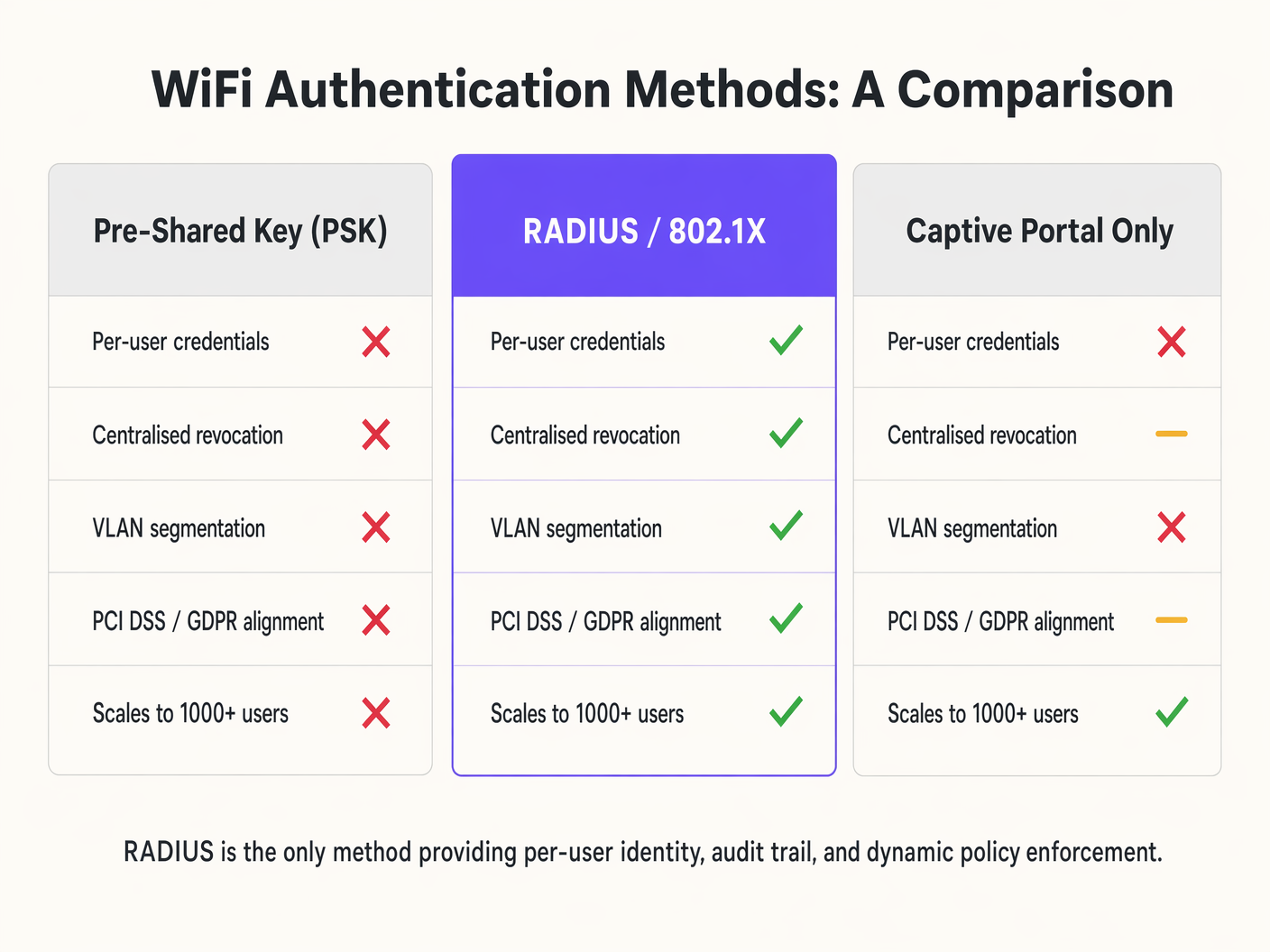
Para los arquitectos de redes empresariales y directores de TI, asegurar el acceso inalámbrico en recintos distribuidos requiere más que una contraseña compartida. A medida que la densidad de dispositivos aumenta en los sectores de hospitalidad, retail y público, las limitaciones de las Claves Pre-Compartidas (PSK) y los captive portals básicos se convierten en vulnerabilidades críticas. Remote Authentication Dial-In User Service (RADIUS) proporciona la arquitectura fundamental para una seguridad WiFi robusta y escalable.
Esta guía de referencia técnica detalla cómo RADIUS opera dentro del marco 802.1X para ofrecer autenticación por usuario, aplicación dinámica de políticas y registros de auditoría completos. Al centralizar la gestión de identidades, RADIUS permite el acceso a la red de confianza cero, mitigando los riesgos de compartir credenciales y el acceso no autorizado, al tiempo que garantiza el cumplimiento de estrictos estándares de protección de datos. Exploramos los componentes principales, las metodologías de implementación y cómo la integración de RADIUS con plataformas como la infraestructura de WiFi para invitados de Purple agiliza las operaciones al tiempo que mejora la postura de seguridad.
Análisis Técnico Profundo: Arquitectura de RADIUS y 802.1X
RADIUS es un protocolo de capa de aplicación que opera sobre UDP (tradicionalmente el puerto 1812 para autenticación y 1813 para contabilidad) que proporciona gestión centralizada de Autenticación, Autorización y Contabilidad (AAA) para usuarios que se conectan a un servicio de red.
Al asegurar el WiFi empresarial, RADIUS actúa como el servidor de autenticación dentro del marco IEEE 802.1X. Esta arquitectura consta de tres componentes principales:
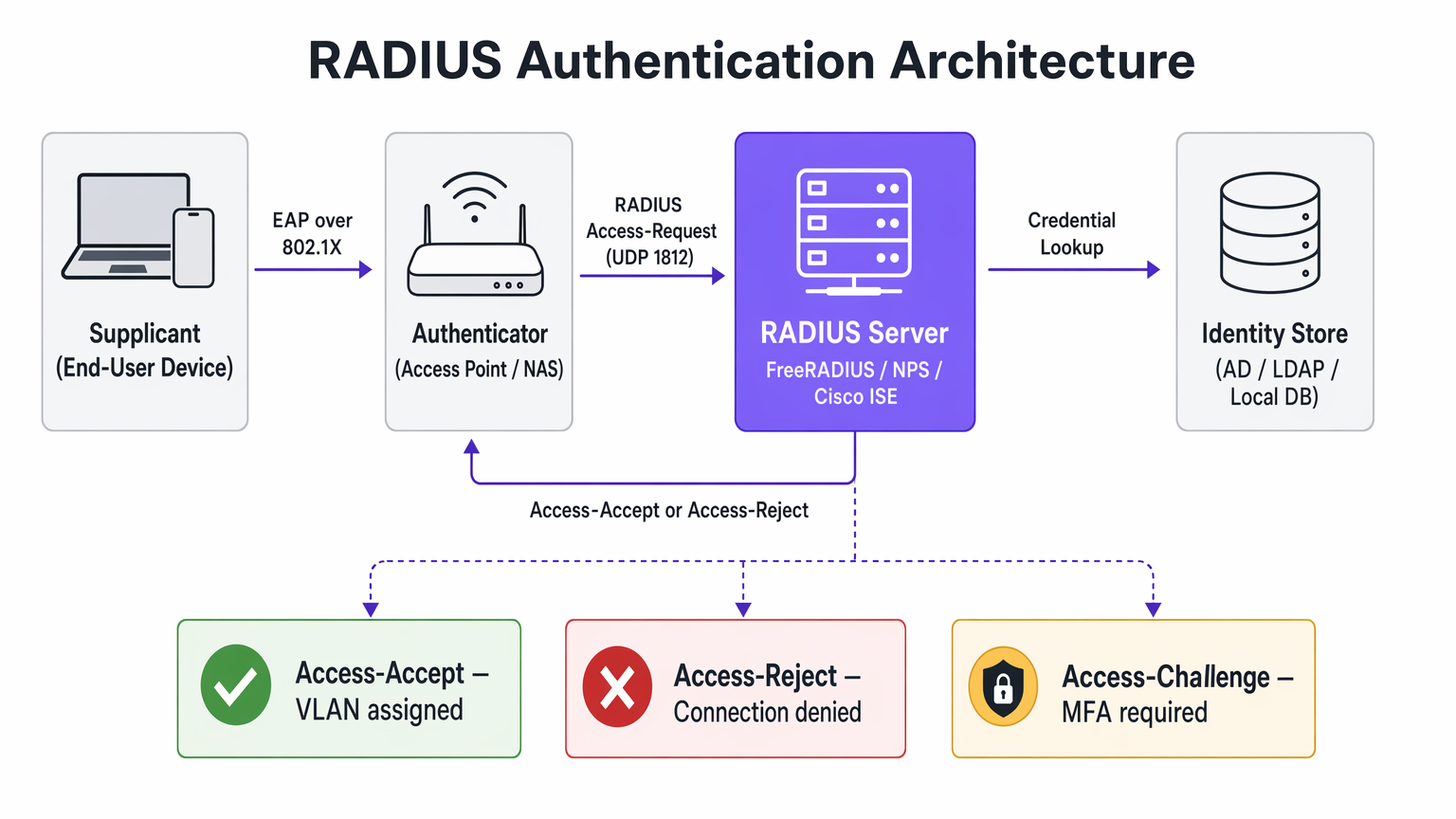
El Solicitante es el dispositivo del usuario final — laptop, smartphone o dispositivo IoT — que solicita acceso a la red. El Autenticador es el Servidor de Acceso a la Red (NAS), típicamente el punto de acceso inalámbrico o switch, que bloquea todo el tráfico hasta que la autenticación es exitosa. El Servidor de Autenticación es el propio servidor RADIUS, que valida las credenciales contra un almacén de identidades como Active Directory, LDAP o un proveedor de identidad en la nube.
El Flujo de Autenticación
Cuando un dispositivo se asocia con un SSID habilitado para 802.1X, el punto de acceso restringe todo el tráfico excepto los mensajes del Protocolo de Autenticación Extensible (EAP). El Autenticador envía un paquete EAP-Request/Identity al Solicitante. El Solicitante responde con un EAP-Response/Identity, que el Autenticador encapsula en un paquete RADIUS Access-Request y lo reenvía al servidor RADIUS. El servidor RADIUS negocia un método EAP — como EAP-TLS o PEAP-MSCHAPv2 — con el Solicitante para intercambiar credenciales de forma segura. Tras una validación exitosa contra el almacén de identidades, el servidor RADIUS devuelve un paquete RADIUS Access-Accept. Este paquete a menudo contiene Atributos Específicos del Proveedor (VSAs) que instruyen al Autenticador a aplicar políticas específicas, como asignar al usuario a una VLAN particular o aplicar límites de ancho de banda.
Métodos EAP y Postura de Seguridad
La seguridad de una implementación de RADIUS depende en gran medida del método EAP elegido. EAP-TLS (Transport Layer Security) es el estándar de oro para la seguridad empresarial. Requiere certificados tanto del servidor como del cliente, eliminando la dependencia de contraseñas y mitigando el robo de credenciales. Sin embargo, exige una Infraestructura de Clave Pública (PKI) robusta y Gestión de Dispositivos Móviles (MDM) para el aprovisionamiento de certificados. PEAP (Protected EAP) crea un túnel TLS cifrado entre el Solicitante y el servidor RADIUS, dentro del cual ocurre la autenticación interna — típicamente MSCHAPv2 usando un nombre de usuario y contraseña. Aunque es más fácil de implementar que EAP-TLS, es vulnerable a la recolección de credenciales si los usuarios omiten las advertencias de validación del certificado del servidor.
La Función de Contabilidad
Más allá de la autenticación y autorización, RADIUS proporciona registros de contabilidad detallados. Cada inicio, detención y actualización intermedia de sesión se registra, capturando la identidad del usuario, la dirección MAC del dispositivo, la duración de la sesión y los datos transferidos. Este registro de auditoría es un requisito de cumplimiento bajo PCI DSS para entornos de Retail y respalda las obligaciones de control de acceso de GDPR. La integración de estos datos con plataformas de WiFi Analytics extiende su valor a la inteligencia operativa.
Guía de Implementación: Despliegue de RADIUS para WiFi Empresarial
El despliegue de RADIUS requiere una planificación cuidadosa para garantizar alta disponibilidad, baja latencia y una experiencia de usuario fluida.
Arquitectura y Dimensionamiento
RADIUS es una ruta crítica para el acceso a la red. Despliegue servidores RADIUS redundantes en centros de datos o zonas de disponibilidad geográficamente diversas. Configure los Autenticadores con direcciones IP de servidor RADIUS primarias y secundarias para habilitar la conmutación por error automática. La autenticación RADIUS es sensible a la latencia — una alta latencia puede causar tiempos de espera de EAP, lo que resulta en conexiones fallidas. Posicione los servidores RADIUS cerca del borde de la red cuando sea factible, o utilice soluciones RADIUS en la nube con puntos de presencia globales.
Integración con Almacenes de Identidad
El servidor RADIUS debe comunicarse con su fuente de verdad para la identidad del usuario. Para implementaciones locales, la integración con Microsoft Active Directory a través de Network Policy Server (NPS) o FreeRADIUS con enlaces LDAP es estándar. Las implementaciones modernas aprovechan cada vez más los proveedores de identidad en la nube (IdPs) como Azure AD, Okta o Google Workspace. Esto a menudo requiere el despliegue de un proxy RADIUS o la utilización de servicios RADIUS en la nube que conectan de forma nativa el protocolo RADIUS a las API de SAML y OIDC.
Aplicación de Políticas y Segmentación
Aproveche los atributos de RADIUS para asignar dinámicamente políticas de red basadas en la identidad del usuario o la pertenencia a grupos. En lugar de transmitir múltiples SSIDs para diferendiferentes grupos de usuarios — Staff, Management, IoT — transmiten un único SSID 802.1X. El servidor RADIUS devuelve el atributo Tunnel-Private-Group-ID para asignar al usuario a la VLAN adecuada de forma dinámica. Aplique Listas de Control de Acceso (ACLs) basadas en las respuestas de RADIUS para restringir el acceso a recursos internos sensibles, implementando el Control de Acceso Basado en Roles (RBAC) en la capa de red.

Mejores Prácticas y Cumplimiento
La implementación de RADIUS es un componente clave para alinearse con los estándares de la industria y los marcos regulatorios.
Asegurando la Infraestructura RADIUS
RADIUS utiliza un secreto compartido para cifrar la comunicación entre el Autenticador y el servidor RADIUS. Utilice secretos compartidos fuertes y generados aleatoriamente — un mínimo de 32 caracteres — y rótelos periódicamente. Coloque los servidores RADIUS en una VLAN de gestión segura y aislada. Restrinja el acceso utilizando reglas estrictas de firewall, permitiendo solo UDP 1812 y 1813 de Autenticadores conocidos. Si utiliza EAP-TLS o PEAP, asegúrese de que el certificado del servidor RADIUS sea emitido por una Autoridad de Certificación (CA) de confianza para los dispositivos cliente, y monitoree rigurosamente las fechas de vencimiento de los certificados.
Consideraciones de Cumplimiento
Para entornos de Comercio Minorista que manejan datos de tarjetas de pago, RADIUS satisface los requisitos de PCI DSS para la identificación única de usuarios y la criptografía fuerte para redes inalámbricas. Para entornos de Salud , RADIUS proporciona el control de acceso y la pista de auditoría requeridos bajo los marcos de protección de datos. Al proporcionar responsabilidad individual, RADIUS apoya los requisitos de GDPR para la seguridad de los datos y el control de acceso. La integración de RADIUS con una plataforma de Análisis de WiFi permite políticas de recopilación y retención de datos conformes. Comprender la interacción entre RADIUS y los estándares de cifrado inalámbrico también es fundamental — nuestra guía WPA, WPA2 y WPA3: ¿Cuál es la diferencia y cuál debería usar? cubre la capa de cifrado en detalle.
Solución de Problemas y Mitigación de Riesgos
Cuando la autenticación RADIUS falla, el impacto es inmediato: los usuarios no pueden conectarse. Un enfoque sistemático para la solución de problemas es esencial.
Desajuste del Secreto Compartido es el error de configuración más común. Si el secreto compartido en el AP no coincide con el servidor, el servidor RADIUS descartará silenciosamente los paquetes Access-Request. El síntoma es un tiempo de espera de conexión del cliente sin registros correspondientes en el servidor RADIUS. Los Tiempos de Espera EAP son causados por la latencia de la red entre el AP y el servidor RADIUS, o por un servidor RADIUS sobrecargado. El síntoma es que se solicita repetidamente a los clientes sus credenciales o que no logran conectarse durante las horas pico. Los Problemas de Confianza del Certificado ocurren cuando el dispositivo cliente no confía en la CA que firmó el certificado del servidor RADIUS, lo que provoca la terminación de la negociación EAP. El síntoma es una advertencia de certificado en el cliente o un fallo de conexión silencioso. Los fallos de Conectividad del Almacén de Identidades ocurren cuando el servidor RADIUS no puede alcanzar Active Directory o LDAP para validar las credenciales, lo que resulta en fallos de autenticación a pesar de las credenciales correctas.
Para mitigar estos riesgos, agregue los registros de RADIUS en una plataforma SIEM o de registro centralizado para monitoreo y alertas en tiempo real. Implemente sondas sintéticas que simulen continuamente autenticaciones 802.1X para detectar problemas de latencia o disponibilidad antes de que afecten a los usuarios. Para organizaciones con propiedades distribuidas, comprender cómo RADIUS encaja en la arquitectura WAN más amplia es valioso — Los Beneficios Clave de SD WAN para Empresas Modernas proporciona un contexto relevante sobre los principios de diseño de red.
ROI e Impacto Empresarial
La transición a una arquitectura 802.1X respaldada por RADIUS requiere inversión en infraestructura y configuración, pero el retorno es significativo para entornos empresariales.
Eficiencia Operativa
RADIUS elimina la necesidad de actualizar y distribuir manualmente las Claves Pre-Compartidas cuando un empleado se va o una clave se ve comprometida. La integración con plataformas MDM permite el aprovisionamiento sin contacto de certificados o perfiles, simplificando la incorporación de dispositivos. Para operadores de Hostelería que gestionan cientos de dispositivos de personal en múltiples propiedades, esta simplificación operativa se traduce directamente en una reducción de los gastos generales de TI. Para centros de Transporte que gestionan miles de conexiones concurrentes, la escalabilidad de RADIUS es innegociable.
Seguridad y Análisis Mejorados
El control de acceso granular y la asignación dinámica de VLAN reducen el radio de impacto de una posible brecha al limitar el movimiento lateral. Los datos de contabilidad de RADIUS proporcionan información valiosa sobre la utilización de la red y el comportamiento del usuario. Cuando se integra con la plataforma de Purple, estos datos mejoran las capacidades de análisis, impulsando mejores decisiones operativas en todos los tipos de recintos. La combinación de autenticación segura y análisis procesables representa la propuesta de valor completa de la infraestructura WiFi empresarial.
Términos clave y definiciones
RADIUS (Remote Authentication Dial-In User Service)
A networking protocol providing centralised Authentication, Authorization, and Accounting (AAA) management for users connecting to a network service. Operates over UDP ports 1812 (authentication) and 1813 (accounting).
The core infrastructure required to move from shared passwords to individual user identities on an enterprise WiFi network.
802.1X
An IEEE standard for port-based Network Access Control (PNAC), providing an authentication mechanism to devices wishing to attach to a LAN or WLAN. It defines the roles of Supplicant, Authenticator, and Authentication Server.
The framework that utilises RADIUS to secure enterprise wireless networks. Any enterprise WiFi deployment targeting WPA2-Enterprise or WPA3-Enterprise must implement 802.1X.
Supplicant
The client device — laptop, smartphone, or IoT device — that wishes to attach to the network and must provide credentials to the Authenticator.
The endpoint that requires configuration, often via MDM, to support the chosen EAP method and trust the RADIUS server's certificate.
Authenticator
The network device — typically a wireless Access Point or an 802.1X-capable switch — that facilitates the authentication process by relaying EAP messages between the Supplicant and the RADIUS server.
The infrastructure component that enforces the block or allow decision based on the RADIUS server's response. It is the 'bouncer' of the network.
EAP (Extensible Authentication Protocol)
An authentication framework that defines a set of negotiable authentication methods (EAP methods) used to carry credentials securely between the Supplicant and the Authentication Server.
The protocol that carries the actual authentication credentials — certificates, passwords — securely over the air within the 802.1X framework.
EAP-TLS (EAP Transport Layer Security)
An EAP method that uses mutual TLS authentication, requiring both the RADIUS server and the client device to present valid digital certificates. It eliminates password-based authentication entirely.
The most secure method for wireless authentication. Recommended for all corporate-managed devices where an MDM platform can provision client certificates.
VSA (Vendor-Specific Attribute)
Custom attributes within a RADIUS packet that allow network vendors to support proprietary or extended features beyond the standard RADIUS attribute set defined in RFC 2865.
Used extensively for advanced policy enforcement, including dynamic VLAN assignment (Tunnel-Private-Group-ID), bandwidth limits, and applying specific firewall roles to authenticated sessions.
Shared Secret
A text string known only to the Authenticator and the RADIUS server, used to verify the integrity of RADIUS packets and encrypt the password field within Access-Request packets.
A critical security parameter. A mismatch between the AP and the server causes silent packet drops and is the most common cause of authentication failure in new deployments.
NAS (Network Access Server)
The network device — typically an Access Point or switch — that acts as the Authenticator in the 802.1X framework, enforcing access control based on RADIUS decisions.
Often used interchangeably with 'Authenticator' in RADIUS documentation and vendor configuration guides.
PEAP (Protected EAP)
An EAP method that establishes an encrypted TLS tunnel between the Supplicant and the RADIUS server, within which a simpler inner authentication method (typically MSCHAPv2) is used to validate username and password credentials.
A pragmatic choice for BYOD environments where deploying client certificates is impractical. Requires strict enforcement of server certificate validation on client devices to prevent credential harvesting attacks.
Casos de éxito
A 200-room hotel needs to segment its wireless network. Currently, they use a single PSK for staff and a captive portal for guests. Staff devices — tablets for housekeeping, laptops for management — are intermingled on the same subnet. How should they redesign this using RADIUS?
Deploy a cloud-hosted RADIUS server integrated with the hotel's Azure AD. Configure the wireless access points to use 802.1X authentication pointing to the RADIUS server. In Azure AD, create security groups for 'Housekeeping' and 'Management'. On the RADIUS server, configure network policies: if the authenticating user is a member of the 'Housekeeping' group, return Access-Accept with the RADIUS attribute Tunnel-Private-Group-ID set to VLAN 20. If the user is in 'Management', return VLAN 30. Deploy MDM profiles via Intune to staff devices with EAP-TLS certificates for seamless, password-free authentication. Guest access continues via a separate SSID using Purple's captive portal for data capture and terms acceptance.
A retail chain with 80 stores is experiencing frequent WiFi connection drops for their handheld inventory scanners during peak holiday shopping hours. The scanners use PEAP-MSCHAPv2 against a central RADIUS server located in a regional data centre connected via a managed MPLS WAN.
Analyse RADIUS server logs to confirm EAP timeouts correlating with peak traffic periods. Measure the round-trip latency between the store APs and the RADIUS server — if this exceeds 150ms, EAP timeouts become likely. Implement local survivability at the branch level by deploying a lightweight RADIUS proxy or edge appliance at each store that caches session credentials for a defined period. Alternatively, migrate to a cloud RADIUS service with regional points of presence to reduce WAN dependency. Adjust the EAP timeout and retry parameters on the wireless controllers to accommodate the measured latency. For the longer term, evaluate migrating scanner authentication to MAC Authentication Bypass (MAB) with strict VLAN assignment, reducing the authentication overhead for non-interactive IoT devices.
Análisis de escenarios
Q1. Your organisation is migrating from a single PSK to 802.1X. You have a mix of corporate-owned laptops managed via Intune and employee BYOD smartphones. What EAP methods should you deploy for each device category, and what are the key configuration requirements for each?
💡 Sugerencia:Consider the certificate provisioning capabilities available for managed versus unmanaged devices, and the security trade-offs of password-based versus certificate-based authentication.
Mostrar enfoque recomendado
Deploy EAP-TLS for corporate-owned laptops, utilising Intune to silently push the required client certificates via a SCEP or PKCS profile. This eliminates password-based authentication and provides the strongest security posture. For BYOD smartphones where client certificate management is impractical, deploy PEAP-MSCHAPv2, allowing users to authenticate with their corporate username and password within a protected TLS tunnel. Critically, configure the RADIUS server to present a certificate from a well-known CA, and enforce server certificate validation on client devices via a WiFi configuration profile to prevent rogue AP attacks. Consider separating BYOD devices onto a restricted VLAN with limited access to internal resources.
Q2. After deploying a new RADIUS server for a stadium's staff WiFi, clients are failing to connect. The AP logs show 'RADIUS Server Timeout'. Network team confirms UDP 1812 is open between the APs and the RADIUS server. What is the most likely root cause, and what is your diagnostic process?
💡 Sugerencia:The RADIUS server will silently discard packets if a specific security parameter does not match, producing a timeout on the AP side with no corresponding log entry on the server.
Mostrar enfoque recomendado
The most likely cause is a Shared Secret mismatch. If the shared secret configured on the Access Point does not exactly match the shared secret configured for that AP's IP address on the RADIUS server, the server will drop the Access-Request packets without generating an authentication failure log entry. The diagnostic process is: (1) Check the RADIUS server logs — if there are zero entries for the AP's IP address, the server is discarding packets, pointing to a shared secret mismatch. (2) Verify the shared secret on both the AP and the RADIUS server client configuration, checking for trailing spaces or character encoding issues. (3) If shared secrets match, use a packet capture on the RADIUS server's network interface to confirm packets are arriving. (4) If packets arrive but are dropped, verify the AP's source IP address matches the client IP configured on the RADIUS server.
Q3. A public sector venue wants to offer seamless, secure WiFi to visitors from partner government departments, allowing them to authenticate using their home organisation's credentials without requiring a separate guest account. How does RADIUS enable this, and what are the key security considerations?
💡 Sugerencia:Think about how RADIUS requests can be forwarded between different organisations based on the identity realm, and what trust relationships must be established.
Mostrar enfoque recomendado
This is achieved using a RADIUS Proxy architecture, similar to the eduroam or govroam models. The local RADIUS server is configured as a proxy. When it receives an Access-Request, it inspects the realm — the domain portion of the username, such as user@department.gov.uk . If the realm belongs to a partner organisation, the local server forwards the Access-Request to the partner's RADIUS server over a pre-established, encrypted RADIUS proxy connection. The partner server authenticates the user against its own identity store and returns the result to the local server, which relays it to the AP. Key security considerations include: establishing formal trust agreements with each partner organisation; using RadSec (RADIUS over TLS) rather than standard UDP for proxy connections to encrypt traffic in transit; validating that the partner RADIUS server's certificate is trusted before accepting proxied responses; and defining clear policies for what network access level to grant to visiting users from each partner realm.




