
RadSec: Cómo RADIUS sobre TLS mejora la seguridad de la autenticación WiFi
Esta referencia técnica autorizada explica cómo RadSec (RFC 6614) protege la autenticación de WiFi empresarial al envolver el tráfico tradicional de RADIUS en un cifrado TLS. Diseñado para directores de TI y arquitectos de redes, cubre la arquitectura, las estrategias de implementación y los pasos prácticos para mitigar los riesgos del tráfico UDP RADIUS sin cifrar en redes corporativas y de invitados.
Video overview
Escucha esta guía
Ver transcripción del podcast
Parte de nuestra serie principal: Guía de seguridad para WiFi empresarial →
Resumen Ejecutivo
El RADIUS tradicional sobre UDP (puertos 1812/1813) no fue diseñado para el panorama de amenazas empresariales moderno. Al depender únicamente de un secreto compartido y de la función hash MD5, deja las credenciales de autenticación y los atributos de sesión vulnerables a la interceptación, especialmente cuando se atraviesan redes públicas o grandes propiedades distribuidas como cadenas hoteleras y de retail. RadSec (RADIUS sobre TLS, RFC 6614) resuelve esta brecha de seguridad fundamental al encapsular el tráfico RADIUS dentro de un túnel TLS 1.3 basado en TCP a través del puerto 2083.
Para los CTO y arquitectos de red, implementar RadSec ya no es solo una buena práctica, es un requisito crítico para proteger el WiFi corporativo, mantener el cumplimiento de PCI-DSS 4.0 y participar en marcos de roaming federados modernos como OpenRoaming. Esta guía detalla la arquitectura, los patrones de implementación y los requisitos operativos para proteger su infraestructura de autenticación.
Análisis Técnico Detallado: RADIUS frente a RadSec
La Vulnerabilidad en el RADIUS Tradicional
En una implementación estándar de 802.1X, el punto de acceso (autenticador) reenvía las credenciales del cliente al servidor RADIUS (servidor de autenticación). En el RADIUS tradicional, esta carga útil se envía a través de UDP. La única protección es una clave previamente compartida (PSK) utilizada para ofuscar la contraseña mediante MD5.
Esta arquitectura presenta tres riesgos críticos:
- Falta de Cifrado de Transporte: Los atributos de usuario, las direcciones MAC y los datos de la sesión se transmiten en texto claro.
- Debilidad Criptográfica: MD5 es vulnerable a ataques de diccionario sin conexión si un atacante captura el tráfico.
- Sin Autenticación Mutua: El punto de acceso no puede verificar criptográficamente si se está comunicando con el servidor RADIUS legítimo, lo que permite ataques de servidores no autorizados.
La Arquitectura de RadSec (RFC 6614)
RadSec aborda estas fallas al cambiar la capa de transporte de UDP a TCP y envolver toda la carga útil en TLS.
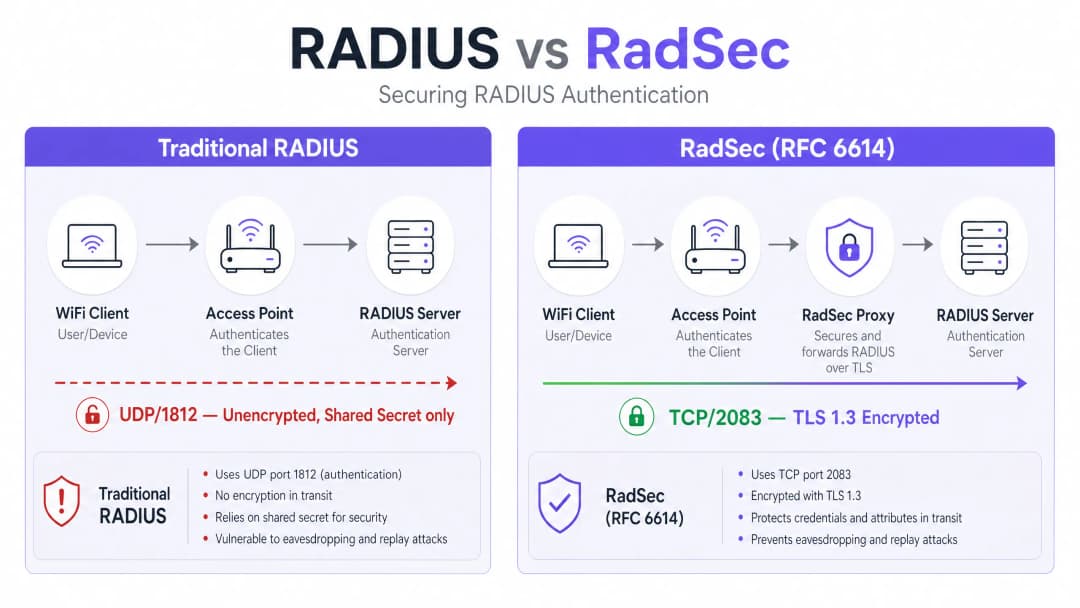
- Transporte: El puerto TCP 2083 garantiza una entrega confiable y conexiones con estado, lo que mejora el rendimiento en entornos de alta latencia.
- Cifrado: TLS 1.2 o 1.3 proporciona un cifrado robusto de extremo a extremo de todos los atributos de RADIUS.
- Autenticación Mutua: Tanto el cliente RADIUS (o proxy) como el servidor deben presentar certificados X.509 válidos emitidos por una Autoridad de Certificación (CA) de confianza. El secreto compartido se conserva únicamente para la compatibilidad con versiones anteriores; TLS proporciona la seguridad real. Esta arquitectura es esencial para entornos distribuidos, como cadenas de Retail o establecimientos de Hospitality, donde los puntos de acceso envían solicitudes de autenticación de retorno a través de la internet pública a un servidor RADIUS central o alojado en la nube.
¿Tiene preguntas sobre su configuración específica?
Nuestro equipo trabaja con gestores de espacios, responsables de TI e ingenieros de redes en 80 000 establecimientos. Reserve una llamada de 20 minutos y le mostraremos cómo lo resolvieron otros profesionales como usted.
Guía de implementación
El despliegue de RadSec suele seguir uno de dos patrones: soporte nativo o basado en proxy.
Patrón 1: RadSec nativo
Si su infraestructura lo admite de forma nativa (por ejemplo, FreeRADIUS 3.0+, Cisco ISE, Aruba ClearPass), usted configura los certificados TLS directamente en el servidor RADIUS y en los puntos de acceso o controladores. Esto proporciona un cifrado real de extremo a extremo desde el borde hasta el núcleo.
Patrón 2: El proxy RadSec
Muchos servidores RADIUS heredados (en particular Microsoft NPS) no admiten RadSec de forma nativa. En estos entornos, se despliega un proxy (como radsecproxy).
- Tramo local: El AP envía RADIUS UDP estándar al proxy local.
- Tramo WAN: El proxy encapsula el tráfico en TLS y lo envía a través de TCP 2083 al servidor ascendente.
Este patrón le permite proteger el tráfico de red de área amplia sin tener que reemplazar la infraestructura heredada.
Integración con Purple
Las plataformas de Guest WiFi y WiFi Analytics de Purple se integran perfectamente con la infraestructura RADIUS empresarial. Bajo la licencia Purple Connect, Purple actúa como un proveedor de identidad gratuito para OpenRoaming, donde RadSec es un requisito obligatorio para proteger el tráfico de federación entre los establecimientos y el centro central.
Mejores prácticas
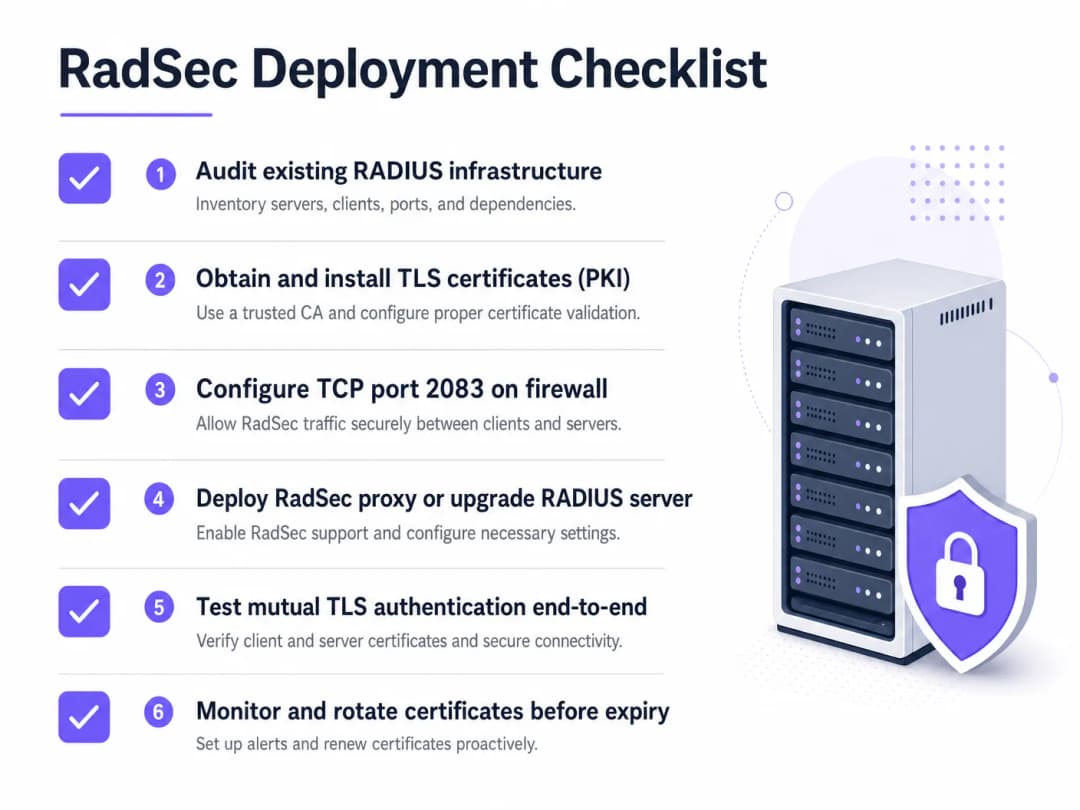
- Gestión del ciclo de vida de los certificados: TLS mutuo depende de certificados válidos. Implemente la renovación automatizada (por ejemplo, a través de ACME) y un monitoreo estricto. Un certificado vencido causará una interrupción total de la autenticación.
- Configuración del firewall: Asegúrese de que el puerto TCP 2083 esté permitido explícitamente tanto de salida desde el establecimiento como de entrada al servidor RADIUS. No asuma que se aplicarán las reglas UDP 1812 existentes.
- Priorice el tráfico de alto riesgo: Comience el despliegue en los enlaces que atraviesan la internet pública o redes WAN no confiables antes de pasar a las VLAN de administración local.
Para obtener más información sobre cómo proteger el borde, lea nuestra guía sobre Access Point Security: Your 2026 Enterprise Guide.
Resolución de problemas y mitigación de riesgos
Cuando RadSec falla, rara vez se trata de un problema de autenticación; casi siempre es un problema de TLS o TCP.
- Síntoma: Los puntos de acceso se muestran como desconectados del servidor RADIUS.
- Verificación: Reglas de firewall para TCP 2083. El RADIUS tradicional utiliza UDP; los equipos de red con frecuencia olvidan abrir el puerto TCP.
- Síntoma: La conexión TCP se establece, pero la autenticación falla de inmediato.
- Verificación: Validación de certificados. Verifique que el Common Name (CN) o el Subject Alternative Name (SAN) coincidan, que el certificado no haya expirado y que el cliente confíe en la CA firmante. Use
openssl s_client -connect <server>:2083para depurar el saludo de conexión (handshake).
- Verificación: Validación de certificados. Verifique que el Common Name (CN) o el Subject Alternative Name (SAN) coincidan, que el certificado no haya expirado y que el cliente confíe en la CA firmante. Use
Asegúrese de que los fundamentos de su red sean sólidos. Revise nuestro consejo sobre cómo Proteger su red con un DNS sólido y seguridad.
ROI e impacto empresarial
Implementar RadSec es una inversión en mitigación de riesgos. El ROI se mide en la prevención de filtraciones de datos, multas por cumplimiento normativo (PCI-DSS, GDPR) y daños a la reputación. Además, permite la participación en federaciones de roaming modernas como OpenRoaming, lo que puede mejorar significativamente la experiencia de los huéspedes en entornos de Salud y Transporte.
Escuche la sesión informativa
Para profundizar en las realidades operativas de la implementación de RadSec, escuche nuestra sesión informativa técnica de 10 minutos:
Para conocer los pasos de configuración específicos en dispositivos cliente, consulte Cómo configurar WiFi empresarial en iOS y macOS con 802.1X o la versión en portugués Como Configurar WiFi Corporativo em iOS e macOS com 802.1X.
Definiciones clave
RadSec
Una extensión del protocolo RADIUS que encapsula el tráfico RADIUS dentro de un túnel TLS sobre el puerto TCP 2083.
Se utiliza para proteger el tráfico de autenticación al atravesar redes no confiables, evitando la interceptación de credenciales.
TLS mutuo (mTLS)
Un proceso de seguridad donde tanto el cliente como el servidor presentan certificados X.509 para verificar la identidad del otro antes de establecer una conexión cifrada.
El mecanismo de autenticación principal de RadSec, que reemplaza la dependencia de secretos compartidos estáticos.
802.1X
El estándar IEEE para el control de acceso a redes basado en puertos, utilizado para autenticar dispositivos que intentan conectarse a una LAN o WLAN.
El marco de trabajo que depende de RADIUS (y por extensión, de RadSec) para validar las credenciales de los usuarios contra un directorio.
radsecproxy
Un demonio de código abierto que actúa como un proxy, convirtiendo el tráfico estándar UDP RADIUS en RadSec (TLS sobre TCP) y viceversa.
Se implementa cuando el soporte nativo de RadSec no está disponible en los puntos de acceso o en los servidores RADIUS heredados como Microsoft NPS.
OpenRoaming
Un estándar de federación desarrollado por la WiFi Alliance que permite a los usuarios conectarse de forma segura y sin problemas a las redes WiFi participantes a nivel mundial.
OpenRoaming exige el uso de RadSec para proteger el tráfico de autenticación entre los establecimientos y los proveedores de identidad.
Secreto compartido
Una cadena de texto estática utilizada en el RADIUS tradicional para ofuscar contraseñas y verificar el origen de las solicitudes.
Aunque técnicamente sigue presente en las configuraciones de RadSec para la compatibilidad con versiones anteriores, es reemplazado por el cifrado TLS.
FreeRADIUS
Un servidor RADIUS de código abierto ampliamente implementado que proporciona soporte nativo para RadSec.
Se utiliza a menudo en entornos empresariales y federaciones de roaming debido a su flexibilidad y capacidades TLS nativas.
PKI (Infraestructura de clave pública)
La estructura de roles, políticas y software necesarios para crear, administrar, distribuir y revocar certificados digitales.
Un requisito previo para implementar RadSec, ya que debe emitir y administrar certificados para todos los clientes y servidores RADIUS.
Ejemplos resueltos
Un grupo hotelero de 200 propiedades utiliza Microsoft NPS de manera centralizada para la autenticación del personal. Los puntos de acceso en cada hotel envían actualmente solicitudes RADIUS a través de la internet pública mediante UDP 1812. El CTO exige el cifrado para todo el tráfico de autenticación, pero reemplazar NPS no es una opción para este año.
Implemente un proxy RadSec (por ejemplo, radsecproxy) en cada sitio de hotel y un proxy correspondiente en el centro de datos central frente a los servidores NPS. Los puntos de acceso locales envían UDP RADIUS al proxy local. El proxy local establece un túnel TLS mutuo sobre TCP 2083 a través de internet hacia el proxy central. El proxy central finaliza el túnel TLS y reenvía el tráfico UDP RADIUS estándar al servidor NPS.
Una gran universidad está implementando OpenRoaming en todo su campus para permitir un acceso sin fricciones a los académicos visitantes. Utilizan FreeRADIUS 3.0.
Habilite RadSec nativo dentro de FreeRADIUS. Genere certificados X.509 de una CA de confianza para la federación OpenRoaming. Configure el firewall del campus para permitir el tráfico TCP 2083 entrante y saliente hacia los nodos de la federación. Configure los controladores de LAN inalámbrica para usar RadSec en todas las solicitudes de autenticación con destino a la federación.
Preguntas de práctica
Q1. Su equipo ha implementado RadSec nativo entre los puntos de acceso de sus sucursales remotas y su servidor FreeRADIUS central. Los AP pueden hacer ping al servidor, pero las solicitudes de autenticación se agotan por completo (timeout) y no llega tráfico a los registros de RADIUS.
Sugerencia: RadSec utiliza un protocolo de transporte y un puerto diferentes en comparación con RADIUS tradicional.
Ver respuesta modelo
Es probable que el firewall esté bloqueando el puerto TCP 2083. Los equipos de red acostumbrados al RADIUS tradicional a menudo solo permiten los puertos UDP 1812/1813. Debe permitir explícitamente el puerto TCP 2083 de salida desde la sucursal y de entrada al servidor RADIUS.
Q2. Está auditando la arquitectura WiFi de un cliente minorista. Utilizan Microsoft NPS de forma centralizada. Los AP de sus tiendas envían solicitudes de autenticación a través de internet mediante una VPN IPsec. ¿Se requiere RadSec en este caso?
Sugerencia: Considere las capas de cifrado que ya están implementadas.
Ver respuesta modelo
Aunque implementar RadSec es la mejor práctica, la VPN IPsec ya proporciona cifrado en la capa de transporte para el tráfico RADIUS de UDP a través de la red no segura de internet. Implementar RadSec aquí ofrecería una defensa en profundidad, pero es menos urgente que si el tráfico cruzara internet de forma nativa.
Q3. Una semana después de una implementación exitosa del proxy RadSec, todas las autenticaciones de WiFi en la empresa fallan simultáneamente a las 09:00 AM de un lunes. El equipo de red confirma que las reglas del firewall no han cambiado.
Sugerencia: ¿Cuál es el mecanismo de autenticación principal para el propio túnel TLS?
Ver respuesta modelo
Es probable que los certificados X.509 utilizados para la autenticación TLS mutua hayan expirado. Cuando los certificados caducan, el protocolo de enlace TLS falla, la conexión TCP se cae y el tráfico RADIUS no puede fluir. Implemente un monitoreo y rotación automatizados de certificados para evitar esto.
Continúe leyendo esta serie
Cómo segmentar de forma segura las redes WiFi del personal y de invitados: mejores prácticas para LAN empresariales
Esta guía proporciona a los administradores de TI y arquitectos de red un modelo técnico e independiente de proveedores para proteger las LAN empresariales mediante la segmentación adecuada del tráfico de WiFi del personal y de invitados. Abarca la autenticación 802.1X, RADIUS en la nube, el aislamiento de VLAN y la gestión del ciclo de vida de las credenciales necesaria para eliminar las contraseñas compartidas y proteger los activos corporativos.
El mejor filtrado de DNS: una guía completa para empresas
Esta guía de referencia técnica explica cómo el filtrado de DNS empresarial protege las redes públicas al bloquear dominios maliciosos en la capa de resolución, antes de que se establezca una conexión. Proporciona a los directores de TI, arquitectos de red y equipos de operaciones de establecimientos la arquitectura de implementación, la configuración del firewall y el contexto de cumplimiento que necesitan para proteger el WiFi de invitados en entornos de hotelería, comercio minorista y sector público. Purple Shield bloquea malware, botnets y contenido inapropiado a nivel de DNS en más de 80,000 establecimientos activos.
Comprensión de Cisco SUDI: Identidad anclada por hardware en el control de acceso seguro a la red
Esta guía explica cómo Cisco SUDI proporciona una identidad criptográficamente segura y anclada por hardware para la infraestructura de red empresarial. Aprenda cómo reemplazar las direcciones MAC vulnerables a la suplantación por certificados 802.1AR inmutables para proteger el control de acceso a la red de su recinto.
¿Tiene preguntas sobre su configuración específica?
Nuestro equipo trabaja con gestores de espacios, responsables de TI e ingenieros de redes en 80 000 establecimientos. Reserve una llamada de 20 minutos y le mostraremos cómo lo resolvieron otros profesionales como usted.