

Les fondamentaux de la PKI pour les administrateurs WiFi : certificats, autorités de certification et chaînes de confiance
This technical reference guide explains the foundational concepts of Public Key Infrastructure (PKI) for enterprise WiFi administrators, covering certificate authorities, trust chains, and X.509 certificates. It details how PKI underpins EAP-TLS mutual authentication and provides actionable deployment guidance for IT teams in hospitality, retail, and public-sector environments. Understanding PKI is a mandatory prerequisite for deploying certificate-based staff WiFi authentication with Purple.
🎧 Écouter ce guide
Voir la transcription

Synthèse
Pour les responsables informatiques, les architectes réseau et les directeurs des opérations sur site, la sécurisation des réseaux WiFi d'entreprise et du personnel est une exigence opérationnelle et de conformité critique. Les méthodes d'authentification obsolètes telles que les clés pré-partagées (PSK) ou le filtrage des adresses MAC sont insuffisantes pour les environnements d'entreprise modernes, laissant les réseaux vulnérables au vol d'identifiants et à l'usurpation d'appareils. Pour obtenir une sécurité robuste et auditable, les organisations doivent passer à une authentification basée sur des certificats — plus précisément EAP-TLS (Extensible Authentication Protocol-Transport Layer Security).
Le déploiement d'EAP-TLS nécessite une solide compréhension de l'infrastructure à clés publiques (PKI). Ce guide démystifie la PKI pour les administrateurs WiFi, en expliquant les rôles des autorités de certification (AC), les mécanismes de la chaîne de confiance et les différences pratiques entre les certificats serveur et client. En maîtrisant ces fondamentaux, les équipes informatiques peuvent concevoir et mettre en œuvre en toute confiance des solutions d'accès réseau sécurisées et évolutives dans les secteurs de l' Hôtellerie , de la Vente au détail et des lieux publics, garantissant la conformité aux normes telles que PCI DSS et GDPR tout en offrant une connectivité fluide et sans mot de passe pour les appareils gérés. Comprendre la PKI est également le prérequis fondamental pour déployer l'authentification WiFi du personnel basée sur des certificats avec Purple.
Analyse technique approfondie
L'architecture de la confiance : qu'est-ce que l'infrastructure à clés publiques (PKI) ?
L'infrastructure à clés publiques (PKI) est un cadre cryptographique qui permet une communication sécurisée et une authentification mutuelle sur un réseau non approuvé. Dans le contexte du WiFi d'entreprise, la PKI agit comme un système de passeport numérique, vérifiant l'identité à la fois de l'appareil client (le demandeur) et du serveur d'authentification réseau (le serveur RADIUS) avant tout échange de données.
Ce système repose sur des certificats X.509, qui lient une clé publique à une identité vérifiée — comme le nom d'hôte d'un serveur ou l'adresse e-mail d'un utilisateur — et sont signés numériquement par un tiers de confiance appelé Autorité de Certification (AC). La signature de l'AC est la garantie cryptographique que la revendication d'identité est légitime.
La hiérarchie des certificats et la chaîne de confiance
La force de la PKI réside dans sa structure hiérarchique, connue sous le nom de chaîne de confiance. Cette hiérarchie garantit que tout certificat présenté par un appareil ou un serveur peut être retracé cryptographiquement jusqu'à une source universellement approuvée. Les trois niveaux sont les suivants.
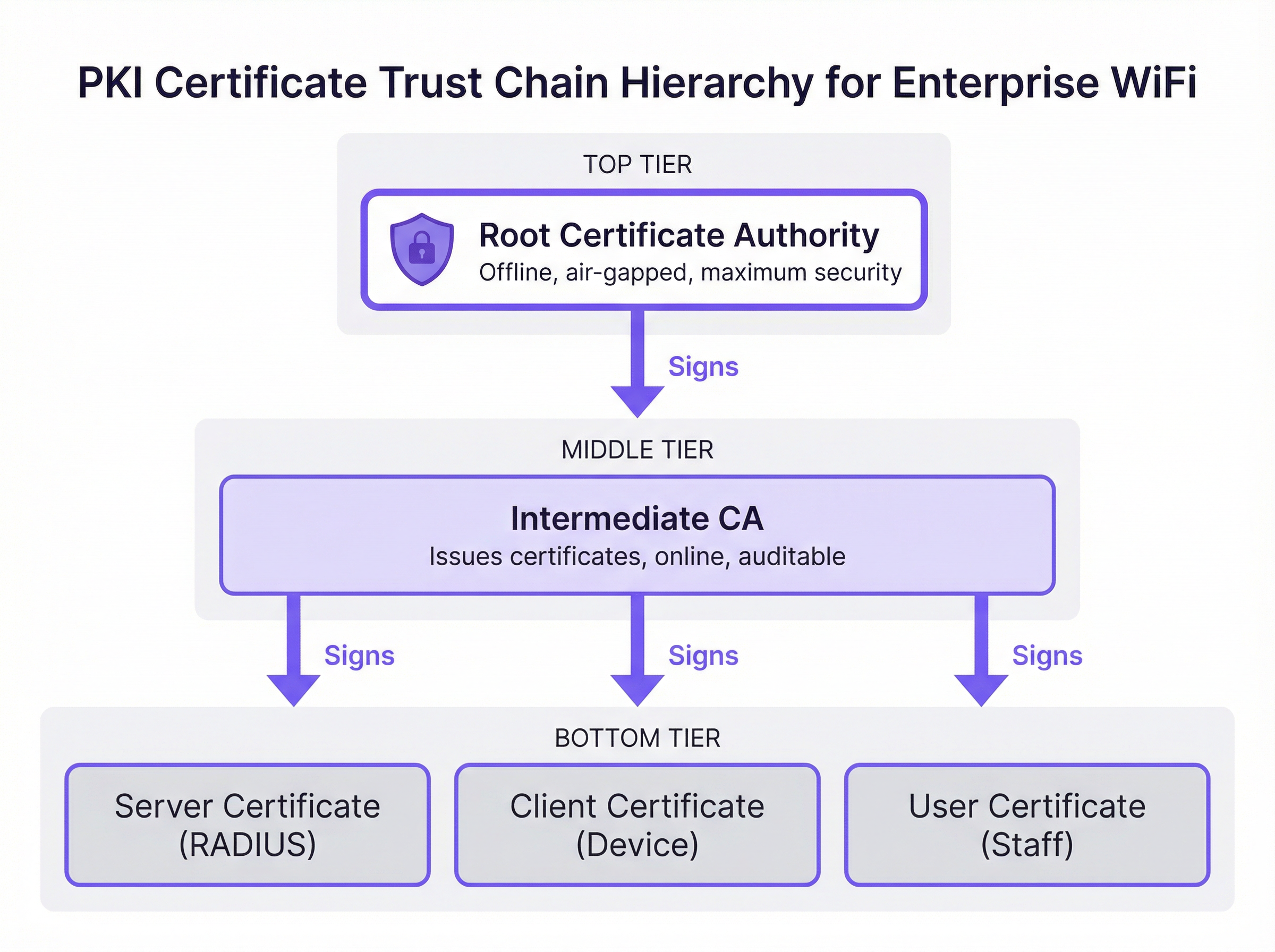
Autorité de certification racine (AC racine) : L'AC racine est l'ancrage cryptographique de l'ensemble de l'écosystème PKI. Elle émet un certificat auto-signé et est intrinsèquement approuvée par les appareils clients et les serveurs. Dans un déploiement d'entreprise sécurisé, l'AC racine est maintenue hors ligne et isolée (air-gapped) pour protéger sa clé privée de toute compromission via le réseau. Son seul but opérationnel est de signer les certificats des AC intermédiaires.
Autorité de certification intermédiaire (AC intermédiaire) : L'AC intermédiaire agit comme un tampon entre l'AC racine hautement sécurisée et l'environnement opérationnel. Elle est en ligne et gère l'émission et la révocation quotidiennes des certificats finaux. Cette séparation est une stratégie critique d'atténuation des risques : si une AC intermédiaire est compromise, elle peut être révoquée par l'AC racine sans invalider l'ensemble de l'infrastructure PKI ni nécessiter la reconfiguration de chaque appareil client.
Certificats finaux (certificats d'entité finale) : Ce sont les certificats installés sur les serveurs individuels et les appareils clients. Ils se situent au bas de la chaîne de confiance et ne peuvent pas eux-mêmes signer d'autres certificats. Il existe deux types principaux pertinents pour le déploiement WiFi. Le certificat serveur est installé sur le serveur RADIUS, permettant aux appareils clients de vérifier qu'ils se connectent au réseau d'entreprise légitime. Le certificat client est installé sur les ordinateurs portables du personnel, les appareils mobiles ou les terminaux de point de vente, permettant au serveur RADIUS de vérifier l'identité de chaque appareil ou utilisateur spécifique.
Comment la PKI sous-tend l'authentification EAP-TLS
EAP-TLS est la référence absolue pour l'authentification WiFi sécurisée car il impose une authentification mutuelle basée sur des certificats. Cela signifie que l'appareil client et le serveur RADIUS doivent tous deux prouver leur identité l'un à l'autre à l'aide de certificats validés par rapport à la chaîne de confiance PKI — éliminant ainsi les risques inhérents aux approches basées sur des mots de passe.
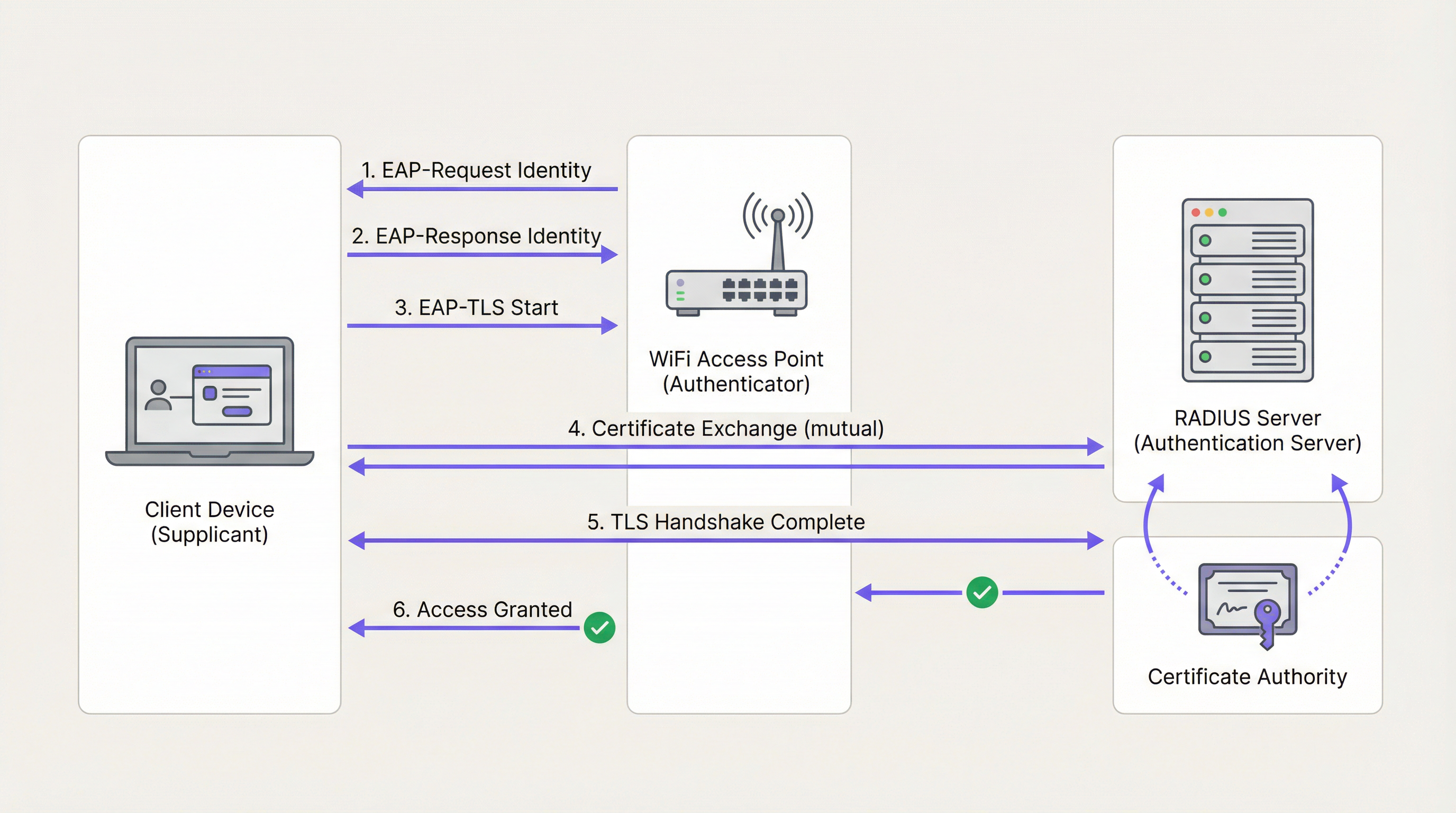
Lors du handshake EAP-TLS, qui fonctionne dans le cadre de la norme IEEE 802.1X, le serveur RADIUS présente d'abord son certificat serveur à l'appareil client. L'appareil valide la signature du certificat par rapport à son magasin d'AC racines de confiance. Si elle est valide, l'appareil a la preuve cryptographique qu'il se connecte au réseau d'entreprise légitime — et non à un point d'accès malveillant ou à un jumeau maléfique (evil twin). L'appareil client présente ensuite son propre certificat client au serveur RADIUS, qui le valide auprès de l'AC. Une fois les deux parties authentifiées, un tunnel TLS sécurisé est établi et l'accès au réseau est accordé. Aucun mot de passe n'est transmis et aucun secret partagé ne peut être volé.
Cette architecture est également le fondement du WPA3-Enterprise, qui impose un mode de sécurité de 192 bits et repose sur les mêmes bases PKI et 802.1X. Pour les organisations déployant des Points d'accès sans fil dans des environnements de haute sécurité, le WPA3-Enterprise avec EAP-TLS représente la meilleure pratique actuelle.
AC publique vs AC privée : la décision de déploiement
L'une des décisions architecturales les plus lourdes de conséquences dans un déploiement PKI est le choix entre une AC publique et une AC privée. Le tableau ci-dessous résume les compromis.
| Critère | AC publique | AC privée |
|---|---|---|
| Coût | Frais par certificat (viable pour un petit nombre de serveurs) | Coût d'infrastructure, mais aucun frais par certificat à grande échelle |
| Confiance des appareils | Approuvée par défaut sur la plupart des systèmes d'exploitation et appareils | Nécessite que l'AC racine soit déployée sur tous les appareils via MDM |
| Contrôle | Limité ; l'AC contrôle les politiques d'émission | Contrôle total sur l'émission, la révocation et le cycle de vie |
| Meilleur cas d'usage | Certificat serveur RADIUS | Certificats clients pour les appareils d'entreprise gérés |
| Conformité | Auditable via les journaux CT publics | Nécessite des processus d'audit internes |
L'approche recommandée pour la plupart des déploiements WiFi d'entreprise est un modèle hybride : utiliser une AC publique pour le certificat serveur RADIUS afin de garantir une large compatibilité, et déployer une AC privée (telle que Microsoft Active Directory Certificate Services ou un fournisseur PKI basé sur le cloud) pour émettre des certificats clients vers les appareils gérés à grande échelle.
Guide de mise en œuvre
Étape 1 : Concevoir l'architecture de l'AC
Commencez par cartographier vos exigences en matière de certificats. Identifiez le nombre d'appareils gérés, les systèmes d'exploitation utilisés et la plateforme MDM disponible. Déterminez si une hiérarchie à deux niveaux (AC racine + AC intermédiaire) ou à trois niveaux est appropriée pour l'échelle et le profil de risque de votre organisation.
Étape 2 : Déployer et sécuriser les AC racines et intermédiaires
Établissez l'AC racine hors ligne sur une machine dédiée et isolée (air-gapped). Utilisez l'AC racine pour signer le certificat de l'AC intermédiaire. Assurez-vous que l'AC intermédiaire est déployée de manière sécurisée dans votre centre de données ou votre environnement cloud et intégrée à votre fournisseur d'identité (IdP) ou à votre solution MDM. Stockez la clé privée de l'AC racine dans un module de sécurité matériel (HSM) si le budget le permet.
Étape 3 : Configurer le serveur RADIUS
Installez le certificat serveur sur votre serveur RADIUS. Configurez le serveur pour exiger EAP-TLS pour le SSID d'entreprise sécurisé. Assurez-vous que le serveur RADIUS approuve l'AC intermédiaire qui a émis les certificats clients, et configurez-le pour effectuer la vérification des révocations via OCSP.
Étape 4 : Distribuer les certificats via MDM
Ne tentez jamais d'installer manuellement des certificats à grande échelle. Utilisez une plateforme MDM telle que Microsoft Intune ou Jamf pour déployer le certificat de l'AC racine, le certificat de l'AC intermédiaire et les certificats clients uniques sur tous les appareils gérés via une politique automatisée. Cela garantit un déploiement cohérent et permet un renouvellement automatisé.
Étape 5 : Mettre en œuvre et tester les mécanismes de révocation
Configurez les listes de révocation de certificats (CRL) ou le protocole de vérification de certificat en ligne (OCSP). Testez le flux de travail de révocation de bout en bout en révoquant un certificat de test et en confirmant que le serveur RADIUS refuse l'accès dans le délai prévu. Pour les environnements nécessitant une révocation quasi instantanée — tels que les réseaux de points de vente dans la Vente au détail — l'OCSP est obligatoire.
Étape 6 : Surveiller et automatiser la gestion du cycle de vie
Mettez en œuvre une surveillance automatisée de l'expiration des certificats à tous les niveaux de la hiérarchie. Configurez des alertes à 90, 60 et 30 jours avant l'expiration. Automatisez le renouvellement à 60 jours. Il s'agit de l'étape opérationnelle la plus impactante pour prévenir les pannes de réseau.
Bonnes pratiques
Imposer l'authentification mutuelle sans exception : Assurez-vous que les appareils clients sont configurés pour valider strictement le certificat du serveur RADIUS. Désactiver la validation du certificat serveur — un raccourci courant lors du déploiement initial — laisse les appareils vulnérables aux attaques de l'homme du milieu (man-in-the-middle) et à la collecte d'identifiants, et viole les exigences de la norme PCI DSS.
Ségréguer les réseaux par méthode d'authentification : Utilisez EAP-TLS pour les appareils d'entreprise et du personnel sur un SSID dédié. Pour l'accès public des visiteurs, déployez une solution de Captive Portal robuste comme le Guest WiFi sur un réseau entièrement ségrégué. Ne tentez pas de déployer une PKI sur des appareils invités non gérés.
Auditer régulièrement l'infrastructure PKI : Effectuez des audits trimestriels des contrôles d'accès de l'AC, des listes de révocation et des journaux d'émission de certificats. Dans les environnements de la Santé et de la Vente au détail , il s'agit d'une exigence de conformité en vertu de l'HIPAA et de la norme PCI DSS respectivement.
Intégrer l'analyse réseau : Une fois l'authentification sécurisée en place, ajoutez WiFi Analytics pour obtenir une visibilité sur le comportement des appareils, les modèles de connexion et les anomalies potentielles. Un réseau sécurisé est la base de données fiables.
Envisager l'intégration SD-WAN : Pour les déploiements multisites dans les chaînes hôtelières ou les parcs de vente au détail, la PKI s'intègre naturellement aux architectures SD-WAN. Pour comprendre comment ces technologies se complètent, consultez Les principaux avantages du SD-WAN pour les entreprises modernes .
Dépannage et atténuation des risques
Le tableau ci-dessous associe les modes de défaillance courants à leurs causes profondes et aux mesures d'atténuation recommandées.
| Symptôme | Cause profonde | Atténuation |
|---|---|---|
| Les appareils ne peuvent pas se connecter ; les journaux RADIUS indiquent 'Unknown CA' | L'appareil client n'approuve pas l'AC qui a émis le certificat du serveur RADIUS | Déployer l'AC racine sur tous les appareils via MDM |
| Panne soudaine à l'échelle du réseau pour tous les appareils d'entreprise | Le certificat du serveur RADIUS ou le certificat de l'AC intermédiaire a expiré | Mettre en œuvre une surveillance et un renouvellement automatisés ; alerter à 90/60/30 jours |
| Un ordinateur portable volé peut toujours accéder au réseau | La CRL est obsolète ou l'OCSP n'est pas configuré | Passer à l'OCSP pour une vérification des révocations en temps réel |
| Les nouveaux appareils ne peuvent pas se connecter après l'inscription MDM | Le certificat client n'a pas encore été déployé par la politique MDM | Vérifier l'attribution de la politique MDM et forcer une synchronisation de l'appareil |
| Échecs d'authentification intermittents | Décalage d'horloge entre le client et le serveur RADIUS | S'assurer que tous les appareils utilisent la synchronisation temporelle NTP |
Pour une compréhension plus approfondie de la configuration et du dépannage de la norme 802.1X, le guide Authentification 802.1X : Sécuriser l'accès réseau sur les appareils modernes fournit des conseils de configuration détaillés et indépendants des fournisseurs.
ROI et impact commercial
La transition vers une architecture EAP-TLS adossée à une PKI offre une valeur commerciale mesurable pour les exploitants de sites à plusieurs niveaux.
Atténuation des risques et conformité : L'élimination de l'authentification basée sur des mots de passe supprime le vecteur d'attaque le plus courant pour la compromission du réseau. Cela réduit directement la probabilité de violations de données coûteuses et simplifie la conformité à la norme PCI DSS (requise pour le traitement des paiements), au GDPR (pour la protection des données) et aux réglementations sectorielles. Pour les sites déployant des Capteurs IoT ou des systèmes d' Orientation basés sur la localisation, un réseau sécurisé cryptographiquement est un prérequis pour l'intégrité des données de confiance.
Efficacité opérationnelle : L'automatisation du déploiement des certificats via MDM élimine la charge opérationnelle liée à la gestion des mots de passe, réduisant ainsi les tickets d'assistance informatique liés à la connectivité WiFi. Dans les environnements à forte rotation de personnel tels que l'hôtellerie et la vente au détail, où l'intégration et le départ du personnel sont fréquents, l'émission et la révocation automatisées des certificats permettent un gain de temps significatif par rapport à la gestion d'identifiants partagés.
Fondation pour les services avancés : Un réseau d'entreprise sécurisé et authentifié est la base de confiance sur laquelle reposent les services opérationnels avancés. Qu'il s'agisse de déployer WiFi Analytics pour l'analyse de la fréquentation, des Capteurs pour les données d'occupation en temps réel, ou l' Orientation pour les grands sites, chacune de ces capacités bénéficie des garanties d'intégrité offertes par la PKI.
Pour les exploitants de l' Hôtellerie en particulier, la combinaison d'un réseau sécurisé pour le personnel et d'un portail invité bien conçu — comme exploré dans Les solutions WiFi modernes pour l'hôtellerie que vos clients méritent — représente l'architecture WiFi d'entreprise complète. Pour les hubs de Transport et les grands lieux publics, les mêmes principes s'appliquent à grande échelle.
Termes clés et définitions
Public Key Infrastructure (PKI)
A framework of roles, policies, hardware, software, and procedures needed to create, manage, distribute, use, store, and revoke digital certificates and manage public-key encryption.
The foundational architecture that must be in place before an IT team can deploy secure, certificate-based WiFi authentication using EAP-TLS.
Certificate Authority (CA)
A trusted entity that issues digital certificates, verifying the identity of the certificate subject and binding that identity to a public key with a cryptographic signature.
The central authority in your network that acts as the source of truth for all device and server identities. Without a trusted CA, no certificate-based authentication is possible.
X.509 Certificate
The standard format for public key certificates, defined in RFC 5280. Contains the subject identity, public key, issuer identity, validity period, and the CA's digital signature.
The actual digital passport installed on a laptop or server that proves its identity during the EAP-TLS handshake.
EAP-TLS (Extensible Authentication Protocol-Transport Layer Security)
An 802.1X authentication method that requires mutual certificate-based authentication between the client device (supplicant) and the authentication server (RADIUS). Defined in RFC 5216.
The most secure method for authenticating corporate devices to a WiFi network. Eliminates the need for passwords and provides cryptographic proof of identity for both parties.
Trust Chain
A hierarchical sequence of certificates used to authenticate an entity, starting from the leaf certificate and tracing upward through the Intermediate CA to the Root CA.
The mechanism by which a laptop verifies that a RADIUS server's certificate is legitimate. Each link in the chain is validated until a trusted Root CA is reached.
Certificate Revocation List (CRL)
A periodically published list of digital certificates that have been revoked by the issuing CA before their scheduled expiration date and should no longer be trusted.
A mechanism for blocking access from lost or stolen devices. CRLs are cached and updated on a schedule, meaning revocation may not be immediate — a limitation addressed by OCSP.
Online Certificate Status Protocol (OCSP)
An internet protocol (RFC 6960) used for obtaining the real-time revocation status of an X.509 digital certificate by querying the CA's OCSP responder.
The preferred revocation mechanism for high-security environments. Enables the RADIUS server to check certificate validity in real-time during each authentication attempt, providing near-instant revocation enforcement.
RADIUS (Remote Authentication Dial-In User Service)
A networking protocol that provides centralised Authentication, Authorisation, and Accounting (AAA) management for users and devices connecting to a network.
The central server in an enterprise WiFi deployment that validates certificates and makes the final access control decision. The RADIUS server is the operational core of an EAP-TLS deployment.
IEEE 802.1X
An IEEE standard for port-based Network Access Control (PNAC) that provides an authentication mechanism for devices wishing to attach to a LAN or WLAN.
The overarching framework within which EAP-TLS operates. Understanding 802.1X is essential for configuring access points and switches to enforce certificate-based authentication.
Mobile Device Management (MDM)
A software platform used by IT administrators to remotely manage, configure, and secure mobile devices and laptops across an organisation.
The essential operational tool for deploying certificates at scale. MDM platforms such as Microsoft Intune and Jamf automate the distribution of Root CA certificates, Intermediate CA certificates, and Client Certificates to all managed devices.
Études de cas
A 500-room luxury hotel in London needs to secure its staff WiFi network for housekeeping tablets and point-of-sale (POS) terminals. Currently, they use a single Pre-Shared Key (PSK) that has not been rotated in three years and is known to all permanent and agency staff. The IT Director has been tasked with transitioning to a certificate-based architecture before the next PCI DSS audit. How should this be approached?
Phase 1 — Architecture Design: Deploy a cloud-based Private PKI (e.g., Microsoft NDES via Intune, or a dedicated cloud PKI provider) integrated with the hotel's MDM platform. Obtain a RADIUS Server Certificate from a Public CA such as DigiCert.
Phase 2 — Infrastructure Deployment: Configure the RADIUS server with the new Server Certificate and enable EAP-TLS on a new hidden SSID designated for staff devices. Configure OCSP for real-time revocation checking.
Phase 3 — Device Enrolment: Use the MDM platform to push the Private Root CA, the Intermediate CA, and unique Client Certificates to all housekeeping tablets and POS terminals. Verify successful certificate installation on a pilot group of 20 devices before full rollout.
Phase 4 — Migration and Decommission: Migrate all devices to the new EAP-TLS SSID via MDM policy. Confirm connectivity across all device types. After a two-week parallel running period, decommission the legacy PSK network.
Phase 5 — Operational Handover: Document the certificate lifecycle, revocation procedures, and MDM policies. Configure automated expiry alerts and schedule quarterly PKI audits.
A national retail chain is deploying EAP-TLS across 200 stores. During pilot testing across five stores, the IT team discovers that when a store manager's laptop is reported stolen and the certificate is revoked in the PKI system, the device can still successfully authenticate to the corporate WiFi for up to 18 hours after revocation. The security team considers this an unacceptable risk given that the device may have access to inventory management systems. How should this be resolved?
The 18-hour delay is caused by the RADIUS server relying on a cached, infrequently downloaded Certificate Revocation List (CRL). CRLs are typically published on a schedule (e.g., every 24 hours) and cached by the RADIUS server, meaning revocation is not reflected in real-time.
The resolution is to reconfigure the RADIUS server to use the Online Certificate Status Protocol (OCSP) as the primary revocation checking mechanism. OCSP allows the RADIUS server to query the CA's OCSP responder in real-time during each EAP-TLS handshake, receiving an immediate 'good', 'revoked', or 'unknown' response for the specific certificate being presented.
Configuration steps: (1) Ensure the Private CA is configured with an OCSP responder endpoint. (2) Update the RADIUS server configuration to query the OCSP endpoint for every authentication attempt. (3) Configure OCSP stapling where supported to reduce latency. (4) Test by revoking a certificate and confirming the RADIUS server denies access within 60 seconds.
Analyse de scénario
Q1. Your organisation is migrating from PEAP-MSCHAPv2 (username and password) to EAP-TLS for the corporate WiFi. The network team proposes using the existing Active Directory Certificate Services (AD CS) infrastructure to issue certificates to both the RADIUS servers and all corporate laptops. A member of the team points out that the organisation also has 50 contractor laptops that are not domain-joined. What is the primary compatibility risk, and how should it be addressed?
💡 Astuce :Consider how non-domain joined devices will validate the RADIUS server's identity when it presents a certificate signed by your Private AD CS Root CA.
Afficher l'approche recommandée
The primary risk is that the 50 non-domain joined contractor laptops will not have the private AD CS Root CA in their trusted certificate store. When the RADIUS server presents its Server Certificate during the EAP-TLS handshake, these devices will receive an 'Untrusted Certificate' error and fail to connect. The recommended resolution is to obtain the RADIUS Server Certificate from a Public CA (such as DigiCert or Sectigo) rather than the private AD CS. Public CA roots are pre-installed in the trust stores of all major operating systems, ensuring compatibility with both domain-joined and non-domain joined devices. The private AD CS should be retained solely for issuing Client Certificates to managed, domain-joined devices.
Q2. During a compliance audit for a large NHS hospital trust, the auditor notes that the Root CA is running as a virtual machine in the primary data centre and is permanently connected to the hospital's internal network. The auditor flags this as a critical finding. What architectural change must be implemented, and why is the current configuration a significant risk?
💡 Astuce :Consider what would happen to every certificate in the organisation if the Root CA's private key were compromised by a ransomware attack or insider threat.
Afficher l'approche recommandée
The Root CA must be immediately taken offline and air-gapped. The current configuration is a critical risk because the Root CA's private key is exposed to network-based attacks, including ransomware, lateral movement from a compromised domain account, or insider threats. If the Root CA's private key is stolen or used to sign malicious certificates, the entire PKI infrastructure — and therefore every certificate-authenticated system in the trust — is compromised. Recovery would require revoking the Root CA and re-issuing every certificate in the organisation, a catastrophic operational event. The correct architecture requires the Root CA to be powered on only when signing or revoking an Intermediate CA certificate, with all day-to-day issuance handled by an online Intermediate CA. The Root CA's private key should be stored in a Hardware Security Module (HSM).
Q3. A large conference centre operator wants to implement certificate-based authentication for both their permanent IT staff and the thousands of exhibitors and visitors who attend events. They ask you to design a single PKI infrastructure to serve both groups. What is your recommendation, and why?
💡 Astuce :Consider the operational feasibility of distributing certificates to thousands of unmanaged, temporary visitors who may attend an event for a single day.
Afficher l'approche recommandée
You should strongly advise against using PKI and EAP-TLS for public visitors and exhibitors. Certificate-based authentication requires installing a Client Certificate and often a Root CA profile on the end-user device, which is operationally impossible for unmanaged, temporary devices and creates an extremely poor user experience. EAP-TLS should be strictly reserved for permanent IT staff using managed corporate devices enrolled in the organisation's MDM platform. For exhibitors and visitors, a captive portal solution should be deployed on a completely separate, segregated SSID. This two-network architecture — secure EAP-TLS for staff, captive portal for guests — is the industry standard for venue operators and is the model supported by Purple's platform.
Q4. An IT manager at a retail chain has successfully deployed EAP-TLS across all 150 stores. Six months later, the RADIUS server at 12 stores simultaneously stops accepting client connections. Investigation reveals no certificate revocations have occurred. What is the most likely cause, and what process failure allowed this to happen?
💡 Astuce :Consider what all 12 affected stores might have in common from a certificate perspective, and what event could cause simultaneous failures.
Afficher l'approche recommandée
The most likely cause is that the Intermediate CA certificate — or the RADIUS Server Certificate — has expired. If all 12 stores were configured using the same Intermediate CA or the same batch of RADIUS Server Certificates issued at the same time, they would all expire simultaneously. This is a lifecycle management failure: the organisation did not implement automated certificate expiry monitoring and alerting. The resolution requires renewing the expired certificate(s) and immediately implementing automated monitoring with alerts at 90, 60, and 30 days before expiry for all certificates in the hierarchy, including the Intermediate CA, the RADIUS Server Certificate, and the Root CA.
Points clés à retenir
- ✓PKI is the cryptographic trust framework that must be in place before deploying EAP-TLS or WPA3-Enterprise certificate-based WiFi authentication.
- ✓The trust chain has three tiers: an offline Root CA (the trust anchor), an online Intermediate CA (the operational issuer), and Leaf Certificates installed on servers and client devices.
- ✓EAP-TLS provides mutual authentication — the client verifies the network and the network verifies the client — eliminating the password-based attack surface entirely.
- ✓Use a Public CA for your RADIUS Server Certificate (for broad device compatibility) and a Private CA for Client Certificates (for cost control and lifecycle management at scale).
- ✓Always keep the Root CA offline and air-gapped; if it is compromised, the entire PKI infrastructure must be rebuilt from scratch.
- ✓Implement OCSP for real-time certificate revocation checking — CRL-based revocation introduces unacceptable delays in high-security environments.
- ✓Automate certificate lifecycle management via MDM and monitoring tools; expired certificates are the leading cause of EAP-TLS network outages.




