
Background App Refresh कैसे Public WiFi के प्रदर्शन को खराब करता है
यह तकनीकी मार्गदर्शिका public WiFi क्षमता और प्रदर्शन पर background app refresh के गंभीर प्रभाव की जांच करती है। यह IT प्रबंधकों को एयर टाइम पुनः प्राप्त करने और अतिथि अनुभव को बेहतर बनाने के लिए व्यावहारिक, नेटवर्क - स्तरीय शमन रणनीतियाँ प्रदान करती है।
इस गाइड को सुनें
पॉडकास्ट ट्रांसक्रिप्ट देखें
हमारी मुख्य श्रृंखला का हिस्सा: Guest WiFi Guide →
कार्यकारी सारांश
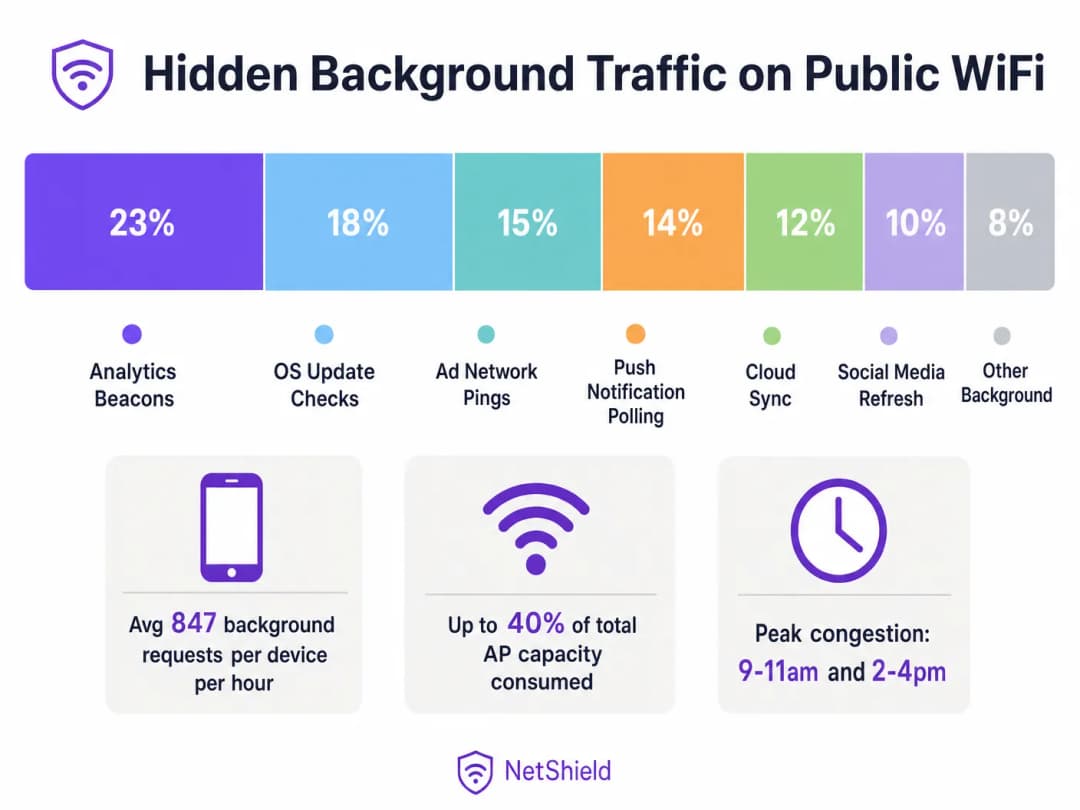
उच्च-घनत्व वाले सार्वजनिक वायरलेस वातावरण में, एक्सेस पॉइंट क्षमता का 40% तक हिस्सा बैकग्राउंड ऐप रिफ्रेश ट्रैफ़िक - जैसे एनालिटिक्स बीकन, विज्ञापन नेटवर्क पिंग, OS अपडेट चेक और पुश नोटिफिकेशन पोलिंग द्वारा चुपचाप खपत किया जा सकता है। यह गाइड नेटवर्क आर्किटेक्ट्स और IT प्रबंधकों को नेटवर्क लेयर पर बैकग्राउंड ट्रैफ़िक की पहचान करने, वर्गीकृत करने और उसे कम करने के लिए एक वेंडर-न्यूट्रल ब्लूप्रिंट प्रदान करता है। लक्षित ब्लॉक लिस्ट और रेट-लिमिटिंग नीतियों को लागू करके, स्थान महत्वपूर्ण एयरटाइम वापस पा सकते हैं, महंगे हार्डवेयर अपग्रेड को टाल सकते हैं और वैध उपयोगकर्ता ट्रैफ़िक के लिए कनेक्टिविटी अनुभव में नाटकीय रूप से सुधार कर सकते हैं।
तकनीकी गहन विश्लेषण
बैकग्राउंड ट्रैफ़िक की संरचना
आपके Guest WiFi नेटवर्क से कनेक्ट होने वाला प्रत्येक स्मार्टफोन बैकग्राउंड रिफ्रेश साइकिल चलाने के लिए कॉन्फ़िगर किए गए दर्जनों एप्लिकेशन चलाता है। ये प्रक्रियाएं उपयोगकर्ता की बातचीत से स्वतंत्र रूप से काम करती हैं, जो टेलीमेट्री सर्वर, क्लाउड सिंक एंडपॉइंट और विज्ञापन नेटवर्क से कनेक्शन शुरू करती हैं।
रेडियो लेयर पर, इसका प्रभाव पेलोड आकार की तुलना में बहुत अधिक होता है। CSMA/CA (कैरियर सेंस मल्टीपल एक्सेस विद कोलिजन अवॉइडेंस) का उपयोग करने वाले एक 802.11 नेटवर्क में, प्रत्येक लेनदेन के लिए एक पूर्ण एसोसिएशन अनुक्रम की आवश्यकता होती है। एक 200-बाइट एनालिटिक्स बीकन के लिए जांच अनुरोधों (प्रोब रिक्वेस्ट), प्रमाणीकरण (ऑथेंटिकेशन), एसोसिएशन और DHCP बातचीत की आवश्यकता होती है। Retail या Hospitality जैसे वातावरण में, यह कंटेंशन ओवरहेड उपलब्ध एयरटाइम को तेजी से समाप्त कर देता है।
WiFi 6 न्यूनीकरण का भ्रम
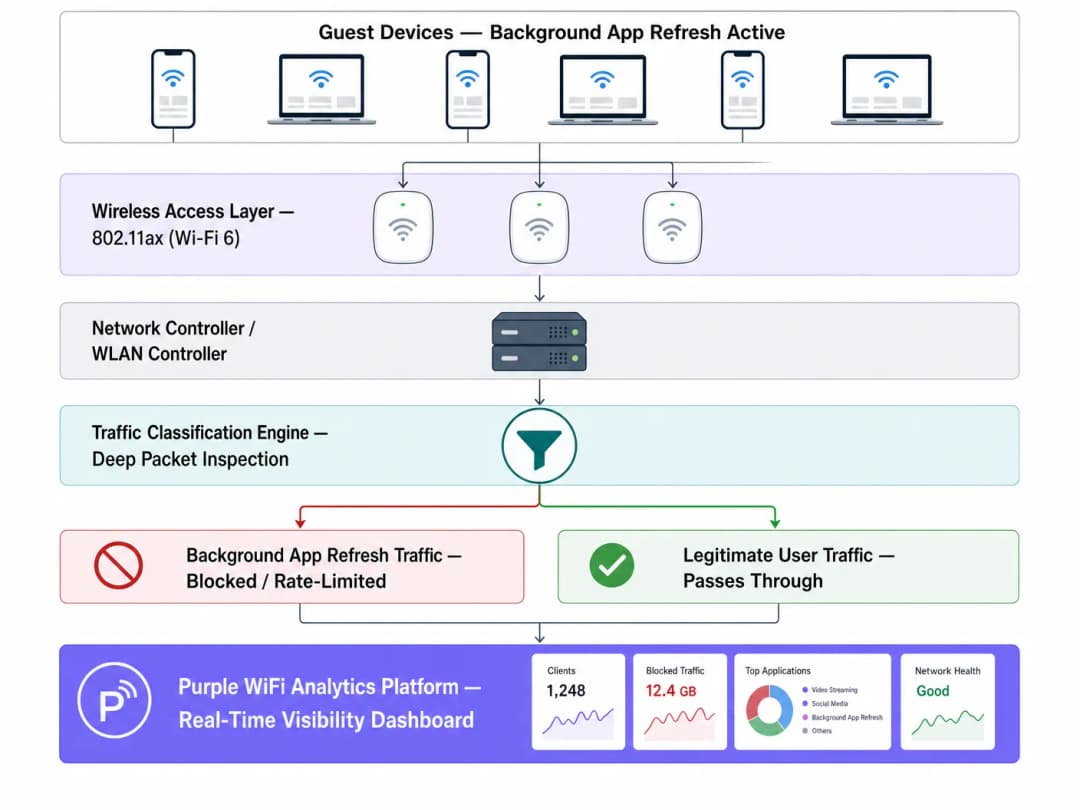
जबकि WiFi 6 (802.11ax) उच्च-घनत्व कंटेंशन को अधिक कुशलता से प्रबंधित करने के लिए OFDMA और BSS कलरिंग पेश करता है, यह अवांछित पेलोड डिलीवरी की बुनियादी समस्या को हल नहीं करता है। एक्सेस पॉइंट एक प्रेजेंटेशन स्ट्रीम करने वाले उपयोगकर्ता और चुपचाप डायग्नोस्टिक डेटा सिंक करने वाले ऐप के बीच अंतर नहीं कर सकता है। डीप पैकेट इंस्पेक्शन (DPI) के माध्यम से नेटवर्क-स्तरीय हस्तक्षेप आवश्यक बना हुआ है।
कार्यान्वयन गाइड
1. ट्रैफ़िक वर्गीकरण और बेसलाइनिंग
नीतिगत बदलावों को लागू करने से पहले, अपने WiFi Analytics प्लेटफ़ॉर्म का उपयोग करके एक बेसलाइन स्थापित करें। पीक बैकग्राउंड एक्टिविटी अवधि और शीर्ष गंतव्य डोमेन की पहचान करने के लिए कम से कम पांच व्यावसायिक दिनों तक ट्रैफ़िक की निगरानी करें।
2. ब्लॉक लिस्ट विकसित करना
ज्ञात एनालिटिक्स और विज्ञापन नेटवर्क एंडपॉइंट्स के लिए DNS या IP-स्तरीय ब्लॉकिंग लागू करें। समुदाय-सत्यापित सूचियों (जैसे OISD) के साथ शुरुआत करें और अपने बेसलाइनिंग डेटा के साथ इसे पूरक करें।महत्वपूर्ण अपवाद: आवश्यक पुश नोटिफिकेशन सेवाओं को ब्लॉक न करें (जैसे, TCP 5223 पर Apple Push Notification Service या Google Firebase Cloud Messaging)। इन्हें ब्लॉक करने से डिवाइस की मुख्य कार्यक्षमता बाधित होगी और उपयोगकर्ता शिकायतें पैदा होंगी।
3. कंट्रोलर लेयर पर पॉलिसी लागू करना
लगातार नीति प्रवर्तन सुनिश्चित करने के लिए व्यक्तिगत एक्सेस पॉइंट्स के बजाय WLAN कंट्रोलर पर वर्गीकरण नियम लागू करें।
सर्वोत्तम प्रथाएं
- OS अपडेट को दर-सीमित करें: OS अपडेट को पूरी तरह से ब्लॉक करने के बजाय, पीक ऑपरेशनल घंटों के दौरान एक सख्त दर सीमा (जैसे, 1 Mbps प्रति डिवाइस) लागू करें।
- QoS मार्किंग लागू करें: बैकग्राउंड ट्रैफ़िक को सबसे कम ट्रैफ़िक क्लास में डी-प्रायोरिटाइज़ करने के लिए DSCP मार्किंग का उपयोग करें, जिससे यह केवल तभी ट्रांसमिट हो सके जब चैनल खाली हो।
- सतत निगरानी: बैकग्राउंड एंडपॉइंट्स विकसित होते रहते हैं। अपनी ब्लॉक सूचियों की त्रैमासिक समीक्षा और अपडेट करें।
समस्या निवारण और जोखिम न्यूनीकरण
- अत्यधिक ब्लॉकिंग: बिना टेस्टिंग के आक्रामक रूप से ब्लॉक करने से वैध ऐप कार्यक्षमता प्रभावित हो सकती है। पूरे एस्टेट में लागू करने से पहले हमेशा एक सिंगल AP ग्रुप पर नीतियों का परीक्षण करें।
- 5GHz/6GHz विभाजन की अनदेखी करना: पुराने डिवाइस डिफॉल्ट्स के कारण बैकग्राउंड ट्रैफ़िक अक्सर 2.4GHz पर क्लस्टर हो जाता है। सुनिश्चित करें कि ट्रैफ़िक विश्लेषण सभी बैंडों को कवर करता है। WiFi Frequencies: A Guide to WiFi Frequencies in 2026 बैंड प्रबंधन पर और अधिक संदर्भ प्रदान करता है।
ROI और व्यावसायिक प्रभाव
30 - 40% बर्बाद एयर टाइम को वापस पाना कार्यात्मक रूप से आपके भौतिक AP घनत्व को उसी मार्जिन से बढ़ाने के बराबर है। क्षमता की कमी का सामना करने वाले स्थानों के लिए, नेटवर्क-स्तर का ट्रैफ़िक प्रबंधन हार्डवेयर रिफ्रेश पर महत्वपूर्ण पूंजीगत व्यय को टाल सकता है और साथ ही अतिथि संतुष्टि स्कोर में तुरंत सुधार कर सकता है।
पूरी तकनीकी जानकारी सुनें:
मुख्य परिभाषाएं
Background App Refresh
एक मोबाइल OS सुविधा जो ऐप्स को सक्रिय उपयोगकर्ता सहभागिता के बिना अपडेट की जांच करने, डेटा सिंक करने और टेलीमेट्री भेजने की अनुमति देती है।
उच्च-घनत्व वाले सार्वजनिक नेटवर्क पर छिपी हुई एयरटाइम खपत का प्राथमिक स्रोत।
CSMA/CA
Carrier Sense Multiple Access with Collision Avoidance; वह प्रोटोकॉल जिसका उपयोग WiFi साझा रेडियो माध्यम तक पहुंच को प्रबंधित करने के लिए करता है।
यह स्पष्ट करता है कि छोटे बैकग्राउंड पेलोड भी प्रतिस्पर्धा के कारण महत्वपूर्ण नेटवर्क ओवरहेड का कारण क्यों बनते हैं।
Air Time
एक विशिष्ट रेडियो फ्रीक्वेंसी पर डिवाइसों द्वारा डेटा संचारित करने के लिए उपलब्ध सीमित समय।
बैकग्राउंड ट्रैफ़िक द्वारा समाप्त होने वाला महत्वपूर्ण संसाधन, जो उच्च-घनत्व वाले परिनियोजन में कच्चे बैंडविड्थ से अधिक महत्वपूर्ण है।
Deep Packet Inspection (DPI)
उन्नत नेटवर्क पैकेट फ़िल्टरिंग जो ट्रैफ़िक प्रकारों को वर्गीकृत करने के लिए पैकेट के डेटा भाग की जांच करती है।
वैध उपयोगकर्ता ट्रैफ़िक और बैकग्राउंड टेलीमेट्री के बीच अंतर करने के लिए आवश्यक।
DSCP Marking
Differentiated Services Code Point; Quality of Service (QoS) के लिए नेटवर्क ट्रैफ़िक को वर्गीकृत और प्रबंधित करने का एक तंत्र।
बैकग्राउंड ट्रैफ़िक को कम प्राथमिकता देने के लिए उपयोग किया जाता है ताकि यह केवल तभी संचारित हो जब नेटवर्क खाली हो।
BSS Colouring
एक WiFi 6 सुविधा जो स्थानिक पुन: उपयोग को बेहतर बनाने के लिए ओवरलैपिंग बेसिक सर्विस सेट की पहचान करती है।
दक्षता में सुधार करता है लेकिन अवांछित बैकग्राउंड पेलोड को ब्लॉक करने की आवश्यकता को समाप्त नहीं करता है।
OFDMA
Orthogonal Frequency-Division Multiple Access; एक एकल AP को एक साथ कई उपकरणों के साथ संचार करने की अनुमति देता है।
एक WiFi 6 संवर्द्धन जो बैकग्राउंड ट्रैफ़िक विवाद को कम करता है लेकिन इसका समाधान नहीं करता है।
Rate Limiting
नेटवर्क इंटरफ़ेस पर भेजे या प्राप्त किए गए ट्रैफ़िक की दर को नियंत्रित करना।
OS अपडेट जैसे आवश्यक लेकिन भारी बैकग्राउंड ट्रैफ़िक को प्रबंधित करने के लिए अनुशंसित दृष्टिकोण।
हल किए गए उदाहरण
एक 340-कमरों वाले फोर-स्टार होटल में हाल ही में WiFi 6 हार्डवेयर अपग्रेड के बावजूद पीक चेक-इन समय (दोपहर 3 बजे - शाम 6 बजे) के दौरान खराब WiFi प्रदर्शन का सामना करना पड़ रहा है।
- Purple WiFi Analytics के माध्यम से ट्रैफ़िक विश्लेषण तैनात करें।
- पहचानें कि 38% एयर टाइम background app refresh द्वारा खपत किया जा रहा है।
- 847 ज्ञात एनालिटिक्स और विज्ञापन डोमेन के लिए एक लक्षित DNS ब्लॉक सूची लागू करें।
- पीक ऑवर्स के दौरान पहचाने गए OS अपडेट ट्रैफ़िक पर 1 Mbps की दर सीमा लागू करें।
60 स्टोर्स वाली एक क्षेत्रीय रिटेल चेन की रिपोर्ट है कि डिजिटल साइनेज बफरिंग उच्च अतिथि WiFi उपयोग के साथ ही होती है।
- पूरे परिसर में ट्रैफ़िक का बेसलाइन बनाएं।
- पता लगाएं कि अतिथि SSID पर iOS अपडेट की जांच WAN लिंक को संतृप्त कर रही है।
- प्रति अतिथि डिवाइस पर Apple अपडेट सर्वर की दर को 512 Kbps तक सीमित करने के लिए WLAN कंट्रोलर के माध्यम से केंद्रीकृत नीति लागू करें।
- QoS के माध्यम से डिजिटल साइनेज MAC पतों को प्राथमिकता दें।
अभ्यास प्रश्न
Q1. एक स्टेडियम IT निदेशक बैंडविड्थ को सुरक्षित रखने के लिए एक बड़े खेल आयोजन के दौरान Apple और Google सर्वर पर सभी ट्रैफ़िक को ब्लॉक करना चाहता है। इसमें क्या जोखिम है?
संकेत: उन आवश्यक डिवाइस सेवाओं पर विचार करें जो निरंतर कनेक्शन पर निर्भर करती हैं।
मॉडल उत्तर देखें
Apple और Google के सभी ट्रैफ़िक को ब्लॉक करने से आवश्यक पुश नोटिफिकेशन सेवाएं (TCP 5223 पर APNS और Firebase Cloud Messaging) बाधित हो जाएंगी। इससे वैध ऐप्स (जैसे डिजिटल टिकटिंग या आपातकालीन अलर्ट) विफल हो जाएंगे। इसके बजाय, विशिष्ट एनालिटिक्स सबडोमेन को ब्लॉक करें और OS अपडेट की दर को सीमित करें।
Q2. WiFi 6 अपग्रेड लागू करने के बाद भी, एक कॉन्फ्रेंस सेंटर में सुबह के कीनोट के दौरान गंभीर लेटेंसी की समस्या आती है जब 2,000 प्रतिभागी पहुंचते हैं। हार्डवेयर अपग्रेड ने इस समस्या को क्यों हल नहीं किया?
संकेत: इस बारे में सोचें कि WiFi 6 किसे अच्छी तरह संभालता है और किसे यह नियंत्रित नहीं कर सकता।
मॉडल उत्तर देखें
WiFi 6 दक्षता में सुधार करता है (OFDMA और BSS Colouring के माध्यम से) लेकिन यह ईमेल चेक करने वाले यूजर और पृष्ठभूमि में ऐप रिफ्रेश निष्पादित करने वाले 2,000 डिवाइस के बीच अंतर नहीं कर सकता। केवल भारी मात्रा में होने वाला कन्टेंशन ओवरहेड अभी भी एयरटाइम को समाप्त कर देता है। इसके लिए नेटवर्क-स्तरीय ट्रैफ़िक वर्गीकरण की आवश्यकता होती है।
Q3. गेस्ट WiFi नेटवर्क के लिए QoS कॉन्फ़िगर करते समय, क्लाउड फोटो सिंक जैसे बैकग्राउंड ट्रैफ़िक को कैसे प्रबंधित किया जाना चाहिए?
संकेत: यह दुर्भावनापूर्ण नहीं है, लेकिन यह जरूरी भी नहीं है।
मॉडल उत्तर देखें
इसे वर्गीकृत किया जाना चाहिए और कम DSCP वैल्यू (जैसे, बैकग्राउंड/स्कैवेंजर क्लास) के साथ चिह्नित किया जाना चाहिए। यह इस ट्रैफ़िक की प्राथमिकता को कम करता है, जिससे यह सुनिश्चित होता है कि यह केवल तभी प्रसारित हो जब नेटवर्क खाली हो, जिससे VoIP या पॉइंट-ऑफ-सेल लेनदेन जैसे रीयल-टाइम ट्रैफ़िक सुरक्षित रहते हैं।
इस श्रृंखला में आगे पढ़ें
सर्वोत्तम चैनल प्लानिंग के लिए RSSI और सिग्नल की ताकत को समझना
यह गाइड सर्वोत्तम चैनल प्लानिंग के लिए RSSI, सिग्नल-टू-नॉइज रेशियो (SNR), और RF प्रोपेगेशन सिद्धांतों की व्यापक तकनीकी जानकारी प्रदान करती है। यह IT प्रबंधकों, नेटवर्क आर्किटेक्ट्स और वेन्यू ऑपरेशंस डायरेक्टरों को को-चैनल और एडजसेंट चैनल इंटरफेरेंस को कम करने, AP प्लेसमेंट को अनुकूलित करने, और हॉस्पिटैलिटी, रिटेल एवं सार्वजनिक क्षेत्र के वातावरण में मापने योग्य व्यावसायिक प्रभाव के लिए एनालिटिक्स का लाभ उठाने की व्यावहारिक रणनीतियों से लैस करती है।
WiFi 6 बनाम WiFi 5: क्या यह चैनल इंटरफेरेंस को हल करता है?
यह गाइड एक तकनीकी डीप-डाइव प्रदान करती है कि कैसे WiFi 6 (802.11ax) OFDMA और BSS कलरिंग के माध्यम से हाई-डेंसिटी एंटरप्राइज़ वातावरण में चैनल इंटरफेरेंस को संबोधित करता है। यह IT प्रबंधकों, नेटवर्क आर्किटेक्ट्स और CTOs को कार्रवाई योग्य डिप्लॉयमेंट रणनीतियों, हॉस्पिटैलिटी और हेल्थकेयर से वास्तविक दुनिया के केस स्टडीज़, और उन स्थानों में इंफ्रास्ट्रक्चर अपग्रेड के ROI का मूल्यांकन करने के लिए एक रूपरेखा से लैस करता है जहां वायरलेस परफॉरमेंस व्यवसाय के लिए महत्वपूर्ण है।
उच्च घनत्व वाले स्थानों के लिए सर्वश्रेष्ठ WiFi चैनल
स्टेडियम, एरेनास और बड़े सार्वजनिक स्थलों जैसे उच्च-घनत्व वाले वातावरण में WiFi चैनलों के चयन और अनुकूलन के लिए एक निश्चित तकनीकी संदर्भ। इसमें RF भौतिकी, 5 GHz और 6 GHz बैंड में चैनल पुन: उपयोग रणनीतियों और IT लीडर्स के लिए व्यावहारिक परिनियोजन मार्गदर्शन शामिल है।
अपने विशिष्ट सेटअप को लेकर कोई सवाल हैं?
हमारी टीम 80,000 से अधिक वेन्यू में वेन्यू ऑपरेटरों, IT मैनेजरों और नेटवर्क इंजीनियरों के साथ काम करती है। 20 मिनट का कॉल बुक करें और हम आपको दिखाएंगे कि आपके जैसे अन्य लोगों ने इसे कैसे हल किया।