
Cómo la actualización en segundo plano de las aplicaciones destruye el rendimiento de la WiFi pública
Esta guía técnica analiza el grave impacto de la actualización en segundo plano de las aplicaciones en la capacidad y el rendimiento de la WiFi pública. Proporciona estrategias de mitigación prácticas a nivel de red para que los administradores de TI recuperen tiempo de transmisión y mejoren la experiencia del cliente.
Escuchar esta guía
Ver transcripción del podcast
📚 Parte de nuestra serie principal: Guest WiFi Guide →
Executive Summary
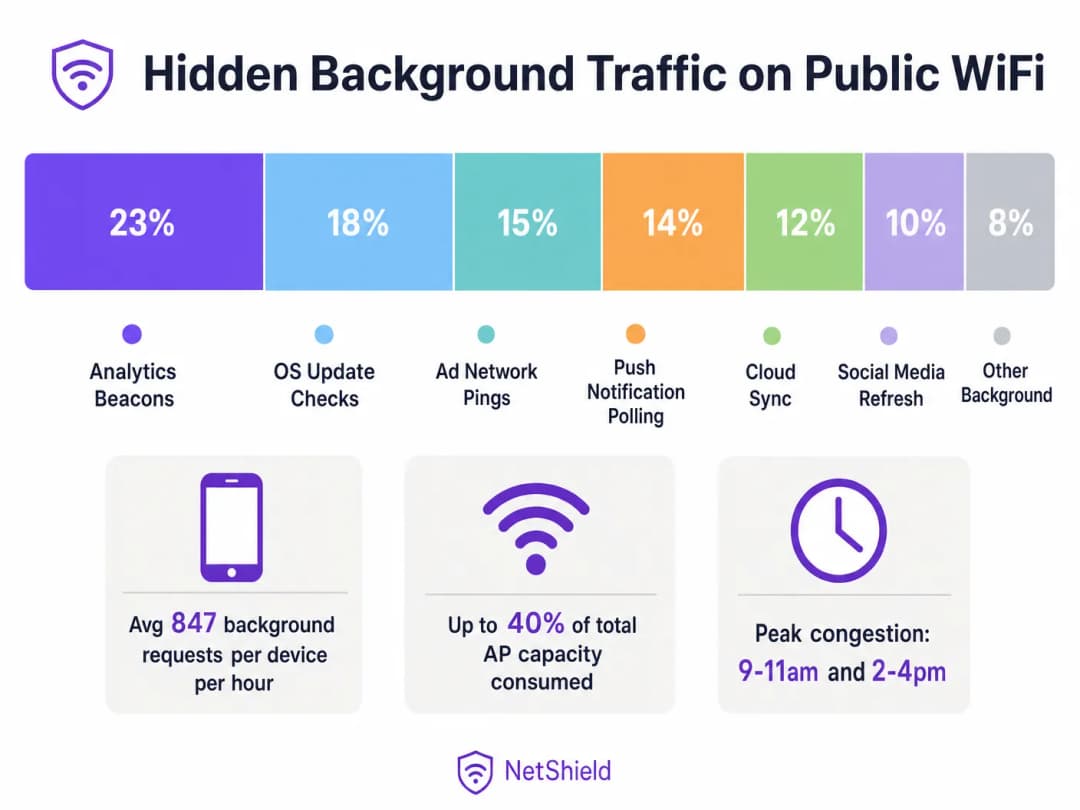
In high-density public wireless environments, up to 40% of access point capacity can be silently consumed by background app refresh traffic—analytics beacons, ad network pings, OS update checks, and push notification polling. This guide provides network architects and IT managers with a vendor-neutral blueprint for identifying, classifying, and mitigating background traffic at the network layer. By implementing targeted block lists and rate-limiting policies, venues can recover significant airtime, defer costly hardware upgrades, and dramatically improve the connectivity experience for legitimate user traffic.
Technical Deep-Dive
The Anatomy of Background Traffic
Every smartphone connecting to your Guest WiFi network runs dozens of applications configured to execute background refresh cycles. These processes operate independently of user interaction, initiating connections to telemetry servers, cloud sync endpoints, and ad networks.
At the radio layer, the impact is disproportionate to the payload size. In an 802.11 network using CSMA/CA (Carrier Sense Multiple Access with Collision Avoidance), every transaction requires a full association sequence. A 200-byte analytics beacon requires probe requests, authentication, association, and DHCP negotiation. In environments like Retail or Hospitality , this contention overhead rapidly depletes available airtime.
The Wi-Fi 6 Mitigation Myth
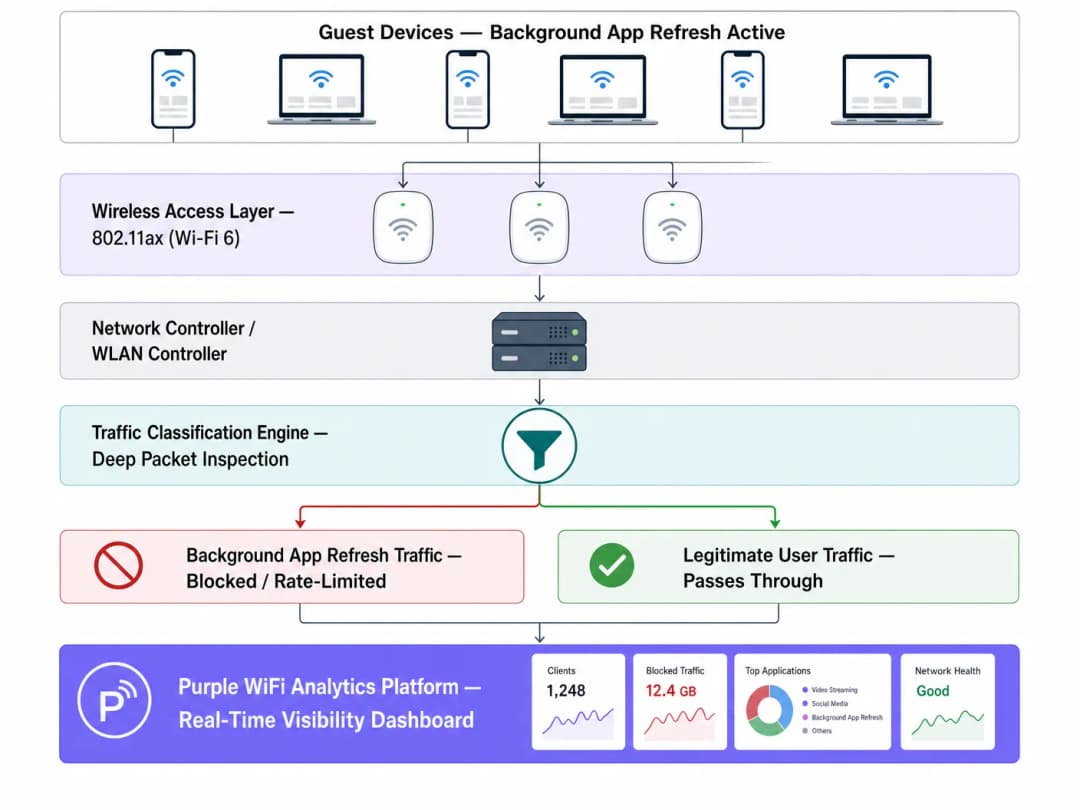
While Wi-Fi 6 (802.11ax) introduces OFDMA and BSS Colouring to manage high-density contention more efficiently, it does not solve the fundamental issue of unwanted payload delivery. The access point cannot distinguish between a user streaming a presentation and an app silently syncing diagnostic data. Network-level intervention via Deep Packet Inspection (DPI) remains essential.
¿Tiene preguntas sobre su configuración específica?
Nuestro equipo trabaja con operadores de recintos, responsables de TI e ingenieros de redes en 80 000 espacios. Reserve una llamada de 20 minutos y le mostraremos cómo lo han solucionado otros profesionales como usted.
Implementation Guide
1. Traffic Classification and Baselining
Before implementing policy changes, establish a baseline using your WiFi Analytics platform. Monitor traffic for at least five business days to identify peak background activity periods and top destination domains.
2. Developing the Block List
Implement DNS or IP-level blocking for known analytics and ad network endpoints. Start with community-validated lists (like OISD) and supplement with your baselining data.
Critical Exception: Do not block essential push notification services (e.g., Apple Push Notification Service on TCP 5223 or Google Firebase Cloud Messaging). Blocking these will disrupt core device functionality and generate user complaints.
3. Policy Enforcement at the Controller Layer
Apply classification rules at the WLAN controller rather than individual access points to ensure consistent policy enforcement.
Best Practices
- Rate-Limit OS Updates: Rather than blocking OS updates entirely, apply a strict rate limit (e.g., 1 Mbps per device) during peak operational hours.
- Implement QoS Marking: Use DSCP markings to deprioritise background traffic to the lowest traffic class, allowing it to transmit only when the channel is clear.
- Continuous Monitoring: Background endpoints evolve. Review and update your block lists quarterly.
Troubleshooting & Risk Mitigation
- Over-Blocking: Aggressive blocking without testing can break legitimate app functionality. Always test policies on a single AP group before estate-wide deployment.
- Ignoring the 5GHz/6GHz Split: Background traffic often clusters on 2.4GHz due to legacy device defaults. Ensure traffic analysis covers all bands. Wi Fi Frequencies: A Guide to Wi-Fi Frequencies in 2026 provides further context on band management.
ROI & Business Impact
Reclaiming 30-40% of wasted air time is functionally equivalent to increasing your physical AP density by the same margin. For venues facing capacity constraints, network-level traffic management can defer significant capital expenditure on hardware refreshes while immediately improving guest satisfaction scores.
Listen to the full technical briefing:
Definiciones clave
Actualización en segundo plano
Una función del sistema operativo móvil que permite a las aplicaciones buscar actualizaciones, sincronizar datos y enviar telemetría sin la interacción activa del usuario.
La fuente principal de consumo oculto de tiempo de transmisión en redes públicas de alta densidad.
CSMA/CA
Acceso múltiple por detección de portadora y prevención de colisiones (Carrier Sense Multiple Access with Collision Avoidance); el protocolo que utiliza la WiFi para gestionar el acceso al medio de radio compartido.
Explica por qué incluso las cargas útiles de fondo pequeñas causan una sobrecarga de red significativa debido a la saturación.
Tiempo de transmisión (Air Time)
La cantidad finita de tiempo disponible para que los dispositivos transmitan datos a través de una frecuencia de radio específica.
El recurso crítico agotado por el tráfico en segundo plano, más importante que el ancho de banda bruto en implementaciones de alta densidad.
Inspección profunda de paquetes (DPI)
Filtrado avanzado de paquetes de red que examina la parte de datos de un paquete para clasificar los tipos de tráfico.
Necesaria para distinguir entre el tráfico legítimo de usuarios y la telemetría en segundo plano.
Marcado DSCP
Punto de código de servicios diferenciados (Differentiated Services Code Point); un mecanismo para clasificar y gestionar el tráfico de red para la calidad de servicio (QoS).
Se utiliza para restar prioridad al tráfico en segundo plano para que solo se transmita cuando la red esté inactiva.
BSS Colouring
Una función de Wi-Fi 6 que identifica conjuntos de servicios básicos superpuestos para mejorar la reutilización espacial.
Mejora la eficiencia pero no elimina la necesidad de bloquear cargas útiles de fondo no deseadas.
OFDMA
Acceso múltiple por división de frecuencias ortogonales (Orthogonal Frequency-Division Multiple Access); permite que un único AP se comunique con varios dispositivos simultáneamente.
Una mejora de Wi-Fi 6 que mitiga pero no resuelve la saturación del tráfico en segundo plano.
Limitación de velocidad (Rate Limiting)
Controlar la velocidad del tráfico enviado o recibido en una interfaz de red.
El enfoque recomendado para gestionar el tráfico en segundo plano pesado pero esencial, como las actualizaciones del sistema operativo.
Ejemplos prácticos
Un hotel de cuatro estrellas y 340 habitaciones experimenta un rendimiento deficiente de la WiFi durante las horas de mayor afluencia de registros (de 15:00 a 18:00), a pesar de una actualización reciente del hardware a Wi-Fi 6.
- Implementar el análisis de tráfico a través de Purple WiFi Analytics.
- Identificar que el 38% del tiempo de transmisión es consumido por la actualización en segundo plano de las aplicaciones.
- Implementar una lista de bloqueo de DNS orientada a 847 dominios conocidos de análisis y publicidad.
- Aplicar un límite de velocidad de 1 Mbps al tráfico identificado de actualizaciones de sistemas operativos durante las horas punta.
Una cadena minorista regional con 60 tiendas informa que el almacenamiento en búfer de la señalización digital se produce simultáneamente con un alto uso de la WiFi de los clientes.
- Establecer una línea de base del tráfico en toda la red.
- Descubrir que las comprobaciones de actualización de iOS en el SSID de invitados están saturando el enlace WAN.
- Desplegar una política centralizada a través del controlador WLAN para limitar la velocidad de los servidores de actualización de Apple a 512 Kbps por dispositivo de invitado.
- Priorizar las direcciones MAC de señalización digital mediante QoS.
Preguntas de práctica
Q1. El director de TI de un estadio quiere bloquear todo el tráfico hacia los servidores de Apple y Google durante un gran evento deportivo para conservar el ancho de banda. ¿Cuál es el riesgo?
Sugerencia: Considere los servicios esenciales de los dispositivos que dependen de conexiones persistentes.
Ver respuesta modelo
Bloquear todo el tráfico hacia Apple y Google interrumpirá los servicios esenciales de notificaciones push (APNS en TCP 5223 y Firebase Cloud Messaging). Esto provocará que las aplicaciones legítimas (como las de venta de entradas digitales o las alertas de emergencia) fallen. En su lugar, bloquee subdominios de análisis específicos y limite la velocidad de las actualizaciones de los sistemas operativos.
Q2. Tras desplegar una actualización a Wi-Fi 6, un centro de conferencias sigue experimentando una latencia grave durante la conferencia de apertura de la mañana, cuando llegan 2000 asistentes. ¿Por qué la actualización del hardware no resolvió el problema?
Sugerencia: Piense en lo que el Wi-Fi 6 gestiona bien frente a lo que no puede controlar.
Ver respuesta modelo
Wi-Fi 6 mejora la eficiencia (mediante OFDMA y BSS Colouring) pero no puede distinguir entre un usuario que consulta el correo electrónico y 2000 dispositivos que ejecutan simultáneamente actualizaciones de aplicaciones en segundo plano. El enorme volumen de sobrecarga de contención sigue agotando el tiempo de transmisión (air time). Se requiere una clasificación del tráfico a nivel de red.
Q3. Al configurar la QoS para una red de invitados, ¿cómo se debe gestionar el tráfico de segundo plano, como la sincronización de fotos en la nube?
Sugerencia: No es malicioso, pero no es urgente.
Ver respuesta modelo
Debe clasificarse y marcarse con un valor DSCP bajo (por ejemplo, clase Background/Scavenger). Esto desprioriza el tráfico, garantizando que solo se transmita cuando la red esté inactiva, protegiendo así el tráfico en tiempo real como VoIP o las transacciones de los puntos de venta.
Continúe leyendo esta serie
Cisco Catalyst WLC y guest WiFi: configuración de Captive Portal con Purple
Cómo funciona un controlador LAN inalámbrico Cisco Catalyst 9800 (IOS-XE) con Purple guest WiFi: autenticación web externa, RADIUS y un walled garden, con un enlace a la guía de configuración paso a paso de Purple para la configuración exacta.
La guía empresarial para configurar WiFi de invitados: seguridad, segmentación y velocidad
Esta guía técnica empresarial proporciona instrucciones prácticas para directores de IT y arquitectos de redes sobre la implementación de WiFi de invitados seguro y segmentado. Cubre la arquitectura VLAN, el cifrado WPA3, la autenticación 802.1X, el cumplimiento de PCI-DSS y GDPR, y la integración de la capa de Captive Portal de Purple, que es independiente del hardware.
Staff WiFi vs. Guest WiFi: mejores prácticas para la segmentación de redes corporativas
Una guía técnica completa para líderes de TI sobre cómo segmentar las redes de staff y guest WiFi. Cubre la arquitectura VLAN, la autenticación 802.1X, las políticas de firewall y el impacto empresarial de un diseño de red seguro.
¿Tiene preguntas sobre su configuración específica?
Nuestro equipo trabaja con operadores de recintos, responsables de TI e ingenieros de redes en 80 000 espacios. Reserve una llamada de 20 minutos y le mostraremos cómo lo han solucionado otros profesionales como usted.