
Multi-Tenant कार्यालय भवनों के लिए WiFi नेटवर्क डिजाइन करना
यह गाइड IT मैनेजरों, नेटवर्क आर्किटेक्ट्स और CTOs को multi-tenant कार्यालय भवनों में स्केलेबल, सुरक्षित और पृथक WiFi नेटवर्क डिजाइन करने के लिए एक वेंडर-न्यूट्रल ब्लूप्रिंट प्रदान करती है। इसमें IEEE 802.1Q के तहत VLAN सेगमेंटेशन, 802.1X और RADIUS के माध्यम से डायनेमिक VLAN असाइनमेंट, उच्च-घनत्व वाले वातावरण के लिए RF प्लानिंग, और GDPR और PCI-DSS के तहत अनुपालन संबंधी विचार शामिल हैं। वेन्यू ऑपरेटरों और बिल्डिंग मैनेजरों को डिप्लॉयमेंट से पहले कार्रवाई योग्य आर्किटेक्चर मार्गदर्शन, वास्तविक दुनिया के केस स्टडीज और कॉन्फ़िगरेशन की गलतियों से बचने के उपाय मिलेंगे।
इस गाइड को सुनें
पॉडकास्ट ट्रांसक्रिप्ट देखें
📚 हमारी मुख्य श्रृंखला का हिस्सा: Multi-Tenant WiFi Guide →
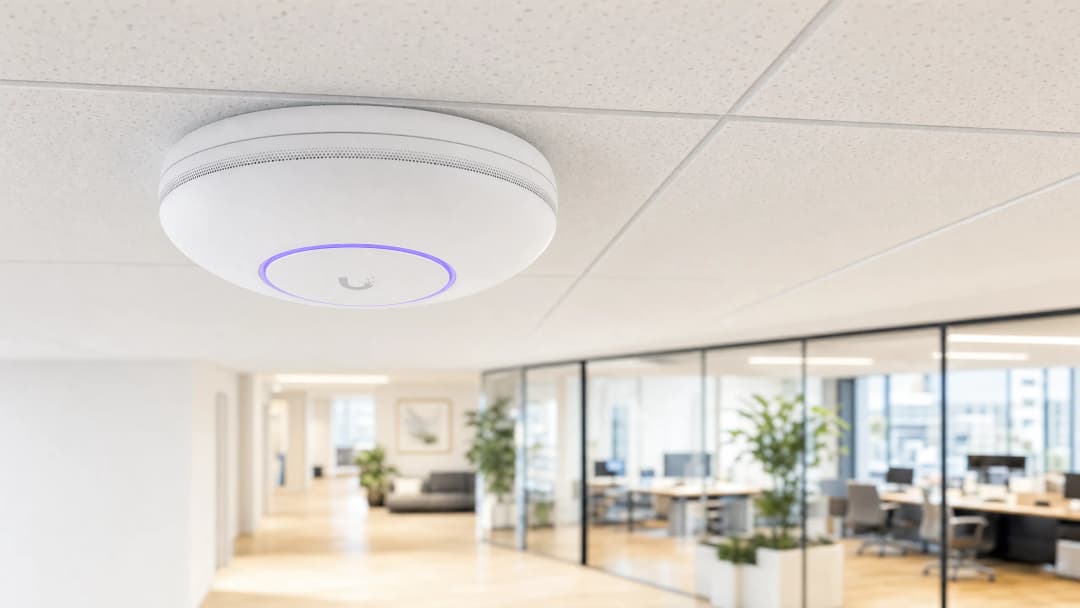
कार्यकारी सारांश (Executive Summary)
मल्टी-टेनेंट ऑफिस बिल्डिंग्स का प्रबंधन करने वाले CTOs और नेटवर्क आर्किटेक्ट्स के लिए, चुनौती स्पष्ट है: एक साझा भौतिक नेटवर्क पर कई स्वतंत्र संगठनों को विश्वसनीय, सुरक्षित, और अलग कनेक्टिविटी कैसे प्रदान की जाए। मल्टी-टेनेंट वातावरण में, एक फ्लैट नेटवर्क आर्किटेक्ट एक गंभीर सुरक्षा जोखिम है। यह GDPR और PCI-DSS के तहत आपके अनुपालन (compliance) दायरे को बढ़ाता है, टेनेंट्स को लेटरल सुरक्षा खतरों के प्रति संवेदनशील बनाता है, और एक ऐसा परिचालन बोझ पैदा करता है जो टेनेंट की संख्या बढ़ने पर प्रबंधित करना कठिन हो जाता है।
यह गाइड मल्टी-टेनेंट WiFi आर्किटेक्चर को डिजाइन करने के लिए एक वेंडर-न्यूट्रल ब्लूप्रिंट प्रदान करता है। IEEE 802.1Q VLAN सेगमेंटेशन, 802.1X-आधारित डायनेमिक VLAN असाइनमेंट, और अनुशासित RF प्लानिंग को लागू करके, आप SSID के अत्यधिक प्रसार को समाप्त कर सकते हैं, एयरटाइम ओवरहेड को 20% तक कम कर सकते हैं, और टेनेंट्स के बीच सख्त Layer 2 अलगाव लागू कर सकते हैं। हम Cisco Meraki, HPE Aruba, Ruckus, और Juniper Mist सहित विभिन्न वेंडर्स के तकनीकी मानकों, हार्डवेयर आवश्यकताओं, और बुनियादी ढांचे को सुरक्षित करने के लिए आवश्यक राउटिंग पॉलिसियों का विवरण देते हैं। सही ढंग से लागू होने पर, यह आर्किटेक्चर सपोर्ट ओवरहेड्स को कम करता है, अनुपालन ऑडिट को सरल बनाता है, और आपको एक सेवा के रूप में कनेक्टिविटी से कमाई करने की अनुमति देता है।
तकनीकी गहन विश्लेषण (Technical Deep Dive)
फ्लैट नेटवर्क के नुकसान
एक फ्लैट नेटवर्क हर डिवाइस को - चाहे वह किसी भी टेनेंट, ट्रैफ़िक प्रकार, या सुरक्षा स्तर का हो - एक ही ब्रॉडकास्ट डोमेन में रखता है। प्रत्येक डिवाइस प्रत्येक ब्रॉडकास्ट पैकेट को प्राप्त करता है। एक भी संक्रमित गेस्ट डिवाइस POS टर्मिनलों, बिल्डिंग मैनेजमेंट सिस्टम और कॉर्पोरेट वर्कस्टेशन को स्कैन कर सकता है और उन तक पहुंच सकता है। यह आपके पूरे नेटवर्क को PCI-DSS ऑडिट के दायरे में ला देता है। यह कोई सैद्धांतिक जोखिम नहीं है; यह कई मल्टी-टेनेंट इमारतों की डिफ़ॉल्ट स्थिति है जिनकी केबलिंग वायरलेस डेंसिटी को ध्यान में रखकर डिजाइन करने से पहले की गई थी।
इसका समाधान लॉजिकल सेगमेंटेशन है। आपको प्रति टेनेंट अलग भौतिक बुनियादी ढांचे की आवश्यकता नहीं है; आपको एक उचित रूप से डिज़ाइन किए गए VLAN आर्किटेक्चर, एक अच्छी तरह से कॉन्फ़िगर किए गए फ़ायरवॉल और एक केंद्रीकृत प्रबंधन प्लेटफॉर्म की आवश्यकता है।
IEEE 802.1Q और VLAN टैगिंग
वर्चुअल LANs - जो IEEE 802.1Q के रूप में मानकीकृत हैं - आपको एक एकल भौतिक स्विच फैब्रिक को कई अलग-अलग लॉजिकल नेटवर्क में विभाजित करने की अनुमति देते हैं। जब कोई क्लाइंट किसी WiFi एक्सेस पॉइंट (AP) से कनेक्ट होता है, तो AP उस क्लाइंट के फ़्रेम को 12-बिट VLAN आइडेंटिफ़ायर (VID) के साथ टैग करता है। स्विच इस टैग को पढ़ते हैं और यह सुनिश्चित करते हैं कि एक VLAN का ट्रैफ़िक दूसरे VLAN के पोर्ट पर तब तक फ़ॉरवर्ड न किया जाए जब तक कि कोई स्पष्ट फ़ायरवॉल राउटिंग नियम इसकी अनुमति न दे।
एक मानक मल्टी-टेनेंट ऑफिस बिल्डिंग के लिए कम से कम चार VLAN की आवश्यकता होती है:
| VLAN | ट्रैफ़िक क्लास | राउटिंग पॉलिसी |
|---|---|---|
| VLAN 10 | Corporate Tenant A | केवल इंटरनेट + टेनेंट-विशिष्ट संसाधन |
| VLAN 20 | Corporate Tenant B | केवल इंटरनेट + टेनेंट-विशिष्ट संसाधन |
| VLAN 30 | Guest WiFi (captive portal) | केवल इंटरनेट, किसी भी टेनेंट VLAN तक कोई पहुंच नहीं |
| VLAN 40 | IoT और BMS | केवल निर्दिष्ट प्रबंधन प्लेटफॉर्मों के लिए आउटगोइंग ट्रैफ़िक |
अधिक टेनेंट वाली इमारतों के लिए, आप इस मॉडल का विस्तार करते हैं। प्रत्येक अतिरिक्त टेनेंट को एक समर्पित VLAN और एक संगत फ़ायरवॉल नीति मिलती है। भौतिक बुनियादी ढांचा साझा रहता है।
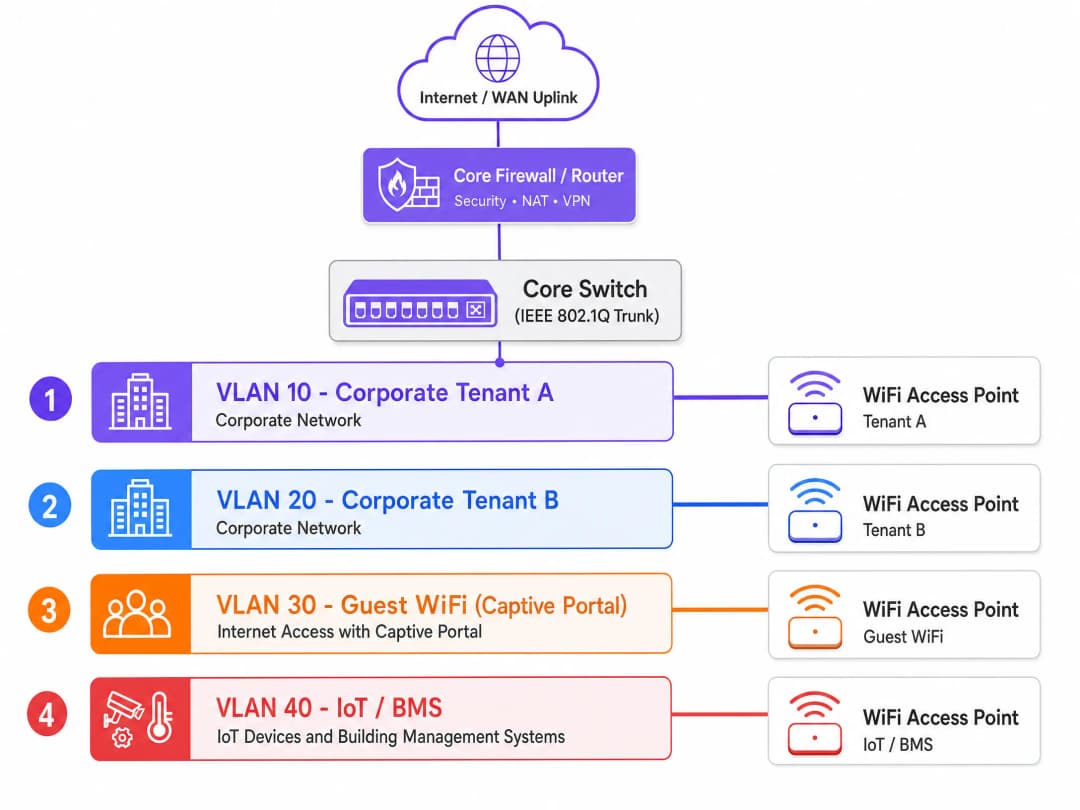
802.1X और RADIUS के माध्यम से डायनेमिक VLAN असाइनमेंट
पहले, नेटवर्क इंजीनियर प्रत्येक टेनेंट के लिए एक अलग SSID बनाते थे। यह दृष्टिकोण प्रदर्शन को खराब करता है। प्रत्येक SSID न्यूनतम बुनियादी अनिवार्य डेटा दर पर प्रबंधन फ़्रेम (बीकन) प्रसारित करता है ताकि यह सुनिश्चित हो सके कि पुराने डिवाइस कनेक्ट हो सकें। एक ही एक्सेस पॉइंट पर छह या सात SSID प्रसारित करने से कोई भी उपयोगकर्ता डेटा ट्रांसमिट होने से पहले उपलब्ध वायरलेस एयरटाइम का 20% से 30% तक खर्च हो सकता है। एक घने मल्टी-टेनेंट भवन में, यह अस्वीकार्य है।
आधुनिक मानक डायनेमिक VLAN असाइनमेंट है। आप IEEE 802.1X प्रमाणीकरण का उपयोग करके एक एकल सुरक्षित SSID प्रसारित करते हैं। जब कोई उपयोगकर्ता कनेक्ट होता है, तो उनका डिवाइस (सप्लिकेंट) एक्सेस पॉइंट (ऑथेंटिकेटर) के माध्यम से RADIUS सर्वर के साथ क्रेडेंशियल साझा करता है। RADIUS सर्वर एक पहचान प्रदाता - Microsoft Entra ID, Okta, या Google Workspace - के खिलाफ क्रेडेंशियल को सत्यापित करता है और एक्सेस पॉइंट को एक Access-Accept संदेश भेजता है। उस संदेश में तीन IETF-मानक RADIUS विशेषताएँ होती हैं:
- Tunnel-Type (विशेषता 64): VLAN पर सेट
- Tunnel-Medium-Type (विशेषता 65): 802 पर सेट
- Tunnel-Private-Group-ID (विशेषता 81): उस उपयोगकर्ता के संगठन के लिए विशिष्ट VLAN ID
एक्सेस पॉइंट इन विशेषताओं को प्राप्त करता है और गतिशील रूप से उस उपयोगकर्ता के ट्रैफ़िक को उनके निर्दिष्ट VLAN में रख देता है। Tenant A का एक कर्मचारी और Tenant B का एक कर्मचारी एक ही SSID से कनेक्ट होते हैं। उनका ट्रैफ़िक लेयर 2 पर पूरी तरह से अलग हो जाता है। स्विच उनके साथ ऐसा व्यवहार करते हैं जैसे कि वे पूरी तरह से अलग भौतिक नेटवर्क से जुड़े हों।
अतिथि सेगमेंट के लिए, ट्रैफ़िक को एक समर्पित अतिथि VLAN के माध्यम से captive portal पर रूट करें। Purple का Guest WiFi प्लेटफ़ॉर्म कॉर्पोरेट नेटवर्क तक शून्य रूटेड पहुंच के साथ, पृथक सेगमेंट पर GDPR-अनुपालक सहमति प्रबंधन, सुरक्षित ऑनबोर्डिंग और WiFi Analytics को संभालता है। एक्सेस कंट्रोल आर्किटेक्चर के अधिक व्यापक अवलोकन के लिए, नेटवर्क एक्सेस कंट्रोल सिस्टम के लिए हमारा गाइड देखें।
WPA3-Enterprise और एन्क्रिप्शन मानक
मल्टी-टेनेंट डिप्लॉयमेंट के लिए WPA3-Enterprise अनुशंसित एन्क्रिप्शन मानक है। यह 192-bit सुरक्षा मोड प्रदान करता है, WPA2 फोर-वे हैंडशेक की कमजोरियों को समाप्त करता है, और IEEE 802.11w के तहत प्रोटेक्टेड मैनेजमेंट फ्रेम्स (PMF) को अनिवार्य करता है। ऐसे वातावरण के लिए जो भुगतान कार्ड डेटा या संवेदनशील कॉर्पोरेट जानकारी को संभालते हैं, EAP-TLS - प्रमाणपत्र-आधारित पारस्परिक प्रमाणीकरण - के साथ WPA3-Enterprise क्रेडेंशियल चोरी की संभावना को पूरी तरह से समाप्त कर देता है।
अतिथि सेगमेंट के लिए जहां प्रमाणपत्र तैनात नहीं किए जा सकते, WPA3-SAE (सिमल्टेनियस ऑथेंटिकेशन ऑफ इक्वल्स) फ़ॉरवर्ड सीक्रेसी प्रदान करता है, जिससे यह सुनिश्चित होता है कि कोई की (key) हैक होने पर भी पुराना ट्रैफ़िक उजागर न हो।
हाई-डेंसिटी वातावरण में RF प्लानिंग
मल्टी-टेनेंट कार्यालय भवनों में खराब WiFi प्रदर्शन का मुख्य कारण को-चैनल इंटरफेरेंस (CCI) है। जब आस-पास के एक्सेस पॉइंट एक ही फ़्रीक्वेंसी चैनल पर ब्रॉडकास्ट करते हैं, तो डिवाइसों को ट्रांसमिट करने से पहले फ्री एयरटाइम की प्रतीक्षा करनी पड़ती है। कई टेनेंट्स और अत्यधिक डिवाइस डेंसिटी वाले भवन में, अनियोजित चैनल आवंटन एक भीड़भाड़ वाला RF वातावरण बनाता है जिसे कितनी भी बैंडविड्थ ठीक नहीं कर सकती है।
डिप्लॉयमेंट से पहले एक सक्रिय ऑन-साइट RF सर्वे आवश्यक है। वेंडर कवरेज मैप आम तौर पर आशावादी होते हैं। आपको भौतिक स्थान में वास्तविक सिग्नल माप की आवश्यकता होती है, जिसमें दीवारों की सामग्री, फर्श का निर्माण, और पड़ोसी भवनों का RF वातावरण शामिल हो।
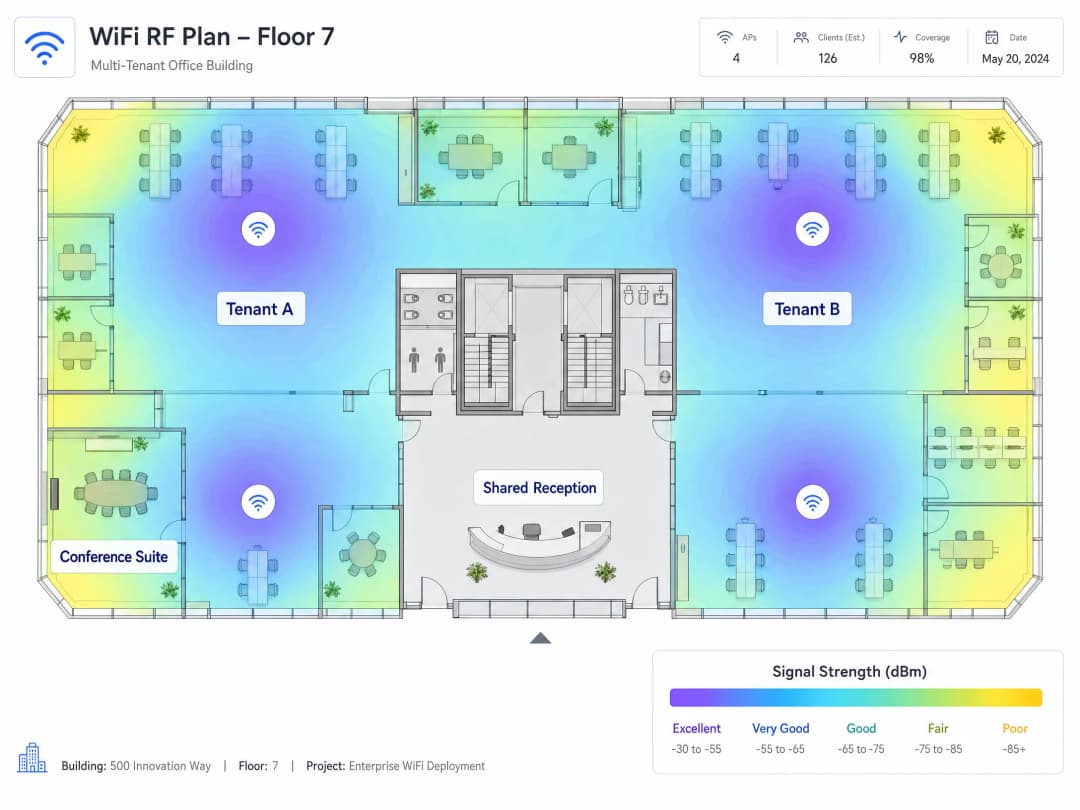
अधिकांश विनियामक क्षेत्रों में, 2.4 GHz बैंड तीन गैर-अतिव्यापी (non-overlapping) चैनल (1, 6, और 11) प्रदान करता है। 5 GHz बैंड काफी अधिक क्षमता प्रदान करता है। WiFi 6E इसे 6 GHz बैंड तक विस्तारित करता है, जो पुराने उपकरणों के हस्तक्षेप से काफी हद तक मुक्त साफ स्पेक्ट्रम प्रदान करता है। नए मल्टी-टेनेंट डिप्लॉयमेंट के लिए, Cisco Meraki, HPE Aruba, Ruckus, Juniper Mist, या Ubiquiti UniFi से WiFi 6E-सक्षम एक्सेस पॉइंट निर्दिष्ट करना वह स्पेक्ट्रल हेडरूम प्रदान करता है जिसकी हाई-डेंसिटी वातावरण मांग करते हैं।
IoT आइसोलेशन
आधुनिक कार्यालय भवनों में बिल्डिंग मैनेजमेंट सिस्टम, HVAC कंट्रोलर, स्मार्ट लाइटिंग, एक्सेस कंट्रोल और CCTV शामिल होते हैं। इन उपकरणों को पैच करना बेहद कठिन होता है और ये एक बड़ा अटैक सरफेस दर्शाते हैं। इन्हें एक समर्पित VLAN पर सख्त इग्रेस फ़िल्टरिंग के साथ अलग किया जाना चाहिए, जो केवल उनके निर्दिष्ट प्रबंधन प्लेटफॉर्म पर आउटबाउंड संचार की अनुमति दे। किसी भी टेनेंट VLAN पर शून्य रूटेड एक्सेस। अतिथि VLAN पर शून्य रूटेड एक्सेस। सुरक्षा और GDPR दोनों ही दृष्टिकोणों से यह गैर-परक्राम्य है।
कार्यान्वयन गाइड
चरण 1: हार्डवेयर को छूने से पहले अपने लॉजिकल आर्किटेक्चर को डिज़ाइन करें। अपने टेनेंट की संख्या और ट्रैफ़िक क्लास (कॉर्पोरेट, अतिथि, IoT, भुगतान, प्रबंधन) को मैप करें और VLAN आवंटित करें। अपने IP एड्रेसिंग स्कीम को डॉक्युमेंट करें। अपनी इंटर-VLAN राउटिंग नीति को परिभाषित करें: कौन किससे बात कर सकता है, और क्या पूरी तरह से प्रतिबंधित है।
Step 2: एक सक्रिय RF साइट सर्वे करवाएं। कभी भी वेंडर के कवरेज मैप्स पर भरोसा न करें। AP प्लेसमेंट और चैनल आवंटन के लिए आपको भौतिक स्थान में लिए गए वास्तविक सिग्नल माप की आवश्यकता होती है।
Step 3: एक Default-Deny पॉलिसी के साथ अपने कोर फ़ायरवॉल को कॉन्फ़िगर करें। डिफ़ॉल्ट रूप से सभी इंटर-VLAN रूटिंग को ब्लॉक करें। केवल स्पष्ट, पोर्ट-विशिष्ट अपवाद जोड़ें। प्रत्येक इंटर-VLAN पथ का उचित कारण और दस्तावेज़ होना चाहिए।
Step 4: सभी ट्रंक पोर्ट पर VLAN 1 को अक्षम करें। ट्रंक पोर्ट पर नेटिव VLAN को अप्रयुक्त, नॉन-रूटेबल VLAN ID में बदलें। यह VLAN हॉपिंग हमलों को रोकता है जो डिफ़ॉल्ट नेटिव VLAN का फायदा उठाते हैं।
Step 5: ट्रंक पोर्ट कॉन्फ़िगरेशन को सत्यापित करें। एक्सेस पॉइंट से डिस्ट्रीब्यूशन लेयर तक के पथ में प्रत्येक ट्रंक लिंक पर हर आवश्यक VLAN ID को स्पष्ट रूप से अनुमति दें। एक गायब VLAN टैग के कारण साइलेंट ट्रैफ़िक ड्रॉप होता है जिसे डायग्नोज़ करने में घंटों लग जाते हैं।
Step 6: केंद्रीकृत क्लाउड प्रबंधन तैनात करें। Cisco Meraki, HPE Aruba, Juniper Mist, और Ruckus के प्लेटफ़ॉर्म प्रति-SSID बैंडविड्थ नीतियां, प्रति-किरायेदार (tenant) रिपोर्टिंग और आपके RADIUS इन्फ्रास्ट्रक्चर के साथ एकीकरण प्रदान करते हैं। नियंत्रक के बिना वितरित AP संपत्ति का प्रबंधन करने में परिचालन लागत आती है जो बड़े पैमाने पर टिकाऊ नहीं है।
Step 7: प्रति सेगमेंट DHCP लीज़ समय सेट करें। कॉर्पोरेट VLANs: 8 से 24 घंटे। गेस्ट WiFi VLANs: 1 से 2 घंटे। गेस्ट सेगमेंट पर कम लीज़ समय उच्च-टर्नओवर वाले वातावरण में IP एड्रेस समाप्त होने से बचाता है।
Step 8: प्रबंधन प्लेन को अलग करें। आपका प्रबंधन VLAN सभी किरायेदार और गेस्ट VLANs से पूरी तरह से अलग होना चाहिए। प्रबंधन ट्रैफ़िक पर सख्त ACLs लागू करें। यदि कोई किरायेदार आपके प्रबंधन प्लेन तक पहुँच सकता है, तो आपके पास एक गंभीर सुरक्षा भेद्यता है।
सर्वोत्तम प्रथाएं
नीचे दी गई तालिका एक अनुपालन वाले मल्टी-किरायेदार WiFi परिनियोजन के लिए प्रमुख कॉन्फ़िगरेशन मानकों को संक्षेप में प्रस्तुत करती है।
| नियंत्रण | मानक | औचित्य |
|---|---|---|
| VLAN सेगमेंटेशन | IEEE 802.1Q | किरायेदारों के बीच लेयर 2 आइसोलेशन |
| प्रमाणीकरण | WPA3-Enterprise के साथ IEEE 802.1X | क्रेडेंशियल चोरी के खतरों को समाप्त करता है |
| डायनेमिक VLAN असाइनमेंट | टनल एट्रिब्यूट्स के साथ RADIUS | SSID की संख्या को कम करता है, एयरटाइम बचाता है |
| गेस्ट ऑनबोर्डिंग | GDPR सहमति के साथ Captive Portal | अनुपालन और डेटा कैप्चर |
| IoT आइसोलेशन | एग्रेस ACLs के साथ समर्पित VLAN | बिना पैच वाले उपकरणों के हमले के दायरे को सीमित करता है |
| RF प्लानिंग | सक्रिय साइट सर्वे | सह-चैनल हस्तक्षेप को कम करता है |
| रोमिंग | 802.11r फास्ट BSS ट्रांज़िशन | APs के बीच निर्बाध हैंडऑफ़ |
| नेटिव VLAN | नॉन-रूटेबल, अप्रयुक्त VLAN ID | VLAN हॉपिंग हमलों को रोकता है |
hospitality परिनियोजन के लिए, गेस्ट VLAN आइसोलेशन महत्वपूर्ण है। retail वातावरण के लिए, एक समर्पित VLAN पर POS टर्मिनलों को अलग करना सीधे PCI DSS ऑडिट के दायरे को कम करता है। transport हब और healthcare सुविधाओं के लिए, समान सेगमेंटेशन सिद्धांत लागू होते हैं, जिसमें समवर्ती कनेक्शन वॉल्यूम और डिवाइस प्रकार की विविधता पर अतिरिक्त ध्यान दिया जाता है।
सैटेलाइट ब्रॉडबैंड WAN अपलिंक पर विचार करने वाले वेन्यू के लिए, Purple की गाइड How to Set Up a Captive Portal on Starlink रिमोट और समुद्री वातावरण के लिए विशिष्ट बातों को कवर करती है।
ट्रबलशूटिंग और जोखिम न्यूनीकरण
साइलेंट ट्रैफिक ड्रॉप्स। यह मल्टी-टेनेंट डिप्लॉयमेंट में सबसे आम विफलता मोड है। इसका कारण ट्रंक पोर्ट पर गायब VLAN टैग है। एक यूजर 802.1X के माध्यम से सफलतापूर्वक प्रमाणित होता है, RADIUS सर्वर उन्हें VLAN 40 पर असाइन करता है, लेकिन VLAN 40 को ट्रंक पोर्ट पर अनुमति नहीं होती है। ट्रैफिक ड्रॉप हो जाता है और यूजर IP एड्रेस प्राप्त नहीं कर पाता है। ट्रंक कॉन्फ़िगरेशन को सावधानीपूर्वक प्रलेखित करें और कमीशनिंग के दौरान उन्हें सत्यापित करें।
SSID प्रसार। आपके द्वारा प्रसारित प्रत्येक SSID बीकन फ्रेम एयरटाइम की खपत करता है। घने वातावरण में, प्रति AP 8 से 10 SSIDs सभी के लिए नेटवर्क प्रदर्शन को कम कर देते हैं। SSIDs को प्रति रेडियो अधिकतम 4 तक सीमित रखें। कई टेनेंट्स को सेवा देने के लिए अलग-अलग SSIDs के बजाय RADIUS एट्रिब्यूट्स के माध्यम से डायनेमिक VLAN असाइनमेंट का उपयोग करें।
मैनेजमेंट प्लेन एक्सपोज़र। यदि आपका मैनेजमेंट VLAN अलग नहीं है, तो एक्सेस प्राप्त करने वाला टेनेंट AP कॉन्फ़िगरेशन को संशोधित कर सकता है, सेवा को बाधित कर सकता है, या मैनेजमेंट ट्रैफिक को इंटरसेप्ट कर सकता है। जहां संभव हो आउट-ऑफ-बैंड मैनेजमेंट का उपयोग करें और सभी मैनेजमेंट इंटरफेस पर सख्त ACLs लागू करें।
IoT डिवाइस का अनियंत्रित फैलाव। बिल्डिंग ऑपरेटर्स अक्सर नेटवर्क टीम को सूचित किए बिना IoT डिवाइस जोड़ते हैं। एक नेटवर्क एक्सेस कंट्रोल (NAC) नीति लागू करें जिसमें IoT VLAN पर किसी भी नए डिवाइस को IP एड्रेस प्राप्त करने से पहले स्पष्ट प्राधिकरण की आवश्यकता हो।
गेस्ट VLAN पर DHCP समाप्ति। उच्च-टर्नओवर वाले वातावरण में, डिवाइस डिस्कनेक्ट होने के बाद भी DHCP लीज बनाए रखते हैं। एक /24 सबनेट 254 एड्रेस प्रदान करता है। एक व्यस्त कॉन्फ्रेंस सेंटर या कोवर्किंग स्पेस में, ये जल्दी समाप्त हो जाते हैं। लीज का समय 1 से 2 घंटे सेट करें और पीक समवर्ती डिवाइस काउंट्स को समायोजित करने के लिए गेस्ट VLAN सबनेट का आकार निर्धारित करें।
ROI और व्यावसायिक प्रभाव
एक उचित रूप से खंडित मल्टी-टेनेंट WiFi आर्किटेक्चर तीन आयामों में मापने योग्य परिणाम प्रदान करता है।
कम अनुपालन लागत। Purple के अपने डिप्लॉयमेंट डेटा के आधार पर, सख्त फ़ायरवॉल नियंत्रणों के साथ एक समर्पित VLAN पर POS और पेमेंट टर्मिनल्स को अलग करने से PCI DSS ऑडिट का दायरा लगभग 70% कम हो जाता है। यह सीधे वार्षिक ऑडिट लागत और आपकी IT टीम द्वारा अनुपालन प्रलेखन पर खर्च किए जाने वाले समय को कम करता है।
परिचालन दक्षता। केंद्रीकृत क्लाउड मैनेजमेंट एक वितरित AP एस्टेट के प्रबंधन से जुड़े OpEx को कम करता है। जीरो-टच प्रोविज़निंग, वैश्विक नीति प्रवर्तन, और प्रति-टेनेंट रिपोर्टिंग ऑन-साइट कॉन्फ़िगरेशन परिवर्तनों की आवश्यकता को समाप्त करती है। टेनेंट ऑनबोर्डिंग का समय दिनों से घटकर घंटों में आ जाता है।राजस्व सृजन। एक सुरक्षित, उच्च-प्रदर्शन वाला नेटवर्क बिल्डिंग ऑपरेटरों को एक सेवा के रूप में कनेक्टिविटी का मुद्रीकरण करने में सक्षम बनाता है। टियर बैंडविड्थ प्लान, प्रति-किरायेदार SLAs और एनालिटिक्स-संचालित इनसाइट्स WiFi को एक लागत केंद्र से राजस्व स्ट्रीम में बदल देते हैं। Purple विश्व स्तर पर 80,000 से अधिक भौतिक स्थानों में काम करता है और उसने 2024 में 440 मिलियन लॉगिन संसाधित किए हैं (Purple आंतरिक डेटा, 2024), जो इस मॉडल को बड़े पैमाने पर समर्थन देने के लिए एनालिटिक्स बुनियादी ढांचा प्रदान करता है।
WiFi कनेक्टिविटी व्यापक डिजिटल समावेशन लक्ष्यों का कैसे समर्थन करती है, इस बारे में अधिक जानने के लिए, World WiFi Day 2026 पर हमारा लेख देखें। मल्टी-साइट डिप्लॉयमेंट के लिए प्रासंगिक WAN आर्किटेक्चर विचारों पर एक प्राइमर के लिए, WAN कंप्यूटर नेटवर्क की परिभाषा के लिए हमारा गाइड देखें।
मुख्य परिभाषाएं
IEEE 802.1Q
नेटवर्किंग मानक जो Ethernet फ्रेम्स के लिए VLAN टैगिंग को परिभाषित करता है। यह प्रत्येक फ्रेम में 12-बिट VLAN आइडेंटिफायर (VID) वाला 4-बाइट टैग जोड़ता है, जिससे स्विचेस को साझा भौतिक बुनियादी ढांचे पर कई पृथक ब्रॉडकास्ट डोमेन बनाए रखने की अनुमति मिलती है।
Multi-tenant नेटवर्क सेगमेंटेशन के लिए मूलभूत प्रोटोकॉल। प्रत्येक एंटरप्राइज स्विच और एक्सेस पॉइंट 802.1Q का समर्थन करता है। इसके बिना, किरायेदारों के बीच तार्किक अलगाव असंभव है।
Dynamic VLAN Assignment
एक विधि जहां एक RADIUS सर्वर सफल 802.1X प्रमाणीकरण पर उपयोगकर्ता या डिवाइस को एक विशिष्ट VLAN असाइन करता है, जिसमें IETF RADIUS विशेषताओं (Tunnel-Type, Tunnel-Medium-Type, Tunnel-Private-Group-ID) का उपयोग करके एक्सेस पॉइंट को निर्देश दिया जाता है कि उपयोगकर्ता को किस VLAN में रखा जाए।
एकल SSID से कई टेनेंट्स को सेवा देने का मानक तरीका। यह SSID के अनावश्यक प्रसार को समाप्त करता है और वायरलेस एयरटाइम को सुरक्षित रखता है, जबकि टेनेंट्स के बीच पूर्ण Layer 2 अलगाव बनाए रखता है।
IEEE 802.1X
पोर्ट-आधारित नेटवर्क एक्सेस कंट्रोल (PNAC) के लिए IEEE मानक। यह तीन-पक्षीय प्रमाणीकरण मॉडल को परिभाषित करता है: सप्लीकेंट (क्लाइंट डिवाइस), ऑथेंटिकेटर (एक्सेस पॉइंट या स्विच), और ऑथेंटिकेशन सर्वर (RADIUS)। ऑथेंटिकेटर तब तक सभी ट्रैफ़िक को ब्लॉक करता है जब तक कि सप्लीकेंट प्रमाणित न हो जाए।
Dynamic VLAN Assignment को लागू करने के लिए उपयोग किया जाने वाला प्रमाणीकरण ढांचा। WPA3-Enterprise परिनियोजन के लिए आवश्यक है। यह Microsoft Entra ID, Okta और Google Workspace सहित पहचान प्रदाताओं के साथ एकीकृत होता है।
RADIUS
रिमोट ऑथेंटिकेशन डायल-इन यूजर सर्विस। एक नेटवर्किंग प्रोटोकॉल जो केंद्रीकृत प्रमाणीकरण, प्राधिकरण और लेखांकन (AAA) प्रबंधन प्रदान करता है। WiFi परिनियोजन में, RADIUS सर्वर उपयोगकर्ता क्रेडेंशियल्स को मान्य करता है और एक्सेस पॉइंट को VLAN असाइनमेंट विशेषताएं वापस करता है।
सर्वर इन्फ्रास्ट्रक्चर जो Dynamic VLAN Assignment को लागू करता है। इसे ऑन-प्रिमाइसेस या क्लाउड सेवा के रूप में तैनात किया जा सकता है। यह LDAP, SAML या SCIM के माध्यम से पहचान प्रदाताओं के साथ एकीकृत होता है।
को-चैनल हस्तक्षेप (CCI)
हस्तक्षेप जो तब होता है जब दो या दो से अधिक एक्सेस पॉइंट एक-दूसरे की सीमा के भीतर एक ही फ्रीक्वेंसी चैनल पर प्रसारण करते हैं। उपकरणों को ट्रांसमिट करने से पहले स्पष्ट एयरटाइम की प्रतीक्षा करनी चाहिए, जिससे उस चैनल पर सभी उपयोगकर्ताओं के लिए प्रभावी थ्रूपुट कम हो जाता है।
घने बहु-टेनेंट भवनों में खराब WiFi प्रदर्शन का प्राथमिक कारण। सक्रिय RF साइट सर्वेक्षणों और 2.4 GHz, 5 GHz और 6 GHz बैंडों में सावधानीपूर्वक चैनल आवंटन के माध्यम से इसे कम किया जाता है।
Native VLAN
802.1Q ट्रंक पोर्ट पर वह VLAN जो अनटैग्ड ट्रैफ़िक ले जाता है। डिफ़ॉल्ट रूप से, अधिकांश स्विचेस VLAN 1 को native VLAN के रूप में उपयोग करते हैं, जिससे VLAN हॉपिंग के लिए एक प्रसिद्ध हमला वेक्टर बनता है।
एक सुरक्षा जोखिम जिसे प्रत्येक बहु-टेनेंट परिनियोजन में संबोधित किया जाना चाहिए। VLAN हॉपिंग हमलों को रोकने के लिए सभी ट्रंक पोर्ट पर native VLAN को अप्रयुक्त, गैर-रूट करने योग्य VLAN ID में बदलें।
Captive Portal
एक वेब पेज जिसके साथ उपयोगकर्ता को नेटवर्क एक्सेस दिए जाने से पहले इंटरैक्ट करना होगा। WiFi परिनियोजन में, उपयोगकर्ता एक ओपन या WPA2-Personal SSID से जुड़ता है, प्रमाणीकरण या शर्तों की स्वीकृति के लिए एक स्पलैश पेज पर रीडायरेक्ट किया जाता है, और फिर उसे एक पृथक VLAN पर केवल-इंटरनेट एक्सेस दिया जाता है।
अतिथि WiFi सेगमेंट के लिए मानक ऑनबोर्डिंग तंत्र। यह GDPR-अनुरूप सहमति संग्रह, पहचान सत्यापन और एनालिटिक्स को सक्षम बनाता है। इसे कॉर्पोरेट या टेनेंट नेटवर्क के लिए शून्य रूटिंग एक्सेस वाले VLAN पर तैनात किया जाना चाहिए।
WPA3-Enterprise
एंटरप्राइज नेटवर्क के लिए नवीनतम Wi-Fi सुरक्षा प्रोटोकॉल, जिसे Wi-Fi एलायंस द्वारा मानकीकृत किया गया है। यह 192-बिट क्रिप्टोग्राफिक ताकत (CNSA सूट) प्रदान करता है, 802.1X प्रमाणीकरण की आवश्यकता रखता है, IEEE 802.11w के तहत प्रोटेक्टेड मैनेजमेंट फ्रेम्स (PMF) को अनिवार्य करता है, और WPA2 के फोर-वे हैंडशेक में कमजोरियों को समाप्त करता है।
बहु-टेनेंट कॉर्पोरेट WiFi सेगमेंट के लिए अनुशंसित एन्क्रिप्शन मानक। भुगतान कार्ड डेटा या संवेदनशील कॉर्पोरेट जानकारी को संभालने वाले वातावरण के लिए आवश्यक है। सभी प्रमुख एंटरप्राइज AP विक्रेताओं द्वारा समर्थित।
EAP-TLS
Extensible Authentication Protocol - Transport Layer Security। एक प्रमाणपत्र-आधारित 802.1X प्रमाणीकरण विधि जिसके लिए क्लाइंट और RADIUS सर्वर दोनों को X.509 डिजिटल प्रमाणपत्र प्रस्तुत करने की आवश्यकता होती है, जो पारस्परिक प्रमाणीकरण प्रदान करता है और पासवर्ड-आधारित क्रेडेंशियल चोरी को समाप्त करता है।
सबसे सुरक्षित 802.1X प्रमाणीकरण विधि। उच्च-सुरक्षा बहु-टेनेंट वातावरण में उपयोग की जाती है जहां क्रेडेंशियल चोरी एक प्राथमिक चिंता है। क्लाइंट प्रमाणपत्र जारी करने और प्रबंधित करने के लिए एक पब्लिक की इन्फ्रास्ट्रक्चर (PKI) की आवश्यकता होती है।
MAC Authentication Bypass (MAB)
एक फ़ॉलबैक प्रमाणीकरण विधि जो किसी उपकरण के MAC पते को उसकी पहचान के रूप में उपयोग करती है जब उपकरण 802.1X का समर्थन नहीं करता है। RADIUS सर्वर MAC पते की खोज करता है और उपकरण को एक पूर्वनिर्धारित VLAN में असाइन करता है।
उन IoT उपकरणों, प्रिंटर और अन्य उपकरणों के लिए उपयोग किया जाता है जो 802.1X प्रमाणीकरण नहीं कर सकते। चूंकि MAC पते को स्पूफ किया जा सकता है, इसलिए MAB को हमेशा असाइन किए गए VLAN पर कड़े फ़ायरवॉल नियमों के साथ जोड़ा जाना चाहिए।
हल किए गए उदाहरण
12 संपत्तियों वाले एक 350-कमरों के होटल समूह को अपने नेटवर्क को सुरक्षित करने की आवश्यकता है। वर्तमान में, गेस्ट स्मार्टफोन, स्टाफ लैपटॉप, POS टर्मिनल और बिल्डिंग मैनेजमेंट सिस्टम सभी एक ही फ्लैट नेटवर्क साझा करते हैं। IT टीम हर महीने PCI-DSS अनुपालन दस्तावेज़ीकरण पर 40 घंटे खर्च करती है क्योंकि पूरा नेटवर्क इसके दायरे में है। CTO अगले ऑडिट से पहले अनुपालन ओवरहेड को कम करना और सुरक्षा स्थिति में सुधार करना चाहते हैं।
एक सेंट्रलाइज्ड क्लाउड मैनेजमेंट प्लेटफॉर्म के माध्यम से सभी 12 संपत्तियों में IEEE 802.1Q का उपयोग करके एक चार-VLAN आर्किटेक्चर तैनात करें। VLAN को इस प्रकार असाइन करें: स्टाफ कॉर्पोरेट के लिए VLAN 10 (802.1X प्रमाणित, आंतरिक संसाधनों और इंटरनेट पर रूट किया गया), Guest WiFi के लिए VLAN 20 (Captive Portal, केवल इंटरनेट), POS टर्मिनलों के लिए VLAN 30 (802.1X प्रमाणित, केवल भुगतान प्रोसेसर एंडपॉइंट्स पर रूट किया गया), और IoT और BMS के लिए VLAN 40 (MAC प्रमाणीकरण बायपास, केवल BMS प्रबंधन प्लेटफॉर्म पर निकास)। सभी VLAN के बीच एक डिफ़ॉल्ट-अस्वीकार फ़ायरवॉल नीति कॉन्फ़िगर करें। GDPR-अनुपालन सहमति प्रबंधन और एनालिटिक्स के लिए VLAN 20 पर Purple के Guest WiFi प्लेटफॉर्म को एकीकृत करें। कमिशनिंग के दौरान पथ में प्रत्येक स्विच पर ट्रंक पोर्ट कॉन्फ़िगरेशन को मान्य करें।
एक कोवर्किंग ऑपरेटर 40 स्वतंत्र सदस्य कंपनियों के साथ एक 15-मंजिला कार्यालय भवन का प्रबंधन करता है। प्रत्येक कंपनी को अपने स्वयं के पृथक WiFi नेटवर्क की आवश्यकता होती है। वर्तमान आर्किटेक्चर प्रति कंपनी एक अलग SSID प्रसारित करता है, जिसके परिणामस्वरूप प्रति मंजिल 40 SSID होते हैं। 10 Gbps फाइबर अपलिंक के बावजूद पूरे भवन में WiFi प्रदर्शन खराब है। नेटवर्क टीम हार्डवेयर को बदले बिना प्रदर्शन समस्याओं को हल करना चाहती है।
WPA3-Enterprise और IEEE 802.1X प्रमाणीकरण का उपयोग करके एक एकल सुरक्षित SSID में समेकित करें। भवन के पहचान प्रदाता (Microsoft Entra ID या Okta) के साथ एकीकृत एक RADIUS सर्वर तैनात करें। प्रत्येक प्रमाणित उपयोगकर्ता के लिए डायनेमिक VLAN असाइनमेंट विशेषताएँ (Tunnel-Type, Tunnel-Medium-Type, Tunnel-Private-Group-ID) वापस करने के लिए RADIUS सर्वर को कॉन्फ़िगर करें, जिससे वे अपनी कंपनी के समर्पित VLAN में आ जाएं। विज़िटर एक्सेस के लिए Captive Portal के साथ एक अलग Guest WiFi SSID बनाए रखें। यह SSID की संख्या को प्रति रेडियो 40 से घटाकर दो कर देता है। SSID समेकन के बाद चैनल आवंटन और AP प्लेसमेंट को मान्य करने के लिए एक सक्रिय RF साइट सर्वेक्षण आयोजित करें।
अभ्यास प्रश्न
Q1. आप भूतल पर 20 स्वतंत्र खुदरा किरायेदारों और पहली से पांचवीं मंजिल पर 10 कार्यालय किरायेदारों वाली एक नई मिश्रित-उपयोग वाली इमारत के लिए WiFi तैनात कर रहे हैं। भवन स्वामी चाहता है कि प्रत्येक किरायेदार का अपना सुरक्षित WiFi नेटवर्क हो, साथ ही आगंतुकों के लिए एक साझा Guest WiFi नेटवर्क हो। सबसे कुशल आर्किटेक्चरल दृष्टिकोण क्या है, और आपको प्रति एक्सेस प्वाइंट अधिकतम कितने SSIDs प्रसारित करने चाहिए?
संकेत: वायरलेस एयरटाइम पर 30 अलग-अलग SSIDs को प्रसारित करने के प्रभाव पर विचार करें। सोचें कि Dynamic VLAN Assignment कैसे एक ही SSID से कई किरायेदारों को सेवा प्रदान कर सकता है।
मॉडल उत्तर देखें
सभी कॉर्पोरेट किरायेदारों के लिए WPA3-Enterprise और IEEE 802.1X प्रमाणीकरण का उपयोग करके एक एकल सुरक्षित SSID तैनात करें। Dynamic VLAN Assignment करने के लिए भवन के पहचान प्रदाता के साथ एकीकृत RADIUS सर्वर का उपयोग करें, जो प्रमाणीकरण के बाद प्रत्येक किरायेदार के उपकरणों को उनके अपने पृथक VLAN में रखता है। Captive Portal के साथ Guest WiFi के लिए दूसरा SSID तैनात करें। इसके परिणामस्वरूप प्रति रेडियो दो SSIDs होते हैं, जो चार-SSID की अधिकतम सीमा के भीतर हैं। 30 किरायेदारों में से प्रत्येक को एक संबंधित Default-Deny फ़ायरवॉल नीति के साथ एक समर्पित VLAN प्राप्त होता है। Guest WiFi VLAN के पास किसी भी किरायेदार के VLAN तक शून्य राउटिंग पहुंच होती है।
Q2. एक बहु-किरायेदार कार्यालय भवन के परिनियोजन के बाद के ऑडिट के दौरान, आपको पता चलता है कि Guest WiFi VLAN (VLAN 30) से ट्रैफ़िक IoT VLAN (VLAN 40) पर उपकरणों को सफलतापूर्वक पिंग कर सकता है। दोनों अलग-अलग VLANs पर हैं। सबसे संभावित कारण क्या है, और तत्काल निवारण कदम क्या है?
संकेत: VLANs लेयर 2 पर ब्रॉडकास्ट डोमेन को अलग करते हैं। लेयर 3 पर विभिन्न सबनेट के बीच ट्रैफ़िक राउटिंग को क्या संभालता है?
मॉडल उत्तर देखें
कोर राउटर या फ़ायरवॉल में Default-Deny इंटर-VLAN राउटिंग नीति गायब है। डिफ़ॉल्ट रूप से, राउटर सभी जुड़े सबनेट के बीच ट्रैफ़िक पास करते हैं। तत्काल समाधान फ़ायरवॉल पर एक स्पष्ट Deny नियम को कॉन्फ़िगर करना है जो VLAN 30 से VLAN 40 तक के सभी ट्रैफ़िक को ब्लॉक करता है। यह पुष्टि करने के लिए कि कोई अन्य अनपेक्षित पथ मौजूद नहीं है, उसी समय अन्य सभी इंटर-VLAN राउटिंग नीतियों का ऑडिट करें। दीर्घकालिक समाधान सभी VLANs में केवल स्पष्ट, प्रलेखित अपवादों की अनुमति के साथ एक Default-Deny नीति लागू करना है।
Q3. एक बहु-किरायेदार कार्यालय भवन में एक किरायेदार रिपोर्ट करता है कि उनके उपकरण WiFi नेटवर्क पर सफलतापूर्वक प्रमाणित हो सकते हैं, लेकिन उन्हें कभी IP पता नहीं मिलता है और वे इंटरनेट का उपयोग नहीं कर सकते हैं। समान एक्सेस पॉइंट्स पर अन्य किरायेदार सामान्य रूप से काम कर रहे हैं। RADIUS सर्वर लॉग सफल प्रमाणीकरण और प्रभावित किरायेदार के लिए VLAN 50 असाइनमेंट दिखाते हैं। आपको सबसे पहले कौन सा कॉन्फ़िगरेशन जांचना चाहिए?
संकेत: उस भौतिक पथ के बारे में सोचें जो VLAN-टैग किया गया ट्रैफ़िक एक्सेस प्वाइंट से कोर स्विच तक लेता है। VLAN 50 ट्रैफ़िक को गुजरने के लिए उस पथ पर क्या कॉन्फ़िगर किया जाना चाहिए?
मॉडल उत्तर देखें
एक्सेस प्वाइंट से जुड़े स्विच पोर्ट पर 802.1Q ट्रंक पोर्ट कॉन्फ़िगरेशन की जांच करें। सत्यापित करें कि VLAN 50 को ट्रंक पर स्पष्ट रूप से अनुमत VLAN के रूप में सूचीबद्ध किया गया है। यदि ट्रंक पर VLAN 50 की अनुमति नहीं है, तो स्विच सभी VLAN 50 टैग किए गए फ़्रेम को छोड़ देता है, और क्लाइंट को कभी भी DHCP प्रतिक्रिया नहीं मिलती है। ट्रंक की अनुमत VLAN सूची में VLAN 50 जोड़ें और सत्यापित करें कि क्लाइंट को एक IP पता प्राप्त होता है। यह भी पुष्टि करें कि VLAN 50 सबनेट के लिए एक DHCP स्कोप मौजूद है।
Q4. एक बिल्डिंग ऑपरेटर एक मल्टी-टेनेंट ऑफिस बिल्डिंग में ऊर्जा खपत की निगरानी के लिए 50 नए IoT सेंसर जोड़ना चाहता है। ये सेंसर 802.1X ऑथेंटिकेशन का समर्थन नहीं करते हैं। आपको इन डिवाइसों को सुरक्षित रूप से कैसे ऑनबोर्ड करना चाहिए, और उनके VLAN पर कौन सी फ़ायरवॉल पॉलिसी लागू होनी चाहिए?
संकेत: उन उपकरणों के लिए उपलब्ध प्रमाणीकरण विधि पर विचार करें जो 802.1X प्रमाणीकरण नहीं कर सकते हैं, और उस विधि के सुरक्षा निहितार्थ।
मॉडल उत्तर देखें
IoT सेंसर को ऑनबोर्ड करने के लिए MAC Authentication Bypass (MAB) का उपयोग करें। RADIUS सर्वर में प्रत्येक सेंसर का MAC एड्रेस रजिस्टर करें और सर्वर को ऑथेंटिकेटेड MAC एड्रेस को समर्पित IoT VLAN (जैसे, VLAN 40) में असाइन करने के लिए कॉन्फ़िगर करें। क्योंकि MAC एड्रेस को स्पूफ़ किया जा सकता है, इसलिए VLAN 40 पर सख्त इग्रेस फ़ायरवॉल नियम लागू करें: आउटबाउंड ट्रैफ़िक को केवल निर्दिष्ट ऊर्जा प्रबंधन प्लेटफ़ॉर्म IP एड्रेस पर जाने की अनुमति दें, और अन्य सभी आउटबाउंड और सभी इनबाउंड ट्रैफ़िक को ब्लॉक करें। VLAN 40 पर किसी भी डिवाइस को किसी भी टेनेंट VLAN या मैनेजमेंट VLAN के साथ कनेक्शन शुरू करने से रोकने के लिए सख्त ACLs लागू करें।
इस श्रृंखला में आगे पढ़ें
Mean time to innocence: कैसे साबित करें कि समस्या WiFi की नहीं है
Mean time to innocence (MTTI) वह महत्वपूर्ण मीट्रिक है जो यह बताती है कि IT टीमें यह साबित करने में कितना समय खर्च करती हैं कि नेटवर्क की समस्या उनकी गलती नहीं है। यह गाइड मल्टी-टेनेंट वातावरण में आरोप-प्रत्यारोप को समाप्त करने के लिए पांच-चरणों वाली ऑब्जर्वेबिलिटी कार्यप्रणाली का विवरण देती है, जिससे आपसी दोषारोपण की जगह साझा साक्ष्यों को लाया जा सके और mean time to resolution (MTTR) को कम किया जा सके।
Shared WiFi इंफ्रास्ट्रक्चर के लिए कानूनी और अनुपालन आवश्यकताएं
यह आधिकारिक तकनीकी संदर्भ मार्गदर्शिका साझा WiFi इंफ्रास्ट्रक्चर को तैनात और प्रबंधित करने के लिए महत्वपूर्ण कानूनी, नियामक और आर्किटेक्चरल आवश्यकताओं को रेखांकित करती है। यह IT प्रबंधकों, नेटवर्क आर्किटेक्ट्स और वेन्यू ऑपरेटरों को एंटरप्राइज मानकों का उपयोग करके मजबूत डेटा सुरक्षा, सख्त भुगतान सुरक्षा अनुपालन और उच्च-प्रदर्शन टेनेंट अलगाव सुनिश्चित करने के लिए व्यावहारिक रूपरेखा प्रदान करती है।
सह-कार्यशील स्थानों (Co-Working Spaces) में बैंडविड्थ प्रबंधन और सेवा की गुणवत्ता (QoS)
सह-कार्यशील परिवेशों में मजबूत बैंडविड्थ प्रबंधन और सेवा की गुणवत्ता (QoS) फ्रेमवर्क को लागू करने पर IT प्रबंधकों, नेटवर्क आर्किटेक्ट्स और वेन्यू संचालन निदेशकों के लिए एक आधिकारिक तकनीकी संदर्भ मार्गदर्शिका। यह मार्गदर्शिका उद्यम-स्तरीय कनेक्टिविटी प्रदान करने के लिए नेटवर्क सेगमेंटेशन, ट्रैफ़िक प्राथमिकता, वेंडर-न्यूट्रल कॉन्फ़िगरेशन और वास्तविक दुनिया के ROI मेट्रिक्स का विवरण देती है। इसमें IEEE 802.11e/WMM मानक, VLAN डिज़ाइन, प्रति-उपयोगकर्ता दर सीमित करना (rate limiting) और मापने योग्य व्यावसायिक परिणामों के साथ समस्या निवारण रणनीतियाँ शामिल हैं।
अपने विशिष्ट सेटअप को लेकर कोई सवाल हैं?
हमारी टीम 80,000 से अधिक वेन्यू में वेन्यू ऑपरेटरों, IT मैनेजरों और नेटवर्क इंजीनियरों के साथ काम करती है। 20 मिनट का कॉल बुक करें और हम आपको दिखाएंगे कि आपके जैसे अन्य लोगों ने इसे कैसे हल किया।