
Active Directory या ऑन-प्रिमाइसेस सर्वर के बिना Enterprise WiFi ऑथेंटिकेशन
यह गाइड बताती है कि ऑन-प्रिमाइसेस Active Directory, Windows NPS, या RADIUS सर्वर के बिना सुरक्षित WPA2/3-Enterprise WiFi ऑथेंटिकेशन को कैसे डिप्लॉय किया जाए। इसमें क्लाउड आइडेंटिटी प्रोवाइडर्स और 802.1X के बीच प्रोटोकॉल मिसमैच, PEAP-MSCHAPv2 के मुकाबले EAP-TLS के फायदे, और Microsoft Entra ID, Okta, या Google Workspace के साथ MDM-जारी किए गए सर्टिफिकेट्स का उपयोग करके क्लाउड RADIUS को डिप्लॉय करने का तरीका शामिल है। यह उन क्लाउड-फर्स्ट और Mac/Chromebook-हैवी संगठनों के IT लीड्स के लिए लिखा गया है जो ऑन-प्रिमाइसेस इंफ्रास्ट्रक्चर को हटाने के लिए तैयार हैं।
इस गाइड को सुनें
पॉडकास्ट ट्रांसक्रिप्ट देखें
हमारी मुख्य श्रृंखला का हिस्सा: Enterprise WiFi Security Guide →
मुख्य सारांश
अधिकांश संगठनों ने अपनी आइडेंटिटी को क्लाउड पर ट्रांसफर कर दिया है। Microsoft Entra ID, Okta, और Google Workspace अब ईमेल, SaaS ऐप्स और डिवाइस मैनेजमेंट के लिए यूजर्स, ग्रुप्स और एक्सेस पॉलिसीज को मैनेज करते हैं। लेकिन एंटरप्राइज WiFi इस गति से आगे नहीं बढ़ पाया है। एक्सेस पॉइंट्स को अभी भी एक RADIUS सर्वर की आवश्यकता होती है, और ऐतिहासिक रूप से वह RADIUS सर्वर Windows Network Policy Server (NPS) रहा है जो ऑन-प्रिमाइसेस Active Directory डोमेन कंट्रोलर से जुड़ा होता है।
यह मिसमैच IT टीमों को केवल WiFi चालू रखने के लिए फालतू ऑन-प्रिमाइसेस इंफ्रास्ट्रक्चर बनाए रखने के लिए मजबूर करता है। इसका समाधान क्लाउड RADIUS है: एक पूरी तरह से मैनेज्ड ऑथेंटिकेशन सर्विस जो आपके एक्सेस पॉइंट्स से RADIUS में बात करती है और आपके क्लाउड आइडेंटिटी प्रोवाइडर से OAuth2, SCIM, और SAML में बात करती है। इसे अपने MDM के माध्यम से EAP-TLS सर्टिफिकेट डिलीवरी के साथ जोड़ें, और आपके पास बिना किसी ऑन-प्रिमाइसेस सर्वर, बिना किसी OS पैचिंग और सीधे आपके क्लाउड डायरेक्टरी से जुड़े तत्काल एक्सेस रिवोकेशन के साथ एक पूरा 802.1X डिप्लॉयमेंट होगा।
Purple वैश्विक स्तर पर 80,000+ से अधिक वेन्यू में क्लाउड RADIUS का संचालन करता है, जिसमें 99.999% अपटाइम (Purple इंटरनल डेटा, 2024) और Microsoft Entra ID, Okta, और Google Workspace के साथ नेटिव इंटीग्रेशन शामिल हैं। आप एक घंटे से भी कम समय में अपने मौजूदा Cisco Meraki, HPE Aruba, Ruckus, Juniper Mist, Ubiquiti UniFi, Cambium, Extreme, या Fortinet एक्सेस पॉइंट्स पर लाइव हो सकते हैं।
टेक्निकल डीप-डाइव
समस्या के केंद्र में प्रोटोकॉल मिसमैच
मूल चुनौती यह है कि क्लाउड आइडेंटिटी प्रोवाइडर्स और WiFi एक्सेस पॉइंट्स पूरी तरह से अलग भाषाएं बोलते हैं। Microsoft Entra ID (पूर्व में Azure AD) SAML, OIDC, और OAuth2 के माध्यम से यूजर्स को ऑथेंटिकेट करता है - वे प्रोटोकॉल जिनका उपयोग ब्राउज़र और SaaS ऐप्स करते हैं। WiFi एक्सेस पॉइंट्स RADIUS (रिमोट ऑथेंटिकेशन डायल-इन यूजर सर्विस, RFC 2865) का उपयोग करते हैं, जो 1990 के दशक में डायल-अप और VPN के लिए डिज़ाइन किया गया एक UDP-आधारित प्रोटोकॉल है। Microsoft ने कभी भी Entra ID के लिए नेटिव RADIUS एंडपॉइंट प्रदान नहीं किया है। आप Meraki या Aruba एक्सेस पॉइंट को सीधे Azure पर पॉइंट नहीं कर सकते और यह उम्मीद नहीं कर सकते कि 802.1X काम करेगा।
यह वह दीवार है जिससे हर क्लाउड-फर्स्ट IT टीम तब टकराती है जब वे WPA2-Enterprise या WPA3-Enterprise के साथ स्टाफ WiFi को सुरक्षित करने का प्रयास करते हैं। एक्सेस पॉइंट और क्लाउड आइडेंटिटी प्रोवाइडर के बीच की दूरी को पाटने के लिए किसी चीज़ की आवश्यकता होती है। वह चीज़ क्लाउड RADIUS है।
Active Directory के बिना PEAP-MSCHAPv2 क्यों विफल हो जाता है
ऐतिहासिक रूप से, 802.1X डिप्लॉयमेंट PEAP-MSCHAPv2 (प्रोटेक्टेड एक्सटेंसिबल ऑथेंटिकेशन प्रोटोकॉल विथ माइक्रोसॉफ्ट चैलेंज हैंडशेक ऑथेंटिकेशन प्रोटोकॉल वर्जन 2) पर निर्भर थे। यूजर ने अपना यूजरनेम और पासवर्ड टाइप किया, एक्सेस पॉइंट ने रिक्वेस्ट को RADIUS सर्वर पर फॉरवर्ड कर दिया, और RADIUS सर्वर ने Active Directory में स्टोर किए गए NTLM हैश के खिलाफ पासवर्ड को वैलिडेट किया।
Microsoft Entra ID NTLM हैश स्टोर नहीं करता है। यह कोई कॉन्फ़िगरेशन गैप नहीं है - यह एक जानबूझकर लिया गया आर्किटेक्चरल निर्णय है। Entra ID एक आधुनिक क्लाउड आइडेंटिटी प्रोवाइडर है, न कि डोमेन कंट्रोलर। नतीजतन, Entra ID पर पॉइंट किया गया RADIUS सर्वर PEAP-MSCHAPv2 चैलेंज को वैलिडेट नहीं कर सकता है। Entra ID के साथ PEAP को काम करने का एकमात्र तरीका Entra Domain Services को डिप्लॉय करना है, जो एक पेड मैनेज्ड Active Directory है जो Entra ID से सिंक्रोनाइज़ होती है, और फिर उसके खिलाफ NPS चलाना है। यह उन अधिकांश चीजों को वापस ले आता है जिन्हें आप खत्म करने की कोशिश कर रहे थे: Windows Server VMs, OS पैचिंग, NTLM हैश स्टोरेज, और मैनुअल सर्टिफिकेट मैनेजमेंट।
EAP-TLS: क्लाउड-फर्स्ट संगठनों के लिए सही उत्तर
EAP-TLS (एक्सटेंसिबल ऑथेंटिकेशन प्रोटोकॉल-ट्रांसपोर्ट लेयर सिक्योरिटी, RFC 5216) पासवर्ड को X.509 डिजिटल सर्टिफिकेट से बदल देता है। डिवाइस RADIUS सर्वर को एक सर्टिफिकेट प्रस्तुत करता है। RADIUS सर्वर एक विश्वसनीय सर्टिफिकेट अथॉरिटी (CA) के खिलाफ सर्टिफिकेट को वैलिडेट करता है। चूंकि इस एक्सचेंज में कोई पासवर्ड नहीं होता है, इसलिए RADIUS सर्वर को NTLM हैश स्टोर की आवश्यकता नहीं होती है। इसे केवल CA पर भरोसा करना होता है और सही VLAN और एक्सेस पॉलिसी लागू करने के लिए आइडेंटिटी प्रोवाइडर में यूजर की ग्रुप मेंबरशिप की जांच करनी होती है।
EAP-TLS डिज़ाइन द्वारा फ़िशिंग-प्रतिरोधी है। चोरी करने के लिए कोई क्रेडेंशियल नहीं है। यह फ़िशिंग-प्रतिरोधी मल्टी-फैक्टर ऑथेंटिकेशन पर CISA के मार्गदर्शन को पूरा करता है और कार्डधारक डेटा को संभालने वाले नेटवर्क पर मजबूत ऑथेंटिकेशन के लिए PCI DSS आवश्यकताओं के अनुरूप है। यह मैनेज्ड डिवाइस फ्लीट के लिए IEEE 802.1X द्वारा अनुशंसित ऑथेंटिकेशन विधि है।
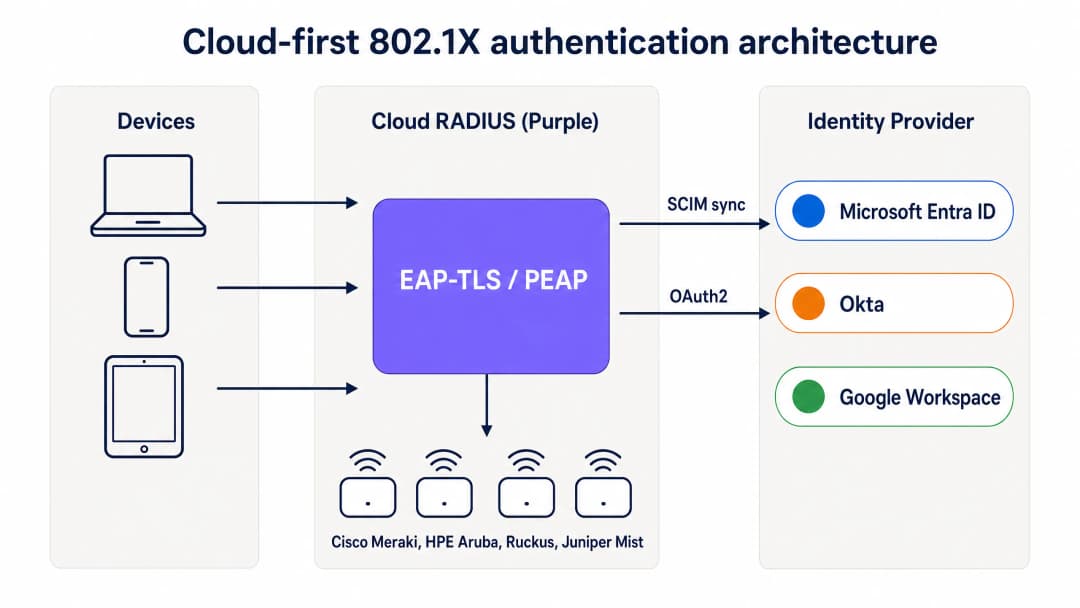
क्लाउड-फर्स्ट 802.1X ऑथेंटिकेशन आर्किटेक्चर: डिवाइस Purple के क्लाउड RADIUS के माध्यम से EAP-TLS के जरिए ऑथेंटिकेट होते हैं, जो सर्टिफिकेट्स को वैलिडेट करता है और Entra ID, Okta, या Google Workspace से ग्रुप-आधारित पॉलिसी लागू करता है।
MDM ऑन-प्रिमाइसेस CA को कैसे रिप्लेस करता है
एक पारंपरिक 802.1X डिप्लॉयमेंट में, सर्टिफिकेट Active Directory सर्टिफिकेट सर्विसेज (AD CS) चलाने वाली ऑन-प्रिमाइसेस सर्टिफिकेट अथॉरिटी द्वारा जारी किए जाते थे। क्लाउड-फर्स्ट डिप्लॉयमेंट में, MDM SCEP (सिंपल सर्टिफिकेट एनरोलमेंट प्रोटोकॉल) का उपयोग करके इस भूमिका को संभालता है। Microsoft Intune, Jamf Pro, और अन्य MDM प्लेटफॉर्म क्लाउड-होस्टेड CA से सर्टिफिकेट का अनुरोध कर सकते हैं और उन्हें चुपचाप मैनेज्ड डिवाइसेज पर पुश कर सकते हैं।
यह फ्लो इस प्रकार काम करता है। IT एडमिनिस्ट्रेटर MDM में एक SCEP सर्टिफिकेट प्रोफाइल बनाता है, जो उन डिवाइस ग्रुप्स तक सीमित होता है जिन्हें WiFi एक्सेस की आवश्यकता होती है। MDM सर्टिफिकेट को Windows, macOS, iOS, iPadOS, Android Enterprise, और ChromeOS डिवाइसेज पर ऑटोमैटिक रूप से पुश करता है। यूजर को कुछ नहीं दिखता। सर्टिफिकेट MDM में डिवाइस आइडेंटिटी से बंधा होता है और समाप्त होने से पहले ऑटोमैटिक रूप से रिन्यू हो जाता है। जब डिवाइस WiFi से कनेक्ट होता, तो यह क्लाउड RADIUS सर्वर को सर्टिफिकेट प्रस्तुत करता है, जो CA के खिलाफ इसे वैलिडेट करता है और सही नेटवर्क पॉलिसी लागू करता है।
Microsoft Intune का उपयोग करने वाले संगठनों के लिए, Microsoft Cloud PKI एक पूरी तरह से मैनेज्ड CA प्रदान करता है जो सीधे Intune SCEP प्रोफाइल के साथ इंटीग्रेट होता है, जिससे ऑन-प्रिमाइसेस NDES (नेटवर्क डिवाइस एनरोलमेंट सर्विस) सर्वर की आवश्यकता समाप्त हो जाती है। Jamf-मैनेज्ड Mac और iOS फ्लीट के लिए, Jamf का इन-बिल्ट CA या थर्ड-पार्टी क्लाउड CA इसी उद्देश्य को पूरा करता है।
SCIM और तत्काल एक्सेस रिवोकेशन
क्लाउड RADIUS के सबसे महत्वपूर्ण ऑपरेशनल पहलुओं में से एक SCIM (सिस्टम फॉर क्रॉस-डोमेन आइडेंटिटी मैनेजमेंट) प्रोविजनिंग है। SCIM एक ओपन स्टैंडर्ड है जो आपके क्लाउड आइडेंटिटी प्रोवाइडर - जो कि सोर्स ऑफ ट्रुथ है - से आइडेंटिटी बदलावों को रियल टाइम में निर्भर सिस्टम्स पर पुश करता है। जब किसी कर्मचारी को Entra ID या Okta में डिसेबल किया जाता है, तो SCIM उस बदलाव को तुरंत क्लाउड RADIUS सर्विस पर पुश कर देता है। अगली बार जब डिवाइस ऑथेंटिकेट करने का प्रयास करता है, तो RADIUS सर्वर Access-Reject रिटर्न करता है। एक्सेस पॉइंट पर कॉन्फ़िगर किए गए शॉर्ट सेशन टाइमआउट के साथ, अकाउंट डिसेबल होने के कुछ ही मिनटों के भीतर डिवाइस को नेटवर्क से हटा दिया जाता है।
यह शेयर्ड PSK नेटवर्क की तुलना में एक महत्वपूर्ण सुरक्षा सुधार है, जहां एक्सेस को रिवोक करने का एकमात्र तरीका हर डिवाइस पर पासवर्ड बदलना है, और लेगेसी RADIUS डिप्लॉयमेंट की तुलना में भी, जो घंटों या दिनों के अंतराल पर होने वाले पीरियोडिक LDAP सिंक पर निर्भर करते हैं।
RadSec: इंटरनेट पर RADIUS ट्रैफिक को सुरक्षित करना
पारंपरिक RADIUS UDP का उपयोग करता है और केवल बुनियादी मैसेज ऑथेंटिकेशन प्रदान करता है। जब आपका RADIUS सर्वर आपके एक्सेस पॉइंट्स के समान डेटा सेंटर में होता है, तो यह स्वीकार्य है। जब आपका RADIUS सर्वर एक क्लाउड सर्विस होता है, तो ऑथेंटिकेशन ट्रैफिक पब्लिक इंटरनेट से होकर गुजरता है। RadSec (RADIUS ओवर TLS, RFC 6614) TLS का उपयोग करके RADIUS एक्सचेंज को एन्क्रिप्ट करता है, जिससे ऑथेंटिकेशन ट्रैफिक के लिए गोपनीयता और अखंडता मिलती है। Purple नेटिव रूप से RadSec का समर्थन करता है, उन एक्सेस पॉइंट्स के लिए IPsec फॉलबैक के साथ जो अभी तक RadSec का समर्थन नहीं करते हैं।
अपने विशिष्ट सेटअप को लेकर कोई सवाल हैं?
हमारी टीम 80,000 से अधिक वेन्यू में वेन्यू ऑपरेटरों, IT मैनेजरों और नेटवर्क इंजीनियरों के साथ काम करती है। 20 मिनट का कॉल बुक करें और हम आपको दिखाएंगे कि आपके जैसे अन्य लोगों ने इसे कैसे हल किया।
इम्प्लीमेंटेशन गाइड
EAP-TLS के साथ क्लाउड RADIUS को डिप्लॉय करने के लिए चार समन्वित स्टेप्स की आवश्यकता होती है। यदि Entra ID और एक MDM पहले से मौजूद हैं, तो एक पायलट SSID एक घंटे से भी कम समय में लाइव हो सकता है।
स्टेप 1: क्लाउड RADIUS को अपने आइडेंटिटी प्रोवाइडर से कनेक्ट करें
OAuth2 एडमिन कंसेंट (Entra ID के लिए) या API टोकन (Okta और Google Workspace के लिए) के माध्यम से Purple को अपने आइडेंटिटी प्रोवाइडर से कनेक्ट करें। यह Purple को डायरेक्टरी से यूजर्स, ग्रुप्स और ग्रुप मेंबरशिप को रीड करने के लिए अधिकृत करता है। रियल टाइम में यूजर स्टेट बदलावों को Purple पर पुश करने के लिए SCIM प्रोविजनिंग को कॉन्फ़िगर करें। डिस्क पर कोई सर्विस प्रिंसिपल क्रेडेंशियल स्टोर नहीं किए जाते हैं। ग्रुप बदलाव अगले ऑथेंटिकेशन इवेंट पर लागू होते हैं, न कि किसी सिंक शेड्यूल पर।
स्टेप 2: अपने MDM और SCEP प्रोफाइल को कॉन्फ़िगर करें
Microsoft Intune में, CA रूट के लिए एक Trusted Certificate Profile बनाएं, फिर Purple-मैनेज्ड CA की ओर इशारा करते हुए एक SCEP सर्टिफिकेट प्रोफाइल बनाएं। दोनों प्रोफाइल को उन डिवाइस ग्रुप्स तक सीमित करें जिन्हें WiFi एक्सेस की आवश्यकता है। Jamf के लिए, एक कॉन्फ़िगरेशन प्रोफाइल में SCEP पेलोड कॉन्फ़िगर करें। MDM चुपचाप सर्टिफिकेट्स को पुश करता है। आगे बढ़ने से पहले MDM कम्प्लायंस डैशबोर्ड में सर्टिफिकेट डिलीवरी को सत्यापित करें।
स्टेप 3: क्लाउड RADIUS डैशबोर्ड में नेटवर्क पॉलिसीज को परिभाषित करें
RADIUS पॉलिसीज बनाएं जो आइडेंटिटी प्रोवाइडर ग्रुप्स को विशिष्ट VLANs और एक्सेस कंट्रोल्स से मैप करती हैं। उदाहरण के लिए, Entra ID ग्रुप "Staff-Finance" को पूर्ण इंटरनेट एक्सेस के साथ VLAN 20 से मैप करें, और "Staff-Contractors" को समय-सीमित एक्सेस के साथ VLAN 30 से मैप करें जो ऑटोमैटिक रूप से समाप्त हो जाता है। Purple का डैशबोर्ड इन पॉलिसीज को ऑथेंटिकेशन के समय लागू करता है, जिसके लिए किसी फ़ायरवॉल बदलाव की आवश्यकता नहीं होती है।
स्टेप 4: एक्सेस पॉइंट कॉन्फ़िगरेशन को अपडेट करें
802.1X के साथ WPA2-Enterprise या WPA3-Enterprise का उपयोग करने के लिए अपने एक्सेस पॉइंट्स पर SSID कॉन्फ़िगरेशन को अपडेट करें। शेयर्ड सीक्रेट के साथ Purple क्लाउड RADIUS प्राइमरी और सेकेंडरी एंडपॉइंट होस्टनेम या IP एड्रेस दर्ज करें। Purple द्वारा रिटर्न किए गए RADIUS एट्रिब्यूट्स के आधार पर डायनेमिक VLAN असाइनमेंट का उपयोग करने के लिए एक्सेस पॉइंट्स को कॉन्फ़िगर करें। पूरे एस्टेट में रोल आउट करने से पहले एक्सेस पॉइंट्स के एक सबसेट पर सिंगल SSID के साथ टेस्ट करें।

क्लाउड RADIUS बनाम ऑन-प्रिमाइसेस RADIUS: डिप्लॉयमेंट टाइम, Active Directory डिपेंडेंसी, हाई अवेलेबिलिटी, OS पैचिंग, आइडेंटिटी इंटीग्रेशन और सर्टिफिकेट लाइफसाइकिल मैनेजमेंट के बीच सीधा मुकाबला।
बेस्ट प्रैक्टिसेज
ये सिफारिशें IEEE 802.1X मानकों, PCI DSS v4.0 आवश्यकताओं और Purple के 80,000+ वेन्यू एस्टेट के ऑपरेशनल अनुभवों को दर्शाती हैं।
मैनेज्ड डिवाइसेज के लिए EAP-TLS को अनिवार्य करें। पासवर्ड फ़िशिंग और क्रेडेंशियल स्टफिंग के प्रति संवेदनशील होते हैं। सर्टिफिकेट आइडेंटिटी और डिवाइस कम्प्लायंस का क्रिप्टोग्राफिक प्रमाण प्रदान करते हैं। EAP-TLS एकमात्र ऐसी 802.1X विधि है जो डिज़ाइन द्वारा फ़िशिंग-प्रतिरोधी है।
तत्काल रिवोकेशन के लिए SCIM का उपयोग करें। पीरियोडिक LDAP सिंक एक ऐसा गैप छोड़ देते हैं जहां नौकरी से निकाले गए कर्मचारी के पास नेटवर्क एक्सेस बनी रहती है। SCIM यह सुनिश्चित करता है कि आइडेंटिटी प्रोवाइडर में अकाउंट डिसेबल होते ही एक्सेस रिवोक हो जाए।
मल्टी-रीजन RADIUS डिप्लॉय करें। अपने एक्सेस पॉइंट्स को अलग-अलग भौगोलिक क्षेत्रों में कम से कम दो RADIUS एंडपॉइंट्स के साथ कॉन्फ़िगर करें। Purple डिफ़ॉल्ट रूप से एक्टिव-एक्टिव मल्टी-रीजन फेलओवर प्रदान करता है, जिसमें फेलओवर सेकंडों में पूरा हो जाता है।
डायनेमिक VLANs के साथ ट्रैफिक को सेगमेंट करें। यूजर्स को डायनेमिक रूप से विशिष्ट VLANs में असाइन करने के लिए आइडेंटिटी प्रोवाइडर ग्रुप मेंबरशिप का उपयोग करें। यह संवेदनशील ट्रैफिक को अलग करता है और मैनुअल फ़ायरवॉल बदलावों की आवश्यकता के बिना किसी कॉम्प्रोमाइज्ड डिवाइस के प्रभाव क्षेत्र को सीमित करता है।
RadSec सक्षम करें। यदि आपके एक्सेस पॉइंट RadSec का समर्थन करते हैं, तो एक्सेस पॉइंट और क्लाउड RADIUS सर्वर के बीच ऑथेंटिकेशन ट्रैफिक को एन्क्रिप्ट करने के लिए इसे सक्षम करें। यह विशेष रूप से उन ब्रांच ऑफिस और वेन्यू के लिए महत्वपूर्ण है जहां एक्सेस पॉइंट एक अविश्वसनीय नेटवर्क सेगमेंट पर है।
सर्टिफिकेट लाइफसाइकिल की निगरानी करें। सर्टिफिकेट लाइफटाइम के 80% पर ट्रिगर होने के लिए MDM ऑटो-रिन्यूअल सेट करें। एक साल के सर्टिफिकेट के लिए, रिन्यूअल 10वें महीने से शुरू होता है। उन डिवाइसेज के लिए अलर्ट सेट करें जो सर्टिफिकेट समाप्त होने से पहले रिन्यू करने में विफल रहते हैं।
एंटरप्राइज WiFi सुरक्षा मानकों और फ्रेमवर्क के व्यापक विवरण के लिए, हमारी Enterprise WiFi Security: A Complete Guide for 2026 देखें।
ट्रबलशूटिंग और रिस्क मिटिगेशन
क्लाउड RADIUS पर ट्रांजिशन करने से नई डिपेंडेंसीज आती हैं। प्रोडक्शन को प्रभावित करने से पहले इन सामान्य विफलता मोड के लिए तैयारी करें।
सर्टिफिकेट की समाप्ति। यदि MDM द्वारा रिन्यू किए जाने से पहले डिवाइस सर्टिफिकेट समाप्त हो जाता है, तो डिवाइस का ऑथेंटिकेशन बिना किसी सूचना के विफल हो जाता है। यूजर को बिना किसी स्पष्टीकरण के कनेक्शन एरर दिखाई देती है। सर्टिफिकेट लाइफटाइम के 80% पर MDM ऑटो-रिन्यूअल कॉन्फ़िगर करके और समाप्त होने वाले सर्टिफिकेट वाले डिवाइसेज के लिए MDM कम्प्लायंस डैशबोर्ड की निगरानी करके इसे कम करें।
MDM सिंक विफलताएं। जो डिवाइस MDM कम्प्लायंस से बाहर हो जाता है या चेक इन करने में विफल रहता है, उसे रिन्यू किया गया सर्टिफिकेट नहीं मिल सकता है। ऐसी कम्प्लायंस पॉलिसीज लागू करें जो अस्वस्थ डिवाइसेज को फ्लैग करती हैं और सर्टिफिकेट समाप्त होने से पहले एडमिनिस्ट्रेटर को अलर्ट करती हैं।
RADIUS ट्रैफिक को ब्लॉक करने वाला फ़ायरवॉल। एक्सेस पॉइंट्स को UDP पोर्ट 1812 (ऑथेंटिकेशन) और UDP पोर्ट 1813 (अकाउंटिंग), या RadSec के लिए TCP पोर्ट 2083 पर क्लाउड RADIUS एंडपॉइंट्स तक पहुंचना चाहिए। ब्रांच ऑफिस में आउटबाउंड फ़ायरवॉल नियम अक्सर इन पोर्ट्स को ब्लॉक कर देते हैं। डिप्लॉयमेंट से पहले एक्सेस पॉइंट मैनेजमेंट VLAN से रीचेबिलिटी का परीक्षण करें।
SCIM प्रोविजनिंग विफलताएं। यदि आइडेंटिटी प्रोवाइडर और Purple के बीच SCIM कनेक्शन बाधित होता है, तो यूजर स्टेट के बदलाव आगे नहीं बढ़ेंगे। आइडेंटिटी प्रोवाइडर और Purple डैशबोर्ड दोनों में SCIM सिंक स्टेटस की निगरानी करें। सिंक विफलताओं के लिए अलर्टिंग कॉन्फ़िगर करें।
सर्टिफिकेट सपोर्ट के बिना लेगेसी डिवाइसेज। IoT डिवाइसेज, प्रिंटर और पुराने हार्डवेयर शायद EAP-TLS का समर्थन न करें। इन डिवाइसेज के लिए, शेयर्ड PSK के बजाय iPSK (इंडिविजुअल प्री-शेयर्ड कीज) का उपयोग करें। Purple नेटिव रूप से iPSK का समर्थन करता है, प्रति डिवाइस एक यूनिक की असाइन करता है और 802.1X सप्लीकेंट सपोर्ट की आवश्यकता के बिना प्रत्येक डिवाइस को सही VLAN पर रखता है।
ROI और बिजनेस इम्पैक्ट
ऑन-प्रिमाइसेस RADIUS से क्लाउड RADIUS पर माइग्रेट करना इंफ्रास्ट्रक्चर, ऑपरेशन्स और सुरक्षा में मापने योग्य वैल्यू प्रदान करता है।
| आयाम | ऑन-प्रिमाइसेस NPS | क्लाउड RADIUS (Purple) |
|---|---|---|
| इंफ्रास्ट्रक्चर लागत | Windows Server लाइसेंस, VM कंप्यूट, स्टोरेज | प्रति-AP सब्सक्रिप्शन, कोई सर्वर हार्डवेयर नहीं |
| डिप्लॉयमेंट का समय | दिनों से हफ्तों तक | एक घंटे से कम |
| हाई अवेलेबिलिटी | मैनुअल - दो सर्वर प्लस रेप्लीकेशन | मल्टी-रीजन एक्टिव-एक्टिव, डिफ़ॉल्ट |
| OS पैचिंग | मासिक, आपकी टीम द्वारा | वेंडर-मैनेज्ड |
| WiFi हेल्पडेस्क टिकट | अधिक - पासवर्ड रीसेट, मैनुअल ऑनबोर्डिंग | 80% कम (Purple कस्टमर डेटा) |
| एक्सेस रिवोकेशन | LDAP सिंक के माध्यम से घंटों से दिनों तक | SCIM के माध्यम से सेकंडों में |
Purple के Staff WiFi का उपयोग करने वाली IT टीमें आमतौर पर WiFi सपोर्ट टिकटों में 80% की गिरावट देखती हैं (Purple इंटरनल डेटा, 2024), जो पासवर्ड रीसेट और मैनुअल ऑनबोर्डिंग के समाप्त होने से प्रेरित है। सर्टिफिकेट-आधारित ऑथेंटिकेशन मजबूत ऑथेंटिकेशन के लिए PCI DSS आवश्यकता 8.3 और सिस्टम और एप्लिकेशन एक्सेस कंट्रोल के लिए ISO 27001 कंट्रोल A.9.4 को भी पूरा करता है, जिससे आपकी सुरक्षा टीम पर ऑडिट का बोझ कम हो जाता है।
रिटेल और हॉस्पिटैलिटी के संगठनों के लिए, एक सिंगल क्लाउड डैशबोर्ड से - एक यूनिफाइड आइडेंटिटी लेयर के साथ - Staff WiFi और गेस्ट WiFi को मैनेज करने की क्षमता मल्टी-साइट एस्टेट में ऑपरेशनल जटिलता को कम करती है। ट्रांसपोर्ट ऑपरेटरों और हेल्थकेयर प्रदाताओं के लिए, तत्काल रिवोकेशन क्षमता और पूर्ण ऑडिट ट्रेल बिना किसी अतिरिक्त टूल के रेगुलेटरी आवश्यकताओं को पूरा करते हैं।
Purple की WiFi Analytics लेयर ऑथेंटिकेशन इंफ्रास्ट्रक्चर के ऊपर ऑक्यूपेंसी और हाइब्रिड वर्किंग डेटा जोड़ती है, जिससे Staff WiFi एक कॉस्ट सेंटर से ऑपरेशनल इंटेलिजेंस के सोर्स में बदल जाता है।
संबंधित पठन: Enterprise WiFi Security: A Complete Guide for 2026 - OpenWrt Custom Firmware Integration with Purple WiFi
मुख्य परिभाषाएं
802.1X
पोर्ट-आधारित नेटवर्क एक्सेस कंट्रोल के लिए एक IEEE मानक (IEEE 802.1X-2020)। इसके लिए आवश्यक है कि एक्सेस पॉइंट द्वारा नेटवर्क एक्सेस प्रदान करने से पहले डिवाइस ऑथेंटिकेट करें, जिसमें RADIUS सर्वर द्वारा मध्यस्थता किए गए EAP एक्सचेंज का उपयोग किया जाता है।
IT टीमें यह सुनिश्चित करने के लिए 802.1X का उपयोग करती हैं कि केवल अधिकृत यूजर्स और डिवाइसेज ही कॉर्पोरेट नेटवर्क से कनेक्ट हों। यह प्रति-यूजर एन्क्रिप्शन, प्रति-सेशन कीज और प्रत्येक कनेक्शन इवेंट का एक पूर्ण ऑडिट ट्रेल प्रदान करता है।
RADIUS
रिमोट ऑथेंटिकेशन डायल-इन यूजर सर्विस (RFC 2865)। एक नेटवर्किंग प्रोटोकॉल जो नेटवर्क एक्सेस के लिए सेंट्रलाइज्ड ऑथेंटिकेशन, ऑथराइजेशन और अकाउंटिंग (AAA) मैनेजमेंट प्रदान करता है।
एक्सेस पॉइंट्स प्रत्येक कनेक्शन रिक्वेस्ट को RADIUS सर्वर पर फॉरवर्ड करते हैं, जो यह तय करता है कि डिवाइस को अनुमति दी जाए या नहीं और उसे कौन सा VLAN असाइन किया जाए। क्लाउड RADIUS ऑन-प्रिमाइसेस NPS या FreeRADIUS सर्वर को रिप्लेस करता है।
EAP-TLS
एक्सटेंसिबल ऑथेंटिकेशन प्रोटोकॉल-ट्रांसपोर्ट लेयर सिक्योरिटी (RFC 5216)। एक 802.1X ऑथेंटिकेशन विधि जो पासवर्ड के बजाय म्यूचुअल X.509 सर्टिफिकेट एक्सचेंज का उपयोग करती है।
EAP-TLS मैनेज्ड डिवाइस फ्लीट के लिए गोल्ड स्टैंडर्ड है। यह फ़िशिंग-प्रतिरोधी है, इसके लिए किसी पासवर्ड हैश स्टोर की आवश्यकता नहीं होती है, और यह एकमात्र ऐसी 802.1X विधि है जो CISA के फ़िशिंग-प्रतिरोधी MFA मार्गदर्शन को पूरा करती है।
PEAP-MSCHAPv2
प्रोटेक्टेड एक्सटेंसिबल ऑथेंटिकेशन प्रोटोकॉल विथ माइक्रोसॉफ्ट चैलेंज हैंडशेक ऑथेंटिकेशन प्रोटोकॉल वर्जन 2। एक लेगेसी 802.1X विधि जो Active Directory में स्टोर किए गए NTLM हैश के खिलाफ पासवर्ड को वैलिडेट करती है।
PEAP-MSCHAPv2 केवल-क्लाउड वातावरण में विफल हो जाता है क्योंकि Entra ID NTLM हैश स्टोर नहीं करता है। ऑन-प्रिमाइसेस AD से माइग्रेट करने वाले संगठनों को PEAP को EAP-TLS से रिप्लेस करना होगा।
SCEP
सिंपल सर्टिफिकेट एनरोलमेंट प्रोटोकॉल। MDM प्लेटफॉर्म द्वारा बिना किसी यूजर हस्तक्षेप के डिवाइसेज पर ऑटोमैटिक रूप से डिजिटल सर्टिफिकेट का अनुरोध करने और इंस्टॉल करने के लिए उपयोग किया जाने वाला एक प्रोटोकॉल।
IT टीमें कर्मचारी डिवाइसेज पर चुपचाप WiFi सर्टिफिकेट प्रोविजन करने के लिए Intune या Jamf के साथ SCEP का उपयोग करती हैं। SCEP क्लाउड-फर्स्ट डिप्लॉयमेंट में ऑन-प्रिमाइसेस NDES (नेटवर्क डिवाइस एनरोलमेंट सर्विस) सर्वर को रिप्लेस करता है।
SCIM
सिस्टम फॉर क्रॉस-डोमेन आइडेंटिटी मैनेजमेंट (RFC 7644)। एक ओपन स्टैंडर्ड जो IT सिस्टम्स के बीच यूजर आइडेंटिटी जानकारी के रियल-टाइम एक्सचेंज को ऑटोमेट करता है।
SCIM यह सुनिश्चित करता है कि जब किसी कर्मचारी को Entra ID या Okta में डिसेबल किया जाता है, तो वह बदलाव तुरंत क्लाउड RADIUS सर्विस पर पुश हो जाता है, जिससे घंटों के बजाय सेकंडों में WiFi एक्सेस रिवोक हो जाती है।
NPS
नेटवर्क पॉलिसी सर्वर। Microsoft का RADIUS इम्प्लीमेंटेशन, जिसे आमतौर पर ऑन-प्रिमाइसेस Active Directory वातावरण के हिस्से के रूप में Windows Server पर चलाया जाता है।
क्लाउड-फर्स्ट संगठन Windows Server VMs, OS पैचिंग और ऑन-प्रिमाइसेस Active Directory पर निर्भरता को समाप्त करने के लिए NPS को हटा रहे हैं। क्लाउड RADIUS इसका सीधा रिप्लेसमेंट है।
RadSec
RADIUS ओवर TLS (RFC 6614)। एक प्रोटोकॉल जो TLS का उपयोग करके RADIUS ऑथेंटिकेशन ट्रैफिक को एन्क्रिप्ट करता है, जो पारंपरिक RADIUS द्वारा उपयोग किए जाने वाले UDP-आधारित क्लियरटेक्स्ट ट्रांसपोर्ट को रिप्लेस करता है।
क्लाउड RADIUS का उपयोग करते समय RadSec आवश्यक है, क्योंकि ऑथेंटिकेशन ट्रैफिक को एक्सेस पॉइंट और क्लाउड सर्विस के बीच पब्लिक इंटरनेट से गुजरना पड़ता है। Purple नेटिव रूप से RadSec का समर्थन करता है।
iPSK
इंडिविजुअल प्री-शेयर्ड की। WPA2-Personal का एक प्रकार जो सभी डिवाइसेज के लिए एक सिंगल शेयर्ड की के बजाय प्रत्येक डिवाइस को एक यूनिक प्री-शेयर्ड की असाइन करता है।
iPSK का उपयोग IoT डिवाइसेज, प्रिंटर और अन्य हार्डवेयर के लिए किया जाता है जो 802.1X EAP-TLS का समर्थन नहीं कर सकते हैं। यह सर्टिफिकेट सपोर्ट की आवश्यकता के बिना प्रति-डिवाइस जवाबदेही और VLAN असाइनमेंट प्रदान करता है।
Dynamic VLAN
एक नेटवर्क सेगमेंटेशन तकनीक जहां RADIUS सर्वर Access-Accept रिस्पॉन्स में एक VLAN आइडेंटिफायर रिटर्न करता है, और एक्सेस पॉइंट डिवाइस को ऑटोमैटिक रूप से उस VLAN पर रख देता है।
डायनेमिक VLANs IT टीमों को मैनुअल फ़ायरवॉल बदलावों के बिना, आइडेंटिटी प्रोवाइडर ग्रुप मेंबरशिप के आधार पर स्टाफ, कॉन्ट्रैक्टर्स, IoT डिवाइसेज और गेस्ट्स को अलग-अलग नेटवर्क सेगमेंट में विभाजित करने की अनुमति देते हैं।
हल किए गए उदाहरण
एक 400-साइट रिटेल चेन को सभी स्थानों पर Staff WiFi को सुरक्षित करने की आवश्यकता है। वे Cisco Meraki एक्सेस पॉइंट्स चलाते हैं और डिवाइस मैनेजमेंट के लिए Intune के साथ Microsoft Entra ID का उपयोग करते हैं। वे वर्तमान में एक शेयर्ड WPA2-Personal PSK का उपयोग करते हैं क्योंकि उनके पास NPS चलाने के लिए कोई ऑन-प्रिमाइसेस Active Directory नहीं है। हाल ही में एक इंटरनल ऑडिट ने शेयर्ड PSK को PCI DSS कम्प्लायंस गैप के रूप में फ्लैग किया है।
चेन Purple के क्लाउड RADIUS को डिप्लॉय करती है। सबसे पहले, वे OAuth एडमिन कंसेंट के माध्यम से Purple को Entra ID से कनेक्ट करते हैं और SCIM प्रोविजनिंग को कॉन्फ़िगर करते हैं। Intune में, वे Purple CA रूट के लिए एक Trusted Certificate Profile और 'Staff-Retail' डिवाइस ग्रुप के लिए सीमित एक SCEP सर्टिफिकेट प्रोफाइल बनाते हैं। Intune चुपचाप सभी मैनेज्ड पॉइंट-ऑफ-सेल टर्मिनलों और स्टाफ टैबलेट पर सर्टिफिकेट पुश करता है। Meraki डैशबोर्ड में, वे Staff SSID को WPA2-Enterprise में अपडेट करते हैं, Purple क्लाउड RADIUS प्राइमरी और सेकेंडरी एंडपॉइंट्स दर्ज करते हैं, और डायनेमिक VLAN असाइनमेंट सक्षम करते हैं। जब कोई डिवाइस कनेक्ट होता है, तो यह अपना Intune-जारी सर्टिफिकेट प्रस्तुत करता है, Purple CA के खिलाफ इसे वैलिडेट करता है और Entra ID ग्रुप की जांच करता है, और डिवाइस को ग्रुप मेंबरशिप के आधार पर VLAN 10 (स्टाफ नेटवर्क) या VLAN 20 (मैनेजमेंट नेटवर्क) पर रखा जाता है। शेयर्ड PSK को हटा दिया जाता है। 400 साइटों पर रोलआउट में एक वीकेंड का समय लगता है, क्योंकि कोई ऑन-साइट हार्डवेयर डिप्लॉय नहीं किया जाता है - केवल Meraki में SSID कॉन्फ़िगरेशन बदलाव किए जाते हैं।
एक 15,000 छात्रों वाला विश्वविद्यालय Google Workspace का उपयोग अपने प्राथमिक आइडेंटिटी प्रोवाइडर के रूप में करता है। IT टीम MacBooks, Chromebooks, और Android फोन के BYOD एस्टेट पर स्टाफ और छात्रों के लिए सुरक्षित WiFi प्रदान करना चाहती है। उनके पास कोई ऑन-प्रिमाइसेस Active Directory नहीं है और वे सर्वर चलाने के इच्छुक नहीं हैं।
विश्वविद्यालय Google Workspace के साथ Purple के क्लाउड RADIUS को इंटीग्रेट करता है। मैनेज्ड Chromebooks के लिए, वे SCEP के माध्यम से WiFi सर्टिफिकेट प्रोफाइल पुश करने के लिए Google Admin का उपयोग करते हैं, जिससे प्रत्येक डिवाइस चुपचाप एनरोल हो जाता है। BYOD MacBooks और Android फोन के लिए, वे एक ऑनबोर्डिंग एप्लिकेशन डिप्लॉय करते हैं जो यूजर को उनके Google क्रेडेंशियल्स के साथ ऑथेंटिकेट करता है और एक सिंगल टैप में डिवाइस पर सर्टिफिकेट इंस्टॉल करता है। बाद के कनेक्शन चुपचाप EAP-TLS का उपयोग करते हैं। Purple Google Workspace ऑर्गनाइजेशनल यूनिट्स को VLANs से मैप करता है: स्टाफ VLAN 10 पर, छात्र VLAN 20 पर, और गेस्ट विजिटर्स एक कैप्टिव पोर्टल SSID पर आते हैं। जब कोई छात्र ग्रेजुएट होता है और उसका Google अकाउंट सस्पेंड कर दिया जाता है, तो SCIM बदलाव को Purple पर पुश करता है और उनका WiFi एक्सेस कुछ ही मिनटों में रिवोक हो जाता है।
अभ्यास प्रश्न
Q1. आपका संगठन ऑन-प्रिमाइसेस Active Directory से पूरी तरह से Microsoft Entra ID पर माइग्रेट हो गया है। आपका वर्तमान Staff WiFi पुराने डोमेन से जुड़े NPS सर्वर के खिलाफ PEAP-MSCHAPv2 का उपयोग करता है। डोमेन कंट्रोलर को हटाने के बाद, स्टाफ रिपोर्ट करता है कि वे अब WiFi से कनेक्ट नहीं हो पा रहे हैं। इसका मूल कारण क्या है, और सही दीर्घकालिक समाधान क्या है?
संकेत: विचार करें कि PEAP-MSCHAPv2 को डायरेक्टरी से क्या आवश्यकता होती है, और क्या Entra ID इसे प्रदान करता है।
मॉडल उत्तर देखें
मूल कारण यह है कि PEAP-MSCHAPv2 के लिए RADIUS सर्वर को Active Directory में स्टोर किए गए NTLM हैश के खिलाफ यूजर के पासवर्ड को वैलिडेट करने की आवश्यकता होती है। डोमेन कंट्रोलर को हटाने के बाद, NPS के पास वैलिडेट करने के लिए कोई डायरेक्टरी नहीं है। Entra ID NTLM हैश स्टोर नहीं करता है, इसलिए NPS को Entra ID पर रीडायरेक्ट नहीं किया जा सकता है। सही दीर्घकालिक समाधान NPS को क्लाउड RADIUS सर्विस से रिप्लेस करना, PEAP-MSCHAPv2 से EAP-TLS पर माइग्रेट करना और SCEP के माध्यम से डिवाइस सर्टिफिकेट जारी करने के लिए MDM (Intune) का उपयोग करना है। यह किसी भी ऑन-प्रिमाइसेस डायरेक्टरी पर निर्भरता को समाप्त करता है।
Q2. आप Jamf Pro द्वारा मैनेज्ड कॉर्पोरेट MacBooks के 200-डिवाइस फ्लीट के लिए क्लाउड RADIUS डिप्लॉय कर रहे हैं। आपका आइडेंटिटी प्रोवाइडर Okta है। इन डिवाइसेज पर WiFi क्रेडेंशियल्स प्रोविजन करने का सबसे सुरक्षित और ऑपरेशनल रूप से कुशल तरीका क्या है?
संकेत: एक ऐसी विधि की तलाश करें जिसमें किसी यूजर हस्तक्षेप की आवश्यकता न हो, पासवर्ड से बचा जा सके और आपके मौजूदा MDM के साथ इंटीग्रेट हो सके।
मॉडल उत्तर देखें
MacBooks पर चुपचाप डिवाइस सर्टिफिकेट पुश करने के लिए SCEP का उपयोग करने के लिए Jamf Pro को कॉन्फ़िगर करें। अपने क्लाउड RADIUS प्रदाता द्वारा मैनेज्ड CA की ओर इशारा करते हुए, Jamf कॉन्फ़िगरेशन प्रोफाइल में एक SCEP पेलोड बनाएं। प्रोफाइल को प्रासंगिक डिवाइस ग्रुप तक सीमित करें। Jamf बिना किसी यूजर हस्तक्षेप के प्रत्येक MacBook पर ऑटोमैटिक रूप से सर्टिफिकेट पुश कर देगा। SCEP-जारी सर्टिफिकेट के साथ EAP-TLS का उपयोग करने के लिए उसी कॉन्फ़िगरेशन प्रोफाइल में WiFi प्रोफाइल को कॉन्फ़िगर करें। यह सुनिश्चित करने के लिए कि जब Okta में किसी कर्मचारी को डिसेबल किया जाता है, तो उनका WiFi एक्सेस तुरंत रिवोक हो जाए, क्लाउड RADIUS सर्विस को SCIM के माध्यम से Okta से कनेक्ट करें।
Q3. एक कर्मचारी को सोमवार को सुबह 9 बजे नौकरी से निकाल दिया जाता है। HR द्वारा सुबह 9:05 बजे उनका Entra ID अकाउंट डिसेबल कर दिया जाता है। सुबह 9:30 बजे, एक सुरक्षा अलर्ट दिखाता है कि कर्मचारी का लैपटॉप अभी भी कार पार्क से कॉर्पोरेट WiFi से कनेक्टेड है। कौन सा कॉन्फ़िगरेशन गायब है, और आप इसे कैसे ठीक करेंगे?
संकेत: RADIUS सर्वर को कैसे पता चलता है कि आइडेंटिटी प्रोवाइडर में यूजर का स्टेटस बदल गया है?
मॉडल उत्तर देखें
डिप्लॉयमेंट SCIM प्रोविजनिंग के बजाय पीरियोडिक LDAP सिंक पर निर्भर है। अकाउंट डिसेबल होने के बाद से LDAP सिंक अभी तक नहीं चला है, इसलिए क्लाउड RADIUS सर्विस अभी भी यूजर को एक्टिव मानती है। इसका समाधान Entra ID और क्लाउड RADIUS सर्विस के बीच SCIM प्रोविजनिंग को सक्षम करना है। SCIM यूजर स्टेट के बदलावों को रियल टाइम में पुश करता है, इसलिए जब सुबह 9:05 बजे Entra ID में अकाउंट डिसेबल किया जाता है, तो RADIUS सर्विस को तुरंत बदलाव मिल जाता है। अगली बार जब डिवाइस री-ऑथेंटिकेट करने का प्रयास करता है (एक्सेस पॉइंट पर सेशन टाइमआउट द्वारा नियंत्रित), तो उसे Access-Reject प्राप्त होता है। एक्सेस पॉइंट पर एक छोटा सेशन टाइमआउट (15 से 30 मिनट) सेट करने से अकाउंट डिसेबल होने और नेटवर्क से बाहर होने के बीच का अधिकतम समय सीमित हो जाता है।
Q4. आपके वेन्यू में 50 IoT डिवाइसेज हैं - डिजिटल साइनेज प्लेयर्स, एनवायरनमेंटल सेंसर्स और प्रिंटर - जो 802.1X EAP-TLS का समर्थन नहीं करते हैं। आप इन डिवाइसेज को अपने EAP-TLS स्टाफ नेटवर्क के समान WiFi इंफ्रास्ट्रक्चर पर कैसे सुरक्षित करते हैं?
संकेत: विचार करें कि कौन सी ऑथेंटिकेशन विधि सर्टिफिकेट सपोर्ट की आवश्यकता के बिना प्रति-डिवाइस जवाबदेही प्रदान करती है।
मॉडल उत्तर देखें
IoT डिवाइसेज के लिए iPSK (इंडिविजुअल प्री-शेयर्ड कीज) का उपयोग करें। क्लाउड RADIUS डैशबोर्ड में प्रत्येक डिवाइस को एक यूनिक प्री-शेयर्ड की असाइन करें, साथ ही एक VLAN असाइनमेंट भी दें। प्रत्येक डिवाइस अपनी यूनिक की के साथ ऑथेंटिकेट करता है, जिसे RADIUS सर्वर वैलिडेट करता है और डिवाइस को स्टाफ नेटवर्क से अलग, IoT VLAN पर रखने के लिए उपयोग करता है। यदि कोई डिवाइस कॉम्प्रोमाइज या डीकमिशन हो जाता है, तो आप किसी अन्य डिवाइस को प्रभावित किए बिना केवल उसी डिवाइस की की को रिवोक करते हैं। यह दृष्टिकोण IoT हार्डवेयर पर 802.1X सप्लीकेंट सपोर्ट की आवश्यकता के बिना प्रति-डिवाइस जवाबदेही और नेटवर्क सेगमेंटेशन प्रदान करता है।
इस श्रृंखला में आगे पढ़ें
कर्मचारी के जाने पर WiFi एक्सेस को कैसे निरस्त करें
यह गाइड IT और वेन्यू ऑपरेशन्स टीमों को दिखाती है कि जब कोई कर्मचारी नौकरी छोड़ता है, तो बाकी वर्कफोर्स को बाधित किए बिना स्टाफ WiFi एक्सेस को कैसे हटाया जाए। यह सर्टिफिकेट-आधारित 802.1X, पहचान-विशिष्ट iPSK और SCIM-driven डीप्रोविज़निंग की तुलना करता है, और फिर उसी दिन का रनबुक, परीक्षण विधि और ऑडिट साक्ष्य मॉडल प्रदान करता है।
सुरक्षित BYOD WiFi: Passpoint प्रमाणपत्र ऑनबोर्डिंग बनाम xPSK (iPSK)
ज़ीरो-टच Passpoint EAP-TLS प्रमाणपत्रों बनाम वेंडर-विशिष्ट xPSK (iPSK/easyPSK, DPSK, PPSK, MPSK) का उपयोग करके अप्रबंधित कर्मचारियों और छात्रों के उपकरणों (BYOD) को सुरक्षित करने पर IT टीमों के लिए एक व्यापक तकनीकी गाइड।
WPA2 Personal बनाम Enterprise: क्या अंतर है और आपको किसका उपयोग करना चाहिए?
यह तकनीकी संदर्भ मार्गदर्शिका एंटरप्राइज़ WiFi परिवेशों के भीतर WPA2 Personal और WPA2 Enterprise सुरक्षा प्रोटोकॉल की व्यापक तुलना प्रदान करती है। यह नेटवर्क आर्किटेक्ट्स और IT लीडर्स को सूचित परिनियोजन निर्णय लेने में मदद करने के लिए प्रत्येक मानक के आर्किटेक्चरल अंतर, परिनियोजन पद्धतियों और सुरक्षा प्रभावों को रेखांकित करती है।
अपने विशिष्ट सेटअप को लेकर कोई सवाल हैं?
हमारी टीम 80,000 से अधिक वेन्यू में वेन्यू ऑपरेटरों, IT मैनेजरों और नेटवर्क इंजीनियरों के साथ काम करती है। 20 मिनट का कॉल बुक करें और हम आपको दिखाएंगे कि आपके जैसे अन्य लोगों ने इसे कैसे हल किया।