

Captive Portal कैसे काम करता है? तकनीकी गहन विश्लेषण
Captive Portal की वास्तुकला में एक व्यापक तकनीकी गहन विश्लेषण, IT पेशेवरों के लिए DNS इंटरसेप्शन, HTTP रीडायरेक्शन, वॉल्ड गार्डन और RADIUS प्रमाणीकरण की व्याख्या करते हुए।
🎧 इस गाइड को सुनें
ट्रांसक्रिप्ट देखें

कार्यकारी सारांश
सार्वजनिक या एंटरप्राइज़ Guest WiFi तैनात करने वाले IT प्रबंधकों और नेटवर्क आर्किटेक्ट्स के लिए, Captive Portal एक अप्रमाणित डिवाइस और आपके नेटवर्क इंफ्रास्ट्रक्चर के बीच महत्वपूर्ण सीमा है। यह मार्गदर्शिका Captive Portal कैसे काम करता है, इस पर एक तकनीकी गहन विश्लेषण प्रदान करती है—मार्केटिंग परत को हटाकर DNS इंटरसेप्शन, HTTP रीडायरेक्शन, वॉल्ड गार्डन कॉन्फ़िगरेशन और RADIUS प्रमाणीकरण के अंतर्निहित तंत्रों की जांच करती है।
चाहे आप किसी स्टेडियम के लिए उच्च-घनत्व परिनियोजन डिज़ाइन कर रहे हों, Retail के लिए एक वितरित नेटवर्क, या Healthcare के लिए एक अनुपालक समाधान, सत्र के जीवनचक्र और वास्तुशिल्प निर्भरताओं को समझना आवश्यक है। एक गलत कॉन्फ़िगर किया गया पोर्टल उपयोगकर्ता अनुभव को खराब करता है, ब्राउज़र सुरक्षा चेतावनियाँ देता है, और संभावित अनुपालन विफलताओं का कारण बनता है। यह संदर्भ मार्गदर्शिका तकनीकी वास्तुकला, कार्यान्वयन की सर्वोत्तम प्रथाओं और सामान्य विफलता मोड की रूपरेखा प्रस्तुत करती है ताकि यह सुनिश्चित किया जा सके कि आपका परिनियोजन सुरक्षित, स्केलेबल और WPA3 और Passpoint जैसे आधुनिक मानकों के अनुरूप है।
तकनीकी गहन विश्लेषण
अपने मूल में, एक Captive Portal एक लेयर 3 नेटवर्क एक्सेस कंट्रोल तंत्र है। यह एक संबद्ध लेकिन अप्रमाणित डिवाइस से ट्रैफ़िक को रोकता है, पूर्ण नेटवर्क एक्सेस प्रदान करने से पहले उपयोगकर्ता को एक प्रमाणीकरण इंटरफ़ेस पर रीडायरेक्ट करता है।
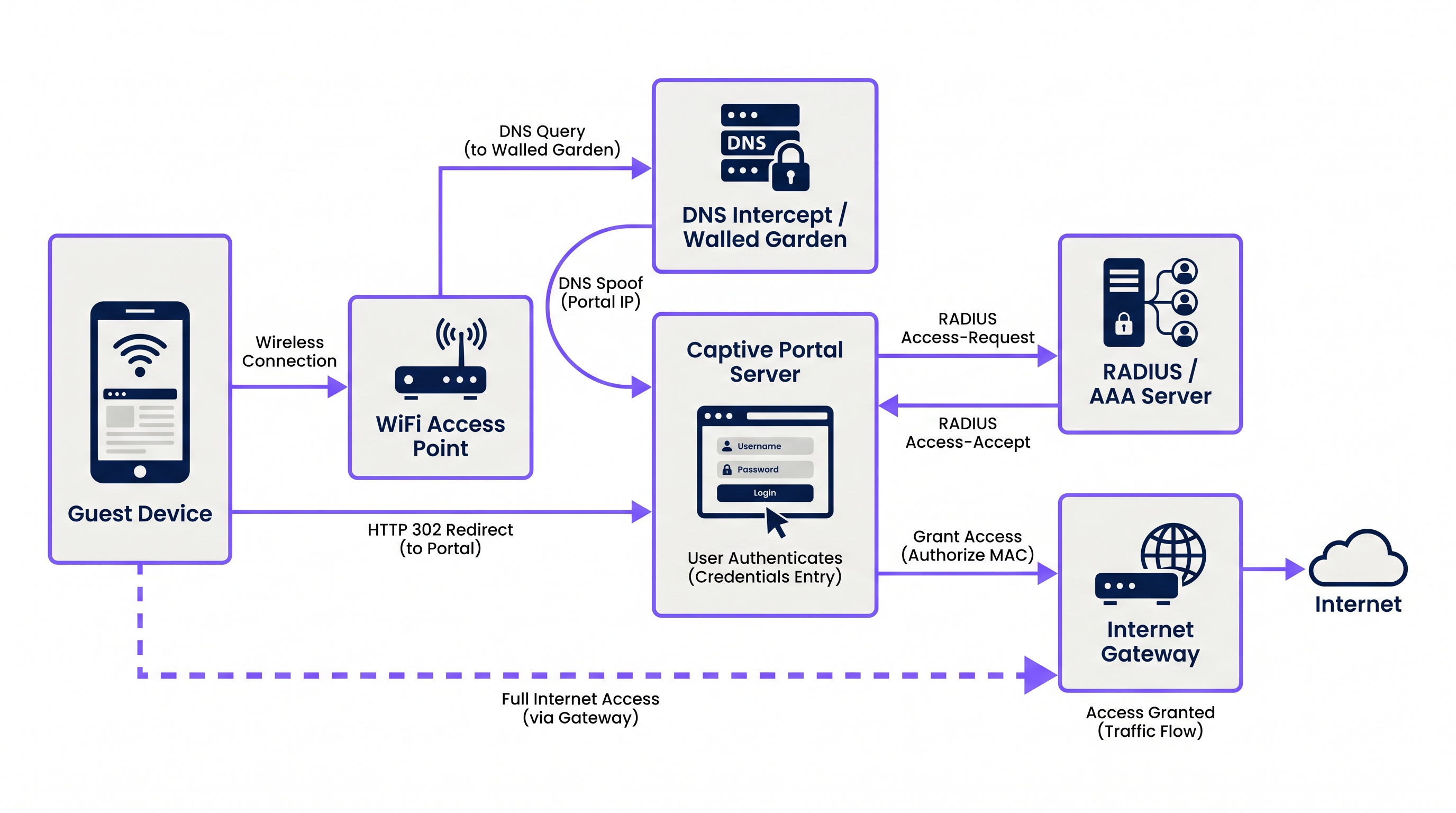
यह प्रक्रिया नेटवर्क सेवाओं के एक समन्वित अनुक्रम पर निर्भर करती है:
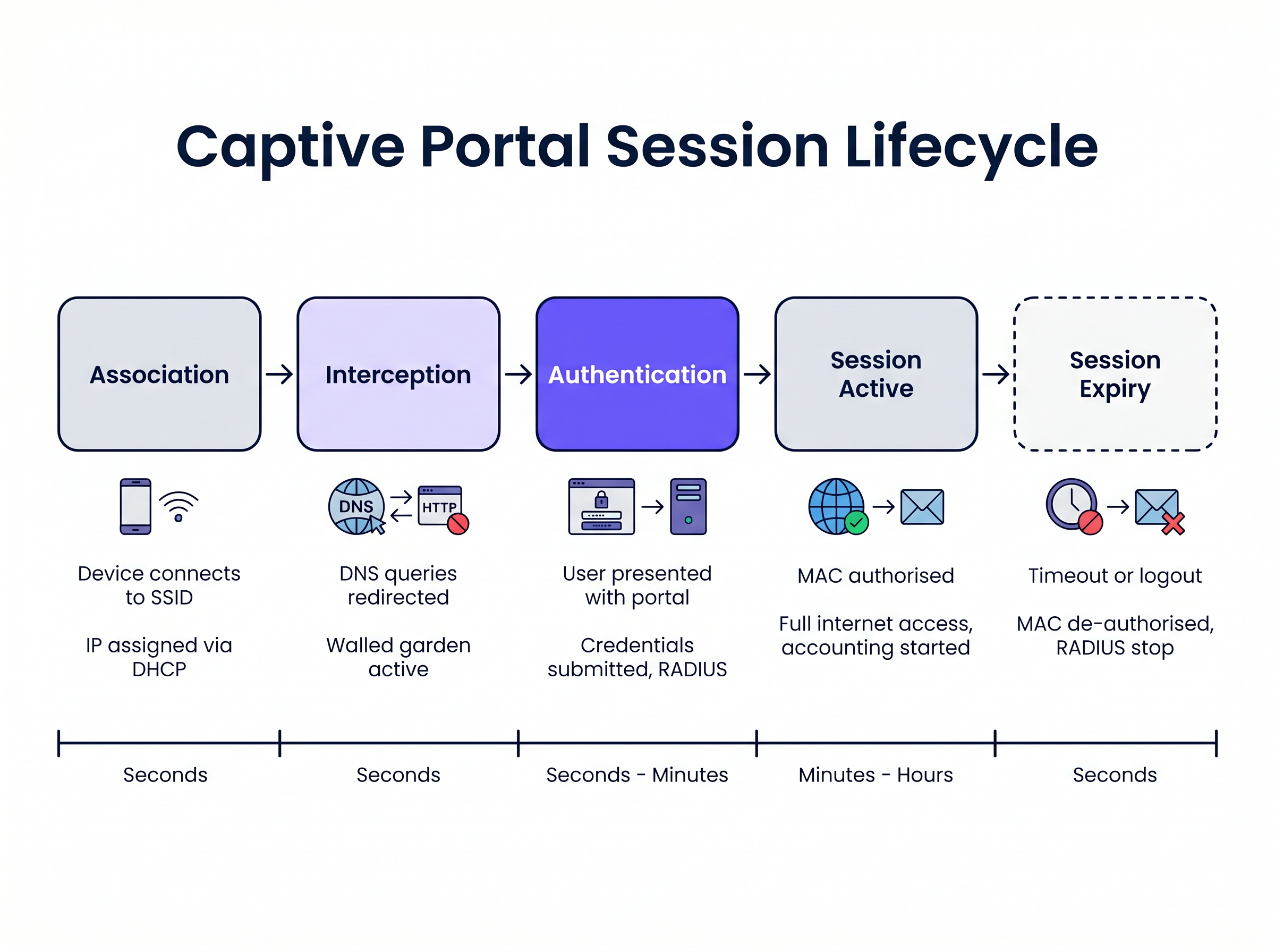
1. एसोसिएशन और IP असाइनमेंट जब कोई अतिथि डिवाइस SSID से कनेक्ट होता है, तो वायरलेस एक्सेस पॉइंट या कंट्रोलर कनेक्शन को एक विशिष्ट VLAN से जोड़ता है। स्थानीय DHCP सर्वर एक IP एड्रेस, सबनेट मास्क और डिफ़ॉल्ट गेटवे असाइन करता है। इस चरण में, डिवाइस लेयर 2 पर कनेक्टेड होता है लेकिन लेयर 3 पर "पूर्व-प्रमाणित" स्थिति में होता है। सभी आउटबाउंड ट्रैफ़िक नेटवर्क एक्सेस सर्वर (NAS) द्वारा लागू सख्त एक्सेस कंट्रोल लिस्ट (ACLs) के अधीन होता है, आमतौर पर वायरलेस LAN कंट्रोलर (WLC) या एज फ़ायरवॉल।
2. DNS इंटरसेप्शन (DNS स्पूफिंग)
Captive Portal को ट्रिगर करने के लिए, नेटवर्क को उपयोगकर्ता के प्रारंभिक वेब अनुरोधों को रोकना होगा। जब डिवाइस किसी डोमेन नाम (उदाहरण के लिए, www.example.com) को हल करने का प्रयास करता है, तो DNS क्वेरी को NAS या वॉल्ड गार्डन के भीतर एक समर्पित DNS सर्वर द्वारा इंटरसेप्ट किया जाता है। अनुरोधित डोमेन के लिए वास्तविक सार्वजनिक IP एड्रेस वापस करने के बजाय, DNS सर्वर Captive Portal सर्वर का IP एड्रेस वापस करता है।
3. HTTP रीडायरेक्शन जब क्लाइंट का ब्राउज़र स्पूफ किए गए IP एड्रेस से HTTP कनेक्शन का प्रयास करता है, तो Captive Portal सर्वर HTTP 302 (Found) या HTTP 303 (See Other) रीडायरेक्ट के साथ प्रतिक्रिया करता है। यह ब्राउज़र को Captive Portal लॉगिन पेज के वास्तविक URL पर नेविगेट करने का निर्देश देता है।
आधुनिक ऑपरेटिंग सिस्टम इसे स्वचालित रूप से पता लगाने के लिए Captive Network Assistant (CNA) तंत्र का उपयोग करते हैं। किसी नेटवर्क से कनेक्ट होने पर, OS एक ज्ञात प्रोब URL (उदाहरण के लिए, iOS/macOS के लिए captive.apple.com, Windows के लिए msftconnecttest.com) पर एक HTTP GET अनुरोध भेजता है। यदि OS को अपेक्षित 200 OK या एक विशिष्ट HTML पेलोड के बजाय एक HTTP रीडायरेक्ट प्राप्त होता है, तो यह मान लेता है कि एक Captive Portal मौजूद है और पोर्टल पेज प्रदर्शित करने के लिए स्वचालित रूप से एक छद्म-ब्राउज़र लॉन्च करता है।
4. वॉल्ड गार्डन पूर्व-प्रमाणित स्थिति के दौरान, उपयोगकर्ता पोर्टल पेज और उसकी संबद्ध संपत्तियों को लोड करने में सक्षम होना चाहिए। "वॉल्ड गार्डन" NAS पर कॉन्फ़िगर किए गए IP एड्रेस, सबनेट और डोमेन की एक श्वेतसूची है। इन श्वेतसूचीबद्ध स्थानों के लिए नियत ट्रैफ़िक की अनुमति है, जबकि अन्य सभी ट्रैफ़िक को छोड़ दिया जाता है। एक सही ढंग से कॉन्फ़िगर किए गए वॉल्ड गार्डन में शामिल होना चाहिए:
- Captive Portal सर्वर का IP एड्रेस।
- पोर्टल पेज के लिए CSS, JavaScript और इमेज एसेट होस्ट करने वाले कंटेंट डिलीवरी नेटवर्क (CDNs)।
- पहचान प्रदाता (उदाहरण के लिए, Facebook, Google) यदि सोशल लॉगिन सक्षम है।
- भुगतान गेटवे यदि पोर्टल को सशुल्क एक्सेस की आवश्यकता है।
5. प्रमाणीकरण और RADIUS
एक बार जब उपयोगकर्ता अपनी क्रेडेंशियल सबमिट करता है या सेवा की शर्तों को स्वीकार करता है, तो Captive Portal सर्वर एक RADIUS क्लाइंट के रूप में कार्य करता है। यह उपयोगकर्ता के विवरण वाले एक RADIUS Access-Request पैकेट का निर्माण करता है और इसे RADIUS (रिमोट ऑथेंटिकेशन डायल-इन यूजर सर्विस) सर्वर पर भेजता है।
RADIUS सर्वर अपने डेटाबेस के विरुद्ध अनुरोध को मान्य करता है। यदि सफल होता है, तो यह एक Access-Accept पैकेट वापस करता है। महत्वपूर्ण रूप से, इस पैकेट में विक्रेता-विशिष्ट विशेषताएँ (VSAs) शामिल हो सकती हैं जो सत्र मापदंडों को परिभाषित करती हैं, जैसे Session-Timeout (अधिकतम कनेक्शन अवधि), Idle-Timeout, और बैंडविड्थ दर सीमाएँ।
6. सत्र सक्रियण और लेखा
Access-Accept प्राप्त होने पर, Captive Portal सर्वर NAS को क्लाइंट के MAC एड्रेस को अधिकृत करने का निर्देश देता है। वॉल्ड गार्डन प्रतिबंध हटा दिए जाते हैं, और डिवाइस को पूर्ण इंटरनेट एक्सेस प्रदान किया जाता है। साथ ही, NAS विश्लेषण और अनुपालन उद्देश्यों के लिए सत्र को ट्रैक करना शुरू करने के लिए RADIUS सर्वर को एक RADIUS Accounting-Request (Start) पैकेट भेजता है।
कार्यान्वयन मार्गदर्शिका
एक मजबूत Captive Portal को तैनात करने के लिए वायरलेस इंफ्रास्ट्रक्चर और पोर्टल प्लेटफॉर्म के बीच सावधानीपूर्वक समन्वय की आवश्यकता होती है। Guest WiFi Providers: What to Look for When Choosing a WiFi Platform का मूल्यांकन करने वाले IT प्रबंधकों के लिए, निम्नलिखित वास्तुशिल्प दृष्टिकोणों पर विचार करें:
क्लाउड-होस्टेड बनाम ऑन-प्रिमाइसेस आधुनिक एंटरप्राइज़ परिनियोजन heक्लाउड-होस्टेड पोर्टल और RADIUS इंफ्रास्ट्रक्चर को अत्यधिक पसंद करते हैं। Purple जैसे प्लेटफॉर्म विश्व स्तर पर वितरित RADIUS आर्किटेक्चर प्रदान करते हैं, जिससे ऑन-प्रिमाइसेस AAA सर्वर की आवश्यकता समाप्त हो जाती है। स्थानीय WLC अपने RADIUS प्रमाणीकरण और अकाउंटिंग अनुरोधों को क्लाउड प्रदाता के एंडपॉइंट्स पर निर्देशित करता है। यह दृष्टिकोण कई साइटों पर सहजता से स्केल करता है और प्रबंधन को केंद्रीकृत करता है, जो वितरित Hospitality और खुदरा वातावरण के लिए विशेष रूप से फायदेमंद है।
वॉल्ड गार्डन कॉन्फ़िगरेशन पोर्टल रेंडरिंग समस्याओं का सबसे आम कारण एक अधूरा वॉल्ड गार्डन है। आधुनिक वेब पेज बाहरी संसाधनों पर बहुत अधिक निर्भर करते हैं। यदि किसी तीसरे पक्ष के CDN पर होस्ट किया गया कोई फ़ॉन्ट या JavaScript लाइब्रेरी ब्लॉक हो जाता है, तो पोर्टल OS के CNA ब्राउज़र के भीतर अटक सकता है या गलत तरीके से रेंडर हो सकता है।
- सिफारिश: अपने WLC द्वारा समर्थित होने पर डोमेन-आधारित वॉल्ड गार्डन प्रविष्टियों का उपयोग करें (उदाहरण के लिए,
*.purple.ai)। यदि आपका हार्डवेयर केवल IP-आधारित वॉल्ड गार्डन का समर्थन करता है, तो आपको पोर्टल प्रदाता के IP सबनेट की एक अद्यतन सूची बनाए रखनी होगी।
HTTPS इंटरसेप्शन को संभालना ऐतिहासिक रूप से, Captive Portal सभी पोर्ट 80 (HTTP) और पोर्ट 443 (HTTPS) ट्रैफ़िक को इंटरसेप्ट करते थे। हालांकि, HTTP Strict Transport Security (HSTS) के व्यापक रूप से अपनाने के साथ, HTTPS ट्रैफ़िक को इंटरसेप्ट करने से ब्राउज़र गंभीर सुरक्षा चेतावनी प्रदर्शित करते हैं, क्योंकि पोर्टल का SSL प्रमाणपत्र अनुरोधित डोमेन से मेल नहीं खाएगा।
- सिफारिश: कभी भी HTTPS ट्रैफ़िक को इंटरसेप्ट न करें। पूरी तरह से OS-नेटिव CNA तंत्रों पर निर्भर रहें (जो HTTP पर जांच करते हैं) या उपयोगकर्ताओं को स्पष्ट रूप से एक ज्ञात HTTP URL (उदाहरण के लिए,
http://neverssl.com) पर नेविगेट करने का निर्देश दें ताकि रीडायरेक्ट ट्रिगर हो सके।
सर्वोत्तम अभ्यास
1. सहज रोमिंग के लिए MAC Address कैशिंग
उपयोगकर्ता अनुभव को बेहतर बनाने के लिए, MAC Address कैशिंग लागू करें। जब कोई उपयोगकर्ता सफलतापूर्वक प्रमाणित होता है, तो RADIUS सर्वर उसका MAC Address रिकॉर्ड करता है। यदि उपयोगकर्ता डिस्कनेक्ट हो जाता है और एक निर्दिष्ट अवधि (उदाहरण के लिए, 30 दिन) के भीतर वापस आता है, तो WLC RADIUS सर्वर को MAC authentication bypass (MAB) अनुरोध भेजता है। सर्वर MAC Address को पहचानता है और तुरंत एक Access-Accept लौटाता है, जिससे उपयोगकर्ता को पोर्टल के साथ फिर से इंटरैक्ट किए बिना नेटवर्क एक्सेस मिल जाता है।
2. Captive Network Assistant (CNA) के लिए डिज़ाइन करना iOS और Android द्वारा Captive Portal प्रदर्शित करने के लिए लॉन्च किए गए स्यूडो-ब्राउज़र में पूर्ण ब्राउज़रों की तुलना में सीमित कार्यक्षमता होती है। वे अक्सर पॉप-अप का समर्थन नहीं करते हैं, उनमें सख्त टाइमआउट बाधाएं होती हैं, और वे कुकीज़ को अलग तरीके से संभालते हैं।
- सिफारिश: पोर्टल UI को हल्का रखें। जटिल JavaScript फ़्रेमवर्क या भारी मीडिया संपत्तियों से बचें जो CNA को टाइमआउट कर सकते हैं। यदि आपको जटिल इंटरैक्शन (जैसे ऐप डाउनलोड) की आवश्यकता है, तो पहले डिवाइस को अधिकृत करने के लिए पोर्टल का उपयोग करें, फिर उपयोगकर्ता को उनके नेटिव ब्राउज़र पर रीडायरेक्ट करें।
3. OpenRoaming और Passpoint के साथ एकीकरण जबकि Captive Portal डेटा कैप्चर और शर्तों की स्वीकृति के लिए आवश्यक बने हुए हैं, उद्योग Passpoint (Hotspot 2.0) जैसे सहज प्रमाणीकरण मानकों की ओर बढ़ रहा है। Purple Connect लाइसेंस के तहत OpenRoaming जैसी सेवाओं के लिए एक मुफ्त पहचान प्रदाता के रूप में कार्य करता है। OpenRoaming प्रोफ़ाइल के साथ कॉन्फ़िगर किए गए डिवाइस Captive Portal के साथ इंटरैक्ट किए बिना Layer 2 (802.1X/EAP के माध्यम से) पर सुरक्षित रूप से प्रमाणित हो सकते हैं, जिससे सेलुलर जैसा रोमिंग अनुभव मिलता है। आपके इंफ्रास्ट्रक्चर को दोनों तंत्रों का एक साथ समर्थन करना चाहिए।
समस्या निवारण और जोखिम न्यूनीकरण
लक्षण: मोबाइल उपकरणों पर पोर्टल पेज स्वचालित रूप से दिखाई नहीं देता है।
- मूल कारण: वॉल्ड गार्डन गलत तरीके से कॉन्फ़िगर किया गया है, जिससे OS के CNA जांच अनुरोध सीधे इंटरनेट तक पहुंच पाते हैं। यदि OS को
captive.apple.comसे200 OKप्राप्त होता है, तो वह मान लेता है कि उसके पास पूर्ण इंटरनेट एक्सेस है और पोर्टल लॉन्च नहीं करेगा। - शमन: सुनिश्चित करें कि CNA जांच डोमेन वॉल्ड गार्डन में श्वेतसूचीबद्ध नहीं हैं। उन्हें इंटरसेप्ट किया जाना चाहिए और पोर्टल सर्वर पर रीडायरेक्ट किया जाना चाहिए।
लक्षण: उपयोगकर्ताओं को SSL/TLS प्रमाणपत्र चेतावनी दिखाई देती है।
- मूल कारण: WLC HTTPS ट्रैफ़िक को इंटरसेप्ट करने का प्रयास कर रहा है और उपयोगकर्ता द्वारा अनुरोधित डोमेन के प्रमाणपत्र के बजाय पोर्टल का SSL प्रमाणपत्र प्रस्तुत कर रहा है।
- शमन: WLC पर HTTPS रीडायरेक्शन अक्षम करें।
लक्षण: सोशल लॉगिन (उदाहरण के लिए, Facebook, Google) लोड होने या प्रमाणित होने में विफल रहता है।
- मूल कारण: पहचान प्रदाता के OAuth प्रवाह के लिए आवश्यक डोमेन वॉल्ड गार्डन से गायब हैं।
- शमन: पहचान प्रदाता के वर्तमान दस्तावेज़ के विरुद्ध वॉल्ड गार्डन कॉन्फ़िगरेशन का ऑडिट करें। ध्यान दें कि ये IP रेंज और डोमेन अक्सर बदलते रहते हैं।
ROI और व्यावसायिक प्रभाव
एक Captive Portal केवल एक तकनीकी आवश्यकता नहीं है; यह एक रणनीतिक संपत्ति है। जेनरिक प्री-शेयर्ड कीज़ (PSKs) को एक प्रबंधित पोर्टल से बदलकर, संगठन प्राप्त करते हैं:
- डेटा कैप्चर और मार्केटिंग ऑटोमेशन: पोर्टल को WiFi Analytics प्लेटफॉर्म के साथ एकीकृत करने से स्थानों को एक्सेस के बदले सत्यापित फर्स्ट-पार्टी डेटा (ईमेल, जनसांख्यिकी) एकत्र करने की अनुमति मिलती है। यह डेटा CRM सिस्टम और लक्षित मार्केटिंग अभियानों को बढ़ावा देता है।
- अनुपालन और जोखिम न्यूनीकरण: सार्वजनिक WiFi ऑपरेटर डेटा प्रतिधारण कानूनों और कॉपीराइट उल्लंघन देयता के अधीन हैं। RADIUS अकाउंटिंग वाला एक Captive Portal इस बात का एक ऑडिट करने योग्य लॉग प्रदान करता है कि किस डिवाइस (MAC Address) ने एक विशिष्ट समय पर कौन सा IP Address रखा था, जिससे स्थान को देयता से बचाया जा सके।
- बैंडविड्थ प्रबंधन:
Filter-IdयाWISPr-Bandwidth-Max-Downजैसे RADIUS एट्रिब्यूट को लागू करके, IT व्यक्तिगत उपयोगकर्ताओं को WAN कनेक्शन पर एकाधिकार करने से रोक सकता है, जिससे सभी मेहमानों के लिए एक सुसंगत अनुभव सुनिश्चित होता है और महत्वपूर्ण बैक-ऑफिस ट्रैफ़िक सुरक्षित रहता है। यह The Core SD WAN Benefits for Modern Businesses का मूल्यांकन करते समय विशेष रूप से प्रासंगिक है।
मुख्य शब्द और परिभाषाएं
Walled Garden
An access control list (ACL) applied to unauthenticated users, permitting traffic only to specific IP addresses or domains required to load the captive portal.
Crucial for allowing access to CDNs, payment gateways, and social login APIs before the user is fully authorised.
RADIUS (Remote Authentication Dial-In User Service)
The industry-standard networking protocol that provides centralised Authentication, Authorisation, and Accounting (AAA) management.
The captive portal server uses RADIUS to tell the wireless controller whether a user is allowed on the network and what restrictions apply.
Captive Network Assistant (CNA)
A pseudo-browser built into modern operating systems (iOS, Android, Windows) designed specifically to detect and display captive portals.
CNAs have limited functionality compared to full browsers; portals must be designed to accommodate their constraints.
MAC Authentication Bypass (MAB)
A process where the network uses a device's MAC address as its identity to authenticate against a RADIUS server without user interaction.
Used to implement 'MAC Caching', allowing returning guests to connect seamlessly without seeing the portal again.
DNS Interception / Spoofing
The process where the network intercepts a user's DNS query and returns the IP address of the captive portal server instead of the actual destination.
This is the primary mechanism used to force the user's web traffic to the portal page.
HTTP 302 Redirect
An HTTP response status code indicating that the requested resource has been temporarily moved to a different URI.
Used by the portal server to redirect the intercepted HTTP request to the actual login page URL.
Vendor-Specific Attributes (VSAs)
Custom parameters included in a RADIUS message that allow vendors to support features not defined in the base RADIUS standard.
Used to pass specific policies, like bandwidth limits or VLAN assignments, from the portal platform to the specific brand of wireless controller.
Passpoint (Hotspot 2.0)
A standard that enables mobile devices to automatically discover and authenticate to Wi-Fi networks securely without user interaction.
The modern alternative to captive portals for seamless roaming; platforms like Purple act as identity providers for Passpoint networks.
केस स्टडीज
A 500-room hotel is upgrading its guest WiFi. They want returning guests to connect seamlessly without seeing the portal again for 30 days, but they require a daily bandwidth limit of 10Mbps per device.
- Configure the WLC to use external RADIUS authentication pointing to the cloud provider. 2. Enable MAC Address Caching on the RADIUS server with a 30-day retention policy. 3. Configure the portal profile to assign a RADIUS Vendor-Specific Attribute (VSA) for bandwidth limiting (e.g., WISPr-Bandwidth-Max-Down = 10000000) in the Access-Accept packet.
A retail chain deploys a new captive portal featuring a Facebook login option. Users report that when they click the Facebook button, the page hangs indefinitely inside the captive portal pop-up.
The WLC's walled garden configuration is incomplete. The network administrator must add Facebook's required OAuth domains (e.g., graph.facebook.com, connect.facebook.net) and IP subnets to the pre-authentication ACL.
परिदृश्य विश्लेषण
Q1. You are deploying a captive portal at a stadium. The portal requires users to watch a 15-second video hosted on YouTube before gaining access. Users are reporting that the portal loads, but the video frame is blank. What is the most likely architectural cause?
💡 संकेत:Consider the state of the device before it is fully authenticated and what resources it needs to access.
अनुशंसित दृष्टिकोण दिखाएं
The walled garden configuration is incomplete. The network administrator must add YouTube's video delivery domains and CDNs to the walled garden ACL. Without this, the unauthenticated device cannot reach the YouTube servers to stream the video content, even though the main portal page (hosted elsewhere) loads successfully.
Q2. A client insists on intercepting all HTTPS traffic to force users to the captive portal, arguing that users rarely type 'http://' anymore. Why is this a bad idea, and what is the standard alternative?
💡 संकेत:Think about how modern browsers handle SSL/TLS certificates and HSTS.
अनुशंसित दृष्टिकोण दिखाएं
Intercepting HTTPS traffic requires the wireless controller to present a certificate for the requested domain (e.g., google.com). Since the controller does not possess Google's private key, the browser will flag the connection as insecure and display a severe certificate warning, breaking the user experience. The standard alternative is to rely on the Operating System's built-in Captive Network Assistant (CNA), which automatically probes known HTTP URLs in the background specifically to trigger the redirect gracefully.
Q3. A venue wants to limit guest WiFi sessions to 2 hours. How is this enforced technically within the captive portal architecture?
💡 संकेत:Which component is responsible for Authorisation and passing policy parameters to the network hardware?
अनुशंसित दृष्टिकोण दिखाएं
This is enforced via RADIUS. When the captive portal server successfully authenticates the user, it receives an Access-Accept packet from the RADIUS server. This packet includes a 'Session-Timeout' attribute set to 7200 seconds (2 hours). The wireless controller reads this attribute, applies the timer to the user's session, and automatically disconnects the device when the timer expires.




