

Como Funciona um Captive Portal? Análise Técnica Aprofundada
Uma análise técnica aprofundada e abrangente da arquitetura de captive portals, explicando a interceção de DNS, redirecionamento HTTP, walled gardens e autenticação RADIUS para profissionais de TI.
🎧 Ouça este Guia
Ver Transcrição

Resumo Executivo
Para gestores de TI e arquitetos de rede que implementam Guest WiFi público ou empresarial, o Captive Portal é a fronteira crítica entre um dispositivo não autenticado e a sua infraestrutura de rede. Este guia oferece uma análise técnica aprofundada sobre como um Captive Portal funciona — removendo a camada de marketing para examinar os mecanismos subjacentes de interceção de DNS, redirecionamento HTTP, configuração de walled garden e autenticação RADIUS.
Quer esteja a projetar uma implementação de alta densidade para um estádio, uma rede distribuída para Retalho , ou uma solução compatível para Saúde , compreender o ciclo de vida da sessão e as dependências arquitetónicas é essencial. Um portal mal configurado leva a experiências de utilizador degradadas, avisos de segurança do navegador e potenciais falhas de conformidade. Este guia de referência descreve a arquitetura técnica, as melhores práticas de implementação e os modos de falha comuns para garantir que a sua implementação é segura, escalável e está em conformidade com os padrões modernos como WPA3 e Passpoint.
Análise Técnica Aprofundada
No seu cerne, um Captive Portal é um mecanismo de controlo de acesso à rede da Camada 3. Interceta o tráfego de um dispositivo associado, mas não autenticado, redirecionando o utilizador para uma interface de autenticação antes de conceder acesso total à rede.
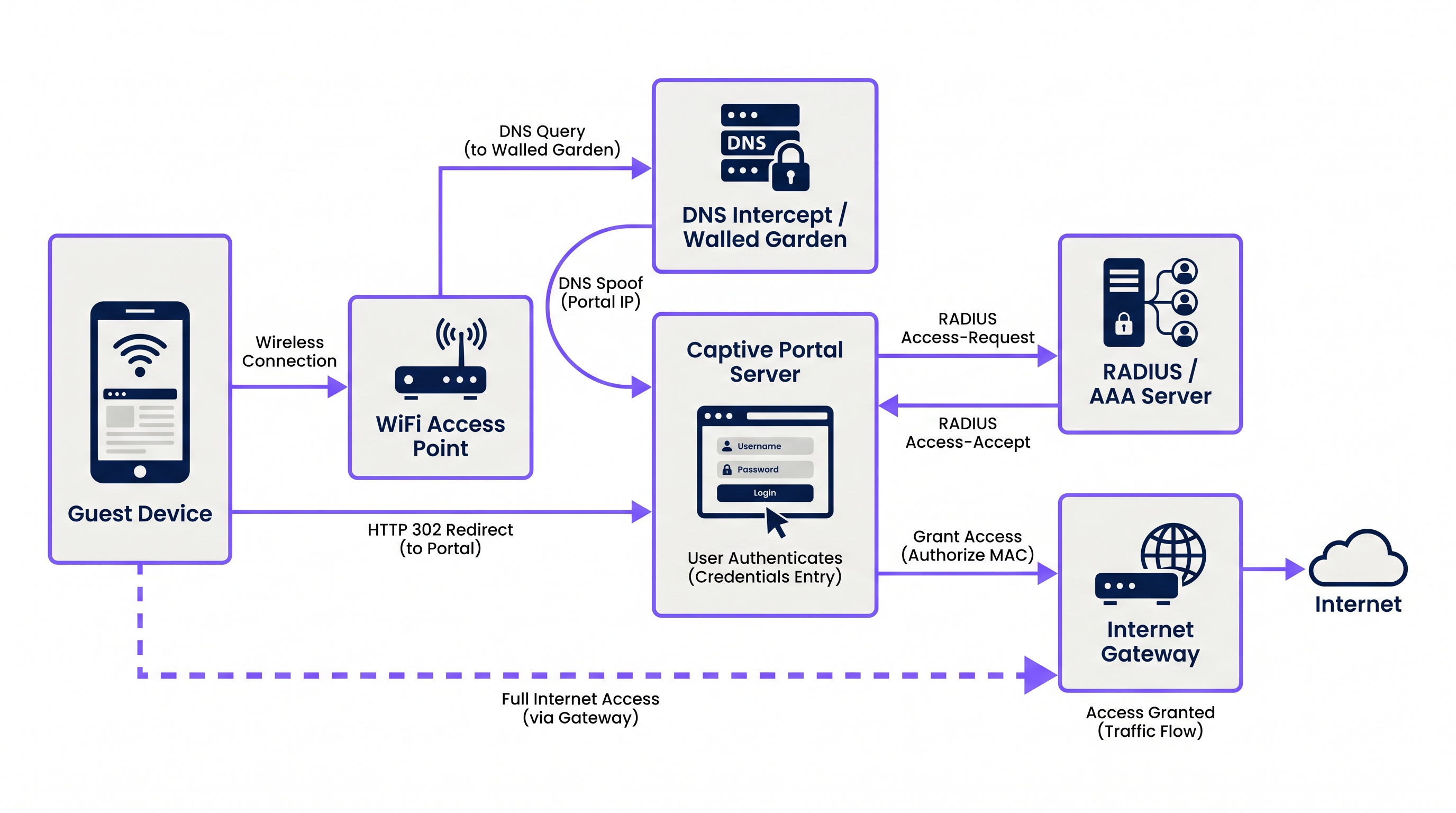
O processo baseia-se numa sequência coordenada de serviços de rede:
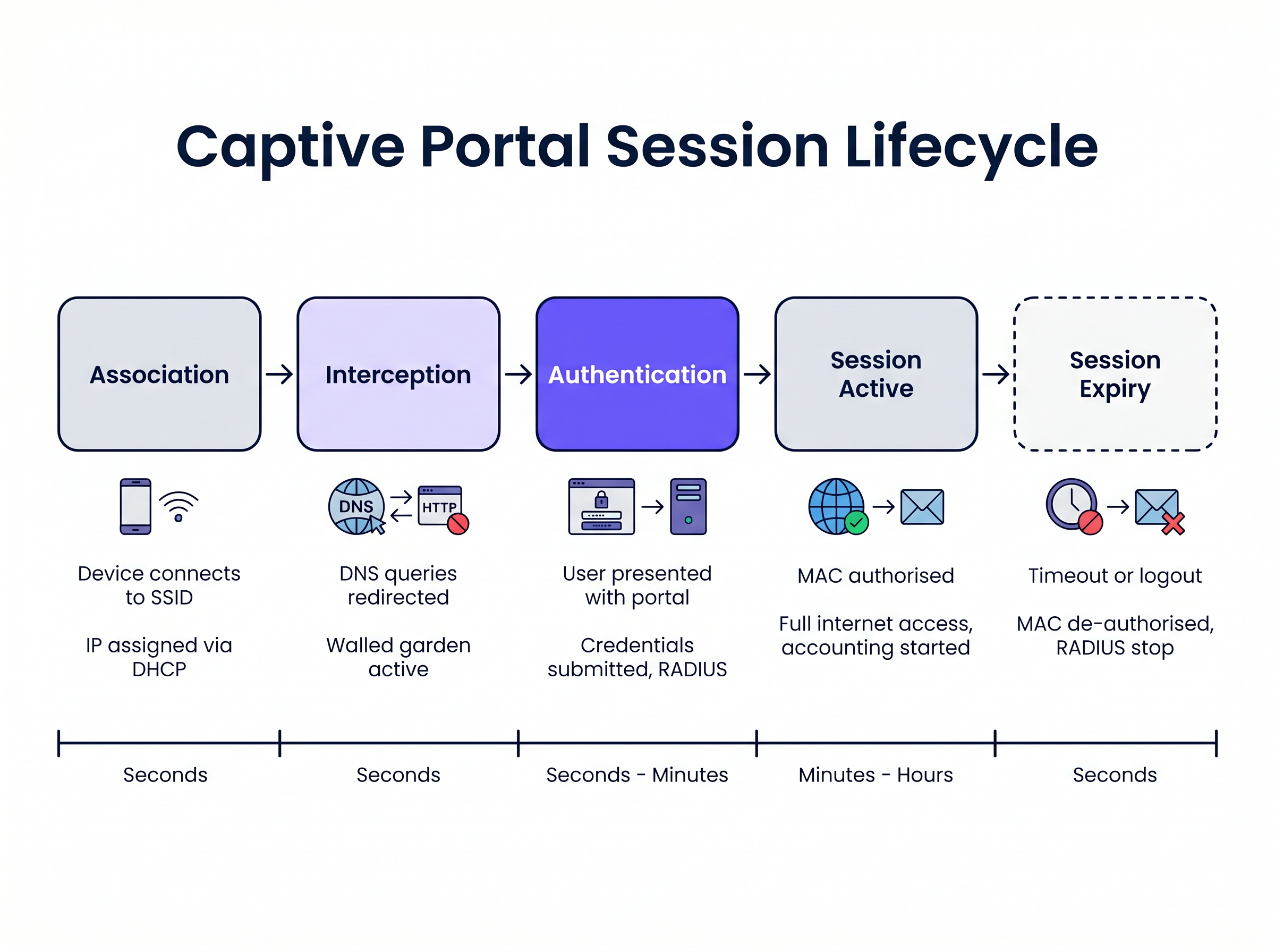
1. Associação e Atribuição de IP Quando um dispositivo convidado se conecta ao SSID, o ponto de acesso sem fios ou o controlador faz a ponte da conexão para uma VLAN específica. O servidor DHCP local atribui um endereço IP, máscara de sub-rede e gateway predefinido. Nesta fase, o dispositivo está conectado na Camada 2, mas encontra-se num estado "pré-autenticado" na Camada 3. Todo o tráfego de saída está sujeito a listas de controlo de acesso (ACLs) rigorosas impostas pelo servidor de acesso à rede (NAS), tipicamente o controlador de LAN sem fios (WLC) ou firewall de borda.
2. Interceção de DNS (DNS Spoofing)
Para acionar o Captive Portal, a rede deve intercetar os pedidos web iniciais do utilizador. Quando o dispositivo tenta resolver um nome de domínio (por exemplo, www.example.com), a consulta DNS é intercetada pelo NAS ou por um servidor DNS dedicado dentro do walled garden. Em vez de retornar o endereço IP público real para o domínio solicitado, o servidor DNS retorna o endereço IP do servidor Captive Portal.
3. Redirecionamento HTTP Quando o navegador do cliente tenta uma conexão HTTP para o endereço IP falsificado, o servidor Captive Portal responde com um redirecionamento HTTP 302 (Found) ou HTTP 303 (See Other). Isso instrui o navegador a navegar para o URL real da página de login do Captive Portal.
Sistemas operativos modernos empregam mecanismos de Captive Network Assistant (CNA) para detetar isso automaticamente. Ao conectar-se a uma rede, o SO envia um pedido HTTP GET para um URL de sonda conhecido (por exemplo, captive.apple.com para iOS/macOS, msftconnecttest.com para Windows). Se o SO receber um redirecionamento HTTP em vez do esperado 200 OK ou de uma carga HTML específica, assume que um Captive Portal está presente e lança automaticamente um pseudo-navegador para exibir a página do portal.
4. O Walled Garden Durante o estado pré-autenticado, o utilizador deve ser capaz de carregar a página do portal e os seus ativos associados. O "walled garden" é uma whitelist de endereços IP, sub-redes e domínios configurados no NAS. O tráfego destinado a estas localizações na whitelist é permitido, enquanto todo o outro tráfego é descartado. Um walled garden corretamente configurado deve incluir:
- O endereço IP do servidor Captive Portal.
- Redes de Entrega de Conteúdo (CDNs) que alojam CSS, JavaScript e ativos de imagem para a página do portal.
- Fornecedores de identidade (por exemplo, Facebook, Google) se o login social estiver ativado.
- Gateways de pagamento se o portal exigir acesso pago.
5. Autenticação e RADIUS
Assim que o utilizador submete as suas credenciais ou aceita os termos de serviço, o servidor Captive Portal atua como um cliente RADIUS. Constrói um pacote RADIUS Access-Request contendo os detalhes do utilizador e envia-o para o servidor RADIUS (Remote Authentication Dial-In User Service).
O servidor RADIUS valida o pedido contra a sua base de dados. Se for bem-sucedido, retorna um pacote Access-Accept. Crucialmente, este pacote pode incluir Atributos Específicos do Fornecedor (VSAs) que definem os parâmetros da sessão, como Session-Timeout (duração máxima da conexão), Idle-Timeout e limites de taxa de largura de banda.
6. Ativação e Contabilização da Sessão
Ao receber o Access-Accept, o servidor Captive Portal instrui o NAS a autorizar o endereço MAC do cliente. As restrições do walled garden são levantadas, e o dispositivo recebe acesso total à internet. Simultaneamente, o NAS envia um pacote RADIUS Accounting-Request (Start) para o servidor RADIUS para iniciar o rastreamento da sessão para fins de análise e conformidade.
Guia de Implementação
Implementar um Captive Portal robusto requer uma coordenação cuidadosa entre a infraestrutura sem fios e a plataforma do portal. Para gestores de TI que avaliam Fornecedores de Guest WiFi: O Que Procurar ao Escolher uma Plataforma WiFi , considere as seguintes abordagens arquitetónicas:
Cloud-Hosted vs. On-Premises Modern enterprise deployments hefavorecem fortemente infraestruturas de portal e RADIUS alojadas na cloud. Plataformas como a Purple fornecem uma arquitetura RADIUS globalmente distribuída, eliminando a necessidade de servidores AAA no local. O WLC local simplesmente direciona os seus pedidos de autenticação e contabilidade RADIUS para os endpoints do fornecedor da cloud. Esta abordagem escala de forma contínua e centraliza a gestão em vários locais, o que é particularmente benéfico para ambientes distribuídos de Hotelaria e retalho.
Configuração de Walled Garden A causa mais frequente de problemas de renderização do portal é um walled garden incompleto. As páginas web modernas dependem fortemente de recursos externos. Se uma fonte ou uma biblioteca JavaScript alojada num CDN de terceiros for bloqueada, o portal pode bloquear ou ser renderizado incorretamente no navegador CNA do sistema operativo.
- Recomendação: Utilize entradas de walled garden baseadas em domínio onde o seu WLC o suporte (por exemplo,
*.purple.ai). Se o seu hardware apenas suportar walled gardens baseados em IP, deve manter uma lista atualizada das sub-redes IP do fornecedor do portal.
Gestão da Interceção HTTPS Historicamente, os captive portals intercetavam todo o tráfego da porta 80 (HTTP) e da porta 443 (HTTPS). No entanto, com a adoção generalizada do HTTP Strict Transport Security (HSTS), a interceção de tráfego HTTPS faz com que os navegadores exibam avisos de segurança graves, uma vez que o certificado SSL do portal não corresponderá ao domínio solicitado.
- Recomendação: Nunca intercete tráfego HTTPS. Confie inteiramente nos mecanismos CNA nativos do sistema operativo (que fazem sondagens via HTTP) ou instrua explicitamente os utilizadores a navegar para um URL HTTP conhecido (por exemplo,
http://neverssl.com) para acionar o redirecionamento.
Boas Práticas
1. Cache de Endereços MAC para Roaming Contínuo
Para melhorar a experiência do utilizador, implemente a cache de endereços MAC. Quando um utilizador se autentica com sucesso, o servidor RADIUS regista o seu endereço MAC. Se o utilizador se desconectar e regressar dentro de um período especificado (por exemplo, 30 dias), o WLC envia um pedido de bypass de autenticação MAC (MAB) para o servidor RADIUS. O servidor reconhece o endereço MAC e devolve um Access-Accept imediatamente, concedendo acesso à rede sem exigir que o utilizador interaja novamente com o portal.
2. Design para o Captive Network Assistant (CNA) Os pseudo-navegadores lançados por iOS e Android para exibir captive portals têm funcionalidade limitada em comparação com navegadores completos. Frequentemente não suportam pop-ups, têm restrições rigorosas de tempo limite e lidam com cookies de forma diferente.
- Recomendação: Mantenha a interface do utilizador do portal leve. Evite frameworks JavaScript complexos ou ativos de multimédia pesados que possam fazer com que o CNA exceda o tempo limite. Se precisar de interações complexas (como downloads de aplicações), use o portal para autorizar o dispositivo primeiro e, em seguida, redirecione o utilizador para o seu navegador nativo.
3. Integração com OpenRoaming e Passpoint Embora os captive portals continuem a ser essenciais para a recolha de dados e aceitação de termos, a indústria está a avançar para padrões de autenticação contínua como o Passpoint (Hotspot 2.0). A Purple atua como um fornecedor de identidade gratuito para serviços como o OpenRoaming sob a licença Connect. Dispositivos configurados com um perfil OpenRoaming podem autenticar-se de forma segura na Camada 2 (via 802.1X/EAP) sem interagir com um captive portal, proporcionando uma experiência de roaming semelhante à de uma rede móvel. A sua infraestrutura deve suportar ambos os mecanismos em simultâneo.
Resolução de Problemas e Mitigação de Riscos
Sintoma: A página do portal não aparece automaticamente em dispositivos móveis.
- Causa Raiz: O walled garden está mal configurado, permitindo que os pedidos de sonda CNA do sistema operativo cheguem diretamente à internet. Se o sistema operativo receber um
200 OKdecaptive.apple.com, assume que tem acesso total à internet e não iniciará o portal. - Mitigação: Certifique-se de que os domínios de sonda CNA não estão na lista branca do walled garden. Devem ser intercetados e redirecionados para o servidor do portal.
Sintoma: Os utilizadores veem um aviso de certificado SSL/TLS.
- Causa Raiz: O WLC está a tentar intercetar tráfego HTTPS e está a apresentar o certificado SSL do portal em vez do certificado para o domínio solicitado pelo utilizador.
- Mitigação: Desative o redirecionamento HTTPS no WLC.
Sintoma: O login social (por exemplo, Facebook, Google) não carrega ou não autentica.
- Causa Raiz: Os domínios necessários para o fluxo OAuth do fornecedor de identidade estão em falta no walled garden.
- Mitigação: Audite a configuração do walled garden em relação à documentação atual do fornecedor de identidade. Note que estes intervalos de IP e domínios mudam frequentemente.
ROI e Impacto no Negócio
Um captive portal não é apenas uma necessidade técnica; é um ativo estratégico. Ao substituir chaves pré-partilhadas genéricas (PSKs) por um portal gerido, as organizações alcançam:
- Recolha de Dados e Automação de Marketing: A integração do portal com uma plataforma de Análise de WiFi permite que os locais recolham dados primários verificados (e-mails, dados demográficos) em troca de acesso. Estes dados alimentam sistemas CRM e campanhas de marketing direcionadas.
- Conformidade e Mitigação de Riscos: Os operadores de WiFi público estão sujeitos a leis de retenção de dados e responsabilidade por infração de direitos de autor. Um captive portal com contabilidade RADIUS fornece um registo auditável de qual dispositivo (endereço MAC) detinha qual endereço IP num determinado momento, protegendo o local de responsabilidade.
- Gestão de Largura de Banda: Ao aplicar atributos RADIUS como
Filter-IdouWISPr-Bandwidth-Max-Down, a TI pode impedir que utilizadores individuais monopolizem a ligação WAN, garantindo uma experiência consistente para todos os convidados e protegendo o tráfego crítico de back-office. Isto é particularmente relevante ao avaliar Os Principais Benefícios do SD WAN para Empresas Modernas .
Termos-Chave e Definições
Walled Garden
An access control list (ACL) applied to unauthenticated users, permitting traffic only to specific IP addresses or domains required to load the captive portal.
Crucial for allowing access to CDNs, payment gateways, and social login APIs before the user is fully authorised.
RADIUS (Remote Authentication Dial-In User Service)
The industry-standard networking protocol that provides centralised Authentication, Authorisation, and Accounting (AAA) management.
The captive portal server uses RADIUS to tell the wireless controller whether a user is allowed on the network and what restrictions apply.
Captive Network Assistant (CNA)
A pseudo-browser built into modern operating systems (iOS, Android, Windows) designed specifically to detect and display captive portals.
CNAs have limited functionality compared to full browsers; portals must be designed to accommodate their constraints.
MAC Authentication Bypass (MAB)
A process where the network uses a device's MAC address as its identity to authenticate against a RADIUS server without user interaction.
Used to implement 'MAC Caching', allowing returning guests to connect seamlessly without seeing the portal again.
DNS Interception / Spoofing
The process where the network intercepts a user's DNS query and returns the IP address of the captive portal server instead of the actual destination.
This is the primary mechanism used to force the user's web traffic to the portal page.
HTTP 302 Redirect
An HTTP response status code indicating that the requested resource has been temporarily moved to a different URI.
Used by the portal server to redirect the intercepted HTTP request to the actual login page URL.
Vendor-Specific Attributes (VSAs)
Custom parameters included in a RADIUS message that allow vendors to support features not defined in the base RADIUS standard.
Used to pass specific policies, like bandwidth limits or VLAN assignments, from the portal platform to the specific brand of wireless controller.
Passpoint (Hotspot 2.0)
A standard that enables mobile devices to automatically discover and authenticate to Wi-Fi networks securely without user interaction.
The modern alternative to captive portals for seamless roaming; platforms like Purple act as identity providers for Passpoint networks.
Estudos de Caso
A 500-room hotel is upgrading its guest WiFi. They want returning guests to connect seamlessly without seeing the portal again for 30 days, but they require a daily bandwidth limit of 10Mbps per device.
- Configure the WLC to use external RADIUS authentication pointing to the cloud provider. 2. Enable MAC Address Caching on the RADIUS server with a 30-day retention policy. 3. Configure the portal profile to assign a RADIUS Vendor-Specific Attribute (VSA) for bandwidth limiting (e.g., WISPr-Bandwidth-Max-Down = 10000000) in the Access-Accept packet.
A retail chain deploys a new captive portal featuring a Facebook login option. Users report that when they click the Facebook button, the page hangs indefinitely inside the captive portal pop-up.
The WLC's walled garden configuration is incomplete. The network administrator must add Facebook's required OAuth domains (e.g., graph.facebook.com, connect.facebook.net) and IP subnets to the pre-authentication ACL.
Análise de Cenários
Q1. You are deploying a captive portal at a stadium. The portal requires users to watch a 15-second video hosted on YouTube before gaining access. Users are reporting that the portal loads, but the video frame is blank. What is the most likely architectural cause?
💡 Dica:Consider the state of the device before it is fully authenticated and what resources it needs to access.
Mostrar Abordagem Recomendada
The walled garden configuration is incomplete. The network administrator must add YouTube's video delivery domains and CDNs to the walled garden ACL. Without this, the unauthenticated device cannot reach the YouTube servers to stream the video content, even though the main portal page (hosted elsewhere) loads successfully.
Q2. A client insists on intercepting all HTTPS traffic to force users to the captive portal, arguing that users rarely type 'http://' anymore. Why is this a bad idea, and what is the standard alternative?
💡 Dica:Think about how modern browsers handle SSL/TLS certificates and HSTS.
Mostrar Abordagem Recomendada
Intercepting HTTPS traffic requires the wireless controller to present a certificate for the requested domain (e.g., google.com). Since the controller does not possess Google's private key, the browser will flag the connection as insecure and display a severe certificate warning, breaking the user experience. The standard alternative is to rely on the Operating System's built-in Captive Network Assistant (CNA), which automatically probes known HTTP URLs in the background specifically to trigger the redirect gracefully.
Q3. A venue wants to limit guest WiFi sessions to 2 hours. How is this enforced technically within the captive portal architecture?
💡 Dica:Which component is responsible for Authorisation and passing policy parameters to the network hardware?
Mostrar Abordagem Recomendada
This is enforced via RADIUS. When the captive portal server successfully authenticates the user, it receives an Access-Accept packet from the RADIUS server. This packet includes a 'Session-Timeout' attribute set to 7200 seconds (2 hours). The wireless controller reads this attribute, applies the timer to the user's session, and automatically disconnects the device when the timer expires.




