

Come funziona un Captive Portal? Approfondimento Tecnico
Un approfondimento tecnico completo sull'architettura dei captive portal, che spiega l'intercettazione DNS, il reindirizzamento HTTP, i walled garden e l'autenticazione RADIUS per i professionisti IT.
🎧 Ascolta questa guida
Visualizza trascrizione

Riepilogo Esecutivo
Per i responsabili IT e gli architetti di rete che implementano Guest WiFi pubblico o aziendale, il captive portal è il confine critico tra un dispositivo non autenticato e l'infrastruttura di rete. Questa guida fornisce un approfondimento tecnico su come funziona un captive portal—eliminando lo strato di marketing per esaminare i meccanismi sottostanti di intercettazione DNS, reindirizzamento HTTP, configurazione del walled garden e autenticazione RADIUS.
Sia che si stia progettando un'implementazione ad alta densità per uno stadio, una rete distribuita per Retail , o una soluzione conforme per Healthcare , comprendere il ciclo di vita della sessione e le dipendenze architetturali è essenziale. Un portal mal configurato porta a esperienze utente degradate, avvisi di sicurezza del browser e potenziali fallimenti di conformità. Questa guida di riferimento delinea l'architettura tecnica, le migliori pratiche di implementazione e le modalità di errore comuni per garantire che la vostra implementazione sia sicura, scalabile e conforme agli standard moderni come WPA3 e Passpoint.
Approfondimento Tecnico
Nella sua essenza, un captive portal è un meccanismo di controllo dell'accesso alla rete di Livello 3. Intercetta il traffico da un dispositivo associato ma non autenticato, reindirizzando l'utente a un'interfaccia di autenticazione prima di concedere l'accesso completo alla rete.
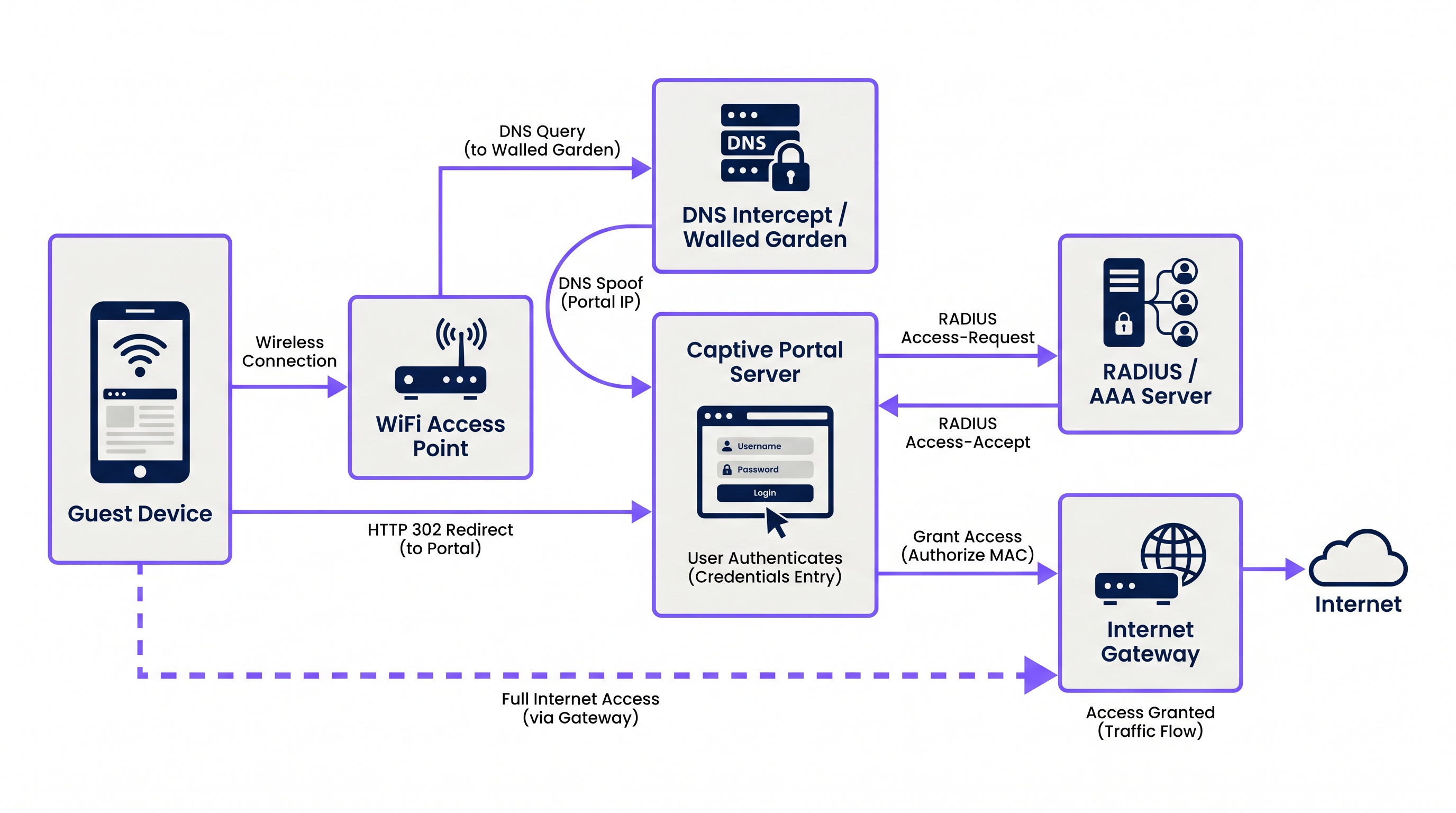
Il processo si basa su una sequenza coordinata di servizi di rete:
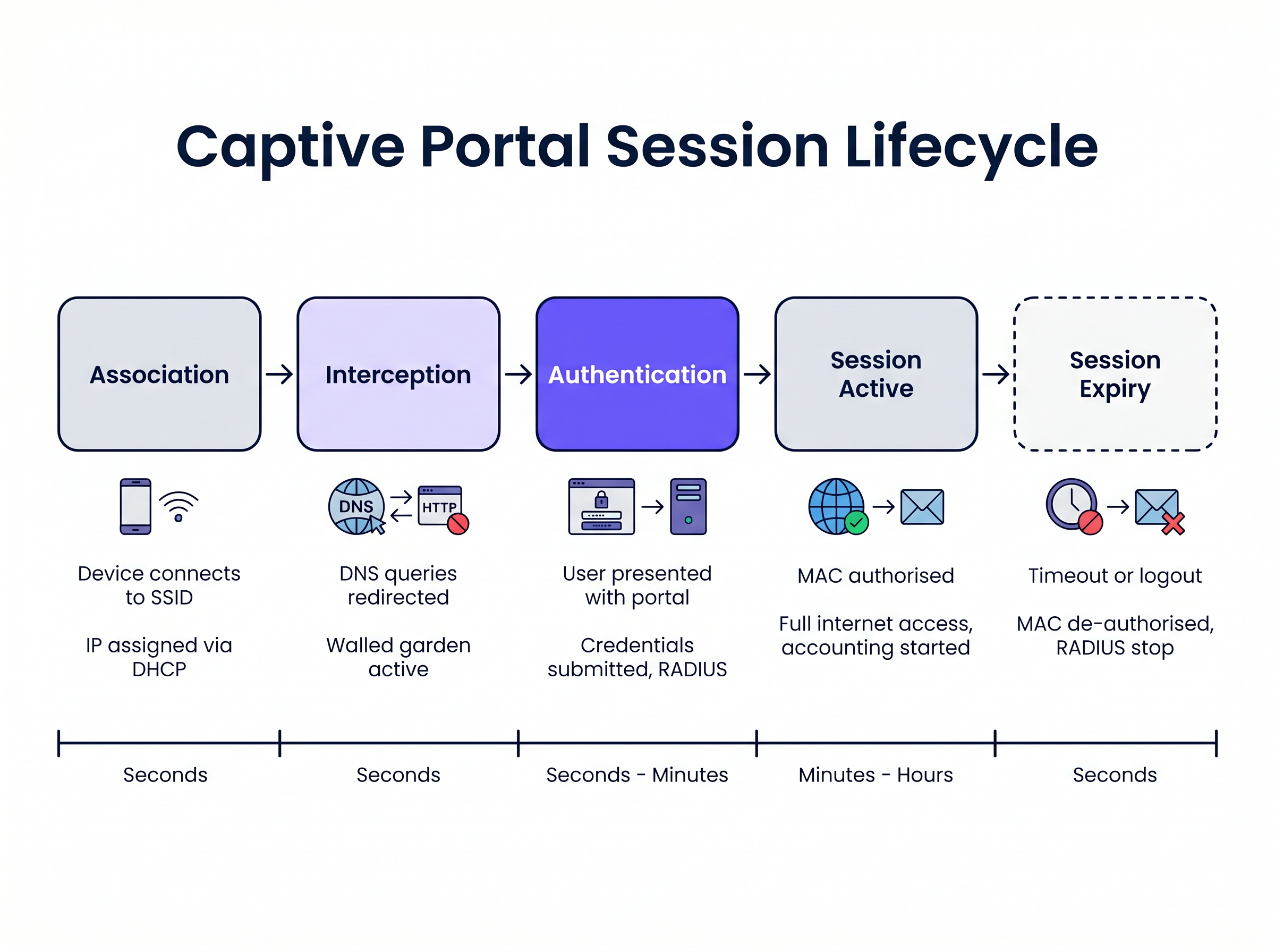
1. Associazione e Assegnazione IP Quando un dispositivo ospite si connette all'SSID, l'access point wireless o il controller collega la connessione a una VLAN specifica. Il server DHCP locale assegna un indirizzo IP, una subnet mask e un gateway predefinito. In questa fase, il dispositivo è connesso al Livello 2 ma si trova in uno stato di "pre-autenticazione" al Livello 3. Tutto il traffico in uscita è soggetto a liste di controllo degli accessi (ACL) rigorose imposte dal network access server (NAS), tipicamente il wireless LAN controller (WLC) o il firewall di bordo.
2. Intercettazione DNS (DNS Spoofing)
Per attivare il captive portal, la rete deve intercettare le richieste web iniziali dell'utente. Quando il dispositivo tenta di risolvere un nome di dominio (ad esempio, www.example.com), la query DNS viene intercettata dal NAS o da un server DNS dedicato all'interno del walled garden. Invece di restituire l'indirizzo IP pubblico effettivo per il dominio richiesto, il server DNS restituisce l'indirizzo IP del server captive portal.
3. Reindirizzamento HTTP Quando il browser del client tenta una connessione HTTP all'indirizzo IP spoofato, il server captive portal risponde con un reindirizzamento HTTP 302 (Found) o HTTP 303 (See Other). Questo istruisce il browser a navigare all'URL effettivo della pagina di login del captive portal.
I sistemi operativi moderni impiegano meccanismi di Captive Network Assistant (CNA) per rilevare questo automaticamente. Dopo essersi connesso a una rete, il sistema operativo invia una richiesta HTTP GET a un URL di prova noto (ad esempio, captive.apple.com per iOS/macOS, msftconnecttest.com per Windows). Se il sistema operativo riceve un reindirizzamento HTTP invece del previsto 200 OK o di un payload HTML specifico, presume la presenza di un captive portal e avvia automaticamente un pseudo-browser per visualizzare la pagina del portal.
4. Il Walled Garden Durante lo stato di pre-autenticazione, l'utente deve essere in grado di caricare la pagina del portal e le sue risorse associate. Il "walled garden" è una whitelist di indirizzi IP, subnet e domini configurati sul NAS. Il traffico destinato a queste posizioni in whitelist è consentito, mentre tutto il resto del traffico viene bloccato. Un walled garden correttamente configurato deve includere:
- L'indirizzo IP del server captive portal.
- Content Delivery Networks (CDN) che ospitano CSS, JavaScript e risorse immagine per la pagina del portal.
- Provider di identità (ad esempio, Facebook, Google) se il social login è abilitato.
- Gateway di pagamento se il portal richiede accesso a pagamento.
5. Autenticazione e RADIUS
Una volta che l'utente invia le proprie credenziali o accetta i termini di servizio, il server captive portal agisce come client RADIUS. Costruisce un pacchetto RADIUS Access-Request contenente i dettagli dell'utente e lo invia al server RADIUS (Remote Authentication Dial-In User Service).
Il server RADIUS convalida la richiesta rispetto al suo database. In caso di successo, restituisce un pacchetto Access-Accept. Fondamentalmente, questo pacchetto può includere Attributi Specifici del Fornitore (VSA) che definiscono i parametri della sessione, come Session-Timeout (durata massima della connessione), Idle-Timeout e limiti di velocità della larghezza di banda.
6. Attivazione e Contabilizzazione della Sessione
Alla ricezione dell' Access-Accept, il server captive portal istruisce il NAS ad autorizzare l'indirizzo MAC del client. Le restrizioni del walled garden vengono rimosse e al dispositivo viene concesso l'accesso completo a internet. Contemporaneamente, il NAS invia un pacchetto RADIUS Accounting-Request (Start) al server RADIUS per iniziare a tracciare la sessione a fini di analisi e conformità.
Guida all'Implementazione
L'implementazione di un captive portal robusto richiede un'attenta coordinazione tra l'infrastruttura wireless e la piattaforma del portal. Per i responsabili IT che valutano Guest WiFi Providers: What to Look for When Choosing a WiFi Platform , considerate i seguenti approcci architetturali:
Cloud-Hosted vs. On-Premises Modern enterprise deployments hefavoriscono fortemente l'infrastruttura di portale e RADIUS ospitata nel cloud. Piattaforme come Purple forniscono un'architettura RADIUS distribuita globalmente, eliminando la necessità di server AAA on-premises. Il WLC locale punta semplicemente le sue richieste di autenticazione e accounting RADIUS agli endpoint del provider cloud. Questo approccio si scala senza problemi e centralizza la gestione su più siti, il che è particolarmente vantaggioso per gli ambienti distribuiti di Hospitality e retail.
Configurazione del Walled Garden La causa più frequente dei problemi di rendering del portale è un walled garden incompleto. Le moderne pagine web si basano fortemente su risorse esterne. Se un font o una libreria JavaScript ospitata su una CDN di terze parti viene bloccata, il portale potrebbe bloccarsi o essere visualizzato in modo errato all'interno del browser CNA del sistema operativo.
- Raccomandazione: Utilizzare voci di walled garden basate su dominio dove supportato dal WLC (es.
*.purple.ai). Se il tuo hardware supporta solo walled garden basati su IP, devi mantenere un elenco aggiornato delle sottoreti IP del provider del portale.
Gestione dell'intercettazione HTTPS Storicamente, i Captive Portal intercettavano tutto il traffico sulla porta 80 (HTTP) e sulla porta 443 (HTTPS). Tuttavia, con l'adozione diffusa di HTTP Strict Transport Security (HSTS), l'intercettazione del traffico HTTPS fa sì che i browser visualizzino gravi avvisi di sicurezza, poiché il certificato SSL del portale non corrisponderà al dominio richiesto.
- Raccomandazione: Non intercettare mai il traffico HTTPS. Affidarsi interamente ai meccanismi CNA nativi del sistema operativo (che sondano tramite HTTP) o istruire esplicitamente gli utenti a navigare verso un URL HTTP noto (es.
http://neverssl.com) per attivare il reindirizzamento.
Best Practice
1. Caching degli indirizzi MAC per un roaming senza interruzioni
Per migliorare l'esperienza utente, implementare il caching degli indirizzi MAC. Quando un utente si autentica con successo, il server RADIUS registra il suo indirizzo MAC. Se l'utente si disconnette e ritorna entro un periodo specificato (es. 30 giorni), il WLC invia una richiesta di MAC authentication bypass (MAB) al server RADIUS. Il server riconosce l'indirizzo MAC e restituisce immediatamente un Access-Accept, garantendo l'accesso alla rete senza richiedere all'utente di interagire nuovamente con il portale.
2. Progettazione per il Captive Network Assistant (CNA) I pseudo-browser lanciati da iOS e Android per visualizzare i Captive Portal hanno funzionalità limitate rispetto ai browser completi. Spesso non supportano i pop-up, hanno rigidi vincoli di timeout e gestiscono i cookie in modo diverso.
- Raccomandazione: Mantenere l'interfaccia utente del portale leggera. Evitare framework JavaScript complessi o risorse multimediali pesanti che potrebbero causare il timeout del CNA. Se sono richieste interazioni complesse (come download di app), utilizzare prima il portale per autorizzare il dispositivo, quindi reindirizzare l'utente al suo browser nativo.
3. Integrazione con OpenRoaming e Passpoint Mentre i Captive Portal rimangono essenziali per l'acquisizione dei dati e l'accettazione dei termini, l'industria si sta muovendo verso standard di autenticazione senza interruzioni come Passpoint (Hotspot 2.0). Purple agisce come un provider di identità gratuito per servizi come OpenRoaming sotto la licenza Connect. I dispositivi configurati con un profilo OpenRoaming possono autenticarsi in modo sicuro al Livello 2 (tramite 802.1X/EAP) senza interagire con un Captive Portal, fornendo un'esperienza di roaming simile a quella cellulare. La tua infrastruttura dovrebbe supportare entrambi i meccanismi contemporaneamente.
Risoluzione dei Problemi e Mitigazione del Rischio
Sintomo: La pagina del portale non appare automaticamente sui dispositivi mobili.
- Causa Radice: Il walled garden è configurato in modo errato, consentendo alle richieste di sonda CNA del sistema operativo di raggiungere direttamente internet. Se il sistema operativo riceve un
200 OKdacaptive.apple.com, presume di avere pieno accesso a internet e non avvierà il portale. - Mitigazione: Assicurarsi che i domini di sonda CNA non siano nella whitelist del walled garden. Devono essere intercettati e reindirizzati al server del portale.
Sintomo: Gli utenti visualizzano un avviso di certificato SSL/TLS.
- Causa Radice: Il WLC sta tentando di intercettare il traffico HTTPS e sta presentando il certificato SSL del portale invece del certificato per il dominio richiesto dall'utente.
- Mitigazione: Disabilitare il reindirizzamento HTTPS sul WLC.
Sintomo: Il login social (es. Facebook, Google) non si carica o non si autentica.
- Causa Radice: I domini richiesti per il flusso OAuth del provider di identità mancano dal walled garden.
- Mitigazione: Verificare la configurazione del walled garden rispetto alla documentazione attuale del provider di identità. Si noti che questi intervalli IP e domini cambiano frequentemente.
ROI e Impatto Commerciale
Un Captive Portal non è solo una necessità tecnica; è una risorsa strategica. Sostituendo le chiavi pre-condivise (PSK) generiche con un portale gestito, le organizzazioni ottengono:
- Acquisizione Dati e Marketing Automation: L'integrazione del portale con una piattaforma di WiFi Analytics consente alle sedi di raccogliere dati di prima parte verificati (email, dati demografici) in cambio dell'accesso. Questi dati alimentano i sistemi CRM e le campagne di marketing mirate.
- Conformità e Mitigazione del Rischio: Gli operatori di WiFi pubblico sono soggetti a leggi sulla conservazione dei dati e responsabilità per violazione del copyright. Un Captive Portal con accounting RADIUS fornisce un registro verificabile di quale dispositivo (indirizzo MAC) ha detenuto quale indirizzo IP in un momento specifico, proteggendo la sede da responsabilità.
- Gestione della Larghezza di Banda: Applicando attributi RADIUS come
Filter-IdoWISPr-Bandwidth-Max-Down, l'IT può impedire ai singoli utenti di monopolizzare la connessione WAN, garantendo un'esperienza coerente per tutti gli ospiti e proteggendo il traffico critico di back-office. Ciò è particolarmente rilevante quando si valutano I Vantaggi Chiave dell'SD WAN per le Aziende Moderne .
Termini chiave e definizioni
Walled Garden
An access control list (ACL) applied to unauthenticated users, permitting traffic only to specific IP addresses or domains required to load the captive portal.
Crucial for allowing access to CDNs, payment gateways, and social login APIs before the user is fully authorised.
RADIUS (Remote Authentication Dial-In User Service)
The industry-standard networking protocol that provides centralised Authentication, Authorisation, and Accounting (AAA) management.
The captive portal server uses RADIUS to tell the wireless controller whether a user is allowed on the network and what restrictions apply.
Captive Network Assistant (CNA)
A pseudo-browser built into modern operating systems (iOS, Android, Windows) designed specifically to detect and display captive portals.
CNAs have limited functionality compared to full browsers; portals must be designed to accommodate their constraints.
MAC Authentication Bypass (MAB)
A process where the network uses a device's MAC address as its identity to authenticate against a RADIUS server without user interaction.
Used to implement 'MAC Caching', allowing returning guests to connect seamlessly without seeing the portal again.
DNS Interception / Spoofing
The process where the network intercepts a user's DNS query and returns the IP address of the captive portal server instead of the actual destination.
This is the primary mechanism used to force the user's web traffic to the portal page.
HTTP 302 Redirect
An HTTP response status code indicating that the requested resource has been temporarily moved to a different URI.
Used by the portal server to redirect the intercepted HTTP request to the actual login page URL.
Vendor-Specific Attributes (VSAs)
Custom parameters included in a RADIUS message that allow vendors to support features not defined in the base RADIUS standard.
Used to pass specific policies, like bandwidth limits or VLAN assignments, from the portal platform to the specific brand of wireless controller.
Passpoint (Hotspot 2.0)
A standard that enables mobile devices to automatically discover and authenticate to Wi-Fi networks securely without user interaction.
The modern alternative to captive portals for seamless roaming; platforms like Purple act as identity providers for Passpoint networks.
Casi di studio
A 500-room hotel is upgrading its guest WiFi. They want returning guests to connect seamlessly without seeing the portal again for 30 days, but they require a daily bandwidth limit of 10Mbps per device.
- Configure the WLC to use external RADIUS authentication pointing to the cloud provider. 2. Enable MAC Address Caching on the RADIUS server with a 30-day retention policy. 3. Configure the portal profile to assign a RADIUS Vendor-Specific Attribute (VSA) for bandwidth limiting (e.g., WISPr-Bandwidth-Max-Down = 10000000) in the Access-Accept packet.
A retail chain deploys a new captive portal featuring a Facebook login option. Users report that when they click the Facebook button, the page hangs indefinitely inside the captive portal pop-up.
The WLC's walled garden configuration is incomplete. The network administrator must add Facebook's required OAuth domains (e.g., graph.facebook.com, connect.facebook.net) and IP subnets to the pre-authentication ACL.
Analisi degli scenari
Q1. You are deploying a captive portal at a stadium. The portal requires users to watch a 15-second video hosted on YouTube before gaining access. Users are reporting that the portal loads, but the video frame is blank. What is the most likely architectural cause?
💡 Suggerimento:Consider the state of the device before it is fully authenticated and what resources it needs to access.
Mostra l'approccio consigliato
The walled garden configuration is incomplete. The network administrator must add YouTube's video delivery domains and CDNs to the walled garden ACL. Without this, the unauthenticated device cannot reach the YouTube servers to stream the video content, even though the main portal page (hosted elsewhere) loads successfully.
Q2. A client insists on intercepting all HTTPS traffic to force users to the captive portal, arguing that users rarely type 'http://' anymore. Why is this a bad idea, and what is the standard alternative?
💡 Suggerimento:Think about how modern browsers handle SSL/TLS certificates and HSTS.
Mostra l'approccio consigliato
Intercepting HTTPS traffic requires the wireless controller to present a certificate for the requested domain (e.g., google.com). Since the controller does not possess Google's private key, the browser will flag the connection as insecure and display a severe certificate warning, breaking the user experience. The standard alternative is to rely on the Operating System's built-in Captive Network Assistant (CNA), which automatically probes known HTTP URLs in the background specifically to trigger the redirect gracefully.
Q3. A venue wants to limit guest WiFi sessions to 2 hours. How is this enforced technically within the captive portal architecture?
💡 Suggerimento:Which component is responsible for Authorisation and passing policy parameters to the network hardware?
Mostra l'approccio consigliato
This is enforced via RADIUS. When the captive portal server successfully authenticates the user, it receives an Access-Accept packet from the RADIUS server. This packet includes a 'Session-Timeout' attribute set to 7200 seconds (2 hours). The wireless controller reads this attribute, applies the timer to the user's session, and automatically disconnects the device when the timer expires.




