

Wie funktioniert ein Captive Portal? Technischer Tiefgang
Ein umfassender technischer Einblick in die Architektur von Captive Portals, der DNS-Interception, HTTP-Weiterleitung, Walled Gardens und RADIUS-Authentifizierung für IT-Profis erklärt.
🎧 Diesen Leitfaden anhören
Transkript anzeigen

Zusammenfassung für Führungskräfte
Für IT-Manager und Netzwerkarchitekten, die öffentliche oder Unternehmens- Guest WiFi bereitstellen, ist das Captive Portal die kritische Grenze zwischen einem nicht authentifizierten Gerät und Ihrer Netzwerkinfrastruktur. Dieser Leitfaden bietet einen technischen Tiefgang in die Funktionsweise eines Captive Portals – er entfernt die Marketing-Ebene, um die zugrunde liegenden Mechanismen der DNS-Interception, HTTP-Weiterleitung, Walled Garden-Konfiguration und RADIUS-Authentifizierung zu untersuchen.
Ob Sie eine High-Density-Bereitstellung für ein Stadion, ein verteiltes Netzwerk für den Retail oder eine konforme Lösung für das Healthcare entwerfen, das Verständnis des Sitzungslebenszyklus und der architektonischen Abhängigkeiten ist unerlässlich. Ein falsch konfiguriertes Portal führt zu einer verschlechterten Benutzererfahrung, Browser-Sicherheitswarnungen und potenziellen Compliance-Fehlern. Dieser Referenzleitfaden beschreibt die technische Architektur, Best Practices für die Implementierung und häufige Fehlerursachen, um sicherzustellen, dass Ihre Bereitstellung sicher, skalierbar und konform mit modernen Standards wie WPA3 und Passpoint ist.
Technischer Tiefgang
Im Kern ist ein Captive Portal ein Layer-3-Netzwerkzugriffssteuerungsmechanismus. Es fängt den Datenverkehr von einem verbundenen, aber nicht authentifizierten Gerät ab und leitet den Benutzer zu einer Authentifizierungsschnittstelle um, bevor der vollständige Netzwerkzugriff gewährt wird.
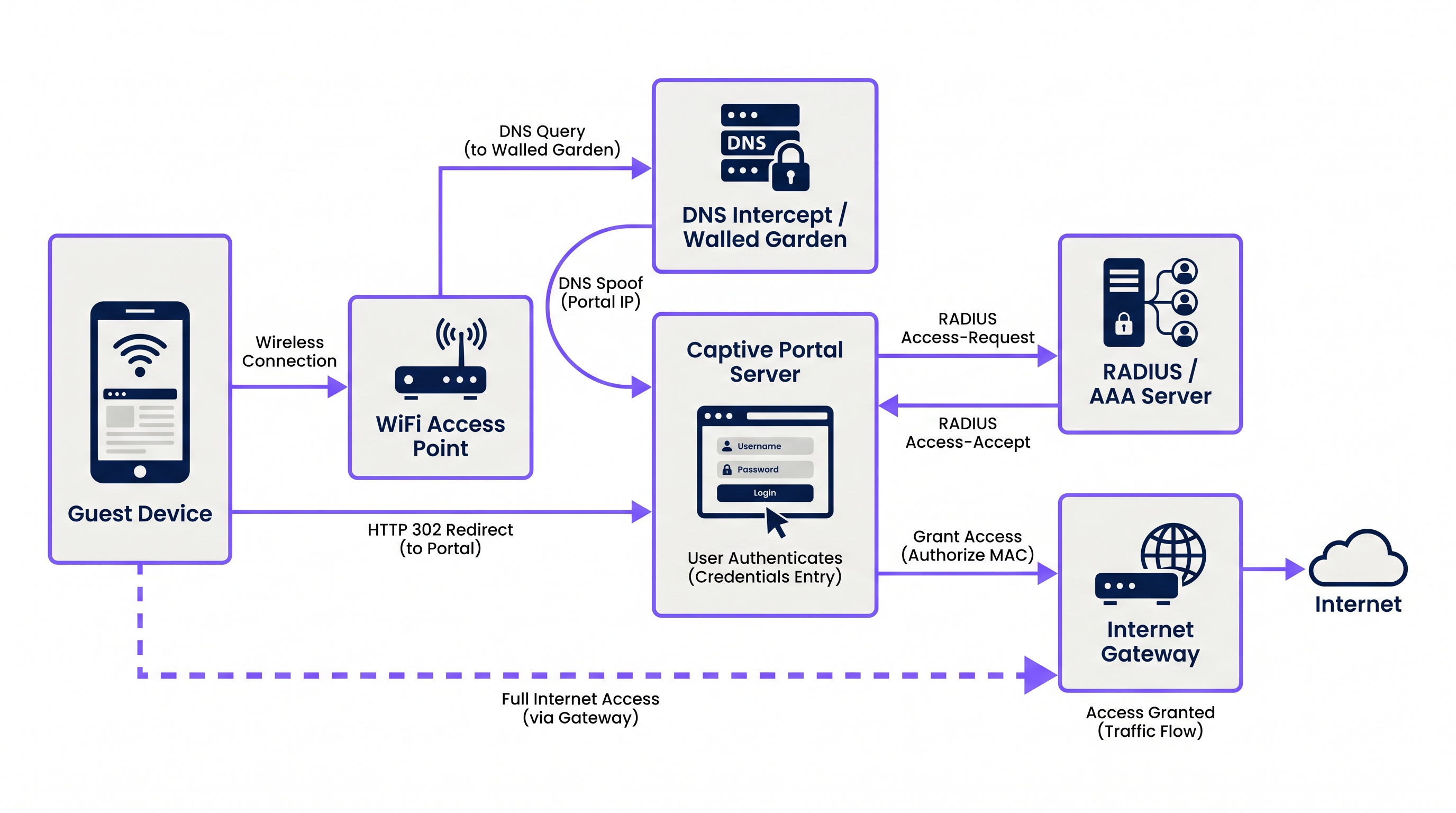
Der Prozess basiert auf einer koordinierten Abfolge von Netzwerkdiensten:
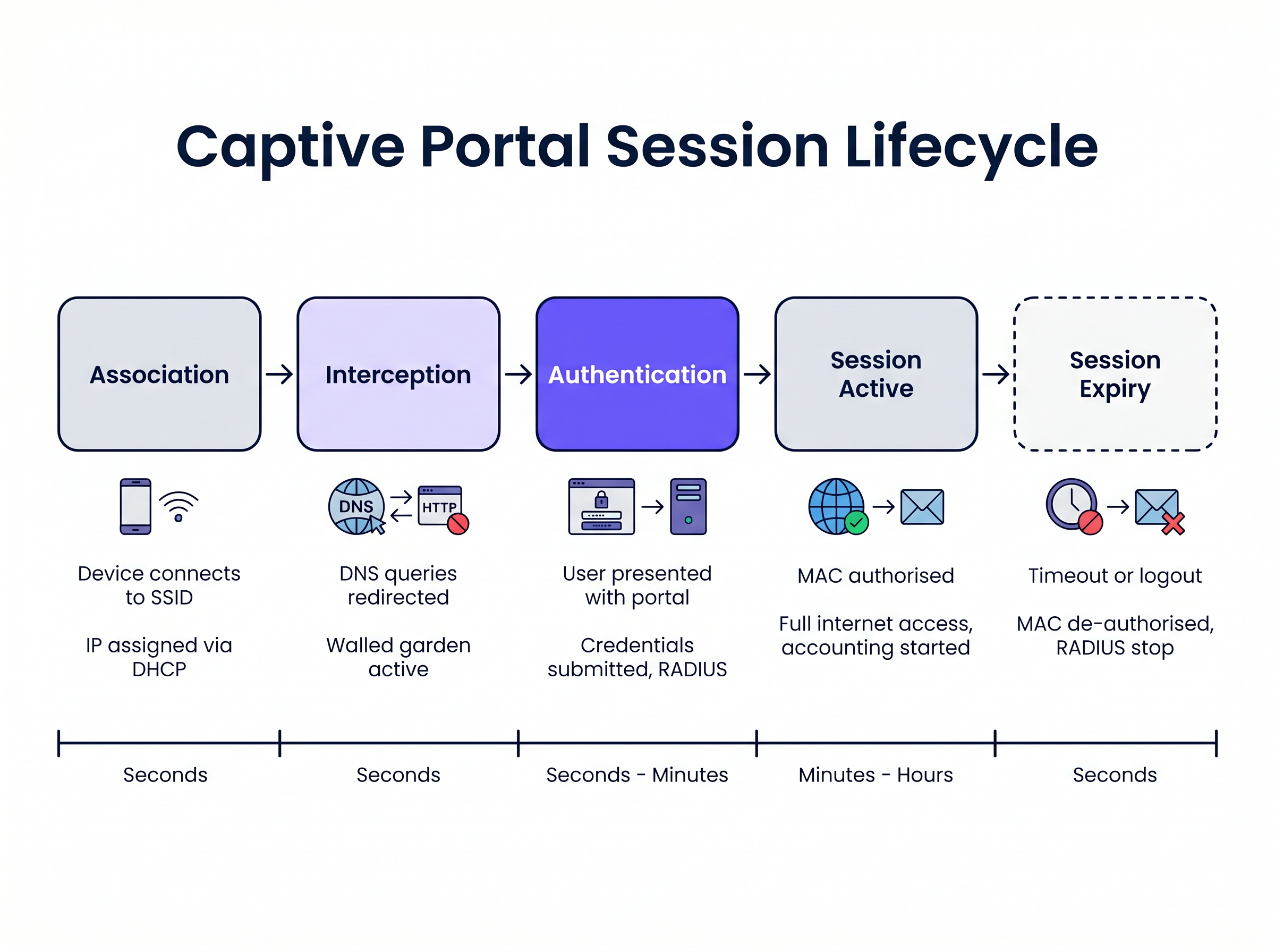
1. Assoziation und IP-Zuweisung Wenn sich ein Gastgerät mit der SSID verbindet, überbrückt der Wireless Access Point oder Controller die Verbindung zu einem bestimmten VLAN. Der lokale DHCP-Server weist eine IP-Adresse, Subnetzmaske und ein Standard-Gateway zu. In diesem Stadium ist das Gerät auf Layer 2 verbunden, befindet sich aber auf Layer 3 in einem „vorauthentifizierten“ Zustand. Der gesamte ausgehende Datenverkehr unterliegt strengen Zugriffssteuerungslisten (ACLs), die vom Network Access Server (NAS), typischerweise dem Wireless LAN Controller (WLC) oder der Edge-Firewall, durchgesetzt werden.
2. DNS-Interception (DNS-Spoofing)
Um das Captive Portal auszulösen, muss das Netzwerk die anfänglichen Webanfragen des Benutzers abfangen. Wenn das Gerät versucht, einen Domainnamen aufzulösen (z. B. www.example.com), wird die DNS-Abfrage vom NAS oder einem dedizierten DNS-Server innerhalb des Walled Garden abgefangen. Anstatt die tatsächliche öffentliche IP-Adresse für die angeforderte Domain zurückzugeben, gibt der DNS-Server die IP-Adresse des Captive Portal-Servers zurück.
3. HTTP-Weiterleitung Wenn der Browser des Clients versucht, eine HTTP-Verbindung zur gefälschten IP-Adresse herzustellen, antwortet der Captive Portal-Server mit einer HTTP 302 (Found) oder HTTP 303 (See Other) Weiterleitung. Dies weist den Browser an, zur tatsächlichen URL der Captive Portal-Anmeldeseite zu navigieren.
Moderne Betriebssysteme verwenden Captive Network Assistant (CNA)-Mechanismen, um dies automatisch zu erkennen. Beim Verbinden mit einem Netzwerk sendet das Betriebssystem eine HTTP GET-Anfrage an eine bekannte Probe-URL (z. B. captive.apple.com für iOS/macOS, msftconnecttest.com für Windows). Wenn das Betriebssystem eine HTTP-Weiterleitung anstelle des erwarteten 200 OK oder einer spezifischen HTML-Nutzlast empfängt, geht es davon aus, dass ein Captive Portal vorhanden ist, und startet automatisch einen Pseudo-Browser, um die Portalseite anzuzeigen.
4. Der Walled Garden Während des vorauthentifizierten Zustands muss der Benutzer in der Lage sein, die Portalseite und die zugehörigen Assets zu laden. Der „Walled Garden“ ist eine Whitelist von IP-Adressen, Subnetzen und Domains, die auf dem NAS konfiguriert sind. Datenverkehr, der für diese Whitelist-Standorte bestimmt ist, ist erlaubt, während aller andere Datenverkehr verworfen wird. Ein korrekt konfigurierter Walled Garden muss Folgendes umfassen:
- Die IP-Adresse des Captive Portal-Servers.
- Content Delivery Networks (CDNs), die CSS-, JavaScript- und Bild-Assets für die Portalseite hosten.
- Identitätsanbieter (z. B. Facebook, Google), wenn Social Login aktiviert ist.
- Zahlungs-Gateways, wenn das Portal kostenpflichtigen Zugang erfordert.
5. Authentifizierung und RADIUS
Sobald der Benutzer seine Anmeldeinformationen übermittelt oder die Nutzungsbedingungen akzeptiert, fungiert der Captive Portal-Server als RADIUS-Client. Er erstellt ein RADIUS Access-Request-Paket mit den Benutzerdetails und sendet es an den RADIUS (Remote Authentication Dial-In User Service)-Server.
Der RADIUS-Server validiert die Anfrage anhand seiner Datenbank. Bei Erfolg gibt er ein Access-Accept-Paket zurück. Entscheidend ist, dass dieses Paket anbieterspezifische Attribute (VSAs) enthalten kann, die die Sitzungsparameter definieren, wie z. B. Session-Timeout (maximale Verbindungsdauer), Idle-Timeout und Bandbreitenbegrenzungen.
6. Sitzungsaktivierung und Abrechnung
Nach Erhalt des Access-Accept weist der Captive Portal-Server den NAS an, die MAC-Adresse des Clients zu autorisieren. Die Walled Garden-Beschränkungen werden aufgehoben, und dem Gerät wird voller Internetzugang gewährt. Gleichzeitig sendet der NAS ein RADIUS Accounting-Request (Start)-Paket an den RADIUS-Server, um die Sitzung für Analyse- und Compliance-Zwecke zu verfolgen.
Implementierungsleitfaden
Die Bereitstellung eines robusten Captive Portals erfordert eine sorgfältige Koordination zwischen der Wireless-Infrastruktur und der Portalplattform. Für IT-Manager, die Guest WiFi Providers: What to Look for When Choosing a WiFi Platform bewerten, sind die folgenden architektonischen Ansätze zu berücksichtigen:
Cloud-basiert vs. On-Premises Moderne Unternehmensbereitstellungen hebevorzugen stark Cloud-gehostete Portal- und RADIUS-Infrastrukturen. Plattformen wie Purple bieten eine global verteilte RADIUS-Architektur, wodurch die Notwendigkeit von lokalen AAA-Servern entfällt. Der lokale WLC leitet seine RADIUS-Authentifizierungs- und Accounting-Anfragen einfach an die Endpunkte des Cloud-Anbieters weiter. Dieser Ansatz skaliert nahtlos und zentralisiert die Verwaltung über mehrere Standorte hinweg, was besonders vorteilhaft für verteilte Gastgewerbe und Einzelhandelsumgebungen ist.
Walled Garden Konfiguration Die häufigste Ursache für Probleme bei der Portal-Darstellung ist ein unvollständiger Walled Garden. Moderne Webseiten sind stark auf externe Ressourcen angewiesen. Wenn eine Schriftart oder eine JavaScript-Bibliothek, die auf einem Drittanbieter-CDN gehostet wird, blockiert ist, kann das Portal hängen bleiben oder im OS's CNA-Browser falsch dargestellt werden.
- Empfehlung: Verwenden Sie domänenbasierte Walled Garden-Einträge, sofern von Ihrem WLC unterstützt (z.B.
*.purple.ai). Wenn Ihre Hardware nur IP-basierte Walled Gardens unterstützt, müssen Sie eine aktualisierte Liste der IP-Subnetze des Portal-Anbieters pflegen.
Umgang mit HTTPS-Abfangen Historisch gesehen haben Captive Portals den gesamten Port 80 (HTTP) und Port 443 (HTTPS) Verkehr abgefangen. Mit der weit verbreiteten Einführung von HTTP Strict Transport Security (HSTS) führt das Abfangen von HTTPS-Verkehr jedoch dazu, dass Browser schwerwiegende Sicherheitswarnungen anzeigen, da das SSL-Zertifikat des Portals nicht mit der angeforderten Domain übereinstimmt.
- Empfehlung: Fangen Sie niemals HTTPS-Verkehr ab. Verlassen Sie sich vollständig auf die OS-nativen CNA-Mechanismen (die über HTTP prüfen) oder weisen Sie Benutzer explizit an, zu einer bekannten HTTP-URL (z.B.
http://neverssl.com) zu navigieren, um die Weiterleitung auszulösen.
Best Practices
1. MAC-Adress-Caching für nahtloses Roaming
Um die Benutzererfahrung zu verbessern, implementieren Sie MAC-Adress-Caching. Wenn sich ein Benutzer erfolgreich authentifiziert, speichert der RADIUS-Server seine MAC-Adresse. Wenn der Benutzer die Verbindung trennt und innerhalb eines bestimmten Zeitfensters (z.B. 30 Tage) zurückkehrt, sendet der WLC eine MAC Authentication Bypass (MAB)-Anfrage an den RADIUS-Server. Der Server erkennt die MAC-Adresse und gibt sofort ein Access-Accept zurück, wodurch der Netzwerkzugriff gewährt wird, ohne dass der Benutzer erneut mit dem Portal interagieren muss.
2. Design für den Captive Network Assistant (CNA) Die von iOS und Android gestarteten Pseudo-Browser zur Anzeige von Captive Portals haben im Vergleich zu vollwertigen Browsern eine eingeschränkte Funktionalität. Sie unterstützen oft keine Pop-ups, haben strenge Timeout-Beschränkungen und behandeln Cookies anders.
- Empfehlung: Halten Sie die Portal-Benutzeroberfläche schlank. Vermeiden Sie komplexe JavaScript-Frameworks oder große Mediendateien, die dazu führen könnten, dass der CNA ein Timeout erhält. Wenn Sie komplexe Interaktionen (wie App-Downloads) benötigen, verwenden Sie das Portal, um das Gerät zuerst zu autorisieren, und leiten Sie den Benutzer dann zu seinem nativen Browser weiter.
3. Integration mit OpenRoaming und Passpoint Während Captive Portals für die Datenerfassung und die Akzeptanz von Bedingungen unerlässlich bleiben, bewegt sich die Branche hin zu nahtlosen Authentifizierungsstandards wie Passpoint (Hotspot 2.0). Purple fungiert als kostenloser Identitätsanbieter für Dienste wie OpenRoaming unter der Connect-Lizenz. Geräte, die mit einem OpenRoaming-Profil konfiguriert sind, können sich sicher auf Layer 2 (über 802.1X/EAP) authentifizieren, ohne mit einem Captive Portal zu interagieren, was ein zellulares Roaming-Erlebnis bietet. Ihre Infrastruktur sollte beide Mechanismen gleichzeitig unterstützen.
Fehlerbehebung & Risikominderung
Symptom: Die Portalseite erscheint nicht automatisch auf mobilen Geräten.
- Grundursache: Der Walled Garden ist falsch konfiguriert, wodurch die CNA-Probe-Anfragen des Betriebssystems direkt das Internet erreichen können. Wenn das Betriebssystem ein
200 OKvoncaptive.apple.comerhält, geht es davon aus, dass es vollen Internetzugang hat und startet das Portal nicht. - Abhilfe: Stellen Sie sicher, dass die CNA-Probe-Domains nicht im Walled Garden auf der Whitelist stehen. Sie müssen abgefangen und zum Portal-Server umgeleitet werden.
Symptom: Benutzer sehen eine SSL/TLS-Zertifikatswarnung.
- Grundursache: Der WLC versucht, HTTPS-Verkehr abzufangen und präsentiert das SSL-Zertifikat des Portals anstelle des Zertifikats für die vom Benutzer angeforderte Domain.
- Abhilfe: Deaktivieren Sie die HTTPS-Weiterleitung auf dem WLC.
Symptom: Social Login (z.B. Facebook, Google) lädt nicht oder authentifiziert nicht.
- Grundursache: Die erforderlichen Domains für den OAuth-Flow des Identitätsanbieters fehlen im Walled Garden.
- Abhilfe: Überprüfen Sie die Walled Garden-Konfiguration anhand der aktuellen Dokumentation des Identitätsanbieters. Beachten Sie, dass sich diese IP-Bereiche und Domains häufig ändern.
ROI & Geschäftsauswirkungen
Ein Captive Portal ist nicht nur eine technische Notwendigkeit; es ist ein strategischer Vorteil. Durch den Ersatz generischer Pre-Shared Keys (PSKs) durch ein verwaltetes Portal erreichen Organisationen:
- Datenerfassung und Marketing-Automatisierung: Die Integration des Portals mit einer WiFi Analytics -Plattform ermöglicht es Veranstaltungsorten, verifizierte Erstanbieterdaten (E-Mails, Demografie) im Austausch für den Zugang zu sammeln. Diese Daten speisen CRM-Systeme und zielgerichtete Marketingkampagnen.
- Compliance und Risikominderung: Betreiber von öffentlichem WiFi unterliegen Datenschutzgesetzen und der Haftung für Urheberrechtsverletzungen. Ein Captive Portal mit RADIUS-Accounting bietet ein auditierbares Protokoll darüber, welches Gerät (MAC-Adresse) zu einem bestimmten Zeitpunkt welche IP-Adresse hatte, wodurch der Veranstaltungsort vor Haftung geschützt wird.
- Bandbreitenmanagement: Durch die Durchsetzung von RADIUS-Attributen wie
Filter-IdoderWISPr-Bandwidth-Max-Downkann die IT verhindern, dass einzelne Benutzer die WAN-Verbindung monopolisieren, wodurch ein konsistentes Erlebnis für alle Gäste gewährleistet und kritischer Back-Office-Verkehr geschützt wird. Dies ist besonders relevant bei der Bewertung von Die zentralen SD WAN Vorteile für moderne Unternehmen .
Schlüsselbegriffe & Definitionen
Walled Garden
An access control list (ACL) applied to unauthenticated users, permitting traffic only to specific IP addresses or domains required to load the captive portal.
Crucial for allowing access to CDNs, payment gateways, and social login APIs before the user is fully authorised.
RADIUS (Remote Authentication Dial-In User Service)
The industry-standard networking protocol that provides centralised Authentication, Authorisation, and Accounting (AAA) management.
The captive portal server uses RADIUS to tell the wireless controller whether a user is allowed on the network and what restrictions apply.
Captive Network Assistant (CNA)
A pseudo-browser built into modern operating systems (iOS, Android, Windows) designed specifically to detect and display captive portals.
CNAs have limited functionality compared to full browsers; portals must be designed to accommodate their constraints.
MAC Authentication Bypass (MAB)
A process where the network uses a device's MAC address as its identity to authenticate against a RADIUS server without user interaction.
Used to implement 'MAC Caching', allowing returning guests to connect seamlessly without seeing the portal again.
DNS Interception / Spoofing
The process where the network intercepts a user's DNS query and returns the IP address of the captive portal server instead of the actual destination.
This is the primary mechanism used to force the user's web traffic to the portal page.
HTTP 302 Redirect
An HTTP response status code indicating that the requested resource has been temporarily moved to a different URI.
Used by the portal server to redirect the intercepted HTTP request to the actual login page URL.
Vendor-Specific Attributes (VSAs)
Custom parameters included in a RADIUS message that allow vendors to support features not defined in the base RADIUS standard.
Used to pass specific policies, like bandwidth limits or VLAN assignments, from the portal platform to the specific brand of wireless controller.
Passpoint (Hotspot 2.0)
A standard that enables mobile devices to automatically discover and authenticate to Wi-Fi networks securely without user interaction.
The modern alternative to captive portals for seamless roaming; platforms like Purple act as identity providers for Passpoint networks.
Fallstudien
A 500-room hotel is upgrading its guest WiFi. They want returning guests to connect seamlessly without seeing the portal again for 30 days, but they require a daily bandwidth limit of 10Mbps per device.
- Configure the WLC to use external RADIUS authentication pointing to the cloud provider. 2. Enable MAC Address Caching on the RADIUS server with a 30-day retention policy. 3. Configure the portal profile to assign a RADIUS Vendor-Specific Attribute (VSA) for bandwidth limiting (e.g., WISPr-Bandwidth-Max-Down = 10000000) in the Access-Accept packet.
A retail chain deploys a new captive portal featuring a Facebook login option. Users report that when they click the Facebook button, the page hangs indefinitely inside the captive portal pop-up.
The WLC's walled garden configuration is incomplete. The network administrator must add Facebook's required OAuth domains (e.g., graph.facebook.com, connect.facebook.net) and IP subnets to the pre-authentication ACL.
Szenarioanalyse
Q1. You are deploying a captive portal at a stadium. The portal requires users to watch a 15-second video hosted on YouTube before gaining access. Users are reporting that the portal loads, but the video frame is blank. What is the most likely architectural cause?
💡 Hinweis:Consider the state of the device before it is fully authenticated and what resources it needs to access.
Empfohlenen Ansatz anzeigen
The walled garden configuration is incomplete. The network administrator must add YouTube's video delivery domains and CDNs to the walled garden ACL. Without this, the unauthenticated device cannot reach the YouTube servers to stream the video content, even though the main portal page (hosted elsewhere) loads successfully.
Q2. A client insists on intercepting all HTTPS traffic to force users to the captive portal, arguing that users rarely type 'http://' anymore. Why is this a bad idea, and what is the standard alternative?
💡 Hinweis:Think about how modern browsers handle SSL/TLS certificates and HSTS.
Empfohlenen Ansatz anzeigen
Intercepting HTTPS traffic requires the wireless controller to present a certificate for the requested domain (e.g., google.com). Since the controller does not possess Google's private key, the browser will flag the connection as insecure and display a severe certificate warning, breaking the user experience. The standard alternative is to rely on the Operating System's built-in Captive Network Assistant (CNA), which automatically probes known HTTP URLs in the background specifically to trigger the redirect gracefully.
Q3. A venue wants to limit guest WiFi sessions to 2 hours. How is this enforced technically within the captive portal architecture?
💡 Hinweis:Which component is responsible for Authorisation and passing policy parameters to the network hardware?
Empfohlenen Ansatz anzeigen
This is enforced via RADIUS. When the captive portal server successfully authenticates the user, it receives an Access-Accept packet from the RADIUS server. This packet includes a 'Session-Timeout' attribute set to 7200 seconds (2 hours). The wireless controller reads this attribute, applies the timer to the user's session, and automatically disconnects the device when the timer expires.




