

How Does a Captive Portal Work? Technical Deep Dive
A comprehensive technical deep dive into the architecture of captive portals, explaining DNS interception, HTTP redirection, walled gardens, and RADIUS authentication for IT professionals.
🎧 Listen to this Guide
View Transcript

Executive Summary
For IT managers and network architects deploying public or enterprise Guest WiFi , the captive portal is the critical boundary between an unauthenticated device and your network infrastructure. This guide provides a technical deep dive into how a captive portal works—stripping away the marketing layer to examine the underlying mechanisms of DNS interception, HTTP redirection, walled garden configuration, and RADIUS authentication.
Whether you are designing a high-density deployment for a stadium, a distributed network for Retail , or a compliant solution for Healthcare , understanding the session lifecycle and architectural dependencies is essential. A misconfigured portal leads to degraded user experiences, browser security warnings, and potential compliance failures. This reference guide outlines the technical architecture, implementation best practices, and common failure modes to ensure your deployment is secure, scalable, and compliant with modern standards like WPA3 and Passpoint.
Technical Deep-Dive
At its core, a captive portal is a Layer 3 network access control mechanism. It intercepts traffic from an associated but unauthenticated device, redirecting the user to an authentication interface before granting full network access.
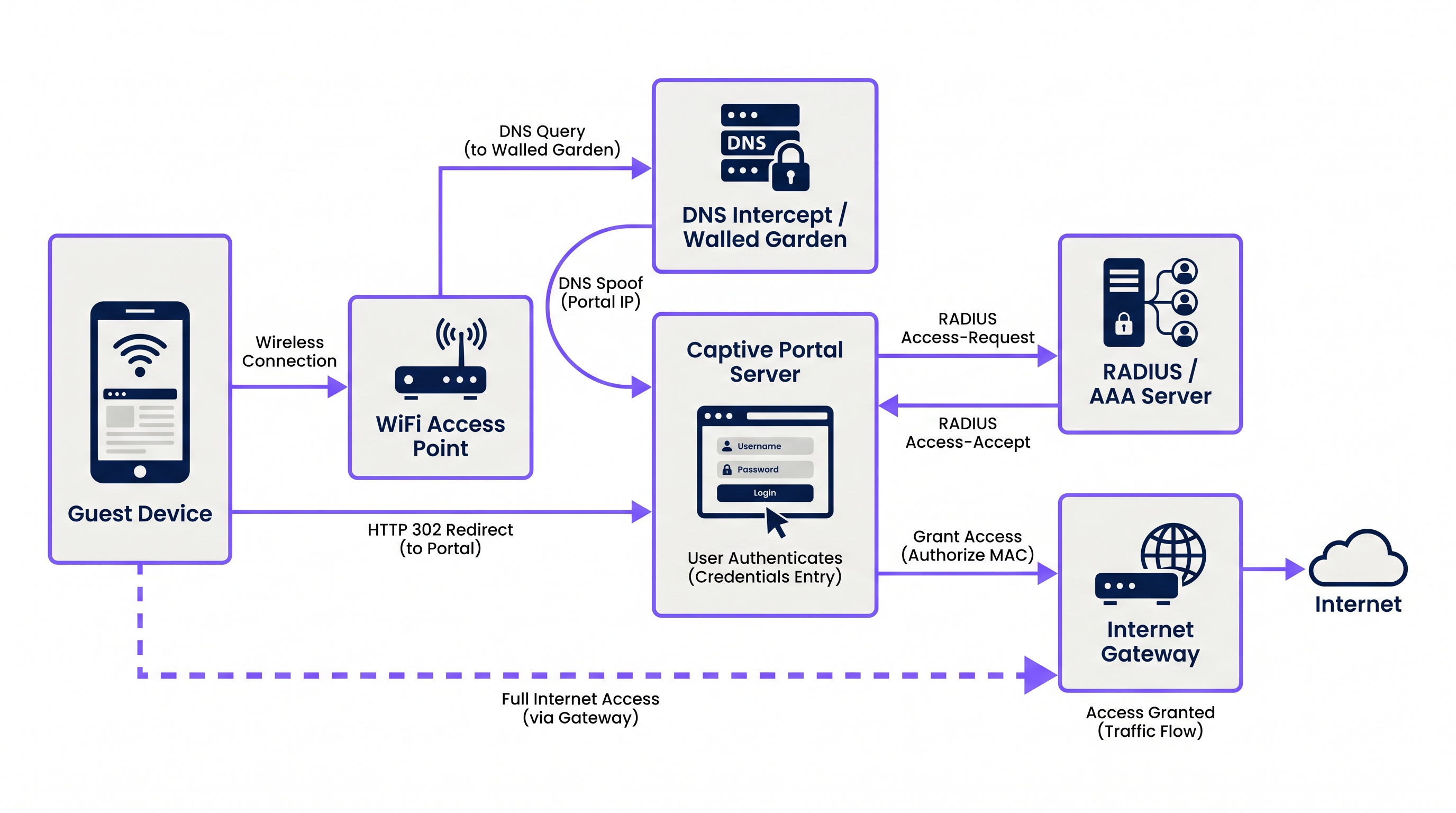
The process relies on a coordinated sequence of network services:
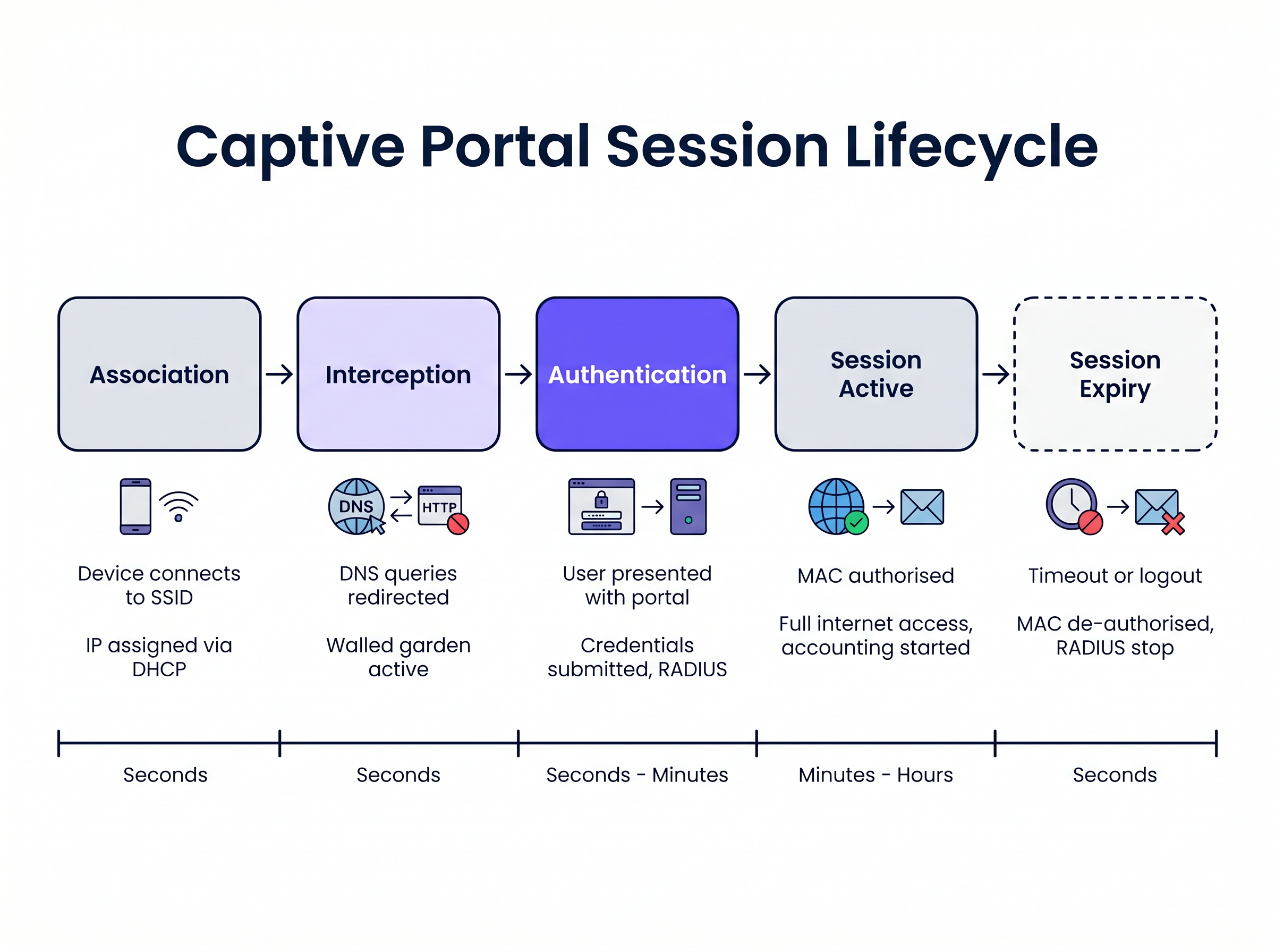
1. Association and IP Assignment When a guest device connects to the SSID, the wireless access point or controller bridges the connection to a specific VLAN. The local DHCP server assigns an IP address, subnet mask, and default gateway. At this stage, the device is connected at Layer 2 but is in a "pre-authenticated" state at Layer 3. All outbound traffic is subject to strict access control lists (ACLs) enforced by the network access server (NAS), typically the wireless LAN controller (WLC) or edge firewall.
2. DNS Interception (DNS Spoofing)
To trigger the Captive Portal, the network must intercept the user's initial web requests. When the device attempts to resolve a domain name (e.g., www.example.com), the DNS query is intercepted by the NAS or a dedicated DNS server within the walled garden. Instead of returning the actual public IP address for the requested domain, the DNS server returns the IP address of the Captive Portal server.
3. HTTP Redirection When the client's browser attempts an HTTP connection to the spoofed IP address, the Captive Portal server responds with an HTTP 302 (Found) or HTTP 303 (See Other) redirect. This instructs the browser to navigate to the actual URL of the Captive Portal login page.
Modern operating systems employ Captive Network Assistant (CNA) mechanisms to detect this automatically. Upon connecting to a network, the OS sends an HTTP GET request to a known probe URL (e.g., captive.apple.com for iOS/macOS, msftconnecttest.com for Windows). If the OS receives an HTTP redirect instead of the expected 200 OK or a specific HTML payload, it assumes a Captive Portal is present and automatically launches a pseudo-browser to display the portal page.
4. The Walled Garden During the pre-authenticated state, the user must be able to load the portal page and its associated assets. The "walled garden" is a whitelist of IP addresses, subnets, and domains configured on the NAS. Traffic destined for these whitelisted locations is permitted, while all other traffic is dropped. A correctly configured walled garden must include:
- The IP address of the Captive Portal server.
- Content Delivery Networks (CDNs) hosting CSS, JavaScript, and image assets for the portal page.
- Identity providers (e.g., Facebook, Google) if social login is enabled.
- Payment gateways if the portal requires paid access.
5. Authentication and RADIUS
Once the user submits their credentials or accepts the terms of service, the Captive Portal server acts as a RADIUS client. It constructs a RADIUS Access-Request packet containing the user's details and sends it to the RADIUS (Remote Authentication Dial-In User Service) server.
The RADIUS server validates the request against its database. If successful, it returns an Access-Accept packet. Crucially, this packet can include Vendor-Specific Attributes (VSAs) that define the session parameters, such as Session-Timeout (maximum connection duration), Idle-Timeout, and bandwidth rate limits.
6. Session Activation and Accounting
Upon receiving the Access-Accept, the Captive Portal server instructs the NAS to authorise the client's MAC address. The walled garden restrictions are lifted, and the device is granted full internet access. Simultaneously, the NAS sends a RADIUS Accounting-Request (Start) packet to the RADIUS server to begin tracking the session for analytics and compliance purposes.
Implementation Guide
Deploying a robust Captive Portal requires careful coordination between the wireless infrastructure and the portal platform. For IT managers evaluating Guest WiFi Providers: What to Look for When Choosing a WiFi Platform , consider the following architectural approaches:
Cloud-Hosted vs. On-Premises Modern enterprise deployments heavily favour cloud-hosted portal and RADIUS infrastructure. Platforms like Purple provide a globally distributed RADIUS architecture, eliminating the need for on-premises AAA servers. The local WLC simply points its RADIUS authentication and accounting requests to the cloud provider's endpoints. This approach scales seamlessly and centralises management across multiple sites, which is particularly beneficial for distributed Hospitality and retail environments.
Walled Garden Configuration The most frequent cause of portal rendering issues is an incomplete walled garden. Modern web pages rely heavily on external resources. If a font or a JavaScript library hosted on a third-party CDN is blocked, the portal may hang or render incorrectly within the OS's CNA browser.
- Recommendation: Use domain-based walled garden entries where supported by your WLC (e.g.,
*.purple.ai). If your hardware only supports IP-based walled gardens, you must maintain an updated list of the portal provider's IP subnets.
Handling HTTPS Interception Historically, captive portals intercepted all port 80 (HTTP) and port 443 (HTTPS) traffic. However, with the widespread adoption of HTTP Strict Transport Security (HSTS), intercepting HTTPS traffic causes browsers to display severe security warnings, as the portal's SSL certificate will not match the requested domain.
- Recommendation: Never intercept HTTPS traffic. Rely entirely on the OS-native CNA mechanisms (which probe over HTTP) or explicitly instruct users to navigate to a known HTTP URL (e.g.,
http://neverssl.com) to trigger the redirect.
Best Practices
1. MAC Address Caching for Seamless Roaming
To improve the user experience, implement MAC address caching. When a user successfully authenticates, the RADIUS server records their MAC address. If the user disconnects and returns within a specified window (e.g., 30 days), the WLC sends a MAC authentication bypass (MAB) request to the RADIUS server. The server recognises the MAC address and returns an Access-Accept immediately, granting network access without requiring the user to interact with the portal again.
2. Designing for the Captive Network Assistant (CNA) The pseudo-browsers launched by iOS and Android to display captive portals have limited functionality compared to full browsers. They often do not support pop-ups, have strict timeout constraints, and handle cookies differently.
- Recommendation: Keep the portal UI lightweight. Avoid complex JavaScript frameworks or heavy media assets that might cause the CNA to timeout. If you require complex interactions (like app downloads), use the portal to authorise the device first, then redirect the user to their native browser.
3. Integration with OpenRoaming and Passpoint While captive portals remain essential for data capture and terms acceptance, the industry is moving towards seamless authentication standards like Passpoint (Hotspot 2.0). Purple acts as a free identity provider for services like OpenRoaming under the Connect license. Devices configured with an OpenRoaming profile can authenticate securely at Layer 2 (via 802.1X/EAP) without interacting with a captive portal, providing a cellular-like roaming experience. Your infrastructure should support both mechanisms concurrently.
Troubleshooting & Risk Mitigation
Symptom: The portal page does not appear automatically on mobile devices.
- Root Cause: The walled garden is misconfigured, allowing the OS's CNA probe requests to reach the internet directly. If the OS receives a
200 OKfromcaptive.apple.com, it assumes it has full internet access and will not launch the portal. - Mitigation: Ensure that the CNA probe domains are not whitelisted in the walled garden. They must be intercepted and redirected to the portal server.
Symptom: Users see an SSL/TLS certificate warning.
- Root Cause: The WLC is attempting to intercept HTTPS traffic and is presenting the portal's SSL certificate instead of the certificate for the domain the user requested.
- Mitigation: Disable HTTPS redirection on the WLC.
Symptom: Social login (e.g., Facebook, Google) fails to load or authenticate.
- Root Cause: The required domains for the identity provider's OAuth flow are missing from the walled garden.
- Mitigation: Audit the walled garden configuration against the identity provider's current documentation. Note that these IP ranges and domains change frequently.
ROI & Business Impact
A captive portal is not merely a technical necessity; it is a strategic asset. By replacing generic pre-shared keys (PSKs) with a managed portal, organisations achieve:
- Data Capture and Marketing Automation: Integrating the portal with a WiFi Analytics platform allows venues to collect verified first-party data (emails, demographics) in exchange for access. This data fuels CRM systems and targeted marketing campaigns.
- Compliance and Risk Mitigation: Public WiFi operators are subject to data retention laws and copyright infringement liability. A captive portal with RADIUS accounting provides an auditable log of which device (MAC address) held which IP address at a specific time, protecting the venue from liability.
- Bandwidth Management: By enforcing RADIUS attributes like
Filter-IdorWISPr-Bandwidth-Max-Down, IT can prevent individual users from monopolising the WAN connection, ensuring a consistent experience for all guests and protecting critical back-office traffic. This is particularly relevant when evaluating The Core SD WAN Benefits for Modern Businesses .
Key Terms & Definitions
Walled Garden
An access control list (ACL) applied to unauthenticated users, permitting traffic only to specific IP addresses or domains required to load the captive portal.
Crucial for allowing access to CDNs, payment gateways, and social login APIs before the user is fully authorised.
RADIUS (Remote Authentication Dial-In User Service)
The industry-standard networking protocol that provides centralised Authentication, Authorisation, and Accounting (AAA) management.
The captive portal server uses RADIUS to tell the wireless controller whether a user is allowed on the network and what restrictions apply.
Captive Network Assistant (CNA)
A pseudo-browser built into modern operating systems (iOS, Android, Windows) designed specifically to detect and display captive portals.
CNAs have limited functionality compared to full browsers; portals must be designed to accommodate their constraints.
MAC Authentication Bypass (MAB)
A process where the network uses a device's MAC address as its identity to authenticate against a RADIUS server without user interaction.
Used to implement 'MAC Caching', allowing returning guests to connect seamlessly without seeing the portal again.
DNS Interception / Spoofing
The process where the network intercepts a user's DNS query and returns the IP address of the captive portal server instead of the actual destination.
This is the primary mechanism used to force the user's web traffic to the portal page.
HTTP 302 Redirect
An HTTP response status code indicating that the requested resource has been temporarily moved to a different URI.
Used by the portal server to redirect the intercepted HTTP request to the actual login page URL.
Vendor-Specific Attributes (VSAs)
Custom parameters included in a RADIUS message that allow vendors to support features not defined in the base RADIUS standard.
Used to pass specific policies, like bandwidth limits or VLAN assignments, from the portal platform to the specific brand of wireless controller.
Passpoint (Hotspot 2.0)
A standard that enables mobile devices to automatically discover and authenticate to Wi-Fi networks securely without user interaction.
The modern alternative to captive portals for seamless roaming; platforms like Purple act as identity providers for Passpoint networks.
Case Studies
A 500-room hotel is upgrading its guest WiFi. They want returning guests to connect seamlessly without seeing the portal again for 30 days, but they require a daily bandwidth limit of 10Mbps per device.
- Configure the WLC to use external RADIUS authentication pointing to the cloud provider. 2. Enable MAC Address Caching on the RADIUS server with a 30-day retention policy. 3. Configure the portal profile to assign a RADIUS Vendor-Specific Attribute (VSA) for bandwidth limiting (e.g., WISPr-Bandwidth-Max-Down = 10000000) in the Access-Accept packet.
A retail chain deploys a new captive portal featuring a Facebook login option. Users report that when they click the Facebook button, the page hangs indefinitely inside the captive portal pop-up.
The WLC's walled garden configuration is incomplete. The network administrator must add Facebook's required OAuth domains (e.g., graph.facebook.com, connect.facebook.net) and IP subnets to the pre-authentication ACL.
Scenario Analysis
Q1. You are deploying a captive portal at a stadium. The portal requires users to watch a 15-second video hosted on YouTube before gaining access. Users are reporting that the portal loads, but the video frame is blank. What is the most likely architectural cause?
💡 Hint:Consider the state of the device before it is fully authenticated and what resources it needs to access.
Show Recommended Approach
The walled garden configuration is incomplete. The network administrator must add YouTube's video delivery domains and CDNs to the walled garden ACL. Without this, the unauthenticated device cannot reach the YouTube servers to stream the video content, even though the main portal page (hosted elsewhere) loads successfully.
Q2. A client insists on intercepting all HTTPS traffic to force users to the captive portal, arguing that users rarely type 'http://' anymore. Why is this a bad idea, and what is the standard alternative?
💡 Hint:Think about how modern browsers handle SSL/TLS certificates and HSTS.
Show Recommended Approach
Intercepting HTTPS traffic requires the wireless controller to present a certificate for the requested domain (e.g., google.com). Since the controller does not possess Google's private key, the browser will flag the connection as insecure and display a severe certificate warning, breaking the user experience. The standard alternative is to rely on the Operating System's built-in Captive Network Assistant (CNA), which automatically probes known HTTP URLs in the background specifically to trigger the redirect gracefully.
Q3. A venue wants to limit guest WiFi sessions to 2 hours. How is this enforced technically within the captive portal architecture?
💡 Hint:Which component is responsible for Authorisation and passing policy parameters to the network hardware?
Show Recommended Approach
This is enforced via RADIUS. When the captive portal server successfully authenticates the user, it receives an Access-Accept packet from the RADIUS server. This packet includes a 'Session-Timeout' attribute set to 7200 seconds (2 hours). The wireless controller reads this attribute, applies the timer to the user's session, and automatically disconnects the device when the timer expires.




