

Comment fonctionne un Captive Portal ? Plongée technique approfondie
Une plongée technique approfondie et complète dans l'architecture des Captive Portals, expliquant l'interception DNS, la redirection HTTP, les jardins clos et l'authentification RADIUS pour les professionnels de l'informatique.
🎧 Écouter ce guide
Voir la transcription

Résumé Exécutif
Pour les responsables informatiques et les architectes réseau déployant un Guest WiFi public ou d'entreprise, le Captive Portal est la frontière critique entre un appareil non authentifié et votre infrastructure réseau. Ce guide propose une plongée technique approfondie sur le fonctionnement d'un Captive Portal, en écartant la couche marketing pour examiner les mécanismes sous-jacents d'interception DNS, de redirection HTTP, de configuration des jardins clos et d'authentification RADIUS.
Que vous conceviez un déploiement haute densité pour un stade, un réseau distribué pour le Commerce de détail ou une solution conforme pour le Secteur de la santé , la compréhension du cycle de vie de la session et des dépendances architecturales est essentielle. Un portail mal configuré entraîne des expériences utilisateur dégradées, des avertissements de sécurité du navigateur et des échecs potentiels de conformité. Ce guide de référence décrit l'architecture technique, les meilleures pratiques de mise en œuvre et les modes de défaillance courants pour garantir que votre déploiement est sécurisé, évolutif et conforme aux normes modernes comme WPA3 et Passpoint.
Plongée Technique Approfondie
À la base, un Captive Portal est un mécanisme de contrôle d'accès réseau de couche 3. Il intercepte le trafic d'un appareil associé mais non authentifié, redirigeant l'utilisateur vers une interface d'authentification avant d'accorder un accès réseau complet.
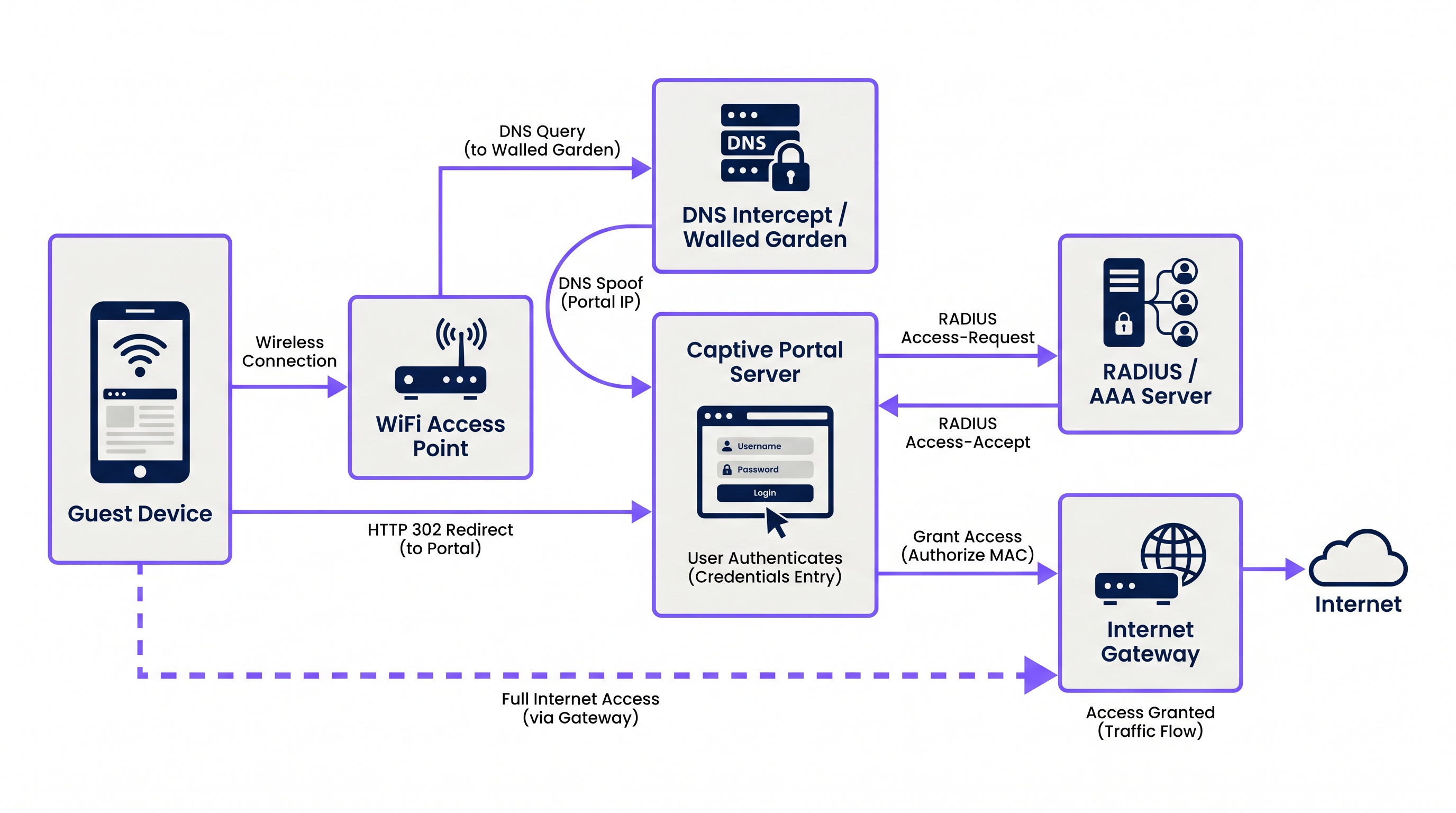
Le processus repose sur une séquence coordonnée de services réseau :
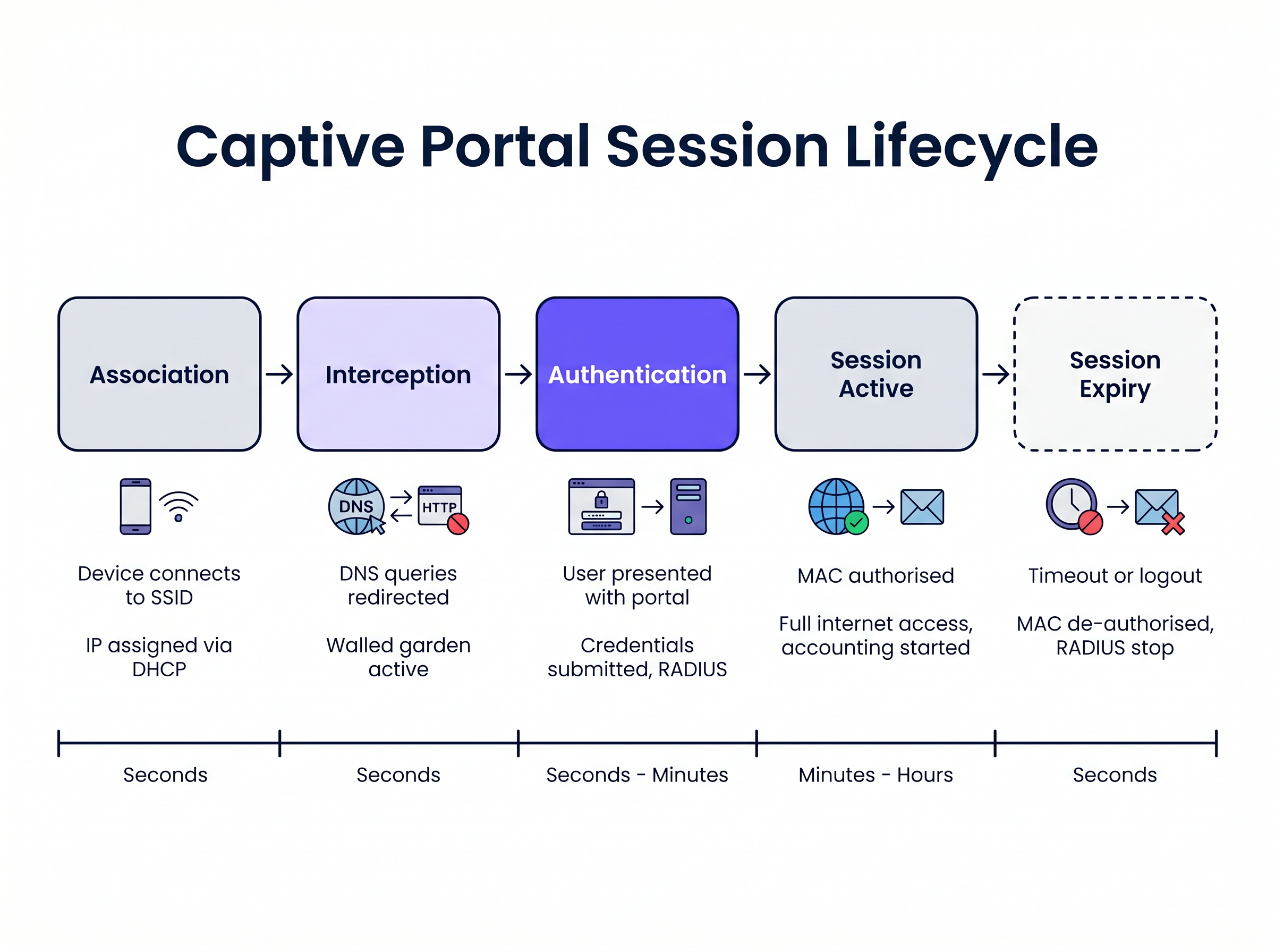
1. Association et attribution d'adresse IP Lorsqu'un appareil invité se connecte au SSID, le point d'accès sans fil ou le contrôleur établit la connexion vers un VLAN spécifique. Le serveur DHCP local attribue une adresse IP, un masque de sous-réseau et une passerelle par défaut. À ce stade, l'appareil est connecté à la couche 2 mais se trouve dans un état "pré-authentifié" à la couche 3. Tout le trafic sortant est soumis à des listes de contrôle d'accès (ACL) strictes appliquées par le serveur d'accès réseau (NAS), généralement le contrôleur de réseau local sans fil (WLC) ou le pare-feu de périphérie.
2. Interception DNS (usurpation DNS)
Pour déclencher le Captive Portal, le réseau doit intercepter les requêtes web initiales de l'utilisateur. Lorsque l'appareil tente de résoudre un nom de domaine (par exemple, www.example.com), la requête DNS est interceptée par le NAS ou un serveur DNS dédié au sein du jardin clos. Au lieu de renvoyer la véritable adresse IP publique pour le domaine demandé, le serveur DNS renvoie l'adresse IP du serveur Captive Portal.
3. Redirection HTTP Lorsque le navigateur du client tente une connexion HTTP à l'adresse IP usurpée, le serveur Captive Portal répond avec une redirection HTTP 302 (Found) ou HTTP 303 (See Other). Cela indique au navigateur de naviguer vers l'URL réelle de la page de connexion du Captive Portal.
Les systèmes d'exploitation modernes utilisent des mécanismes d'assistant de réseau captif (CNA) pour détecter cela automatiquement. Lors de la connexion à un réseau, l'OS envoie une requête HTTP GET à une URL de sonde connue (par exemple, captive.apple.com pour iOS/macOS, msftconnecttest.com pour Windows). Si l'OS reçoit une redirection HTTP au lieu du 200 OK attendu ou d'une charge utile HTML spécifique, il suppose qu'un Captive Portal est présent et lance automatiquement un pseudo-navigateur pour afficher la page du portail.
4. Le Jardin Clos Pendant l'état pré-authentifié, l'utilisateur doit pouvoir charger la page du portail et ses ressources associées. Le "jardin clos" est une liste blanche d'adresses IP, de sous-réseaux et de domaines configurée sur le NAS. Le trafic destiné à ces emplacements figurant sur la liste blanche est autorisé, tandis que tout autre trafic est abandonné. Un jardin clos correctement configuré doit inclure :
- L'adresse IP du serveur Captive Portal.
- Les réseaux de diffusion de contenu (CDN) hébergeant les ressources CSS, JavaScript et les images pour la page du portail.
- Les fournisseurs d'identité (par exemple, Facebook, Google) si la connexion sociale est activée.
- Les passerelles de paiement si le portail nécessite un accès payant.
5. Authentification et RADIUS
Une fois que l'utilisateur soumet ses identifiants ou accepte les conditions d'utilisation, le serveur Captive Portal agit comme un client RADIUS. Il construit un paquet RADIUS Access-Request contenant les détails de l'utilisateur et l'envoie au serveur RADIUS (Remote Authentication Dial-In User Service).
Le serveur RADIUS valide la requête par rapport à sa base de données. En cas de succès, il renvoie un paquet Access-Accept. De manière cruciale, ce paquet peut inclure des Attributs Spécifiques au Fournisseur (VSA) qui définissent les paramètres de la session, tels que Session-Timeout (durée maximale de connexion), Idle-Timeout et les limites de débit de bande passante.
6. Activation et Comptabilisation de la Session
Dès réception de l'Access-Accept, le serveur Captive Portal demande au NAS d'autoriser l'adresse MAC du client. Les restrictions du jardin clos sont levées et l'appareil se voit accorder un accès Internet complet. Simultanément, le NAS envoie un paquet RADIUS Accounting-Request (Start) au serveur RADIUS pour commencer à suivre la session à des fins d'analyse et de conformité.
Guide d'Implémentation
Le déploiement d'un Captive Portal robuste nécessite une coordination minutieuse entre l'infrastructure sans fil et la plateforme de portail. Pour les responsables informatiques évaluant les Fournisseurs de Guest WiFi : Ce qu'il faut rechercher lors du choix d'une plateforme WiFi , considérez les approches architecturales suivantes :
Hébergé dans le cloud vs. Sur site Les déploiements d'entreprise modernes hefavorisent fortement les infrastructures de portail et RADIUS hébergées dans le cloud. Des plateformes comme Purple offrent une architecture RADIUS distribuée mondialement, éliminant le besoin de serveurs AAA sur site. Le WLC local pointe simplement ses requêtes d'authentification et de comptabilité RADIUS vers les points de terminaison du fournisseur cloud. Cette approche s'adapte de manière transparente et centralise la gestion sur plusieurs sites, ce qui est particulièrement avantageux pour les environnements de l'hôtellerie et de la vente au détail distribués.
Configuration du Walled Garden La cause la plus fréquente des problèmes de rendu de portail est un walled garden incomplet. Les pages web modernes dépendent fortement de ressources externes. Si une police ou une bibliothèque JavaScript hébergée sur un CDN tiers est bloquée, le portail peut se bloquer ou s'afficher incorrectement dans le navigateur CNA du système d'exploitation.
- Recommandation : Utilisez des entrées de walled garden basées sur des domaines lorsque votre WLC les prend en charge (par exemple,
*.purple.ai). Si votre matériel ne prend en charge que les walled gardens basés sur IP, vous devez maintenir une liste à jour des sous-réseaux IP du fournisseur de portail.
Gestion de l'interception HTTPS Historiquement, les Captive Portals interceptaient tout le trafic sur le port 80 (HTTP) et le port 443 (HTTPS). Cependant, avec l'adoption généralisée de HTTP Strict Transport Security (HSTS), l'interception du trafic HTTPS entraîne l'affichage d'avertissements de sécurité sévères par les navigateurs, car le certificat SSL du portail ne correspondra pas au domaine demandé.
- Recommandation : N'interceptez jamais le trafic HTTPS. Fiez-vous entièrement aux mécanismes CNA natifs du système d'exploitation (qui sondent via HTTP) ou demandez explicitement aux utilisateurs de naviguer vers une URL HTTP connue (par exemple,
http://neverssl.com) pour déclencher la redirection.
Bonnes Pratiques
1. Mise en cache des adresses MAC pour un roaming transparent
Pour améliorer l'expérience utilisateur, implémentez la mise en cache des adresses MAC. Lorsqu'un utilisateur s'authentifie avec succès, le serveur RADIUS enregistre son adresse MAC. Si l'utilisateur se déconnecte et revient dans une fenêtre spécifiée (par exemple, 30 jours), le WLC envoie une requête de contournement d'authentification MAC (MAB) au serveur RADIUS. Le serveur reconnaît l'adresse MAC et renvoie immédiatement un Access-Accept, accordant l'accès au réseau sans que l'utilisateur n'ait à interagir à nouveau avec le portail.
2. Conception pour le Captive Network Assistant (CNA) Les pseudo-navigateurs lancés par iOS et Android pour afficher les Captive Portals ont des fonctionnalités limitées par rapport aux navigateurs complets. Ils ne prennent souvent pas en charge les pop-ups, ont des contraintes de délai d'attente strictes et gèrent les cookies différemment.
- Recommandation : Gardez l'interface utilisateur du portail légère. Évitez les frameworks JavaScript complexes ou les ressources multimédias lourdes qui pourraient entraîner un dépassement de délai du CNA. Si vous avez besoin d'interactions complexes (comme des téléchargements d'applications), utilisez d'abord le portail pour autoriser l'appareil, puis redirigez l'utilisateur vers son navigateur natif.
3. Intégration avec OpenRoaming et Passpoint Bien que les Captive Portals restent essentiels pour la capture de données et l'acceptation des conditions, l'industrie évolue vers des standards d'authentification transparents comme Passpoint (Hotspot 2.0). Purple agit comme un fournisseur d'identité gratuit pour des services comme OpenRoaming sous la licence Connect. Les appareils configurés avec un profil OpenRoaming peuvent s'authentifier en toute sécurité à la Couche 2 (via 802.1X/EAP) sans interagir avec un Captive Portal, offrant une expérience de roaming similaire à celle du cellulaire. Votre infrastructure devrait prendre en charge les deux mécanismes simultanément.
Dépannage et atténuation des risques
Symptôme : La page du portail n'apparaît pas automatiquement sur les appareils mobiles.
- Cause première : Le walled garden est mal configuré, permettant aux requêtes de sonde CNA du système d'exploitation d'atteindre directement Internet. Si le système d'exploitation reçoit un
200 OKdecaptive.apple.com, il suppose qu'il a un accès complet à Internet et ne lancera pas le portail. - Atténuation : Assurez-vous que les domaines de sonde CNA ne sont pas mis sur liste blanche dans le walled garden. Ils doivent être interceptés et redirigés vers le serveur de portail.
Symptôme : Les utilisateurs voient un avertissement de certificat SSL/TLS.
- Cause première : Le WLC tente d'intercepter le trafic HTTPS et présente le certificat SSL du portail au lieu du certificat du domaine demandé par l'utilisateur.
- Atténuation : Désactivez la redirection HTTPS sur le WLC.
Symptôme : La connexion sociale (par exemple, Facebook, Google) ne se charge pas ou échoue à s'authentifier.
- Cause première : Les domaines requis pour le flux OAuth du fournisseur d'identité sont manquants dans le walled garden.
- Atténuation : Vérifiez la configuration du walled garden par rapport à la documentation actuelle du fournisseur d'identité. Notez que ces plages d'adresses IP et ces domaines changent fréquemment.
ROI et impact commercial
Un Captive Portal n'est pas seulement une nécessité technique ; c'est un atout stratégique. En remplaçant les clés pré-partagées génériques (PSK) par un portail géré, les organisations réalisent :
- Capture de données et automatisation du marketing : L'intégration du portail avec une plateforme WiFi Analytics permet aux établissements de collecter des données de première partie vérifiées (e-mails, données démographiques) en échange d'un accès. Ces données alimentent les systèmes CRM et les campagnes de marketing ciblées.
- Conformité et atténuation des risques : Les opérateurs de WiFi public sont soumis aux lois sur la conservation des données et à la responsabilité en matière de violation du droit d'auteur. Un Captive Portal avec comptabilité RADIUS fournit un journal vérifiable de quel appareil (adresse MAC) détenait quelle adresse IP à un moment précis, protégeant ainsi l'établissement de toute responsabilité.
- Gestion de la bande passante : En appliquant des attributs RADIUS comme
Filter-IdouWISPr-Bandwidth-Max-Down, l'IT peut empêcher les utilisateurs individuels de monopoliser la connexion WAN, assurant une expérience cohérente pour tous les invités et protégeant le trafic critique de back-office. Ceci est particulièrement pertinent lors de l'évaluation des avantages clés du SD WAN pour les entreprises modernes .
Termes clés et définitions
Walled Garden
An access control list (ACL) applied to unauthenticated users, permitting traffic only to specific IP addresses or domains required to load the captive portal.
Crucial for allowing access to CDNs, payment gateways, and social login APIs before the user is fully authorised.
RADIUS (Remote Authentication Dial-In User Service)
The industry-standard networking protocol that provides centralised Authentication, Authorisation, and Accounting (AAA) management.
The captive portal server uses RADIUS to tell the wireless controller whether a user is allowed on the network and what restrictions apply.
Captive Network Assistant (CNA)
A pseudo-browser built into modern operating systems (iOS, Android, Windows) designed specifically to detect and display captive portals.
CNAs have limited functionality compared to full browsers; portals must be designed to accommodate their constraints.
MAC Authentication Bypass (MAB)
A process where the network uses a device's MAC address as its identity to authenticate against a RADIUS server without user interaction.
Used to implement 'MAC Caching', allowing returning guests to connect seamlessly without seeing the portal again.
DNS Interception / Spoofing
The process where the network intercepts a user's DNS query and returns the IP address of the captive portal server instead of the actual destination.
This is the primary mechanism used to force the user's web traffic to the portal page.
HTTP 302 Redirect
An HTTP response status code indicating that the requested resource has been temporarily moved to a different URI.
Used by the portal server to redirect the intercepted HTTP request to the actual login page URL.
Vendor-Specific Attributes (VSAs)
Custom parameters included in a RADIUS message that allow vendors to support features not defined in the base RADIUS standard.
Used to pass specific policies, like bandwidth limits or VLAN assignments, from the portal platform to the specific brand of wireless controller.
Passpoint (Hotspot 2.0)
A standard that enables mobile devices to automatically discover and authenticate to Wi-Fi networks securely without user interaction.
The modern alternative to captive portals for seamless roaming; platforms like Purple act as identity providers for Passpoint networks.
Études de cas
A 500-room hotel is upgrading its guest WiFi. They want returning guests to connect seamlessly without seeing the portal again for 30 days, but they require a daily bandwidth limit of 10Mbps per device.
- Configure the WLC to use external RADIUS authentication pointing to the cloud provider. 2. Enable MAC Address Caching on the RADIUS server with a 30-day retention policy. 3. Configure the portal profile to assign a RADIUS Vendor-Specific Attribute (VSA) for bandwidth limiting (e.g., WISPr-Bandwidth-Max-Down = 10000000) in the Access-Accept packet.
A retail chain deploys a new captive portal featuring a Facebook login option. Users report that when they click the Facebook button, the page hangs indefinitely inside the captive portal pop-up.
The WLC's walled garden configuration is incomplete. The network administrator must add Facebook's required OAuth domains (e.g., graph.facebook.com, connect.facebook.net) and IP subnets to the pre-authentication ACL.
Analyse de scénario
Q1. You are deploying a captive portal at a stadium. The portal requires users to watch a 15-second video hosted on YouTube before gaining access. Users are reporting that the portal loads, but the video frame is blank. What is the most likely architectural cause?
💡 Astuce :Consider the state of the device before it is fully authenticated and what resources it needs to access.
Afficher l'approche recommandée
The walled garden configuration is incomplete. The network administrator must add YouTube's video delivery domains and CDNs to the walled garden ACL. Without this, the unauthenticated device cannot reach the YouTube servers to stream the video content, even though the main portal page (hosted elsewhere) loads successfully.
Q2. A client insists on intercepting all HTTPS traffic to force users to the captive portal, arguing that users rarely type 'http://' anymore. Why is this a bad idea, and what is the standard alternative?
💡 Astuce :Think about how modern browsers handle SSL/TLS certificates and HSTS.
Afficher l'approche recommandée
Intercepting HTTPS traffic requires the wireless controller to present a certificate for the requested domain (e.g., google.com). Since the controller does not possess Google's private key, the browser will flag the connection as insecure and display a severe certificate warning, breaking the user experience. The standard alternative is to rely on the Operating System's built-in Captive Network Assistant (CNA), which automatically probes known HTTP URLs in the background specifically to trigger the redirect gracefully.
Q3. A venue wants to limit guest WiFi sessions to 2 hours. How is this enforced technically within the captive portal architecture?
💡 Astuce :Which component is responsible for Authorisation and passing policy parameters to the network hardware?
Afficher l'approche recommandée
This is enforced via RADIUS. When the captive portal server successfully authenticates the user, it receives an Access-Accept packet from the RADIUS server. This packet includes a 'Session-Timeout' attribute set to 7200 seconds (2 hours). The wireless controller reads this attribute, applies the timer to the user's session, and automatically disconnects the device when the timer expires.




