

¿Cómo funciona un Captive Portal? Análisis Técnico Detallado
Un análisis técnico detallado y exhaustivo sobre la arquitectura de los captive portals, explicando la intercepción de DNS, la redirección HTTP, los jardines vallados (walled gardens) y la autenticación RADIUS para profesionales de TI.
🎧 Escucha esta guía
Ver transcripción

Resumen Ejecutivo
Para gerentes de TI y arquitectos de red que implementan WiFi para Invitados público o empresarial, el captive portal es la frontera crítica entre un dispositivo no autenticado y su infraestructura de red. Esta guía ofrece un análisis técnico detallado sobre cómo funciona un captive portal —eliminando la capa de marketing para examinar los mecanismos subyacentes de intercepción de DNS, redirección HTTP, configuración de jardines vallados (walled garden) y autenticación RADIUS.
Ya sea que esté diseñando una implementación de alta densidad para un estadio, una red distribuida para Comercio Minorista , o una solución conforme para Atención Médica , comprender el ciclo de vida de la sesión y las dependencias arquitectónicas es esencial. Un portal mal configurado conduce a experiencias de usuario degradadas, advertencias de seguridad del navegador y posibles fallas de cumplimiento. Esta guía de referencia describe la arquitectura técnica, las mejores prácticas de implementación y los modos de falla comunes para garantizar que su implementación sea segura, escalable y cumpla con los estándares modernos como WPA3 y Passpoint.
Análisis Técnico Detallado
En esencia, un captive portal es un mecanismo de control de acceso a la red de Capa 3. Intercepta el tráfico de un dispositivo asociado pero no autenticado, redirigiendo al usuario a una interfaz de autenticación antes de concederle acceso completo a la red.
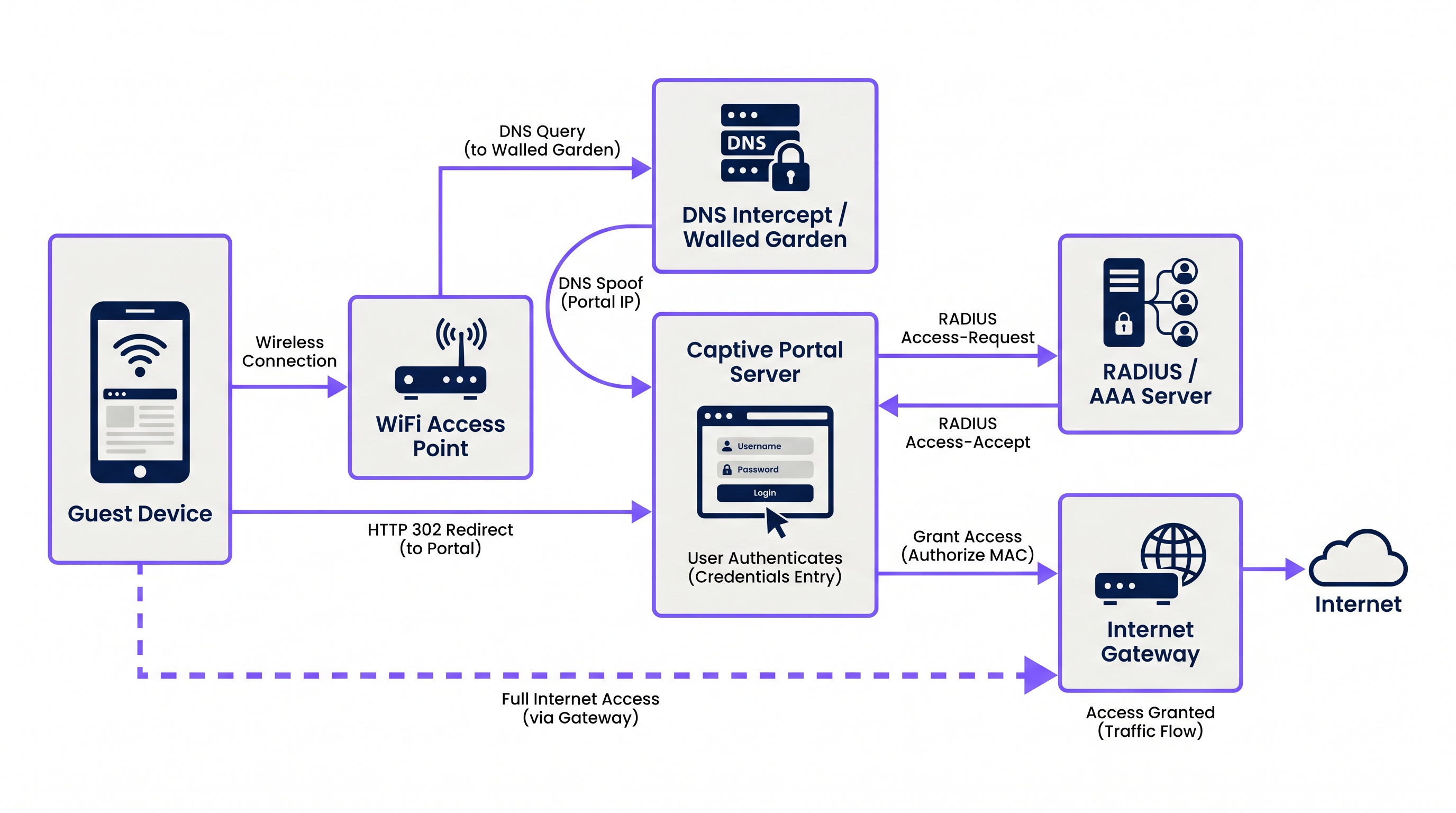
El proceso se basa en una secuencia coordinada de servicios de red:
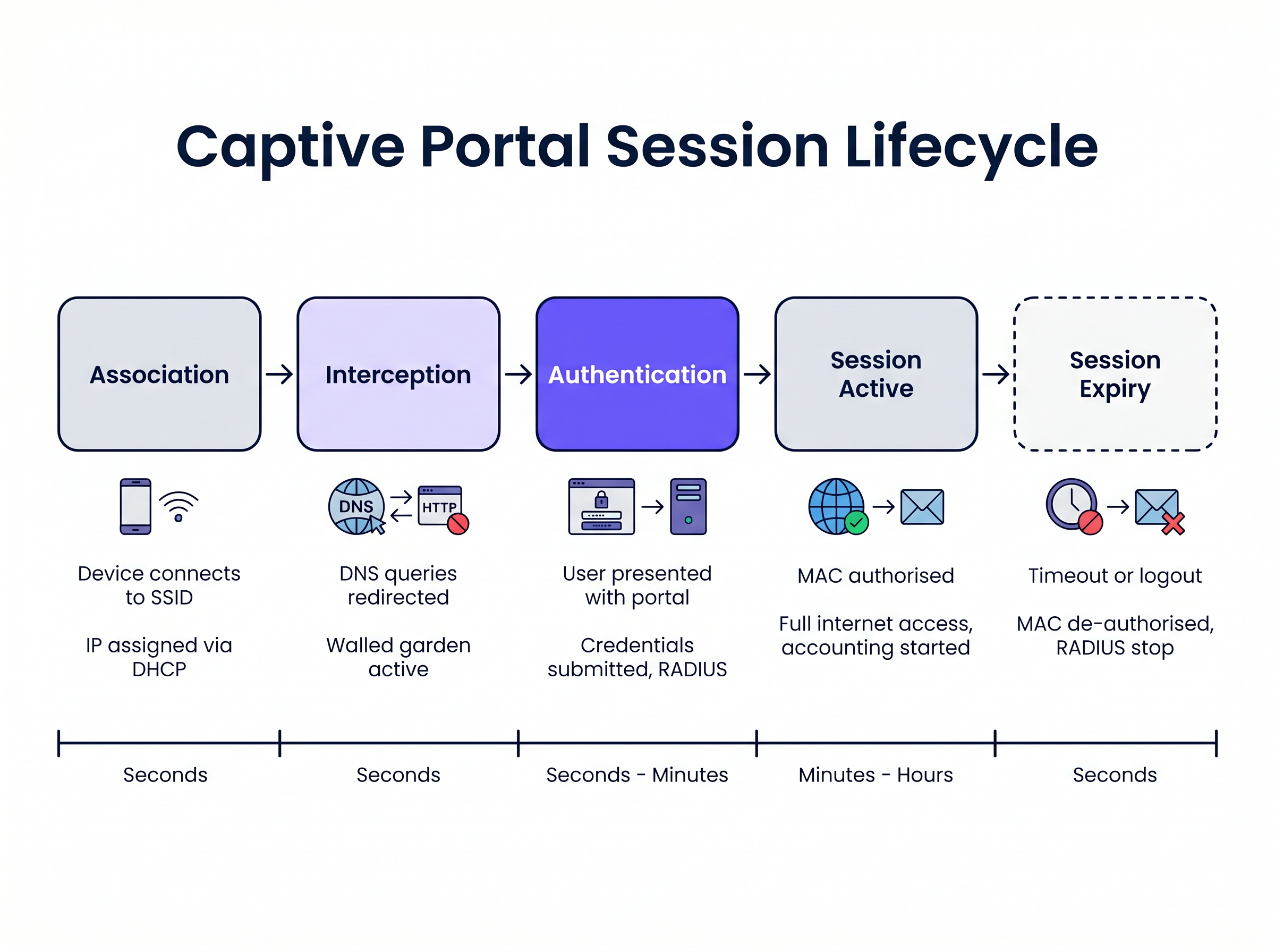
1. Asociación y Asignación de IP Cuando un dispositivo invitado se conecta al SSID, el punto de acceso inalámbrico o el controlador puentea la conexión a una VLAN específica. El servidor DHCP local asigna una dirección IP, máscara de subred y puerta de enlace predeterminada. En esta etapa, el dispositivo está conectado en la Capa 2 pero se encuentra en un estado de "pre-autenticación" en la Capa 3. Todo el tráfico saliente está sujeto a estrictas listas de control de acceso (ACL) aplicadas por el servidor de acceso a la red (NAS), típicamente el controlador de LAN inalámbrica (WLC) o el firewall perimetral.
2. Intercepción de DNS (DNS Spoofing)
Para activar el captive portal, la red debe interceptar las solicitudes web iniciales del usuario. Cuando el dispositivo intenta resolver un nombre de dominio (por ejemplo, www.example.com), la consulta DNS es interceptada por el NAS o un servidor DNS dedicado dentro del jardín vallado (walled garden). En lugar de devolver la dirección IP pública real para el dominio solicitado, el servidor DNS devuelve la dirección IP del servidor del captive portal.
3. Redirección HTTP Cuando el navegador del cliente intenta una conexión HTTP a la dirección IP falsificada, el servidor del captive portal responde con una redirección HTTP 302 (Found) o HTTP 303 (See Other). Esto instruye al navegador a navegar a la URL real de la página de inicio de sesión del captive portal.
Los sistemas operativos modernos emplean mecanismos de Asistente de Red Cautiva (CNA) para detectar esto automáticamente. Al conectarse a una red, el sistema operativo envía una solicitud HTTP GET a una URL de sondeo conocida (por ejemplo, captive.apple.com para iOS/macOS, msftconnecttest.com para Windows). Si el sistema operativo recibe una redirección HTTP en lugar del 200 OK esperado o una carga útil HTML específica, asume que hay un captive portal presente y lanza automáticamente un pseudo-navegador para mostrar la página del portal.
4. El Jardín Vallado (Walled Garden) Durante el estado de pre-autenticación, el usuario debe poder cargar la página del portal y sus activos asociados. El "jardín vallado" (walled garden) es una lista blanca de direcciones IP, subredes y dominios configurados en el NAS. El tráfico destinado a estas ubicaciones en la lista blanca está permitido, mientras que todo el demás tráfico se descarta. Un jardín vallado (walled garden) correctamente configurado debe incluir:
- La dirección IP del servidor del captive portal.
- Redes de Entrega de Contenido (CDN) que alojan activos CSS, JavaScript e imágenes para la página del portal.
- Proveedores de identidad (por ejemplo, Facebook, Google) si el inicio de sesión social está habilitado.
- Pasarelas de pago si el portal requiere acceso de pago.
5. Autenticación y RADIUS
Una vez que el usuario envía sus credenciales o acepta los términos de servicio, el servidor del captive portal actúa como cliente RADIUS. Construye un paquete RADIUS Access-Request que contiene los detalles del usuario y lo envía al servidor RADIUS (Remote Authentication Dial-In User Service).
El servidor RADIUS valida la solicitud contra su base de datos. Si tiene éxito, devuelve un paquete Access-Accept. Fundamentalmente, este paquete puede incluir Atributos Específicos del Proveedor (VSA) que definen los parámetros de la sesión, como Session-Timeout (duración máxima de la conexión), Idle-Timeout y límites de velocidad de ancho de banda.
6. Activación y Contabilidad de Sesiones
Al recibir el Access-Accept, el servidor del captive portal instruye al NAS para que autorice la dirección MAC del cliente. Las restricciones del jardín vallado (walled garden) se levantan y al dispositivo se le concede acceso completo a internet. Simultáneamente, el NAS envía un paquete RADIUS Accounting-Request (Start) al servidor RADIUS para comenzar a rastrear la sesión con fines de análisis y cumplimiento.
Guía de Implementación
La implementación de un captive portal robusto requiere una coordinación cuidadosa entre la infraestructura inalámbrica y la plataforma del portal. Para los gerentes de TI que evalúan Proveedores de WiFi para Invitados: Qué buscar al elegir una Plataforma WiFi , consideren los siguientes enfoques arquitectónicos:
Alojado en la Nube vs. Local (On-Premises) Las implementaciones empresariales modernas hefavorecen en gran medida los portales alojados en la nube y la infraestructura RADIUS. Plataformas como Purple ofrecen una arquitectura RADIUS distribuida globalmente, eliminando la necesidad de servidores AAA locales. El WLC local simplemente dirige sus solicitudes de autenticación y contabilidad RADIUS a los puntos finales del proveedor de la nube. Este enfoque se escala sin problemas y centraliza la gestión en múltiples sitios, lo cual es particularmente beneficioso para entornos distribuidos de Hospitalidad y comercio minorista.
Configuración de Walled Garden La causa más frecuente de problemas de renderizado del portal es un walled garden incompleto. Las páginas web modernas dependen en gran medida de recursos externos. Si una fuente o una biblioteca JavaScript alojada en una CDN de terceros está bloqueada, el portal puede quedarse colgado o renderizarse incorrectamente dentro del navegador CNA del sistema operativo.
- Recomendación: Utilice entradas de walled garden basadas en dominio donde su WLC lo admita (por ejemplo,
*.purple.ai). Si su hardware solo admite walled gardens basados en IP, debe mantener una lista actualizada de las subredes IP del proveedor del portal.
Manejo de la Interceptación HTTPS Históricamente, los Captive Portals interceptaban todo el tráfico del puerto 80 (HTTP) y del puerto 443 (HTTPS). Sin embargo, con la adopción generalizada de HTTP Strict Transport Security (HSTS), la interceptación del tráfico HTTPS hace que los navegadores muestren advertencias de seguridad graves, ya que el certificado SSL del portal no coincidirá con el dominio solicitado.
- Recomendación: Nunca intercepte el tráfico HTTPS. Confíe completamente en los mecanismos CNA nativos del sistema operativo (que sondean a través de HTTP) o instruya explícitamente a los usuarios a navegar a una URL HTTP conocida (por ejemplo,
http://neverssl.com) para activar la redirección.
Mejores Prácticas
1. Almacenamiento en Caché de Direcciones MAC para Roaming sin Interrupciones
Para mejorar la experiencia del usuario, implemente el almacenamiento en caché de direcciones MAC. Cuando un usuario se autentica con éxito, el servidor RADIUS registra su dirección MAC. Si el usuario se desconecta y regresa dentro de un período especificado (por ejemplo, 30 días), el WLC envía una solicitud de omisión de autenticación MAC (MAB) al servidor RADIUS. El servidor reconoce la dirección MAC y devuelve un Access-Accept inmediatamente, otorgando acceso a la red sin requerir que el usuario interactúe con el portal nuevamente.
2. Diseño para el Captive Network Assistant (CNA) Los pseudo-navegadores lanzados por iOS y Android para mostrar Captive Portals tienen una funcionalidad limitada en comparación con los navegadores completos. A menudo no admiten ventanas emergentes, tienen estrictas restricciones de tiempo de espera y manejan las cookies de manera diferente.
- Recomendación: Mantenga la interfaz de usuario del portal ligera. Evite frameworks JavaScript complejos o activos multimedia pesados que puedan causar que el CNA agote el tiempo de espera. Si requiere interacciones complejas (como descargas de aplicaciones), use el portal para autorizar el dispositivo primero y luego redirija al usuario a su navegador nativo.
3. Integración con OpenRoaming y Passpoint Si bien los Captive Portals siguen siendo esenciales para la captura de datos y la aceptación de términos, la industria avanza hacia estándares de autenticación sin interrupciones como Passpoint (Hotspot 2.0). Purple actúa como un proveedor de identidad gratuito para servicios como OpenRoaming bajo la licencia Connect. Los dispositivos configurados con un perfil OpenRoaming pueden autenticarse de forma segura en la Capa 2 (a través de 802.1X/EAP) sin interactuar con un Captive Portal, proporcionando una experiencia de roaming similar a la celular. Su infraestructura debe admitir ambos mecanismos simultáneamente.
Solución de Problemas y Mitigación de Riesgos
Síntoma: La página del portal no aparece automáticamente en dispositivos móviles.
- Causa Raíz: El walled garden está mal configurado, permitiendo que las solicitudes de sondeo CNA del sistema operativo lleguen directamente a internet. Si el sistema operativo recibe un
200 OKdecaptive.apple.com, asume que tiene acceso completo a internet y no lanzará el portal. - Mitigación: Asegúrese de que los dominios de sondeo CNA no estén en la lista blanca del walled garden. Deben ser interceptados y redirigidos al servidor del portal.
Síntoma: Los usuarios ven una advertencia de certificado SSL/TLS.
- Causa Raíz: El WLC está intentando interceptar el tráfico HTTPS y presenta el certificado SSL del portal en lugar del certificado del dominio solicitado por el usuario.
- Mitigación: Deshabilite la redirección HTTPS en el WLC.
Síntoma: El inicio de sesión social (por ejemplo, Facebook, Google) no se carga o no se autentica.
- Causa Raíz: Faltan los dominios requeridos para el flujo OAuth del proveedor de identidad en el walled garden.
- Mitigación: Audite la configuración del walled garden en comparación con la documentación actual del proveedor de identidad. Tenga en cuenta que estos rangos de IP y dominios cambian con frecuencia.
ROI e Impacto Empresarial
Un Captive Portal no es simplemente una necesidad técnica; es un activo estratégico. Al reemplazar las claves precompartidas (PSK) genéricas con un portal gestionado, las organizaciones logran:
- Captura de Datos y Automatización de Marketing: La integración del portal con una plataforma de WiFi Analytics permite a los establecimientos recopilar datos verificados de primera mano (correos electrónicos, datos demográficos) a cambio de acceso. Estos datos alimentan los sistemas CRM y las campañas de marketing dirigidas.
- Cumplimiento y Mitigación de Riesgos: Los operadores de WiFi público están sujetos a leyes de retención de datos y responsabilidad por infracción de derechos de autor. Un Captive Portal con contabilidad RADIUS proporciona un registro auditable de qué dispositivo (dirección MAC) tuvo qué dirección IP en un momento específico, protegiendo al establecimiento de responsabilidades.
- Gestión de Ancho de Banda: Al aplicar atributos RADIUS como
Filter-IdoWISPr-Bandwidth-Max-Down, TI puede evitar que usuarios individuales monopolicen la conexión WAN, asegurando una experiencia consistente para todos los invitados y protegiendo el tráfico crítico de back-office. Esto es particularmente relevante al evaluar Los Beneficios Clave de SD WAN para Empresas Modernas .
Términos clave y definiciones
Walled Garden
An access control list (ACL) applied to unauthenticated users, permitting traffic only to specific IP addresses or domains required to load the captive portal.
Crucial for allowing access to CDNs, payment gateways, and social login APIs before the user is fully authorised.
RADIUS (Remote Authentication Dial-In User Service)
The industry-standard networking protocol that provides centralised Authentication, Authorisation, and Accounting (AAA) management.
The captive portal server uses RADIUS to tell the wireless controller whether a user is allowed on the network and what restrictions apply.
Captive Network Assistant (CNA)
A pseudo-browser built into modern operating systems (iOS, Android, Windows) designed specifically to detect and display captive portals.
CNAs have limited functionality compared to full browsers; portals must be designed to accommodate their constraints.
MAC Authentication Bypass (MAB)
A process where the network uses a device's MAC address as its identity to authenticate against a RADIUS server without user interaction.
Used to implement 'MAC Caching', allowing returning guests to connect seamlessly without seeing the portal again.
DNS Interception / Spoofing
The process where the network intercepts a user's DNS query and returns the IP address of the captive portal server instead of the actual destination.
This is the primary mechanism used to force the user's web traffic to the portal page.
HTTP 302 Redirect
An HTTP response status code indicating that the requested resource has been temporarily moved to a different URI.
Used by the portal server to redirect the intercepted HTTP request to the actual login page URL.
Vendor-Specific Attributes (VSAs)
Custom parameters included in a RADIUS message that allow vendors to support features not defined in the base RADIUS standard.
Used to pass specific policies, like bandwidth limits or VLAN assignments, from the portal platform to the specific brand of wireless controller.
Passpoint (Hotspot 2.0)
A standard that enables mobile devices to automatically discover and authenticate to Wi-Fi networks securely without user interaction.
The modern alternative to captive portals for seamless roaming; platforms like Purple act as identity providers for Passpoint networks.
Casos de éxito
A 500-room hotel is upgrading its guest WiFi. They want returning guests to connect seamlessly without seeing the portal again for 30 days, but they require a daily bandwidth limit of 10Mbps per device.
- Configure the WLC to use external RADIUS authentication pointing to the cloud provider. 2. Enable MAC Address Caching on the RADIUS server with a 30-day retention policy. 3. Configure the portal profile to assign a RADIUS Vendor-Specific Attribute (VSA) for bandwidth limiting (e.g., WISPr-Bandwidth-Max-Down = 10000000) in the Access-Accept packet.
A retail chain deploys a new captive portal featuring a Facebook login option. Users report that when they click the Facebook button, the page hangs indefinitely inside the captive portal pop-up.
The WLC's walled garden configuration is incomplete. The network administrator must add Facebook's required OAuth domains (e.g., graph.facebook.com, connect.facebook.net) and IP subnets to the pre-authentication ACL.
Análisis de escenarios
Q1. You are deploying a captive portal at a stadium. The portal requires users to watch a 15-second video hosted on YouTube before gaining access. Users are reporting that the portal loads, but the video frame is blank. What is the most likely architectural cause?
💡 Sugerencia:Consider the state of the device before it is fully authenticated and what resources it needs to access.
Mostrar enfoque recomendado
The walled garden configuration is incomplete. The network administrator must add YouTube's video delivery domains and CDNs to the walled garden ACL. Without this, the unauthenticated device cannot reach the YouTube servers to stream the video content, even though the main portal page (hosted elsewhere) loads successfully.
Q2. A client insists on intercepting all HTTPS traffic to force users to the captive portal, arguing that users rarely type 'http://' anymore. Why is this a bad idea, and what is the standard alternative?
💡 Sugerencia:Think about how modern browsers handle SSL/TLS certificates and HSTS.
Mostrar enfoque recomendado
Intercepting HTTPS traffic requires the wireless controller to present a certificate for the requested domain (e.g., google.com). Since the controller does not possess Google's private key, the browser will flag the connection as insecure and display a severe certificate warning, breaking the user experience. The standard alternative is to rely on the Operating System's built-in Captive Network Assistant (CNA), which automatically probes known HTTP URLs in the background specifically to trigger the redirect gracefully.
Q3. A venue wants to limit guest WiFi sessions to 2 hours. How is this enforced technically within the captive portal architecture?
💡 Sugerencia:Which component is responsible for Authorisation and passing policy parameters to the network hardware?
Mostrar enfoque recomendado
This is enforced via RADIUS. When the captive portal server successfully authenticates the user, it receives an Access-Accept packet from the RADIUS server. This packet includes a 'Session-Timeout' attribute set to 7200 seconds (2 hours). The wireless controller reads this attribute, applies the timer to the user's session, and automatically disconnects the device when the timer expires.




