
Interference से बचने के लिए WiFi Channels को कैसे बदलें
यह व्यापक तकनीकी गाइड IT प्रबंधकों, नेटवर्क आर्किटेक्ट्स और वेन्यू ऑपरेशंस निदेशकों को WiFi interference स्रोतों की पहचान करने और उन्हें समाप्त करने के लिए रणनीतिक रूप से WiFi channels को बदलने के लिए एक निश्चित, चरण-दर-चरण दृष्टिकोण प्रदान करती है। इसमें IEEE 802.11 मानकों और वास्तविक दुनिया के परिनियोजन परिदृश्यों के आधार पर 2.4 GHz और 5 GHz बैंड प्लानिंग, स्पेक्ट्रम विश्लेषण, Radio Resource Management और DFS विचार शामिल हैं। इन रणनीतियों को लागू करने से नए हार्डवेयर पर पूंजीगत व्यय की आवश्यकता के बिना नेटवर्क थ्रूपुट, क्लाइंट स्थिरता और बुनियादी ढांचे के ROI में मापने योग्य सुधार मिलते हैं।
इस गाइड को सुनें
पॉडकास्ट ट्रांसक्रिप्ट देखें
हमारी मुख्य श्रृंखला का हिस्सा: Guest WiFi Guide →
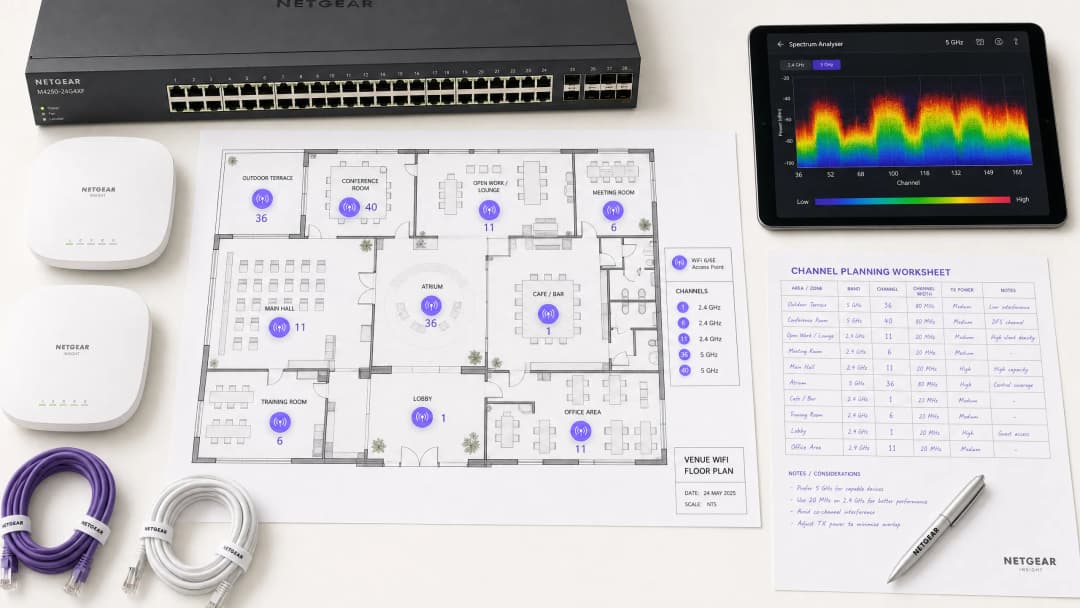
Overview
एंटरप्राइज परिवेशों के लिए - विशाल hospitality स्थानों से लेकर घने retail परिसरों तक - विश्वसनीय WiFi अब केवल एक अतिरिक्त सुविधा नहीं है; यह एक महत्वपूर्ण बुनियादी ढांचा है। हस्तक्षेप (इंटरफेरेंस) अभी भी ड्रॉप होने वाले कनेक्शन, हाई लेटेंसी और खराब थ्रूपुट का प्राथमिक कारण बना हुआ है, जो सीधे परिचालन दक्षता और guest WiFi अनुभव को प्रभावित करता है। यह गाइड नेटवर्क आर्किटेक्ट्स और IT प्रबंधकों को हस्तक्षेप के स्रोतों की पहचान करने और उन्हें कम करने के लिए रणनीतिक रूप से WiFi चैनलों को बदलने के लिए एक निश्चित, चरण-दर-चरण पद्धति प्रदान करती है।
विक्रेता-तटस्थ स्पेक्ट्रम प्रबंधन के सर्वोत्तम अभ्यासों को लागू करके, संगठन अपने बुनियादी ढांचे के ROI को अधिकतम कर सकते हैं, सहज क्लाइंट रोमिंग सुनिश्चित कर सकते हैं, और PCI-DSS और GDPR सहित सुरक्षा या अनुपालन मानकों से समझौता किए बिना बढ़ती IoT और उपयोगकर्ता-उपकरण डेंसिटी का समर्थन कर सकते हैं। मूल सिद्धांत सरल है: हस्तक्षेप एक स्पेक्ट्रम प्रबंधन की समस्या है, हार्डवेयर की नहीं। मौजूदा बुनियादी ढांचे को सही ढंग से कॉन्फ़िगर करना अधिकांश मामलों में प्रदर्शन की समस्याओं को हल करता है जिन्हें संगठन गलती से अपर्याप्त AP डेंसिटी या अप्रचलित हार्डवेयर के कारण मानते हैं।
Technical Deep Dive
किसी भी कॉन्फ़िगरेशन परिवर्तन को निष्पादित करने से पहले, IEEE 802.11 नेटवर्क की भौतिक परत (फिजिकल लेयर) को समझना आवश्यक है। रेडियो फ्रीक्वेंसी (RF) स्पेक्ट्रम CSMA/CA (कैरियर सेंस मल्टीपल एक्सेस विद कोलिजन अवॉइडेंस) प्रोटोकॉल द्वारा शासित एक साझा माध्यम है, और हस्तक्षेप आम तौर पर दो अलग-अलग श्रेणियों में आता है: सह-चैनल हस्तक्षेप - Co-Channel Interference (CCI) और आसन्न-चैनल हस्तक्षेप - Adjacent-Channel Interference (ACI)।
Co-Channel Interference (CCI) तब होता है जब कई एक्सेस पॉइंट या क्लाइंट एक ही चैनल पर ट्रांसमिट करते हैं। हालांकि 802.11 प्रोटोकॉल इसे CSMA/CA का उपयोग करके प्रबंधित करता है - जहां उपकरण ट्रांसमिट करने से पहले सुनते हैं - अत्यधिक CCI उपकरणों को क्लियर-टू-सेंड समय की प्रतीक्षा करने के लिए मजबूर करता है, जिससे थ्रूपुट काफी कम हो जाता है और लेटेंसी बढ़ जाती है। यह अनिवार्य रूप से वास्तविक RF शोर के बजाय एक कंजेशन की समस्या है, और CSMA/CA तंत्र इसे एक हद तक आसानी से संभाल लेता है।
Adjacent-Channel Interference (ACI) कहीं अधिक विनाशकारी है। यह तब होता है जब AP ओवरलैपिंग फ्रीक्वेंसी पर काम करते हैं (उदाहरण के लिए, 2.4 GHz बैंड पर चैनल 2 और 4)। चूंकि ट्रांसमिशन ओवरलैप होते हैं लेकिन CSMA/CA द्वारा डीकोड नहीं किए जा सकते हैं, इसलिए उन्हें शुद्ध शोर के रूप में माना जाता है, जिससे शोर का स्तर बढ़ जाता है और पैकेट हानि और रिट्रांसमिशन होता है। व्यस्त स्थानों में, ACI प्रभावी थ्रूपुट को 60-70% तक कम कर सकता है और एंटरप्राइज डिप्लॉयमेंट में सबसे आम कॉन्फ़िगरेशन त्रुटि है।
The 2.4 GHz Conundrum
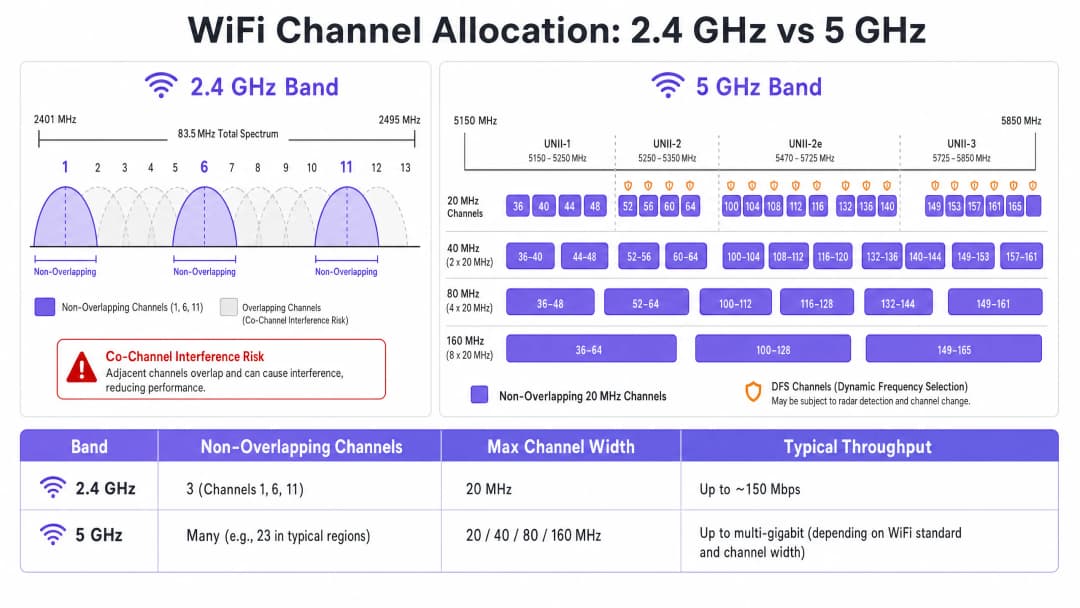
2.4 GHz बैंड बेहतर रेंज और वॉल पेनेट्रेशन प्रदान करता है, लेकिन इसके संकीर्ण स्पेक्ट्रम - कुल मिलाकर लगभग 83.5 MHz - द्वारा यह गंभीर रूप से सीमित है। हालांकि रेगुलेटरी डोमेन के आधार पर 11 से 14 चैनल उपलब्ध हैं, लेकिन केवल तीन ही वास्तव में नॉन-ओवरलैपिंग हैं: चैनल 1, 6, और 11। मल्टी-AP डिप्लॉयमेंट में किसी अन्य चैनल का उपयोग करना ACI की गारंटी देता है। इसके अतिरिक्त, यह बैंड नॉन-WiFi इंटरफेरर्स से भरा हुआ है, जिसमें इसी स्पेक्ट्रम में काम करने वाले Bluetooth डिवाइस, माइक्रोवेव ओवन और DECT कॉर्डलेस फोन शामिल हैं। Bluetooth Low Energy, WiFi इन्फ्रास्ट्रक्चर के साथ कैसे सह-अस्तित्व में रहता है, इसके विस्तृत विश्लेषण के लिए, हमारी गाइड Enterprise BLE Low Energy Decoded देखें। बैंड चयन के अधिक व्यापक विश्लेषण के लिए, Wi-Fi Frequencies: The 2026 Guide to Wi-Fi Frequencies देखें।
5 GHz का लाभ
5 GHz बैंड काफी अधिक स्पेक्ट्रम प्रदान करता है, जो UNII-1, UNII-2, UNII-2e, और UNII-3 सब-बैंड में प्रचुर मात्रा में नॉन-ओवरलैपिंग 20 MHz चैनल प्रदान करता है। एंटरप्राइज़ क्लाइंट ट्रैफ़िक के लिए यह बैंड सही डिफ़ॉल्ट विकल्प है। हालांकि, यह दो महत्वपूर्ण जटिलताओं को पेश करता है: चैनल-बॉन्डिंग ट्रेड-ऑफ और Dynamic Frequency Selection (DFS)।
चैनल बॉन्डिंग - 20 MHz चैनलों को 40, 80, या 160 MHz चौड़ाई में जोड़ना - एक एकल क्लाइंट के लिए पीक थ्रूपुट को बढ़ाता है लेकिन उपलब्ध स्वतंत्र चैनलों की कुल संख्या को कम करता है। हाई-डेंसिटी वाले वातावरण में, यह गंभीर CCI का कारण बनता है। DFS चैनलों (मुख्य रूप से UNII-2 और UNII-2e) के लिए APs को रडार सिग्नलों की निगरानी करने और यदि पता चलता है तो तुरंत चैनल खाली करने की आवश्यकता होती है, जिससे क्लाइंट डिस्कनेक्ट हो जाते हैं। यह हवाई अड्डों, मौसम केंद्रों या सैन्य प्रतिष्ठानों के पास स्थित स्थानों के लिए एक महत्वपूर्ण विचार है।
अपने विशिष्ट सेटअप को लेकर कोई सवाल हैं?
हमारी टीम 80,000 से अधिक वेन्यू में वेन्यू ऑपरेटरों, IT मैनेजरों और नेटवर्क इंजीनियरों के साथ काम करती है। 20 मिनट का कॉल बुक करें और हम आपको दिखाएंगे कि आपके जैसे अन्य लोगों ने इसे कैसे हल किया।
कार्यान्वयन प्लेबुक
WiFi चैनलों को बदलना कभी भी अनुमान पर आधारित नहीं होना चाहिए। इसके लिए एक व्यवस्थित, डेटा-संचालित दृष्टिकोण की आवश्यकता होती है।
चरण 1: स्पेक्ट्रम विश्लेषण आयोजित करें
कोई भी कॉन्फ़िगरेशन परिवर्तन करने से पहले, एक एम्पिरिकल बेसलाइन स्थापित करें। दोनों बैंड पर RF वातावरण का सर्वेक्षण करने के लिए एक स्पेक्ट्रम विश्लेषक - या तो समर्पित हार्डवेयर या एंटरप्राइज़ WLAN कंट्रोलर में निर्मित टूल - तैनात करें। निम्नलिखित का दस्तावेजीकरण करें: अनधिकृत या पड़ोसी APs और उनके चैनल आवंटन, प्रति चैनल नॉइज़ फ्लोर, नॉन-WiFi इंटरफेरर्स की उपस्थिति, और वर्तमान AP ट्रांसमिट पावर स्तर। यह बेसलाइन बाद के परिवर्तनों के प्रभाव को मापने के लिए आपका संदर्भ बिंदु है।
चरण 2: एक चैनल योजना विकसित करें
2.4 GHz बैंड के लिए: अपने चैनल पूल को सख्ती से चैनल 1, 6, और 11 तक सीमित रखें। सभी चैनल चौड़ाई को 20 MHz पर सेट करें - यह गैर-परक्राम्य है। यदि AP डेंसिटी इतनी अधिक है कि 1-6-11 योजना के साथ भी महत्वपूर्ण CCI का कारण बनती है, तो चेकरबोर्ड पैटर्न में चुनिंदा रूप से 2.4 GHz रेडियो को अक्षम करने पर विचार करें, जिससे शेष APs के माध्यम से कवरेज बनाए रखते हुए प्रभावी रूप से 2.4 GHz AP डेंसिटी आधी हो जाएगी।
5 GHz बैंड के लिए: उपलब्ध नॉन-ओवरलैपिंग चैनलों के उपयोग को अधिकतम करें। हाई-डेंसिटी डेप्लॉयमेंट्स - कॉन्फ्रेंस सेंटर, स्टेडियम, परिवहन हब - में स्वतंत्र चैनलों की संख्या को अधिकतम करने के लिए 20 MHz चैनल विड्थ लागू करें। केवल कम-डेंसिटी वाले क्षेत्रों में 40 MHz बढ़ाएं जहां CCI कोई चिंता का विषय नहीं है। आपके विशिष्ट स्थान और रडार स्रोतों की निकटता के आधार पर DFS चैनलों को शामिल करने का सावधानीपूर्वक मूल्यांकन करें। अपने राष्ट्रीय नियामक प्राधिकरण की विशिष्ट क्षेत्रीय चैनल उपलब्धता सूची से परामर्श लें।
चरण 3: एक्सेस पॉइंट्स को कॉन्फ़िगर करें
अपने चैनल प्लान को लागू करने के लिए अपने वायरलेस लैन कंट्रोलर (WLC) या क्लाउड मैनेजमेंट डैशबोर्ड को एक्सेस करें। अधिकांश एंटरप्राइज़ प्लेटफ़ॉर्म रेडियो रिसोर्स मैनेजमेंट (RRM) या Auto-RF सुविधाएँ प्रदान करते हैं जो गतिशील रूप से चैनलों और पावर स्तरों को आवंटित करती हैं।
| कार्यप्रणाली | किसके लिए सर्वोत्तम | जोखिम |
|---|---|---|
| मैनुअल स्टैटिक प्लानिंग | जटिल, हाई-डेंसिटी, या रडार के निकट वाले स्थान | वातावरण बदलने पर समय-समय पर पुनः सर्वेक्षण की आवश्यकता होती है |
| Auto-RF / RRM | सरल, कम-डेंसिटी वाले डेप्लॉयमेंट्स | उतार-चढ़ाव वाले RF वातावरण में चैनल फ़्लैपिंग का कारण बन सकता है |
| हाइब्रिड मोड | अधिकांश एंटरप्राइज़ डेप्लॉयमेंट्स | सावधानीपूर्वक बाधा कॉन्फ़िगरेशन की आवश्यकता होती है |
अत्यधिक जटिल वातावरणों में, प्रेडिक्टिव सर्वेक्षणों पर आधारित मैनुअल स्टैटिक चैनल प्लानिंग अक्सर केवल Auto-RF पर भरोसा करने की तुलना में बेहतर स्थिरता प्रदान करती है। ट्रांसमिट पावर को समानांतर में ट्यून किया जाना चाहिए - सेल साइज को सिकोड़ने और AP के बीच हस्तक्षेप को कम करने के लिए डेंस डेप्लॉयमेंट्स में 5 GHz AP ट्रांसमिट पावर को 10–14 dBm तक कम करना।
चरण 4: सत्यापित करें और मॉनिटर करें
बदलावों को लागू करने के बाद, नए चैनल प्लान को मान्य करने के लिए कार्यान्वयन के बाद का साइट सर्वेक्षण करें। अपने WiFi analytics प्लेटफ़ॉर्म के माध्यम से की परफॉरमेंस इंडिकेटर्स (KPIs) की निगरानी करें, जिसमें रिट्राई रेट्स, प्रति AP एयरटाइम यूटिलाइजेशन, क्लाइंट एसोसिएशन काउंट्स और रोमिंग व्यवहार पर ध्यान केंद्रित किया जाए। एक अच्छी तरह से ट्यून किए गए RF वातावरण में पीक ऑवर्स के दौरान रिट्राई रेट्स 10% से नीचे और एयरटाइम यूटिलाइजेशन 70% से नीचे दिखाई देना चाहिए।

सर्वोत्तम प्रथाएं
हाई-डेंसिटी वाले वातावरणों में 20 MHz विड्थ लागू करें। कॉन्फ्रेंस सेंटर या स्टेडियम जैसे वातावरणों में, व्यापक चैनलों से पीक सिंगल-क्लाइंट थ्रूपुट की तुलना में क्षमता - अधिक नॉन-ओवरलैपिंग चैनल - को प्राथमिकता दें। इससे समग्र नेटवर्क प्रदर्शन में काफी सुधार होगा।
बैंड स्टीयरिंग को सक्रिय रूप से लागू करें। 5 GHz-सक्षम क्लाइंट्स को भीड़भाड़ वाले 2.4 GHz बैंड से दूर और 5 GHz की ओर धकेलने के लिए बैंड स्टीयरिंग को कॉन्फ़िगर करें। अधिकांश आधुनिक एंटरप्राइज़ कंट्रोलर मूल रूप से इसका समर्थन करते हैं। 2.4 GHz को IoT उपकरणों और लीगेसी हार्डवेयर के लिए आरक्षित रखें जो 5 GHz पर काम नहीं कर सकते। विरासत डेटा दरों (legacy data rates) को अक्षम करें। सभी SSIDs पर 802.11b डेटा दरों (1, 2, 5.5, 11 Mbps) को अक्षम करें। ये पुरानी दरें असमान रूप से एयरटाइम की खपत करती हैं और पूरे नेटवर्क को धीमा कर देती हैं। न्यूनतम डेटा दर को 12 या 24 Mbps पर सेट करें, जिससे क्लाइंट जल्दी रोम करने के लिए मजबूर होंगे और प्रबंधन फ़्रेम ओवरहेड कम होगा।
नियमित RF ऑडिट शेड्यूल करें। RF वातावरण गतिशील होते हैं। नए पड़ोसी नेटवर्क, भवन नवीनीकरण, और नए डिवाइस सभी हस्तक्षेप परिदृश्य को बदल देते हैं। अपने चैनल प्लान को अद्यतित रखने के लिए त्रैमासिक RF ऑडिट शेड्यूल करें।
सुरक्षा और नेटवर्क प्रबंधन को एकीकृत करें। सुनिश्चित करें कि अनधिकृत डिवाइसों को हस्तक्षेप या सुरक्षा कमजोरियों का कारण बनने से रोकने के लिए दुष्ट AP पहचान और शमन सक्षम हैं। व्यापक साइबर सुरक्षा संदर्भ के लिए, जिसमें अतिथि नेटवर्क पर सामग्री फ़िल्टरिंग शामिल है, What is DNS Filtering? How to Block Harmful Content on Guest WiFi से परामर्श लें। कार्यालय-विशिष्ट अनुकूलन रणनीतियों के लिए, Office Wi-Fi: Optimising Your Modern Office Wi-Fi Network देखें।
समस्या निवारण और जोखिम शमन
लक्षण: मजबूत सिग्नल स्ट्रेंथ, खराब थ्रूपुट। यह सह-चैनल हस्तक्षेप का एक प्रमुख संकेत है। नॉइज़ फ़्लोर कम है, लेकिन एयरटाइम संतृप्त है। चैनल असाइनमेंट और AP ट्रांसमिट पावर का ऑडिट करें। एयरटाइम खाली करने और स्थानिक पुन: उपयोग को बेहतर बनाने के लिए ट्रांसमिट पावर को कम करें और 20 MHz चैनल चौड़ाई लागू करें।
लक्षण: विशिष्ट क्षेत्रों में यादृच्छिक क्लाइंट डिस्कनेक्शन। DFS इवेंट लॉग की तुरंत जांच करें। यदि उस क्षेत्र में AP UNII-2 या UNII-2e चैनलों पर हैं और रडार स्रोत के पास हैं, तो वे कानूनी रूप से चैनल खाली करने के लिए बाध्य हैं, जिससे क्लाइंट डिस्कनेक्ट हो जाते हैं। प्रभावित क्षेत्र में चैनल प्लान से उन विशिष्ट DFS चैनलों को बाहर करें।
लक्षण: चैनल प्लान लगातार स्वचालित रूप से बदल रहा है। यह अस्थायी हस्तक्षेप पर प्रतिक्रिया करने वाले अत्यधिक संवेदनशील Auto-RF एल्गोरिदम के कारण होने वाला चैनल फ्लैपिंग है। RRM संवेदनशीलता सेटिंग्स को सीमित करें, होल्ड टाइमर बढ़ाएं, या सर्वेक्षण डेटा के आधार पर एक स्थिर चैनल प्लान पर माइग्रेट करें।
लक्षण: विशिष्ट क्षेत्रों में अच्छा सिग्नल लेकिन खराब प्रदर्शन। माइक्रोवेव ओवन, DECT फोन, या औद्योगिक उपकरणों से गैर-WiFi हस्तक्षेप नॉइज़ फ़्लोर को बढ़ा सकता है। एक स्पेक्ट्रम विश्लेषक इन स्रोतों की पहचान करेगा। इसका समाधान स्रोत को हटाना या प्रभावित AP को 5 GHz या 6 GHz बैंड पर माइग्रेट करना है, जो अधिकांश गैर-WiFi 2.4 GHz हस्तक्षेप स्रोतों से सुरक्षित हैं।
ROI और व्यावसायिक प्रभाव
WiFi चैनलों को अनुकूलित करना एक शून्य-लागत वाला इंफ्रास्ट्रक्चर अपग्रेड है जो तत्काल, मापने योग्य परिणाम देता है। जो संगठन उचित RF चैनल प्लानिंग लागू करते हैं, वे आमतौर पर पहली तिमाही के भीतर WiFi से संबंधित हेल्पडेस्क टिकटों में 30-40% की कमी की रिपोर्ट करते हैं। स्वास्थ्य सेवा के माहौल में, एक अच्छी तरह से ट्यून किया गया RF वातावरण महत्वपूर्ण टेलीमेट्री डेटा के निरंतर प्रवाह को सुनिश्चित करता है और नैदानिक उपकरण संचार आवश्यकताओं के अनुपालन का समर्थन करता है। रिटेल में, यह मोबाइल पॉइंट-ऑफ-सेल सिस्टम के निर्बाध संचालन, सटीक स्थान विश्लेषण और विश्वसनीय इन्वेंट्री प्रबंधन अनुप्रयोगों की गारंटी देता है।
CapEx के दृष्टिकोण से, सही चैनल प्लानिंग अक्सर अतिरिक्त AP हार्डवेयर की कथित आवश्यकता को समाप्त कर देती है। कई संगठन जो मानते हैं कि उनके पास AP डेंसिटी की समस्या है, उनके पास वास्तव में चैनल प्लानिंग की समस्या होती है। किसी भी कड़े नेटवर्क मूल्यांकन के दौरान - अतिरिक्त हार्डवेयर की खरीद से पहले - सबसे पहले RF कॉन्फ़िगरेशन समस्याओं का समाधान करना एक मानक अभ्यास है। एक अच्छी तरह से ट्यून किया गया RF वातावरण मौजूदा इंफ्रास्ट्रक्चर के परिचालन जीवनचक्र को भी बढ़ाता है, जिससे महंगे हार्डवेयर रिफ्रेश साइकिल टल जाते हैं और मौजूदा पूंजीगत निवेश पर तत्काल, मापने योग्य रिटर्न मिलता है।
मुख्य परिभाषाएं
Co-Channel Interference (CCI)
हस्तक्षेप जो तब होता है जब मल्टीपल एक्सेस पॉइंट्स या क्लाइंट डिवाइसेज एक ही समय में बिल्कुल समान फ्रीक्वेंसी चैनल पर ट्रांसमिट करते हैं।
CSMA/CA द्वारा प्रबंधित किया जाता है, लेकिन अत्यधिक होने पर कंजेशन और कम थ्रूपुट का कारण बनता है। इसका मुख्य लक्षण कम थ्रूपुट के साथ हाई एयरटाइम यूटिलाइजेशन है।
Adjacent-Channel Interference (ACI)
ओवरलैपिंग लेकिन गैर-समान फ्रीक्वेंसी चैनलों पर ट्रांसमिट करने वाले डिवाइसेज के कारण होने वाला हस्तक्षेप, जो ऐसा RF नॉइज़ पैदा करता है जिसे CSMA/CA डिकोड या प्रबंधित नहीं कर सकता है।
CCI की तुलना में अधिक नुकसानदायक। नॉइज़ फ्लोर को बढ़ाता है, पैकेट लॉस का कारण बनता है, और रीट्रांसमिशन के लिए मजबूर करता है। 2.4 GHz पर 1, 6 और 11 के अलावा अन्य चैनलों के उपयोग के कारण होता है।
Dynamic Frequency Selection (DFS)
एक IEEE 802.11h मैकेनिज्म जिसके लिए WiFi एक्सेस पॉइंट्स को कुछ 5 GHz चैनलों पर रडार सिग्नलों की निगरानी करने और रडार का पता चलने पर तुरंत चैनल खाली करने की आवश्यकता होती है।
UNII-2 और UNII-2e चैनलों को प्रभावित करता है। हवाई अड्डों, मौसम स्टेशनों, या सैन्य स्थलों के पास के स्थानों के लिए महत्वपूर्ण विचार, जहां लगातार रडार डिटेक्शन के कारण क्लाइंट डिस्कनेक्ट हो जाते हैं।
Radio Resource Management (RRM)
एंटरप्राइज WLAN कंट्रोलर्स के भीतर ऑटोमेटेड एल्गोरिदम जो रियल-टाइम RF स्थितियों के आधार पर चैनल असाइनमेंट और ट्रांसमिट पावर लेवल को डायनेमिक रूप से एडजस्ट करते हैं।
बदलते RF वातावरण के अनुकूल होने के लिए उपयोगी है, लेकिन अस्थिर वातावरण में 'चैनल चर्न' - लगातार चैनल परिवर्तन - का कारण बन सकता है, जिससे क्लाइंट कनेक्टिविटी बाधित होती है।
Channel Bonding
पिक सिंगल-क्लाइंट थ्रूपुट को बढ़ाने के लिए मल्टीपल एड्जैसंट 20 MHz चैनलों को व्यापक 40, 80, या 160 MHz चैनलों में संयोजित करने की प्रक्रिया।
उपलब्ध नॉन-ओवरलैपिंग चैनलों की कुल संख्या को कम करता है, जिससे डेंस डिप्लॉयमेंट में CCI का जोखिम बढ़ जाता है। हाई-डेंसिटी एंटरप्राइज वातावरण में इससे बचना चाहिए।
Band Steering
एक WLAN कंट्रोलर फीचर जो डुअल-बैंड सक्षम क्लाइंट डिवाइसेज को कंजस्टेड 2.4 GHz बैंड के बजाय 5 GHz बैंड के साथ जुड़ने के लिए प्रोत्साहित करता है।
एंटरप्राइज डिप्लॉयमेंट में लोड बैलेंसिंग के लिए आवश्यक। IoT डिवाइसेज और लेगेसी हार्डवेयर जो 5 GHz पर काम नहीं कर सकते हैं, उनके लिए सीमित 2.4 GHz स्पेक्ट्रम को सुरक्षित रखता है।
CSMA/CA
कैरियर सेंस मल्टीपल एक्सेस विद कोलिजन अवॉइडेंस। IEEE 802.11 WiFi द्वारा उपयोग किया जाने वाला मीडियम एक्सेस कंट्रोल प्रोटोकॉल, जिसके लिए डिवाइसेज को ट्रांसमिट करने से पहले क्लियर एयरटाइम सुनने की आवश्यकता होती है।
वह मैकेनिज्म जो यह नियंत्रित करता है कि WiFi डिवाइसेज RF मीडियम को कैसे शेयर करते हैं। हाई CCI डिवाइसेज को क्लियर एयरटाइम के लिए लंबे समय तक प्रतीक्षा करने के लिए मजबूर करता है, जिससे थ्रूपुट सीधे तौर पर कम होता है और लेटेंसी बढ़ती है।
Noise Floor
dBm में मापा गया, किसी दिए गए फ्रीक्वेंसी बैंड में मौजूद बैकग्राउंड RF एनर्जी का कुल स्तर। एक हायर नॉइज़ फ्लोर WiFi ट्रांसमिशन के लिए प्रभावी सिग्नल-टू-नॉइज़ रेशियो (SNR) को कम करता है।
ACI, नॉन-WiFi हस्तक्षेप और खराब चैनल प्लानिंग के कारण बढ़ता है। हाई नॉइज़ फ्लोर डिवाइसेज को कम मॉड्यूलेशन स्कीम और डेटा रेट्स का उपयोग करने के लिए मजबूर करता है, जिससे थ्रूपुट कम हो जाता है।
Spatial Reuse
मल्टीपल एक्सेस पॉइंट्स की बिना एक-दूसरे में हस्तक्षेप किए एक ही चैनल पर एक साथ ट्रांसमिट करने की क्षमता, जो फिजिकल सेपरेशन और उचित ट्रांसमिट पावर लेवल द्वारा सक्षम होती है।
मूल मैकेनिज्म जो हाई-डेंसिटी WiFi नेटवर्क को स्केल करने की अनुमति देता है। AP ट्रांसमिट पावर को कम करके और न्यूनतम आवश्यक चैनल विड्थ का उपयोग करके इसे अधिकतम किया जाता है।
हल किए गए उदाहरण
एक 200 कमरों वाले होटल में शाम के व्यस्त समय के दौरान धीमे WiFi की व्यापक शिकायतें मिल रही हैं। वर्तमान परिनियोजन में 80 APs पर 2.4 GHz बैंड पर 40 MHz channels का उपयोग किया जाता है, और Auto-RF सक्षम है। WLAN कंट्रोलर लॉग पूरी शाम बार-बार channel परिवर्तन दिखाते हैं।
चरण 1 - तत्काल समाधान: सभी 2.4 GHz रेडियो को तुरंत 20 MHz channel विड्थ पर रीकॉन्फ़िगर करें। कंट्रोलर के भीतर 2.4 GHz channel पूल को केवल channel 1, 6 और 11 तक सीमित करें। अकेले इससे पूरे परिनियोजन में ACI समाप्त हो जाएगा।
चरण 2 - Auto-RF को स्थिर करें: Auto-RF इवेंट लॉग की समीक्षा करें। यदि APs प्रति घंटे एक से अधिक बार channel बदल रहे हैं, तो एल्गोरिदम अस्थायी interference पर प्रतिक्रिया कर रहा है। RRM होल्ड-डाउन टाइमर बढ़ाएं और संवेदनशीलता थ्रेशोल्ड को कम करें। यदि यह बदलाव जारी रहता है, तो एक स्थिर channel योजना पर माइग्रेट करें।
चरण 3 - बैंड स्टीयरिंग: डुअल-बैंड डिवाइसों को 5 GHz पर धकेलने के लिए आक्रामक बैंड स्टीयरिंग सक्षम करें। इससे व्यस्त अवधि के दौरान 2.4 GHz लोड काफी कम हो जाता है।
चरण 4 - सत्यापन: बदलाव के बाद एक स्पेक्ट्रम विश्लेषक तैनात करें और सुधार की पुष्टि करने के लिए 48 घंटों तक WiFi एनालिटिक्स डैशबोर्ड के माध्यम से पुनः प्रयास दरों और एयरटाइम उपयोग की निगरानी करें।
एक बड़ी रिटेल श्रृंखला ने 4,000 वर्ग मीटर के वितरण केंद्र में हर 12 मीटर पर APs तैनात किए हैं। 20 MHz channels का उपयोग करके 5 GHz बैंड पर भी, CCI अधिक है, थ्रूपुट खराब है, और मोबाइल स्कैनिंग डिवाइस व्यस्त शिफ्ट घंटों के दौरान बार-बार डिस्कनेक्ट हो रहे हैं।
चरण 1 - ट्रांसमिट पावर का ऑडिट करें: APs निश्चित रूप से अधिकतम TX पावर (आमतौर पर 20-23 dBm) पर कॉन्फ़िगर किए गए हैं। 12-मीटर की दूरी पर, यह भारी सेल ओवरलैप बनाता है। सेल के आकार को छोटा करने और AP के बीच के interference को कम करने के लिए 5 GHz पर TX पावर को 10-12 dBm तक कम करें।
चरण 2 - लीगेसी डेटा दरों को अक्षम करें: 12 Mbps से कम की सभी 802.11b/g डेटा दरों को अक्षम करें। यह स्कैनिंग उपकरणों को कम डेटा दर पर दूर के AP से जुड़े रहने के बजाय निकटतम AP पर रोम करने के लिए मजबूर करता है, जो अत्यधिक एयरटाइम की खपत करता है।
चरण 3 - channel योजना की समीक्षा करें: सुनिश्चित करें कि 5 GHz channel योजना उपलब्ध गैर-ओवरलैपिंग channels की अधिकतम संख्या का उपयोग करती है। उच्च AP घनत्व के साथ, हर अद्वितीय channel मायने रखता है।
चरण 4 - बदलाव के बाद सर्वेक्षण के साथ सत्यापन करें: पूरे फ्लोर पर कम ओवरलैप और बेहतर SNR की पुष्टि करने के लिए स्पेक्ट्रम विश्लेषक के साथ वॉकथ्रू सर्वेक्षण करें।
अभ्यास प्रश्न
Q1. आप एक बहु-किराएदार (multi-tenant) कार्यालय भवन में एक नया वायरलेस नेटवर्क तैनात कर रहे हैं। आपका स्पेक्ट्रम स्कैन पड़ोसी किराएदारों से चैनल 1, 6 और 11 पर भारी उपयोग दिखाता है। एक जूनियर इंजीनियर 'भीड़भाड़ से बचने' के लिए चैनल 3, 8 और 13 का उपयोग करने का सुझाव देता है। आप क्या प्रतिक्रिया देंगे, और सही कॉन्फ़िगरेशन क्या है?
संकेत: Co-Channel Interference (CCI) और Adjacent-Channel Interference (ACI) के बीच अंतर पर विचार करें, और यह भी कि नेटवर्क परफॉर्मेंस के लिए कौन सा अधिक हानिकारक है।
मॉडल उत्तर देखें
जूनियर इंजीनियर का सुझाव गलत है और इससे प्रदर्शन में भारी गिरावट आएगी। चैनल 3, 8 और 13 क्रमशः चैनल 1, 6 और 11 के साथ ओवरलैप करते हैं, जिससे एडजसेंट-चैनल इंटरफेरेंस (Adjacent-Channel Interference) उत्पन्न होगा - जो WiFi हस्तक्षेप का सबसे विनाशकारी रूप है। ACI शुद्ध RF शोर के रूप में प्रकट होता है जिसे CSMA/CA प्रबंधित नहीं कर सकता है, जिससे पैकेट हानि और पुनः प्रसारण (retransmissions) होता है। सही कॉन्फ़िगरेशन चैनल 1, 6 और 11 पर तैनात करना है। हालांकि इससे पड़ोसी किराएदारों के साथ को-चैनल इंटरफेरेंस (Co-Channel Interference) होगा, लेकिन CSMA/CA उपकरणों को बारी-बारी से काम करने की अनुमति देकर CCI को आसानी से संभाल सकता है। कुल प्रदर्शन ACI की तुलना में काफी बेहतर होगा।
Q2. एक स्टेडियम परिनियोजन इवेंट के दौरान 'गीगाबिट WiFi' गति का विज्ञापन करने के लिए 5 GHz बैंड पर 80 MHz चैनलों का उपयोग कर रहा है। उपयोगकर्ता पीक ऑक्यूपेंसी के दौरान धीमी गति से लोड होने का समय, बार-बार डिस्कनेक्शन और खराब वीडियो स्ट्रीमिंग गुणवत्ता की रिपोर्ट करते हैं। AP हार्डवेयर आधुनिक WiFi 6 उपकरण है। आर्किटेक्चरल दोष क्या है, और इसका समाधान क्या है?
संकेत: एक उच्च-घनत्व वाले वातावरण में पीक सिंगल-क्लाइंट थ्रूपुट और समग्र नेटवर्क क्षमता के बीच संतुलन का मूल्यांकन करें।
मॉडल उत्तर देखें
आर्किटेक्चरल दोष उच्च-घनत्व वाले वातावरण में 80 MHz चैनल चौड़ाई का उपयोग है। प्रत्येक 80 MHz चैनल चार 20 MHz चैनलों को एक साथ जोड़ता है, जिससे पूरे परिनियोजन में उपलब्ध नॉन-ओवरलैपिंग चैनलों की कुल संख्या काफी कम हो जाती है। कई APs को एक ही चौड़े चैनलों का पुन: उपयोग करने के लिए मजबूर होने के कारण, को-चैनल इंटरफेरेंस गंभीर हो जाता है। इसका समाधान सभी APs में चैनल की चौड़ाई को घटाकर 20 MHz करना है। इससे उपलब्ध स्वतंत्र चैनलों की संख्या बढ़ जाती है, CCI कम होता है, और समग्र नेटवर्क क्षमता में काफी सुधार होता है। प्रति क्लाइंट पीक थ्रूपुट कम हो जाएगा, लेकिन एक साथ सेवा प्राप्त करने वाले क्लाइंट्स की संख्या - और उनके अनुभव की गुणवत्ता - काफी बढ़ जाएगी।
Q3. आपके अस्पताल के नेटवर्क में अस्पताल के रूफटॉप हेलीपैड के पास के वार्डों में चिकित्सा उपकरणों को प्रभावित करने वाले रुक-रुक कर क्लाइंट डिस्कनेक्शन की समस्या आ रही है। प्रभावित APs को चैनल 52, 56, 60 और 64 का उपयोग करने के लिए कॉन्फ़िगर किया गया है। इसका सबसे संभावित कारण क्या है, और सही समाधान क्या है?
संकेत: उपयोग में आने वाले विशिष्ट 5 GHz चैनलों के लिए नियामक आवश्यकताओं पर विचार करें और हेलीपैड के पास कौन से सिस्टम काम करते हैं।
मॉडल उत्तर देखें
चैनल 52, 56, 60 और 64 UNII-2 DFS चैनल हैं। हेलीपैड का उपयोग करने वाले हेलीकॉप्टर, या संबंधित विमानन रडार सिस्टम, उस ज़ोन में APs पर DFS रडार डिटेक्शन इवेंट को ट्रिगर कर रहे हैं। जब रडार का पता चलता है, तो APs को कानूनी रूप से उन चैनलों को तुरंत खाली करने की आवश्यकता होती है, जिससे क्लाइंट डिस्कनेक्ट हो जाते हैं। सही समाधान हेलीपैड के पास के ज़ोन में APs के लिए चैनल योजना से सभी DFS चैनलों को बाहर करना है। उन APs को UNII-1 चैनलों (36, 40, 44, 48) या UNII-3 चैनलों (149, 153, 157, 161, 165) का उपयोग करने के लिए पुन: कॉन्फ़िगर करें, जो DFS आवश्यकताओं के अधीन नहीं हैं।
इस श्रृंखला में आगे पढ़ें
सर्वोत्तम चैनल प्लानिंग के लिए RSSI और सिग्नल की ताकत को समझना
यह गाइड सर्वोत्तम चैनल प्लानिंग के लिए RSSI, सिग्नल-टू-नॉइज रेशियो (SNR), और RF प्रोपेगेशन सिद्धांतों की व्यापक तकनीकी जानकारी प्रदान करती है। यह IT प्रबंधकों, नेटवर्क आर्किटेक्ट्स और वेन्यू ऑपरेशंस डायरेक्टरों को को-चैनल और एडजसेंट चैनल इंटरफेरेंस को कम करने, AP प्लेसमेंट को अनुकूलित करने, और हॉस्पिटैलिटी, रिटेल एवं सार्वजनिक क्षेत्र के वातावरण में मापने योग्य व्यावसायिक प्रभाव के लिए एनालिटिक्स का लाभ उठाने की व्यावहारिक रणनीतियों से लैस करती है।
WiFi 6 बनाम WiFi 5: क्या यह चैनल इंटरफेरेंस को हल करता है?
यह गाइड एक तकनीकी डीप-डाइव प्रदान करती है कि कैसे WiFi 6 (802.11ax) OFDMA और BSS कलरिंग के माध्यम से हाई-डेंसिटी एंटरप्राइज़ वातावरण में चैनल इंटरफेरेंस को संबोधित करता है। यह IT प्रबंधकों, नेटवर्क आर्किटेक्ट्स और CTOs को कार्रवाई योग्य डिप्लॉयमेंट रणनीतियों, हॉस्पिटैलिटी और हेल्थकेयर से वास्तविक दुनिया के केस स्टडीज़, और उन स्थानों में इंफ्रास्ट्रक्चर अपग्रेड के ROI का मूल्यांकन करने के लिए एक रूपरेखा से लैस करता है जहां वायरलेस परफॉरमेंस व्यवसाय के लिए महत्वपूर्ण है।
उच्च घनत्व वाले स्थानों के लिए सर्वश्रेष्ठ WiFi चैनल
स्टेडियम, एरेनास और बड़े सार्वजनिक स्थलों जैसे उच्च-घनत्व वाले वातावरण में WiFi चैनलों के चयन और अनुकूलन के लिए एक निश्चित तकनीकी संदर्भ। इसमें RF भौतिकी, 5 GHz और 6 GHz बैंड में चैनल पुन: उपयोग रणनीतियों और IT लीडर्स के लिए व्यावहारिक परिनियोजन मार्गदर्शन शामिल है।
अपने विशिष्ट सेटअप को लेकर कोई सवाल हैं?
हमारी टीम 80,000 से अधिक वेन्यू में वेन्यू ऑपरेटरों, IT मैनेजरों और नेटवर्क इंजीनियरों के साथ काम करती है। 20 मिनट का कॉल बुक करें और हम आपको दिखाएंगे कि आपके जैसे अन्य लोगों ने इसे कैसे हल किया।