
PEAP ऑथेंटिकेशन क्या है? PEAP आपके WiFi को कैसे सुरक्षित करता है
यह आधिकारिक गाइड एंटरप्राइज WiFi नेटवर्क के लिए PEAP ऑथेंटिकेशन का विश्लेषण करती है, इसके आर्किटेक्चर, EAP-TLS की तुलना में इसकी सुरक्षा सीमाओं और व्यावहारिक तैनाती रणनीतियों का विवरण देती है। IT प्रबंधकों और नेटवर्क आर्किटेक्ट्स के लिए डिज़ाइन की गई, यह इस बात पर कार्रवाई योग्य अंतर्दृष्टि प्रदान करती है कि PEAP-MSCHAPv2 कब उपयुक्त रहता है और इसे आधुनिक खतरों से कैसे सुरक्षित किया जाए।
इस गाइड को सुनें
पॉडकास्ट ट्रांसक्रिप्ट देखें
कार्यकारी सारांश
Protected Extensible Authentication Protocol (PEAP) आज भी एंटरप्राइज परिवेशों में सबसे व्यापक रूप से तैनात किया जाने वाला 802.1X ऑथेंटिकेशन तरीका है। Cisco, Microsoft और RSA Security द्वारा संयुक्त रूप से विकसित, PEAP को एक विशिष्ट परिचालन चुनौती को हल करने के लिए डिज़ाइन किया गया था: नेटवर्क पर प्रत्येक डिवाइस पर क्लाइंट सर्टिफिकेट तैनात करने के भारी प्रशासनिक ओवरहेड के बिना मजबूत, सर्टिफिकेट-आधारित सर्वर ऑथेंटिकेशन कैसे प्राप्त किया जाए।
जटिल संपत्तियों का प्रबंधन करने वाले IT निदेशकों और नेटवर्क आर्किटेक्ट्स के लिए—चाहे वह रिटेल में हो, हेल्थकेयर में हो, या बड़े कॉर्पोरेट कार्यालयों में हो—PEAP-MSCHAPv2 प्री-शेयर्ड कीज़ (PSK) की असुरक्षा और EAP-TLS की तैनाती की जटिलता के बीच एक व्यावहारिक मध्यम मार्ग प्रदान करता है। हालांकि, यह सुविधा अंतर्निहित सुरक्षा समझौतों के साथ आती है। जैसे-जैसे दुष्ट एक्सेस पॉइंट (rogue access point) हमले तेजी से परिष्कृत होते जा रहे हैं, गलत तरीके से कॉन्फ़िगर किए गए PEAP डिप्लॉयमेंट एक गंभीर भेद्यता (vulnerability) पेश करते हैं।
यह गाइड PEAP आर्किटेक्चर, इसके परिचालन तंत्र और आधुनिक एंटरप्राइज नेटवर्क में इसे सुरक्षित करने के लिए आवश्यक अनिवार्य कॉन्फ़िगरेशन मानकों के बारे में एक व्यापक तकनीकी गहन विश्लेषण प्रदान करती है।
तकनीकी गहन विश्लेषण: PEAP का आर्किटेक्चर
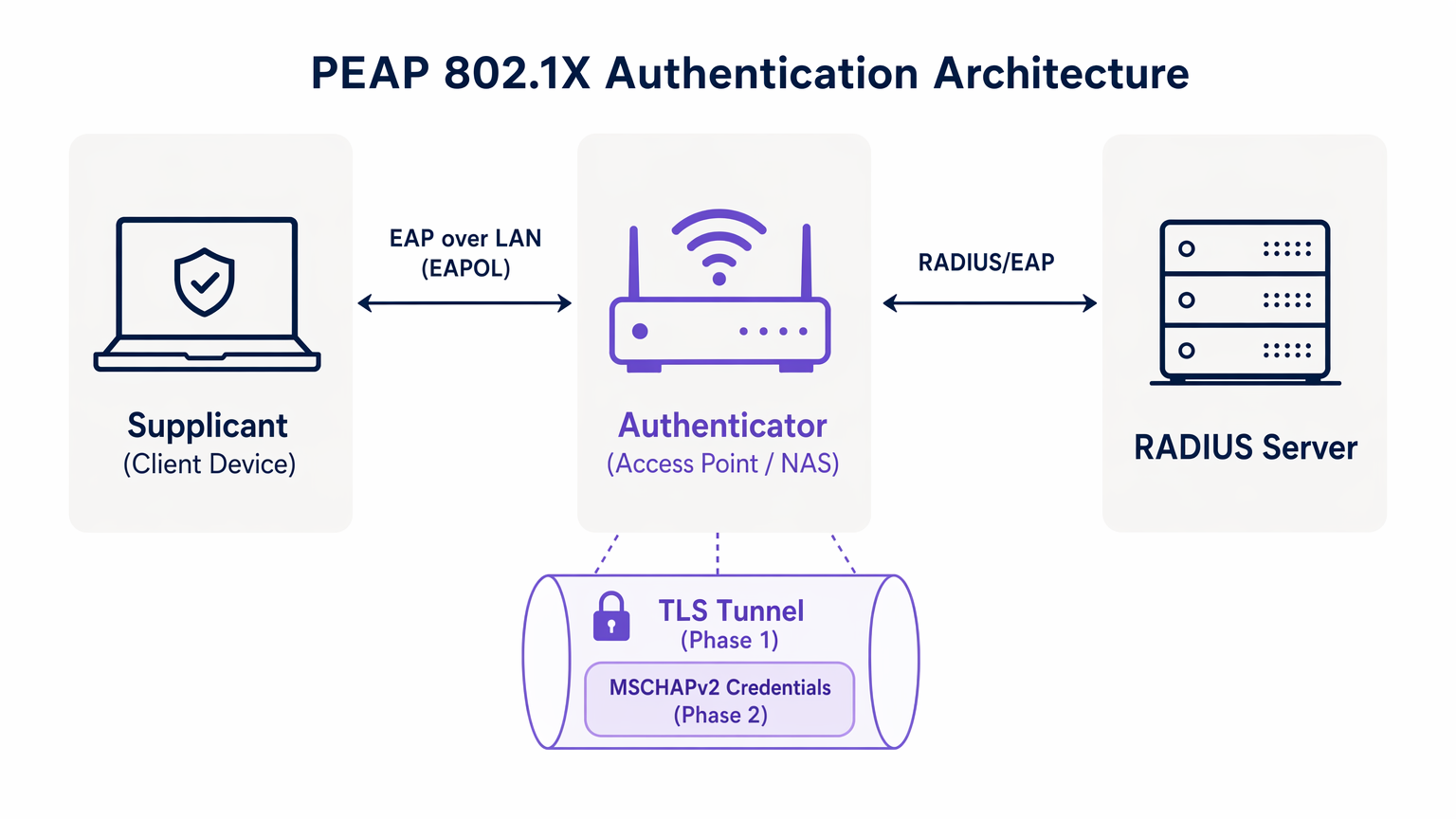
PEAP को समझने के लिए, हमें इसकी दो-चरण ऑथेंटिकेशन प्रक्रिया की जांच करनी होगी। PEAP इनर टनल में किसी भी संवेदनशील क्रेडेंशियल डेटा का आदान-प्रदान करने से पहले एक सुरक्षित आउटर टनल स्थापित करके काम करता है।
चरण 1: TLS टनल स्थापना
जब एक सप्लीकेंट (क्लाइंट डिवाइस) नेटवर्क से कनेक्ट करने का प्रयास करता है, तो ऑथेंटिकेटर (आमतौर पर एक वायरलेस एक्सेस पॉइंट) Extensible Authentication Protocol over LAN (EAPOL) फ्रेम को छोड़कर सभी ट्रैफ़िक को ब्लॉक कर देता है। ऑथेंटिकेटर इन फ्रेम को ऑथेंटिकेशन सर्वर, आमतौर पर एक RADIUS सर्वर पर फॉरवर्ड करता है। इस इंफ्रास्ट्रक्चर की व्यापक समझ के लिए, हमारे गाइड RADIUS क्या है? RADIUS सर्वर WiFi नेटवर्क को कैसे सुरक्षित करते हैं को देखें।
चरण 1 के दौरान, RADIUS सर्वर सप्लीकेंट को अपना डिजिटल सर्टिफिकेट प्रस्तुत करता है। सप्लीकेंट अपने विश्वसनीय रूट सर्टिफिकेट अथॉरिटीज (CAs) के खिलाफ इस सर्टिफिकेट को सत्यापित करता है। यदि सत्यापन सफल होता है, तो सप्लीकेंट और RADIUS सर्वर के बीच एक TLS (Transport Layer Security) टनल स्थापित हो जाती है। यह एन्क्रिप्टेड टनल वायरलेस माध्यम पर होने वाले बाद के सभी संचार को जासूसी से बचाती है।
चरण 2: इनर ऑथेंटिकेशन
एक बार TLS टनल स्थापित हो जाने के बाद, वास्तविक उपयोगकर्ता ऑथेंटिकेशन इस सुरक्षित चैनल के अंदर होता है। सबसे आम इनर ऑथेंटिकेशन प्रोटोकॉल MSCHAPv2 (Microsoft Challenge Handshake Authentication Protocol version 2) है।
टनल के अंदर, सप्लीकेंट उपयोगकर्ता के क्रेडेंशियल (यूज़रनेम और पासवर्ड) RADIUS सर्वर को भेजता है। सर्वर इन क्रेडेंशियल्स को एक आइडेंटिटी स्टोर, जैसे कि Active Directory या LDAP डायरेक्टरी के खिलाफ सत्यापित करता है। यदि क्रेडेंशियल मान्य हैं, तो RADIUS सर्वर ऑथेंटिकेटर को वापस एक Access-Accept संदेश भेजता है, और क्लाइंट को नेटवर्क एक्सेस प्रदान कर दिया जाता है।
PEAP का महत्वपूर्ण सुरक्षा आधार यह है कि कमजोर MSCHAPv2 एक्सचेंज पूरी तरह से एन्क्रिप्टेड TLS टनल के भीतर समाहित होता है, जो इसे पैसिव इंटरसेप्शन (चोरी-छिपे सुनने) से बचाता है।
कार्यान्वयन गाइड: PEAP-MSCHAPv2 को सुरक्षित करना
हालांकि PEAP अत्यधिक कार्यात्मक है, कई क्लाइंट ऑपरेटिंग सिस्टम पर इसका डिफ़ॉल्ट कॉन्फ़िगरेशन इसे परिष्कृत हमलों के प्रति संवेदनशील छोड़ देता है। PEAP को सुरक्षित रूप से लागू करने के लिए निम्नलिखित परिनियोजन मानकों का कड़ाई से पालन करना आवश्यक है।
1. अनिवार्य सर्वर सर्टिफिकेट सत्यापन
PEAP डिप्लॉयमेंट में सबसे महत्वपूर्ण भेद्यता क्लाइंट साइड पर सर्वर सर्टिफिकेट सत्यापन लागू करने में विफलता है। चूंकि PEAP को क्लाइंट सर्टिफिकेट की आवश्यकता नहीं होती है, इसलिए क्रेडेंशियल प्रसारित करने से पहले सप्लीकेंट को पूरी तरह से आश्वस्त होना चाहिए कि वह वैध RADIUS सर्वर के साथ संचार कर रहा है।
यदि कोई क्लाइंट डिवाइस किसी भी सर्टिफिकेट पर भरोसा करने के लिए कॉन्फ़िगर किया गया है, तो एक हमलावर एक नकली एक्सेस पॉइंट तैनात कर सकता है, एक फर्जी सर्टिफिकेट प्रस्तुत कर सकता है, और MSCHAPv2 हैंडशेक को इंटरसेप्ट कर सकता है। hostapd-wpe जैसे टूल इस हमले को स्वचालित करते हैं।
कार्यान्वयन कार्रवाई: IT टीमों को सर्वर सर्टिफिकेट को कड़ाई से सत्यापित करने के लिए सभी एंटरप्राइज उपकरणों को कॉन्फ़िगर करना होगा। इसमें उस विशिष्ट रूट CA को पिन करना शामिल है जिसने RADIUS सर्वर का सर्टिफिकेट जारी किया था और सर्वर के अपेक्षित कॉमन नेम (CN) या Subject Alternative Name (SAN) को स्पष्ट रूप से परिभाषित करना शामिल है।
2. MDM-लागू वायरलेस प्रोफाइल
802.1X सेटिंग्स को मैन्युअल रूप से कॉन्फ़िगर करने के लिए अंतिम उपयोगकर्ताओं पर भरोसा करना विफलता का एक निश्चित मार्ग है। उपयोगकर्ता अक्सर सर्टिफिकेट चेतावनियों पर क्लिक करके आगे बढ़ जाते हैं, जिससे TLS टनल की अखंडता से समझौता होता है।
कार्यान्वयन कार्रवाई: वायरलेस नेटवर्क प्रोफाइल को मोबाइल डिवाइस मैनेजमेंट (MDM) प्लेटफॉर्म (जैसे, Microsoft Intune, Jamf) या ग्रुप पॉलिसी ऑब्जेक्ट्स (GPO) के माध्यम से सभी कॉर्पोरेट उपकरणों पर भेजा जाना चाहिए। इन प्रोफाइलों को EAP सेटिंग्स को लॉक कर देना चाहिए, जिससे उपयोगकर्ता सर्टिफिकेट सत्यापन आवश्यकताओं को बदल न सकें।
3. पुराने प्रोटोकॉल को हटाना
TLS के पुराने संस्करणों में ज्ञात क्रिप्टोग्राफ़िक कमजोरियां होती हैं। PEAP डिप्लॉयमेंट को आधुनिक एन्क्रिप्शन मानकों को लागू करना चाहिए।
कार्यान्वयन कार्रवाई: TLS 1.0 और TLS 1.1 कनेक्शन को अस्वीकार करने के लिए RADIUS सर्वर को कॉन्फ़िगर करें। पूर्ण न्यूनतम के रूप में TLS 1.2 लागू करें, और जहां क्लाइंट बेस द्वारा समर्थित हो, वहां TLS 1.3 को प्राथमिकता दी जाए।
सर्वोत्तम अभ्यास: रणनीतिक नेटवर्क सेगमेंटेशन
एक आम आर्किटेक्चरल गलती अतिथि (guest) और BYOD नेटवर्क सहित सभी वायरलेस एक्सेस के लिए PEAP का उपयोग करने का प्रयास करना है। PEAP को एक केंद्रीय डायरेक्टरी के खिलाफ ऑथेंटिकेट करने वाले प्रबंधित एंटरप्राइज उपकरणों के लिए डिज़ाइन किया गया है।
अतिथि एक्सेस को अलग करना
गैर-कॉर्पोरेट उपकरणों के लिए, PEAP गलत टूल है। RADIUS डायरेक्टरी में अतिथि क्रेडेंशियल्स को प्रबंधित करने का प्रयास करने से अनावश्यक प्रशासनिक ओवरहेड पैदा होता है और सुरक्षा जोखिम उत्पन्न होते हैं।
हॉस्पिटैलिटी और ट्रांसपोर्ट के स्थानों को एक समर्पित Guest WiFi समाधान लागू करना चाहिए। Purple जैसे प्लेटफॉर्म सुरक्षित, कैप्टिव पोर्टल-आधारित ऑनबोर्डिंग प्रदान करते हैं जो पूरी तरह से एंटरप्राइज 802.1X इंफ्रास्ट्रक्चर से स्वतंत्र रूप से काम करता है। यह सुनिश्चित करता है कि अतिथि ट्रैफ़िक अलग रहे, साथ ही WiFi Analytics के माध्यम से समृद्ध डेटा कैप्चर को सक्षम बनाता है।
EAP-TLS की भूमिका
PEAP का मूल्यांकन करते समय, नेटवर्क आर्किटेक्ट्स को EAP-TLS पर भी विचार करना चाहिए। EAP-TLS पारस्परिक ऑथेंटिकेशन (mutual authentication) प्रदान करता है—सर्वर और क्लाइंट दोनों को वैध सर्टिफिकेट प्रस्तुत करने होंगे। यह पूरी तरह से पासवर्ड पर निर्भरता को समाप्त करता है, जिससे क्रेडेंशियल चोरी के हमले अप्रचलित हो जाते हैं।
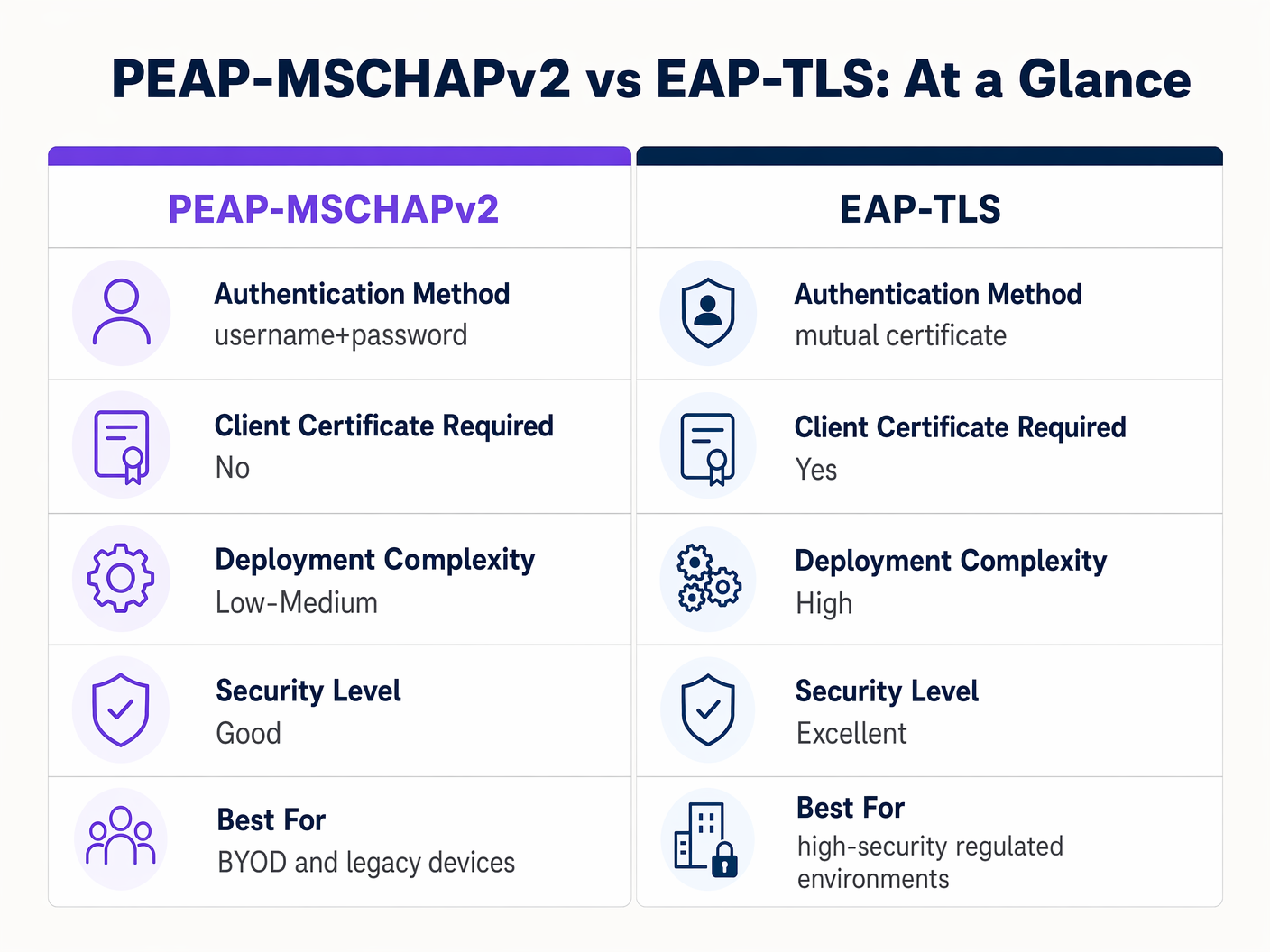
जबकि EAP-TLS बेहतर सुरक्षा प्रदान करता है, इसके लिए क्लाइंट सर्टिफिकेट जारी करने और प्रबंधित करने के लिए एक मजबूत पब्लिक की इंफ्रास्ट्रक्चर (PKI) की आवश्यकता होती है। अत्यधिक विनियमित वातावरण के लिए, EAP-TLS लक्षित आर्किटेक्चर है। PKI परिपक्वता की कमी वाले संगठनों के लिए, कड़ाई से कॉन्फ़िगर किया गया PEAP-MSCHAPv2 डिप्लॉयमेंट एक बचाव योग्य विकल्प बना हुआ है।
समस्या निवारण और जोखिम न्यूनीकरण
अच्छी तरह से आर्किटेक्ट किए गए PEAP डिप्लॉयमेंट भी परिचालन विफलताओं का अनुभव कर सकते हैं। त्वरित समाधान के लिए सामान्य विफलता मोड को समझना आवश्यक है।
सर्टिफिकेट समाप्ति का संकट
PEAP वातावरण में सबसे विघटनकारी घटना RADIUS सर्वर सर्टिफिकेट की अप्रबंधित समाप्ति है। जब सर्टिफिकेट समाप्त हो जाता है, तो सत्यापन लागू करने वाले सभी क्लाइंट तुरंत कनेक्शन छोड़ देंगे, जिसके परिणामस्वरूप पूरे नेटवर्क में आउटेज हो जाएगा।
न्यूनीकरण: RADIUS सर्वर सर्टिफिकेट के लिए स्वचालित निगरानी लागू करें। समाप्ति से कम से कम 30 दिन पहले नए सर्टिफिकेट को नवीनीकृत और तैनात करने के लिए एक मानक संचालन प्रक्रिया स्थापित करें। यदि आंतरिक CA का उपयोग कर रहे हैं, तो सुनिश्चित करें कि CA पदानुक्रम (hierarchy) की भी निगरानी की जा रही है।
पासवर्ड नीति और ऑफ़लाइन क्रैकिंग
हालांकि TLS टनल पारगमन (transit) में MSCHAPv2 एक्सचेंज की सुरक्षा करती है, यदि कोई हमलावर गलत तरीके से कॉन्फ़िगर किए गए क्लाइंट के कारण सफलतापूर्वक एक दुष्ट AP हमला करता है, तो वे चैलेंज-रिस्पॉन्स पेयर को कैप्चर कर लेंगे। शोध ने साबित किया है कि MSCHAPv2 हैश को ऑफ़लाइन क्रैक किया जा सकता है।
न्यूनीकरण: अंतर्निहित उपयोगकर्ता पासवर्ड की जटिलता रक्षा की अंतिम पंक्ति है। ऑफ़लाइन क्रैकिंग की कम्प्यूटेशनल लागत को बढ़ाने के लिए सख्त पासवर्ड नीतियां—न्यूनतम लंबाई की आवश्यकताएं, जटिलता नियम और नियमित रोटेशन—लागू करें।
ROI और व्यावसायिक प्रभाव
PSK से उचित रूप से प्रबंधित PEAP 802.1X डिप्लॉयमेंट में संक्रमण कई आयामों में मापने योग्य व्यावसायिक मूल्य प्रदान करता है।
- कम प्रशासनिक ओवरहेड: WiFi ऑथेंटिकेशन को सीधे कॉर्पोरेट आइडेंटिटी प्रोवाइडर (जैसे, Active Directory) के साथ एकीकृत करने से ऑनबोर्डिंग और ऑफबोर्डिंग स्वचालित हो जाती है। जब कोई कर्मचारी जाता है, तो उनके डायरेक्टरी खाते को अक्षम करने से तुरंत नेटवर्क एक्सेस रद्द हो जाता है, जिससे साझा पासवर्ड को बदलने की आवश्यकता समाप्त हो जाती है।
- उन्नत ऑडिटेबिलिटी: 802.1X नेटवर्क एक्सेस में विस्तृत, उपयोगकर्ता-स्तरीय दृश्यता प्रदान करता है। IT टीमें निश्चित रूप से नेटवर्क गतिविधि को विशिष्ट व्यक्तियों तक ट्रैक कर सकती हैं, जो PCI-DSS और GDPR जैसे अनुपालन ढांचे के लिए एक महत्वपूर्ण आवश्यकता है।
- जोखिम न्यूनीकरण: साझा कीज़ से दूर जाकर, संगठन पूर्व कर्मचारियों या दुर्भावनापूर्ण अभिनेताओं द्वारा अनधिकृत पहुंच के जोखिम को काफी कम करते हैं, जिससे बौद्धिक संपदा और संवेदनशील कॉर्पोरेट डेटा की रक्षा होती है।
उन संगठनों के लिए जो अपनी वायरलेस सुरक्षा के साथ-साथ अपने व्यापक नेटवर्क आर्किटेक्चर को अनुकूलित करना चाहते हैं, आधुनिक WAN समाधानों की खोज करने की अत्यधिक अनुशंसा की जाती है। आधुनिक व्यवसायों के लिए मुख्य SD WAN लाभ के बारे में अधिक जानें।
मुख्य परिभाषाएं
PEAP (Protected Extensible Authentication Protocol)
एक 802.1X ऑथेंटिकेशन प्रोटोकॉल जो एक सुरक्षित TLS टनल के भीतर एक इनर ऑथेंटिकेशन विधि (आमतौर पर MSCHAPv2) को समाहित करता है।
सुरक्षा और तैनाती में आसानी के संतुलन के कारण एंटरप्राइज WiFi ऑथेंटिकेशन के लिए प्रमुख मानक।
802.1X
पोर्ट-आधारित नेटवर्क एक्सेस कंट्रोल के लिए IEEE मानक, जो LAN या WLAN से जुड़ने के इच्छुक उपकरणों को एक ऑथेंटिकेशन तंत्र प्रदान करता है।
वह मूलभूत ढांचा जिसके भीतर PEAP और EAP-TLS जैसे प्रोटोकॉल काम करते हैं।
EAPOL (EAP over LAN)
स्थानीय क्षेत्र नेटवर्क पर EAP संदेशों को समाहित करने के लिए उपयोग किया जाने वाला प्रोटोकॉल, जिसका उपयोग 802.1X ऑथेंटिकेशन के प्रारंभिक चरणों के दौरान किया जाता है।
वह तंत्र जिसके द्वारा नेटवर्क पोर्ट पूरी तरह से खुलने से पहले क्लाइंट और एक्सेस पॉइंट संवाद करते हैं।
Supplicant
नेटवर्क तक पहुंच का अनुरोध करने वाला क्लाइंट डिवाइस (लैपटॉप, स्मार्टफोन)।
वह एंडपॉइंट जिसे PEAP डिप्लॉयमेंट में सर्वर सर्टिफिकेट को सत्यापित करने के लिए सही ढंग से कॉन्फ़िगर किया जाना चाहिए।
Authenticator
वह नेटवर्क डिवाइस (एक्सेस पॉइंट या स्विच) जो सप्लीकेंट और RADIUS सर्वर के बीच ऑथेंटिकेशन प्रक्रिया को सुगम बनाता है।
वह प्रवर्तन बिंदु (enforcement point) जो ऑथेंटिकेशन सफल होने तक ट्रैफ़िक को ब्लॉक करता है।
RADIUS (Remote Authentication Dial-In User Service)
एक नेटवर्किंग प्रोटोकॉल जो केंद्रीकृत ऑथेंटिकेशन, ऑथराइजेशन और अकाउंटिंग (AAA) प्रबंधन प्रदान करता है।
वह सर्वर जो उपयोगकर्ता के क्रेडेंशियल्स को सत्यापित करता है और अंतिम स्वीकार/अस्वीकार का निर्णय जारी करता है।
MSCHAPv2
Microsoft द्वारा विकसित एक चैलेंज-रिस्पॉन्स ऑथेंटिकेशन प्रोटोकॉल, जिसे आमतौर पर PEAP के भीतर इनर ऑथेंटिकेशन विधि के रूप में उपयोग किया जाता है।
वह प्रोटोकॉल जो वास्तव में यूज़रनेम और पासवर्ड को सत्यापित करता है, लेकिन क्रिप्टोग्राफ़िक कमजोरियों के कारण PEAP TLS टनल की सुरक्षा की आवश्यकता होती है।
EAP-TLS
एक EAP विधि जिसमें क्लाइंट और सर्वर दोनों पर डिजिटल सर्टिफिकेट का उपयोग करके पारस्परिक ऑथेंटिकेशन की आवश्यकता होती है।
PEAP का अत्यधिक सुरक्षित विकल्प, जिसके लिए PKI डिप्लॉयमेंट की आवश्यकता होती है लेकिन पासवर्ड-आधारित कमजोरियों को समाप्त करता है।
हल किए गए उदाहरण
एक 300-बेड वाले लक्जरी होटल को अपने बैक-ऑफ-हाउस स्टाफ WiFi नेटवर्क को सुरक्षित करने की आवश्यकता है। वर्तमान में, वे एक एकल WPA2-Personal पासवर्ड का उपयोग करते हैं जिसे तीन वर्षों से नहीं बदला गया है क्योंकि सभी पॉइंट-ऑफ-सेल टर्मिनलों और स्टाफ टैबलेट को अपडेट करने में परिचालन संबंधी व्यवधान उत्पन्न होगा। इसे हल करने के लिए उन्हें PEAP को कैसे लागू करना चाहिए?
होटल को PEAP-MSCHAPv2 का उपयोग करके एक 802.1X आर्किटेक्चर तैनात करना चाहिए, जो एक RADIUS सर्वर (जैसे, Microsoft NPS) के माध्यम से अपने वायरलेस LAN कंट्रोलर को अपने केंद्रीय Active Directory के साथ एकीकृत करता है। उन्हें सभी स्टाफ टैबलेट और POS टर्मिनलों पर एक मानकीकृत वायरलेस प्रोफ़ाइल भेजने के लिए अपने MDM प्लेटफ़ॉर्म का उपयोग करना चाहिए। इस प्रोफ़ाइल को स्पष्ट रूप से सर्वर सर्टिफिकेट सत्यापन लागू करना चाहिए, जो NPS सर्वर के सर्टिफिकेट को जारी करने वाले CA को पिन करता है। कर्मचारी अपने व्यक्तिगत AD क्रेडेंशियल्स का उपयोग करके ऑथेंटिकेट करेंगे।
एक बड़ी रिटेल श्रृंखला 500 स्थानों पर स्टोर प्रबंधकों को कॉर्पोरेट लैपटॉप वितरित कर रही है। वे PEAP-MSCHAPv2 का उपयोग करना चाहते हैं लेकिन इतने सारे स्थानों पर RADIUS सर्टिफिकेट प्रबंधित करने के प्रशासनिक बोझ को लेकर चिंतित हैं।
प्रत्येक स्टोर पर स्थानीय RADIUS सर्वर तैनात करने के बजाय, रिटेलर को अपने क्लाउड आइडेंटिटी प्रोवाइडर (जैसे, Azure AD या Okta) के साथ एकीकृत क्लाउड-होस्टेड RADIUS समाधान का उपयोग करना चाहिए। सभी 500 स्थानों पर एक्सेस पॉइंट क्लाउड RADIUS एंडपॉइंट्स की ओर इशारा करते हैं। क्लाउड RADIUS सर्वर पर एक एकल, विश्व स्तर पर विश्वसनीय सार्वजनिक सर्टिफिकेट का उपयोग किया जाता है, और लैपटॉप पर तैनात MDM पेलोड इस विशिष्ट सार्वजनिक सर्टिफिकेट को पिन करता है।
अभ्यास प्रश्न
Q1. आप एक अस्पताल के WiFi नेटवर्क का ऑडिट कर रहे हैं। वे स्टाफ उपकरणों के लिए PEAP-MSCHAPv2 का उपयोग करते हैं। आपकी समीक्षा के दौरान, आप देखते हैं कि iPads पर भेजे गए MDM प्रोफ़ाइल में 'Validate Server Certificate' चेक नहीं किया गया है। तत्काल जोखिम क्या है?
संकेत: विचार करें कि क्या होता है यदि कोई हमलावर अस्पताल के SSID को प्रसारित करने वाला उपकरण स्थापित करता है।
मॉडल उत्तर देखें
तत्काल जोखिम एक दुष्ट एक्सेस पॉइंट (Evil Twin) हमला है। चूंकि iPads सर्वर सर्टिफिकेट को सत्यापित नहीं कर रहे हैं, वे सही SSID प्रसारित करने वाले किसी भी AP के साथ ऑथेंटिकेट करने का प्रयास करेंगे। एक हमलावर MSCHAPv2 हैंडशेक को इंटरसेप्ट कर सकता है और स्टाफ के पासवर्ड को ऑफ़लाइन क्रैक करने का प्रयास कर सकता है, जिससे क्रेडेंशियल से समझौता हो सकता है।
Q2. एक विश्वविद्यालय का IT विभाग अपने छात्र नेटवर्क को प्री-शेयर्ड की (PSK) से 802.1X पर स्थानांतरित करने की योजना बना रहा है। वे अधिकतम सुरक्षा के लिए EAP-TLS का उपयोग करना चाहते हैं लेकिन हेल्पडेस्क टीम के विरोध का सामना कर रहे हैं। इस परिदृश्य में PEAP-MSCHAPv2 अधिक व्यावहारिक विकल्प क्यों हो सकता है?
संकेत: विश्वविद्यालय के वातावरण में डिवाइस स्वामित्व मॉडल पर विचार करें।
मॉडल उत्तर देखें
एक विश्वविद्यालय में, उपकरण अप्रबंधित (BYOD) होते हैं। EAP-TLS को तैनात करने के लिए प्रत्येक छात्र के व्यक्तिगत लैपटॉप, फोन और टैबलेट पर एक अद्वितीय क्लाइंट सर्टिफिकेट जारी करने और स्थापित करने की आवश्यकता होती है। यह हेल्पडेस्क के लिए एक बड़ा समर्थन बोझ प्रस्तुत करता है। PEAP-MSCHAPv2 के लिए छात्रों को केवल अपना मौजूदा विश्वविद्यालय यूज़रनेम और पासवर्ड दर्ज करने की आवश्यकता होती है, जिससे ऑनबोर्डिंग काफी आसान हो जाती है और फिर भी PSK की तुलना में एक बड़ा सुरक्षा अपग्रेड मिलता है।
Q3. आपके संगठन का RADIUS सर्वर सर्टिफिकेट 14 दिनों में समाप्त हो रहा है। यह एक सार्वजनिक CA द्वारा जारी किया गया है। PEAP-MSCHAPv2 वायरलेस नेटवर्क में कोई व्यवधान न हो, यह सुनिश्चित करने के लिए आपको क्या कदम उठाने चाहिए?
संकेत: विचार करें कि सप्लीकेंट्स वर्तमान में किस पर भरोसा करने के लिए कॉन्फ़िगर किए गए हैं।
मॉडल उत्तर देखें
आपको सार्वजनिक CA से नया सर्टिफिकेट प्राप्त करना होगा और इसे RADIUS सर्वर पर स्थापित करना होगा। महत्वपूर्ण रूप से, आपको MDM वायरलेस प्रोफाइल की समीक्षा करनी होगी। यदि प्रोफाइल विशिष्ट पुराने सर्टिफिकेट से पिन किए गए हैं, तो पुराने सर्टिफिकेट की समाप्ति से पहले उन्हें नए सर्टिफिकेट पर भरोसा करने के लिए अपडेट किया जाना चाहिए। यदि प्रोफाइल केवल रूट CA को पिन करते हैं, और नया सर्टिफिकेट उसी रूट CA द्वारा जारी किया जाता है, तो संक्रमण निर्बाध होना चाहिए, लेकिन इसका परीक्षण किया जाना चाहिए।
इस श्रृंखला में आगे पढ़ें
विक्रेता द्वारा प्रति-डिवाइस PSK: iPSK, DPSK, MPSK और PPSK की तुलना (और WPA3 सपोर्ट)
Cisco Meraki, HPE Aruba, Ruckus, Juniper Mist, Extreme, Fortinet, और Ubiquiti UniFi में प्रति-डिवाइस PSK कार्यान्वयन की एक व्यापक तुलना। जानें कि WPA3-SAE प्रति-डिवाइस कुंजी रणनीतियों को कैसे प्रभावित करता है और कब ट्रांज़िशन मोड को लागू करना चाहिए बनाम 802.1X पर जाना चाहिए।
कैप्टिव पोर्टल प्रमाणीकरण विधियों की तुलना
यह आधिकारिक तकनीकी संदर्भ गाइड पांच मुख्य कैप्टिव पोर्टल प्रमाणीकरण विधियों के आर्किटेक्चरल, परिचालन और अनुपालन ट्रेड-ऑफ का मूल्यांकन करती है। यह नेटवर्क आर्किटेक्ट्स, IT निदेशकों और मार्केटिंग प्रबंधकों को एंटरप्राइज़ वेन्यू में डेटा-संग्रह आवश्यकताओं के साथ गेस्ट ऑनबोर्डिंग घर्षण को संतुलित करने के लिए आवश्यक मात्रात्मक डेटा और निर्णय ढांचे प्रदान करती है।
MAC Address Authentication क्या है? इसका उपयोग कब करें और कब बचें
यह आधिकारिक तकनीकी संदर्भ गाइड एंटरप्राइज़ WiFi वातावरण में MAC एड्रेस ऑथेंटिकेशन को कवर करती है — लेयर 2 पर RADIUS-आधारित MAC ऑथेंटिकेशन कैसे काम करता है, इसकी अंतर्निहित सुरक्षा कमजोरियां (जिसमें MAC स्पूफिंग और OS-स्तरीय MAC रैंडमाइज़ेशन का प्रभाव शामिल है), और सटीक परिचालन संदर्भ जहां यह IoT और हेडलेस डिवाइसों के प्रबंधन के लिए एक वैध उपकरण बना हुआ है। यह हॉस्पिटैलिटी, रिटेल, हेल्थकेयर और सार्वजनिक क्षेत्र के स्थानों में IT प्रबंधकों और नेटवर्क आर्किटेक्ट्स के लिए कार्रवाई योग्य डिप्लॉयमेंट मार्गदर्शन प्रदान करता है, जिसमें वास्तविक दुनिया के काम किए गए उदाहरण, निर्णय ढांचे और Purple के अतिथि WiFi और एनालिटिक्स प्लेटफ़ॉर्म के लिए एकीकरण संदर्भ शामिल हैं।