
चरण-दर-चरण मार्गदर्शिका: अतिथि WiFi Captive Portals के लिए Ruijie वायरलेस कंट्रोलर को कॉन्फ़िगर करना
यह मार्गदर्शिका एंटरप्राइज-ग्रेड अतिथि WiFi Captive Portals को तैनात करने के लिए Ruijie वायरलेस कंट्रोलर और गेटवे को कॉन्फ़िगर करने के लिए एक संपूर्ण तकनीकी विवरण प्रदान करती है। इसमें VLAN सेगमेंटेशन, WISPr प्रोटोकॉल के माध्यम से बाहरी RADIUS प्रमाणीकरण, वॉल्ड गार्डन कॉन्फ़िगरेशन, और आतिथ्य, खुदरा और सार्वजनिक-क्षेत्र के वातावरण में प्रथम-पक्ष डेटा कैप्चर करने और मापने योग्य व्यावसायिक मूल्य बढ़ाने के लिए Purple के पहचान-आधारित नेटवर्क प्लेटफॉर्म के साथ सहज एकीकरण शामिल है।
इस गाइड को सुनें
पॉडकास्ट ट्रांसक्रिप्ट देखें
हमारी मुख्य श्रृंखला का हिस्सा: Captive Portal मार्गदर्शिका →

कार्यकारी सारांश (Executive Summary)
वितरित उद्यमों में गेस्ट WiFi को तैनात करने में केवल एक ओपन SSID प्रदान करने से कहीं अधिक शामिल है। IT प्रबंधकों और नेटवर्क आर्किटेक्ट्स के लिए, चुनौती सख्त सुरक्षा, GDPR अनुपालन और डेटा अधिग्रहण आवश्यकताओं के साथ निर्बाध पहुंच को संतुलित करने में है। यह गाइड Ruijie वायरलेस कंट्रोलर और गेटवे का उपयोग करके एक सुरक्षित, स्केलेबल Captive Portal को तैनात करने के लिए आवश्यक विशिष्ट कॉन्फ़िगरेशन चरणों का विवरण देती है, जो यह दर्शाती है कि इस इंफ्रास्ट्रक्चर को Purple के Guest WiFi प्लेटफॉर्म के साथ एकीकृत करने से बुनियादी वायरलेस कनेक्टिविटी एक अनुपालन और राजस्व-उत्पादक संपत्ति में कैसे बदल जाती है।
हम तकनीकी आवश्यकताओं, VLAN अलगाव रणनीतियों, WISPr प्रोटोकॉल के माध्यम से बाहरी RADIUS प्रमाणीकरण, Walled Garden कॉन्फ़िगरेशन, और प्रोडक्शन-ग्रेड परिनियोजन के लिए आवश्यक विशिष्ट QoS सेटिंग्स को कवर करेंगे। चाहे आप 200 कमरों वाले होटल, 50 स्टोरों वाली रिटेल चेन, या 40,000 की क्षमता वाले स्टेडियम का प्रबंधन करते हों, यह गाइड एक सुरक्षित Ruijie Captive Portal सेटअप के लिए आधिकारिक ब्लूप्रिंट प्रदान करती है। दुनिया भर में 80,000 से अधिक सक्रिय स्थानों पर काम कर रहे और 2024 में 440 मिलियन लॉगिन को प्रोसेस करने वाले (Purple का आंतरिक डेटा), यहाँ वर्णित एकीकरण पैटर्न बड़े पैमाने पर सिद्ध हुए हैं।
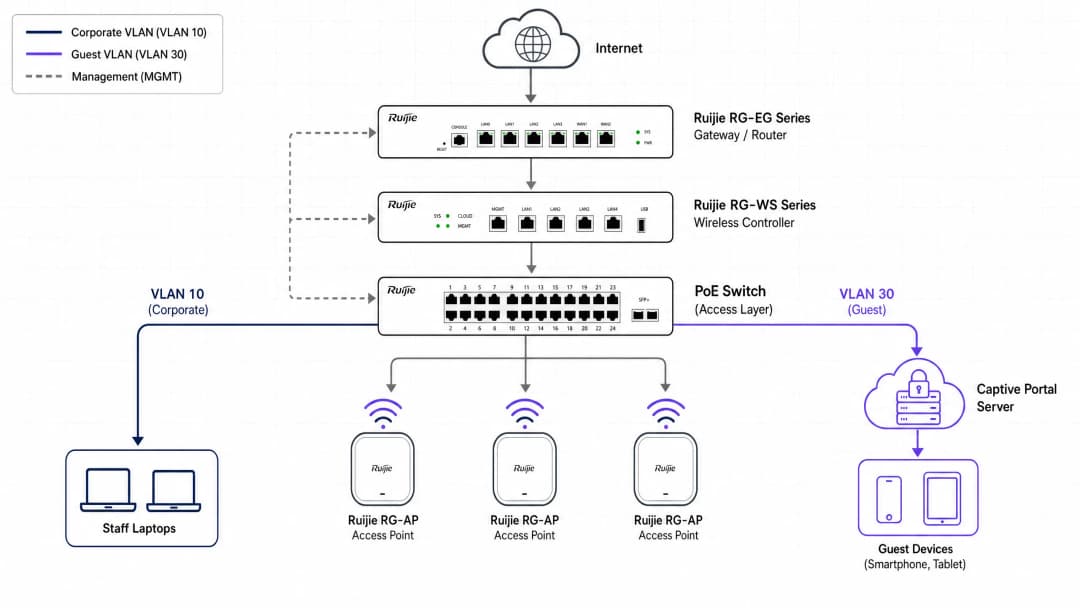
तकनीकी आर्किटेक्चर और आवश्यकताएं
अपने Ruijie कंट्रोलर को संशोधित करने से पहले, सही नेटवर्क आर्किटेक्चर स्थापित करें। एक सुरक्षित गेस्ट नेटवर्क को Layer 2 (स्विच स्तर) पर कॉर्पोरेट ट्रैफ़िक से पूर्ण अलगाव की आवश्यकता होती है।
नेटवर्क सेगमेंटेशन
सुरक्षित गेस्ट WiFi का आधारशिला VLAN अलगाव है। आपको Ruijie गेटवे या कोर स्विच पर एक समर्पित गेस्ट VLAN बनाना होगा। यह सुनिश्चित करता है कि गेस्ट ट्रैफ़िक कभी भी आंतरिक प्रणालियों, भुगतान टर्मिनलों या कर्मचारियों के उपकरणों के साथ न टकराए। Ruijie परिनियोजन के लिए एक मानक उद्यम VLAN योजना नीचे दिखाई गई है:
| VLAN ID | उद्देश्य | नोट्स |
|---|---|---|
| 10 | कॉर्पोरेट | कर्मचारी उपकरण, आंतरिक सर्वर |
| 20 | वॉयस | VoIP फोन |
| 30 | गेस्ट | Captive Portal, केवल-इंटरनेट |
| 40 | IoT | प्रिंटर, स्मार्ट टीवी, सेंसर |
| 99 | प्रबंधन | कंट्रोलर, स्विच प्रबंधन |
उपभोक्ता-ग्रेड दृष्टिकोण यहाँ क्यों विफल हो जाते हैं, इस बारे में अधिक जानकारी के लिए, Why consumer-grade WiFi gear is not for your guest network पढ़ें।
आवश्यक घटक
इस परिनियोजन को पूरा करने के लिए, आपको आवश्यकता होगी:
- एक Ruijie Cloud खाता या एक ऑन-प्रिमाइसेस Ruijie RG-WS श्रृंखला वायरलेस कंट्रोलर (जैसे, RG-WS6008 या RG-WS7110)।
- एक Ruijie RG-EG श्रृंखला गेटवे - WISPr के माध्यम से बाहरी पोर्टल प्रमाणीकरण के लिए आवश्यक।
- Ruijie RG-AP श्रृंखला एक्सेस पॉइंट्स (जैसे, RG-AP820-I, RG-AP850-AR)।- एक Purple Connect, Capture, या Engage लाइसेंस।
- गेटवे से Purple सर्वर तक पोर्ट 1812 (RADIUS प्रमाणीकरण) और 1813 (RADIUS एकाउंटिंग) के लिए आउटबाउंड UDP एक्सेस की अनुमति।
प्रमाणीकरण प्रोटोकॉल अवलोकन
Ruijie कई प्रमाणीकरण विधियों का समर्थन करता है। एंटरप्राइज-ग्रेड डिप्लॉयमेंट को बाहरी RADIUS प्रमाणीकरण का उपयोग करना चाहिए। यह विधि WISPr (वायरलेस इंटरनेट सर्विस प्रोवाइडर रोमिंग) प्रोटोकॉल का उपयोग करके अप्रमाणित उपयोगकर्ताओं को Purple के Splash Page पर सुरक्षित रूप से रीडायरेक्ट करती है, उनके क्रेडेंशियल्स को प्रोसेस करती है, और Ruijie कंट्रोलर को RADIUS Accept या Reject संदेश वापस भेजती है।
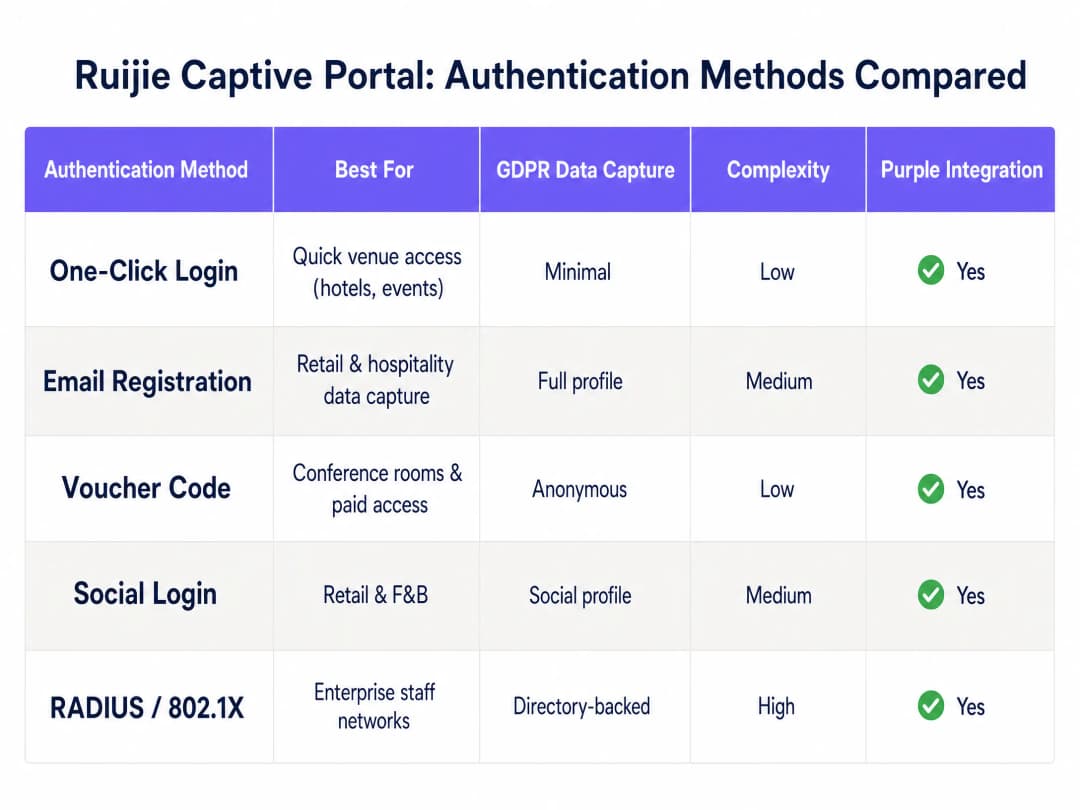
ऊपर दी गई तालिका Ruijie प्लेटफॉर्म द्वारा दी जाने वाली पांच प्रमाणीकरण विधियों का सारांश प्रस्तुत करती है। हॉस्पिटैलिटी और रिटेल परिवेशों के लिए ईमेल साइन-अप और सोशल मीडिया लॉग इन सबसे आम विकल्प हैं, क्योंकि वे व्यवस्थित, GDPR-अनुरूप फर्स्ट-पार्टी डेटा कैप्चर करते हैं। वाउचर कोड मीटिंग रूम और सशुल्क एक्सेस स्तरों के लिए उपयुक्त हैं। 802.1X के साथ RADIUS विशेष रूप से स्टाफ नेटवर्क के लिए आरक्षित है जिसके लिए डायरेक्टरी-समर्थित प्रमाणीकरण की आवश्यकता होती है।
चरण-दर-चरण कार्यान्वयन गाइड
कृपया Ruijie क्लाउड या ऑन-प्रिमाइसेस कंट्रोलर इंटरफ़ेस में निम्नलिखित चरणों को निष्पादित करें। नीचे दिए गए UI पथ नए Ruijie क्लाउड इंटरफ़ेस (2024 के बाद) और Ruijie JaCS प्लेटफ़ॉर्म पर लागू होते हैं।
चरण 1: गेस्ट SSID कॉन्फ़िगर करें
वायरलेस ब्रॉडकास्ट नेटवर्क स्थापित करें।
- Ruijie क्लाउड या ऑन-प्रिमाइसेस कंट्रोलर वेब इंटरफ़ेस पर लॉग इन करें।
- Device Config पर जाएं, और वायरलेस अनुभाग के अंतर्गत WiFi चुनें।
- एक नया SSID बनाने के लिए + पर क्लिक करें, या किसी मौजूदा SSID को संपादित करें।
- SSID Name सेट करें (जैसे, "Free Guest WiFi")।
- Security Mode को Open पर सेट करें - कोई प्री-शेयर्ड कुंजी नहीं।
- SSID को अपने समर्पित गेस्ट VLAN (जैसे, VLAN 30) पर असाइन करें।
- SSID कॉन्फ़िगरेशन सहेजें।
चरण 2: Captive Portal पॉलिसी को परिभाषित करें
गेस्ट ट्रैफ़िक को रोकने और उसे Purple पर रीडायरेक्ट करने के लिए कंट्रोलर को निर्देश दें।
- Auth & Account पर जाएं, और प्रमाणीकरण के अंतर्गत Captive Portal चुनें।
- एक नई पॉलिसी बनाएं। एक वर्णनात्मक Policy Name सेट करें (जैसे, "Purple-Guest-Portal")।
- Policy Mode को External पर सेट करें।
- Authentication Device को अपने Ruijie गेटवे (RG-EG श्रृंखला) या एक्सेस पॉइंट पर सेट करें।
- चरण 1 में बनाए गए गेस्ट SSID को चुनें।
- Portal Server URL फ़ील्ड में, अपना विशिष्ट Purple Splash Page URL दर्ज करें (जो Purple नियंत्रण कक्ष में 'हार्डवेयर कॉन्फ़िगरेशन' के अंतर्गत मिलता है)।
- निर्दिष्ट फ़ील्ड में Purple RADIUS सर्वर IP पते दर्ज करें।
- अपनी सत्र टाइमआउट नीति से मिलान करने के लिए Seamless Online अवधि सेट करें (जैसे हॉस्पिटैलिटी के लिए 24 घंटे, रिटेल के लिए 1 घंटा)।
- Portal Escape व्यवहार निर्धारित करें - नीचे "सर्वोत्तम अभ्यास" अनुभाग देखें।
चरण 3: Walled Garden (अनुमति सूची) कॉन्फ़िगर करें
एक Captive Portal तब तक सभी ट्रैफ़िक को रोकता है जब तक कि कोई उपयोगकर्ता प्रमाणित नहीं हो जाता। लॉगिन पेज को लोड करने और सोशल मीडिया लॉगिन को प्रोसेस करने के लिए प्री-ऑथेंटिकेशन चरण में कुछ ट्रैफ़िक की अनुमति दी जानी चाहिए। यह किसी भी Captive Portal परिनियोजन का सबसे आम गलत कॉन्फ़िगर किया गया हिस्सा है।
- Auth & Account पर जाएं और Allowlist चुनें।
- सभी आवश्यक Purple इंफ्रास्ट्रक्चर डोमेन जोड़ें। आपका Purple डैशबोर्ड आपके क्षेत्र के लिए विशिष्ट सूची प्रदान करता है।
- यदि सोशल मीडिया लॉगिन की पेशकश कर रहे हैं, तो प्रत्येक प्रदाता के लिए OAuth डोमेन जोड़ें:
- Microsoft Entra ID के लिए:
*.microsoft.com,*.microsoftonline.com,login.live.com - Google Workspace के लिए:
*.google.com,accounts.google.com - Okta के लिए: आपका विशिष्ट Okta टेनेंट डोमेन
- Microsoft Entra ID के लिए:
- यदि सशुल्क WiFi योजनाओं की पेशकश कर रहे हैं, तो कोई भी भुगतान प्रोसेसर डोमेन जोड़ें।
- Allowlist को सहेजें और लागू करें।
चरण 4: RADIUS प्रमाणीकरण कॉन्फ़िगर करें
Ruijie और Purple के बीच सुरक्षित संचार चैनल कॉन्फ़िगर करें।
- अपने Ruijie कंट्रोलर या गेटवे में RADIUS सर्वर सेटिंग्स पर जाएं।
- प्रमाणीकरण के लिए Purple प्राथमिक RADIUS सर्वर IP एड्रेस और पोर्ट 1812 जोड़ें।
- फ़ेलओवर के लिए Purple द्वितीयक RADIUS सर्वर IP एड्रेस जोड़ें।
- अपने Purple डैशबोर्ड से Shared Secret दर्ज करें। यह बिल्कुल मेल खाना चाहिए।
- पोर्ट 1813 पर अकाउंटिंग सर्वर जोड़ें और RADIUS अकाउंटिंग सक्षम करें। यह सेशन की अवधि और डेटा उपयोग को ट्रैक करता है, जो सीधे Purple की WiFi Analytics रिपोर्टिंग में वापस फीड होता है।
- Purple के एनालिटिक्स में ट्रैफ़िक को अलग करने के लिए NAS Identifier को एक सार्थक स्ट्रिंग (जैसे आपके स्थान का नाम) पर सेट करें।
चरण 5: QoS नीतियां लागू करें
अप्रतिबंधित गेस्ट एक्सेस पीक आवर्स के दौरान आपके इंटरनेट लिंक को संतृप्त कर सकता है।
- अपने Ruijie गेटवे के QoS या बैंडविड्थ प्रबंधन अनुभाग पर जाएं।
- प्रति-उपयोगकर्ता डाउनलोड सीमाएं सेट करें (जैसे होटल के मेहमानों के लिए 10 Mbps, रिटेल ग्राहकों के लिए 5 Mbps)।
- प्रति-उपयोगकर्ता अपलोड सीमाएं सेट करें (जैसे 2 - 5 Mbps)।
- यदि पोर्टल सर्वर अस्थायी रूप से अनुपलब्ध है तो यह सुनिश्चित करने के लिए कि अप्रमाणित उपयोगकर्ता नेटवर्क तक नहीं पहुंच सकते हैं, Client Escape को अक्षम करें।
- कॉन्फ़िगरेशन सहेजें और सभी प्रासंगिक डिवाइसों पर पुश करें।
चरण 6: परिनियोजन का परीक्षण करें
हमेशा बिना किसी कैश्ड क्रेडेंशियल वाले एक नए डिवाइस का उपयोग करके परीक्षण करें।
- एक मोबाइल डिवाइस को गेस्ट SSID से कनेक्ट करें।
- एक ब्राउज़र खोलें और एक गैर-HTTPS URL (जैसे
http://example.com) पर जाएं। पोर्टल पेज को रीडायरेक्ट होना चाहिए। - सत्यापित करें कि Purple स्प्लैश पेज सही ढंग से लोड हो रहा है।
- प्रमाणीकरण प्रक्रिया पूरी करें।
- पुष्टि करें कि प्रमाणीकरण के बाद इंटरनेट एक्सेस प्रदान किया गया है।
- यह पुष्टि करने के लिए Purple डैशबोर्ड की जांच करें कि सेशन आपके एनालिटिक्स में दिखाई दे रहा है।
अपने विशिष्ट सेटअप को लेकर कोई सवाल हैं?
हमारी टीम 80,000 से अधिक वेन्यू में वेन्यू ऑपरेटरों, IT मैनेजरों और नेटवर्क इंजीनियरों के साथ काम करती है। 20 मिनट का कॉल बुक करें और हम आपको दिखाएंगे कि आपके जैसे अन्य लोगों ने इसे कैसे हल किया।
एंटरप्राइज परिनियोजन सर्वोत्तम प्रथाएं
सुरक्षा और अनुपालन
गैस्ट एक्सेस के लिए कभी भी शेयर्ड PSKs पर निर्भर न रहें। शेयर्ड पासवर्ड कोई ऑडिट ट्रेल प्रदान नहीं करते हैं और उन्हें व्यक्तिगत स्तर पर रद्द भी नहीं किया जा सकता है। व्यक्तिगत प्रमाणीकरण के साथ Purple Captive Portal का उपयोग करके, आप डेटा प्रोसेसिंग के लिए स्पष्ट सहमति अनिवार्य कर सकते हैं, जिससे GDPR Article 7 की आवश्यकताएं पूरी होती हैं। Purple के पास ISO 27001, GDPR, CCPA, और Cyber Essentials प्रमाणपत्र हैं, जो यह सुनिश्चित करते हैं कि डेटा कैप्चर मैकेनिज्म स्वयं ऑडिट करने योग्य है।
सुरक्षा आर्किटेक्चर के बारे में अधिक विस्तार से जानने के लिए, हमारी Enterprise WiFi Security: Complete Guide for 2026 और What is Secure WiFi: The Essential Enterprise Guide for 2026 पढ़ें।
Portal Escape: एक सुविचारित निर्णय
Ruijie का Portal Escape फीचर स्वचालित रूप से यूजर ट्रैफिक को गुजरने की अनुमति देता है यदि AP, Portal Server से कनेक्ट नहीं हो पाता है। हॉस्पिटैलिटी सेक्टर में, आप इसे सक्षम करना चुन सकते हैं - संक्षिप्त सर्वर खराबी के कारण WiFi से कनेक्ट न कर पाने वाले गैस्ट शिकायतों का कारण बनेंगे। रिटेल या हेल्थकेयर वातावरण में, आप इसे अक्षम करना चुन सकते हैं - बिना प्रमाणीकरण के एक्सेस एक अनुपालन और सुरक्षा जोखिम का प्रतिनिधित्व करता है। अपने नेटवर्क रनबुक्स में अपने निर्णय और उसके कारणों को दर्ज करें।
मल्टी-साइट निरंतरता
सभी स्थानों पर केंद्रीय रूप से कॉन्फ़िगरेशन प्रबंधित करने के लिए Ruijie Cloud का उपयोग करें। साइटों के बीच कॉन्फ़िगरेशन ड्रिफ्ट को खत्म करने के लिए पोर्टल नीतियों को एक साथ पुश करें - जो वितरित संपत्तियों में असंगत गैस्ट अनुभवों का सबसे आम कारण है। Purple का क्लाउड ओवरले भी इसी सिद्धांत पर काम करता है: एक डैशबोर्ड, सभी स्थान।
फर्मवेयर प्रबंधन
कुछ Ruijie Captive Portal सुविधाओं, विशेष रूप से बैंडविड्थ नियंत्रण और गतिशील VLAN असाइनमेंट के लिए, आपके गेटवे पर विशिष्ट फर्मवेयर संस्करणों के चलने की आवश्यकता होती है। Ruijie इन निर्भरताओं को अपने रिलीज नोट्स में दर्ज करता है। सुनिश्चित करें कि क्लाउड-प्रबंधित परिनियोजन में पूर्ण QoS सपोर्ट के लिए आपके RG-EG गेटवे फर्मवेयर संस्करण RGOS11.9(6)B17T1 या उच्चतर पर चल रहे हों।
समस्या निवारण और जोखिम न्यूनीकरण
पोर्टल पेज लोड होने में विफल
यदि डिवाइस के कनेक्ट होने पर Captive Portal दिखाई नहीं देता है, तो सबसे पहले अपनी Walled Garden सेटिंग्स को सत्यापित करें। प्रमाणित होने से पहले डिवाइस को DNS को रीसॉल्व करने और Purple पोर्टल URL तक पहुंचने में सक्षम होना चाहिए। जांचें कि आपकी Ruijie अनुमति सूची (allowlist) में सभी आवश्यक डोमेन शामिल हैं और आपके DNS सर्वर गैस्ट VLAN से सुलभ हैं।
प्रमाणीकरण टाइमआउट
यदि उपयोगकर्ताओं को पोर्टल दिखाई देता है लेकिन वे लॉग इन नहीं कर पा रहे हैं, तो समस्या आमतौर पर RADIUS कॉन्फ़िगरेशन में होती है। RADIUS सर्वर IPs, पोर्ट्स (प्रमाणीकरण के लिए 1812, अकाउंटिंग के लिए 1813) और शेयर्ड सीक्रेट की पुष्टि करें। सुनिश्चित करें कि आपके फायरवॉल Ruijie गेटवे प्रबंधन IP से इन पोर्ट्स पर इनबाउंड और आउटबाउंड UDP ट्रैफिक की अनुमति देते हैं।
सोशल मीडिया लॉगिन अटकना
यदि उपयोगकर्ता सोशल मीडिया लॉगिन बटन पर क्लिक करते हैं और कुछ नहीं होता है, तो OAuth रीडायरेक्ट ब्लॉक है। अपनी Ruijie अनुमति सूची (allowlist) में आवश्यक सोशल मीडिया प्रदाता डोमेन जोड़ें। प्रमाणीकरण से पहले अस्थायी रूप से सभी ट्रैफिक को अनुमति देकर इसका परीक्षण करें ताकि यह पुष्टि हो सके कि पोर्टल काम करता है, फिर धीरे-धीरे अनुमति सूची को कड़ा करें।
डायनेमिक VLAN असाइनमेंट विफल होना
यदि आप उपयोगकर्ताओं को डायनेमिक रूप से VLAN में असाइन करने के लिए RADIUS का उपयोग करते हैं, तो सुनिश्चित करें कि RADIUS प्रतिक्रिया में सही VLAN विशेषताएँ (Tunnel-Type, Tunnel-Medium-Type, Tunnel-Private-Group-ID) शामिल हों। Ruijie के RG-EG310GH-E और समान गेटवे डायनेमिक VLAN असाइनमेंट का समर्थन करते हैं, लेकिन इस सुविधा के लिए RADIUS सर्वर और गेटवे दोनों पर स्पष्ट कॉन्फ़िगरेशन की आवश्यकता होती है।
ROI और व्यावसायिक प्रभाव
एक सुरक्षित Captive Portal को तैनात करना अतिथि WiFi को लागत केंद्र से एक रणनीतिक संपत्ति में बदल देता है। Purple का WiFi Analytics प्लेटफॉर्म आपके Ruijie इन्फ्रास्ट्रक्चर के साथ एकीकृत होकर फर्स्ट-पार्टी डेटा कैप्चर करने, उच्च-इरादे वाली संपर्क सूचियां बनाने और आपके स्थानों पर आने वाले मेहमानों के व्यवहार में कार्रवाई योग्य अंतर्दृष्टि प्रदान करने का काम करता है।
Harrods ने अपने लॉयल्टी कार्यक्रम को बढ़ावा देने के लिए Purple के गेस्ट WiFi का उपयोग किया, जिससे उद्योग-अग्रणी ऑप्ट-इन दर और 57 गुना ROI प्राप्त हुआ (Purple ग्राहक डेटा)। c2c Rail ने सीधे बुकिंग को प्रोत्साहित करने के लिए Purple का उपयोग किया, जिससे निवेश पर 121% का रिटर्न मिला और परिचालन लागत में £76,000 की बचत हुई (Purple ग्राहक डेटा)। Pizza Express ने समृद्ध ग्राहक प्रोफाइल बनाने के लिए 470 से अधिक रेस्तरां में Purple को तैनात किया।
hospitality ऑपरेटरों के लिए, लॉगिन के समय कैप्चर किया गया डेटा (ईमेल, जनसांख्यिकी, विज़िट की आवृत्ति) सीधे CRM सिस्टम और लॉयल्टी कार्यक्रमों में भेजा जा सकता है। retail वातावरण के लिए, बार-बार आने वाले ग्राहकों का विश्लेषण आपके उच्चतम-मूल्य वाले खरीदारों की पहचान करता है। transport केंद्रों के लिए, यात्री प्रवाह डेटा स्टाफिंग और वाणिज्यिक स्थान योजना को अनुकूलित करता है।
Purple, Cisco Meraki, HPE Aruba, Ruckus, Juniper Mist, Ubiquiti UniFi, Cambium, Extreme, Fortinet, और Ruijie के साथ एकीकृत होता है, जो इसे एक हार्डवेयर-अज्ञेयवादी क्लाउड ओवरले बनाता है जो आपके मौजूदा उपकरणों के साथ काम करता है, जिसके लिए किसी भी रिप-एंड-रिप्लेस की आवश्यकता नहीं होती है।
-
संबंधित गाइड: Grandstream GWN Access Points and Purple WiFi Integration
मुख्य परिभाषाएं
Captive portal
एक वेब पेज जिसे सार्वजनिक पहुंच नेटवर्क के उपयोगकर्ता को इंटरनेट पहुंच प्रदान करने से पहले देखना और उसके साथ इंटरैक्ट करना आवश्यक है। यह सभी HTTP ट्रैफ़िक को रोकता है और उपयोगकर्ता के ब्राउज़र को पोर्टल पेज पर रीडायरेक्ट करता है।
अतिथि WiFi नेटवर्क पर प्रमाणीकरण लागू करने का मुख्य तंत्र। पहुंच को नियंत्रित करने और सहमति प्राप्त करने के लिए होटल, खुदरा, स्टेडियम और सार्वजनिक-क्षेत्र के स्थानों में उपयोग किया जाता है।
Walled garden
एक प्री-ऑथेंटिकेशन अनुमति सूची (allowlist) जो विशिष्ट डोमेन और IP एड्रेस को Captive Portal इंटरसेप्शन को बायपास करने की अनुमति देती है। यूज़र के प्रमाणित होने से पहले इन गंतव्यों तक जाने वाले ट्रैफ़िक की अनुमति होती है।
यह यूज़र को पूरी तरह से प्रमाणित करने से पहले डिवाइसों को स्प्लैश पेज लोड करने, सोशल लॉगिन प्रदाताओं तक पहुँचने और भुगतान प्रक्रियाओं को पूरा करने की अनुमति देने के लिए आवश्यक है। यहाँ गलत कॉन्फ़िगरेशन होना Captive Portal की विफलताओं का मुख्य कारण है।
RADIUS
रिमोट ऑथेंटिकेशन डायल-इन यूज़र सर्विस। एक नेटवर्किंग प्रोटोकॉल जो नेटवर्क सेवा से जुड़ने वाले यूज़र्स के लिए केंद्रीकृत ऑथेंटिकेशन, ऑथराइजेशन और एकाउंटिंग प्रबंधन प्रदान करता है।
यह वह सुरक्षित प्रोटोकॉल है जिसका उपयोग Ruijie कंट्रोलर Purple के सर्वर के साथ संचार करने के लिए करते हैं। ऑथेंटिकेशन अनुरोध पोर्ट 1812 (UDP) पर जाते हैं; एकाउंटिंग रिकॉर्ड पोर्ट 1813 (UDP) पर जाते हैं।
WISPr
वायरलेस इंटरनेट सर्विस प्रोवाइडर रोमिंग। एक प्रोटोकॉल विनिर्देश जो यह परिभाषित करता है कि एक Captive Portal अप्रमाणित यूज़र्स को लॉगिन पेज पर कैसे रीडायरेक्ट करता है और एक्सेस कंट्रोलर ऑथेंटिकेशन परिणाम कैसे प्राप्त करता है।
बाहरी Captive Portal रीडायरेक्शन और ऑथेंटिकेशन फ्लो को संभालने के लिए Ruijie और Purple द्वारा उपयोग किया जाने वाला विशिष्ट प्रोटोकॉल फ़्रेमवर्क। Ruijie गेटवे पर बाहरी पोर्टल मोड के लिए आवश्यक है।
VLAN isolation
नेटवर्क ट्रैफ़िक को स्विच स्तर पर अलग-अलग वर्चुअल लोकल एरिया नेटवर्क में विभाजित करने की प्रक्रिया, जो विभिन्न VLAN पर मौजूद डिवाइसों को सीधे संवाद करने से रोकती है।
अतिथि नेटवर्क के लिए यह अत्यंत आवश्यक है। यह सुनिश्चित करता है कि अतिथि डिवाइस कॉर्पोरेट सर्वर, कर्मचारियों के लैपटॉप या भुगतान टर्मिनलों के साथ संवाद न कर सकें, भले ही वे एक ही भौतिक बुनियादी ढांचे से जुड़े हों।
Portal Escape
एक Ruijie सुविधा जो एक्सेस पॉइंट और पोर्टल सर्वर के पहुंच से बाहर होने पर यूज़र ट्रैफ़िक को स्वचालित रूप से मुक्त कर देती है, जिससे आउटेज के दौरान अप्रमाणित इंटरनेट एक्सेस की अनुमति मिलती है।
उपलब्धता और सुरक्षा के बीच एक सोच-समझकर किया गया समझौता। हॉस्पिटैलिटी ऑपरेटर आउटेज के दौरान मेहमानों की शिकायतों को रोकने के लिए इसे सक्षम कर सकते हैं। स्वास्थ्य सेवा और रिटेल ऑपरेटर आमतौर पर हर समय सख्त ऑथेंटिकेशन लागू करने के लिए इसे अक्षम रखते हैं।
SSID
सर्विस सेट आइडेंटिफायर। वायरलेस नेटवर्क का सार्वजनिक नाम जिसे डिवाइस अपनी उपलब्ध नेटवर्क सूची में प्रदर्शित करते हैं।
वह नेटवर्क नाम जिसे मेहमान अपने डिवाइस पर चुनते हैं, जो Captive Portal रीडायरेक्शन को ट्रिगर करता है। Ruijie परिनियोजन में प्रत्येक SSID को एक विशिष्ट VLAN और ऑथेंटिकेशन नीति से मैप किया जाता है।
QoS
क्वालिटी ऑफ़ सर्विस। तकनीकों का एक समूह जो पैकेट हानि, विलंबता और जिटर को कम करने और विशिष्ट ट्रैफ़िक प्रकारों के लिए अनुमानित प्रदर्शन सुनिश्चित करने के लिए डेटा ट्रैफ़िक का प्रबंधन करता है।
अतिथि नेटवर्क में प्रति-यूज़र बैंडविड्थ को सीमित करने के लिए उपयोग किया जाता है, जिससे किसी एकल डिवाइस को इंटरनेट लिंक को पूरी तरह से संतृप्त करने और अन्य सभी जुड़े यूज़र्स के अनुभव को खराब करने से रोका जा सके।
802.1X
पोर्ट-आधारित नेटवर्क एक्सेस कंट्रोल के लिए एक IEEE मानक, जो LAN या WLAN से जुड़ने वाले डिवाइसों के लिए एक ऑथेंटिकेशन तंत्र प्रदान करता है।
कर्मचारी नेटवर्क के लिए उपयोग किया जाता है जिन्हें निर्देशिका-आधारित पहचान की आवश्यकता होती है (जैसे, Microsoft Entra ID या Okta के माध्यम से)। आमतौर पर अतिथि नेटवर्क के लिए उपयोग नहीं किया जाता है, जहाँ RADIUS के साथ Captive Portal एक उपयुक्त पैटर्न है।
हल किए गए उदाहरण
एक 250 कमरों वाला होटल Ruijie RG-AP820-I एक्सेस पॉइंट और एक RG-EG310GH-E गेटवे का उपयोग करता है। मार्केटिंग डेटाबेस बनाने के लिए उन्हें मेहमानों को ईमेल के माध्यम से प्रमाणित करने की आवश्यकता होती है। प्रबंधन मेहमानों द्वारा पोर्टल को बायपास करने और कॉन्फ्रेंस इवेंट्स के दौरान पीक-ऑवर बैंडविड्थ संतृप्ति को लेकर चिंतित है।
IT टीम कोर स्विच पर एक समर्पित अतिथि VLAN (VLAN 40) बनाती है और इसे Ruijie गेटवे और APs से ट्रंक करती है। Ruijie क्लाउड में, वे VLAN 40 पर मैप किया गया एक ओपन SSID बनाते हैं। वे Purple डैशबोर्ड से पोर्टल सर्वर URL और RADIUS क्रेडेंशियल के साथ, Purple स्प्लैश पेज URL की ओर इशारा करते हुए एक बाहरी Captive Portal नीति कॉन्फ़िगर करते हैं। महत्वपूर्ण रूप से, वे केवल Purple के डोमेन में ट्रैफ़िक की अनुमति देने के लिए वॉल्ड गार्डन को कॉन्फ़िगर करते हैं और Ruijie गेटवे पर पोर्टल एस्केप सुविधा को अक्षम करते हैं, जिससे किसी भी पोर्टल आउटेज के दौरान अप्रमाणित पहुंच को रोका जा सके। वे एक QoS नीति लागू करते हैं जो प्रत्येक क्लाइंट को 10 Mbps डाउन और 3 Mbps अप तक सीमित करती है। कॉन्फ्रेंस इवेंट्स के दौरान, वे वाउचर-आधारित पोर्टल और प्रति डिवाइस 5 Mbps की सख्त बैंडविड्थ सीमाओं के साथ VLAN 50 पर एक अलग SSID बनाते हैं।
50 स्थानों वाली एक रिटेल चेन Ruijie WS6008 कंट्रोलर का उपयोग करती है। वे WiFi का उपयोग करने वाले खरीदारों के लिए सोशल लॉगिन (Facebook और Google Workspace) लागू करते हैं, लेकिन जब उपयोगकर्ता सोशल लॉगिन बटन पर क्लिक करते हैं तो पोर्टल पेज हैंग हो जाता है। यह समस्या एक साथ सभी 50 साइटों को प्रभावित करती है।
IT प्रबंधक ने पहचान की कि Ruijie कंट्रोलर पर अनुमति सूची (वॉल्ड गार्डन) कॉन्फ़िगरेशन में Facebook और Google द्वारा आवश्यक OAuth डोमेन गायब हैं। हालांकि Purple पोर्टल URL को सही ढंग से अनुमति दी गई थी, लेकिन OAuth हैंडशेक के लिए आवश्यक सोशल प्रदाता डोमेन Captive Portal इंटरसेप्शन द्वारा अवरुद्ध कर दिए गए थे। टीम आवश्यक वाइल्डकार्ड डोमेन - विशेष रूप से *.facebook.com, *.fbcdn.net, accounts.google.com, और *.googleapis.com - को Ruijie अनुमति सूची में जोड़ती है। वे Ruijie क्लाउड के माध्यम से एक ही ऑपरेशन में पूरे एस्टेट में समस्या का समाधान करते हुए, सभी 50 साइटों पर अपडेटेड कॉन्फ़िगरेशन को एक साथ भेजते हैं।
अभ्यास प्रश्न
Q1. आपने Ruijie RG-EG गेटवे पर एक बाहरी Captive Portal कॉन्फ़िगर किया है। मेहमान SSID से जुड़ते हैं, लेकिन उनके डिवाइस 'कोई इंटरनेट कनेक्शन नहीं' की रिपोर्ट करते हैं और पोर्टल पेज कभी लोड नहीं होता है। सबसे संभावित कॉन्फ़िगरेशन त्रुटि क्या है और आप इसे कैसे हल करेंगे?
संकेत: विचार करें कि यूज़र को लॉगिन पेज दिखाई देने से पहले कौन से नेटवर्क संचालन सफल होने चाहिए।
मॉडल उत्तर देखें
वॉल्ड गार्डन (अनुमति सूची) गलत कॉन्फ़िगर है। Ruijie गेटवे DNS रिज़ॉल्यूशन या HTTP ट्रैफ़िक को ब्लॉक कर रहा है जो बाहरी Purple स्प्लैश पेज URL तक पहुँचने के लिए आवश्यक है। ऑथेंटिकेशन से पहले, डिवाइस को पोर्टल डोमेन को रिज़ॉल्व करने और उससे HTTP कनेक्शन बनाने में सक्षम होना चाहिए। Ruijie Auth & Account अनुभाग में प्री-ऑथेंटिकेशन अनुमति सूची में विशिष्ट Purple डोमेन जोड़ें। यह भी सत्यापित करें कि अतिथि VLAN के पास DHCP के माध्यम से असाइन किया गया एक मान्य DNS सर्वर है।
Q2. एक स्टेडियम IT निदेशक इवेंट के दौरान प्रशंसकों के WiFi के लिए Ruijie APs तैनात करना चाहता है। वे मार्केटिंग डेटा एकत्र करना चाहते हैं लेकिन उन्हें चिंता है कि जब गेट खुलने के पहले 30 मिनट के दौरान 10,000 प्रशंसक एक साथ कनेक्ट होंगे, तो RADIUS प्रमाणीकरण के कारण देरी होगी। डेटा कैप्चर और उपयोगकर्ता अनुभव को संतुलित करने के लिए उन्हें प्रमाणीकरण प्रवाह को कैसे डिज़ाइन करना चाहिए?
संकेत: बड़े पैमाने पर डेटा की प्रचुरता और ऑथेंटिकेशन की अड़चनों के बीच संतुलन पर विचार करें।
मॉडल उत्तर देखें
उन्हें लौटने वाले प्रशंसकों के लिए Purple के One-Click Login का उपयोग करना चाहिए, जिन्होंने पहले प्रमाणित किया है, जो फॉर्म भरने को बायपास करता है और RADIUS लोड को कम करता है। नए प्रशंसकों के लिए, सोशल लॉगिन की तुलना में एक न्यूनतम ईमेल कैप्चर फॉर्म बेहतर है, जिसके लिए अतिरिक्त OAuth राउंड-ट्रिप्स की आवश्यकता होती है। एक साथ 10,000 कनेक्शन के लिए, समवर्ती RADIUS अनुरोधों को संभालने के लिए Ruijie गेटवे का आकार निर्धारित किया जाना चाहिए - इसके लिए एक उच्च-क्षमता वाले RG-EG सीरीज गेटवे की आवश्यकता होती है। 30-दिन की सत्र अवधि के साथ Seamless Online को सक्षम करने का अर्थ है कि लौटने वाले प्रशंसक बाद के इवेंट्स में स्वचालित रूप से कनेक्ट हो जाते हैं। मुख्य भीड़ के आने से पहले शुरुआती लोगों को लिंक संतृप्त करने से रोकने के लिए QoS सीमाएं सख्त (5 Mbps प्रति डिवाइस) होनी चाहिए।
Q3. एक सुरक्षा ऑडिट के दौरान, एक पेनेट्रेशन टेस्टर Ruijie AP द्वारा प्रसारित 'Guest WiFi' SSID से कनेक्ट होने के दौरान कॉर्पोरेट फ़ाइल सर्वर तक पहुँच प्राप्त कर लेता है। गेस्ट नेटवर्क एक सही ढंग से कॉन्फ़िगर किए गए Captive Portal का उपयोग करता है। आप इस गंभीर भेद्यता को कैसे हल करेंगे?
संकेत: प्रमाणीकरण और नेटवर्क विभाजन अलग-अलग चिंताएं हैं। एक का अर्थ दूसरा नहीं है।
मॉडल उत्तर देखें
Captive Portal सही ढंग से काम कर रहा है, लेकिन VLAN आइसोलेशन गायब है या गलत तरीके से कॉन्फ़िगर किया गया है। गेस्ट SSID प्रमाणित उपयोगकर्ताओं को कॉर्पोरेट VLAN या नेटिव VLAN पर छोड़ रहा है, जिसके पास आंतरिक सर्वरों तक रूटिंग पहुंच है। आपको यह करना होगा: (1) कोर स्विच पर एक समर्पित गेस्ट VLAN (जैसे, VLAN 50) बनाएं; (2) Ruijie कंट्रोलर में Guest SSID को VLAN 50 असाइन करें; (3) APs को जोड़ने वाले स्विच पोर्ट्स को VLAN 50 की अनुमति देने वाले 802.1Q ट्रंक के रूप में कॉन्फ़िगर करें; (4) VLAN 50 और सभी कॉर्पोरेट सबनेट्स के बीच रूटिंग को ब्लॉक करने के लिए Ruijie गेटवे को कॉन्फ़िगर करें, जिससे केवल गेस्ट VLAN से इंटरनेट-बाउंड ट्रैफ़िक की अनुमति मिले। प्रमाणीकरण और नेटवर्क विभाजन स्वतंत्र नियंत्रण हैं - दोनों को सही ढंग से कॉन्फ़िगर किया जाना चाहिए।
Q4. आपके Ruijie डिप्लॉयमेंट में Portal Escape सक्षम है। Purple RADIUS सर्वर पर एक नियोजित रखरखाव विंडो के दौरान, आप देखते हैं कि मेहमान बिना प्रमाणित हुए इंटरनेट का उपयोग कर रहे हैं। क्या यह अपेक्षित व्यवहार है, और इसके अनुपालन निहितार्थ क्या हैं?
संकेत: Portal Escape के उद्देश्य और अपने GDPR दायित्वों पर विचार करें।
मॉडल उत्तर देखें
हाँ, यह Portal Escape का अपेक्षित व्यवहार है। जब पोर्टल सर्वर पहुंच से बाहर होता है, तो Ruijie कनेक्टिविटी बनाए रखने के लिए ट्रैफ़िक को स्वचालित रूप से छोड़ देता है। हालाँकि, यह एक अनुपालन अंतर पैदा करता है: उपयोगकर्ता डेटा प्रोसेसिंग के लिए सहमति दिए बिना इंटरनेट का उपयोग कर रहे हैं, जो कि GDPR आवश्यकताओं का उल्लंघन हो सकता है यदि आपकी सेवा की शर्तें या डेटा कैप्चर प्रमाणीकरण इवेंट से जुड़े हैं। उन स्थानों के लिए जहां सहमति कैप्चर करना एक कानूनी या व्यावसायिक आवश्यकता है, Portal Escape को अक्षम किया जाना चाहिए। न्यूनतम गेस्ट गतिविधि की अवधि के दौरान RADIUS सर्वर रखरखाव को शेड्यूल करें, और स्थान प्रबंधन को रखरखाव विंडो के बारे में सूचित करें। इस परिदृश्य को पूरी तरह से समाप्त करने के लिए एक फ़ेलओवर के रूप में द्वितीयक Purple RADIUS सर्वर को लागू करने पर विचार करें।
इस श्रृंखला में आगे पढ़ें
Ubiquiti UniFi गेस्ट पोर्टल रीडायरेक्ट नहीं हो रहा: कारण और समाधान
यह गाइड अतिथि स्थिति, रीडायरेक्ट, प्री-ऑथराइजेशन रूट और कंट्रोलर ऑथराइजेशन का क्रमवार पालन करके UniFi guest portal रीडायरेक्ट विफलता का पता लगाती है। यह वेन्यू IT टीमों को guest-network बनाम Hotspot के भ्रम, बाहरी पोर्टल हैंड-ऑफ़, वर्तमान UniFi OS अकाउंट आवश्यकताओं और DNS आइसोलेशन परीक्षण को हल करने के लिए एक विश्वसनीय तरीका प्रदान करती है।
Cisco Meraki splash page नहीं चल रहा है: एक ट्रबलशूटिंग फ्लोचार्ट
यह व्यावहारिक डे-टू गाइड यह पहचानती है कि Cisco Meraki splash फ्लो कहाँ विफल हुआ है: क्लाइंट ऑथराइजेशन, HTTP रीडायरेक्ट की शुरुआत, walled-garden रीचैबिलिटी या RADIUS साइन-ऑन। यह वेन्यू IT टीमों को एक नियंत्रित साक्ष्य पथ प्रदान करता है, ताकि वे लाइव एस्टेट में बड़े बदलाव किए बिना Guest WiFi को बहाल कर सकें।
एंटरप्राइज गेस्ट WiFi सेटअप गाइड: VLAN सेगमेंटेशन, सुरक्षा, और Captive Portals
यह तकनीकी गाइड IT टीमों को दिखाती है कि VLAN Segmentation, फ़ायरवॉल पॉलिसी और एक Captive Portal का उपयोग करके Guest WiFi को एक नियंत्रित इंटरनेट-एक्सेस सेवा के रूप में कैसे सेट किया जाए। यह यह भी बताती है कि कैसे Purple के रजिस्ट्रेशन फॉर्म और ऑनबोर्डिंग नियंत्रण स्टाफ, भुगतान और परिचालन प्रणालियों के चारों ओर की सीमा को कमजोर किए बिना एक आनुपातिक विज़िटर अनुभव का समर्थन करते हैं।
अपने विशिष्ट सेटअप को लेकर कोई सवाल हैं?
हमारी टीम 80,000 से अधिक वेन्यू में वेन्यू ऑपरेटरों, IT मैनेजरों और नेटवर्क इंजीनियरों के साथ काम करती है। 20 मिनट का कॉल बुक करें और हम आपको दिखाएंगे कि आपके जैसे अन्य लोगों ने इसे कैसे हल किया।