
एज पर विज्ञापन नेटवर्क को ब्लॉक करके WiFi स्पीड में सुधार करना
यह गाइड IT प्रबंधकों, नेटवर्क आर्किटेक्ट्स और CTOs को वेन्यू WiFi नेटवर्क पर एज-लेवल विज्ञापन ब्लॉकिंग को तैनात करने के लिए एक व्यावहारिक, आर्किटेक्चर-लेवल की रणनीति प्रदान करती है। यह प्रोग्रामेटिक विज्ञापन, DNS क्वेरी वॉल्यूम और नेटवर्क लेटेंसी के बीच तकनीकी संबंध को समझाती है, और विस्तार से बताती है कि कैसे एज गेटवे पर विज्ञापन-संबंधी DNS अनुरोधों को रोककर महत्वपूर्ण बैंडविड्थ को पुनः प्राप्त किया जा सकता है और अतिथि अनुभव को बेहतर बनाया जा सकता है। होटल डिप्लॉयमेंट से लेकर स्टेडियम इवेंट्स और डिस्ट्रीब्यूटेड रिटेल एस्टेट्स तक, यह गाइड कार्यान्वयन के चरणों, जोखिम कम करने, अनुपालन विचारों और मापने योग्य ROI को कवर करती है।
इस गाइड को सुनें
पॉडकास्ट ट्रांसक्रिप्ट देखें
हमारी मुख्य श्रृंखला का हिस्सा: अतिथि WiFi गाइड →

कार्यकारी सारांश (Executive Summary)
हाई-डेंसिटी वाले आयोजन स्थलों के नेटवर्क की निगरानी करने वाले IT प्रबंधकों और CTOs के लिए, बैंडविड्थ की खपत को प्रबंधित करना और लेटेंसी को कम करना एक निरंतर परिचालन चुनौती है। हालांकि पारंपरिक क्वालिटी ऑफ सर्विस (QoS) नीतियां और बैंडविड्थ कैपिंग कुछ लक्षणों का समाधान करती हैं, लेकिन वे एक महत्वपूर्ण छिपी हुई समस्या को हल करने में विफल रहती हैं: प्रोग्रामेटिक विज्ञापन। आधुनिक वेब पेज और एप्लिकेशन मुख्य कंटेंट को प्रस्तुत करने से पहले विज्ञापन एक्सचेंजों, ट्रैकर्स और टेलीमेट्री सेवाओं के लिए दर्जनों बैकग्राउंड DNS अनुरोध निष्पादित करते हैं। हजारों समवर्ती उपयोगकर्ताओं वाले एक आयोजन स्थल में, यह एक लेटेंसी गुणक प्रभाव पैदा करता है जो पर्याप्त बैंडविड्थ होने पर भी अनुभव किए जाने वाले WiFi प्रदर्शन को कम कर देता है।
यह गाइड विस्तार से बताती है कि एज-लेवल DNS फ़िल्टरिंग लागू करके WiFi स्पीड में कैसे सुधार किया जाए, जिससे DNS रिज़ॉल्यूशन समय 86% तक कम हो जाता है और एंटरप्राइज़ डिप्लॉयमेंट में उपयोग की जाने वाली 15-30% बैंडविड्थ वापस मिल जाती है। इस पद्धति के लिए किसी क्लाइंट-साइड सॉफ़्टवेयर की आवश्यकता नहीं होती है, यह अंतिम-उपयोगकर्ताओं के लिए पारदर्शी है, और ज्ञात दुर्भावनापूर्ण डोमेन को ब्लॉक करके माध्यमिक सुरक्षा लाभ प्रदान करती है। यह विशेष रूप से hospitality, retail, transport, और सार्वजनिक-क्षेत्र के वातावरण में प्रभावी है जहां गेस्ट डेंसिटी अधिक होती है और कनेक्शन की अवधि भिन्न होती है।
तकनीकी गहराई (Technical Deep-Dive)
लेटेंसी गुणक प्रभाव (Latency Multiplier Effect)
प्रोग्रामेटिक विज्ञापन और नेटवर्क लेटेंसी के बीच तकनीकी संबंध डोमेन नाम सिस्टम (DNS) रिज़ॉल्यूशन प्रक्रिया में निहित है। जब कोई गेस्ट डिवाइस आयोजन स्थल के guest WiFi से जुड़ता है और एक आधुनिक समाचार साइट या एप्लिकेशन तक पहुंचता है, तो प्राथमिक HTTP अनुरोध माध्यमिक अनुरोधों की एक श्रृंखला शुरू करता है। ये माध्यमिक अनुरोध विज्ञापन एक्सचेंजों, डिमांड-साइड प्लेटफॉर्म (DSPs), डेटा प्रबंधन प्लेटफॉर्म (DMPs), व्यूएबिलिटी ट्रैकर्स और कन्वर्शन्स पिक्सल को लक्षित करते हैं - और यह सब प्राथमिक कंटेंट का एक भी बाइट डिलीवर होने से पहले होता है।
इस प्रोग्रामेटिक श्रृंखला में प्रत्येक विज्ञापन इकाई के लिए आवश्यक है:
- विज्ञापन सर्वर डोमेन के लिए एक DNS लुकअप
- एक TCP कनेक्शन स्थापना (SYN, SYN-ACK, ACK)
- एक TLS हैंडशेक बातचीत (आमतौर पर 2-3 राउंड ट्रिप)
- HTTP GET अनुरोध और पेलोड डिलीवरी
स्टेडियम या कॉन्फ्रेंस सेंटरों जैसे हाई-डेंसिटी वाले वातावरण में, इस प्रक्रिया को एक साथ निष्पादित करने वाले हजारों उपकरण भारी मात्रा में DNS क्वेरी उत्पन्न करते हैं। इससे भी महत्वपूर्ण बात यह है कि प्रत्येक TCP कनेक्शन एज राउटर के कनेक्शन स्टेट टेबल में एक प्रविष्टि लेता है - जो एक सीमित मेमोरी संरचना है। जब यह टेबल अपनी क्षमता तक पहुंच जाती है, तो राउटर मनमाने ढंग से कनेक्शन छोड़ना शुरू कर देता है। यह हाई-डेंसिटी वाले स्थानों में अनुभव की जाने वाली WiFi गिरावट का प्राथमिक कारण है, भले ही WAN लिंक अपनी क्षमता से काफी नीचे काम कर रहा हो।
| मीट्रिक | बिना एज ब्लॉकिंग के | एज ब्लॉकिंग के साथ |
|---|---|---|
| प्रति उपयोगकर्ता औसत DNS क्वेरी/मिनट | 180-240 | 65-90 |
| औसत पेज लोड समय | 4.0-4.5 s | 1.6-2.0 s |
| विज्ञापनों/ट्रैकर्स द्वारा खपत बैंडविड्थ | कुल का 18-32% | कुल का <5% |
| राउटर स्टेट टेबल उपयोग (पीक) | 85-95% | 35-50% |
Edge DNS फ़िल्टरिंग आर्किटेक्चर
Edge पर विज्ञापन ब्लॉक करना लागू करने में क्लाइंट DNS प्रश्नों को एक स्थानीय या क्लाउड-आधारित DNS रिज़ॉल्वर पर रीडायरेक्ट करना शामिल है जो व्यापक ब्लॉकलिस्ट के साथ कॉन्फ़िगर किया गया हो। जब कोई क्लाइंट किसी ज्ञात विज्ञापन-प्रसारण डोमेन के लिए रिज़ॉल्यूशन का अनुरोध करता है, तो edge रिज़ॉल्वर एक नल IP एड्रेस (0.0.0.0) या एक NXDOMAIN प्रतिक्रिया देता है। यह बाद के सभी TCP और TLS कनेक्शन प्रयासों को रोकता है, जिससे बैंडविड्थ और राउटर स्टेट टेबल प्रविष्टियों दोनों की बचत होती है।

यह आर्किटेक्चर अंतिम-उपयोगकर्ताओं के लिए पूरी तरह से पारदर्शी है और इसके लिए गेस्ट डिवाइसों पर किसी सॉफ़्टवेयर इंस्टॉलेशन की आवश्यकता नहीं होती है। यह मौजूदा WiFi analytics प्लेटफॉर्मों का भी पूरक है, यह सुनिश्चित करते हुए कि वैध Captive Portal ट्रैफ़िक और जुड़ाव मेट्रिक्स अप्रभावित रहें। DNS लेयर तार्किक रूप से गेस्ट VLAN और अपस्ट्रीम रिज़ॉल्वर के बीच बैठती है, नेटवर्क परिधि से बाहर जाने से पहले सभी DNS प्रश्नों को इंटरसेप्ट करती है।
DNS over HTTPS (DoH) और बायपास की समस्याएं
आधुनिक ब्राउज़र - Chrome, Firefox, और Edge - डिफ़ॉल्ट रूप से तेज़ी से DNS over HTTPS (DoH) का उपयोग कर रहे हैं, जो DNS प्रश्नों को एन्क्रिप्ट करता है और उन्हें पोर्ट 443 के माध्यम से रूट करता है। चूंकि DoH ट्रैफ़िक को मानक HTTPS से अलग नहीं किया जा सकता है, इसलिए पोर्ट-आधारित इंटरसेप्शन नियम अप्रभावी होते हैं। वर्तमान उद्योग का सर्वोत्तम अभ्यास फ़ायरवॉल लेयर पर ज्ञात DoH प्रदाता IP एड्रेस श्रेणियों की एक ब्लॉकलिस्ट बनाए रखना और लागू करना है, जिससे ब्राउज़रों को मानक अनएन्क्रिप्टेड DNS पर वापस जाने के लिए मजबूर होना पड़े, जिसे बाद में फ़िल्टर किया जा सकता है। यह दृष्टिकोण एंटरप्राइज़ नेटवर्क प्रबंधन मानकों के अनुरूप है और उपयोगकर्ता की गोपनीयता के दायित्वों का उल्लंघन नहीं करता है, क्योंकि फ़िल्टरिंग विज्ञापन और दुर्भावनापूर्ण डोमेन पर लागू होती है, न कि व्यक्तिगत ब्राउज़िंग सामग्री पर।
अपने विशिष्ट सेटअप को लेकर कोई सवाल हैं?
हमारी टीम 80,000 से अधिक वेन्यू में वेन्यू ऑपरेटरों, IT मैनेजरों और नेटवर्क इंजीनियरों के साथ काम करती है। 20 मिनट का कॉल बुक करें और हम आपको दिखाएंगे कि आपके जैसे अन्य लोगों ने इसे कैसे हल किया।
कार्यान्वयन गाइड
Edge विज्ञापन ब्लॉकिंग को तैनात करने के लिए सावधानीपूर्वक योजना बनाने की आवश्यकता होती है ताकि वैध सेवाओं को बाधित करने या Captive Portal प्रमाणीकरण वर्कफ़्लो को तोड़ने से बचा जा सके।
चरण 1 - वर्तमान DNS क्वेरी वॉल्यूम का ऑडिट करें। परिनियोजन से पहले, एक बेसलाइन स्थापित करें। अधिकांश एंटरप्राइज़ फ़ायरवॉल और DNS सर्वर क्वेरी लॉग निर्यात कर सकते हैं। सबसे अधिक बार पूछे जाने वाले डोमेन की पहचान करें और ज्ञात विज्ञापन नेटवर्क सूचियों के साथ उनका मिलान करें। यह अवसर को मापता है और परिनियोजन से पहले और बाद का तुलनात्मक मीट्रिक प्रदान करता है। करता है। चरण 2 - रिज़ॉल्यूशन आर्किटेक्चर चुनें। यह निर्धारित करें कि क्या एक स्थानीय ऑन-प्रिमाइसेस रिज़ॉल्वर या क्लाउड-आधारित सेवा उपयुक्त है। ऑन-प्रिमाइसेस रिज़ॉल्वर (जैसे, Pi-hole, AdGuard Home, Infoblox) सबसे कम लेटेंसी प्रदान करते हैं लेकिन इसके लिए हार्डवेयर संसाधनों और रखरखाव की आवश्यकता होती है। क्लाउड रिज़ॉल्वर (जैसे, Cisco Umbrella, Cloudflare Gateway) वितरित स्थानों पर प्रबंधन को सरल बनाते हैं और स्थानीय IT कर्मचारियों के बिना मल्टी-वेन्यू रिटेल या हॉस्पिटैलिटी चेन के लिए दृढ़ता से अनुशंसित हैं।
चरण 3 - DHCP और DNS इंटरसेप्शन कॉन्फ़िगर करें। क्लाइंट्स को एज रिज़ॉल्वर का IP एड्रेस वितरित करने के लिए DHCP स्कोप को अपडेट करें। सबसे महत्वपूर्ण बात, गेस्ट VLAN से सभी आउटबाउंड UDP/TCP पोर्ट 53 ट्रैफ़िक को इंटरसेप्ट करने और इसे एज रिज़ॉल्वर पर रीडायरेक्ट करने के लिए फ़ायरवॉल पर डेस्टिनेशन NAT (DNAT) नियम लागू करें। इस चरण के बिना, हार्डकोड किए गए DNS सेटिंग्स वाले डिवाइस फ़िल्टर को पूरी तरह से बायपास कर देंगे।
चरण 4 - DoH फ़ॉलबैक प्रबंधित करें। ज्ञात DoH प्रदाता IP एड्रेस श्रेणियों की एक ब्लॉकलिस्ट संकलित करें और बनाए रखें। गेस्ट VLAN से इन श्रेणियों के लिए एक फ़ायरवॉल डेनाई नियम लागू करें। यह DoH-सक्षम ब्राउज़रों को मानक DNS पर वापस जाने के लिए मजबूर करता है, जिसे रिज़ॉल्वर फ़िल्टर कर सकता है।
चरण 5 - ब्लॉकलिस्ट और एलाउलिस्टिंग को क्यूरेट करें। रूढ़िवादी, अच्छी तरह से प्रबंधित ब्लॉकलिस्ट के साथ शुरुआत करें। अपने Captive Portal, सोशल लॉगिन प्रदाताओं, भुगतान गेटवे और किसी भी वेन्यू-विशिष्ट एप्लिकेशन के लिए आवश्यक सभी डोमेन को तुरंत एलाउलिस्ट करें। गलत पॉजिटिव को एलाउलिस्ट करने के लिए एक त्वरित-प्रतिक्रिया प्रक्रिया स्थापित करें - व्यावसायिक घंटों के दौरान दो घंटे से कम का SLA एक उचित लक्ष्य है।
चरण 6 - मॉनिटर, लॉग और दोहराएं। ब्लॉक दरों की निगरानी करने और विसंगतियों की पहचान करने के लिए रिज़ॉल्वर क्वेरी लॉग का उपयोग करें। एकल डिवाइस से ब्लॉक किए गए प्रश्नों में अचानक वृद्धि यह संकेत दे सकती है कि मैलवेयर कमांड-एंड-कंट्रोल इन्फ्रास्ट्रक्चर के साथ संचार करने का प्रयास कर रहा है - जो कि DNS फ़िल्टरिंग का एक द्वितीयक सुरक्षा लाभ है। जहाँ संभव हो इन लॉग को अपने SIEM या नेटवर्क मॉनिटरिंग प्लेटफ़ॉर्म के साथ एकीकृत करें।
-
सर्वोत्तम प्रथाएं
गेस्ट नेटवर्क के लिए फ़ेल-ओपन डिज़ाइन। गेस्ट WiFi के लिए, कनेक्टिविटी प्राथमिक दायित्व है। फ़ॉलबैक के रूप में एक द्वितीयक, अनफ़िल्टर्ड अपस्ट्रीम रिज़ॉल्वर को कॉन्फ़िगर करें। यदि प्राथमिक एज रिज़ॉल्वर विफल हो जाता है, तो कनेक्टिविटी बनाए रखने के लिए DNS क्वेरीज़ फ़ॉलबैक पर रूट होनी चाहिए, जिससे पूरी तरह से आउटेज होने के बजाय विज्ञापन फ़िल्टरिंग के अस्थायी नुकसान को स्वीकार किया जा सके।
Captive Portal अनुकूलता परीक्षण। लाइव होने से पहले, अपने Captive Portal द्वारा समर्थित प्रत्येक प्रमाणीकरण विधि का परीक्षण करें - सोशल लॉगिन (Facebook, Google, Apple), ईमेल, SMS, और कोई भी भुगतान एकीकरण। सभी आवश्यक डोमेन को स्पष्ट रूप से एलाउलिस्ट करें। आवश्यक डोमेन की व्यापक सूची के लिए अपने Captive Portal प्रदाता के दस्तावेज़ देखें।
अनुपालन और डेटा गवर्नेंस। DNS क्वेरी लॉग उपयोगकर्ता के ब्राउज़िंग व्यवहार को प्रकट कर सकते हैं और इसलिए वे GDPR सहित डेटा सुरक्षा नियमों के अधीन हैं। सुनिश्चित करें कि लॉग सुरक्षित रूप से संग्रहीत किए जाएं, केवल परिचालन उद्देश्यों के लिए आवश्यक न्यूनतम अवधि तक रखे जाएं, और प्रोफाइलिंग या मार्केटिंग के लिए उपयोग न किए जाएं। ऑडिट ट्रेल आवश्यकताओं पर विस्तृत मार्गदर्शन के लिए, Explain what is audit trail for IT Security in 2026 देखें।
कर्मचारी नेटवर्क के लिए अलग नीतियां। कर्मचारी VLANs पर अलग, संभावित रूप से अधिक उदार फ़िल्टरिंग नीतियां लागू करें। कर्मचारियों को वैध व्यावसायिक उद्देश्यों के लिए विज्ञापन प्लेटफॉर्म, एनालिटिक्स टूल या सोशल मीडिया तक पहुंच की आवश्यकता हो सकती है। व्यापक कर्मचारी नेटवर्क सुरक्षा मार्गदर्शन के लिए, Secure BYOD Policies for Staff WiFi Networks देखें।
ब्लॉकलिस्ट की उत्पत्ति और रखरखाव। अच्छी तरह से प्रबंधित, समुदाय द्वारा जांची गई ब्लॉकलिस्ट (जैसे Steven Black की hosts सूची, EasyList, OISD) का उपयोग करें और कम से कम साप्ताहिक रूप से स्वचालित अपडेट शेड्यूल करें। पुरानी ब्लॉकलिस्ट नए विज्ञापन डोमेन को मिस कर देती हैं और गलत वर्गीकृत प्रविष्टियों को बनाए रख सकती हैं।
समस्या निवारण और जोखिम न्यूनीकरण
फॉल्स पॉजिटिव - टूटी हुई वेबसाइटें या एप्लिकेशन। सबसे आम विफलता मोड एक ऐसे डोमेन को ब्लॉक करना है जो विज्ञापनों के साथ-साथ वैध कंटेंट भी परोसता है। एक CDN डोमेन एक प्रमुख समाचार साइट के लिए विज्ञापन स्क्रिप्ट और CSS स्टाइलशीट दोनों को होस्ट कर सकता है। न्यूनीकरण: रूढ़िवादी ब्लॉकलिस्ट के साथ शुरुआत करें, एक स्पष्ट अनुमति सूची SLA स्थापित करें, और टूटी हुई साइटों के लिए कर्मचारियों को एक सरल रिपोर्टिंग तंत्र प्रदान करें।
Captive Portal प्रमाणीकरण विफलताएं। यदि परिनियोजन के बाद सोशल लॉगिन या भुगतान प्रवाह बाधित होता है, तो रिज़ॉल्वर एक आवश्यक डोमेन को ब्लॉक कर रहा है। न्यूनीकरण: विफल अनुरोध की पहचान करने के लिए ब्राउज़र डेवलपर टूल का उपयोग करें और डोमेन को अनुमति सूची में जोड़ें। प्रोडक्शन रोलआउट से पहले हमेशा स्टेजिंग वातावरण में परीक्षण करें।
DoH बाईपास का शेष रहना। यदि परिनियोजन के बाद भी DNS क्वेरी वॉल्यूम अधिक रहता है, तो कुछ डिवाइस अभी भी DoH का उपयोग कर रहे हो सकते हैं। न्यूनीकरण: पूर्णता के लिए अपने DoH प्रदाता IP ब्लॉकलिस्ट का ऑडिट करें। यदि आपका फ़ायरवॉल इसका समर्थन करता है तो पोर्ट 443 पर DoH ट्रैफ़िक पैटर्न की पहचान करने और ब्लॉक करने के लिए डीप पैकेट इंस्पेक्शन (DPI) नियम लागू करने पर विचार करें।
लोड के तहत रिज़ॉल्वर का प्रदर्शन। बहुत उच्च घनत्व वाले परिनियोजन (5,000+ समवर्ती उपयोगकर्ता) में, एक एकल रिज़ॉल्वर इंस्टेंस बाधा बन सकता है। न्यूनीकरण: लोड बैलेंसिंग के साथ उच्च-उपलब्धता जोड़ी में रिज़ॉल्वर इंस्टेंस तैनात करें, या क्लाउड-आधारित एनीकास्ट सेवा का उपयोग करें जो स्वचालित रूप से स्केल होती है।
ROI और व्यावसायिक प्रभाव
एज विज्ञापन ब्लॉकिंग को लागू करने से कई आयामों में मापने योग्य, मात्रात्मक व्यावसायिक परिणाम मिलते हैं।
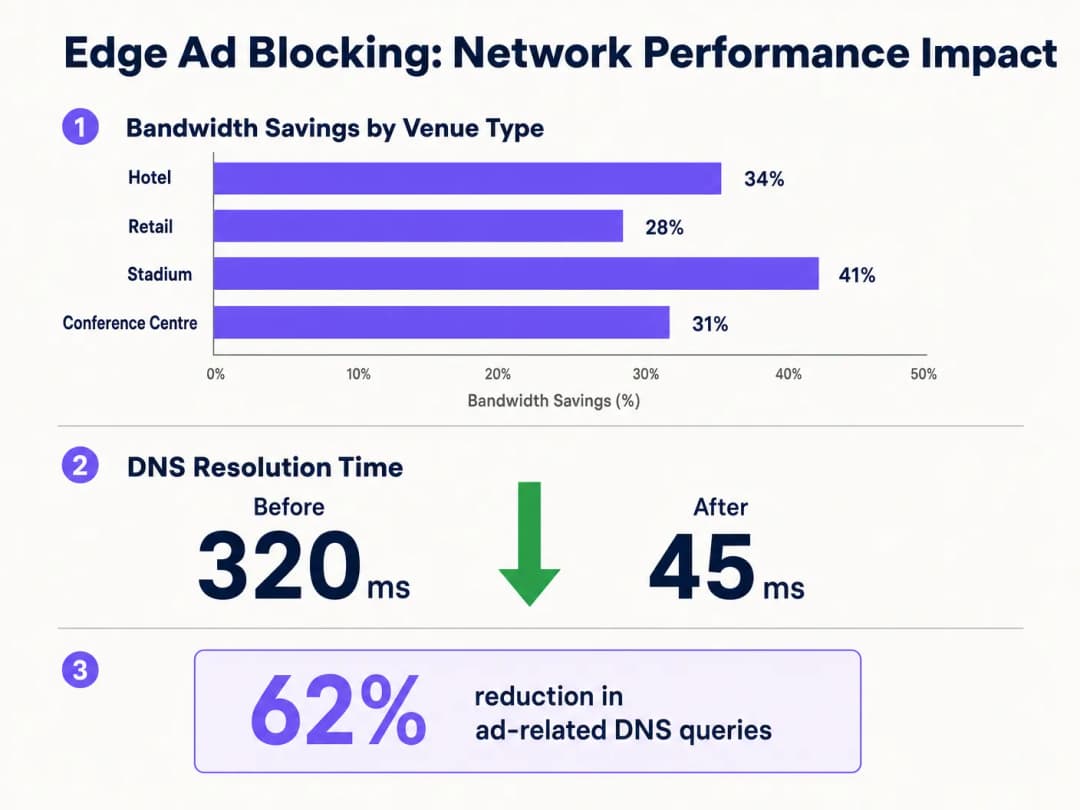
बैंडविड्थ की बचत। वेन्यू लगातार डिप्लॉयमेंट के बाद समग्र बैंडविड्थ खपत में 15-30% की कमी की रिपोर्ट करते हैं। 1Gbps WAN सर्किट पर प्रति माह £3,000 खर्च करने वाले वेन्यू के लिए, प्रभावी उपयोग में 20% की कमी सर्किट अपग्रेड को 12-18 महीनों तक टाल सकती है, जो उस अवधि में £36,000 - £54,000 की बचत को दर्शाती है।
अतिथि संतुष्टि में सुधार। पेज लोड होने का समय ध्यान देने योग्य रूप से कम हो जाता है - सामान्य डिप्लॉयमेंट में औसतन 4+ सेकंड से घटकर 2 सेकंड से भी कम हो जाता है। यह सीधे तौर पर उच्च अतिथि संतुष्टि स्कोर और फ्रंट डेस्क या हेल्पडेस्क पर कम WiFi-संबंधित शिकायतों से संबंधित है। हॉस्पिटैलिटी परिवेश में, अतिथि समीक्षाओं में WiFi गुणवत्ता को लगातार एक शीर्ष कारक के रूप में उद्धृत किया जाता है।
बेहतर सुरक्षा स्थिति। DNS ब्लॉकलिस्ट स्वाभाविक रूप से ज्ञात मैलवेयर वितरण डोमेन, फ़िशिंग साइटों और कमांड-एंड-कंट्रोल इन्फ्रास्ट्रक्चर को कवर करती हैं। इससे वेन्यू नेटवर्क पर रहने के दौरान अतिथि उपकरणों के प्रभावित होने का जोखिम कम हो जाता है, जिससे ऑपरेटर की प्रतिष्ठा और संभावित लायबिलिटी जोखिम सीमित हो जाते हैं।
परिचालन दक्षता। WiFi प्रदर्शन से संबंधित हेल्पडेस्क कॉल वॉल्यूम में कमी सीधे तौर पर IT कर्मचारियों के समय की बचत में बदल जाती है। एक मल्टी-प्रॉपर्टी होटल समूह में, यह पूरे एस्टेट में प्रति सप्ताह कई FTE-घंटों का प्रतिनिधित्व कर सकता है।
व्यापक डिजिटल इन्फ्रास्ट्रक्चर पहलों के साथ एज ब्लॉकिंग को एकीकृत करके - जैसा कि Purple Appoints Iain Fox as VP Growth - Public Sector to Drive Digital Inclusion and Smart City Innovation और Purple Launches Offline Maps Mode for Seamless, Secure Navigation to WiFi Hotspots में चर्चा की गई है - संगठन वास्तव में एक प्रीमियम कनेक्टिविटी अनुभव प्रदान कर सकते हैं जो परिचालन दक्षता और अतिथि जुड़ाव लक्ष्यों दोनों का समर्थन करता है।
मुख्य परिभाषाएं
Edge DNS Resolver
नेटवर्क परिधि पर या उसके पास तैनात एक DNS सर्वर जो स्थानीय क्लाइंट्स के लिए डोमेन नाम रिज़ॉल्यूशन को संभालता है, और क्वेरी को आगे भेजने से पहले कस्टम फ़िल्टरिंग नीतियां लागू करता है।
इसे वेन्यू स्तर पर तैनात करने से ISP DNS पर निर्भरता कम हो जाती है, कस्टम फ़िल्टरिंग सक्षम होती है, और DNS रिज़ॉल्यूशन के लिए राउंड-ट्रिप समय न्यूनतम हो जाता है।
Connection State Table
राउटर और फ़ायरवॉल द्वारा बनाए रखा जाने वाला एक मेमोरी स्ट्रक्चर जो डिवाइस से गुजरने वाले प्रत्येक सक्रिय TCP/UDP कनेक्शन के विवरण को रिकॉर्ड करता है।
उच्च-घनत्व वाले वेन्यू अक्सर विज्ञापन नेटवर्क द्वारा शुरू किए गए माइक्रो-कनेक्शन की मात्रा के कारण इस टेबल को समाप्त कर देते हैं, जिससे अंधाधुंध पैकेट ड्रॉप होते हैं और WiFi में गिरावट महसूस होती है।
Destination NAT (DNAT)
एक फ़ायरवॉल तकनीक जो पैकेट के राउटर से गुजरते समय उसके गंतव्य IP पते को फिर से लिखती है, और उसे मूल रूप से इच्छित होस्ट के बजाय दूसरे होस्ट पर रीडायरेक्ट करती है।
सार्वजनिक रिज़ॉल्वर (जैसे, 8.8.8.8) के लिए नियत DNS अनुरोधों को वेन्यू के फ़िल्टर किए गए DNS सर्वर के माध्यम से रूट करने के लिए बाध्य करने के लिए उपयोग किया जाता है, जिससे विज्ञापन-अवरोधक नीति को बायपास करने से रोका जा सके।
DNS over HTTPS (DoH)
एक प्रोटोकॉल जो पोर्ट 443 पर एक एन्क्रिप्टेड HTTPS कनेक्शन के माध्यम से DNS रिज़ॉल्यूशन करता है, जो पारंपरिक पोर्ट 53 फ़िल्टरिंग नियमों द्वारा इंटरसेप्शन को रोकता है।
आधुनिक ब्राउज़रों में तेजी से डिफ़ॉल्ट बन रहे DoH के लिए नेटवर्क प्रशासकों को स्थानीय DNS फ़िल्टरिंग नीतियों को लागू करने के लिए ज्ञात DoH प्रदाता IP श्रेणियों को ब्लॉक करने की आवश्यकता होती है।
NXDOMAIN
एक DNS प्रतिक्रिया कोड जो यह दर्शाता है कि क्वेरी किया गया डोमेन नाम DNS नेमस्पेस में मौजूद नहीं है।
Edge रिज़ॉल्वर ब्लॉक किए गए विज्ञापन डोमेन के लिए यह प्रतिक्रिया लौटाते हैं, जिससे क्लाइंट राउटर स्टेट टेबल संसाधनों का उपभोग किए बिना तुरंत कनेक्शन के प्रयास को छोड़ देता है।
Programmatic Advertising
डिजिटल विज्ञापन इन्वेंट्री की स्वचालित, रीयल-टाइम खरीद और बिक्री, जिसमें आम तौर पर कई मध्यस्थ प्लेटफ़ॉर्म (विज्ञापन एक्सचेंज, DSP, DMP) शामिल होते हैं, जिनमें से प्रत्येक को अलग नेटवर्क कनेक्शन की आवश्यकता होती है।
प्रोग्रामैटिक विज्ञापन की बहु-प्लेटफ़ॉर्म प्रकृति ही DNS क्वेरी गुणन प्रभाव का मूल कारण है जो गेस्ट नेटवर्क के प्रदर्शन को ख़राब करती है।
Captive Portal
एक वेब-आधारित प्रमाणीकरण तंत्र जो एक नए नेटवर्क उपयोगकर्ता के HTTP ट्रैफ़िक को रोकता है और पूर्ण नेटवर्क एक्सेस प्रदान करने से पहले उन्हें लॉगिन या शर्तों की स्वीकृति वाले पृष्ठ पर रीडायरेक्ट करता है।
विज्ञापन अवरोधक नीतियों को सावधानीपूर्वक कॉन्फ़िगर किया जाना चाहिए ताकि Captive Portal कार्यक्षमता के लिए आवश्यक डोमेन को ब्लॉक करने से बचा जा सके, जिसमें सोशल लॉगिन प्रदाता और भुगतान गेटवे शामिल हैं।
Allowlisting
विशिष्ट डोमेन या IP पतों तक पहुंच की अनुमति देने के लिए DNS रिज़ॉल्वर या फ़ायरवॉल का स्पष्ट कॉन्फ़िगरेशन, जो लागू होने वाली किसी भी व्यापक अवरोधक नीतियों को ओवरराइड करता है।
गलत सकारात्मकताओं (false positives) को हल करने और यह सुनिश्चित करने के लिए आवश्यक है कि Captive Portal, लॉयल्टी ऐप्स और भुगतान प्रोसेसर सहित व्यवसाय-महत्वपूर्ण सेवाएं सुलभ बनी रहें।
Anycast Routing
एक नेटवर्क एड्रेसिंग विधि जहां एक ही IP पता विभिन्न स्थानों में कई सर्वरों को सौंपा जाता है, जिसमें ट्रैफ़िक स्वचालित रूप से निकटतम इंस्टेंस पर रूट किया जाता है।
क्लाउड-आधारित DNS फ़िल्टरिंग सेवाएं वेन्यू के भौगोलिक स्थान की परवाह किए बिना कम-विलंबता वाले DNS रिज़ॉल्यूशन को सुनिश्चित करने के लिए anycast का उपयोग करती हैं।
हल किए गए उदाहरण
एक 400 कमरों वाला होटल 1 Gbps फाइबर कनेक्शन होने के बावजूद पीक शाम के घंटों (शाम 7 बजे से रात 10 बजे) के दौरान गंभीर WiFi लेटेंसी का सामना कर रहा है। IT प्रबंधक को संदेह है कि स्ट्रीमिंग और ब्राउज़िंग से उच्च DNS क्वेरी वॉल्यूम एज राउटर के स्टेट टेबल को समाप्त कर रहा है। होटल एक सोशल लॉगिन Captive Portal का उपयोग करता है और उसके पास कोई समर्पित सर्वर इंफ्रास्ट्रक्चर नहीं है।
IT टीम मौजूदा हाइपरवाइजर (इस स्केल के लिए 1 vCPU, 512 MB RAM पर्याप्त है) पर वर्चुअल मशीन के रूप में एक लाइटवेट DNS रिजॉल्वर तैनात करती है। वे केवल अतिथि VLAN में रिजॉल्वर का IP वितरित करने के लिए कोर स्विच पर DHCP हेल्पर को कॉन्फ़िगर करते हैं, जिससे प्रबंधन और स्टाफ VLAN मौजूदा ISP DNS पर ही रहते हैं। वे लगभग 200,000 ज्ञात विज्ञापन और ट्रैकर डोमेन को कवर करने वाली एक मानक संयुक्त ब्लॉकलिस्ट (EasyList + OISD) लागू करते हैं। लाइव होने से पहले, वे Captive Portal का परीक्षण करते हैं और स्पष्ट रूप से सभी Facebook, Google और Apple प्रमाणीकरण डोमेन को अनुमति सूची (allowlist) में डालते हैं। वे अतिथि VLAN से सभी आउटबाउंड पोर्ट 53 ट्रैफ़िक को स्थानीय रिजॉल्वर पर रीडायरेक्ट करने वाला एक DNAT फ़ायरवॉल नियम जोड़ते हैं। वे Cloudflare (1.1.1.1), Google (8.8.8.8) और अन्य प्रमुख DoH प्रदाताओं के IP श्रेणियों के लिए फ़ायरवॉल डेनाय नियम भी जोड़ते हैं। डिप्लॉयमेंट के बाद, DNS क्वेरी वॉल्यूम में 62% की गिरावट आती है, औसत पेज लोड समय 4.2 सेकंड से घटकर 1.8 सेकंड हो जाता है, और पीक राउटर स्टेट टेबल उपयोग 91% से गिरकर 44% हो जाता है।
50 स्टोर वाली एक रिटेल श्रृंखला ग्राहकों के लिए अपने इन-स्टोर अतिथि WiFi ऐप के प्रदर्शन को बेहतर बनाना चाहती है। यह ऐप लॉयल्टी प्रोग्राम साइन-अप और प्रमोशनल ऑफ़र के लिए प्राथमिक माध्यम है। श्रृंखला के पास कोई ऑन-साइट IT स्टाफ नहीं है और वह एक तृतीय-पक्ष प्रदाता से प्रबंधित SD-WAN सेवा का उपयोग करती है।
आर्किटेक्चर टीम प्रबंधन पोर्टल के साथ क्लाउड-आधारित DNS फ़िल्टरिंग सेवा का चयन करती है। वे क्लाउड प्रदाता के एनीकास्ट रिजॉल्वर IP पतों पर अतिथि VLAN से DNS क्वेरीज़ को फॉरवर्ड करने के लिए सभी ब्रांच राउटर्स को कॉन्फ़िगर करने के लिए SD-WAN प्रदाता के साथ काम करते हैं। वे विज्ञापन नेटवर्क और ज्ञात दुर्भावनापूर्ण डोमेन को ब्लॉक करने वाली एक केंद्रीकृत नीति लागू करते हैं। महत्वपूर्ण रूप से, वे अपने लॉयल्टी ऐप, भुगतान प्रोसेसर और Captive Portal प्रदाता से जुड़े सभी डोमेन को कवर करने वाली एक स्पष्ट अनुमति सूची (allowlist) बनाते हैं। वे क्लाउड पोर्टल को ब्लॉक किए गए क्वेरी वॉल्यूम और प्रति साइट शीर्ष ब्लॉक किए गए डोमेन पर साप्ताहिक रिपोर्ट जेनरेट करने के लिए कॉन्फ़िगर करते हैं। रोलआउट को तीन दिनों के भीतर सभी 50 साइटों पर दूरस्थ रूप से पूरा किया जाता है। पूरे एस्टेट में औसत बैंडविड्थ खपत 28% कम हो जाती है, और लॉयल्टी ऐप का औसत लोड समय 3.1 सेकंड से सुधरकर 1.4 सेकंड हो जाता है।
अभ्यास प्रश्न
Q1. एक स्टेडियम IT टीम ने लोकल DNS रिज़ॉल्वर के माध्यम से एड्ज एड ब्लॉकिंग तैनात की है और रिज़ॉल्वर के IP को वितरित करने के लिए DHCP को कॉन्फ़िगर किया है। हालांकि, परिनियोजन के बाद की निगरानी से पता चलता है कि लगभग 30% डिवाइस अभी भी 1.1.1.1 और 8.8.8.8 पर बाहरी DNS ट्रैफ़िक की उच्च मात्रा उत्पन्न कर रहे हैं। इसका सबसे संभावित कारण क्या है, और सही समाधान क्या है?
संकेत: हार्डकोडेड DNS सेटिंग्स और आधुनिक ब्राउज़र गोपनीयता सुविधाओं दोनों पर विचार करें जो पारंपरिक पोर्ट 53 फ़िल्टरिंग को बायपास करती हैं।
मॉडल उत्तर देखें
इसके दो संभावित कारण हैं। पहला, हार्डकोडेड DNS सेटिंग्स वाले डिवाइस DHCP-असाइन किए गए रिज़ॉल्वर को अनदेखा कर रहे हैं। इसका समाधान एक DNAT फ़ायरवॉल नियम लागू करना है जो गेस्ट VLAN से सभी आउटबाउंड UDP/TCP पोर्ट 53 ट्रैफ़िक को रोकता है और गंतव्य IP की परवाह किए बिना इसे लोकल रिज़ॉल्वर पर रीडायरेक्ट करता है। दूसरा, कुछ डिवाइस DNS over HTTPS (DoH) का उपयोग कर रहे हो सकते हैं, जो पोर्ट 53 फ़िल्टरिंग को पूरी तरह से बायपास कर देता है। इसका समाधान ज्ञात DoH प्रदाताओं (Cloudflare 1.1.1.1, Google 8.8.8.8, आदि) के IP पतों के लिए फ़ायरवॉल डेनाई (अस्वीकार) नियम जोड़ना है, जिससे ब्राउज़र मानक DNS पर वापस जाने के लिए मजबूर हो सकें।
Q2. एक होटल में एड्ज DNS फ़िल्टर की तैनाती के बाद, मेहमान रिपोर्ट कर रहे हैं कि वे अपने Facebook खातों का उपयोग करके WiFi लॉगिन प्रक्रिया को पूरा नहीं कर पा रहे हैं। Captive Portal सोशल लॉगिन बटन एक त्रुटि (एरर) दिखाता है। IT टीम पुष्टि करती है कि रिज़ॉल्वर काम कर रहा है। इसका सबसे संभावित कारण क्या है और इसे कैसे हल किया जाना चाहिए?
संकेत: ब्लॉकलिस्ट श्रेणियों और OAuth-आधारित सोशल ऑथेंटिकेशन के लिए आवश्यक डोमेन के बीच परस्पर क्रिया की समीक्षा करें।
मॉडल उत्तर देखें
ब्लॉकलिस्ट ने Facebook के OAuth ऑथेंटिकेशन फ़्लो के लिए आवश्यक एक या अधिक डोमेन को विज्ञापन या ट्रैकिंग डोमेन के रूप में वर्गीकृत किया है और उनके लिए NXDOMAIN वापस कर रहा है। IT टीम को लॉगिन प्रयास के दौरान रिज़ॉल्व होने में विफल रहने वाले विशिष्ट डोमेन की पहचान करने के लिए ब्राउज़र डेवलपर टूल (नेटवर्क टैब) का उपयोग करना चाहिए। इन डोमेन को - आमतौर पर facebook.com, fbcdn.net, या connect.facebook.net नेमस्पेस में - रिज़ॉल्वर की अनुमति सूची (allowlist) में जोड़ा जाना चाहिए। आगे बढ़ते हुए, किसी भी ब्लॉकलिस्ट को सक्रिय करने से पहले मानक परिनियोजन चेकलिस्ट के हिस्से के रूप में सभी सोशल लॉगिन प्रदाता डोमेन को पहले से अनुमत सूची में शामिल किया जाना चाहिए।
Q3. एक मल्टी-साइट कॉन्फ्रेंस सेंटर ग्रुप के CTO दो विकल्पों का मूल्यांकन कर रहे हैं: अपने 12 स्थानों में से प्रत्येक पर एक ऑन-प्रिमाइसेस Pi-hole रिज़ॉल्वर तैनात करना बनाम क्लाउड-आधारित DNS फ़िल्टरिंग सेवा को अपनाना। प्रत्येक स्थान पर सीमित स्थानीय IT सहायता है। प्राथमिक उद्देश्य बैंडविड्थ लागत को कम करना और बड़े आयोजनों के दौरान उपस्थित लोगों के WiFi अनुभव को बेहतर बनाना है। किस दृष्टिकोण की सिफारिश की जाती है और क्यों?
संकेत: दृष्टिकोणों के बीच मामूली विलंबता (लेटेंसी) के अंतर के मुकाबले प्रबंधन ओवरहेड, विफलता जोखिम, पीक इवेंट लोड के दौरान स्केलेबिलिटी और स्थानीय IT संसाधन आवंटन की लागत को तौलें।
मॉडल उत्तर देखें
इस परिदृश्य के लिए क्लाउड-आधारित DNS फ़िल्टरिंग सेवा अनुशंसित दृष्टिकोण है। हालांकि एक ऑन-प्रिमाइसेस Pi-hole मामूली रूप से कम DNS रिज़ॉल्यूशन विलंबता (लेटेंसी) प्रदान करेगा, लेकिन परिचालन जोखिम इस लाभ से अधिक हैं। सीमित स्थानीय IT सहायता के साथ, एक विफल ऑन-प्रिमाइसेस रिज़ॉल्वर किसी बड़े आयोजन के दौरान एक स्थान पर पूर्ण DNS आउटेज का कारण बन सकता है - जो कि एक हाई-विजिबिलिटी, हाई-इम्पैक्ट विफलता है। एनीकास्ट राउटिंग के साथ एक क्लाउड-आधारित सेवा एकल पोर्टल से सभी 12 स्थानों पर भौगोलिक अतिरेक (रिडंडेंसी), स्वचालित विफलता सुधार (फेलओवर) और केंद्रीकृत नीति प्रबंधन प्रदान करती है। विज्ञापन ट्रैफ़िक को ब्लॉक करने से होने वाली लेटेंसी बचत की तुलना में DNS लेटेंसी में मामूली वृद्धि (आमतौर पर निकटतम एनीकास्ट नोड तक 5-15ms) नगण्य है। क्लाउड सेवा बिना किसी मानवीय हस्तक्षेप के पीक इवेंट क्वेरी वॉल्यूम को संभालने के लिए स्वचालित रूप से स्केल भी करती है।
इस श्रृंखला में आगे पढ़ें
WiFi व्यवधान के लिए स्कैन कैसे करें और सर्वोत्तम चैनल कैसे खोजें
यह व्यापक तकनीकी गाइड एंटरप्राइज IT लीडर्स को RF व्यवधान की पहचान करने और इष्टतम 5GHz चैनलों का चयन करने के लिए व्यावहारिक कार्यप्रणालियां प्रदान करता है। यह नए हार्डवेयर निवेश की आवश्यकता के बिना थ्रूपुट को अधिकतम करने और लेटेंसी को कम करने के लिए स्पेक्ट्रम विश्लेषण, DFS विचारों और व्यावहारिक परिनियोजन रणनीतियों को कवर करता है।
नए एक्सेस पॉइंट खरीदे बिना WiFi की स्पीड कैसे सुधारें
यह गाइड विस्तार से बताती है कि एंटरप्राइज़ वेन्यू नए एक्सेस पॉइंट खरीदे बिना अपने WiFi बैंडविड्थ का 30%+ कैसे वापस पा सकते हैं। DNS फ़िल्टरिंग, बैंड स्टीयरिंग और QoS नीतियां लागू करके, IT टीमें हार्डवेयर का जीवनकाल बढ़ा सकती हैं, CapEx कम कर सकती हैं, और नेटवर्क प्रदर्शन और सुरक्षा में सुधार कर सकती हैं।
हाई-डेंसिटी WiFi नेटवर्क पर लेटेंसी कम करना
यह गाइड विस्तार से बताती है कि ट्रैकिंग डोमेन के लिए अनावश्यक DNS लुकअप को खत्म करने से हाई-डेंसिटी WiFi नेटवर्क पर लेटेंसी कैसे काफी कम हो जाती है। यह भीड़भाड़ वाले वेन्यू परिवेशों का प्रबंधन करने वाले IT लीडर्स के लिए कार्रवाई योग्य आर्किटेक्चर, कार्यान्वयन और ROI मार्गदर्शन प्रदान करती है।
अपने विशिष्ट सेटअप को लेकर कोई सवाल हैं?
हमारी टीम 80,000 से अधिक वेन्यू में वेन्यू ऑपरेटरों, IT मैनेजरों और नेटवर्क इंजीनियरों के साथ काम करती है। 20 मिनट का कॉल बुक करें और हम आपको दिखाएंगे कि आपके जैसे अन्य लोगों ने इसे कैसे हल किया।