
Improving WiFi Speeds by Blocking Ad Networks at the Edge
This guide provides IT managers, network architects, and CTOs with a practical, architecture-level strategy for deploying edge-level ad blocking on venue WiFi networks. It explains the technical relationship between programmatic advertising, DNS query volume, and perceived network latency, and details how intercepting ad-related DNS requests at the edge gateway can reclaim significant bandwidth and improve guest experience. From hotel deployments to stadium events and distributed retail properties, the guide covers implementation steps, risk mitigation, compliance considerations, and measurable ROI.
Video overview
Listen to this guide
View podcast transcript
Part of our core series: Guest WiFi Guide →

Executive Summary
For IT managers and CTOs overseeing high-density venue networks, managing bandwidth consumption and reducing latency is a constant operational challenge. While traditional Quality of Service (QoS) policies and bandwidth capping address some symptoms, they fail to resolve a significant hidden problem: programmatic advertising. Modern web pages and applications execute dozens of background DNS requests to ad exchanges, trackers, and telemetry services before rendering the primary content. In a venue with thousands of concurrent users, this creates a latency multiplier effect that degrades perceived WiFi performance even when there is sufficient bandwidth.
This guide details how to improve WiFi speeds by implementing edge-level DNS filtering, reducing DNS resolution times by up to 86% and reclaiming 15 - 30% of bandwidth used across enterprise deployments. This method requires no client-side software, is transparent to end-users, and provides secondary security benefits by blocking known malicious domains. This is particularly effective in hospitality, retail, transport, and public-sector environments where guest density is high and connection durations vary.
Technical Deep-Dive
Latency Multiplier Effect
The technical relationship between programmatic advertising and network latency is rooted in the Domain Name System (DNS) resolution process. When a guest device connects to the venue's guest WiFi and accesses a modern news site or application, the primary HTTP request triggers a cascade of secondary requests. These secondary requests target ad exchanges, demand-side platforms (DSPs), data management platforms (DMPs), viewability trackers, and conversion pixels - and all of this occurs before a single byte of the primary content is delivered.
Each ad unit in this programmatic chain requires:
- A DNS lookup for the ad server domain
- A TCP connection establishment (SYN, SYN-ACK, ACK)
- A TLS handshake negotiation (typically 2 - 3 round trips)
- HTTP GET request and payload delivery
In high-density environments like stadiums or conference centers, thousands of devices executing this process simultaneously generate a massive volume of DNS queries. More importantly, each TCP connection occupies an entry in the edge router's connection state table - which is a finite memory structure. When this table reaches its capacity, the router begins dropping connections arbitrarily. This is the primary cause of perceived WiFi degradation in high-density venues, even when the WAN link is operating well below its capacity.
| Metric | Without Edge Blocking | With Edge Blocking |
|---|---|---|
| Average DNS queries/minute per user | 180-240 | 65-90 |
| DNS resolution time (average) | 280-340 ms | 40-55 ms |
| Average page load time | 4.0-4.5 s | 1.6-2.0 s |
| Bandwidth consumed by ads/trackers | 18-32% of total | <5% of total |
| Router state table utilization (peak) | 85-95% | 35-50% |
Edge DNS Filtering Architecture
Implementing ad blocking at the edge involves redirecting client DNS queries to a local or cloud-based DNS resolver configured with extensive blocklists. When a client requests resolution for a known ad-serving domain, the edge resolver returns a null IP address (0.0.0.0) or an NXDOMAIN response. This prevents all subsequent TCP and TLS connection attempts, saving both bandwidth and router state table entries.

This architecture is completely transparent to end-users and requires no software installation on guest devices. It also complements existing WiFi analytics platforms by ensuring that legitimate Captive Portal traffic and engagement metrics remain unaffected. The DNS layer logically sits between the guest VLAN and the upstream resolver, intercepting all DNS queries before they leave the network perimeter.
DNS over HTTPS (DoH) and Bypass Issues
Modern browsers - Chrome, Firefox, and Edge - increasingly use DNS over HTTPS (DoH) by default, which encrypts DNS queries and routes them via port 443. Since DoH traffic cannot be distinguished from standard HTTPS, port-based interception rules are ineffective. Current industry best practice is to maintain and enforce a blocklist of known DoH provider IP address ranges at the firewall layer, forcing browsers to fall back to standard unencrypted DNS, which can then be filtered. This approach is consistent with enterprise network management standards and does not violate user privacy obligations, as filtering is applied to advertising and malicious domains, not personal browsing content.
-
Got questions about your specific setup?
Our team works with venue operators, IT managers, and network engineers across 80,000 venues. Book a 20-minute call and we will show you how others like you solved it.
Implementation Guide
Deploying edge ad blocking requires careful planning to avoid disrupting legitimate services or breaking Captive Portal authentication workflows.
Step 1 - Audit current DNS query volume. Prior to deployment, establish a baseline. Most enterprise firewalls and DNS servers can export query logs. Identify the most frequently queried domains and cross-reference them with known ad network lists. This quantifies the opportunity and provides a pre/post comparison metric.
Step 2 - Select resolution architecture. Determine whether a local on-premises resolver or a cloud-based service is appropriate. On-premises resolvers (e.g., Pi-hole, AdGuard Home, Infoblox) offer the lowest latency but require hardware resources and maintenance. Cloud resolvers (e.g., Cisco Umbrella, Cloudflare Gateway) simplify management across distributed sites and are strongly recommended for multi-venue retail or hospitality chains without local IT staff.\n\nStep 3 - Configure DHCP and DNS interception. Update DHCP scopes to distribute the edge resolver's IP address to clients. Most importantly, implement Destination NAT (DNAT) rules on the firewall to intercept all outbound UDP/TCP port 53 traffic from the guest VLAN and redirect it to the edge resolver. Without this step, devices with hardcoded DNS settings will bypass the filter entirely.\n\nStep 4 - Manage DoH fallback. Compile and maintain a blocklist of known DoH provider IP address ranges. Apply a firewall deny rule for these ranges from the guest VLAN. This forces DoH-enabled browsers to fall back to standard DNS, which the resolver can filter.\n\nStep 5 - Curate blocklists and whitelisting. Begin with conservative, well-managed blocklists. Immediately whitelist all domains required for your Captive Portal, social login providers, payment gateways, and any venue-specific applications. Establish a rapid-response process for whitelisting false positives - an SLA of less than two hours during business hours is a reasonable target.\n\nStep 6 - Monitor, log, and iterate. Use resolver query logs to monitor block rates and identify anomalies. A sudden spike in blocked queries from a single device can indicate that malware is attempting to communicate with command-and-control infrastructure - which is a secondary security benefit of DNS filtering. Integrate these logs with your SIEM or network monitoring platform where possible.\n\n---\n\n## Best Practices\n\nFail-open design for guest networks. For guest WiFi, connectivity is the primary obligation. Configure a secondary, unfiltered upstream resolver as a fallback. If the primary edge resolver fails, DNS queries should route to the fallback to maintain connectivity, accepting the temporary loss of ad filtering rather than causing a complete outage.\n\nCaptive Portal compatibility testing. Before going live, test every authentication method supported by your Captive Portal - social login (Facebook, Google, Apple), email, SMS, and any payment integrations. Explicitly whitelist all required domains. Refer to your Captive Portal provider's documentation for a comprehensive list of required domains.\n\nCompliance and data governance. DNS query logs can reveal user browsing behavior and are therefore subject to data protection regulations, including CCPA/CPRA. Ensure logs are stored securely, retained only for the minimum duration necessary for operational purposes, and not used for profiling or marketing. For detailed guidance on audit trail requirements, see Explain what is audit trail for IT Security in 2026.
Separate policies for staff networks. Apply separate, potentially more permissive filtering policies to staff VLANs. Staff may require access to advertising platforms, analytics tools, or social media for legitimate business purposes. For broader staff network security guidance, see Secure BYOD Policies for Staff WiFi Networks.
Blocklist provenance and maintenance. Use well-managed, community-vetted blocklists (such as Steven Black's hosts list, EasyList, OISD) and schedule automated updates at least weekly. Outdated blocklists miss new ad domains and can retain misclassified entries.
-
Troubleshooting and Risk Mitigation
False positives - broken websites or applications. The most common failure mode is blocking a domain that serves legitimate content alongside advertisements. A CDN domain might host both advertising scripts and CSS stylesheets for a major news site. Mitigation: Begin with conservative blocklists, establish a clear allowlisting SLA, and provide staff with a simple reporting mechanism for broken sites.
Captive Portal authentication failures. If social login or payment flows break post-deployment, the resolver is blocking a required domain. Mitigation: Use browser developer tools to identify the failed request and add the domain to the allowlist. Always test in a staging environment prior to production rollout.
DoH bypass remaining. If post-deployment DNS query volume remains high, some devices may still be using DoH. Mitigation: Audit your DoH provider IP blocklist for completeness. Consider implementing a Deep Packet Inspection (DPI) rule to identify and block DoH traffic patterns on port 443 if your firewall supports it.
Resolver performance under load. In very high-density deployments (5,000+ concurrent users), a single resolver instance can become a bottleneck. Mitigation: Deploy resolver instances in a high-availability pair with load balancing, or use a cloud-based anycast service that scales automatically.
-
ROI and Business Impact
Implementing edge ad blocking delivers measurable, quantifiable business outcomes across multiple dimensions.
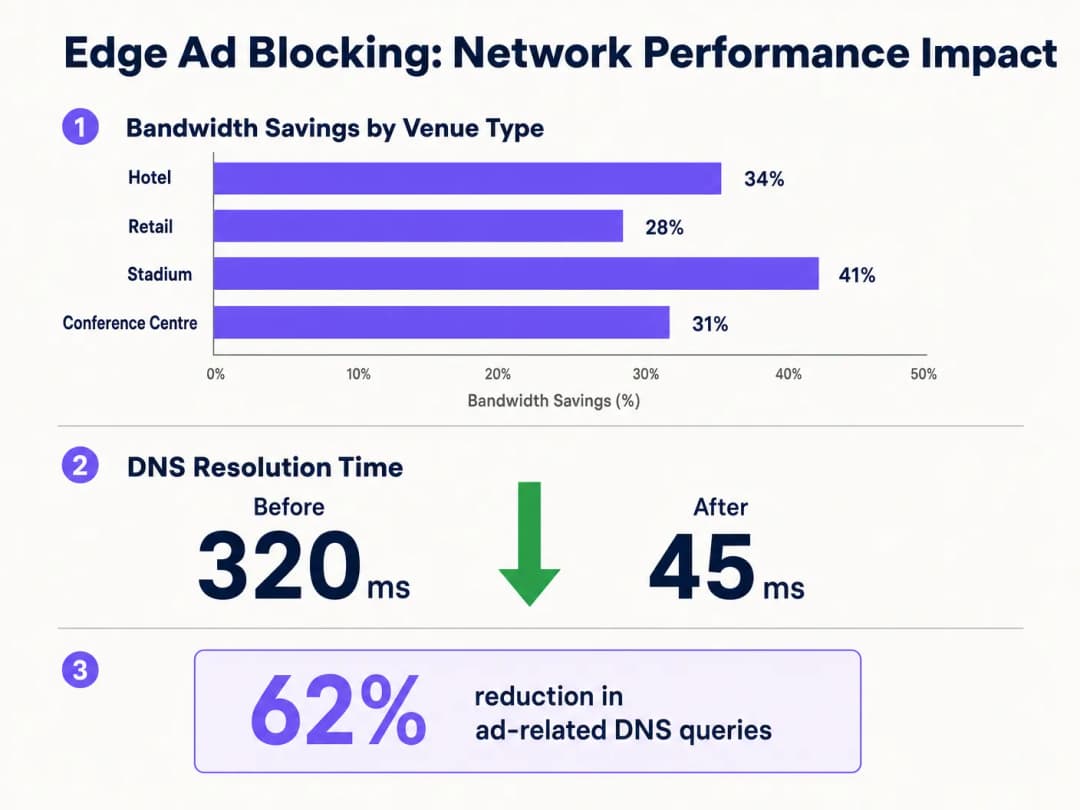
Bandwidth reclamation. Venues consistently report a 15-30% reduction in overall bandwidth consumption post-deployment. For a venue spending $3,000 per month on a 1Gbps WAN circuit, a 20% reduction in effective utilization can defer a circuit upgrade by 12-18 months, representing a saving of $36,000-$54,000 over that period.
Improved guest satisfaction. Page load times decrease noticeably - from an average of 4+ seconds to under 2 seconds in typical deployments. This correlates directly with higher guest satisfaction scores and fewer WiFi-related complaints to the front desk or helpdesk. In hospitality environments, WiFi quality is consistently cited as a top factor in guest reviews.
Enhanced security posture. DNS blocklists inherently cover known malware distribution domains, phishing sites, and command-and-control infrastructure. This reduces the risk of guest devices being compromised while on the venue network, limiting operator reputational and potential liability risks.
Operational efficiency. The reduction in helpdesk call volume related to WiFi performance translates directly into time savings for IT staff. In a multi-property hotel group, this can represent several FTE-hours per week across the estate.
By integrating edge blocking with broader digital infrastructure initiatives - as discussed in Purple Appoints Iain Fox as VP Growth - Public Sector to Drive Digital Inclusion and Smart City Innovation and Purple Launches Offline Maps Mode for Seamless, Secure Navigation to WiFi Hotspots - organizations can deliver a truly premium connectivity experience that supports both operational efficiency and guest engagement goals.
Key Definitions
Edge DNS Resolver
A DNS server deployed at or near the network perimeter that handles domain name resolution for local clients, applying custom filtering policies before forwarding queries upstream.
Deploying this at the venue level reduces reliance on ISP DNS, enables custom filtering, and minimizes the round-trip time for DNS resolution.
Connection State Table
A memory structure maintained by routers and firewalls that records the details of every active TCP/UDP connection passing through the device.
High-density venues frequently exhaust this table due to the volume of micro-connections initiated by ad networks, causing indiscriminate packet drops and perceived WiFi degradation.
Destination NAT (DNAT)
A firewall technique that rewrites the destination IP address of a packet as it traverses the router, redirecting it to a different host than originally intended.
Used to force DNS requests destined for public resolvers (e.g., 8.8.8.8) to route through the venue's filtered DNS server, preventing bypass of the ad-blocking policy.
DNS over HTTPS (DoH)
A protocol that performs DNS resolution over an encrypted HTTPS connection on port 443, preventing interception by traditional port 53 filtering rules.
Increasingly the default in modern browsers, DoH requires network administrators to block known DoH provider IP ranges to enforce local DNS filtering policies.
NXDOMAIN
A DNS response code indicating that the queried domain name does not exist in the DNS namespace.
Edge resolvers return this response for blocked ad domains, causing the client to immediately abandon the connection attempt without consuming router state table resources.
Programmatic Advertising
The automated, real-time buying and selling of digital advertising inventory, typically involving multiple intermediary platforms (ad exchanges, DSPs, DMPs) each requiring separate network connections.
The multi-platform nature of programmatic advertising is the root cause of the DNS query multiplication effect that degrades guest network performance.
Captive Portal
A web-based authentication mechanism that intercepts a new network user's HTTP traffic and redirects them to a login or terms-acceptance page before granting full network access.
Ad blocking policies must be carefully configured to avoid blocking domains required for Captive Portal functionality, including social login providers and payment gateways.
Allowlisting
The explicit configuration of a DNS resolver or firewall to permit access to specific domains or IP addresses, overriding any broader blocking policies that would otherwise apply.
Essential for resolving false positives and ensuring that business-critical services - including the Captive Portal, loyalty apps, and payment processors - remain accessible.
Anycast Routing
A network addressing method where the same IP address is assigned to multiple servers in different locations, with traffic automatically routed to the nearest instance.
Cloud-based DNS filtering services use anycast to ensure low-latency DNS resolution regardless of the venue's geographic location.
Worked Examples
A 400-room hotel is experiencing severe WiFi latency during peak evening hours (7 PM - 10 PM) despite having a 1 Gbps fiber connection. The IT manager suspects high DNS query volume from streaming and browsing is exhausting the edge router's state table. The hotel uses a social login Captive Portal and has no dedicated server infrastructure.
The IT team deploys a lightweight DNS resolver as a virtual machine on an existing hypervisor (1 vCPU, 512 MB RAM is sufficient for this scale). They configure the DHCP helper on the core switch to distribute the resolver's IP to the guest VLAN only, leaving the management and staff VLANs on the existing ISP DNS. They apply a standard combined blocklist (EasyList + OISD) covering approximately 200,000 known ad and tracker domains. Before going live, they test the Captive Portal and explicitly allowlist all Facebook, Google, and Apple authentication domains. They add a DNAT firewall rule redirecting all outbound port 53 traffic from the guest VLAN to the local resolver. They also add firewall deny rules for the IP ranges of Cloudflare (1.1.1.1), Google (8.8.8.8), and other major DoH providers. Post-deployment, DNS query volume drops by 62%, average page load time falls from 4.2 seconds to 1.8 seconds, and peak router state table utilization drops from 91% to 44%.
A retail chain with 50 stores wants to improve the performance of their in-store guest WiFi app for customers. The app is the primary vehicle for loyalty program sign-ups and promotional offers. The chain has no on-site IT staff and uses a managed SD-WAN service from a third-party provider.
The architecture team selects a cloud-based DNS filtering service with a management portal. They work with the SD-WAN provider to configure all branch routers to forward DNS queries from the guest VLAN to the cloud provider's anycast resolver IP addresses. They apply a centralized policy blocking ad networks and known malicious domains. Critically, they create an explicit allowlist covering all domains associated with their loyalty app, payment processor, and the Captive Portal provider. They configure the cloud portal to generate weekly reports on blocked query volume and top blocked domains per site. The rollout is completed remotely across all 50 sites within three days. Average bandwidth consumption across the properties drops by 28%, and the loyalty app's average load time improves from 3.1 seconds to 1.4 seconds.
Practice Questions
Q1. A stadium IT team has deployed edge ad blocking via a local DNS resolver and configured DHCP to distribute the resolver's IP. However, post-deployment monitoring shows that approximately 30% of devices are still generating high volumes of external DNS traffic to 1.1.1.1 and 8.8.8.8. What is the most likely cause, and what is the correct remediation?
Hint: Consider both hardcoded DNS settings and modern browser privacy features that bypass traditional port 53 filtering.
View model answer
There are two likely causes. First, devices with hardcoded DNS settings are ignoring the DHCP-assigned resolver. The remediation is to implement a DNAT firewall rule that intercepts all outbound UDP/TCP port 53 traffic from the guest VLAN and redirects it to the local resolver, regardless of the destination IP. Second, some devices may be using DNS over HTTPS (DoH), which bypasses port 53 filtering entirely. The remediation is to add firewall deny rules for the IP addresses of known DoH providers (Cloudflare 1.1.1.1, Google 8.8.8.8, etc.), forcing browsers to fall back to standard DNS.
Q2. Following the deployment of an edge DNS filter at a hotel, guests are reporting that they cannot complete the WiFi login process using their Facebook accounts. The Captive Portal social login button returns an error. The IT team confirms the resolver is operational. What is the most likely cause and how should it be resolved?
Hint: Review the interaction between the blocklist categories and the domains required for OAuth-based social authentication.
View model answer
The blocklist has categorized one or more domains required by Facebook's OAuth authentication flow as advertising or tracking domains and is returning NXDOMAIN for them. The IT team should use browser developer tools (Network tab) to identify the specific domain(s) failing to resolve during the login attempt. These domains - typically in the facebook.com, fbcdn.net, or connect.facebook.net namespaces - should be added to the resolver's allowlist. Going forward, all social login provider domains should be pre-allowlisted as part of the standard deployment checklist before any blocklist is activated.
Q3. A CTO at a multi-site conference center group is evaluating two options: deploying an on-premises Pi-hole resolver at each of their 12 venues versus adopting a cloud-based DNS filtering service. Each venue has limited local IT support. The primary driver is reducing bandwidth costs and improving attendee WiFi experience during large events. Which approach is recommended and why?
Hint: Weigh management overhead, failure risk, scalability during peak event load, and the cost of local IT resource allocation against the slight latency difference between approaches.
View model answer
The cloud-based DNS filtering service is the recommended approach for this scenario. While an on-premises Pi-hole would offer marginally lower DNS resolution latency, the operational risks outweigh this benefit. With limited local IT support, a failed on-premises resolver could cause a complete DNS outage at a venue during a major event - a high-visibility, high-impact failure. A cloud-based service with anycast routing provides geographic redundancy, automatic failover, and centralized policy management across all 12 venues from a single portal. The slight increase in DNS latency (typically 5-15ms to the nearest anycast node) is negligible compared to the latency savings from blocking ad traffic. The cloud service also scales automatically to handle peak event query volumes without manual intervention.
Continue reading in this series
Understanding RSSI and Signal Strength for Optimal Channel Planning
This guide provides a comprehensive technical deep-dive into RSSI, Signal-to-Noise Ratio (SNR), and RF propagation principles for optimal channel planning. It equips IT managers, network architects, and venue operations directors with actionable strategies to mitigate Co-Channel and Adjacent Channel Interference, optimize AP placement, and leverage analytics for measurable business impact across hospitality, retail, and public-sector environments.
WiFi 6 vs WiFi 5: Does it Solve Channel Interference?
This guide provides a technical deep dive into how WiFi 6 (802.11ax) addresses channel interference in high-density enterprise environments through OFDMA and BSS Coloring. It equips IT managers, network architects, and CTOs with actionable deployment strategies, real-world case studies from hospitality and healthcare, and a framework for evaluating the ROI of infrastructure upgrades in venues where wireless performance is business-critical.
Best WiFi Channels for High-Density Venues
A definitive technical reference for selecting and optimizing WiFi channels in high-density environments like stadiums, arenas, and large public venues. It covers RF physics, channel reuse strategies across 5 GHz and 6 GHz bands, and actionable deployment guidance for IT leaders.
Got questions about your specific setup?
Our team works with venue operators, IT managers, and network engineers across 80,000 venues. Book a 20-minute call and we will show you how others like you solved it.