
तुमच्या राउटरचे डीफॉल्ट चॅनल कसे बदलावे
हे अधिकृत तांत्रिक संदर्भ मार्गदर्शक IT मॅनेजर्स आणि नेटवर्क आर्किटेक्ट्सना हस्तक्षेप कमी करण्यासाठी, थ्रुपुट जास्तीत जास्त करण्यासाठी आणि Purple Guest WiFi आणि Analytics सारख्या एंटरप्राइझ ॲप्लिकेशन्ससाठी स्थिर RF पाया सुनिश्चित करण्यासाठी WiFi चॅनेल्स कॉन्फिगर करण्यासाठी कृतीयोग्य धोरणे प्रदान करते.
आमच्या मुख्य मालिकेचा भाग: Guest WiFi Guide →
Executive Summary
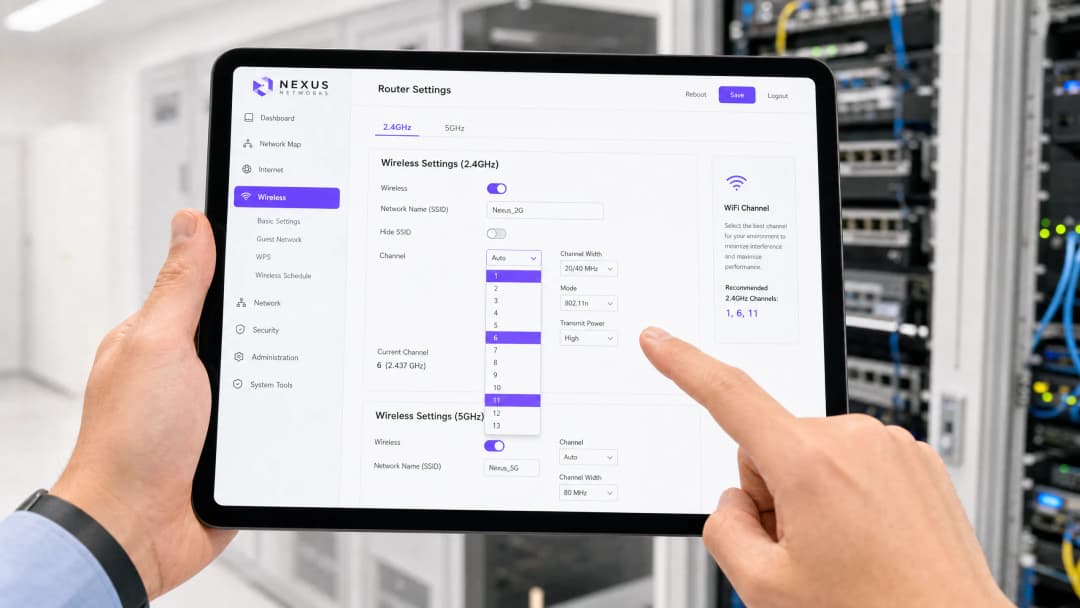
किरकोळ विक्री साखळी, आदरातिथ्य क्षेत्र (हॉस्पिटॅलिटी) आणि सार्वजनिक क्षेत्रातील कार्यालयांसारख्या हाय-डेन्सिटी पर्यावरणांचे व्यवस्थापन करणाऱ्या CTOs आणि नेटवर्क आर्किटेक्ट्ससाठी, राउटरच्या डीफॉल्ट चॅनल सेटिंग्जवर अवलंबून राहणे ही एक गंभीर त्रुटी आहे. रेडीमेड कॉन्फिगरेशन्स अनेकदा गर्दीच्या फ्रिक्वेन्सी बँड्सवर डीफॉल्ट सेट असतात, ज्यामुळे गंभीर को-चॅनल हस्तक्षेप, कमी झालेला थ्रूपुट आणि खराब वापरकर्ता अनुभव मिळतो. हे तांत्रिक मार्गदर्शक 2.4GHz आणि 5GHz चॅनल वितरणाचे मेकॅनिक्स, शेजारील-चॅनलच्या हस्तक्षेपाचा प्रभाव आणि न ओव्हरलॅप होणाऱ्या चॅनल्सच्या धोरणात्मक उपयोजनाचा शोध घेते. एक व्यवस्थित चॅनल प्लॅन लागू करून, आयटी टीम्स मजबूत RF पाया तयार करू शकतात जो विश्वासार्ह कनेक्टिव्हिटी, Guest WiFi द्वारे अखंड प्रमाणीकरण आणि WiFi Analytics द्वारे अचूक स्थानिक डेटा संकलित करण्यासाठी अत्यंत आवश्यक आहे.
Technical Deep-Dive
2.4GHz बँड: गर्दी कमी करणे
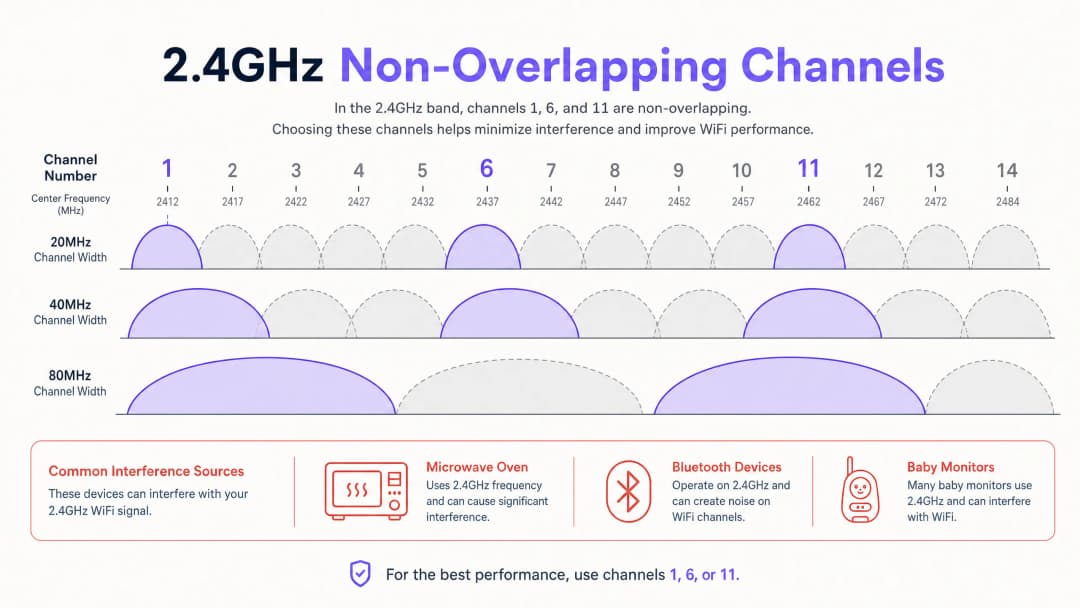
2.4GHz स्पेक्ट्रम जुन्या उपकरणांसाठी आणि IoT सेन्सर्ससाठी अजूनही आवश्यक आहे, परंतु तो प्रचंड गर्दीचा आहे. जरी जागतिक स्तरावर 14 चॅनल्स आहेत, तरी त्यांच्यात केवळ 5MHz चे अंतर आहे. एका मानकीकृत WiFi ट्रान्समिशनसाठी 20MHz बँडविड्थची आवश्यकता असते, याचा अर्थ असा की शेजारील चॅनल्स मोठ्या प्रमाणावर एकमेकांवर ओव्हरलॅप होतात. या ओव्हरलॅपमुळे शेजारील-चॅनल हस्तक्षेप होतो, जो को-चॅनल हस्तक्षेपापेक्षा अधिक घातक असतो कारण कॅरियर-सेन्सिंग मेकॅनिझम ट्रान्समिशनचे समन्वय करू शकत नाही, ज्यामुळे केवळ RF नॉईज तयार होतो.
उत्कृष्ट कामगिरी सुनिश्चित करण्यासाठी, नेटवर्क प्रशासकांनी न ओव्हरलॅप होणाऱ्या चॅनल्सचे काटेकोरपणे पालन केले पाहिजे: 1, 6 आणि 11. इतर कोणत्याही चॅनलचा वापर केल्यास (उदा. चॅनल 3 किंवा 9) शेजारील अनेक नेटवर्क्समध्ये नक्कीच हस्तक्षेप निर्माण होईल.
5GHz बँड आणि चॅनल रुंदी
5GHz बँड अनेक न ओव्हरलॅप होणारे चॅनल्स ऑफर करतो, ज्यामुळे हाय-कॅपॅसिटी एंटरप्राइझ नेटवर्क्ससाठी हा एक पसंतीचा पर्याय ठरतो. तथापि, हाय-डेन्सिटी डिप्लॉयमेंट्समध्ये, चॅनल बाँडिंगचा (40MHz किंवा 80MHz रुंदी वापरून) वापर करून वैयक्तिक थ्रूपुट वाढवण्याचा मोह टाळला पाहिजे. चॅनल बाँडिंग उपलब्ध न ओव्हरलॅप होणाऱ्या चॅनल्सची संख्या निम्मी करते, ज्यामुळे को-चॅनल हस्तक्षेपाची शक्यता वाढते. स्टेडियम किंवा कॉन्फरन्स सेंटर्ससारख्या वातावरणात, 5GHz बँडवर 20MHz चॅनल रुंदी मानकीकृत केल्याने एकूण नेटवर्क क्षमता आणि स्थिरता जास्तीत जास्त वाढते.
याव्यतिरिक्त, प्रशासकांनी Dynamic Frequency Selection (DFS) चॅनेल्स काळजीपूर्वक व्यवस्थापित करणे आवश्यक आहे. या फ्रिक्वेन्सी रडार सिस्टमसह शेअर केल्या जातात, आणि जेव्हा रडार सिग्नल आढळतो, तेव्हा ॲक्सेस पॉइंट्सना चॅनेल रिकामा करावा लागतो, ज्यामुळे क्लायंटचे कनेक्शन डिस्कनेक्ट होते. या नियामक आवश्यकतेबद्दल अधिक सविस्तर माहितीसाठी, आमचे सर्वसमावेशक मार्गदर्शक पहा: DFS Channels: What They Are and When to Avoid Them.
तुमच्या विशिष्ट सेटअपबद्दल काही प्रश्न आहेत का?
आमची टीम ८०,००० हून अधिक वेन्यूजमधील वेन्यू ऑपरेटर्स, IT मॅनेजर्स आणि नेटवर्क इंजिनिअर्ससोबत काम करते. २० मिनिटांचा कॉल बुक करा आणि तुमच्यासारख्या इतरांनी ही समस्या कशी सोडवली हे आम्ही तुम्हाला दाखवू.
अंमलबजावणी मार्गदर्शक
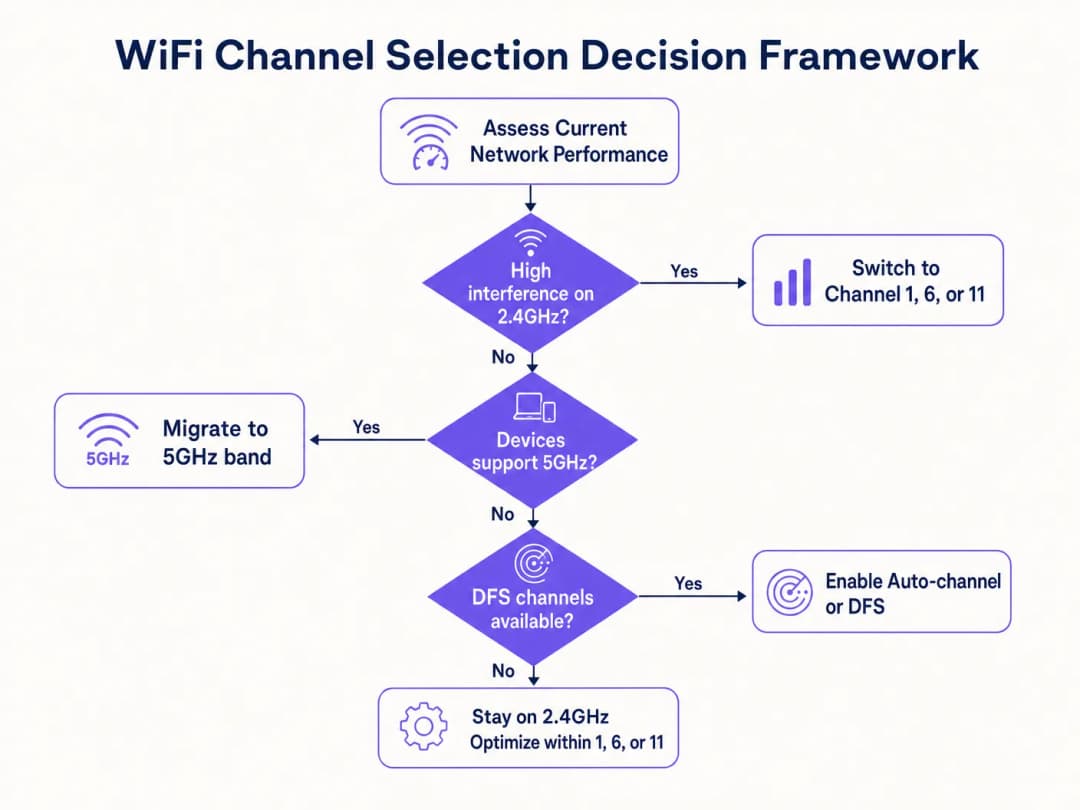
- सक्रिय साइट सर्वेक्षण करा: शेजारील नेटवर्क आणि नॉन-WiFi स्त्रोतांकडून (जसे की मायक्रोवेव्ह ओव्हन आणि ब्लूटूथ) येणाऱ्या हस्तक्षेपाची ओळख पटवण्यासाठी, दोन्ही बँडमधील अस्तित्वात असलेला RF आवाज मॅप करण्यासाठी स्पेक्ट्रम ॲनालायझर वापरा.
- परवानगी असलेल्या चॅनेलची सूची निश्चित करा: अप्रतिबंधित "Auto" सेटिंगवर अवलंबून राहण्याऐवजी, तुमच्या Radio Resource Management (RRM) अल्गोरिदमला कोणते चॅनेल वापरण्याची परवानगी आहे हे स्पष्टपणे निश्चित करा. 2.4GHz बँडवर, हे काटेकोरपणे केवळ 1, 6, आणि 11 पुरते मर्यादित ठेवा.
- चॅनेलची रुंदी ऑप्टिमाइझ करा: ओव्हरलॅप न होणाऱ्या चॅनेल्सचा जास्तीत जास्त पुनर्वापर करण्यासाठी हाय-डेंसिटी (अति-गर्दीच्या) भागांमध्ये 5GHz चॅनेलची रुंदी 20MHz वर सेट करा.
- DFS वापराचे मूल्यांकन करा: तुमच्या ठिकाणाचे विमानतळ किंवा हवामान केंद्राच्या जवळ असण्यामुळे DFS चॅनेल वापरण्यास अडथळा येतो का ते ठरवा. रडारच्या घटना वारंवार घडत असल्यास, परवानगी असलेल्या सूचीमधून DFS चॅनेल वगळा.
सर्वोत्तम पद्धती
- ओव्हरलॅप होणारे 2.4GHz चॅनेल कधीही वापरू नका: नेहमी 1, 6, आणि 11 वापरा.
- पीक स्पीडपेक्षा क्षमतेला प्राधान्य द्या: दाटीवाटीच्या ठिकाणी 5GHz वर 20MHz चॅनेल वापरा.
- ऑटो-चॅनेल अल्गोरिदम मर्यादित करा: RRM ला पूर्ण सूट देऊ नका; क्लीन चॅनेल्सची तयार केलेली सूची प्रदान करा.
- रडारवर लक्ष ठेवा: क्लायंटचे अनपेक्षित डिस्कनेक्शन टाळण्यासाठी AP लॉग्समधील DFS घटनांवर सक्रियपणे लक्ष ठेवा.
त्रुटी निवारण आणि जोखीम कमी करणे
- लक्षण: जास्त सिग्नल स्ट्रेंथ परंतु कमी थ्रुपुट.
- निदान: बहुधा को-चॅनेल किंवा शेजारील-चॅनेलचा हस्तक्षेप असू शकतो. APs समान चॅनेल शेअर करत नसल्याची किंवा ओव्हरलॅप होणारे 2.4GHz चॅनेल वापरत नसल्याची खात्री करा.
- लक्षण: क्लायंट अचानक 5GHz नेटवर्कवरून डिस्कनेक्ट होत आहेत.
- निदान: शक्यतो DFS रडार डिटेक्शनमुळे AP ला चॅनेल बदलणे भाग पडत आहे. लॉग्स तपासा आणि प्रभावित भागात DFS चॅनेल्स बंद करण्याचा विचार करा.
ROI आणि व्यावसायिक प्रभाव
सुव्यवस्थित नियोजन केलेले RF वातावरण थेट व्यवसायाच्या नफ्यावर परिणाम करते. hospitality किंवा retail मधील ठिकाणांसाठी, खराब कनेक्टिव्हिटीमुळे ग्राहक लॉगिन प्रक्रिया अर्धवट सोडतात, ज्यामुळे गेस्ट WiFi च्या माध्यमातून मिळणाऱ्या फर्स्ट-पार्टी डेटाचे प्रमाण कमी होते. याशिवाय, विसंगत चॅनेलच्या कामगिरीमुळे लोकेशन अॅनालिटिक्स विस्कळीत होऊ शकते, ज्यामुळे फूटफॉल आणि ड्वेल-टाइम मेट्रिक्सच्या अचूकतेवर परिणाम होतो. योग्य चॅनेल कॉन्फिगरेशनसाठी वेळ गुंतवल्यास मूळ इन्फ्रास्ट्रक्चर प्रगत बिझनेस इंटेलिजन्स अॅप्लिकेशन्स आणि अखंड युझर अनुभवाला यशस्वीरित्या सपोर्ट करू शकते.
या विषयावरील आमच्या तज्ज्ञांचे मार्गदर्शन ऐका:
{{asset:how_to_change_your_router_s_default_channel_podcast.wav}}
महत्वाच्या व्याख्या
को - चॅनल हस्तक्षेप (CCI)
जेव्हा मल्टिपल ॲक्सेस पॉइंट्स आणि क्लायंट्स अगदी त्याच फ्रिक्वेन्सी चॅनलवर ट्रान्समिट करतात, ज्यामुळे त्यांना उपलब्ध एअरटाइम शेअर करावा लागतो, तेव्हा होणारा हस्तक्षेप.
हाय - डेन्सिटी डिप्लॉयमेंट्समध्ये महत्त्वपूर्ण जेथे APs एकमेकांच्या जवळ ठेवले जातात; काळजीपूर्वक चॅनल प्लॅनिंग आणि ट्रान्समिट पॉवर कमी करून हे नियंत्रित केले जाते.
ॲडजसंट - चॅनल हस्तक्षेप (ACI)
ओव्हरलॅपिंग फ्रिक्वेन्सीमुळे होणारा हस्तक्षेप (उदा. २.४GHz बँडवर चॅनल ३ वापरणे), जो ट्रान्समिशन खराब करतो कारण करिअर सेन्स मेकॅनिझम ॲक्सेसचे योग्यरित्या समन्वय करू शकत नाहीत.
प्रशासकांनी २.४GHz बँडवर केवळ चॅनेल्स १, ६ आणि ११ चे काटेकोरपणे पालन का केले पाहिजे याचे मुख्य कारण.
डायनॅमिक फ्रिक्वेन्सी सिलेक्शन (DFS)
एक नियामक यंत्रणा ज्यासाठी विशिष्ट ५GHz चॅनेल्समध्ये कार्यरत असलेल्या WiFi उपकरणांना रडार सिस्टीम शोधणे आणि त्यांच्यामध्ये हस्तक्षेप करणे टाळणे आवश्यक असते.
पूर्ण ५GHz स्पेक्ट्रम वापरण्यासाठी आवश्यक आहे, परंतु क्लायंट डिस्कनेक्ट टाळण्यासाठी विमानतळ किंवा हवामान केंद्रांजवळ काळजीपूर्वक व्यवस्थापन आवश्यक आहे.
रेडिओ रिसोर्स मॅनेजमेंट (RRM)
RF वातावरणावर आधारित चॅनल असाइनमेंट्स आणि ट्रान्समिट पॉवर डायनॅमिकली ॲडजस्ट करण्यासाठी एंटरप्राइझ WLAN कंट्रोलर्सद्वारे वापरले जाणारे ऑटोमेटेड अल्गोरिदम.
उपयुक्त असले तरी, प्रशासकांनी अनेकदा RRM वर मर्यादा घातली पाहिजे जेणेकरून ते ओव्हरलॅपिंग २.४GHz चॅनेल्स निवडण्यासारखे सबऑप्टिमल पर्याय निवडणार नाहीत.
चॅनल बाँडिंग
वैयक्तिक क्लायंटसाठी सैद्धांतिक पीक थ्रुपुट वाढवण्यासाठी विस्तीर्ण चॅनेल्स (४०MHz, ८०MHz, किंवा १६०MHz) तयार करण्यासाठी जवळचे २०MHz चॅनेल्स एकत्रित करणे.
हाय - डेन्सिटी एंटरप्राइझ वातावरणात सामान्यतः याला परावृत्त केले जाते कारण यामुळे उपलब्ध नॉन - ओव्हरलॅपिंग चॅनेल्सची संख्या कमालीची कमी होते.
एअरटाइम कंटेंशन
शेअर केलेल्या हाफ - डुप्लेक्स WiFi माध्यमावर डेटा ट्रान्समिट करण्यासाठी मल्टिपल डिव्हाइसेसमधील स्पर्धा.
WiFi नेटवर्क्समधील मूलभूत अडथळा; प्रभावी चॅनल प्लॅनिंग मल्टिपल क्लीन चॅनेल्सवर डिव्हाइसेसचे वितरण करून स्पर्धा कमी करते.
स्पेक्ट्रम विश्लेषण
हस्तक्षेपाचे (interference) स्त्रोत ओळखण्यासाठी विशिष्ट फ्रिक्वेन्सी बँडवर RF उर्जेचे मोजमाप आणि व्हिज्युअलाइज करण्याची प्रक्रिया.
एंटरप्राइझ वायरलेस नेटवर्क डिझाइन करण्यापूर्वी किंवा ट्रबलशूट करण्यापूर्वी एक अनिवार्य पूर्व-आवश्यक पायरी.
Half-Duplex
एक कम्युनिकेशन सिस्टम जिथे एकाच फ्रिक्वेन्सीवर एकाच वेळी ट्रान्समिशन आणि रिसीव्हिंग होऊ शकत नाही.
WiFi वाद किंवा चढाओढीस बळी पडण्याचे आणि को-चॅनल हस्तक्षेप कमी करणे अत्यंत महत्त्वाचे असण्यामागचे मूळ कारण.
सोडवलेली उदाहरणे
एका दाट शहरी भागातील २०० खोल्यांच्या हॉटेलमध्ये, प्रत्येक दुसऱ्या खोलीत AP असूनही, २.४GHz बँडवरील WiFi स्पीडबाबत अतिथींच्या गंभीर तक्रारी येत आहेत.
IT टीमने स्पेक्ट्रम विश्लेषण केले आणि त्यांना आढळले की APs डीफॉल्ट 'Auto' सेटिंग्जवर सोडले गेले होते, ज्यामुळे अनेक APs ३, ४ आणि ८ सारख्या ओव्हरलॅपिंग चॅनेल्सची निवड करत होते. टीमने एक स्टॅटिक चॅनल प्लॅन लागू केला, ज्यामध्ये सर्व २.४GHz रेडिओ केवळ चॅनेल्स १, ६ आणि ११ पुरते मर्यादित केले, जेणेकरून जवळचे APs कधीही समान चॅनल शेअर करणार नाहीत. त्यांनी सेलचा आकार मर्यादित करण्यासाठी आणि क्लायंट्सना ५GHz बँडवर स्थलांतरित होण्यास प्रोत्साहित करण्यासाठी २.४GHz रेडिओवरील ट्रान्समिट पॉवर देखील कमी केली.
एक मोठी रिटेल साखळी ५० ठिकाणी नवीन ॲक्सेस पॉइंट्स तैनात करत आहे आणि त्यांना त्यांच्या अंतर्गत इन्व्हेंटरी स्कॅनर्स आणि अतिथी WiFi साठी ५GHz कामगिरी जास्तीत जास्त करायची आहे.
नेटवर्क आर्किटेक्ट्सनी डीफॉल्ट ४०MHz किंवा ८०MHz ऐवजी ५GHz बँडवर २०MHz चॅनल विड्थ वापरण्यासाठी डिप्लॉयमेंट टेम्पलेटचे मानकीकरण केले. त्यांनी DFS चॅनेल्स देखील सक्षम केले परंतु २४ तासांच्या कालावधीत कोणत्याही AP ला तीनपेक्षा जास्त रडार डिटेक्शन इव्हेंट्सचा सामना करावा लागल्यास NOC ला अलर्ट करण्यासाठी मॉनिटरिंग स्क्रिप्ट लागू केली, ज्यामुळे त्यांना समस्याप्रधान APs स्टॅटिकली नॉन - DFS चॅनेल्सवर पुन्हा नियुक्त करणे शक्य झाले.
सराव प्रश्न
Q1. तुम्ही हॉस्पिटलच्या एका नवीन विभागामध्ये WiFi तैनात करत आहात. वैद्यकीय उपकरणे पुरवणाऱ्या विक्रेत्याला त्यांच्या जुन्या टेलीमेट्री मॉनिटर्ससाठी 2.4GHz बँड वापरणे आवश्यक आहे. एक कनिष्ठ अभियंता उपकरणांचा प्रसार करण्यासाठी चॅनेल 1, 4, 8 आणि 11 वापरण्याची शिफारस करतो. तुम्ही काय उत्तर द्याल?
टीप: मानक WiFi साठी आवश्यक चॅनेल रुंदी आणि केंद्र फ्रिक्वेन्सीमधील अंतराचा विचार करा.
नमुना उत्तर पहा
हा सल्ला फेटाळून लावा. चॅनेल 4 आणि 8 वापरल्याने चॅनेल 1 आणि 11 सह गंभीर ॲडजेसंट-चॅनेल हस्तक्षेप होईल, ज्यामुळे ट्रान्समिशन खराब होईल. महत्त्वपूर्ण टेलीमेट्री मॉनिटर्ससाठी विश्वसनीय संवाद सुनिश्चित करण्यासाठी तुम्ही केवळ चॅनेल 1, 6 आणि 11 च्या कठोर वापराचा आदेश दिला पाहिजे.
Q2. एका स्टेडियममधील डिप्लॉयमेंटमध्ये कार्यक्रमांदरम्यान खराब कार्यप्रदर्शन अनुभवले जात आहे. उपस्थितांना 'कमाल गती' प्रदान करण्यासाठी APs सध्या 5GHz बँडवर 80MHz चॅनेल रुंदी वापरण्यासाठी कॉन्फिगर केलेले आहेत. शिफारस केलेला आर्किटेक्चरल बदल कोणता आहे?
टीप: उच्च-घनता (high-density) वातावरणात वैयक्तिक पीक थ्रुपुट आणि एकूण नेटवर्क क्षमतेमधील तडजोडीचे विश्लेषण करा.
नमुना उत्तर पहा
20MHz चॅनेल रुंदी वापरण्यासाठी APs पुन्हा कॉन्फिगर करा. जरी 80MHz एकाच वापरकर्त्यासाठी उच्च सैद्धांतिक गती प्रदान करत असले, तरी ते चार मानक चॅनेल वापरते, ज्यामुळे उपलब्ध नसलेल्या नॉन-ओव्हरलॅपिंग चॅनेलची संख्या लक्षणीयरीत्या कमी होते. स्टेडियममध्ये, स्वतंत्र चॅनेलची संख्या वाढवून (20MHz रुंदी वापरून) को-चॅनेल हस्तक्षेप कमी करणे एकूण क्षमतेसाठी आवश्यक आहे.
Q3. तुमच्या एंटरप्राइझ कंट्रोलर लॉग्स दर्शवतात की कॉर्पोरेट मुख्यालयातील APs 5GHz बँडवर वारंवार चॅनेल बदलत आहेत, ज्यामुळे VoIP कॉलवरील वापरकर्त्यांसाठी कनेक्टिव्हिटीमध्ये संक्षिप्त खंड पडत आहेत. ही इमारत प्रादेशिक विमानतळापासून 5 मैल अंतरावर आहे. याचे सर्वात संभाव्य कारण आणि उपाय काय आहे?
टीप: 5GHz बँडमधील विशिष्ट फ्रिक्वेन्सीसाठी नियामक आवश्यकतांचा विचार करा.
नमुना उत्तर पहा
APs बहुधा जवळच्या विमानतळावरून DFS चॅनेलवर रडार सिग्नल्स शोधत आहेत, ज्यामुळे अनिवार्य चॅनेल बदल ट्रिगर होत आहेत. त्या विशिष्ट साइटसाठी रेडिओ रिसोर्स मॅनेजमेंट कॉन्फिगरेशनमधील मंजूर चॅनेल सूचीमधून DFS चॅनेल काढून टाकणे हा यावर उपाय आहे.
या मालिकेमध्ये पुढे वाचा
WLC (Wireless LAN Controller) म्हणजे काय आणि तुम्हाला अजूनही त्याची गरज आहे का?
ही सर्वसमावेशक मार्गदर्शिका Wireless LAN Controllers (WLCs) च्या उत्क्रांतीचा शोध घेते आणि २०२६ मध्ये योग्य आर्किटेक्चर निश्चित करण्यासाठी तांत्रिक फ्रेमवर्क प्रदान करते. यामध्ये पारंपारिक हार्डवेअर, क्लाउड-मॅनेज्ड आणि कंट्रोलर-लेस मॉडेल्सचा समावेश आहे, जे त्यांच्या अनुपालन, स्केलेबिलिटी आणि अतिथी अनुभवावरील प्रभावाचे तपशील देतात.
Access Points साठी Power over Ethernet (PoE): एक अंमलबजावणी मार्गदर्शिका
ही मार्गदर्शिका इन्फ्रास्ट्रक्चर तंत्रज्ञ, नेटवर्क आर्किटेक्ट्स आणि IT निर्णयकर्त्यांना हॉटेल्स, रिटेल इस्टेट्स, स्टेडियम्स आणि सार्वजनिक क्षेत्रातील सुविधांसह एंटरप्राइझ ठिकाणी Power over Ethernet (PoE) access points तैनात करण्यासाठी निश्चित तांत्रिक संदर्भ प्रदान करते. यात 802.3af ते 802.3bt पर्यंतचे IEEE मानके, पॉवर बजेट गणना, केबलिंग आवश्यकता, VLAN विभागणी आणि सुरक्षा अनुपालन समाविष्ट आहे, ज्यामध्ये ठोस अंमलबजावणीचे सिनॅरिओ आणि मोजता येण्याजोगे ROI बेंचमार्क आहेत. PoE आर्किटेक्चर समजून घेणे हे कोणत्याही [Guest WiFi](/guest-wifi) किंवा [WiFi Analytics](/guest-wifi-marketing-analytics-platform) तैनातीसाठी पायाभूत आहे, कारण फिजिकल लेयरची विश्वासार्हता थेट डेटा कॅप्चरची गुणवत्ता, वापरकर्ता अनुभव आणि ऑपरेशनल अपटाइम ठरवते.
Mesh Network vs Access Points: मोठ्या ठिकाणांसाठी कोणते अधिक चांगले आहे?
हे तांत्रिक मार्गदर्शक मोठ्या प्रमाणावरील ठिकाणांसाठी mesh networks आणि पारंपारिक वायर्ड access points दरम्यान एक निश्चित तुलना प्रदान करते, ज्यामध्ये आर्किटेक्चर, परफॉर्मन्स तडजोड आणि उपयोजन धोरण समाविष्ट आहे. हे IT मॅनेजर्स, नेटवर्क आर्किटेक्ट्स आणि CTOs ना हॉस्पिटॅलिटी, रिटेल, इव्हेंट्स आणि सार्वजनिक क्षेत्रातील वातावरणासाठी हाय-परफॉर्मन्स, सुसंगत WiFi इन्फ्रास्ट्रक्चर डिझाइन करण्यासाठी व्यावहारिक फ्रेमवर्कसह सुसज्ज करते. हे मार्गदर्शक या आर्किटेक्चरल निर्णयांना Purple च्या हार्डवेअर-अज्ञेयवादी गेस्ट WiFi आणि ॲनालिटिक्स प्लॅटफॉर्मशी देखील जोडते, आणि योग्य इन्फ्रास्ट्रक्चरची निवड कशा प्रकारे मोजता येण्याजोगे व्यावसायिक परिणाम मिळवून देते हे दर्शवते.
तुमच्या विशिष्ट सेटअपबद्दल काही प्रश्न आहेत का?
आमची टीम ८०,००० हून अधिक वेन्यूजमधील वेन्यू ऑपरेटर्स, IT मॅनेजर्स आणि नेटवर्क इंजिनिअर्ससोबत काम करते. २० मिनिटांचा कॉल बुक करा आणि तुमच्यासारख्या इतरांनी ही समस्या कशी सोडवली हे आम्ही तुम्हाला दाखवू.