

Purple विरुद्ध Tanaza: Captive Portal प्लॅटफॉर्मची तुलना
हे तांत्रिक संदर्भ मार्गदर्शक SMB आणि मध्यम-बाजारातील Captive Portal उपयोजनांसाठी Purple आणि Tanaza ची विक्रेता-तटस्थ तुलना प्रदान करते. हे दोन्ही प्लॅटफॉर्मचे तांत्रिक आर्किटेक्चर, हार्डवेअर सुसंगतता, अनुपालन स्थिती आणि किंमत यावर मूल्यांकन करते, जेणेकरून IT नेत्यांना त्यांची नेटवर्क ॲक्सेस स्ट्रॅटेजी मोजता येण्याजोग्या व्यावसायिक परिणामांशी जुळवून घेण्यास मदत होईल.
🎧 हे मार्गदर्शक ऐका
ट्रान्सक्रिप्ट पहा
कार्यकारी सारांश
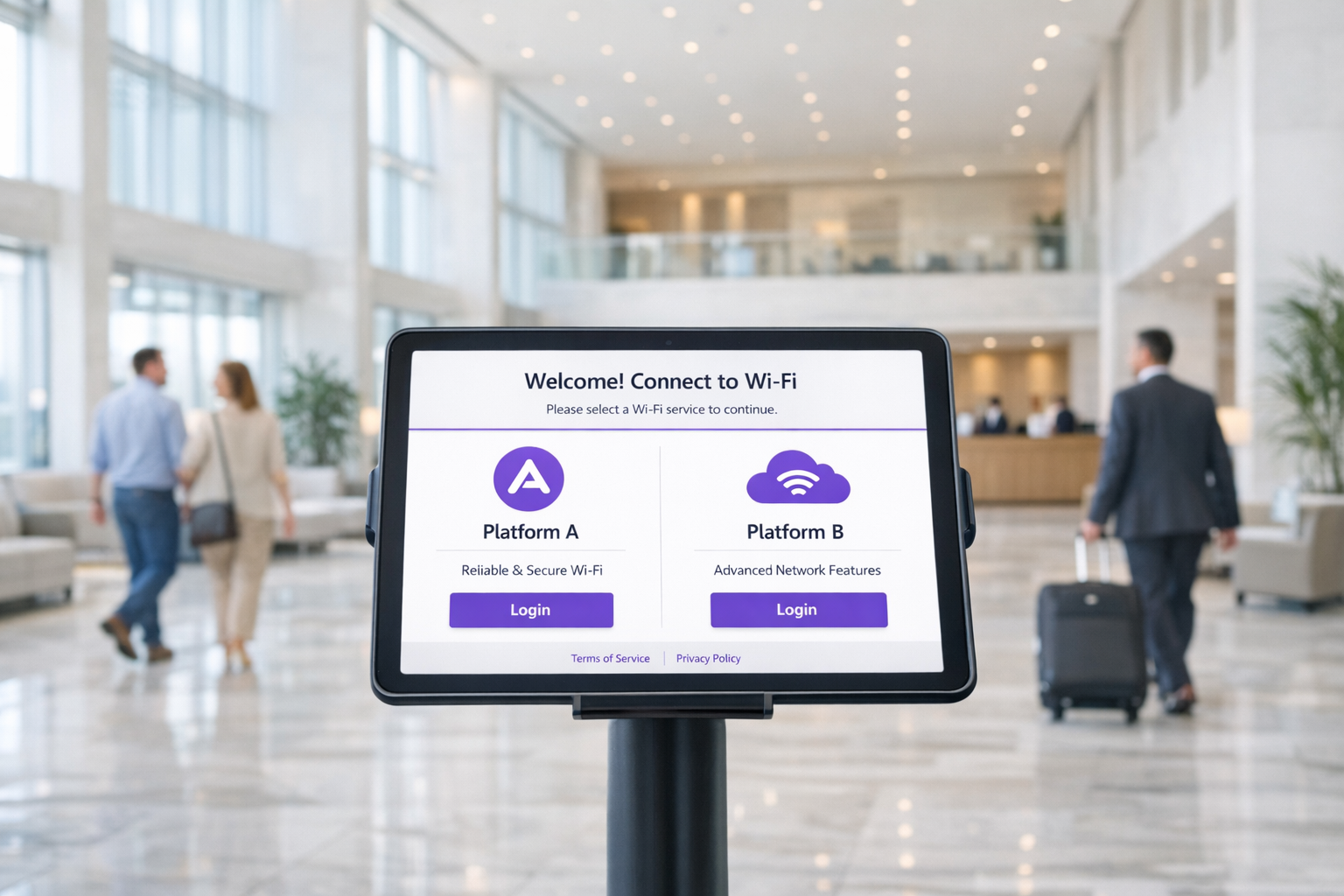
Captive Portal प्लॅटफॉर्मचे मूल्यांकन करणाऱ्या IT व्यवस्थापक आणि नेटवर्क आर्किटेक्टसाठी, Purple आणि Tanaza यांच्यातील निवड हा एक मूलभूत आर्किटेक्चरल निर्णय आहे. Tanaza प्रामुख्याने क्लाउड-आधारित नेटवर्क व्यवस्थापन प्लॅटफॉर्म म्हणून कार्य करते, ज्यात अंगभूत Captive Portal वैशिष्ट्ये आहेत, जे कस्टम फर्मवेअरद्वारे मल्टी-व्हेंडर SMB उपयोजनांचे व्यवस्थापन करणाऱ्या MSPs साठी डिझाइन केलेले आहे. याउलट, Purple एक एंटरप्राइझ-ग्रेड गेस्ट इंटेलिजन्स लेयर म्हणून कार्य करते जे बाह्य Captive Portal रीडायरेक्टद्वारे विद्यमान नेटवर्क इन्फ्रास्ट्रक्चरच्या वर बसते, आणि मानक Guest WiFi ला डेटा कॅप्चर आणि ॲनालिटिक्स इंजिनमध्ये रूपांतरित करते.
हे मार्गदर्शक दोन्ही प्लॅटफॉर्ममधील तांत्रिक फरक, उपयोजन मॉडेल्स आणि एकूण मालकी खर्च (TCO) स्पष्ट करते. तुम्ही एका 200 खोल्यांच्या हॉटेलचे अपग्रेड करत असाल किंवा 50-साइट Retail साखळीत उपयोजन करत असाल, प्रत्येक प्लॅटफॉर्म कुठे उत्कृष्ट आहे हे समजून घेतल्यास भविष्यात होणारे महागडे आर्किटेक्चरल रिफॅक्टरिंग टाळता येईल.
तांत्रिक सखोल विश्लेषण
आर्किटेक्चरल दृष्टिकोन
दोन्ही प्लॅटफॉर्ममधील सर्वात महत्त्वाचा फरक म्हणजे ते तुमच्या मूलभूत नेटवर्क हार्डवेअरशी कसे संवाद साधतात.
Tanaza TanazaOS वर अवलंबून आहे, एक Linux-आधारित ऑपरेटिंग सिस्टम जी सुसंगत ॲक्सेस पॉइंट्सवर फ्लॅश करणे आवश्यक आहे (किंवा Tanaza Powered Devices वर पूर्व-स्थापित खरेदी करणे आवश्यक आहे). हे Tanaza ला ॲक्सेस पॉइंटवर सखोल नियंत्रण देते, ज्यामुळे त्यांच्या क्लाउड डॅशबोर्डवरून थेट झिरो-टच प्रोव्हिजनिंग, रिअल-टाइम लोड मॉनिटरिंग आणि चॅनल ऑप्टिमायझेशन शक्य होते. तथापि, या दृष्टिकोनासाठी OEM फर्मवेअर बदलणे आवश्यक आहे, ज्यामुळे वॉरंटी रद्द होऊ शकते आणि हार्डवेअरची निवड TP-Link, Ubiquiti आणि MikroTik सारख्या विक्रेत्यांच्या समर्थित मॉडेल्सपुरती मर्यादित राहते.
Purple ओव्हरले आर्किटेक्चर स्वीकारते. हे 50 पेक्षा जास्त एंटरप्राइझ हार्डवेअर विक्रेत्यांशी—ज्यात Cisco Meraki, Aruba, Ruckus, आणि Juniper Mist यांचा समावेश आहे—मानक बाह्य Captive Portal रीडायरेक्ट आणि RADIUS प्रमाणीकरणाद्वारे समाकलित होते. कोणत्याही फर्मवेअर बदलाची आवश्यकता नाही. हे Purple ला मध्यम-बाजार आणि एंटरप्राइझ उपयोजनांसाठी लक्षणीयरीत्या कमी धोकादायक बनवते, जिथे विद्यमान उच्च-कार्यक्षमतेचे इन्फ्रास्ट्रक्चर आधीच अस्तित्वात आहे. हे विस्तृत नेटवर्क डिझाइनमध्ये कसे समाकलित होते याबद्दल अधिक माहितीसाठी, आमचे Internet of Things Architecture: A Complete Guide पहा.
Captive Portal क्षमता
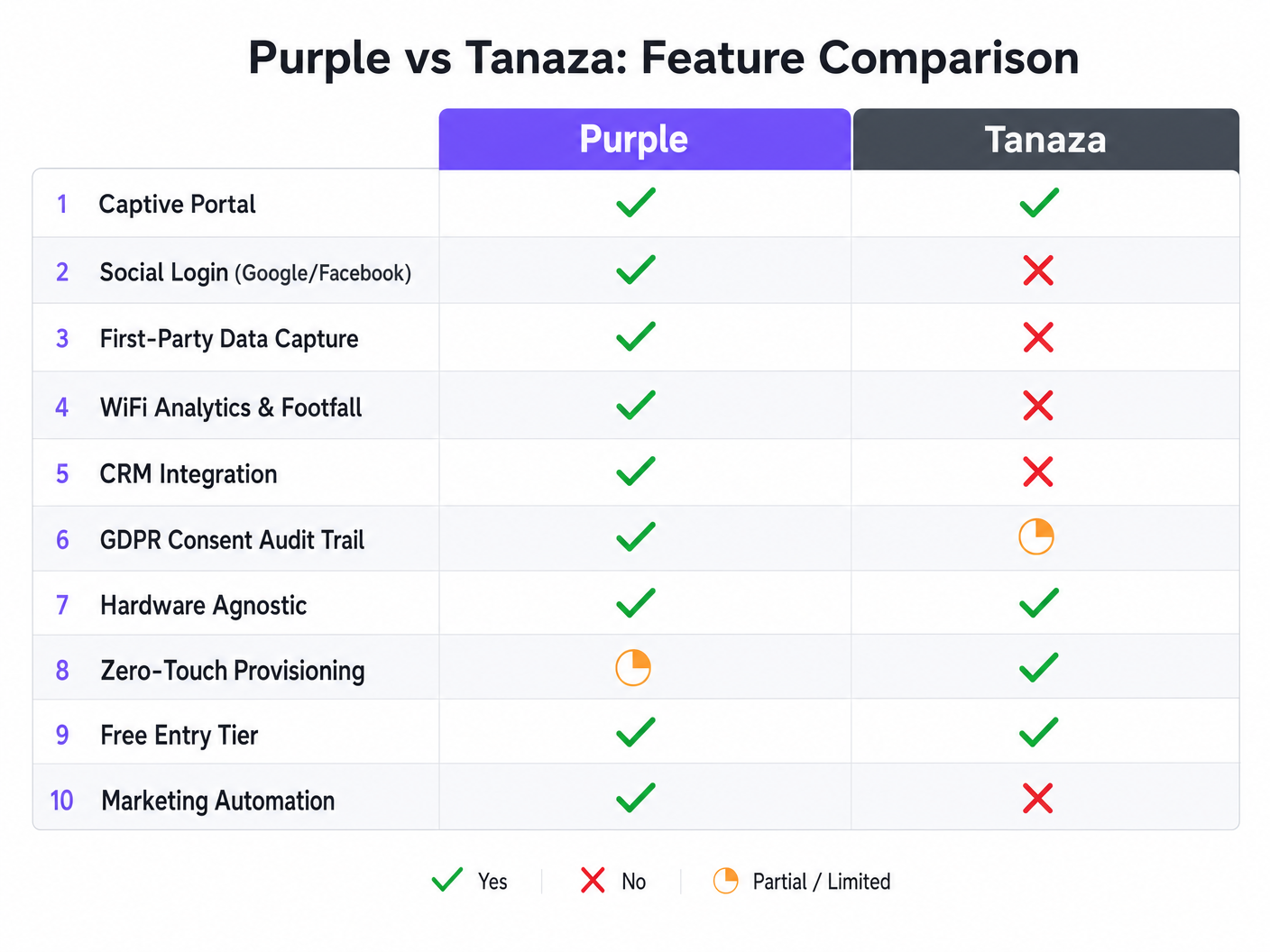
Tanaza चे अंगभूत स्प्लॅश पेज कार्यात्मक, सरळ गेस्ट ॲक्सेस प्रदान करते. हे क्लिक-थ्रू करार आणि कोड-आधारित लॉगिनला मूळतः समर्थन देते. तथापि, यात मूळ सोशल लॉगिन क्षमता (Google, Facebook, Apple) नाहीत आणि हे साध्य करण्यासाठी DataWiFi सारख्या तृतीय-पक्ष समाकलनाची आवश्यकता आहे.
Purple चे Captive Portal डेटा संपादन आणि मार्केटिंग अनुपालनासाठी तयार केले आहे. हे मूळतः सोशल लॉगिन, SMS OTP आणि रिअल-टाइम पडताळणीसह ईमेल कॅप्चर यासह अनेक प्रमाणीकरण पद्धतींना समर्थन देते. ड्रॅग-अँड-ड्रॉप बिल्डर 25 भाषांना समर्थन देतो आणि सखोल ब्रँड कस्टमायझेशनला अनुमती देतो.
अनुपालन आणि सुरक्षा
Healthcare किंवा सार्वजनिक क्षेत्रांमध्ये गेस्ट नेटवर्क उपयोजित करताना, अनुपालन हे गैर-वाटाघाटी करण्यायोग्य आहे. Tanaza प्रशासकांना अटी आणि शर्ती कॉन्फिगर करण्याची परवानगी देते, परंतु GDPR अनुपालन दर्शविण्याचा भार मोठ्या प्रमाणात ऑपरेटरवर येतो.
Purple ऑनबोर्डिंग प्रवाहामध्ये अनुपालन समाविष्ट करते. हे वापरकर्त्याच्या संमतीचा संपूर्ण ऑडिट ट्रेल राखते, डेटा रिटेन्शन धोरणे आपोआप हाताळते आणि राइट-टू-इरेझर विनंत्यांसाठी अंगभूत वर्कफ्लो प्रदान करते. हे आर्किटेक्चर GDPR, CCPA आणि LGPD च्या कठोर आवश्यकता पूर्ण करण्यासाठी डिझाइन केलेले आहे. विशिष्ट प्रादेशिक अनुपालन धोरणांसाठी, आमचे Brazil LGPD and Guest WiFi: A Compliance Guide पहा.
अंमलबजावणी मार्गदर्शक
Tanaza उपयोजित करणे
- हार्डवेअर निवड: तुमचे ॲक्सेस पॉइंट्स Tanaza समर्थित सूचीमध्ये आहेत याची पडताळणी करा किंवा Tanaza Powered Devices खरेदी करा.
- फर्मवेअर फ्लॅशिंग: विद्यमान हार्डवेअर वापरत असल्यास, TanazaOS स्थापित करण्यासाठी विशिष्ट फ्लॅशिंग सूचनांचे पालन करा. या चरणासाठी तांत्रिक प्रवीणता आणि APs किंवा स्टेजिंग वातावरणात प्रत्यक्ष प्रवेश आवश्यक आहे.
- क्लाउड प्रोव्हिजनिंग: MAC ॲड्रेस Tanaza क्लाउड डॅशबोर्डमध्ये जोडा.
- नेटवर्क कॉन्फिगरेशन: SSIDs, VLAN टॅगिंग आणि बँडविड्थ मर्यादा केंद्रीयरित्या कॉन्फिगर करा.
- पोर्टल सेटअप: अंगभूत स्प्लॅश पेज सक्षम करा आणि मूलभूत क्लिक-थ्रू अटी कॉन्फिगर करा.
Purple उपयोजित करणे
- इन्फ्रास्ट्रक्चर एकत्रीकरण: तुमचे विद्यमान WLC किंवा क्लाउड कंट्रोलर (उदा. Meraki Dashboard, Aruba Central) Purple च्या बाह्य Captive Portal URLs आणि RADIUS सर्व्हरकडे निर्देशित करण्यासाठी कॉन्फिगर करा.
- पोर्टल डिझाइन: स्प्लॅश पेज डिझाइन करण्यासाठी, सोशल लॉगिन APIs कॉन्फिगर करण्यासाठी आणि डेटा कॅप्चर आवश्यकता सेट करण्यासाठी Purple पोर्टल बिल्डर वापरा.
- अनुपालन कॉन्फिगरेशन: डेटा रिटेन्शन मर्यादा सेट करा आणि Purple डॅशबोर्डमध्ये गोपनीयता धोरण लिंक्स कॉन्फिगर करा.
- CRM मॅपिंग: Purple ला तुमच्या CRM (उदा. Salesforce, HubSpot) शी कनेक्ट करा आणि कॅप्चर केलेली लोकसंख्याशास्त्रीय डेटा फील्ड तुमच्या संपर्क रेकॉर्डशी मॅप करा.
या उपयोजन धोरणांमध्ये सखोल माहितीसाठी आमच्या वरिष्ठ सल्लागाराचे ब्रीफिंग ऐका:
सर्वोत्तम पद्धती
- प्रथम व्यावसायिक परिणाम परिभाषित करा: जर ध्येय केवळ लहान उपयोजनासाठी ऑपरेशनल नेटवर्क व्यवस्थापन असेल, तर Tanaza च्या झिरो-टच प्रोव्हिजनिंगला प्राधान्य द्या. जर ध्येय मार्केटिंग इंटेलिजन्स आणि WiFi Analytics असेल, तर Purple हे आवश्यक आर्किटेक्चर आहे.
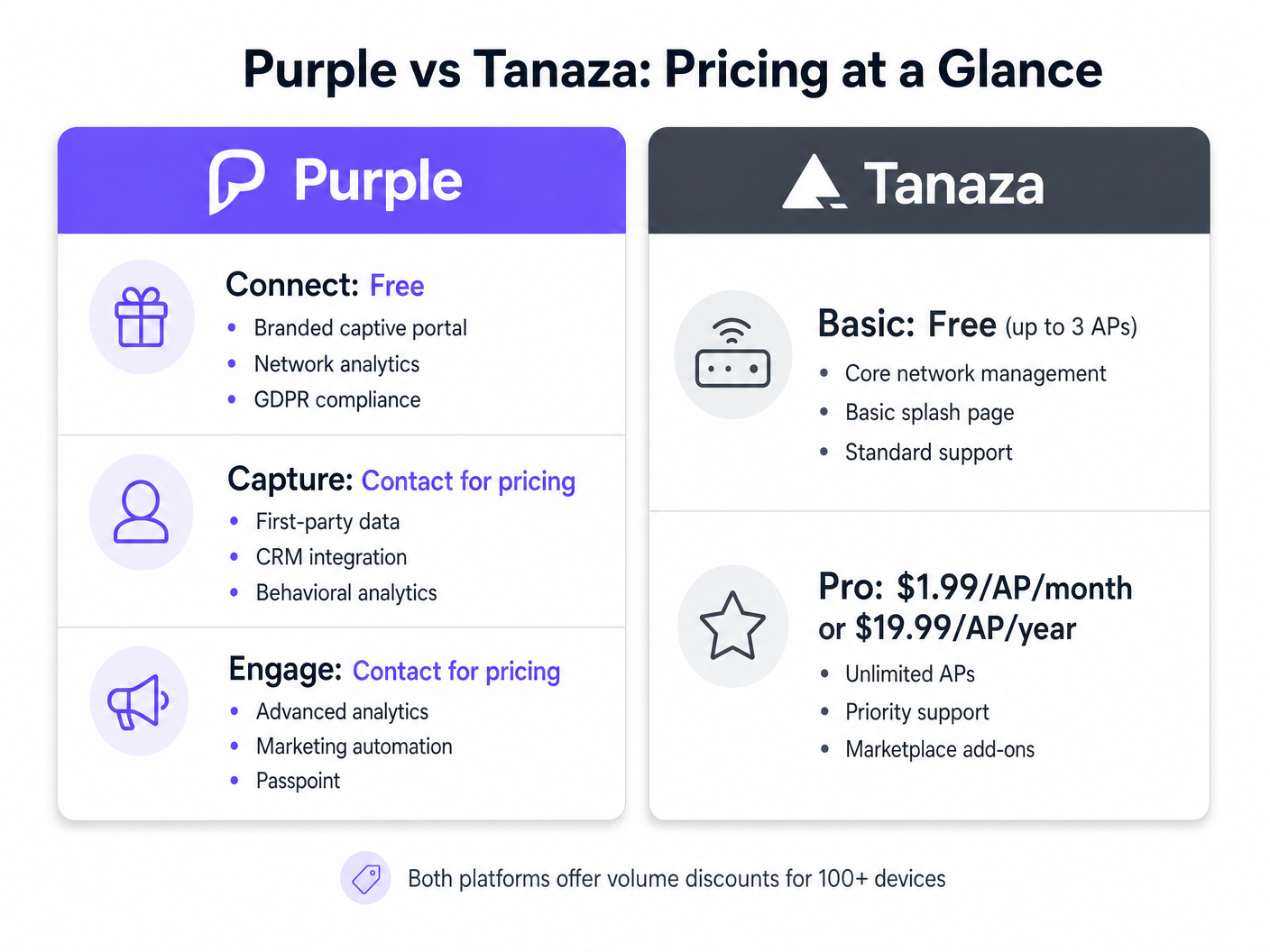
- एकूण मालकी खर्चाचे (TCO) मूल्यांकन करा: Tanaza चा प्रो टियर प्रति-AP मासिक शुल्क आकारतो. Purple चेमूलभूत ब्रँडेड ॲक्सेस आणि अनुपालनासाठी एक मजबूत विनामूल्य टियर (Connect) प्रदान करते, तर प्रगत ॲनालिटिक्स आणि CRM एकत्रीकरणाच्या गरजेनुसार सशुल्क टियर (Capture आणि Engage) वाढतात. Tanaza वर मार्केटिंग वैशिष्ट्ये तयार करण्याचा प्रयत्न करत असल्यास तृतीय-पक्ष ॲड-ऑनचा खर्च विचारात घ्या.
- भविष्यासाठी तयार हार्डवेअर निर्णय: कस्टम फर्मवेअरवर अवलंबून राहिल्याने भविष्यातील हार्डवेअर लवचिकता मर्यादित होते. ओव्हरले आर्किटेक्चर्स Captive Portal अनुभव पुन्हा तयार न करता अंतर्निहित हार्डवेअर विक्रेत्यांना स्थलांतरित करण्याची तुमची क्षमता टिकवून ठेवतात.
समस्यानिवारण आणि जोखीम कमी करणे
जोखीम: मार्केटिंग आवश्यकतांमध्ये स्कोप क्रीप अनेक IT टीम्स मूलभूत Captive Portal तैनात करतात, परंतु सहा महिन्यांनंतर मार्केटिंग विभाग CRM एकत्रीकरण आणि फुटफॉल ॲनालिटिक्सची मागणी करतो. शमन: जर मार्केटिंग आवश्यकता अपेक्षित असतील, तर नंतर महागडे प्लॅटफॉर्म स्थलांतर टाळण्यासाठी पहिल्या दिवसापासून Purple सारखे ओव्हरले आर्किटेक्चर तैनात करा.
जोखीम: इंस्टॉलेशन दरम्यान फर्मवेअर ब्रिकिंग APs वर कस्टम फर्मवेअर फ्लॅश केल्याने डिव्हाइस ब्रिक होण्याची थोडी पण निश्चित जोखीम असते. शमन: Tanaza तैनात करत असल्यास, APs ला डिप्लॉयमेंट साइटवर पाठवण्यापूर्वी फ्लॅश आणि चाचणी करण्यासाठी स्टेजिंग वातावरणाचा वापर करा, किंवा प्री-फ्लॅश केलेले Tanaza Powered Devices खरेदी करा.
ROI आणि व्यावसायिक परिणाम
निवडलेल्या आर्किटेक्चरनुसार Captive Portal प्लॅटफॉर्मसाठी गुंतवणुकीवरील परतावा (ROI) वेगवेगळ्या प्रकारे मोजला जातो.
Tanaza डिप्लॉयमेंट्ससाठी, ROI सामान्यतः ऑपरेशनल कार्यक्षमतेमध्ये मोजला जातो. एकाच इंटरफेसवरून मल्टी-व्हेंडर APs व्यवस्थापित करण्याची क्षमता ट्रक रोल्स कमी करते आणि MSPs साठी समस्यानिवारण सोपे करते.
Purple डिप्लॉयमेंट्ससाठी, ROI डेटा संपादन आणि ऑपरेशनल इंटेलिजन्समध्ये मोजला जातो. सत्यापित फर्स्ट-पार्टी डेटा कॅप्चर करून आणि प्रत्यक्ष थांबण्याच्या वेळा ट्रॅक करून, ठिकाणे पुन्हा भेटींना प्रोत्साहन देणाऱ्या मार्केटिंग मोहिमा स्वयंचलित करू शकतात. हॉस्पिटॅलिटी आणि रिटेल वातावरणात, हे WiFi नेटवर्कला IT खर्चातून मोजता येणाऱ्या महसूल चालकामध्ये रूपांतरित करते.
महत्त्वाच्या संज्ञा आणि व्याख्या
External Captive Portal
A mechanism where the network controller redirects unauthenticated users to a splash page hosted on an external server, rather than serving the page locally from the access point.
This is the architecture Purple uses to remain hardware-agnostic and scalable across enterprise deployments.
Zero-Touch Provisioning
The ability to configure a network device remotely so that it automatically downloads its configuration from the cloud the moment it is connected to the internet.
Crucial for MSPs deploying Tanaza to multiple remote sites without sending specialized IT staff.
First-Party Data
Information a company collects directly from its customers, such as email addresses and demographics gathered during WiFi authentication.
The primary value driver for marketing teams utilizing Purple's Capture and Engage tiers.
Firmware Flashing
The process of overwriting the original manufacturer's operating system on a hardware device with a custom operating system.
Required when deploying Tanaza on third-party hardware to enable cloud management.
RADIUS
Remote Authentication Dial-In User Service; a networking protocol that provides centralized Authentication, Authorization, and Accounting (AAA) management.
Used by both platforms to securely authenticate users and enforce bandwidth or time limits.
Dwell Time
The measurable duration a visitor spends within a specific physical location or zone, tracked via their device's WiFi probe requests.
A key operational metric provided by Purple's analytics engine, used heavily in retail and hospitality.
Audit Trail
A secure, immutable record of user actions, specifically relating to when and how a user consented to data processing terms.
Essential for demonstrating compliance with GDPR and other privacy regulations during an audit.
Overlay Architecture
A software or service layer that operates independently of the underlying physical network infrastructure.
Allows platforms like Purple to provide unified analytics across disparate hardware environments.
केस स्टडीज
A 350-room hotel chain needs to deploy a captive portal across 12 properties. They currently use a mix of older Ruckus ZoneDirectors and new Cisco Meraki MR access points. They require GDPR-compliant guest access and want to integrate guest emails with their central HubSpot CRM.
The IT team should deploy Purple using the overlay architecture. They will configure the Ruckus ZoneDirectors and Meraki dashboards to redirect guest traffic to Purple's external captive portal. In the Purple dashboard, they will build a unified splash page, enable the HubSpot native integration, and configure the GDPR consent workflows.
A regional Managed Service Provider (MSP) is deploying WiFi for 40 small independent coffee shops. The shops need basic click-through WiFi access. The MSP wants to minimize hardware costs and manage all 40 sites from a single dashboard.
The MSP should deploy Tanaza. They can purchase cost-effective access points (e.g., TP-Link or Ubiquiti), flash them with TanazaOS in a staging lab, and ship them to the coffee shops for zero-touch provisioning. They will use Tanaza's multi-site dashboard to monitor AP health and configure a basic click-through splash page for each location.
परिस्थिती विश्लेषण
Q1. A stadium IT director wants to monetize their high-density WiFi network by displaying sponsor advertisements on the splash page and capturing fan emails for the ticketing CRM. They have a newly installed Cisco Catalyst network. Which platform should they choose?
💡 संकेत:Consider the requirement for CRM integration and the existing enterprise hardware.
शिफारस केलेला दृष्टिकोन दाखवा
They should choose Purple. Purple integrates natively with Cisco Catalyst WLCs without requiring firmware changes, which is critical for a high-density stadium deployment. Furthermore, Purple's native CRM integrations and advanced splash page builder support the marketing and monetization requirements, whereas Tanaza would require third-party add-ons and firmware flashing that is incompatible with enterprise Cisco controllers.
Q2. A franchise owner of 15 fast-food restaurants needs to replace aging consumer-grade routers. They have a very tight budget, no dedicated IT staff, and just want to offer customers 30 minutes of free WiFi without capturing data. What is the recommended approach?
💡 संकेत:Focus on the need for low-cost hardware and simplified multi-site management without marketing needs.
शिफारस केलेला दृष्टिकोन दाखवा
They should choose Tanaza. The franchise can purchase low-cost hardware like TP-Link or Ubiquiti, utilize Tanaza's zero-touch provisioning for easy deployment without on-site IT staff, and use the built-in splash page to enforce the 30-minute limit. The Tanaza Pro tier provides cost-effective centralized management for this exact scenario.
Q3. An enterprise retail chain operating in the EU is migrating to Juniper Mist access points. They need to ensure their guest WiFi captures explicit, auditable consent for marketing communications to comply with GDPR. How should they architecture this?
💡 संकेत:Evaluate how both platforms handle compliance and their compatibility with Juniper Mist.
शिफारस केलेला दृष्टिकोन दाखवा
They must deploy Purple as an overlay on the Juniper Mist infrastructure. Purple natively supports Juniper Mist via external captive portal integration. More importantly, Purple's architecture is designed to capture and store auditable GDPR consent records per user, providing the necessary legal protection for the retail chain's marketing activities.




