

Purple vs. Tanaza: Plataformas de Captive Portal Comparadas
Este guia de referência técnica oferece uma comparação neutra entre Purple e Tanaza para implantações de captive portal em SMBs e no mercado intermediário. Ele avalia ambas as plataformas em termos de arquitetura técnica, compatibilidade de hardware, postura de conformidade e precificação para ajudar líderes de TI a alinhar sua estratégia de acesso à rede com resultados de negócios mensuráveis.
🎧 Ouça este Guia
Ver Transcrição
Resumo Executivo
Para gerentes de TI e arquitetos de rede que avaliam plataformas de captive portal, a escolha entre Purple e Tanaza representa uma decisão arquitetônica fundamental. Tanaza opera principalmente como uma plataforma de gerenciamento de rede baseada em nuvem com recursos de captive portal integrados, projetada para MSPs que gerenciam implantações SMB de múltiplos fornecedores via firmware personalizado. Purple, por outro lado, funciona como uma camada de inteligência de convidado de nível empresarial que se posiciona acima da infraestrutura de rede existente via redirecionamentos externos de captive portal, transformando o Guest WiFi padrão em um motor de captura e análise de dados.
Este guia detalha as diferenças técnicas, modelos de implantação e custo total de propriedade para ambas as plataformas. Seja você atualizando um único hotel de 200 quartos ou implantando em uma rede de Varejo de 50 unidades, entender onde cada plataforma se destaca evitará refatorações arquitetônicas dispendiosas no futuro.
Análise Técnica Detalhada
Abordagens Arquitetônicas
O diferencial mais significativo entre as duas plataformas é como elas interagem com o hardware de rede subjacente.
Tanaza depende do TanazaOS, um sistema operacional baseado em Linux que deve ser gravado em pontos de acesso compatíveis (ou adquirido pré-instalado em Dispositivos Tanaza Powered). Isso confere à Tanaza controle profundo sobre o ponto de acesso, permitindo provisionamento zero-touch, monitoramento de carga em tempo real e otimização de canal diretamente de seu painel na nuvem. No entanto, essa abordagem exige a substituição do firmware OEM, o que pode anular garantias e limita as escolhas de hardware a modelos suportados de fornecedores como TP-Link, Ubiquiti e MikroTik.
Purple adota uma arquitetura de overlay. Ele se integra com mais de 50 fornecedores de hardware empresarial — incluindo Cisco Meraki, Aruba, Ruckus e Juniper Mist — via redirecionamentos padrão de captive portal externo e autenticação RADIUS. Nenhuma modificação de firmware é necessária. Isso torna Purple significativamente de menor risco para implantações de médio porte e empresariais onde a infraestrutura de alto desempenho existente já está em vigor. Para mais informações sobre como isso se integra com o design de rede mais amplo, consulte nosso Arquitetura da Internet das Coisas: Um Guia Completo .
Recursos do Captive Portal
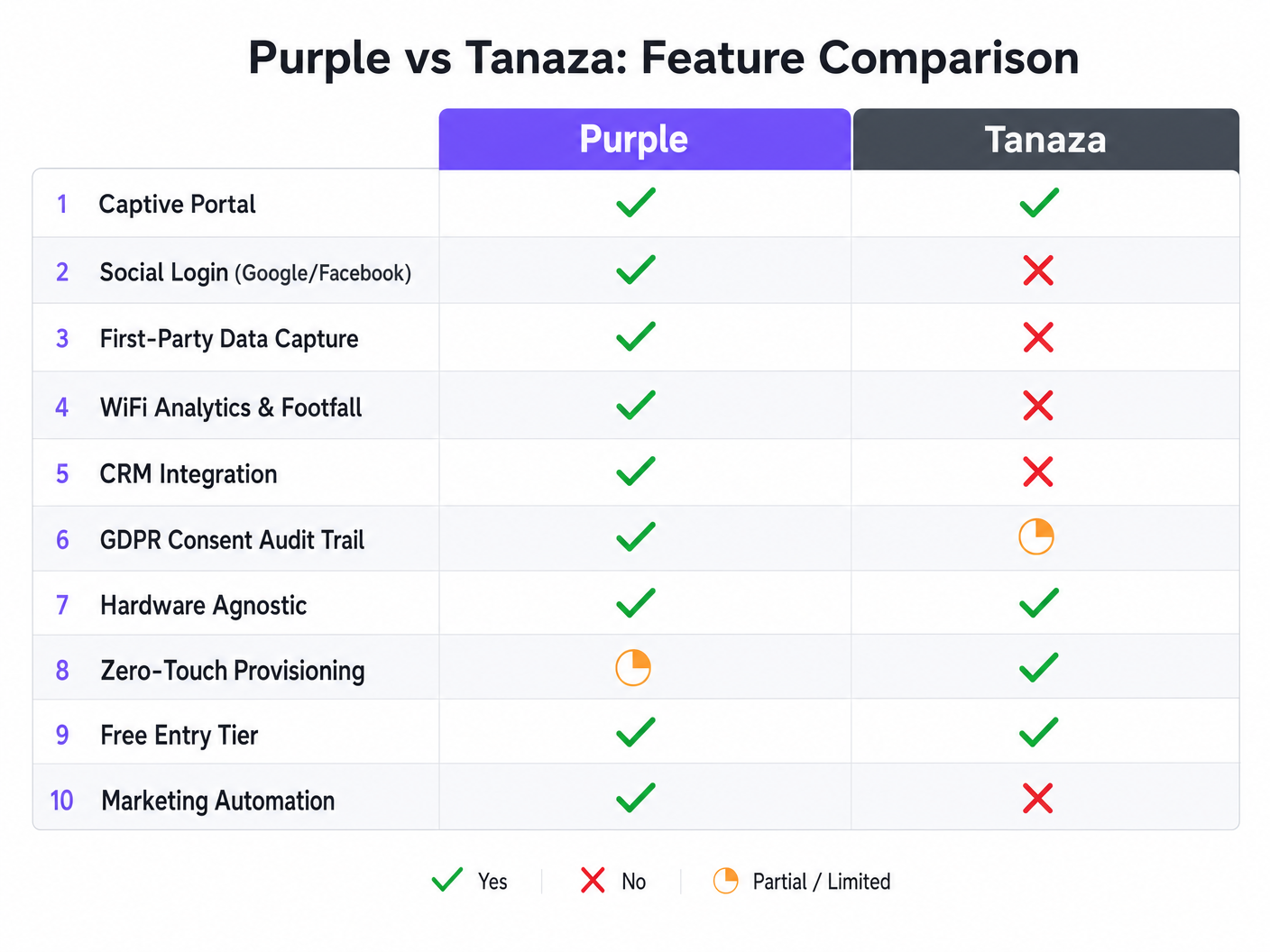
A página de splash integrada da Tanaza oferece acesso de convidado funcional e direto. Ela suporta acordos de clique e logins baseados em código nativamente. No entanto, ela carece de recursos nativos de login social (Google, Facebook, Apple) e requer integrações de terceiros como DataWiFi para conseguir isso.
O captive portal da Purple é construído para aquisição de dados e conformidade de marketing. Ele suporta nativamente uma ampla gama de métodos de autenticação, incluindo logins sociais, SMS OTP e captura de e-mail com verificação em tempo real. O construtor de arrastar e soltar suporta 25 idiomas e permite uma profunda personalização da marca.
Conformidade e Segurança
Ao implantar redes de convidados em Saúde ou setores públicos, a conformidade é inegociável. Tanaza permite que os administradores configurem termos e condições, mas o ônus de demonstrar a conformidade com o GDPR recai em grande parte sobre o operador.
Purple incorpora a conformidade no fluxo de onboarding. Ele mantém um registro de auditoria completo do consentimento do usuário, gerencia automaticamente as políticas de retenção de dados e fornece fluxos de trabalho integrados para solicitações de direito ao esquecimento. Esta arquitetura é projetada para atender aos requisitos rigorosos do GDPR, CCPA e LGPD de forma nativa. Para estratégias de conformidade regionais específicas, consulte nosso LGPD do Brasil e Guest WiFi: Um Guia de Conformidade .
Guia de Implementação
Implantando Tanaza
- Seleção de Hardware: Verifique se seus pontos de acesso estão na lista de suporte da Tanaza ou adquira Dispositivos Tanaza Powered.
- Gravação de Firmware: Se estiver usando hardware existente, siga as instruções específicas de gravação para instalar o TanazaOS. Esta etapa requer proficiência técnica e acesso físico aos APs ou a um ambiente de staging.
- Provisionamento em Nuvem: Adicione os endereços MAC ao painel de nuvem da Tanaza.
- Configuração de Rede: Configure SSIDs, marcação de VLAN e limites de largura de banda centralmente.
- Configuração do Portal: Habilite a página de splash integrada e configure os termos básicos de clique para aceitar.
Implantando Purple
- Integração de Infraestrutura: Configure seu WLC ou controlador de nuvem existente (por exemplo, Meraki Dashboard, Aruba Central) para apontar para as URLs de captive portal externo e servidores RADIUS da Purple.
- Design do Portal: Use o construtor de portal da Purple para projetar a página de splash, configurar APIs de login social e definir os requisitos de captura de dados.
- Configuração de Conformidade: Defina os limites de retenção de dados e configure os links da política de privacidade dentro do painel da Purple.
- Mapeamento de CRM: Conecte Purple ao seu CRM (por exemplo, Salesforce, HubSpot) e mapeie os campos de dados demográficos capturados para seus registros de contato.
Ouça o briefing do nosso consultor sênior para uma análise mais aprofundada dessas estratégias de implantação:
Melhores Práticas
- Defina o Resultado de Negócio Primeiro: Se o objetivo é puramente o gerenciamento operacional de rede para uma pequena implantação, priorize o provisionamento zero-touch da Tanaza. Se o objetivo é inteligência de marketing e Análise de WiFi , Purple é a arquitetura necessária.
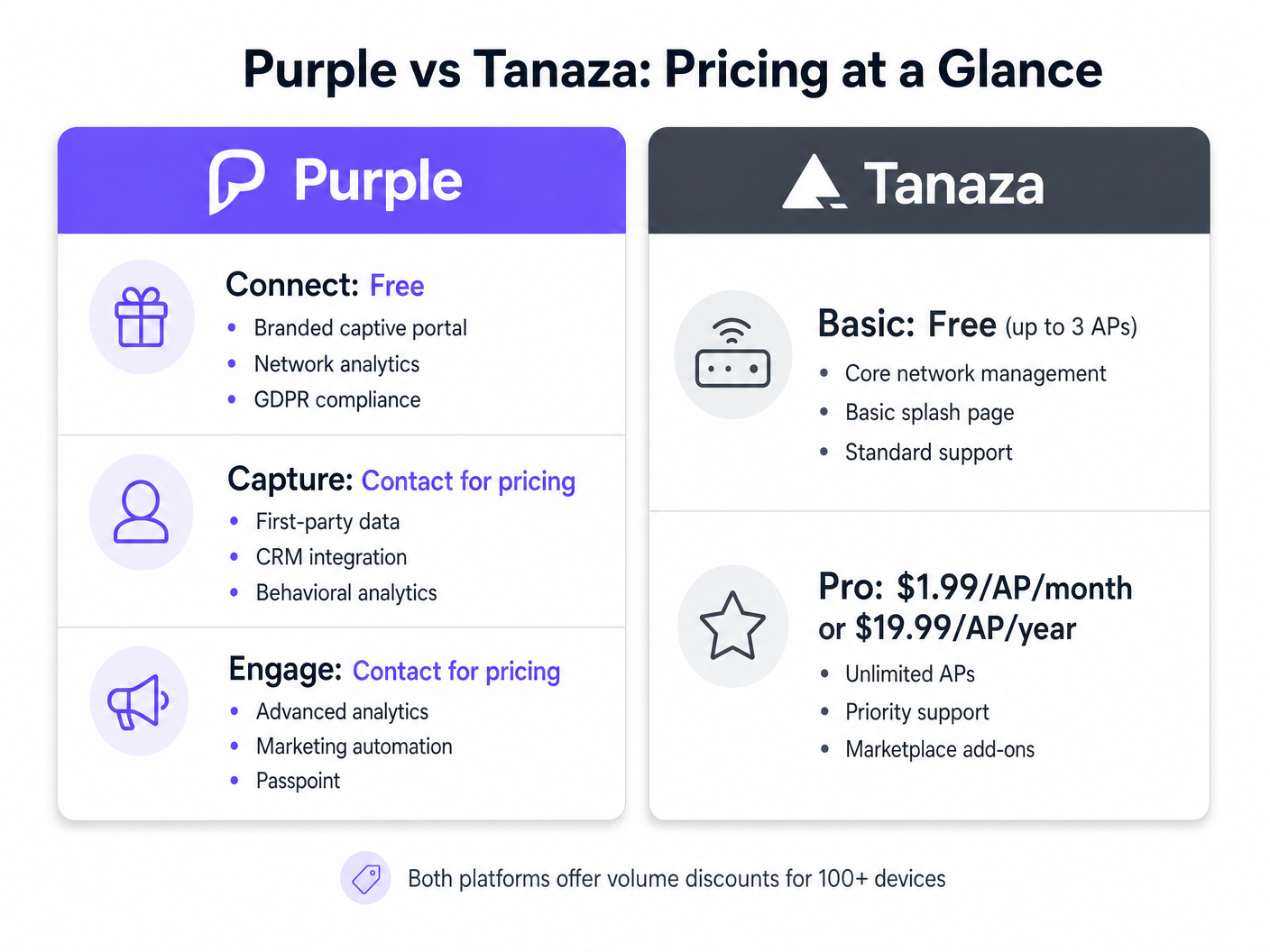
- Avalie o Custo Total de Propriedade (TCO): O nível Pro da Tanaza cobra uma taxa mensal fixa por AP. Purple ofoferece um nível gratuito robusto (Connect) para acesso básico de marca e conformidade, com níveis pagos (Capture e Engage) que escalam com base nas necessidades de análises avançadas e integração de CRM. Considere o custo de complementos de terceiros se tentar construir recursos de marketing sobre o Tanaza.
- Decisões de Hardware à Prova de Futuro: Confiar em firmware personalizado limita a flexibilidade futura do hardware. Arquiteturas de sobreposição preservam sua capacidade de migrar fornecedores de hardware subjacentes sem reconstruir a experiência do Captive Portal.
Solução de Problemas e Mitigação de Riscos
Risco: Expansão do Escopo nos Requisitos de Marketing Muitas equipes de TI implementam um Captive Portal básico apenas para o departamento de marketing solicitar integração de CRM e análise de fluxo de visitantes seis meses depois. Mitigação: Se os requisitos de marketing forem antecipados, implemente uma arquitetura de sobreposição como a Purple desde o primeiro dia para evitar uma migração de plataforma dispendiosa posteriormente.
Risco: Bricking do Firmware durante a Instalação Gravar firmware personalizado em APs acarreta um risco pequeno, mas não nulo, de inutilizar o dispositivo. Mitigação: Se estiver implementando Tanaza, utilize um ambiente de teste para gravar e testar os APs antes de enviá-los para o local de implantação, ou adquira Dispositivos Tanaza Powered pré-gravados.
ROI e Impacto nos Negócios
O retorno sobre o investimento para plataformas de Captive Portal é medido de forma diferente dependendo da arquitetura escolhida.
Para implementações Tanaza, o ROI é tipicamente medido em eficiência operacional. A capacidade de gerenciar APs de múltiplos fornecedores a partir de um único painel reduz as visitas técnicas e simplifica a solução de problemas para MSPs.
Para implementações Purple, o ROI é medido em aquisição de dados e inteligência operacional. Ao capturar dados primários verificados e rastrear tempos de permanência física, os locais podem automatizar campanhas de marketing que impulsionam visitas repetidas. Em ambientes de Hospitalidade e varejo, isso transforma a rede WiFi de uma despesa de TI em um gerador de receita mensurável.
Termos-Chave e Definições
External Captive Portal
A mechanism where the network controller redirects unauthenticated users to a splash page hosted on an external server, rather than serving the page locally from the access point.
This is the architecture Purple uses to remain hardware-agnostic and scalable across enterprise deployments.
Zero-Touch Provisioning
The ability to configure a network device remotely so that it automatically downloads its configuration from the cloud the moment it is connected to the internet.
Crucial for MSPs deploying Tanaza to multiple remote sites without sending specialized IT staff.
First-Party Data
Information a company collects directly from its customers, such as email addresses and demographics gathered during WiFi authentication.
The primary value driver for marketing teams utilizing Purple's Capture and Engage tiers.
Firmware Flashing
The process of overwriting the original manufacturer's operating system on a hardware device with a custom operating system.
Required when deploying Tanaza on third-party hardware to enable cloud management.
RADIUS
Remote Authentication Dial-In User Service; a networking protocol that provides centralized Authentication, Authorization, and Accounting (AAA) management.
Used by both platforms to securely authenticate users and enforce bandwidth or time limits.
Dwell Time
The measurable duration a visitor spends within a specific physical location or zone, tracked via their device's WiFi probe requests.
A key operational metric provided by Purple's analytics engine, used heavily in retail and hospitality.
Audit Trail
A secure, immutable record of user actions, specifically relating to when and how a user consented to data processing terms.
Essential for demonstrating compliance with GDPR and other privacy regulations during an audit.
Overlay Architecture
A software or service layer that operates independently of the underlying physical network infrastructure.
Allows platforms like Purple to provide unified analytics across disparate hardware environments.
Estudos de Caso
A 350-room hotel chain needs to deploy a captive portal across 12 properties. They currently use a mix of older Ruckus ZoneDirectors and new Cisco Meraki MR access points. They require GDPR-compliant guest access and want to integrate guest emails with their central HubSpot CRM.
The IT team should deploy Purple using the overlay architecture. They will configure the Ruckus ZoneDirectors and Meraki dashboards to redirect guest traffic to Purple's external captive portal. In the Purple dashboard, they will build a unified splash page, enable the HubSpot native integration, and configure the GDPR consent workflows.
A regional Managed Service Provider (MSP) is deploying WiFi for 40 small independent coffee shops. The shops need basic click-through WiFi access. The MSP wants to minimize hardware costs and manage all 40 sites from a single dashboard.
The MSP should deploy Tanaza. They can purchase cost-effective access points (e.g., TP-Link or Ubiquiti), flash them with TanazaOS in a staging lab, and ship them to the coffee shops for zero-touch provisioning. They will use Tanaza's multi-site dashboard to monitor AP health and configure a basic click-through splash page for each location.
Análise de Cenário
Q1. A stadium IT director wants to monetize their high-density WiFi network by displaying sponsor advertisements on the splash page and capturing fan emails for the ticketing CRM. They have a newly installed Cisco Catalyst network. Which platform should they choose?
💡 Dica:Consider the requirement for CRM integration and the existing enterprise hardware.
Mostrar Abordagem Recomendada
They should choose Purple. Purple integrates natively with Cisco Catalyst WLCs without requiring firmware changes, which is critical for a high-density stadium deployment. Furthermore, Purple's native CRM integrations and advanced splash page builder support the marketing and monetization requirements, whereas Tanaza would require third-party add-ons and firmware flashing that is incompatible with enterprise Cisco controllers.
Q2. A franchise owner of 15 fast-food restaurants needs to replace aging consumer-grade routers. They have a very tight budget, no dedicated IT staff, and just want to offer customers 30 minutes of free WiFi without capturing data. What is the recommended approach?
💡 Dica:Focus on the need for low-cost hardware and simplified multi-site management without marketing needs.
Mostrar Abordagem Recomendada
They should choose Tanaza. The franchise can purchase low-cost hardware like TP-Link or Ubiquiti, utilize Tanaza's zero-touch provisioning for easy deployment without on-site IT staff, and use the built-in splash page to enforce the 30-minute limit. The Tanaza Pro tier provides cost-effective centralized management for this exact scenario.
Q3. An enterprise retail chain operating in the EU is migrating to Juniper Mist access points. They need to ensure their guest WiFi captures explicit, auditable consent for marketing communications to comply with GDPR. How should they architecture this?
💡 Dica:Evaluate how both platforms handle compliance and their compatibility with Juniper Mist.
Mostrar Abordagem Recomendada
They must deploy Purple as an overlay on the Juniper Mist infrastructure. Purple natively supports Juniper Mist via external captive portal integration. More importantly, Purple's architecture is designed to capture and store auditable GDPR consent records per user, providing the necessary legal protection for the retail chain's marketing activities.




