

Purple vs Tanaza: Captive Portal Plattformen im Vergleich
Dieser technische Leitfaden bietet einen herstellerneutralen Vergleich von Purple und Tanaza für Captive Portal Implementierungen im SMB- und Mid-Market-Bereich. Er bewertet beide Plattformen hinsichtlich technischer Architektur, Hardware-Kompatibilität, Compliance-Haltung und Preisgestaltung, um IT-Führungskräften zu helfen, ihre Netzwerkzugriffsstrategie an messbaren Geschäftsergebnissen auszurichten.
🎧 Diesen Leitfaden anhören
Transkript anzeigen
Zusammenfassung für Führungskräfte
Für IT-Manager und Netzwerkarchitekten, die Captive Portal Plattformen evaluieren, stellt die Wahl zwischen Purple und Tanaza eine grundlegende architektonische Entscheidung dar. Tanaza fungiert primär als cloudbasierte Netzwerkmanagement-Plattform mit integrierten Captive Portal Funktionen, konzipiert für MSPs, die Multi-Vendor-SMB-Implementierungen über benutzerdefinierte Firmware verwalten. Purple hingegen fungiert als unternehmensweite Gastintelligenzschicht, die über der bestehenden Netzwerkinfrastruktur über externe Captive Portal Weiterleitungen sitzt und standardmäßiges Guest WiFi in eine Datenerfassungs- und Analyse-Engine verwandelt.
Dieser Leitfaden beleuchtet die technischen Unterschiede, Bereitstellungsmodelle und die Gesamtbetriebskosten für beide Plattformen. Ob Sie ein einzelnes Hotel mit 200 Zimmern aufrüsten oder eine Einzelhandels -Kette mit 50 Standorten implementieren, das Verständnis der Stärken jeder Plattform wird kostspielige architektonische Umstrukturierungen in der Zukunft verhindern.
Technischer Einblick
Architektonische Ansätze
Der wesentlichste Unterschied zwischen den beiden Plattformen ist, wie sie mit Ihrer zugrunde liegenden Netzwerkhardware interagieren.
Tanaza basiert auf TanazaOS, einem Linux-basierten Betriebssystem, das auf kompatible Access Points geflasht (oder vorinstalliert auf Tanaza Powered Devices erworben) werden muss. Dies verleiht Tanaza eine tiefe Kontrolle über den Access Point und ermöglicht Zero-Touch-Provisioning, Echtzeit-Lastüberwachung und Kanaloptimierung direkt über ihr Cloud-Dashboard. Dieser Ansatz erfordert jedoch den Austausch der OEM-Firmware, was Garantien ungültig machen und die Hardware-Auswahl auf unterstützte Modelle von Anbietern wie TP-Link, Ubiquiti und MikroTik beschränken kann.
Purple verwendet eine Overlay-Architektur. Es integriert sich mit über 50 Enterprise-Hardware-Anbietern – darunter Cisco Meraki, Aruba, Ruckus und Juniper Mist – über standardmäßige externe Captive Portal Weiterleitungen und RADIUS-Authentifizierung. Keine Firmware-Modifikation ist erforderlich. Dies macht Purple zu einer deutlich risikoärmeren Lösung für Mid-Market- und Enterprise-Implementierungen, bei denen bereits eine leistungsstarke Infrastruktur vorhanden ist. Für weitere Informationen zur Integration in ein breiteres Netzwerkdesign siehe unseren Internet der Dinge Architektur: Ein vollständiger Leitfaden .
Captive Portal Funktionen
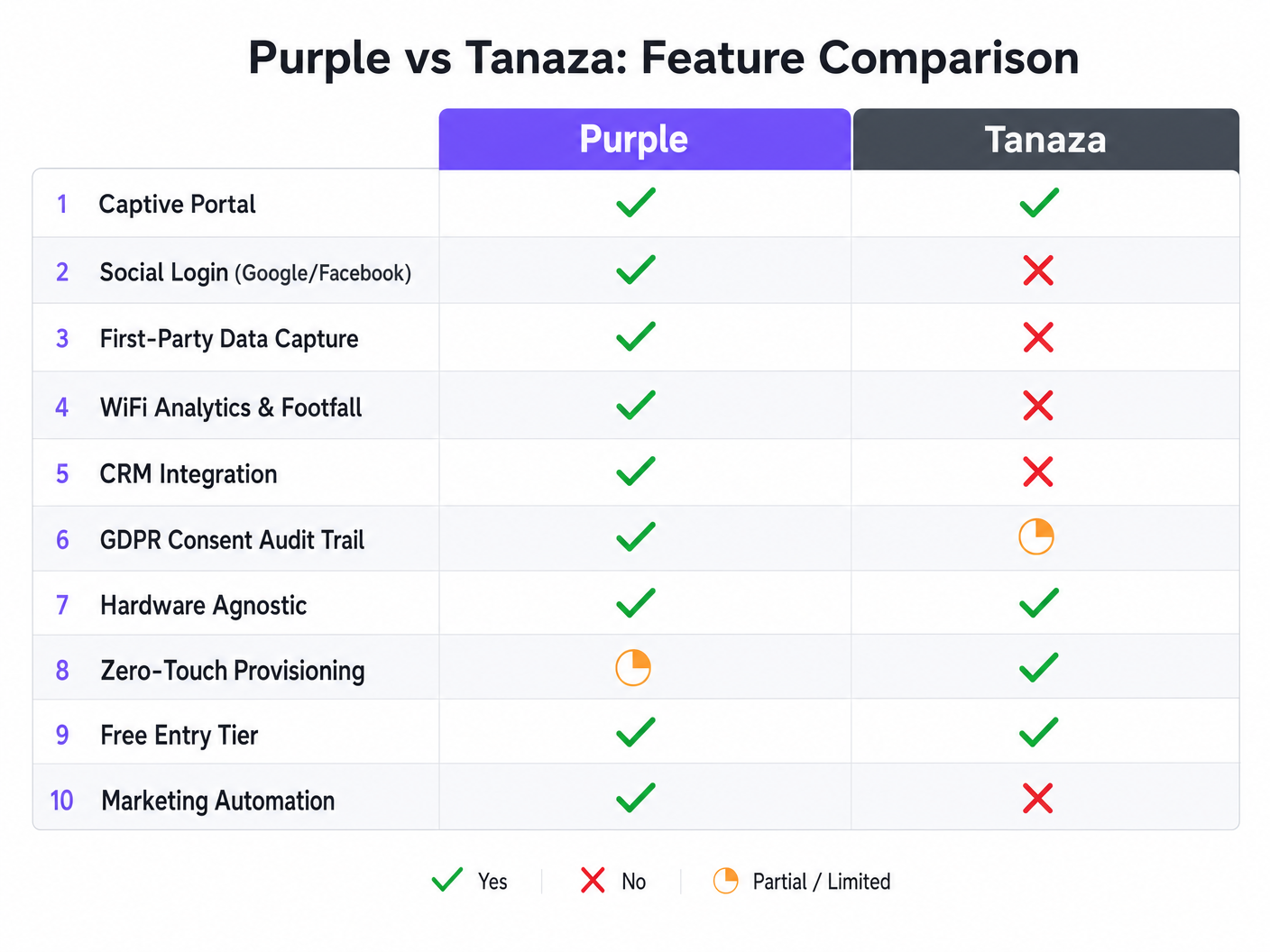
Die integrierte Splash-Page von Tanaza bietet funktionalen, unkomplizierten Gastzugang. Sie unterstützt nativ Click-Through-Vereinbarungen und codebasierte Logins. Es fehlen jedoch native Social-Login-Funktionen (Google, Facebook, Apple) und es sind Drittanbieter-Integrationen wie DataWiFi erforderlich, um dies zu erreichen.
Das Captive Portal von Purple ist für die Datenerfassung und Marketing-Compliance konzipiert. Es unterstützt nativ eine Vielzahl von Authentifizierungsmethoden, einschließlich Social Logins, SMS OTP und E-Mail-Erfassung mit Echtzeit-Verifizierung. Der Drag-and-Drop-Builder unterstützt 25 Sprachen und ermöglicht eine umfassende Markenanpassung.
Compliance und Sicherheit
Beim Einsatz von Gastnetzwerken im Gesundheitswesen oder im öffentlichen Sektor ist Compliance nicht verhandelbar. Tanaza ermöglicht Administratoren die Konfiguration von Geschäftsbedingungen, aber die Last des Nachweises der GDPR-Compliance liegt größtenteils beim Betreiber.
Purple integriert Compliance in den Onboarding-Prozess. Es führt ein vollständiges Audit-Protokoll der Benutzerzustimmung, handhabt Datenaufbewahrungsrichtlinien automatisch und bietet integrierte Workflows für Anträge auf Löschung. Diese Architektur ist darauf ausgelegt, die strengen Anforderungen von GDPR, CCPA und LGPD sofort zu erfüllen. Für spezifische regionale Compliance-Strategien siehe unseren Brasilien LGPD und Guest WiFi: Ein Compliance-Leitfaden .
Implementierungsleitfaden
Tanaza bereitstellen
- Hardware-Auswahl: Überprüfen Sie, ob Ihre Access Points auf der Tanaza-Supportliste stehen, oder erwerben Sie Tanaza Powered Devices.
- Firmware-Flash: Wenn Sie vorhandene Hardware verwenden, befolgen Sie die spezifischen Flash-Anweisungen zur Installation von TanazaOS. Dieser Schritt erfordert technisches Fachwissen und physischen Zugang zu den APs oder einer Staging-Umgebung.
- Cloud-Bereitstellung: Fügen Sie die MAC-Adressen zum Tanaza Cloud-Dashboard hinzu.
- Netzwerkkonfiguration: Konfigurieren Sie SSIDs, VLAN-Tagging und Bandbreitenbegrenzungen zentral.
- Portal-Einrichtung: Aktivieren Sie die integrierte Splash-Page und konfigurieren Sie die grundlegenden Click-Through-Bedingungen.
Purple bereitstellen
- Infrastruktur-Integration: Konfigurieren Sie Ihren vorhandenen WLC oder Cloud-Controller (z.B. Meraki Dashboard, Aruba Central) so, dass er auf die externen Captive Portal URLs und RADIUS-Server von Purple verweist.
- Portal-Design: Verwenden Sie den Purple Portal Builder, um die Splash-Page zu gestalten, Social Login APIs zu konfigurieren und Datenerfassungsanforderungen festzulegen.
- Compliance-Konfiguration: Legen Sie Datenaufbewahrungsgrenzen fest und konfigurieren Sie die Links zur Datenschutzerklärung im Purple Dashboard.
- CRM-Mapping: Verbinden Sie Purple mit Ihrem CRM (z.B. Salesforce, HubSpot) und ordnen Sie die erfassten demografischen Datenfelder Ihren Kontaktdatensätzen zu.
Hören Sie sich unser Briefing des Senior Consultants an, um einen tieferen Einblick in diese Bereitstellungsstrategien zu erhalten:
Best Practices
- Geschäftsergebnis zuerst definieren: Wenn das Ziel rein operatives Netzwerkmanagement für eine kleine Implementierung ist, priorisieren Sie Tanazas Zero-Touch-Provisioning. Wenn das Ziel Marketing-Intelligenz und WiFi Analytics ist, ist Purple die erforderliche Architektur.
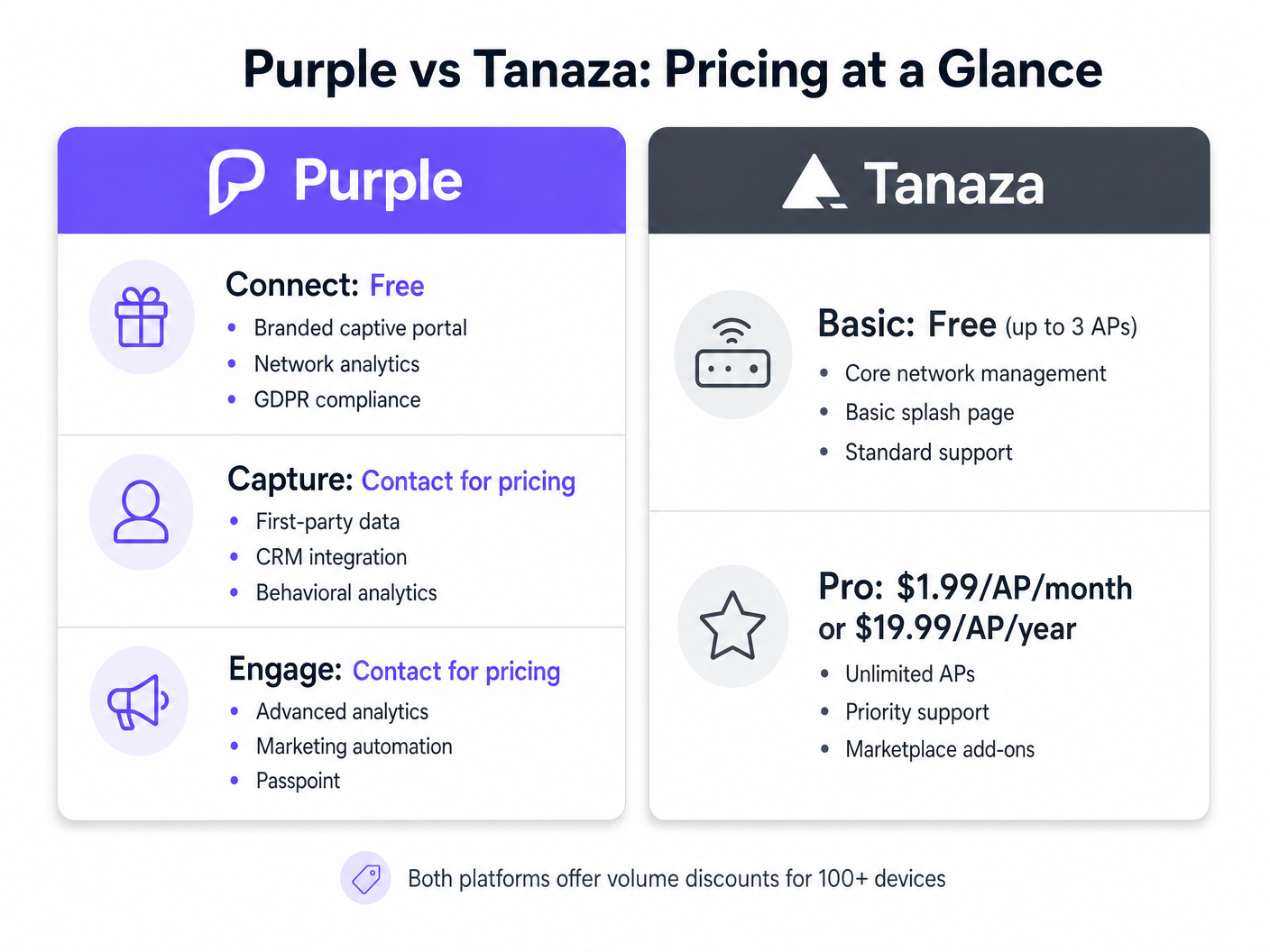
- Gesamtbetriebskosten (TCO) bewerten: Tanazas Pro-Tier berechnet eine pauschale monatliche Gebühr pro AP. Purple vonbietet eine robuste kostenlose Stufe (Connect) für grundlegenden Marken-Zugang und Compliance, mit kostenpflichtigen Stufen (Capture und Engage), die basierend auf erweiterten Analysen und CRM-Integrationsbedürfnissen skalieren. Berücksichtigen Sie die Kosten für Add-ons von Drittanbietern, wenn Sie versuchen, Marketingfunktionen auf Tanaza aufzubauen.
- Zukunftssichere Hardware-Entscheidungen: Das Vertrauen auf benutzerdefinierte Firmware schränkt die zukünftige Hardware-Flexibilität ein. Overlay-Architekturen bewahren Ihre Fähigkeit, zugrunde liegende Hardware-Anbieter zu migrieren, ohne das Captive Portal-Erlebnis neu aufbauen zu müssen.
Fehlerbehebung & Risikominderung
Risiko: Scope Creep bei Marketinganforderungen Viele IT-Teams implementieren ein grundlegendes Captive Portal, nur um sechs Monate später von der Marketingabteilung CRM-Integration und Besucherfrequenzanalysen anzufordern. Minderung: Wenn Marketinganforderungen erwartet werden, implementieren Sie von Anfang an eine Overlay-Architektur wie Purple, um eine kostspielige Plattformmigration später zu vermeiden.
Risiko: Firmware-Bricking während der Installation Das Flashen benutzerdefinierter Firmware auf APs birgt ein geringes, aber nicht null Risiko, das Gerät zu beschädigen. Minderung: Wenn Sie Tanaza implementieren, nutzen Sie eine Staging-Umgebung, um APs zu flashen und zu testen, bevor Sie sie an den Bereitstellungsort versenden, oder erwerben Sie vorinstallierte Tanaza Powered Devices.
ROI & Geschäftsauswirkungen
Der Return on Investment für Captive Portal-Plattformen wird je nach gewählter Architektur unterschiedlich gemessen.
Bei Tanaza-Implementierungen wird der ROI typischerweise in betrieblicher Effizienz gemessen. Die Möglichkeit, APs verschiedener Anbieter über eine einzige Oberfläche zu verwalten, reduziert Vor-Ort-Einsätze und vereinfacht die Fehlerbehebung für MSPs.
Bei Purple-Implementierungen wird der ROI in Datenerfassung und operativer Intelligenz gemessen. Durch die Erfassung verifizierter Erstanbieterdaten und die Verfolgung physischer Verweildauern können Veranstaltungsorte Marketingkampagnen automatisieren, die wiederkehrende Besuche fördern. In Hospitality und Einzelhandelsumgebungen verwandelt dies das WiFi-Netzwerk von einer IT-Ausgabe in einen messbaren Umsatztreiber.
Schlüsselbegriffe & Definitionen
External Captive Portal
A mechanism where the network controller redirects unauthenticated users to a splash page hosted on an external server, rather than serving the page locally from the access point.
This is the architecture Purple uses to remain hardware-agnostic and scalable across enterprise deployments.
Zero-Touch Provisioning
The ability to configure a network device remotely so that it automatically downloads its configuration from the cloud the moment it is connected to the internet.
Crucial for MSPs deploying Tanaza to multiple remote sites without sending specialized IT staff.
First-Party Data
Information a company collects directly from its customers, such as email addresses and demographics gathered during WiFi authentication.
The primary value driver for marketing teams utilizing Purple's Capture and Engage tiers.
Firmware Flashing
The process of overwriting the original manufacturer's operating system on a hardware device with a custom operating system.
Required when deploying Tanaza on third-party hardware to enable cloud management.
RADIUS
Remote Authentication Dial-In User Service; a networking protocol that provides centralized Authentication, Authorization, and Accounting (AAA) management.
Used by both platforms to securely authenticate users and enforce bandwidth or time limits.
Dwell Time
The measurable duration a visitor spends within a specific physical location or zone, tracked via their device's WiFi probe requests.
A key operational metric provided by Purple's analytics engine, used heavily in retail and hospitality.
Audit Trail
A secure, immutable record of user actions, specifically relating to when and how a user consented to data processing terms.
Essential for demonstrating compliance with GDPR and other privacy regulations during an audit.
Overlay Architecture
A software or service layer that operates independently of the underlying physical network infrastructure.
Allows platforms like Purple to provide unified analytics across disparate hardware environments.
Fallstudien
A 350-room hotel chain needs to deploy a captive portal across 12 properties. They currently use a mix of older Ruckus ZoneDirectors and new Cisco Meraki MR access points. They require GDPR-compliant guest access and want to integrate guest emails with their central HubSpot CRM.
The IT team should deploy Purple using the overlay architecture. They will configure the Ruckus ZoneDirectors and Meraki dashboards to redirect guest traffic to Purple's external captive portal. In the Purple dashboard, they will build a unified splash page, enable the HubSpot native integration, and configure the GDPR consent workflows.
A regional Managed Service Provider (MSP) is deploying WiFi for 40 small independent coffee shops. The shops need basic click-through WiFi access. The MSP wants to minimize hardware costs and manage all 40 sites from a single dashboard.
The MSP should deploy Tanaza. They can purchase cost-effective access points (e.g., TP-Link or Ubiquiti), flash them with TanazaOS in a staging lab, and ship them to the coffee shops for zero-touch provisioning. They will use Tanaza's multi-site dashboard to monitor AP health and configure a basic click-through splash page for each location.
Szenarioanalyse
Q1. A stadium IT director wants to monetize their high-density WiFi network by displaying sponsor advertisements on the splash page and capturing fan emails for the ticketing CRM. They have a newly installed Cisco Catalyst network. Which platform should they choose?
💡 Hinweis:Consider the requirement for CRM integration and the existing enterprise hardware.
Empfohlenen Ansatz anzeigen
They should choose Purple. Purple integrates natively with Cisco Catalyst WLCs without requiring firmware changes, which is critical for a high-density stadium deployment. Furthermore, Purple's native CRM integrations and advanced splash page builder support the marketing and monetization requirements, whereas Tanaza would require third-party add-ons and firmware flashing that is incompatible with enterprise Cisco controllers.
Q2. A franchise owner of 15 fast-food restaurants needs to replace aging consumer-grade routers. They have a very tight budget, no dedicated IT staff, and just want to offer customers 30 minutes of free WiFi without capturing data. What is the recommended approach?
💡 Hinweis:Focus on the need for low-cost hardware and simplified multi-site management without marketing needs.
Empfohlenen Ansatz anzeigen
They should choose Tanaza. The franchise can purchase low-cost hardware like TP-Link or Ubiquiti, utilize Tanaza's zero-touch provisioning for easy deployment without on-site IT staff, and use the built-in splash page to enforce the 30-minute limit. The Tanaza Pro tier provides cost-effective centralized management for this exact scenario.
Q3. An enterprise retail chain operating in the EU is migrating to Juniper Mist access points. They need to ensure their guest WiFi captures explicit, auditable consent for marketing communications to comply with GDPR. How should they architecture this?
💡 Hinweis:Evaluate how both platforms handle compliance and their compatibility with Juniper Mist.
Empfohlenen Ansatz anzeigen
They must deploy Purple as an overlay on the Juniper Mist infrastructure. Purple natively supports Juniper Mist via external captive portal integration. More importantly, Purple's architecture is designed to capture and store auditable GDPR consent records per user, providing the necessary legal protection for the retail chain's marketing activities.




