

Onboarding de WiFi Orientado por Webhook: Automatizando o Acesso de Convidados em Escala
Este guia abrangente detalha como implementar o onboarding de WiFi orientado por webhook para automatizar o acesso à rede de convidados. Ele aborda arquitetura, estratégias de integração, melhores práticas e o impacto nos negócios da implantação de entrega de credenciais sem toque em escala.
🎧 Ouça este Guia
Ver Transcrição
Resumo Executivo
Para locais modernos de hospitalidade, varejo e setor público, a experiência do WiFi para convidados começa muito antes de o usuário entrar nas instalações. Confiar na distribuição manual de credenciais — seja por meio de cartões impressos na recepção ou senhas genéricas compartilhadas — introduz atrito operacional, compromete a segurança e cria uma desconexão entre a identidade de reserva do convidado e sua presença na rede.
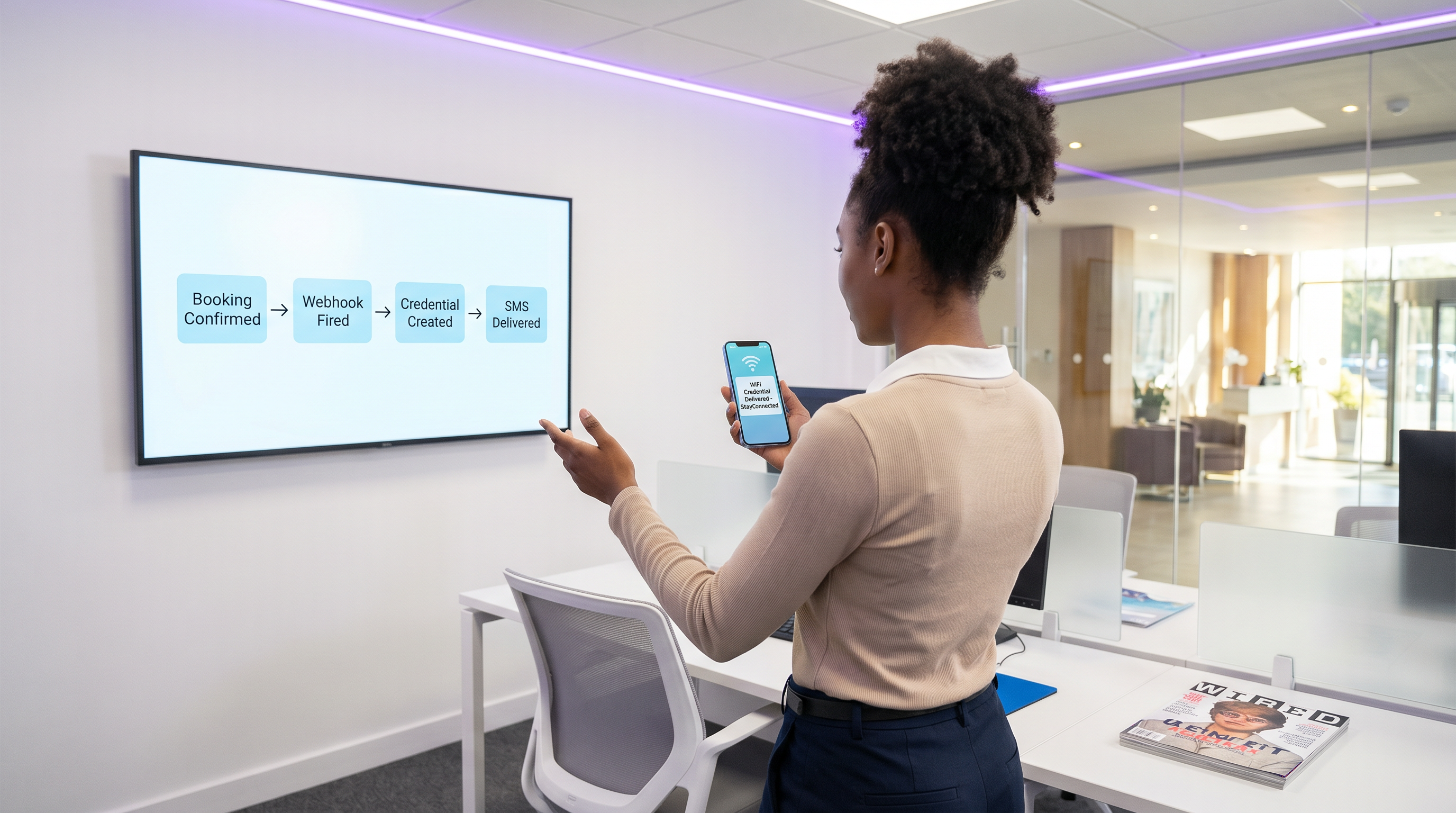
A automação de onboarding de WiFi orientada por webhook elimina esse atrito. Ao integrar seus sistemas de reserva existentes (como um Sistema de Gerenciamento de Propriedades ou CRM) com a camada de controle de acesso à rede, você pode gerar e distribuir automaticamente credenciais de WiFi seguras e com prazo definido no momento em que uma reserva é confirmada. Essa abordagem sem intervenção reduz drasticamente a sobrecarga da recepção, garante a conformidade com os padrões de privacidade de dados e oferece uma experiência de onboarding sem toque e contínua para o convidado.
Este guia detalha a arquitetura, as etapas de implementação e as melhores práticas para implantar o onboarding orientado por webhook em escala, aproveitando o motor LogicFlow da Purple para preencher a lacuna entre eventos de negócios e acesso à rede.
Análise Técnica Aprofundada: Arquitetura de Webhook
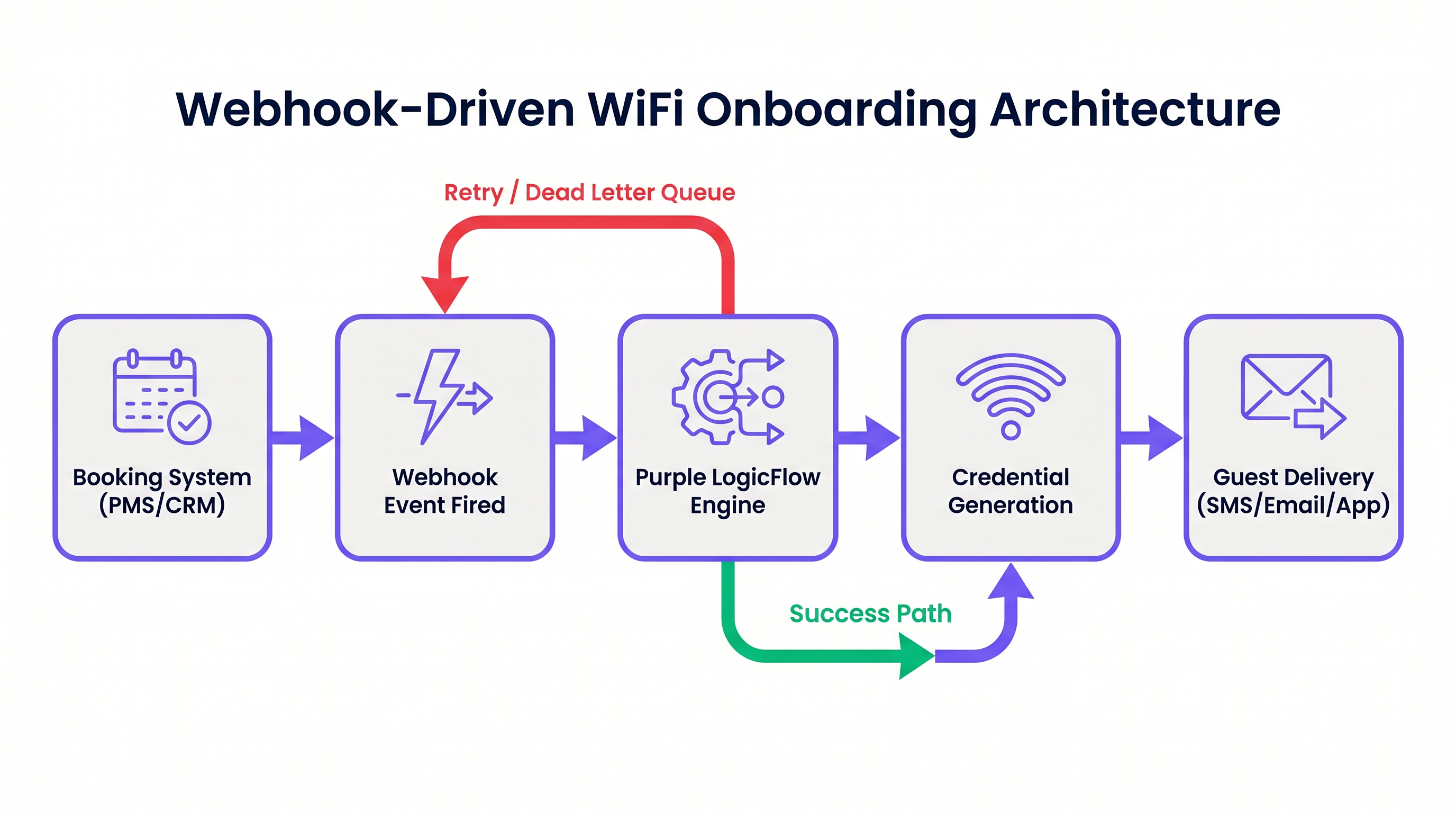
Em sua essência, um webhook é uma requisição HTTP POST acionada por um evento específico em um sistema de origem. No contexto da automação de onboarding de WiFi, o sistema de origem é tipicamente um Sistema de Gerenciamento de Propriedades (PMS), CRM ou plataforma de registro de eventos.
Quando um evento ocorre — como uma confirmação de reserva, check-in ou modificação de estadia — o sistema de origem envia um payload JSON contendo dados relevantes do convidado para um endpoint designado.
O Motor LogicFlow da Purple
O motor LogicFlow da Purple serve como o middleware inteligente nesta arquitetura. Ele recebe o payload do webhook, analisa os dados do convidado e executa um fluxo de trabalho predefinido para gerar uma credencial de rede. Esta credencial pode assumir a forma de uma Chave Pré-Compartilhada Única (PPSK) ou uma conta dinâmica baseada em RADIUS.
LogicFlow gerencia todo o ciclo de vida da credencial:
- Geração: Criação de uma credencial segura e única vinculada à identidade do convidado.
- Entrega: Envio da credencial via SMS, e-mail ou push de API para um aplicativo móvel.
- Ativação/Revogação: Habilitar a credencial no check-in e desabilitá-la precisamente no check-out.
Esta integração transforma a rede de uma utilidade de TI isolada em um ativo consciente dos negócios, perfeitamente alinhado com o ritmo operacional do local. Para uma perspectiva mais ampla sobre arquiteturas de rede modernas, considere Os Principais Benefícios do SD WAN para Empresas Modernas .
Guia de Implementação
A implantação do onboarding orientado por webhook requer uma abordagem sistemática para garantir confiabilidade e segurança.
Etapa 1: Definir o Esquema de Eventos
Antes de configurar qualquer fluxo de trabalho, mapeie os eventos exatos que seu sistema de reservas pode disparar e a estrutura de dados dos payloads correspondentes. Você deve garantir que o payload contenha um identificador de convidado único, um método de entrega (e-mail ou número de telefone) e a duração da estadia.
Etapa 2: Configurar a Integração
Determine o método de integração com base nas capacidades do seu sistema de reservas.
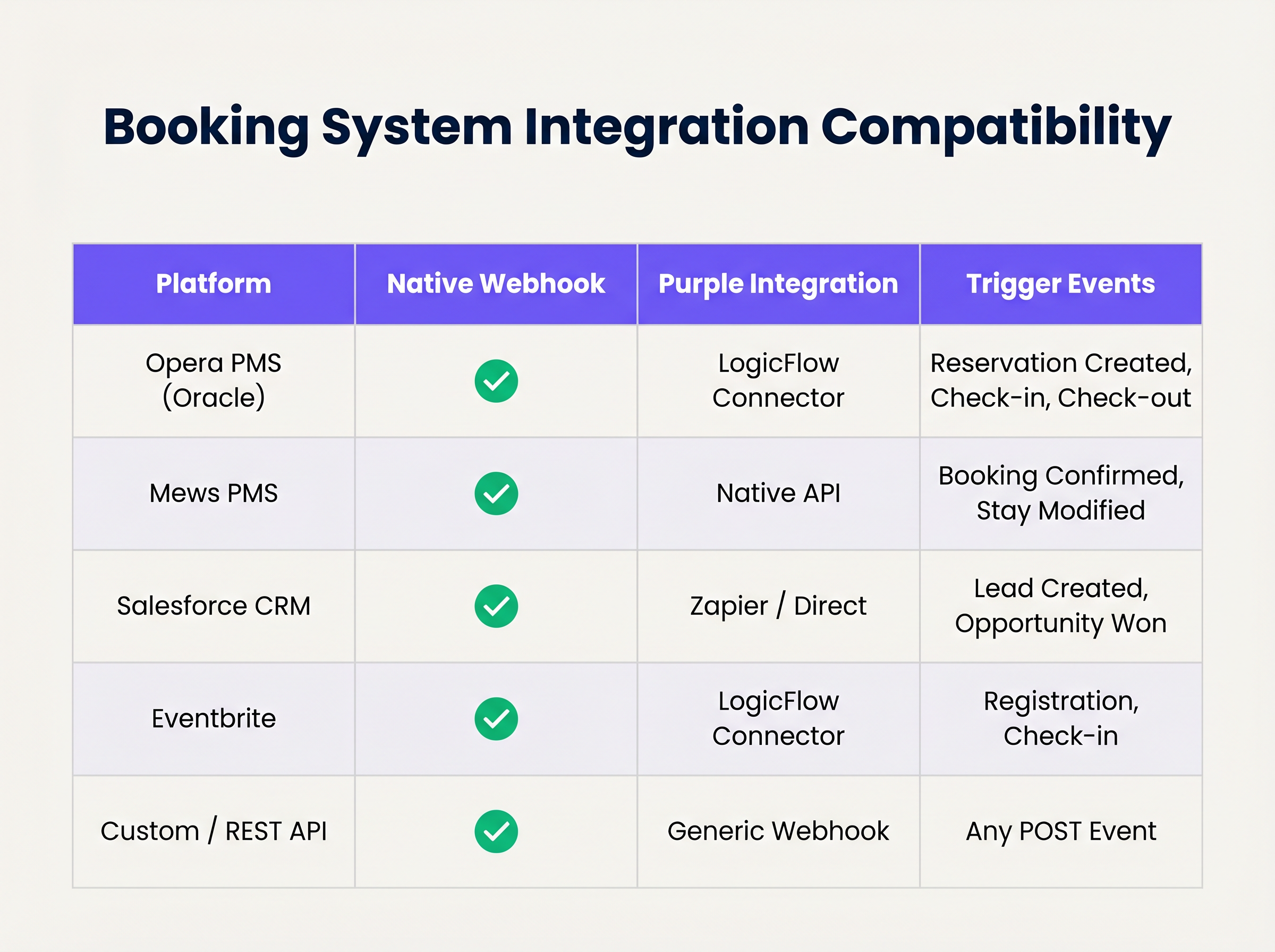
Se o seu sistema suporta webhooks nativos, configure-o para apontar para o seu endpoint LogicFlow. Para sistemas sem suporte nativo a webhook, você pode precisar utilizar os conectores de polling da Purple ou uma plataforma de integração intermediária.
Etapa 3: Projetar o Ciclo de Vida da Credencial
Estabeleça as regras para a validade da credencial. Uma boa prática é gerar a credencial na confirmação da reserva, mas atrasar a entrega até 24-48 horas antes da chegada. Garanta que a credencial expire automaticamente no horário de check-out programado.
Etapa 4: Estabelecer Tratamento de Retentativas e Falhas
Requisições de rede podem falhar. Implemente a idempotência para lidar com eventos de webhook duplicados de forma elegante. Configure as políticas de retentativa do LogicFlow com backoff exponencial e estabeleça uma fila de mensagens mortas (dead-letter queue) para eventos que esgotam seus limites de retentativa, garantindo que sejam sinalizados para revisão manual.
Melhores Práticas
- Minimização de Dados: Cumpra rigorosamente as regulamentações de privacidade. Extraia e processe apenas os dados mínimos necessários para gerar e entregar a credencial. Para uma comparação detalhada de estruturas regulatórias, revise CCPA vs GDPR: Conformidade Global de Privacidade para Dados de WiFi de Convidados .
- Idempotência: Garanta que sua lógica de processamento de webhook seja idempotente. Processar o mesmo "reserva confirmada" evento várias vezes não deve resultar na geração de múltiplas credenciais ou no envio de e-mails duplicados.
- Mecanismos de Contingência: Mantenha sempre um processo manual de geração de credenciais na recepção. Embora a automação lide com a grande maioria dos casos, casos extremos (por exemplo, detalhes de contato incorretos fornecidos na reserva) exigirão intervenção humana.
Solução de Problemas e Mitigação de Riscos
Mesmo sistemas automatizados robustos encontram problemas. Modos de falha comuns incluem:
- Incompatibilidades de Fuso Horário: Se o PMS opera no horário local enquanto o controlador de rede opera em UTC, as credenciais podem expirar prematuramente ou permanecer ativas por muito tempo. Lide explicitamente com as conversões de fuso horário em sua configuração do LogicFlow.
- Alterações no Esquema do Payload: Atualizações do sistema de reservas podem ocasionalmente alterar a estrutura do payload do webhook, causando erros de análise. Implemente validação de esquema e alertas para detectar essas mudanças imediatamente.
- Falhas na Entrega: Entrega de SMS ou e-mailA entrega pode falhar devido a detalhes de contato inválidos ou problemas com a operadora. Monitore os recibos de entrega e configure alertas para altas taxas de falha.
ROI e Impacto nos Negócios
A transição para o onboarding automatizado de WiFi oferece valor de negócio mensurável em várias dimensões:
- Eficiência Operacional: A eliminação da distribuição manual de credenciais economiza um tempo significativo da equipe. Em um hotel de 200 quartos, economizar 3 minutos por hóspede se traduz em centenas de horas de produtividade recuperada anualmente.
- Experiência Aprimorada do Hóspede: Os hóspedes esperam conectividade perfeita. A entrega de credenciais antes da chegada remove um ponto de atrito no check-in, contribuindo diretamente para pontuações de satisfação mais altas.
- Integridade de Dados e Análise: Ao vincular o acesso à rede diretamente à identidade da reserva, os estabelecimentos obtêm dados altamente precisos e determinísticos sobre o comportamento do hóspede e o tempo de permanência, impulsionando iniciativas de marketing mais eficazes. Para insights sobre como quantificar esse valor, consulte Medindo o ROI do WiFi para Hóspedes: Uma Estrutura para CMOs .
Ouça o briefing do podcast que o acompanha para um aprofundamento nesses conceitos:
Termos-Chave e Definições
Webhook
An automated HTTP POST request sent from one application to another, triggered by a specific event, carrying a data payload.
The fundamental mechanism for real-time, event-driven integration between booking systems and network infrastructure.
PPSK (Private Pre-Shared Key)
A network security method where each user or device is assigned a unique passphrase for the same SSID.
The preferred credential type for automated hospitality onboarding, offering a balance of security and ease of use compared to standard WPA2-Personal.
Idempotency
A property of certain operations in computer science where applying the operation multiple times has the same effect as applying it once.
Critical for webhook endpoint design to prevent duplicate credential generation if a PMS retries a payload delivery.
Dead-Letter Queue (DLQ)
A holding queue for messages or events that cannot be processed successfully after a defined number of retries.
Essential for troubleshooting integration failures without losing the original booking event data.
LogicFlow
Purple's visual automation engine that receives external triggers, evaluates conditions, and executes actions like credential creation and messaging.
The middleware layer that translates business events from a PMS into network access commands.
RADIUS
Remote Authentication Dial-In User Service; a networking protocol that provides centralized Authentication, Authorization, and Accounting (AAA) management.
Used in high-security environments (like enterprise or healthcare) where 802.1X dynamic credentials are required instead of PPSK.
Payload Schema
The defined structure and format (typically JSON) of the data transmitted within a webhook request.
IT teams must map the PMS payload schema to ensure the automation engine extracts the correct fields for guest name, email, and dates.
Exponential Backoff
An algorithm that uses feedback to multiplicatively decrease the rate of some process, used in network retries.
Prevents overwhelming a recovering service by increasing the wait time between successive retry attempts of a failed webhook.
Estudos de Caso
A 300-room resort uses Mews PMS and wants to automate WiFi access. They need credentials to be valid only from the official check-in time (15:00) to check-out time (11:00), but want to email the details to the guest the day before arrival.
Configure Mews to fire a 'Reservation Confirmed' webhook to Purple LogicFlow. LogicFlow parses the payload to extract the guest email, arrival date, and departure date. The workflow is configured to generate a PPSK credential immediately, setting the 'Valid From' attribute to 15:00 on the arrival date and 'Valid Until' to 11:00 on the departure date. A scheduled action is then queued in LogicFlow to dispatch the email template containing the PPSK exactly 24 hours prior to the arrival date.
A large conference centre uses Eventbrite for ticketing. They experience massive spikes in concurrent arrivals, causing bottlenecks at the registration desk where WiFi codes are currently handed out.
Integrate Eventbrite with Purple LogicFlow using a webhook triggered on 'Registration Confirmed'. LogicFlow generates a unique WiFi voucher code and immediately emails it to the attendee as part of their digital ticket package. The network controller is configured to activate the voucher upon first use, valid for the duration of the multi-day event.
Análise de Cenário
Q1. Your hotel is migrating to a new PMS that sends stay dates in UTC, but your network controller is configured for local time (UTC+2). The webhook payload includes: `"checkout_time": "2024-05-10T10:00:00Z"`. If no timezone conversion is applied in the automation layer, what is the operational impact?
💡 Dica:Consider when the guest expects to lose access versus when the system will actually revoke it.
Mostrar Abordagem Recomendada
The network controller will interpret the 10:00:00 time as local time. Because local time is UTC+2, 10:00:00 local time occurs two hours before 10:00:00 UTC. Therefore, the guest's WiFi credential will be revoked two hours before their actual checkout time, leading to connectivity complaints on the morning of departure. Timezone normalization must be explicitly handled in the LogicFlow configuration.
Q2. A stadium ticketing system fires a webhook for every ticket sold. You notice that your LogicFlow engine is processing 500 events per minute during an on-sale rush, but the downstream SMS gateway API is rate-limiting you to 100 requests per minute. How should you architect the automation to handle this?
💡 Dica:Look at the decoupling of credential generation and credential delivery.
Mostrar Abordagem Recomendada
You must decouple the credential generation from the delivery mechanism. The webhook should trigger LogicFlow to generate the credential and place the delivery task into a managed queue. The queue should then process the SMS dispatches at a controlled rate (e.g., 90 per minute) to respect the SMS gateway's rate limits, utilizing exponential backoff for any throttled requests.
Q3. During a network audit, the compliance officer notes that webhook payloads containing guest names and phone numbers are being logged in plain text in your middleware diagnostic logs for 90 days. What is the recommended remediation?
💡 Dica:Refer to the Data Minimisation best practice and GDPR Article 5.
Mostrar Abordagem Recomendada
Diagnostic logs should be configured to obfuscate or redact Personally Identifiable Information (PII) such as names and phone numbers. Only non-sensitive metadata (like event IDs or timestamp) should be retained for troubleshooting. Furthermore, the retention period for diagnostic logs should be reduced to the minimum necessary for operational monitoring (e.g., 7 to 14 days), rather than 90 days.
Principais Conclusões
- ✓Webhook automation eliminates manual WiFi credential distribution, reducing front-desk overhead and friction.
- ✓Integration relies on HTTP POST payloads triggered by PMS events like 'Reservation Confirmed'.
- ✓Purple's LogicFlow engine acts as the middleware, translating booking events into network access commands.
- ✓Idempotency is critical to prevent duplicate credential generation from retried webhook events.
- ✓Credentials should be generated early but activated strictly according to check-in/check-out times.
- ✓Proper handling of timezones and dead-letter queues is essential for robust, enterprise-grade deployments.




