

Onboarding WiFi basato su Webhook: Automazione dell'accesso ospite su larga scala
Questa guida autorevole descrive come implementare l'onboarding WiFi basato su webhook per automatizzare l'accesso alla rete ospite. Copre architettura, strategie di integrazione, migliori pratiche e l'impatto aziendale dell'implementazione della distribuzione di credenziali zero-touch su larga scala.
🎧 Ascolta questa guida
Visualizza trascrizione
Riepilogo Esecutivo
Per le moderne strutture ricettive, i punti vendita al dettaglio e le sedi del settore pubblico, l'esperienza WiFi per gli ospiti inizia molto prima che l'utente metta piede nei locali. Affidarsi alla distribuzione manuale delle credenziali — sia tramite schede stampate alla reception che password generiche condivise — introduce attriti operativi, compromette la sicurezza e crea una disconnessione tra l'identità di prenotazione dell'ospite e la sua presenza in rete.
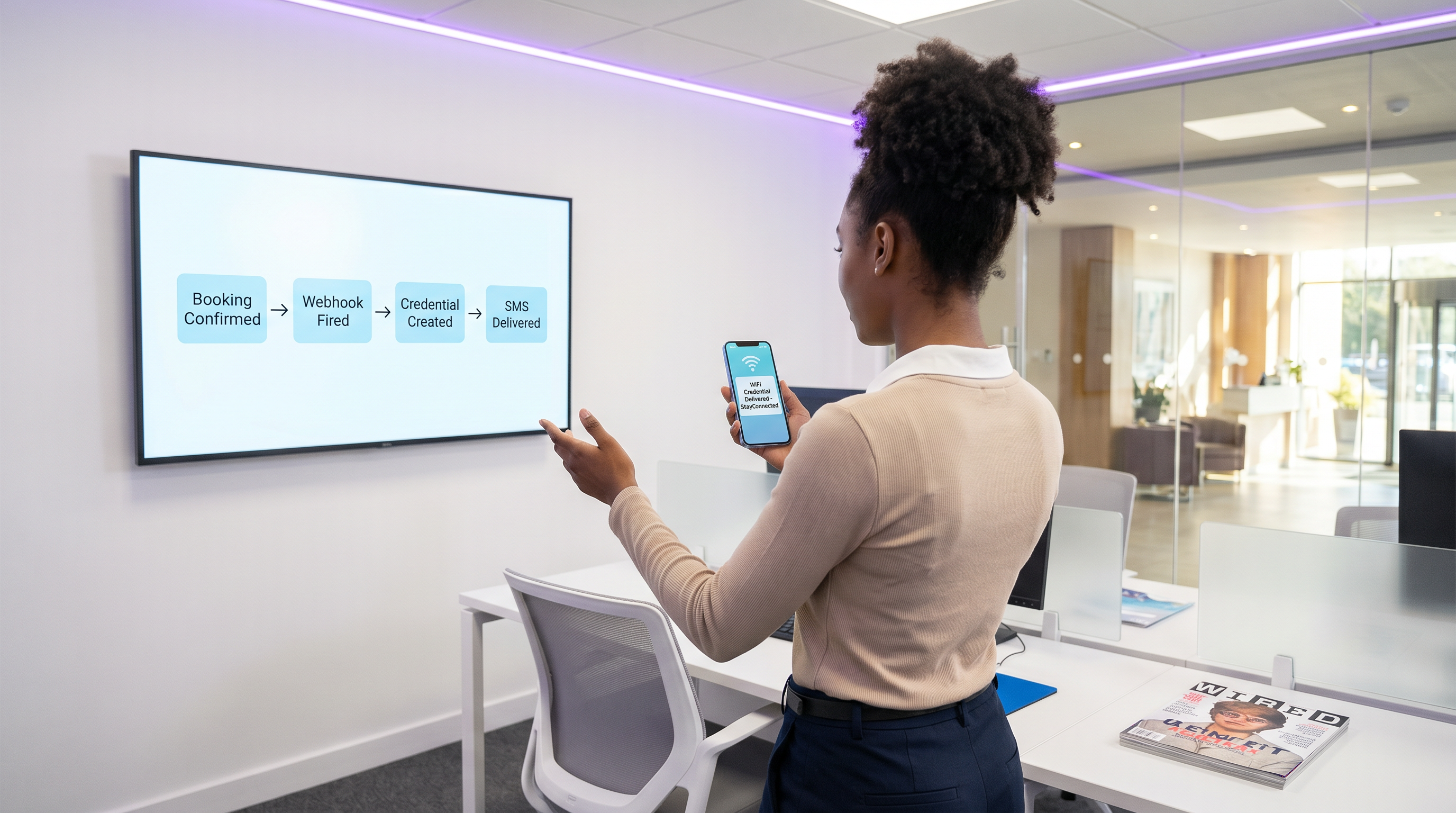
L'automazione dell'onboarding WiFi basato su webhook elimina questo attrito. Integrando i sistemi di prenotazione esistenti (come un Property Management System o un CRM) con il livello di controllo dell'accesso alla rete, è possibile generare e distribuire automaticamente credenziali WiFi sicure e con limiti di tempo nel momento in cui una prenotazione viene confermata. Questo approccio "hands-off" riduce drasticamente il carico di lavoro della reception, garantisce la conformità agli standard di privacy dei dati e offre un'esperienza di onboarding senza interruzioni e zero-touch per l'ospite.
Questa guida descrive l'architettura, i passaggi di implementazione e le migliori pratiche per l'implementazione dell'onboarding basato su webhook su larga scala, sfruttando il motore LogicFlow di Purple per colmare il divario tra gli eventi aziendali e l'accesso alla rete.
Approfondimento Tecnico: Architettura Webhook
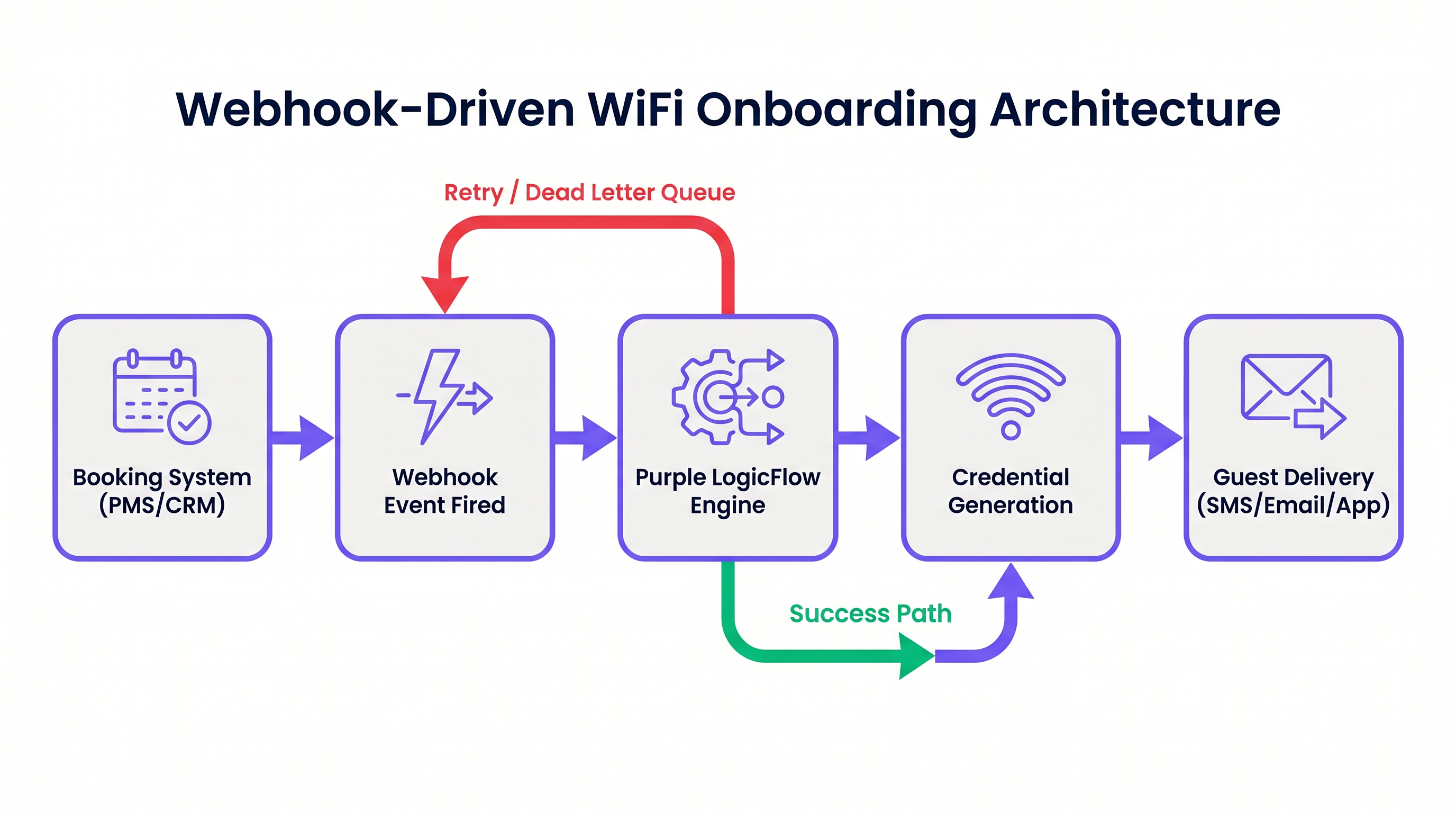
Al suo interno, un webhook è una richiesta HTTP POST attivata da un evento specifico in un sistema sorgente. Nel contesto dell'automazione dell'onboarding WiFi, il sistema sorgente è tipicamente un Property Management System (PMS), un CRM o una piattaforma di registrazione eventi.
Quando si verifica un evento — come una conferma di prenotazione, un check-in o una modifica del soggiorno — il sistema sorgente invia un payload JSON contenente i dati rilevanti dell'ospite a un endpoint designato.
Il Motore LogicFlow di Purple
Il motore LogicFlow di Purple funge da middleware intelligente in questa architettura. Riceve il payload del webhook, analizza i dati dell'ospite ed esegue un flusso di lavoro predefinito per generare una credenziale di rete. Questa credenziale può assumere la forma di una Pre-Shared Key (PPSK) unica o di un account dinamico basato su RADIUS.
LogicFlow gestisce l'intero ciclo di vita delle credenziali:
- Generazione: Creazione di una credenziale sicura e unica legata all'identità dell'ospite.
- Consegna: Invio della credenziale tramite SMS, email o push API a un'app mobile.
- Attivazione/Revoca: Abilitazione della credenziale al check-in e disabilitazione precisa al check-out.
Questa integrazione trasforma la rete da una utility IT isolata in una risorsa consapevole del business, perfettamente allineata con il ritmo operativo della struttura. Per una prospettiva più ampia sulle moderne architetture di rete, considera I Vantaggi Chiave dell'SD WAN per le Aziende Moderne .
Guida all'Implementazione
L'implementazione dell'onboarding basato su webhook richiede un approccio sistematico per garantire affidabilità e sicurezza.
Passaggio 1: Definire lo Schema degli Eventi
Prima di configurare qualsiasi flusso di lavoro, mappa gli eventi esatti che il tuo sistema di prenotazione può attivare e la struttura dei dati dei payload corrispondenti. Devi assicurarti che il payload contenga un identificatore unico dell'ospite, un metodo di consegna (email o numero di telefono) e la durata del soggiorno.
Passaggio 2: Configurare l'Integrazione
Determina il metodo di integrazione in base alle capacità del tuo sistema di prenotazione.
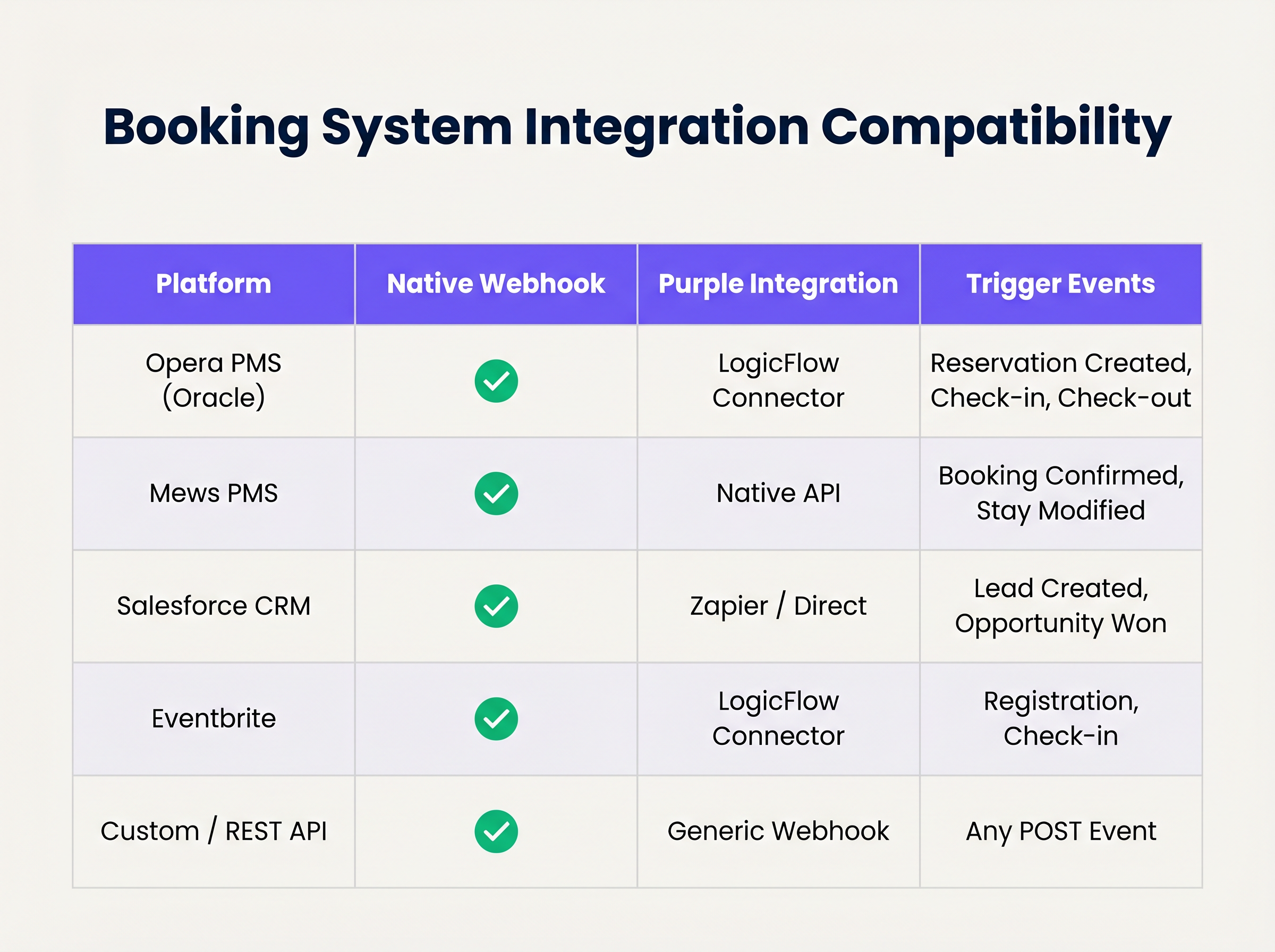
Se il tuo sistema supporta webhook nativi, configuralo in modo che punti al tuo endpoint LogicFlow. Per i sistemi senza supporto webhook nativo, potrebbe essere necessario utilizzare i connettori di polling di Purple o una piattaforma di integrazione intermediaria.
Passaggio 3: Progettare il Ciclo di Vita delle Credenziali
Stabilisci le regole per la validità delle credenziali. Una buona pratica è generare la credenziale al momento della conferma della prenotazione, ma ritardarne la consegna fino a 24-48 ore prima dell'arrivo. Assicurati che la credenziale scada automaticamente all'orario di check-out programmato.
Passaggio 4: Stabilire la Gestione dei Tentativi e degli Errori
Le richieste di rete possono fallire. Implementa l'idempotenza per gestire elegantemente gli eventi webhook duplicati. Configura le politiche di retry di LogicFlow con backoff esponenziale e stabilisci una coda di dead-letter per gli eventi che esauriscono i loro limiti di retry, assicurandoti che siano segnalati per la revisione manuale.
Migliori Pratiche
- Minimizzazione dei Dati: Aderisci rigorosamente alle normative sulla privacy. Estrai ed elabora solo i dati minimi necessari per generare e consegnare la credenziale. Per un confronto dettagliato dei quadri normativi, consulta CCPA vs GDPR: Conformità Globale alla Privacy per i Dati WiFi degli Ospiti .
- Idempotenza: Assicurati che la logica di elaborazione del tuo webhook sia idempotente. L'elaborazione dello stesso "prenotazione confermata" evento più volte non deve comportare la generazione di più credenziali o l'invio di email duplicate.
- Meccanismi di Fallback: Mantieni sempre un processo manuale di generazione delle credenziali alla reception. Mentre l'automazione gestisce la stragrande maggioranza dei casi, i casi limite (ad esempio, dettagli di contatto errati forniti al momento della prenotazione) richiederanno l'intervento umano.
Risoluzione dei Problemi e Mitigazione del Rischio
Anche i sistemi automatizzati robusti incontrano problemi. Le modalità di errore comuni includono:
- Disallineamenti di Fuso Orario: Se il PMS opera nell'ora locale mentre il controller di rete opera in UTC, le credenziali potrebbero scadere prematuramente o rimanere attive troppo a lungo. Gestisci esplicitamente le conversioni di fuso orario nella tua configurazione LogicFlow.
- Modifiche allo Schema del Payload: Gli aggiornamenti del sistema di prenotazione possono occasionalmente alterare la struttura del payload del webhook, causando errori di parsing. Implementa la validazione dello schema e l'alerting per rilevare immediatamente queste modifiche.
- Errori di Consegna: Consegna SMS o email delivLa consegna può fallire a causa di dettagli di contatto non validi o problemi del vettore a monte. Monitora le ricevute di consegna e configura avvisi per tassi di fallimento elevati.
ROI e Impatto sul Business
La transizione all'onboarding WiFi automatizzato offre un valore di business misurabile sotto diversi aspetti:
- Efficienza Operativa: L'eliminazione della distribuzione manuale delle credenziali consente di risparmiare tempo significativo al personale. In un hotel di 200 camere, risparmiare 3 minuti per ospite si traduce in centinaia di ore di produttività recuperata annualmente.
- Esperienza Ospite Migliorata: Gli ospiti si aspettano una connettività senza interruzioni. La consegna delle credenziali prima dell'arrivo elimina un punto di attrito al check-in, contribuendo direttamente a punteggi di soddisfazione più elevati.
- Integrità dei Dati e Analisi: Collegando l'accesso alla rete direttamente all'identità della prenotazione, le strutture ottengono dati altamente accurati e deterministici sul comportamento degli ospiti e sul tempo di permanenza, alimentando iniziative di marketing più efficaci. Per approfondimenti sulla quantificazione di questo valore, consulta Measuring ROI on Guest WiFi: A Framework for CMOs .
Ascolta il briefing del podcast di accompagnamento per un approfondimento su questi concetti:
Termini chiave e definizioni
Webhook
An automated HTTP POST request sent from one application to another, triggered by a specific event, carrying a data payload.
The fundamental mechanism for real-time, event-driven integration between booking systems and network infrastructure.
PPSK (Private Pre-Shared Key)
A network security method where each user or device is assigned a unique passphrase for the same SSID.
The preferred credential type for automated hospitality onboarding, offering a balance of security and ease of use compared to standard WPA2-Personal.
Idempotency
A property of certain operations in computer science where applying the operation multiple times has the same effect as applying it once.
Critical for webhook endpoint design to prevent duplicate credential generation if a PMS retries a payload delivery.
Dead-Letter Queue (DLQ)
A holding queue for messages or events that cannot be processed successfully after a defined number of retries.
Essential for troubleshooting integration failures without losing the original booking event data.
LogicFlow
Purple's visual automation engine that receives external triggers, evaluates conditions, and executes actions like credential creation and messaging.
The middleware layer that translates business events from a PMS into network access commands.
RADIUS
Remote Authentication Dial-In User Service; a networking protocol that provides centralized Authentication, Authorization, and Accounting (AAA) management.
Used in high-security environments (like enterprise or healthcare) where 802.1X dynamic credentials are required instead of PPSK.
Payload Schema
The defined structure and format (typically JSON) of the data transmitted within a webhook request.
IT teams must map the PMS payload schema to ensure the automation engine extracts the correct fields for guest name, email, and dates.
Exponential Backoff
An algorithm that uses feedback to multiplicatively decrease the rate of some process, used in network retries.
Prevents overwhelming a recovering service by increasing the wait time between successive retry attempts of a failed webhook.
Casi di studio
A 300-room resort uses Mews PMS and wants to automate WiFi access. They need credentials to be valid only from the official check-in time (15:00) to check-out time (11:00), but want to email the details to the guest the day before arrival.
Configure Mews to fire a 'Reservation Confirmed' webhook to Purple LogicFlow. LogicFlow parses the payload to extract the guest email, arrival date, and departure date. The workflow is configured to generate a PPSK credential immediately, setting the 'Valid From' attribute to 15:00 on the arrival date and 'Valid Until' to 11:00 on the departure date. A scheduled action is then queued in LogicFlow to dispatch the email template containing the PPSK exactly 24 hours prior to the arrival date.
A large conference centre uses Eventbrite for ticketing. They experience massive spikes in concurrent arrivals, causing bottlenecks at the registration desk where WiFi codes are currently handed out.
Integrate Eventbrite with Purple LogicFlow using a webhook triggered on 'Registration Confirmed'. LogicFlow generates a unique WiFi voucher code and immediately emails it to the attendee as part of their digital ticket package. The network controller is configured to activate the voucher upon first use, valid for the duration of the multi-day event.
Analisi degli scenari
Q1. Your hotel is migrating to a new PMS that sends stay dates in UTC, but your network controller is configured for local time (UTC+2). The webhook payload includes: `"checkout_time": "2024-05-10T10:00:00Z"`. If no timezone conversion is applied in the automation layer, what is the operational impact?
💡 Suggerimento:Consider when the guest expects to lose access versus when the system will actually revoke it.
Mostra l'approccio consigliato
The network controller will interpret the 10:00:00 time as local time. Because local time is UTC+2, 10:00:00 local time occurs two hours before 10:00:00 UTC. Therefore, the guest's WiFi credential will be revoked two hours before their actual checkout time, leading to connectivity complaints on the morning of departure. Timezone normalization must be explicitly handled in the LogicFlow configuration.
Q2. A stadium ticketing system fires a webhook for every ticket sold. You notice that your LogicFlow engine is processing 500 events per minute during an on-sale rush, but the downstream SMS gateway API is rate-limiting you to 100 requests per minute. How should you architect the automation to handle this?
💡 Suggerimento:Look at the decoupling of credential generation and credential delivery.
Mostra l'approccio consigliato
You must decouple the credential generation from the delivery mechanism. The webhook should trigger LogicFlow to generate the credential and place the delivery task into a managed queue. The queue should then process the SMS dispatches at a controlled rate (e.g., 90 per minute) to respect the SMS gateway's rate limits, utilizing exponential backoff for any throttled requests.
Q3. During a network audit, the compliance officer notes that webhook payloads containing guest names and phone numbers are being logged in plain text in your middleware diagnostic logs for 90 days. What is the recommended remediation?
💡 Suggerimento:Refer to the Data Minimisation best practice and GDPR Article 5.
Mostra l'approccio consigliato
Diagnostic logs should be configured to obfuscate or redact Personally Identifiable Information (PII) such as names and phone numbers. Only non-sensitive metadata (like event IDs or timestamp) should be retained for troubleshooting. Furthermore, the retention period for diagnostic logs should be reduced to the minimum necessary for operational monitoring (e.g., 7 to 14 days), rather than 90 days.
Punti chiave
- ✓Webhook automation eliminates manual WiFi credential distribution, reducing front-desk overhead and friction.
- ✓Integration relies on HTTP POST payloads triggered by PMS events like 'Reservation Confirmed'.
- ✓Purple's LogicFlow engine acts as the middleware, translating booking events into network access commands.
- ✓Idempotency is critical to prevent duplicate credential generation from retried webhook events.
- ✓Credentials should be generated early but activated strictly according to check-in/check-out times.
- ✓Proper handling of timezones and dead-letter queues is essential for robust, enterprise-grade deployments.




