

Intégration WiFi pilotée par webhook : Automatisation de l'accès invité à grande échelle
Ce guide faisant autorité détaille comment implémenter l'intégration WiFi pilotée par webhook pour automatiser l'accès au réseau invité. Il couvre l'architecture, les stratégies d'intégration, les meilleures pratiques et l'impact commercial du déploiement d'une livraison de justificatifs sans contact à grande échelle.
🎧 Écouter ce guide
Voir la transcription
Résumé Exécutif
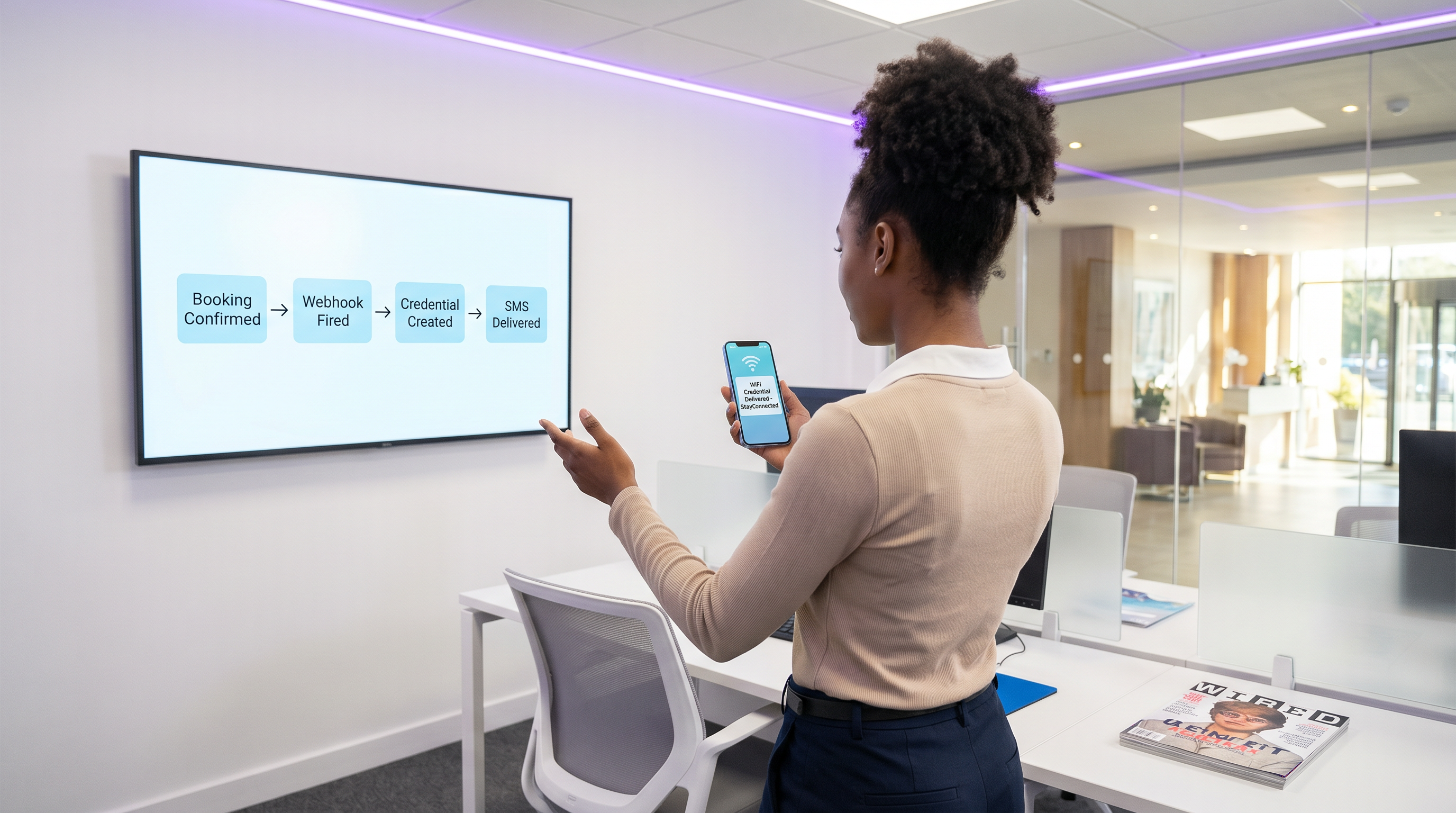
Pour les établissements modernes de l'hôtellerie, du commerce de détail et du secteur public, l'expérience WiFi invité commence bien avant que l'utilisateur n'arrive sur les lieux. S'appuyer sur la distribution manuelle de justificatifs – que ce soit via des cartes imprimées à la réception ou des mots de passe génériques partagés – introduit des frictions opérationnelles, compromet la sécurité et crée une déconnexion entre l'identité de réservation de l'invité et sa présence sur le réseau.
L'automatisation de l'intégration WiFi pilotée par webhook élimine cette friction. En intégrant vos systèmes de réservation existants (tels qu'un Property Management System ou un CRM) avec la couche de contrôle d'accès réseau, vous pouvez générer et distribuer automatiquement des justificatifs WiFi sécurisés et limités dans le temps dès qu'une réservation est confirmée. Cette approche autonome réduit considérablement les frais généraux de la réception, assure la conformité aux normes de confidentialité des données et offre une expérience d'intégration fluide et sans contact pour l'invité.
Ce guide détaille l'architecture, les étapes de mise en œuvre et les meilleures pratiques pour le déploiement d'une intégration pilotée par webhook à grande échelle, en tirant parti du moteur LogicFlow de Purple pour combler le fossé entre les événements commerciaux et l'accès au réseau.
Plongée Technique : Architecture Webhook
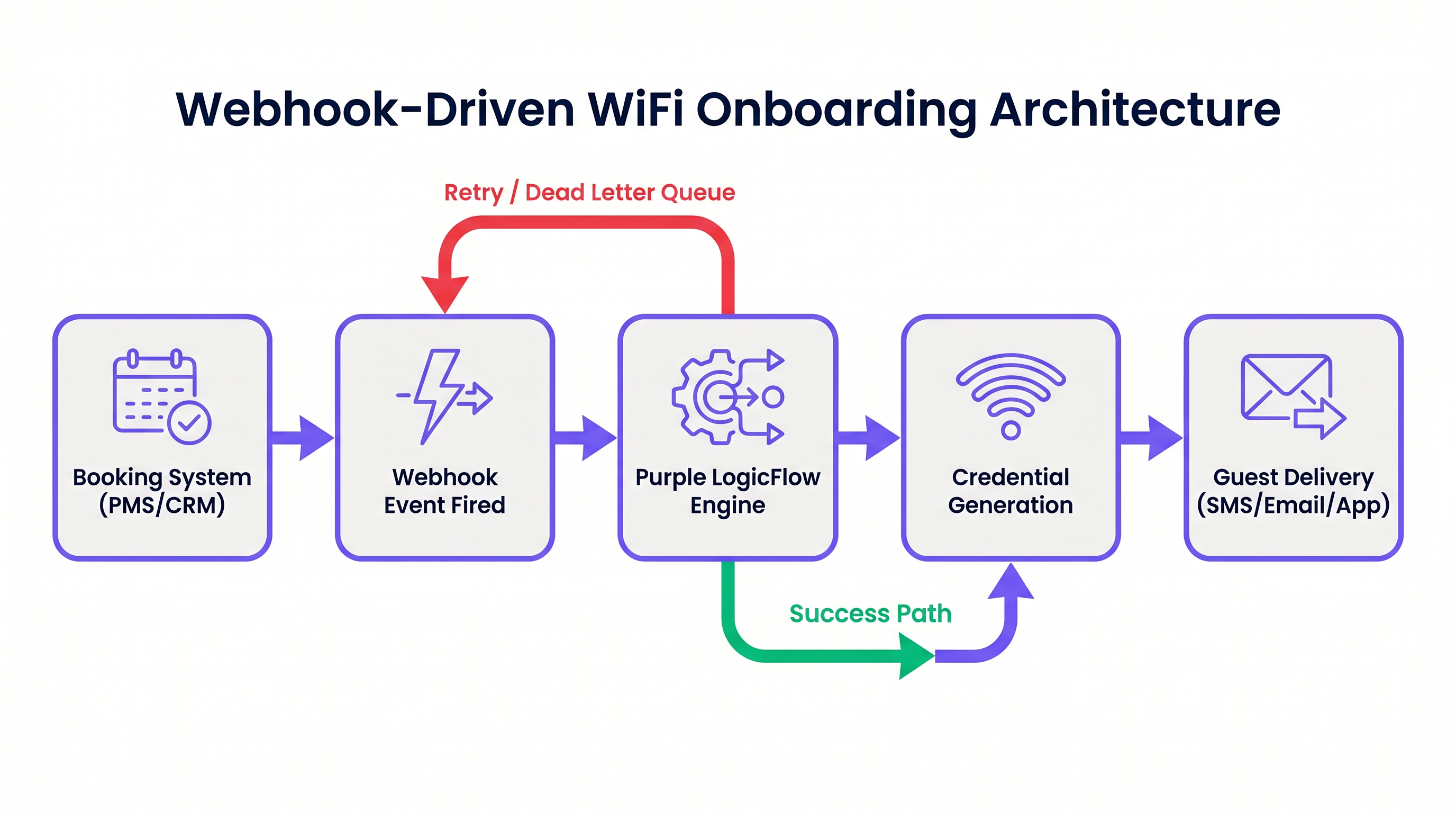
À la base, un webhook est une requête HTTP POST déclenchée par un événement spécifique dans un système source. Dans le contexte de l'automatisation de l'intégration WiFi, le système source est généralement un Property Management System (PMS), un CRM ou une plateforme d'inscription à des événements.
Lorsqu'un événement se produit – tel qu'une confirmation de réservation, un enregistrement ou une modification de séjour – le système source envoie une charge utile JSON contenant les données pertinentes de l'invité à un point de terminaison désigné.
Le Moteur LogicFlow de Purple
Le moteur LogicFlow de Purple sert de middleware intelligent dans cette architecture. Il reçoit la charge utile du webhook, analyse les données de l'invité et exécute un flux de travail prédéfini pour générer un justificatif réseau. Ce justificatif peut prendre la forme d'une clé pré-partagée unique (PPSK) ou d'un compte dynamique basé sur RADIUS.
LogicFlow gère l'intégralité du cycle de vie des justificatifs :
- Génération : Création d'un justificatif sécurisé et unique lié à l'identité de l'invité.
- Livraison : Envoi du justificatif par SMS, e-mail ou push API vers une application mobile.
- Activation/Révocation : Activation du justificatif à l'enregistrement et désactivation précise au départ.
Cette intégration transforme le réseau d'une utilité IT isolée en un actif conscient des affaires, parfaitement aligné sur le rythme opérationnel du lieu. Pour une perspective plus large sur les architectures réseau modernes, consultez Les avantages clés du SD WAN pour les entreprises modernes .
Guide d'Implémentation
Le déploiement d'une intégration pilotée par webhook nécessite une approche systématique pour garantir la fiabilité et la sécurité.
Étape 1 : Définir le Schéma d'Événement
Avant de configurer des flux de travail, définissez précisément les événements que votre système de réservation peut déclencher et la structure des données des charges utiles correspondantes. Vous devez vous assurer que la charge utile contient un identifiant invité unique, une méthode de livraison (e-mail ou numéro de téléphone) et la durée du séjour.
Étape 2 : Configurer l'Intégration
Déterminez la méthode d'intégration en fonction des capacités de votre système de réservation.
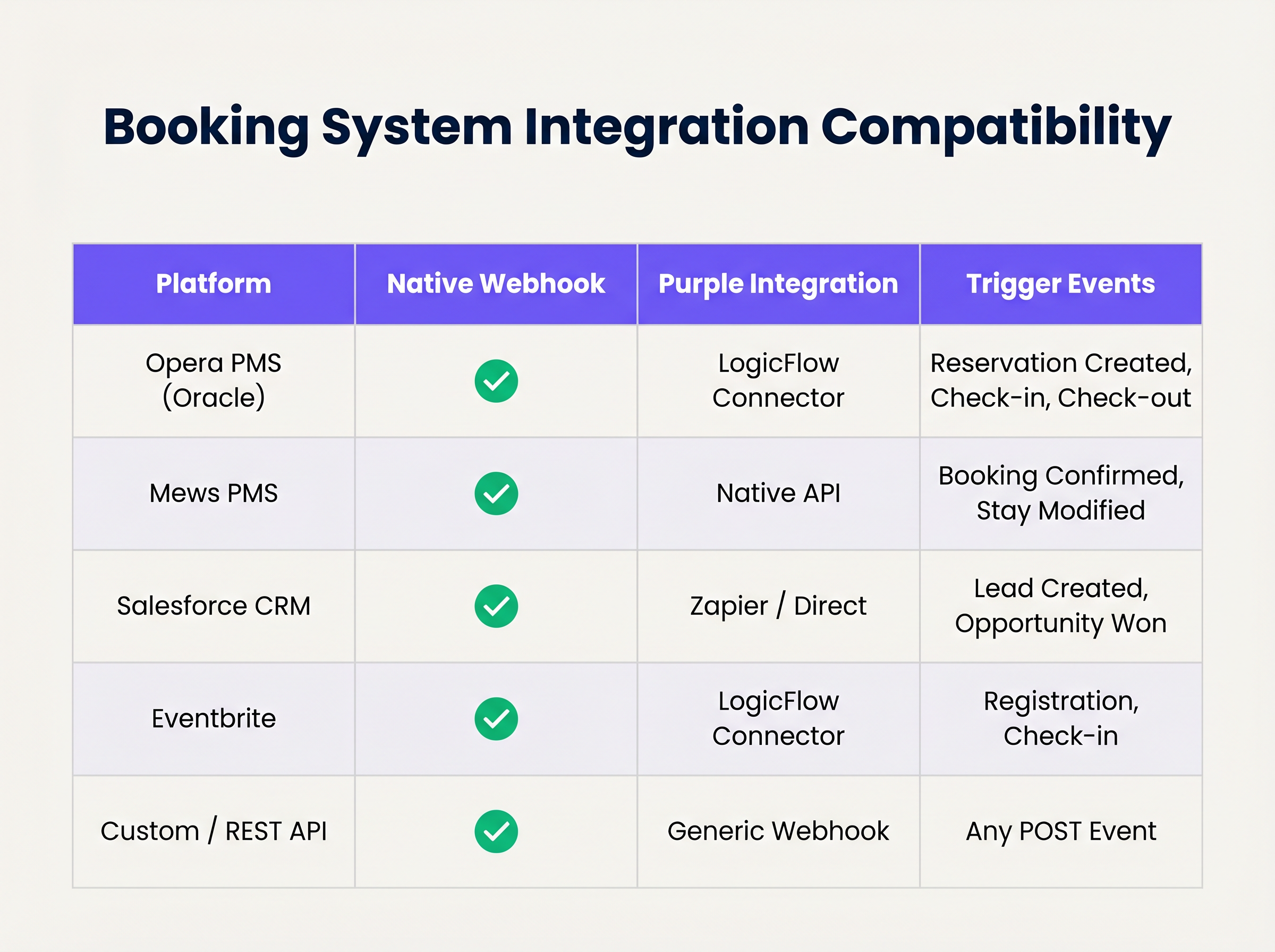
Si votre système prend en charge les webhooks natifs, configurez-le pour qu'il pointe vers votre point de terminaison LogicFlow. Pour les systèmes sans prise en charge native des webhooks, vous devrez peut-être utiliser les connecteurs d'interrogation de Purple ou une plateforme d'intégration intermédiaire.
Étape 3 : Concevoir le Cycle de Vie des Justificatifs
Établissez les règles de validité des justificatifs. Une bonne pratique consiste à générer le justificatif lors de la confirmation de la réservation, mais à retarder la livraison jusqu'à 24-48 heures avant l'arrivée. Assurez-vous que le justificatif expire automatiquement à l'heure de départ prévue.
Étape 4 : Établir la Gestion des Retentatives et des Échecs
Les requêtes réseau peuvent échouer. Implémentez l'idempotence pour gérer les événements webhook en double avec élégance. Configurez les politiques de réessai de LogicFlow avec un backoff exponentiel, et établissez une file d'attente de lettres mortes pour les événements qui épuisent leurs limites de réessai, en veillant à ce qu'ils soient signalés pour examen manuel.
Bonnes Pratiques
- Minimisation des Données : Respectez strictement les réglementations en matière de confidentialité. N'extrayez et ne traitez que les données minimales requises pour générer et livrer le justificatif. Pour une comparaison détaillée des cadres réglementaires, consultez CCPA vs GDPR : Conformité mondiale à la confidentialité pour les données WiFi des invités .
- Idempotence : Assurez-vous que votre logique de traitement des webhooks est idempotente. Le traitement du même "réservation confirmée" événement plusieurs fois ne doit pas entraîner la génération de plusieurs justificatifs ou l'envoi d'e-mails en double.
- Mécanismes de Repli : Maintenez toujours un processus manuel de génération de justificatifs à la réception. Bien que l'automatisation gère la grande majorité des cas, les cas limites (par exemple, des coordonnées incorrectes fournies lors de la réservation) nécessiteront une intervention humaine.
Dépannage et Atténuation des Risques
Même les systèmes automatisés robustes rencontrent des problèmes. Les modes de défaillance courants incluent :
- Incohérences de Fuseau Horaire : Si le PMS fonctionne en heure locale tandis que le contrôleur réseau fonctionne en UTC, les justificatifs peuvent expirer prématurément ou rester actifs trop longtemps. Gérez explicitement les conversions de fuseau horaire dans votre configuration LogicFlow.
- Modifications du Schéma de Charge Utile : Les mises à jour du système de réservation peuvent occasionnellement modifier la structure de la charge utile du webhook, entraînant des erreurs d'analyse. Implémentez la validation de schéma et les alertes pour détecter ces changements immédiatement.
- Échecs de Livraison : SMS ou e-mail livrLa livraison peut échouer en raison de coordonnées invalides ou de problèmes de l'opérateur en amont. Surveillez les accusés de réception et configurez des alertes pour les taux d'échec élevés.
ROI et impact commercial
La transition vers l'intégration WiFi automatisée offre une valeur commerciale mesurable à plusieurs niveaux :
- Efficacité opérationnelle : L'élimination de la distribution manuelle des identifiants permet d'économiser un temps considérable pour le personnel. Dans un hôtel de 200 chambres, économiser 3 minutes par client représente des centaines d'heures de productivité récupérées chaque année.
- Expérience client améliorée : Les clients s'attendent à une connectivité fluide. La livraison des identifiants avant l'arrivée élimine un point de friction lors de l'enregistrement, contribuant directement à des scores de satisfaction plus élevés.
- Intégrité des données et analyses : En liant l'accès au réseau directement à l'identité de la réservation, les établissements obtiennent des données très précises et déterministes sur le comportement des clients et leur temps de présence, ce qui alimente des initiatives marketing plus efficaces. Pour des informations sur la quantification de cette valeur, consultez Mesurer le ROI sur le Guest WiFi : Un cadre pour les CMO .
Écoutez le briefing podcast d'accompagnement pour une exploration plus approfondie de ces concepts :
Termes clés et définitions
Webhook
An automated HTTP POST request sent from one application to another, triggered by a specific event, carrying a data payload.
The fundamental mechanism for real-time, event-driven integration between booking systems and network infrastructure.
PPSK (Private Pre-Shared Key)
A network security method where each user or device is assigned a unique passphrase for the same SSID.
The preferred credential type for automated hospitality onboarding, offering a balance of security and ease of use compared to standard WPA2-Personal.
Idempotency
A property of certain operations in computer science where applying the operation multiple times has the same effect as applying it once.
Critical for webhook endpoint design to prevent duplicate credential generation if a PMS retries a payload delivery.
Dead-Letter Queue (DLQ)
A holding queue for messages or events that cannot be processed successfully after a defined number of retries.
Essential for troubleshooting integration failures without losing the original booking event data.
LogicFlow
Purple's visual automation engine that receives external triggers, evaluates conditions, and executes actions like credential creation and messaging.
The middleware layer that translates business events from a PMS into network access commands.
RADIUS
Remote Authentication Dial-In User Service; a networking protocol that provides centralized Authentication, Authorization, and Accounting (AAA) management.
Used in high-security environments (like enterprise or healthcare) where 802.1X dynamic credentials are required instead of PPSK.
Payload Schema
The defined structure and format (typically JSON) of the data transmitted within a webhook request.
IT teams must map the PMS payload schema to ensure the automation engine extracts the correct fields for guest name, email, and dates.
Exponential Backoff
An algorithm that uses feedback to multiplicatively decrease the rate of some process, used in network retries.
Prevents overwhelming a recovering service by increasing the wait time between successive retry attempts of a failed webhook.
Études de cas
A 300-room resort uses Mews PMS and wants to automate WiFi access. They need credentials to be valid only from the official check-in time (15:00) to check-out time (11:00), but want to email the details to the guest the day before arrival.
Configure Mews to fire a 'Reservation Confirmed' webhook to Purple LogicFlow. LogicFlow parses the payload to extract the guest email, arrival date, and departure date. The workflow is configured to generate a PPSK credential immediately, setting the 'Valid From' attribute to 15:00 on the arrival date and 'Valid Until' to 11:00 on the departure date. A scheduled action is then queued in LogicFlow to dispatch the email template containing the PPSK exactly 24 hours prior to the arrival date.
A large conference centre uses Eventbrite for ticketing. They experience massive spikes in concurrent arrivals, causing bottlenecks at the registration desk where WiFi codes are currently handed out.
Integrate Eventbrite with Purple LogicFlow using a webhook triggered on 'Registration Confirmed'. LogicFlow generates a unique WiFi voucher code and immediately emails it to the attendee as part of their digital ticket package. The network controller is configured to activate the voucher upon first use, valid for the duration of the multi-day event.
Analyse de scénario
Q1. Your hotel is migrating to a new PMS that sends stay dates in UTC, but your network controller is configured for local time (UTC+2). The webhook payload includes: `"checkout_time": "2024-05-10T10:00:00Z"`. If no timezone conversion is applied in the automation layer, what is the operational impact?
💡 Astuce :Consider when the guest expects to lose access versus when the system will actually revoke it.
Afficher l'approche recommandée
The network controller will interpret the 10:00:00 time as local time. Because local time is UTC+2, 10:00:00 local time occurs two hours before 10:00:00 UTC. Therefore, the guest's WiFi credential will be revoked two hours before their actual checkout time, leading to connectivity complaints on the morning of departure. Timezone normalization must be explicitly handled in the LogicFlow configuration.
Q2. A stadium ticketing system fires a webhook for every ticket sold. You notice that your LogicFlow engine is processing 500 events per minute during an on-sale rush, but the downstream SMS gateway API is rate-limiting you to 100 requests per minute. How should you architect the automation to handle this?
💡 Astuce :Look at the decoupling of credential generation and credential delivery.
Afficher l'approche recommandée
You must decouple the credential generation from the delivery mechanism. The webhook should trigger LogicFlow to generate the credential and place the delivery task into a managed queue. The queue should then process the SMS dispatches at a controlled rate (e.g., 90 per minute) to respect the SMS gateway's rate limits, utilizing exponential backoff for any throttled requests.
Q3. During a network audit, the compliance officer notes that webhook payloads containing guest names and phone numbers are being logged in plain text in your middleware diagnostic logs for 90 days. What is the recommended remediation?
💡 Astuce :Refer to the Data Minimisation best practice and GDPR Article 5.
Afficher l'approche recommandée
Diagnostic logs should be configured to obfuscate or redact Personally Identifiable Information (PII) such as names and phone numbers. Only non-sensitive metadata (like event IDs or timestamp) should be retained for troubleshooting. Furthermore, the retention period for diagnostic logs should be reduced to the minimum necessary for operational monitoring (e.g., 7 to 14 days), rather than 90 days.
Points clés à retenir
- ✓Webhook automation eliminates manual WiFi credential distribution, reducing front-desk overhead and friction.
- ✓Integration relies on HTTP POST payloads triggered by PMS events like 'Reservation Confirmed'.
- ✓Purple's LogicFlow engine acts as the middleware, translating booking events into network access commands.
- ✓Idempotency is critical to prevent duplicate credential generation from retried webhook events.
- ✓Credentials should be generated early but activated strictly according to check-in/check-out times.
- ✓Proper handling of timezones and dead-letter queues is essential for robust, enterprise-grade deployments.




