

Webhook-Driven WiFi Onboarding: Automating Guest Access at Scale
This authoritative guide details how to implement webhook-driven WiFi onboarding to automate guest network access. It covers architecture, integration strategies, best practices, and the business impact of deploying zero-touch credential delivery at scale.
🎧 Listen to this Guide
View Transcript
Executive Summary
For modern hospitality, retail, and public sector venues, the guest WiFi experience begins long before the user steps onto the premises. Relying on manual credential distribution—whether via printed cards at reception or generic shared passwords—introduces operational friction, compromises security, and creates a disconnect between the guest's booking identity and their network presence.
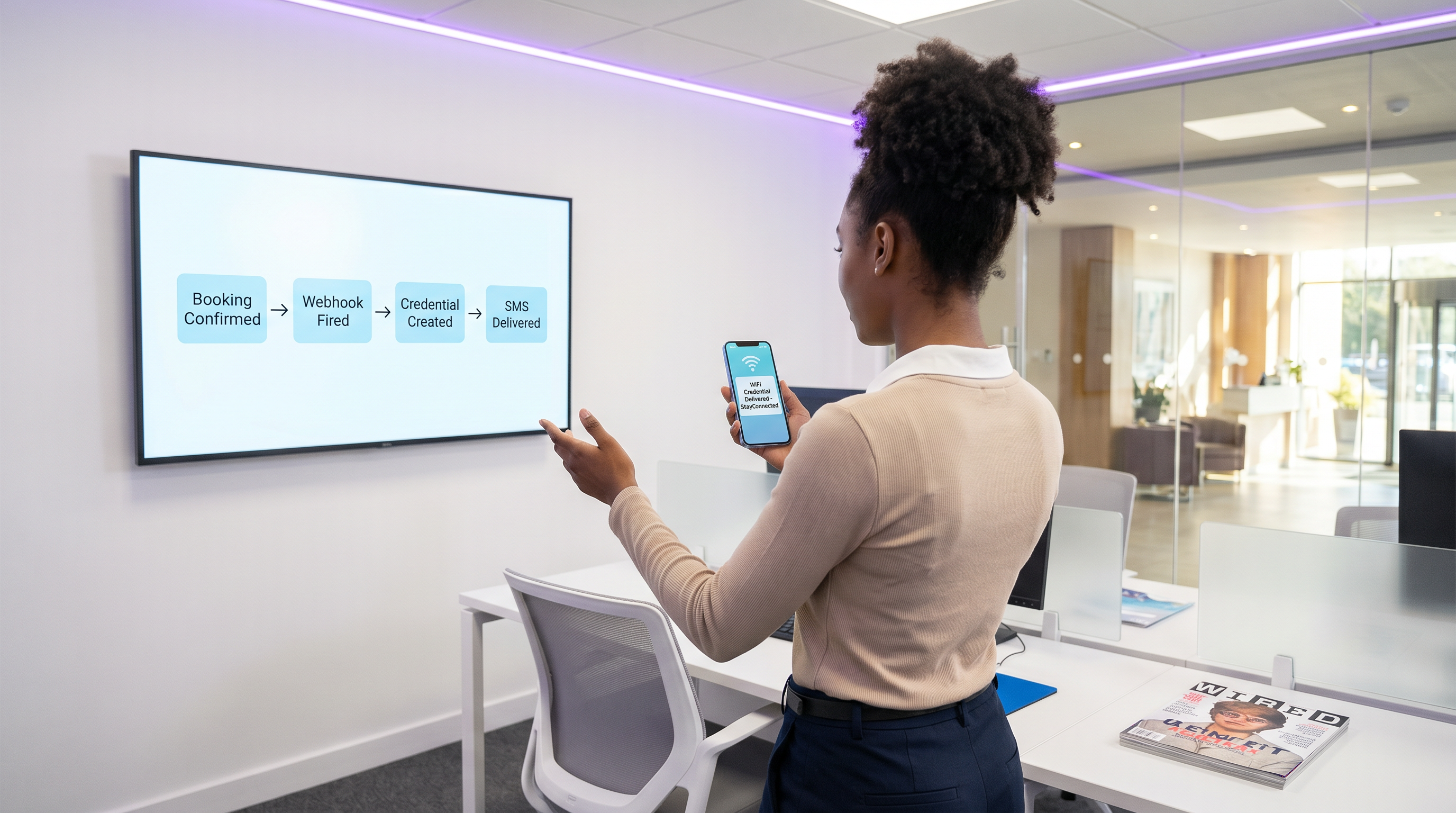
Webhook-driven WiFi onboarding automation eliminates this friction. By integrating your existing booking systems (such as a Property Management System or CRM) with the network access control layer, you can automatically generate and distribute secure, time-bounded WiFi credentials the moment a reservation is confirmed. This hands-off approach drastically reduces front desk overhead, ensures compliance with data privacy standards, and provides a seamless, zero-touch onboarding experience for the guest.
This guide details the architecture, implementation steps, and best practices for deploying webhook-driven onboarding at scale, leveraging Purple's LogicFlow engine to bridge the gap between business events and network access.
Technical Deep Dive: Webhook Architecture
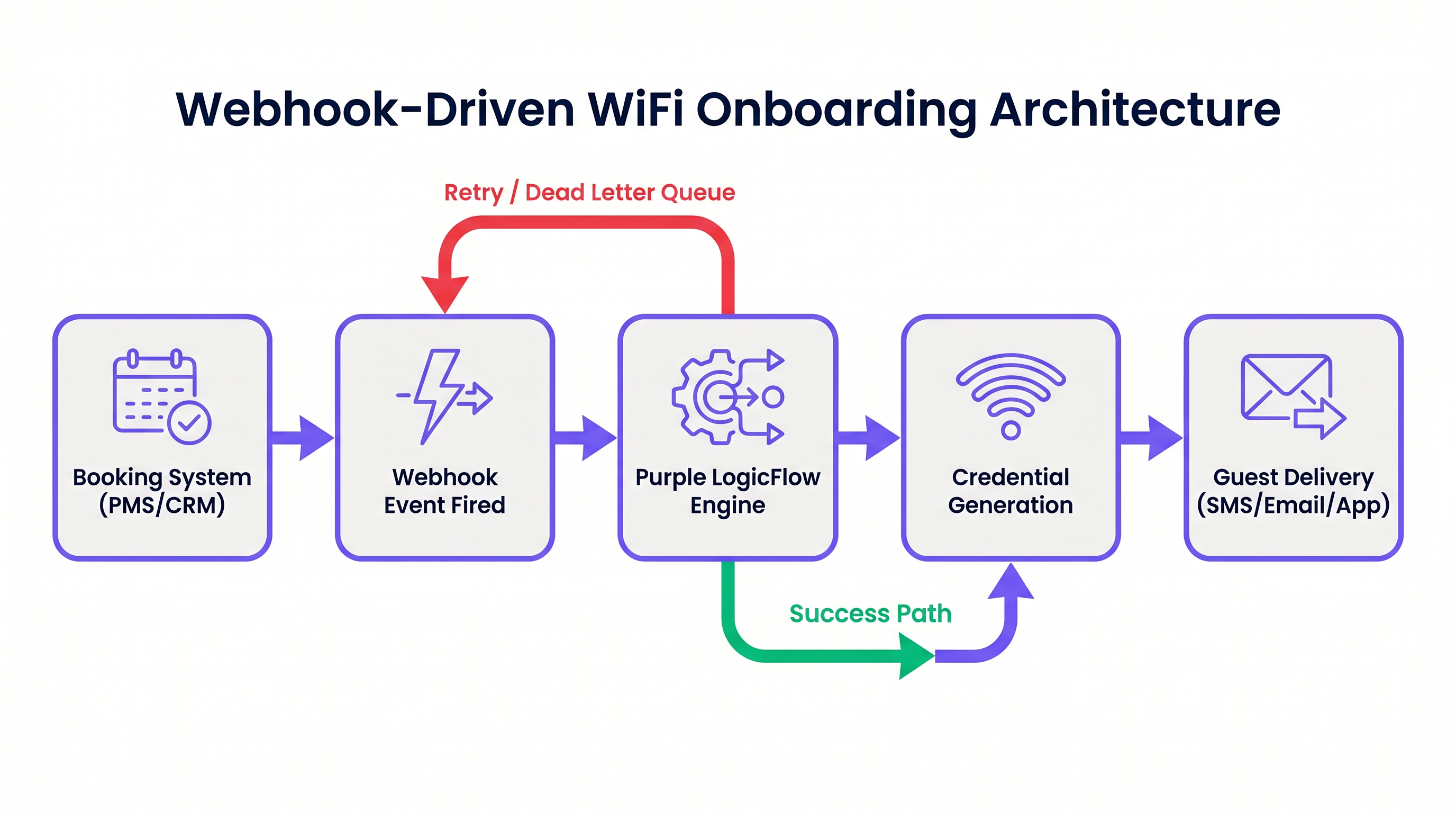
At its core, a webhook is an HTTP POST request triggered by a specific event in a source system. In the context of WiFi onboarding automation, the source system is typically a Property Management System (PMS), CRM, or event registration platform.
When an event occurs—such as a booking confirmation, check-in, or stay modification—the source system fires a JSON payload containing relevant guest data to a designated endpoint.
The Purple LogicFlow Engine
Purple's LogicFlow engine serves as the intelligent middleware in this architecture. It receives the webhook payload, parses the guest data, and executes a predefined workflow to generate a network credential. This credential can take the form of a unique Pre-Shared Key (PPSK) or a RADIUS-based dynamic account.
LogicFlow handles the entire credential lifecycle:
- Generation: Creating a secure, unique credential tied to the guest's identity.
- Delivery: Dispatching the credential via SMS, email, or API push to a mobile app.
- Activation/Revocation: Enabling the credential at check-in and disabling it precisely at check-out.
This integration transforms the network from an isolated IT utility into a business-aware asset, perfectly aligned with the venue's operational rhythm. For a broader perspective on modern network architectures, consider The Core SD WAN Benefits for Modern Businesses .
Implementation Guide
Deploying webhook-driven onboarding requires a systematic approach to ensure reliability and security.
Step 1: Define the Event Schema
Before configuring any workflows, map out the exact events your booking system can fire and the data structure of the corresponding payloads. You must ensure the payload contains a unique guest identifier, a delivery method (email or phone number), and the stay duration.
Step 2: Configure the Integration
Determine the integration method based on your booking system's capabilities.
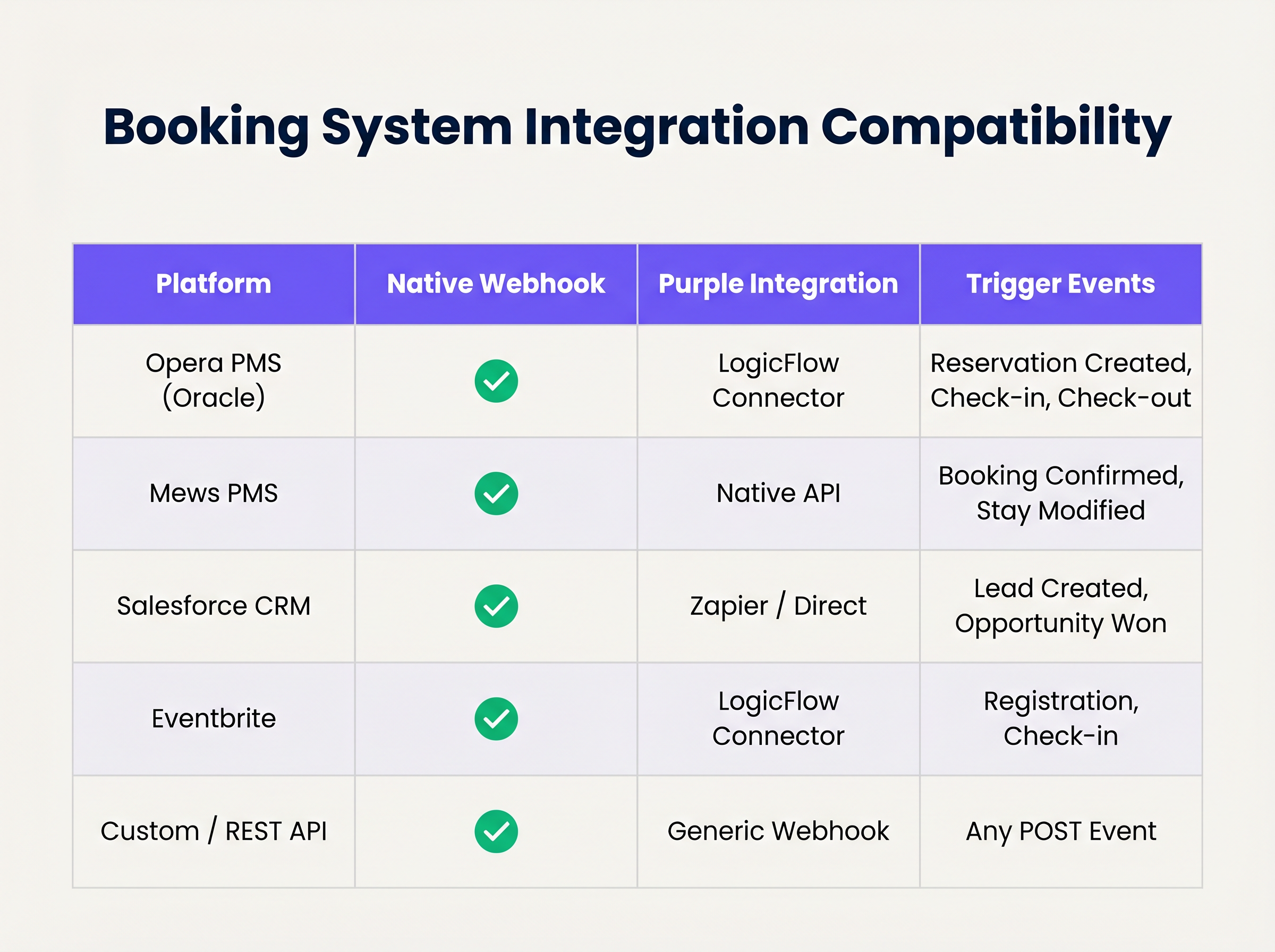
If your system supports native webhooks, configure it to point to your LogicFlow endpoint. For systems without native webhook support, you may need to utilise Purple's polling connectors or an intermediary integration platform.
Step 3: Design the Credential Lifecycle
Establish the rules for credential validity. A best practice is to generate the credential upon booking confirmation but delay delivery until 24-48 hours prior to arrival. Ensure the credential automatically expires at the scheduled check-out time.
Step 4: Establish Retry and Failure Handling
Network requests can fail. Implement idempotency to handle duplicate webhook events gracefully. Configure LogicFlow's retry policies with exponential backoff, and establish a dead-letter queue for events that exhaust their retry limits, ensuring they are flagged for manual review.
Best Practices
- Data Minimisation: Adhere strictly to privacy regulations. Only extract and process the minimum data required to generate and deliver the credential. For a detailed comparison of regulatory frameworks, review CCPA vs GDPR: Global Privacy Compliance for Guest WiFi Data .
- Idempotency: Ensure your webhook processing logic is idempotent. Processing the same "reservation confirmed" event multiple times must not result in multiple credentials being generated or duplicate emails being sent.
- Fallback Mechanisms: Always maintain a manual credential generation process at the front desk. While automation handles the vast majority of cases, edge cases (e.g., incorrect contact details provided at booking) will require human intervention.
Troubleshooting & Risk Mitigation
Even robust automated systems encounter issues. Common failure modes include:
- Timezone Mismatches: If the PMS operates in local time while the network controller operates in UTC, credentials may expire prematurely or remain active too long. Explicitly handle timezone conversions in your LogicFlow configuration.
- Payload Schema Changes: Booking system updates can occasionally alter the structure of the webhook payload, causing parsing errors. Implement schema validation and alerting to detect these changes immediately.
- Delivery Failures: SMS or email delivery can fail due to invalid contact details or upstream carrier issues. Monitor delivery receipts and configure alerts for high failure rates.
ROI & Business Impact
The transition to automated WiFi onboarding delivers measurable business value across several dimensions:
- Operational Efficiency: Eliminating manual credential distribution saves significant staff time. In a 200-room hotel, saving 3 minutes per guest translates to hundreds of hours of recovered productivity annually.
- Enhanced Guest Experience: Guests expect seamless connectivity. Delivering credentials prior to arrival removes a point of friction at check-in, directly contributing to higher satisfaction scores.
- Data Integrity and Analytics: By tying network access directly to the booking identity, venues gain highly accurate, deterministic data on guest behaviour and dwell time, powering more effective marketing initiatives. For insights on quantifying this value, see Measuring ROI on Guest WiFi: A Framework for CMOs .
Listen to the accompanying podcast briefing for a deeper dive into these concepts:
Key Terms & Definitions
Webhook
An automated HTTP POST request sent from one application to another, triggered by a specific event, carrying a data payload.
The fundamental mechanism for real-time, event-driven integration between booking systems and network infrastructure.
PPSK (Private Pre-Shared Key)
A network security method where each user or device is assigned a unique passphrase for the same SSID.
The preferred credential type for automated hospitality onboarding, offering a balance of security and ease of use compared to standard WPA2-Personal.
Idempotency
A property of certain operations in computer science where applying the operation multiple times has the same effect as applying it once.
Critical for webhook endpoint design to prevent duplicate credential generation if a PMS retries a payload delivery.
Dead-Letter Queue (DLQ)
A holding queue for messages or events that cannot be processed successfully after a defined number of retries.
Essential for troubleshooting integration failures without losing the original booking event data.
LogicFlow
Purple's visual automation engine that receives external triggers, evaluates conditions, and executes actions like credential creation and messaging.
The middleware layer that translates business events from a PMS into network access commands.
RADIUS
Remote Authentication Dial-In User Service; a networking protocol that provides centralized Authentication, Authorization, and Accounting (AAA) management.
Used in high-security environments (like enterprise or healthcare) where 802.1X dynamic credentials are required instead of PPSK.
Payload Schema
The defined structure and format (typically JSON) of the data transmitted within a webhook request.
IT teams must map the PMS payload schema to ensure the automation engine extracts the correct fields for guest name, email, and dates.
Exponential Backoff
An algorithm that uses feedback to multiplicatively decrease the rate of some process, used in network retries.
Prevents overwhelming a recovering service by increasing the wait time between successive retry attempts of a failed webhook.
Case Studies
A 300-room resort uses Mews PMS and wants to automate WiFi access. They need credentials to be valid only from the official check-in time (15:00) to check-out time (11:00), but want to email the details to the guest the day before arrival.
Configure Mews to fire a 'Reservation Confirmed' webhook to Purple LogicFlow. LogicFlow parses the payload to extract the guest email, arrival date, and departure date. The workflow is configured to generate a PPSK credential immediately, setting the 'Valid From' attribute to 15:00 on the arrival date and 'Valid Until' to 11:00 on the departure date. A scheduled action is then queued in LogicFlow to dispatch the email template containing the PPSK exactly 24 hours prior to the arrival date.
A large conference centre uses Eventbrite for ticketing. They experience massive spikes in concurrent arrivals, causing bottlenecks at the registration desk where WiFi codes are currently handed out.
Integrate Eventbrite with Purple LogicFlow using a webhook triggered on 'Registration Confirmed'. LogicFlow generates a unique WiFi voucher code and immediately emails it to the attendee as part of their digital ticket package. The network controller is configured to activate the voucher upon first use, valid for the duration of the multi-day event.
Scenario Analysis
Q1. Your hotel is migrating to a new PMS that sends stay dates in UTC, but your network controller is configured for local time (UTC+2). The webhook payload includes: `"checkout_time": "2024-05-10T10:00:00Z"`. If no timezone conversion is applied in the automation layer, what is the operational impact?
💡 Hint:Consider when the guest expects to lose access versus when the system will actually revoke it.
Show Recommended Approach
The network controller will interpret the 10:00:00 time as local time. Because local time is UTC+2, 10:00:00 local time occurs two hours before 10:00:00 UTC. Therefore, the guest's WiFi credential will be revoked two hours before their actual checkout time, leading to connectivity complaints on the morning of departure. Timezone normalization must be explicitly handled in the LogicFlow configuration.
Q2. A stadium ticketing system fires a webhook for every ticket sold. You notice that your LogicFlow engine is processing 500 events per minute during an on-sale rush, but the downstream SMS gateway API is rate-limiting you to 100 requests per minute. How should you architect the automation to handle this?
💡 Hint:Look at the decoupling of credential generation and credential delivery.
Show Recommended Approach
You must decouple the credential generation from the delivery mechanism. The webhook should trigger LogicFlow to generate the credential and place the delivery task into a managed queue. The queue should then process the SMS dispatches at a controlled rate (e.g., 90 per minute) to respect the SMS gateway's rate limits, utilizing exponential backoff for any throttled requests.
Q3. During a network audit, the compliance officer notes that webhook payloads containing guest names and phone numbers are being logged in plain text in your middleware diagnostic logs for 90 days. What is the recommended remediation?
💡 Hint:Refer to the Data Minimisation best practice and GDPR Article 5.
Show Recommended Approach
Diagnostic logs should be configured to obfuscate or redact Personally Identifiable Information (PII) such as names and phone numbers. Only non-sensitive metadata (like event IDs or timestamp) should be retained for troubleshooting. Furthermore, the retention period for diagnostic logs should be reduced to the minimum necessary for operational monitoring (e.g., 7 to 14 days), rather than 90 days.
Key Takeaways
- ✓Webhook automation eliminates manual WiFi credential distribution, reducing front-desk overhead and friction.
- ✓Integration relies on HTTP POST payloads triggered by PMS events like 'Reservation Confirmed'.
- ✓Purple's LogicFlow engine acts as the middleware, translating booking events into network access commands.
- ✓Idempotency is critical to prevent duplicate credential generation from retried webhook events.
- ✓Credentials should be generated early but activated strictly according to check-in/check-out times.
- ✓Proper handling of timezones and dead-letter queues is essential for robust, enterprise-grade deployments.




