
Captive Portal লগইন ট্রাবলশুটিং এবং সমাধান
ধাপ অনুসারে Captive Portal লগইন ব্যর্থতার ট্রাবলশুট করুন। CNA পপআপ সাপ্রেশন, HSTS সার্টিফিকেট ত্রুটি, NeverSSL প্রোব এবং RADIUS টাইমআউট সমস্যাগুলি সমাধান করুন।
Video overview
এই গাইডটি শুনুন
পডকাস্ট ট্রান্সক্রিপ্ট দেখুন
আমাদের মূল সিরিজের অংশ: Captive Portal নির্দেশিকা →
এক্সিকিউটিভ সামারি
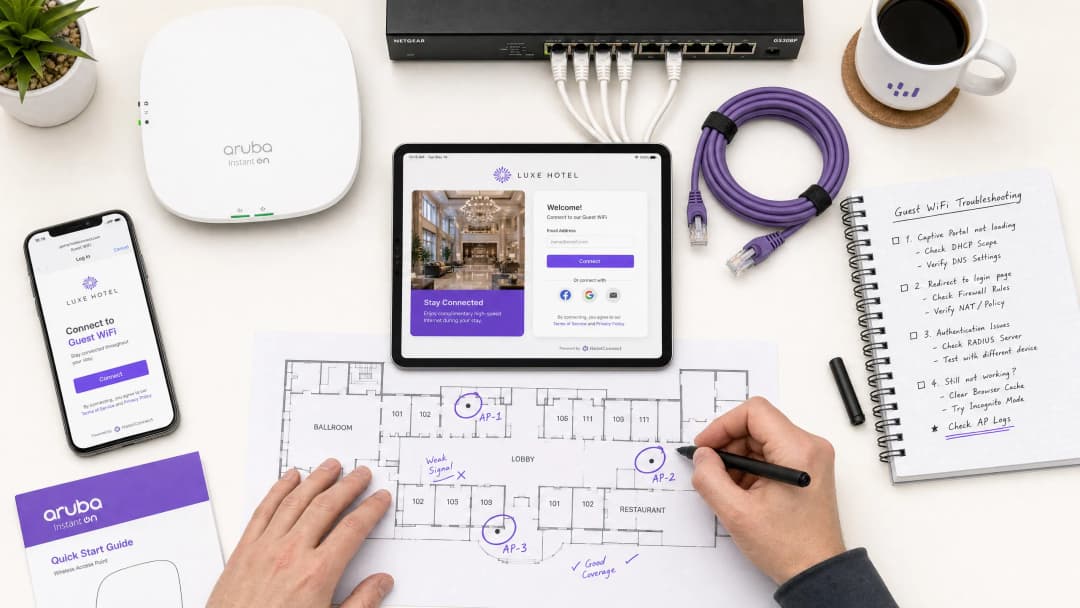
আধুনিক এন্টারপ্রাইজ ভেন্যুগুলোর জন্য, গেস্ট ওয়্যারলেস নেটওয়ার্কগুলো গ্রাহক সম্পৃক্ততা, অপারেশনাল ইন্টেলিজেন্স এবং ব্র্যান্ড পজিশনিংয়ের জন্য একটি অত্যন্ত গুরুত্বপূর্ণ মাধ্যম। তবে, এই নেটওয়ার্কগুলোর ব্যবসায়িক মূল্য নির্ভর করে প্রাথমিক সংযোগের নির্ভরযোগ্যতার ওপর। যখন কোনো গেস্ট একটি নেটওয়ার্কে সংযুক্ত হন এবং captive portal login পৃষ্ঠাটি প্রদর্শিত হতে ব্যর্থ হয়, তখন ভেন্যুটি তাৎক্ষণিকভাবে ফ্রন্ট-অফ-হাউস সমস্যা, সাপোর্ট টিকিটের বৃদ্ধি এবং ডেটা ক্যাপচারের সুযোগ হারানোর সম্মুখীন হয়।
এই ব্যর্থতাগুলোর মূল কারণ হলো নিরাপদ ওয়েব স্ট্যান্ডার্ড এবং ক্যাপটিভ পোর্টাল দ্বারা ঐতিহাসিকভাবে ব্যবহৃত নেটওয়ার্ক-স্তরের ইন্টারসেপশন প্রযুক্তির মধ্যে একটি মৌলিক দ্বন্দ্ব। আধুনিক ওয়েব ব্রাউজার এবং অপারেটিং সিস্টেমগুলো ব্যবহারকারীদের নিরাপত্তা ঝুঁকি থেকে রক্ষা করার জন্য অননুমোদিত ট্রাফিক রিডাইরেকশন সনাক্ত এবং ব্লক করার জন্য ডিজাইন করা হয়েছে। সঠিক HTTP এবং DNS রিডাইরেকশন সিকোয়েন্স, HTTP Strict Transport Security (HSTS)-এর প্রভাব এবং ক্লায়েন্ট-সাইড সেটিংস যা এই প্রক্রিয়াগুলোকে ব্যাহত করে তা বোঝার মাধ্যমে, IT সংস্থাগুলো শক্তিশালী কনফিগারেশন বাস্তবায়ন করতে পারে যা নির্বিঘ্ন অনবোর্ডিং নিশ্চিত করে।
এই গাইডটিতে বিস্তারিত আলোচনা করা হয়েছে কীভাবে Purple-এর ক্লাউড-ম্যানেজড Guest WiFi প্ল্যাটফর্ম সমস্ত ভোক্তা অপারেটিং সিস্টেম জুড়ে উচ্চ-উপযোগিতা সম্পন্ন রিডাইরেকশন সরবরাহ করতে এই চ্যালেঞ্জগুলোর সমাধান করে, যা ভেন্যু সাপোর্ট ওভারহেড কমায় এবং ওয়্যারলেস পরিকাঠামো বিনিয়োগের রিটার্নকে সর্বোচ্চ করে। হসপিটালিটি, রিটেইল, হেলথকেয়ার বা পরিবহন পরিবেশেই হোক না কেন, এই গাইডের নীতি এবং চেকলিস্টগুলো সর্বজনীনভাবে প্রযোজ্য।
টেকনিক্যাল ডিপ-ডাইভ
ক্যাপটিভ পোর্টাল ব্যর্থতার কার্যকর সমাধান করতে, নেটওয়ার্ক অ্যাডমিনিস্ট্রেটরদের অবশ্যই একটি ক্লায়েন্ট ডিভাইস ওপেন বা প্রি-শেয়ার্ড কী (PSK) গেস্ট ওয়্যারলেস নেটওয়ার্কের সাথে সংযুক্ত হওয়ার সময় ঠিক কী ধরনের ঘটনা ঘটে তার সঠিক সিকোয়েন্স বুঝতে হবে। আধুনিক অপারেটিং সিস্টেমগুলো - Apple iOS/macOS, Google Android, Microsoft Windows এবং Linux ডিস্ট্রিবিউশনসহ - ইন্টারনেট সংযোগ পরীক্ষা করার জন্য ব্যবহারকারীর ব্রাউজার খোলার অপেক্ষা করে না। পরিবর্তে, তারা অ্যাসোসিয়েশন এবং DHCP পর্ব সম্পন্ন করার সাথে সাথেই একটি স্বয়ংক্রিয় অ্যাক্টিভ প্রোবিং প্রক্রিয়া কার্যকর করে।
ক্যাপটিভ পোর্টাল সনাক্তকরণ সিকোয়েন্স
সংযোগ এবং যাচাইকরণ প্রক্রিয়াটি একটি সুনির্দিষ্ট সিকোয়েন্স অনুসরণ করে:
| ধাপ | অ্যাকশন | টেকনিক্যাল বিবরণ | প্রত্যাশিত সাফল্যের সূচক |
|---|---|---|---|
| ১ | অ্যাসোসিয়েশন | ক্লায়েন্ট লেয়ার ২-এ গেস্ট SSID-এর সাথে যুক্ত হয়। | সফল 802.11 অ্যাসোসিয়েশন ফ্রেম বিনিময়। |
| ২ | IP প্রোভিশনিং | DHCP সার্ভার একটি IP অ্যাড্রেস, সাবনেট মাস্ক, গেটওয়ে এবং লোকাল DNS সার্ভার বরাদ্দ করে। | ক্লায়েন্ট দ্বারা DHCP ACK প্যাকেট প্রাপ্ত। |
| ৩ | অ্যাক্টিভ প্রোবিং | OS ব্যাকগ্রাউন্ড সার্ভিস একটি ভেন্ডর ক্যানারি URL-এ একটি আনএনক্রিপ্টেড HTTP GET অনুরোধ পাঠায়। | HTTP 200 OK (Apple/Windows) বা HTTP 204 No Content (Google)। |
| 5 | পোর্টাল রেন্ডারিং | Captive Portal Assistant (CPA) ইঞ্জিন ওপেন হয় এবং স্প্ল্যাশ পেজটি রেন্ডার করে। | লগইন ইন্টারফেস সফলভাবে রেন্ডার হয়েছে। |
+--------+             +------------+             +------------+             +-------------------+
| Client |             | AP/Gateway |             | DNS Server |             | Captive Portal IP |
+--------+             +------------+             +------------+             +-------------------+
    |                        |                          |                              |
    |--- 1. DHCP Request --->|                          |                              |
    |<-- 2. DHCP Ack --------|                          |                              |
    |    (IP & DNS Assigned) |                          |                              |
    |--- 3. DNS Query ------>|------------------------->|                              |
    |    (canary URL)        |                          |                              |
    |<-- 4. DNS Response ----|<-------------------------|                              |
    |    (Resolved IP)       |                          |                              |
    |--- 5. HTTP GET ------->|                          |                              |
    |    (canary URL)        |                          |                              |
    |<-- 6. HTTP 302 --------|                          |                              |
    |    (Redirect to Portal)|                          |                              |
    |--- 7. DNS Query ------>|------------------------->|                              |
    |    (Portal FQDN)       |                          |                              |
    |<-- 8. DNS Response ----|<-------------------------|                              |
    |    (Portal IP)         |                          |                              |
    |--- 9. HTTP/S GET ------>-------------------------------------------------------->|
    |    (Render Splash Page)|                          |                              |
    |<-- 10. Render Page <-------------------------------------------------------------||
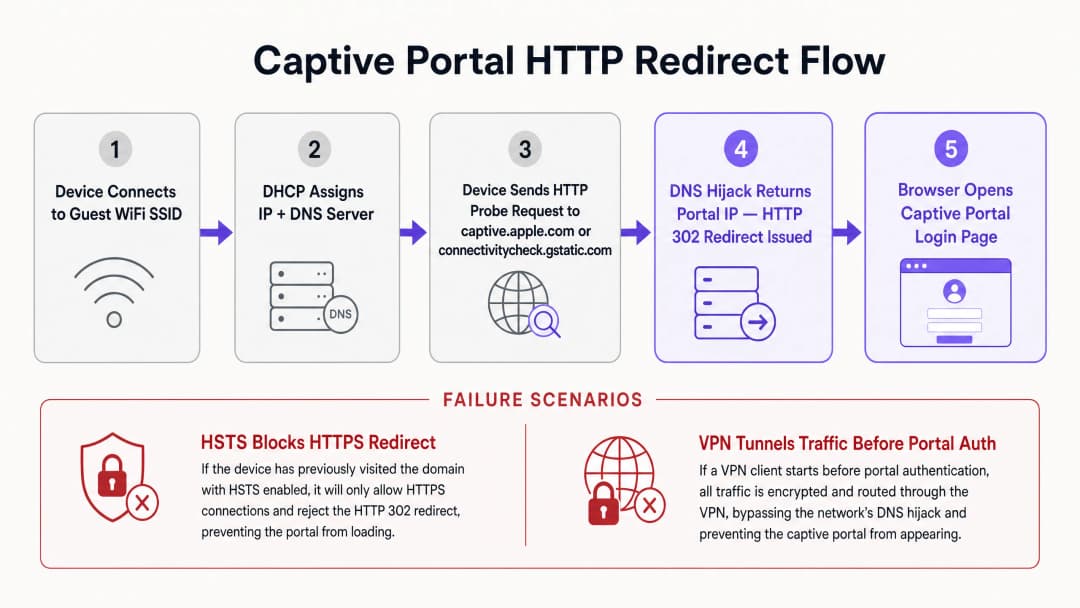
নেটওয়ার্কের স্থিতি নির্ধারণের জন্য প্রতিটি অপারেটিং সিস্টেম একটি নির্দিষ্ট সেট ক্যানারি URL এবং প্রত্যাশিত প্রতিক্রিয়া ব্যবহার করে। Apple (iOS/macOS) http://captive.apple.com/hotspot-detect.html প্রোব করে এবং এর টাইটেল ও বডিতে শুধুমাত্র Success শব্দটি ধারণকারী একটি HTML ডকুমেন্ট প্রত্যাশা করে। Google (Android/ChromeOS) http://connectivitycheck.gstatic.com/generate_204 প্রোব করে এবং একটি খালি বডি সহ 204 No Content HTTP স্ট্যাটাস কোড প্রত্যাশা করে। Microsoft (Windows 10/11) http://www.msftconnecttest.com/connecttest.txt প্রোব করে এবং Microsoft Connect Test এর একটি প্লেইন টেক্সট প্রতিক্রিয়া প্রত্যাশা করে।
যদি ডিভাইসটি প্রত্যাশিত প্রতিক্রিয়া পায়, তাহলে এটি সিদ্ধান্ত নেয় যে নেটওয়ার্কটিতে সরাসরি ইন্টারনেট অ্যাক্সেস রয়েছে। প্রতিক্রিয়াটি পরিবর্তিত হলে - যেমন একটি HTTP 302 রিডাইরেক্ট পেলে - অপারেটিং সিস্টেমের Captive Portal Assistant (CPA) রিডাইরেক্টের লক্ষ্যটি দেখানোর জন্য একটি ডেডিকেটেড, স্যান্ডবক্সড ব্রাউজার উইন্ডো চালু করে: যা হলো Captive portal স্প্ল্যাশ লগইন পৃষ্ঠা।
HSTS এবং HTTPS রিডাইরেকশনের দ্বন্দ্ব
Captive portal রিডাইরেকশনের ঐতিহাসিক পদ্ধতিটি DNS হাইজ্যাকিং বা HTTP ইন্টারসেপশনের উপর নির্ভর করে। যখন কোনো অপ্রমাণিত ব্যবহারকারী যেকোনো ওয়েবসাইট ব্রাউজ করার চেষ্টা করেন, তখন গেটওয়েটি TCP পোর্ট 80 (HTTP) বা পোর্ট 443 (HTTPS) ট্রাফিক ইন্টারসেপ্ট করে এবং গন্তব্য সার্ভারের পক্ষে প্রতিক্রিয়া জানায়, একটি HTTP 302 রিডাইরেক্ট ইনজেক্ট করে। এটি অনিরাপদ HTTP ওয়েব ব্রাউজিংয়ের যুগে কাজ করলেও, আধুনিক HTTPS-শাসিত পরিবেশে এটি মারাত্মক নিরাপত্তা এবং অপারেশনাল চ্যালেঞ্জ তৈরি করে।
প্রধান বাধাটি হলো HTTP Strict Transport Security (HSTS), যা RFC 6797-এ নির্দিষ্ট করা হয়েছে। HSTS ওয়েব ব্রাউজারগুলোকে শুধুমাত্র নিরাপদ HTTPS সংযোগ ব্যবহার করে ওয়েবসাইটের সাথে ইন্টারঅ্যাক্ট করতে বাধ্য করে। যখন কোনো ব্রাউজার HSTS-সক্ষম ডোমেন - যেমন Google, Facebook বা ব্যাংকিং পোর্টালগুলোর সাথে সংযোগ করার চেষ্টা করে - তখন এটি যেকোনো আনএনক্রিপ্টেড যোগাযোগকে কঠোরভাবে নিষিদ্ধ করে এবং SSL/TLS সার্টিফিকেট যাচাইকরণ প্রয়োগ করে।
যদি কোনো captive portal গেটওয়ে কোনো HSTS ডোমেনে করা HTTPS অনুরোধ ইন্টারসেপ্ট করার চেষ্টা করে, তবে তাকে অবশ্যই ক্লায়েন্টের কাছে নিজস্ব SSL সার্টিফিকেট বা একটি স্পুফড সার্টিফিকেট উপস্থাপন করতে হবে। যেহেতু গেটওয়ে সার্টিফিকেটটি অনুরোধ করা ডোমেন নামের সাথে মেলে না, তাই ক্লায়েন্ট ব্রাউজার একটি সার্টিফিকেট ত্রুটি সনাক্ত করে এবং একটি এড়ানো অসম্ভব এমন নিরাপত্তা সতর্কবার্তা (NET::ERR_CERT_COMMON_NAME_INVALID) প্রদর্শন করে। ব্রাউজারটি রিডাইরেক্ট সম্পূর্ণরূপে ব্লক করে দেয়, যা captive portal page লোড হতে বাধা দেয়।
এটি প্রশমিত করার জন্য, আধুনিক এন্টারপ্রাইজ ওয়্যারলেস নেটওয়ার্কগুলি দুটি পদ্ধতি ব্যবহার করে। প্রথমত, OS প্রোভকে অব্যাহতি দেওয়া নিশ্চিত করে যে অপারেটিং সিস্টেমগুলির দ্বারা প্রেরিত আনএনক্রিপ্টেড HTTP প্রোভগুলি কখনই HTTPS ইন্টারসেপশনের শিকার হবে না; গেটওয়েকে অবশ্যই স্ট্যান্ডার্ড HTTP 302 রেসপন্স ব্যবহার করে পোর্টালের সিকিউর ফুল্লি-কোয়ালিফাইড ডোমেন নেমে (FQDN) আনএনক্রিপ্টেড HTTP প্রোভ রিডাইরেক্ট করার অনুমতি দিতে হবে। দ্বিতীয়ত, RFC 8910 (Captive Portal API) এমন একটি প্রক্রিয়া সংজ্ঞায়িত করে যেখানে DHCP Option 114 বা IPv6 রাউটার অ্যাডভার্টাইজমেন্ট ক্লায়েন্ট ডিভাইসগুলিকে Captive Portal API এন্ডপয়েন্টের সঠিক URL সম্পর্কে অবহিত করে। ব্রুট-ফোর্স DNS হাইজ্যাকিং বা HTTP রিডাইরেকশনের উপর নির্ভর করার পরিবর্তে, সামঞ্জস্যপূর্ণ ক্লায়েন্ট ডিভাইসগুলি HSTS দ্বন্দ্বগুলি এড়িয়ে সরাসরি পোর্টাল URL পেতে এই API কোয়েরি করে।
-
নেটওয়ার্ক অ্যাডমিনদের জন্য সরাসরি ডায়াগনস্টিক ম্যাট্রিক্স
| পর্যবেক্ষিত লক্ষণ | প্রাথমিক মূল কারণ | তাৎক্ষণিক সমাধানমূলক পদক্ষেপ |
|---|---|---|
| পোর্টাল পেজ চালু হতে ব্যর্থ হচ্ছে | HTTPS/HSTS ইন্টারসেপশন ব্লক | আনএনক্রিপ্টেড HTTP প্রোভ ট্রিগার করতে ব্রাউজারটিকে সরাসরি http://neverssl.com-এ নিয়ে যান |
| প্রতি ১৫ মিনিট অন্তর বারবার লগইন করার অনুরোধ | প্রাইভেট MAC অ্যাড্রেস র্যান্ডমাইজেশন | ক্লায়েন্ট ডিভাইসের নেটওয়ার্ক সেটিংসে প্রাইভেট WiFi অ্যাড্রেস বন্ধ করুন |
| কোনো IP অ্যাড্রেস বরাদ্দ করা হয়নি | DHCP স্কোপ পুল খালি হয়ে যাওয়া | ওয়্যারলেস গেটওয়েতে DHCP লিজের সময় কমিয়ে ১৫ - ৩০ মিনিট করুন |
| সোশ্যাল লগইন পপআপ ব্যর্থ হচ্ছে বা আটকে যাচ্ছে | অপূর্ণাঙ্গ ওয়াল্ড গার্ডেন ACL | অনুমোদিত তালিকায় প্রয়োজনীয় OAuth ডোমেনগুলি (*.googleapis.com, *.gstatic.com) যুক্ত করুন |
| VPN কানেক্টেড কিন্তু ইন্টারনেট নেই | এনক্রিপ্টেড টানেল স্থানীয় রিডাইরেক্ট ব্লক করছে | Captive Portal অথেন্টিকেশন শেষ না হওয়া পর্যন্ত সাময়িকভাবে VPN পজ করুন |
-
আপনার নির্দিষ্ট সেটআপ নিয়ে কোনো প্রশ্ন আছে?
আমাদের টিম ৮০,০০০ ভেন্যুতে ভেন্যু অপারেটর, IT ম্যানেজার এবং নেটওয়ার্ক ইঞ্জিনিয়ারদের সাথে কাজ করে। একটি ২০ মিনিটের কল বুক করুন এবং আপনার মতো অন্যরা কীভাবে এর সমাধান করেছেন তা আমরা আপনাকে দেখাব।
ইমপ্লিমেন্টেশন গাইড
একটি নির্ভরযোগ্য Captive Portal স্থাপন করার জন্য ফিজিক্যাল ওয়্যারলেস ইনফ্রাস্ট্রাকচার (অ্যাক্সেস পয়েন্ট, কন্ট্রোলার, গেটওয়ে) এবং ক্লাউড-ভিত্তিক পোর্টাল প্ল্যাটফর্মের মধ্যে সমন্বয় প্রয়োজন। এন্টারপ্রাইজ নেটওয়ার্ক জুড়ে রিডাইরেকশন সামঞ্জস্য নিশ্চিত করতে এই বিভাগটি একটি ভেন্ডর-নিরপেক্ষ ইমপ্লিমেন্টেশন গাইড প্রদান করে, যেখানে Cisco, Aruba, এবং Ruckus কন্ট্রোলারের কনফিগারেশন উল্লেখ করা হয়েছে। সম্পর্কিত অ্যাক্সেস কন্ট্রোল আর্কিটেকচারের জন্য, ক্লাউড RADIUS-এর সাথে কীভাবে 802.1X অথেন্টিকেশন ইমপ্লিমেন্ট করবেন সম্পর্কিত আমাদের গাইডটি দেখুন।
ধাপ ১: ওয়াল্ড গার্ডেন (ACL) কনফিগারেশন
একটি ওয়াল্ড গার্ডেন বা অ্যাক্সেস কন্ট্রোল লিস্ট (ACL) নির্দিষ্ট বাহ্যিক ডোমেন, IP অ্যাড্রেস বা সাবনেট সংজ্ঞায়িত করে যা একটি আনঅথেন্টিকেটেড গেস্ট ডিভাইস লগ ইন করার পূর্বে অ্যাক্সেস করার অনুমতি পায়। যদি ওয়াল্ড গার্ডেন ভুলভাবে কনফিগার করা হয়, তবে ক্লায়েন্ট ডিভাইসটি পোর্টালের রিসোর্সগুলি রেজোলিউট বা লোড করতে অক্ষম হবে, যার ফলে একটি খালি স্ক্রিন বা টাইমআউট হবে।
Purple প্ল্যাটফর্মের সাথে নির্বিঘ্ন অপারেশন নিশ্চিত করতে, ওয়াল্ড গার্ডেনে অবশ্যই পোর্টাল FQDNs (*.purple.ai বা আঞ্চলিক ভ্যারিয়েন্ট), সোশ্যাল লগইন OAuth এন্ডপয়েন্টের জন্য আইডেন্টিটি প্রোভাইডার (IdPs) এবং CSS, JavaScript, ফন্ট বা ইমেজ হোস্টকারী কনটেন্ট ডেলিভারি নেটওয়ার্ক (CDNs) অন্তর্ভুক্ত থাকতে হবে।অনেক আধুনিক কন্ট্রোলার walled garden কনফিগারেশনে ওয়াইল্ডকার্ড ডোমেন নেম সমর্থন করে। কন্ট্রোলারটি ডায়নামিকভাবে অথেনটিকেশন না হওয়া ক্লায়েন্টদের থেকে DNS কুয়েরিগুলো পরীক্ষা করে; যখন কোনো ক্লায়েন্ট ওয়াইল্ডকার্ডের সাথে মিলে যাওয়া কোনো ডোমেন কুয়েরি করে, তখন কন্ট্রোলারটি সাময়িকভাবে রিটার্নড IP অ্যাড্রেসটিকে প্রি-অথেনটিকেশন অনুমতি তালিকায় যোগ করে।
ধাপ ২: DHCP এবং DNS অপ্টিমাইজেশন
যেহেতু Captive Portal ডিটেকশন প্রাথমিক নেটওয়ার্ক হ্যান্ডশেকের ওপর নির্ভর করে, তাই উচ্চ-ঘনত্বের পরিবেশের জন্য DHCP এবং DNS কনফিগারেশন অবশ্যই অপ্টিমাইজ করতে হবে। শপিং মল, ট্রানজিট হাব বা স্টেডিয়ামের মতো উচ্চ-পদচারণাপূর্ণ স্থানগুলোতে IP অ্যাড্রেস শেষ হয়ে যাওয়া পোর্টাল ব্যর্থতার একটি সাধারণ কারণ। যদি DHCP লিজ টাইম খুব বেশি সেট করা থাকে (যেমন ২৪ ঘণ্টা), তবে IP পুল দ্রুত খালি হয়ে যাবে। গেস্ট নেটওয়ার্কের জন্য DHCP লিজ টাইম ১৫ থেকে ৩০ মিনিট (৯০০ থেকে ১৮০০ সেকেন্ড) এর মধ্যে কনফিগার করা উচিত।
গেস্ট ক্লায়েন্টদের অবশ্যই একটি নির্ভরযোগ্য DNS সার্ভার বরাদ্দ করতে হবে যা পাবলিক ডোমেন এবং লোকাল পোর্টাল FQDN উভয়ই রিজলভ করতে সক্ষম (যেমন Cloudflare 1.1.1.1 অথবা Google 8.8.8.8)। অত্যন্ত গুরুত্বপূর্ণ বিষয় হলো, ওয়্যারলেস গেটওয়েকে অবশ্যই অথেনটিকেশন না হওয়া ক্লায়েন্টদের DNS রেজোলিউশন সম্পাদন করার অনুমতি দিতে হবে। যদি একটি ফায়ারওয়াল নিয়ম প্রি-অথেনটিকেটেড ব্যবহারকারীদের জন্য পোর্ট ৫৩ (UDP/TCP) ট্রাফিক ব্লক করে, তবে OS ক্যানারি URLগুলো রিজলভ করতে পারবে না এবং Captive Portal অ্যাসিস্ট্যান্ট কখনোই চালু হবে না।
ধাপ ৩: SSL/TLS সার্টিফিকেট ম্যানেজমেন্ট
যখন একটি গেস্ট ডিভাইসকে Captive Portal-এ রিডাইরেক্ট করা হয়, তখন ব্রাউজার পোর্টাল FQDN-এর সাথে একটি সুরক্ষিত HTTPS সংযোগ স্থাপন করে। সার্টিফিকেটের সতর্কবার্তা স্ক্রিন এড়াতে, Captive Portal-কে অবশ্যই একটি বৈধ, পাবলিকলি-বিশ্বস্ত SSL/TLS সার্টিফিকেট দ্বারা সুরক্ষিত করতে হবে। সেলফ-সাইনড সার্টিফিকেটগুলো মোবাইল অপারেটিং সিস্টেম দ্বারা ব্লক করা হবে, যা পোর্টাল অ্যাসিস্ট্যান্টকে পেজটি রেন্ডার করতে বাধা দেবে।
সর্বোত্তম অনুশীলন
একটি উচ্চ-ক্ষমতাসম্পন্ন গেস্ট ওয়্যারলেস নেটওয়ার্ক বজায় রাখতে যা সাপোর্ট টিকিট কমায় এবং ব্যবহারকারীর সন্তুষ্টি বাড়ায়, নেটওয়ার্ক অপারেটরদের স্ট্যান্ডার্ড ইন্ডাস্ট্রির সর্বোত্তম অনুশীলনগুলো মেনে চলা উচিত।
১. সোশ্যাল লগইনের জন্য walled garden নিয়ম অপ্টিমাইজ করুন
ব্যবহারকারীর প্রোফাইল ক্যাপচার করতে সোশ্যাল লগইন অপশন ব্যবহার করার সময়, walled garden অত্যন্ত সতর্কতার সাথে বজায় রাখতে হবে। সোশ্যাল মিডিয়া প্ল্যাটফর্মগুলো নিয়মিত তাদের অথেনটিকেশন সাবডোমেন এবং CDN IP রেঞ্জ আপডেট করে। যদি কোনো প্রয়োজনীয় ডোমেন বাদ পড়ে যায়, তবে সোশ্যাল লগইন পপআপ লোড হতে ব্যর্থ হবে বা অনির্দিষ্টকালের জন্য আটকে থাকবে।
| প্রোভাইডার | প্রয়োজনীয় Walled Garden ডোমেনসমূহ |
|---|---|
accounts.google.com, ssl.gstatic.com, fonts.gstatic.com, lh3.googleusercontent.com |
|
facebook.com, *.facebook.com, *.fbcdn.net, m.facebook.com |
|
| Apple | appleid.apple.com, appleid.cdn-apple.com, gsa.apple.com |
২. প্রোফাইল-ভিত্তিক অথেনটিকেশন এবং OpenRoaming-এ স্থানান্তর
যদিও প্রাথমিক ডেটা ক্যাপচার এবং ব্যবহারের শর্তাবলী গ্রহণের জন্য Captive Portal অত্যন্ত চমৎকার, তবুও প্রতিবার পরিদর্শনের সময় লগইন প্রক্রিয়ার পুনরাবৃত্তি ব্যবহারকারীর জন্য বিরক্তির কারণ হয়। আধুনিক এন্টারপ্রাইজ নেটওয়ার্কগুলো এখন প্রোফাইল-ভিত্তিক অথেনটিকেশন এবং OpenRoaming-এর মতো Passpoint (Hotspot 2.0) প্রযুক্তিতে স্থানান্তরিত হচ্ছে।Purple Connect লাইসেন্সের অধীনে, Purple OpenRoaming পরিষেবার জন্য একটি বিনামূল্যে আইডেন্টিটি প্রোভাইডার হিসেবে কাজ করে। Passpoint একজন অতিথিকে তাদের প্রথম পরিদর্শনের সময় তাদের ডিভাইসে একটি সুরক্ষিত প্রোফাইল ইনস্টল করতে দেয়। পরবর্তীতে বিশ্বব্যাপী যেকোনো অংশগ্রহণকারী ভেন্যুতে পরিদর্শনের সময়, ডিভাইসটি ক্যাপটিভ পোর্টালকে সম্পূর্ণভাবে এড়িয়ে গিয়ে WPA3-Enterprise ব্যবহার করে লেয়ার 2-এ স্বয়ংক্রিয়ভাবে অথেন্টিকেট করে।
৩. রেগুলেটরি ফ্রেমওয়ার্কের সাথে সম্মতি নিশ্চিত করুন
অতিথি WiFi ডেপ্লয়মেন্ট অবশ্যই বৈশ্বিক ডেটা গোপনীয়তা এবং নিরাপত্তা মান মেনে চলতে হবে। GDPR / CCPA Compliance-এর জন্য, ক্যাপটিভ পোর্টালে অবশ্যই স্পষ্ট পরিষেবার শর্তাবলী এবং গোপনীয়তা নীতি প্রদর্শন করতে হবে। মার্কেটিং যোগাযোগের জন্য সম্মতি অবশ্যই সক্রিয়ভাবে অপ্ট-ইন করতে হবে (আগে থেকে টিক দেওয়া থাকবে না)। PCI DSS Compliance-এর জন্য, যদি অতিথি নেটওয়ার্ক অবকাঠামো পয়েন্ট অব সেল (POS) সিস্টেমের সাথে সহ-অবস্থান করে, তবে কঠোর লজিক্যাল সেগমেন্টেশন প্রয়োগ করতে হবে। পুরোনো ডিভাইসগুলোকে WPA2-Personal ব্যবহার করে সংযোগ করার অনুমতি দিতে এবং নতুন ডিভাইসগুলোকে WPA3 নিরাপত্তা থেকে উপকৃত করতে WPA3-Transition Mode প্রয়োগ করুন।
সমস্যা সমাধান ও ঝুঁকি প্রশমন
যখন অতিথি ওয়্যারলেস সমস্যার রিপোর্ট করা হয়, তখন ভেন্যু অপারেশন এবং ফ্রন্ট-অফ-হাউস কর্মীদের একটি স্পষ্ট ডায়াগনস্টিক সিকোয়েন্সের প্রয়োজন হয়।
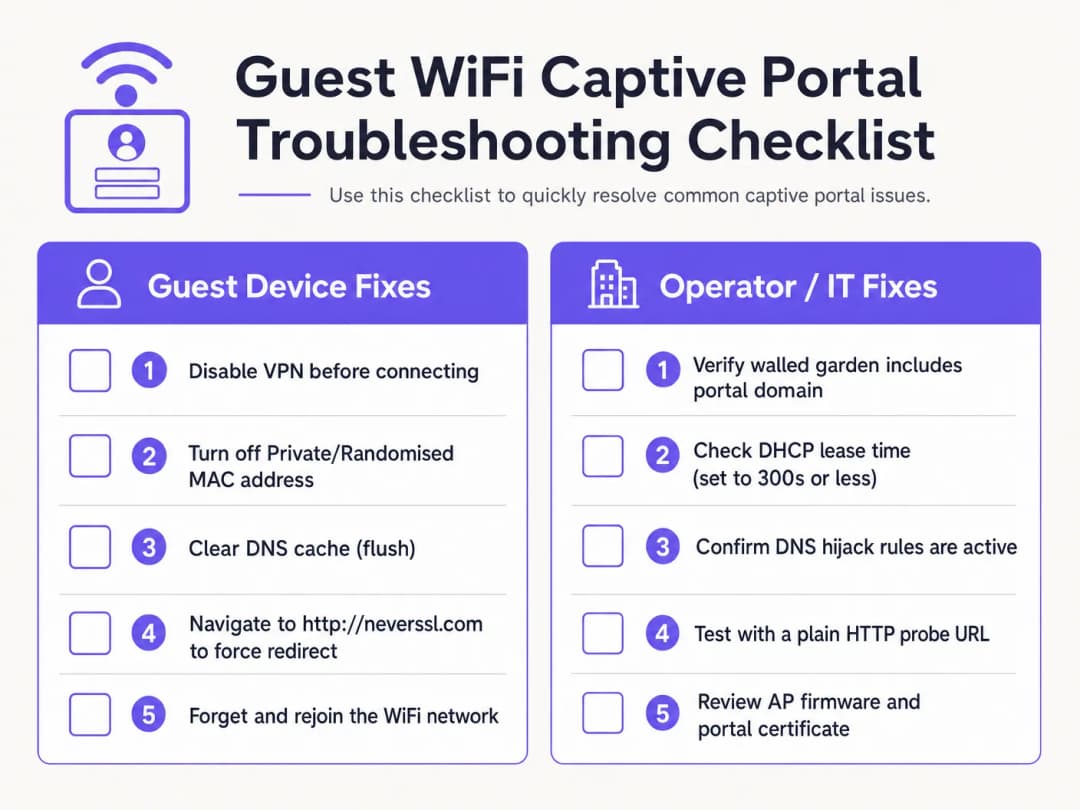
ক্লায়েন্ট-সাইড ডায়াগনস্টিক চেকলিস্ট
১. সক্রিয় VPN নিষ্ক্রিয় করুন। VPN সংযোগের সাথে সাথেই ট্রাফিক এনক্রিপ্ট এবং রুট করে, যা গেটওয়ে DNS হাইজ্যাকিং এবং HTTP রিডাইরেকশনকে বাইপাস করে। পোর্টাল লগইন সম্পন্ন করতে অতিথিদের সাময়িকভাবে তাদের VPN বন্ধ করতে হবে।
২. প্রাইভেট MAC অ্যাড্রেস বন্ধ করুন। iOS 14+ এবং Android 10+ ডিফল্টভাবে প্রাইভেট WiFi অ্যাড্রেস সক্রিয় করে। এর ফলে ডিভাইসগুলো ডায়নামিক MAC অ্যাড্রেস দেখায়, যা MAC সেশনের ধারাবাহিকতাকে নষ্ট করে। অতিথিদের ভেন্যুর SSID-এর জন্য প্রাইভেট অ্যাড্রেস নিষ্ক্রিয় করার নির্দেশ দিন।
৩. সিকিউর DNS (DoH/DoT) বাইপাস করুন। কোনো অতিথি যদি ব্রাউজার সেটিংসে কাস্টম DNS-over-HTTPS (DoH) ব্যবহার করেন, তবে ব্রাউজার স্থানীয় DNS হাইজ্যাকিং প্রতিক্রিয়াগুলো প্রত্যাখ্যান করবে। স্থানীয় রিডাইরেক্টের অনুমতি দিতে অতিথিদের সাময়িকভাবে সিকিউর DNS বন্ধ করতে হবে।
৪. একটি আনএনক্রিপ্টেড HTTP সংযোগ জোরপূর্বক করুন (NeverSSL)। ক্যাপটিভ পোর্টাল অ্যাসিস্ট্যান্ট যদি স্বয়ংক্রিয়ভাবে চালু হতে ব্যর্থ হয়, তবে অতিথিকে একটি ব্রাউজার উইন্ডো খুলতে এবং http://neverssl.com-এ নেভিগেট করতে নির্দেশ দিন। যেহেতু এই সাইটটি কখনই SSL/TLS ব্যবহার করে না, গেটওয়ে HTTP অনুরোধটিকে ইন্টারসেপ্ট করতে পারে এবং লগইন স্ক্রিনে একটি HTTP 302 রিডাইরেক্ট ইনজেক্ট করতে পারে।
৫. নেটওয়ার্ক ফরগেট এবং রিজয়েন করুন। নেটওয়ার্ক ফরগেট করে আবার সংযোগ করা হলে তা একটি পরিষ্কার DHCP হ্যান্ডশেক জোরদার করে এবং ক্যাপটিভ পোর্টাল সনাক্তকরণ পুনরায় শুরু করে।
অপারেটর-সাইড ইনফ্রাস্ট্রাকচার ট্রাবলশুটিং
১. DHCP পুল ব্যবহার মনিটর করুন: স্থানীয় গেটওয়েতে DHCP স্কোপ পরীক্ষা করুন। পুলের ব্যবহার বেশি হলে, লিজের সময় কমিয়ে ১৫-৩০ মিনিট করুন। ২. DNS রিডাইরেকশন নিয়ম যাচাই করুন: আনঅথেনটিকেটেড ক্লায়েন্টরা পোর্ট 53-এ DNS প্রতিক্রিয়া পাচ্ছে কিনা তা নিশ্চিত করতে গেটওয়ে ইন্টারফেসে একটি প্যাকেট ক্যাপচার (PCAP) সম্পাদন করুন।৩. Walled Garden ল্যাটেন্সি অডিট করুন: কন্ট্রোলারে walled garden ডোমেনগুলোর জন্য DNS রেজোলিউশন সঠিকভাবে ক্যাশিং হচ্ছে কিনা তা নিশ্চিত করুন। ৪. সার্টিফিকেটের মেয়াদ শেষ হওয়ার তারিখ পরীক্ষা করুন: ওয়্যারলেস কন্ট্রোলারে ইনস্টল করা SSL/TLS সার্টিফিকেটটি বৈধ এবং একটি বিশ্বস্ত CA দ্বারা স্বাক্ষরিত কিনা তা যাচাই করুন।
Purple এর মাধ্যমে গেস্ট WiFi সাপোর্ট টিকিট দূর করুন
ত্রুটিপূর্ণ captive portal রিডাইরেক্ট ডিবাগ করতে IT-র মূল্যবান সময় নষ্ট করা বন্ধ করুন। Purple এর ক্লাউড-ম্যানেজড গেস্ট WiFi প্ল্যাটফর্মটি নির্বিঘ্ন, GDPR-সম্মত অনবোর্ডিং এবং স্বয়ংক্রিয় Passpoint অ্যাক্সেস সরবরাহ করতে Cisco Meraki, HPE Aruba, Ruckus, এবং Ubiquiti এর সাথে নেটিভভাবে ইন্টিগ্রেট করে।
ব্যবসায়িক প্রভাব এবং সাপোর্ট ROI
একটি ক্লাউড-ম্যানেজড captive portal প্ল্যাটফর্মে বিনিয়োগ করলে তা এন্টারপ্রাইজ ভেন্যুগুলোর জন্য আর্থিক এবং পরিচালনাগত রিটার্ন নিয়ে আসে।
সাপোর্ট ওভারহেড এবং গেস্টদের হয়রানি হ্রাস
হসপিটালিটি এবং রিটেল ভেন্যুগুলোর জন্য, ফ্রন্ট-অফ-হাউস স্টাফরা প্রায়শই গেস্ট WiFi কানেক্টিভিটি সংক্রান্ত সমস্যার সমাধান করতে সময় ব্যয় করেন। একটি উচ্চ captive portal ব্যর্থতার হার নেতিবাচক রিভিউ, সাপোর্ট টিকিটের স্তূপ এবং স্টাফদের কাজে বিভ্রান্তি সৃষ্টি করে। Purple এর ক্রস-প্ল্যাটফর্ম রিডাইরেকশন মেকানিজম প্রয়োগ করার মাধ্যমে, ভেন্যুগুলো WiFi-সম্পর্কিত সাপোর্ট অভিযোগ ৫০% থেকে ৭০% হ্রাস করতে পারে।
ডেটা ক্যাপচার এবং মার্কেটিং ROI সর্বাধিক করা
একটি captive portal হল প্রথম-পক্ষের কাস্টমার ডেটা, যেমন ইমেল অ্যাড্রেস, ফোন নম্বর এবং সোশ্যাল প্রোফাইল ক্যাপচার করার প্রবেশদ্বার। একটি কার্যকর পোর্টালের মাধ্যমে, ভেন্যুগুলো মার্কেটিং যোগাযোগের জন্য ৬০%-এর বেশি অপ্ট-ইন রেট অর্জন করে। WiFi Analytics এর সাথে অথেন্টিকেশন ইন্টিগ্রেট করলে তা ভিজিটরদের আচরণ, থাকার সময় এবং ফিরে আসার হারের উপর গভীর অন্তর্দৃষ্টি প্রদান করে।
রিটেল মিডিয়া মনিটাইজেশন আনলক করা
শপিং মল, স্টেডিয়াম এবং প্রদর্শনী কেন্দ্রগুলোর জন্য, স্প্ল্যাশ পেজ এবং লগইন-পরবর্তী রিডাইরেক্ট স্ক্রিনগুলো ডিজিটাল রিয়েল এস্টেটের প্রতিনিধিত্ব করে। অপারেটররা টার্গেটেড, লোকেশন-অ্যাওয়্যার বিজ্ঞাপন প্রদর্শন করতে পারেন বা ব্র্যান্ডগুলোর কাছে স্পনসরশিপ প্যাকেজ বিক্রি করতে পারেন, যা IT অবকাঠামোকে একটি রাজস্ব সম্পদে পরিণত করে।
তথ্যসূত্র
[1] উইকিপিডিয়া অবদানকারী। "Captive Portal।" উইকিপিডিয়া, মুক্ত বিশ্বকোষ। https://en.wikipedia.org/wiki/Captive_portal
[2] IETF RFC 6797। "HTTP Strict Transport Security (HSTS)।" ইন্টারনেট ইঞ্জিনিয়ারিং টাস্ক ফোর্স। https://datatracker.ietf.org/doc/html/rfc6797
[3] IETF RFC 8910। "Captive-Portal Identification in DHCP and Router Advertisements।" ইন্টারনেট ইঞ্জিনিয়ারিং টাস্ক ফোর্স। https://datatracker.ietf.org/doc/html/rfc8910
[4] ওয়্যারলেস ব্রডব্যান্ড অ্যালায়েন্স। "OpenRoaming।" WBA। https://wballiance.com/openroaming/
[5] NeverSSL। "NeverSSL: Helping you get online।" NeverSSL। http://neverssl.com/
মূল সংজ্ঞাসমূহ
Captive portal
একটি ওয়েব ল্যান্ডিং পেজ যা নতুন যুক্ত হওয়া গেস্ট WiFi ব্যবহারকারীদের আরও বিস্তৃত ইন্টারনেট অ্যাক্সেস দেওয়ার আগে প্রদর্শিত হয়, যা অথেন্টিকেশন, পরিষেবার শর্তাবলী গ্রহণ এবং মার্কেটিং ডেটা সংগ্রহের জন্য ব্যবহৃত হয়।
ভেন্যু, হোটেল এবং রিটেল সেন্টারে পাবলিক ওয়্যারলেস নেটওয়ার্কের প্রাথমিক অ্যাক্সেস গেট হিসেবে কাজ করে।
DNS hijacking
একটি ট্রাফিক ইন্টারসেপশন কৌশল যেখানে একটি ওয়্যারলেস গেটওয়ে সমস্ত অথেন্টিকেট না করা DNS অনুরোধের জন্য Captive Portal সার্ভারের IP অ্যাড্রেস ফেরত পাঠায়।
HTTP প্রোবগুলিকে রিডাইরেক্ট করতে ব্যবহৃত হয়, তবে DNS-over-HTTPS (DoH) এবং DNS-over-TLS (DoT) প্রোটোকল দ্বারা ক্রমশ বাইপাস হচ্ছে।
HTTP Strict Transport Security (HSTS)
একটি ওয়েব সিকিউরিটি পলিসি (RFC 6797) যা ব্রাউজারগুলিকে কঠোরভাবে HTTPS-এর মাধ্যমে যোগাযোগ করতে এবং অবৈধ SSL সার্টিফিকেট প্রত্যাখ্যান করতে বাধ্য করে।
যখন গেটওয়েগুলি HSTS-সক্ষম ডোমেনগুলিতে HTTPS অনুরোধগুলি ইন্টারসেপ্ট করার চেষ্টা করে, তখন এটি Captive Portal রিডাইরেকশনে ব্যর্থতার সৃষ্টি করে।
Walled garden
একটি প্রাক-অথেন্টিকেশন অ্যাক্সেস কন্ট্রোল লিস্ট (ACL) যা অথেন্টিকেট না করা গেস্ট ডিভাইসগুলিকে নির্দিষ্ট বাহ্যিক ডোমেন এবং IP অ্যাড্রেসে পৌঁছানোর অনুমতি দেয়।
পোর্টাল অ্যাসেট, আইডেন্টিটি প্রোভাইডার OAuth এন্ডপয়েন্ট এবং অপারেটিং সিস্টেম কানেক্টিভিটি প্রোব URL হোস্ট করার জন্য অপরিহার্য।
MAC address randomisation
মোবাইল ডিভাইসের (iOS 14+, Android 10+) একটি গোপনীয়তা বৈশিষ্ট্য যা ওয়্যারলেস নেটওয়ার্কগুলিতে একটি ডাইনামিক হার্ডওয়্যার MAC অ্যাড্রেস উপস্থাপন করে।
MAC-ভিত্তিক সেশন স্থায়িত্বকে ব্যাহত করে, যার ফলে র্যান্ডমাইজড আইডেন্টিফায়ার পরিবর্তিত হলে অতিথিদের পুনরায় অথেন্টিকেট করতে বাধ্য করা হয়।
RFC 8910 (Captive Portal API)
একটি IETF স্ট্যান্ডার্ড যা DHCP Option 114 বা IPv6 Router Advertisements ব্যবহার করে সরাসরি ক্লায়েন্ট ডিভাইসে captive portal API এন্ডপয়েন্ট কমিউনিকেট করতে সাহায্য করে।
লেগাসি DNS hijacking-এর বিকল্প হিসেবে কাজ করে, যা আধুনিক ক্লায়েন্ট অপারেটিং সিস্টেমে HSTS সার্টিফিকেট দ্বন্দ্বের সমাধান করে।
সমাধানকৃত উদাহরণসমূহ
Cisco Catalyst 9800 কন্ট্রোলার ব্যবহারকারী একটি ৩৫০ রুমের শহরের কেন্দ্রস্থলের হোটেল প্রতিদিন ২০ জন অতিথির কাছ থেকে অভিযোগ পায় যে WiFi লগইন স্প্ল্যাশ পেজটি লোড হতে ব্যর্থ হচ্ছে। এই সমস্যাটি মূলত iOS 17 এবং Android 13 ডিভাইস ব্যবহারকারী অতিথিদের প্রভাবিত করে। নেটওয়ার্ক আর্কিটেক্টের কীভাবে এটি সুশৃঙ্খলভাবে সমাধান করা উচিত?
একটি চার অংশের প্রতিকার পরিকল্পনা সম্পাদন করুন: ১. DHCP স্কোপ পরীক্ষা করুন: লোকাল গেটওয়েতে DHCP পুলটি পরীক্ষা করুন। যদি IP ব্যবহার ৮৫% অতিক্রম করে, তবে দ্রুত লিজ পুনরুদ্ধার করতে লিজের সময় ২৪ ঘণ্টা থেকে কমিয়ে ৩০ মিনিট (১৮০০ সেকেন্ড) করুন। ২. DNS ইন্টারসেপশন যাচাই করুন: প্রাক-অথেন্টিকেশন ACL গুলি যেন পাবলিক DNS রিজলভারগুলিতে UDP/TCP পোর্ট ৫৩ ট্রাফিক অনুমোদন করে তা নিশ্চিত করুন। ৩. Walled Garden ACL অডিট করুন: captive.apple.com, connectivitycheck.gstatic.com এবং *.purple.ai এর জন্য কন্ট্রোলারে DNS স্নুপিং সক্ষম করুন। ৪. RFC 8910 কনফিগার করুন: DHCP সার্ভারে পোর্টাল URL নির্দেশকারী DHCP অপশন ১১৪ স্থাপন করুন, যা iOS 16+ এবং Android 12+ ডিভাইসগুলিকে DNS হাইজ্যাকিং ছাড়াই সরাসরি পোর্টাল API কুয়েরি করার অনুমতি দেয়।
Aruba Central ব্যবহারকারী একটি রিটেল ভেন্যু রিপোর্ট করেছে যে গেস্ট ইমেল লগইন কাজ করে, কিন্তু ৩০% ভিজিটরের জন্য 'Login with Google' সোশ্যাল অথেন্টিকেশন মাঝে মাঝে আটকে যায়। নেটওয়ার্ক অ্যাডমিনিস্ট্রেটরদের কীভাবে এর মূল কারণ নির্ণয় করা উচিত?
১. ব্রাউজার DevTools দিয়ে পুনরায় তৈরি করুন: একটি টেস্ট ডিভাইস সংযুক্ত করুন, ব্রাউজারের Network ট্যাব (F12) খুলুন এবং ERR_CONNECTION_REFUSED রিটার্ন করা ব্লক করা ডোমেনগুলি সনাক্ত করতে Login with Google-এ ক্লিক করুন। ২. Walled Garden আপডেট করুন: Aruba Central হোয়াইটলিস্টে সমস্ত Google OAuth এন্ডপয়েন্ট অন্তর্ভুক্ত রয়েছে তা নিশ্চিত করুন: accounts.google.com, ssl.gstatic.com, fonts.gstatic.com এবং oauth2.googleapis.com। ৩. ডাইনামিক হোয়াইটলিস্টিং সক্ষম করুন: Google-এর পরিবর্তনশীল CDN IP রেঞ্জগুলিকে স্বয়ংক্রিয়ভাবে অনুমতি দিতে DNS-ভিত্তিক ওয়াইল্ডকার্ড ম্যাচিং (*.googleapis.com, *.gstatic.com) কনফিগার করুন।
অনুশীলনী প্রশ্নসমূহ
Q1. google.com এর মতো একটি HTTPS ডোমেইনে নেভিগেট করলে কেন captive portal লগইন স্ক্রিন ট্রিগার হতে ব্যর্থ হয়?
ইঙ্গিত: HSTS পলিসি এবং SSL/TLS সার্টিফিকেট ভ্যালিডেশন বিবেচনা করুন।
মডেল উত্তর দেখুন
প্রধান HTTPS ডোমেইনগুলো HTTP Strict Transport Security (HSTS) প্রয়োগ করে। যখন একটি গেটওয়ে একটি HTTPS কানেকশন ইন্টারসেপ্ট করার চেষ্টা করে, তখন ক্লায়েন্ট ব্রাউজার একটি সার্টিফিকেট অমিল সনাক্ত করে এবং ম্যান-ইন-দ্য-মিডল আক্রমণ প্রতিরোধ করতে রিকোয়েস্টটি ব্লক করে দেয়। ম্যানুয়ালি পোর্টালটি ট্রিগার করতে, অতিথিদের অবশ্যই একটি এনক্রিপ্ট না করা HTTP সাইটে নেভিগেট করতে হবে যেমন http://neverssl.com অথবা অপারেটিং সিস্টেমের বিল্ট-ইন প্রোব রান করতে দিতে হবে।
Q2. কীভাবে প্রাইভেট MAC অ্যাড্রেস র্যান্ডমাইজেশন এন্টারপ্রাইজ WiFi নেটওয়ার্কে গেস্ট সেশন পারসিস্টেন্সকে প্রভাবিত করে?
ইঙ্গিত: ওয়্যারলেস গেটওয়ে কীভাবে অথেন্টিকেটেড এন্ডপয়েন্ট ট্র্যাক করে তা ভাবুন।
মডেল উত্তর দেখুন
ওয়্যারলেস গেটওয়ে ডিভাইস MAC অ্যাড্রেসের মাধ্যমে অথেন্টিকেটেড সেশন ট্র্যাক করে। যখন একটি মোবাইল OS তার প্রাইভেট MAC অ্যাড্রেস পরিবর্তন করে, তখন গেটওয়ে এন্ডপয়েন্টটিকে একটি নতুন আন-অথেন্টিকেটেড ক্লায়েন্ট হিসাবে বিবেচনা করে এবং পুনরায় অথেন্টিকেশন করতে বাধ্য করে। ভেন্যু SSID এর জন্য প্রাইভেট অ্যাড্রেস নিষ্ক্রিয় করা বা Passpoint/OpenRoaming প্রোফাইল মোতায়েন করা নিরবচ্ছিন্ন সেশন পারসিস্টেন্স বজায় রাখে।
Q3. স্টেডিয়াম বা শপিং মলের মতো উচ্চ-ঘনত্বের পাবলিক গেস্ট WiFi ভেন্যুগুলোর জন্য প্রস্তাবিত DHCP লিজ টাইম কত?
ইঙ্গিত: DHCP ট্রাফিক ভলিউমের বিপরীতে IP অ্যাড্রেস রিক্লেমেশন সামঞ্জস্য করুন।
মডেল উত্তর দেখুন
সাময়িক এবং উচ্চ-ঘনত্বের ভেন্যুগুলোতে গেস্ট WiFi নেটওয়ার্কগুলোর জন্য DHCP লিজ টাইম ১৫ থেকে ৩০ মিনিট (৯০০ থেকে ১৮০০ সেকেন্ড) কনফিগার করা উচিত। এটি অল্প সময়ের জন্য আসা দর্শনার্থীদের কারণে IP পুল শেষ হয়ে যাওয়া প্রতিরোধ করে এবং DHCP রিনিউয়াল ট্রাফিককে নিয়ন্ত্রণের মধ্যে রাখে।
প্রায়শই জিজ্ঞাসিত প্রশ্নাবলী
Why does the captive portal redirect fail to open automatically on mobile devices?
Mobile operating systems (iOS, Android, Windows) rely on unauthenticated HTTP probes to vendor endpoints (such as captive.apple.com or connectivitycheck.gstatic.com/generate_204). If the network gateway does not intercept port 80 traffic with a clean HTTP 302 redirect, or if DNS queries for those probe domains are dropped before authentication, the Captive Network Assistant (CNA) will not launch.
Why does the 'captive portal login keeps stopping' error occur on Android devices?
The 'captive portal login keeps stopping' error on Android occurs when the system WebView crashes during redirection or when the gateway drops the generate_204 HTTP probe midway through authentication. Clearing the cache of the Android System WebView or Chrome app, disabling randomized MAC addresses for the venue SSID, and navigating manually to an unencrypted HTTP probe address resolves the crash loop.
How do unencrypted HTTP sites like neverssl.com force a captive portal login screen to load?
Because modern browsers enforce HTTP Strict Transport Security (HSTS) on encrypted domains like google.com, wireless gateways cannot intercept HTTPS traffic without triggering browser certificate warnings. Navigating to an unencrypted HTTP destination such as http://neverssl.com or http://1.1.1.1 sends a plaintext request that the gateway can safely intercept with an HTTP 302 redirect to the login splash page.
Why do Android devices show 'Sign into network' errors or fail the generate_204 probe?
Android devices query clients3.google.com/generate_204 and connectivitycheck.gstatic.com. If the wireless controller or walled garden blocks access to Google IP addresses without intercepting the HTTP request with a 302 redirect, Android detects a connection error or assumes an isolated intranet, suppressing the portal prompt. Whitelisting the required probe domains or ensuring transparent HTTP redirection resolves this.
How do you prevent HTTPS certificate warnings when intercepting captive portal traffic?
When a guest browser navigates to an HTTPS domain prior to login, intercepting the TLS handshake triggers severe browser security warnings (such as NET::ERR_CERT_COMMON_NAME_INVALID) due to HSTS and certificate mismatch. Enterprise networks prevent this by leaving HTTPS traffic undisturbed and relying exclusively on plaintext HTTP probe interception to trigger the operating system's native captive portal browser.
What causes RADIUS authentication timeouts during captive portal guest login?
RADIUS timeouts occur when the wireless access point or controller fails to receive a RADIUS Access-Accept packet from the authentication server within the timeout window (typically 5 seconds). Common causes include outbound UDP ports 1812 and 1813 being filtered by perimeter firewalls, mismatched RADIUS shared secrets, or asymmetric routing between the access point and the cloud RADIUS service.
How does RFC 8910 (Captive Portal API) resolve modern captive portal connection issues?
RFC 8910 standardizes captive portal discovery via DHCP Option 114 and IPv6 Router Advertisements. Rather than intercepting DNS queries or HTTP packets, the network directly advertises the captive portal API endpoint URL to connecting client devices. Modern operating systems query this API directly, eliminating HSTS certificate collisions, DNS hijacking latency, and CNA browser rendering bugs.
How does MAC address randomisation affect captive portal reconnection?
iOS 14+ and Android 10+ rotate private MAC addresses periodically or when re-associating with SSIDs. If a guest network tracks sessions solely by physical MAC address, returning visitors are forced to authenticate repeatedly. Enterprise platforms like Purple solve this by tying session authorisation to user identity tokens and Passpoint (Hotspot 2.0) profiles rather than transient hardware MACs.
How does Purple resolve captive portal redirect failures across multi-vendor networks?
Purple operates as a hardware-agnostic cloud overlay across Cisco Meraki, HPE Aruba, Ruckus, Juniper Mist, Fortinet, and UniFi hardware. By automating walled garden configurations, managing trusted SSL redirect domains, and providing high-availability cloud RADIUS clusters with sub-second failover, Purple eliminates captive portal redirect drops and delivers reliable guest onboarding.
এই সিরিজে পড়া চালিয়ে যান
Ubiquiti UniFi গেস্ট পোর্টাল রিডাইরেক্ট হচ্ছে না: কারণ এবং সমাধান
এই নির্দেশিকাটি গেস্ট স্টেট, রিডাইরেক্ট, প্রি-অথোরাইজেশন রুট এবং কন্ট্রোলার অথোরাইজেশন ধারাবাহিকভাবে অনুসরণ করে একটি UniFi গেস্ট পোর্টাল রিডাইরেক্ট ব্যর্থতা আলাদা করে চিহ্নিত করে। এটি ভেন্যু আইটি টিমগুলোকে গেস্ট নেটওয়ার্ক বনাম Hotspot বিভ্রান্তি, এক্সটার্নাল পোর্টাল হ্যান্ড-অফ, বর্তমান UniFi OS অ্যাকাউন্ট প্রয়োজনীয়তা এবং DNS আইসোলেশন টেস্টিং সমাধানের জন্য একটি বিশ্বস্ত পদ্ধতি প্রদান করে।
Cisco Meraki splash page কাজ করছে না: একটি ট্রাবলশুটিং ফ্লোচার্ট
এই ব্যবহারিক ডে-টু গাইডটি সনাক্ত করে যে ঠিক কোথায় একটি Cisco Meraki splash ফ্লো ব্যর্থ হয়েছে: ক্লায়েন্ট অথরাইজেশন, HTTP রিডাইরেক্ট ইনিশিয়েশন, walled-garden রিচিবিলিটি বা RADIUS সাইন-অন। এটি ভেন্যু আইটি টিমগুলিকে একটি নিয়ন্ত্রিত প্রমাণ পথ প্রদান করে, যাতে তারা একটি লাইভ এস্টেটে বড় কোনো পরিবর্তন না করেই Guest WiFi পুনরুদ্ধার করতে পারে।
Enterprise Guest WiFi সেটআপ নির্দেশিকা: VLAN Segmentation, নিরাপত্তা এবং Captive Portals
এই প্রযুক্তিগত নির্দেশিকাটি IT টিমগুলোকে দেখায় কীভাবে VLAN segmentation, firewall policy এবং একটি captive portal ব্যবহার করে Guest WiFi-কে একটি নিয়ন্ত্রিত ইন্টারনেট-অ্যাক্সেস পরিষেবা হিসেবে সেট আপ করতে হয়। এটি আরও ব্যাখ্যা করে যে কীভাবে Purple-এর রেজিস্ট্রেশন ফর্ম এবং অনবোর্ডিং নিয়ন্ত্রণগুলো স্টাফ, পেমেন্ট এবং অপারেশনাল সিস্টেমের চারপাশের সীমানাকে দুর্বল না করে একটি আনুপাতিক ভিজিটর অভিজ্ঞতা প্রদান করতে সহায়তা করে।
আপনার নির্দিষ্ট সেটআপ নিয়ে কোনো প্রশ্ন আছে?
আমাদের টিম ৮০,০০০ ভেন্যুতে ভেন্যু অপারেটর, IT ম্যানেজার এবং নেটওয়ার্ক ইঞ্জিনিয়ারদের সাথে কাজ করে। একটি ২০ মিনিটের কল বুক করুন এবং আপনার মতো অন্যরা কীভাবে এর সমাধান করেছেন তা আমরা আপনাকে দেখাব।