
Risoluzione dei problemi e correzione del login al captive portal
Risolvi i problemi di errore di accesso al captive portal passo dopo passo. Correggi la soppressione dei popup CNA, gli errori dei certificati HSTS, i probe NeverSSL e i problemi di timeout RADIUS.
Video overview
Ascolta questa guida
Visualizza trascrizione del podcast
Parte della nostra serie principale: Guida al Captive Portal →
Executive Summary
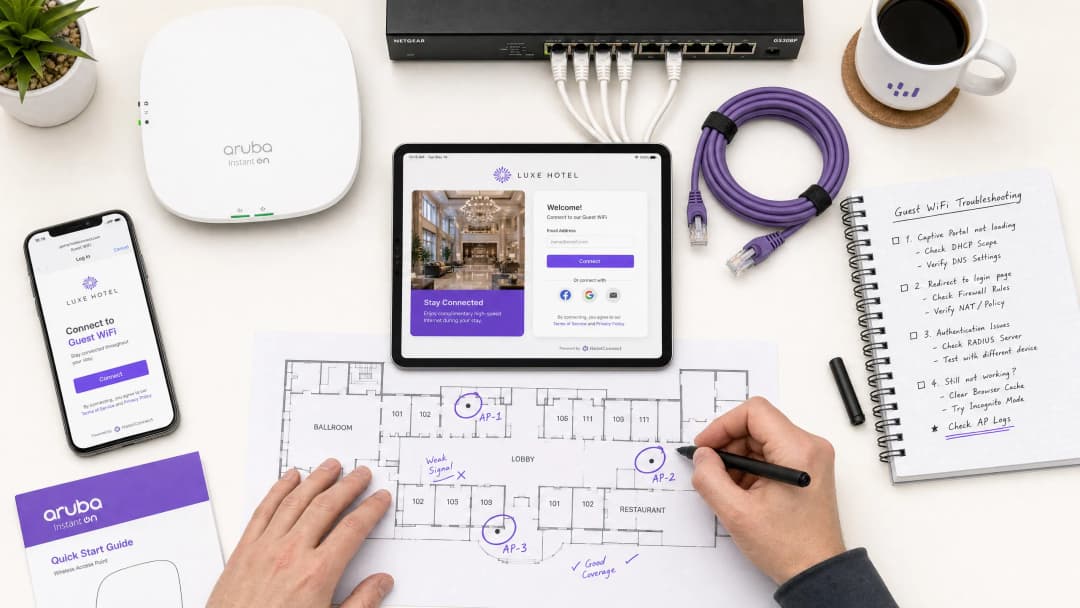
Per i moderni spazi aziendali, le reti wireless per gli ospiti rappresentano un punto di contatto fondamentale per il coinvolgimento dei clienti, l'intelligence operativa e il posizionamento del marchio. Tuttavia, il valore aziendale di queste reti dipende dall'affidabilità dell'esperienza di connessione iniziale. Quando un ospite si connette a una rete e la pagina di accesso al captive portal non viene visualizzata, la struttura subisce immediatamente un aumento degli attriti in reception, un'impennata dei ticket di supporto e la perdita di opportunità per l'acquisizione dei dati.
Alla base di questi problemi c'è una tensione fondamentale tra gli standard web sicuri e le tecniche di intercettazione a livello di rete storicamente utilizzate dai captive portal. I moderni browser web e sistemi operativi sono progettati per rilevare e bloccare il reindirizzamento del traffico non autorizzato per proteggere gli utenti dai rischi di sicurezza. Comprendendo le esatte sequenze di reindirizzamento HTTP e DNS, l'impatto di HTTP Strict Transport Security (HSTS) e le impostazioni lato client che interrompono questi meccanismi, i reparti IT possono implementare configurazioni robuste che garantiscono un onboarding continuo.
Questa guida illustra in dettaglio come la piattaforma cloud-managed Guest WiFi di Purple affronti queste sfide per offrire un reindirizzamento ad alta disponibilità su tutti i sistemi operativi dei consumatori, riducendo al minimo i costi di supporto per la struttura e massimizzando il ritorno sugli investimenti nelle infrastrutture wireless. Sia che si tratti di installazioni in settori quali ospitalità, retail, sanità o trasporti, i principi e le liste di controllo di questa guida si applicano universalmente.
Technical Deep-Dive
Per risolvere efficacemente i problemi di mancato funzionamento dei captive portal, gli amministratori di rete devono comprendere l'esatta sequenza di eventi che si verifica quando un dispositivo client si connette a una rete wireless ospiti aperta o con chiave pre-condivisa (PSK). I moderni sistemi operativi - inclusi Apple iOS/macOS, Google Android, Microsoft Windows e le distribuzioni Linux - non aspettano che l'utente apra un browser per verificare la connettività Internet. Al contrario, eseguono un meccanismo di probing attivo automatizzato subito dopo aver completato le fasi di associazione e DHCP.
Sequenza di rilevamento del captive portal
Il processo di connessione e verifica segue una sequenza strutturata:
| Step | Azione | Descrizione Tecnica | Indicatore di Successo Previsto |
|---|---|---|---|
| 1 | Associazione | Il client si associa al SSID Guest a livello Layer 2. | Scambio di frame di associazione 802.11 riuscito. |
| 2 | Assegnazione IP | Il server DHCP assegna un indirizzo IP, una subnet mask, un gateway e un server DNS locale. | Pacchetto DHCP ACK ricevuto dal client. |
| 3 | Probing Attivo | Il servizio in background del sistema operativo invia una richiesta HTTP GET non crittografata a un URL di test (canary URL) del produttore. | HTTP 200 OK (Apple/Windows) o HTTP 204 No Content (Google). |
| 4 | Intercettazione e Reindirizzamento | Il gateway intercetta la sonda HTTP e restituisce un reindirizzamento HTTP 302/303 al portale. | Reindirizzamento HTTP 302 al FQDN del Captive Portal. |
| 5 | Rendering del Portale | Il motore del Captive Portal Assistant (CPA) si apre e mostra la splash page. | Rendering corretto dell'interfaccia di login. |
+--------+             +------------+             +------------+             +-------------------+
| Client |             | AP/Gateway |             | DNS Server |             | Captive Portal IP |
+--------+             +------------+             +------------+             +-------------------+
    |                        |                          |                              |
    |--- 1. DHCP Request --->|                          |                              |
    |<-- 2. DHCP Ack --------|                          |                              |
    |    (IP & DNS Assigned) |                          |                              |
    |--- 3. DNS Query ------>|------------------------->|                              |
    |    (canary URL)        |                          |                              |
    |<-- 4. DNS Response ----|<-------------------------|                              |
    |    (Resolved IP)       |                          |                              |
    |--- 5. HTTP GET ------->|                          |                              |
    |    (canary URL)        |                          |                              |
    |<-- 6. HTTP 302 --------|                          |                              |
    |    (Redirect to Portal)|                          |                              |
    |--- 7. DNS Query ------>|------------------------->|                              |
    |    (Portal FQDN)       |                          |                              |
    |<-- 8. DNS Response ----|<-------------------------|                              |
    |    (Portal IP)         |                          |                              |
    |--- 9. HTTP/S GET ------>-------------------------------------------------------->|
    |    (Render Splash Page)|                          |                              |
    |<-- 10. Render Page <-------------------------------------------------------------||
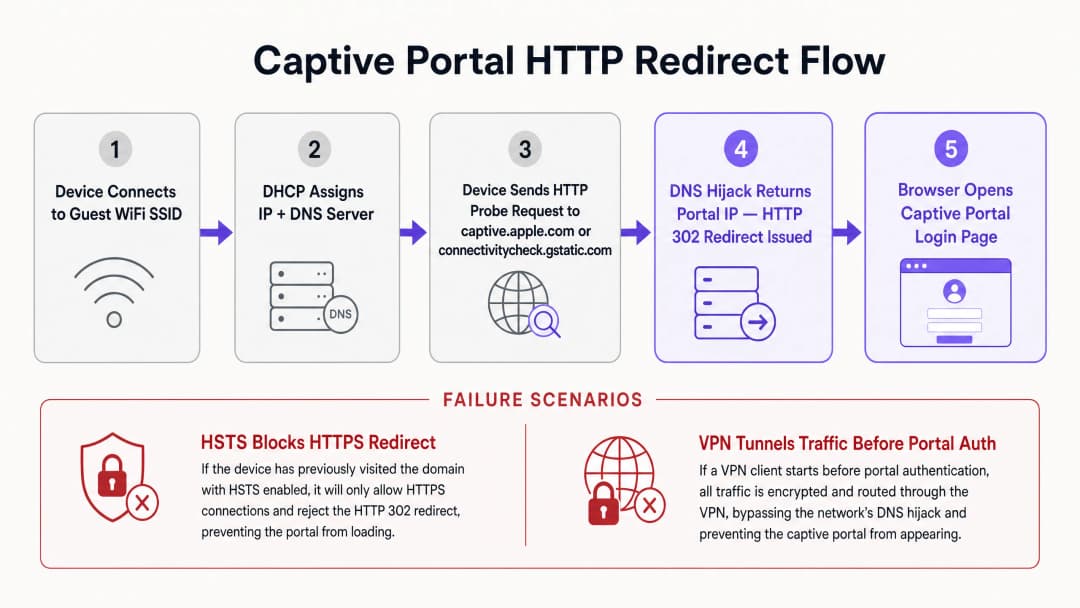
Ciascun sistema operativo utilizza un set distinto di URL canarino e risposte previste per determinare lo stato della rete. Apple (iOS/macOS) interroga http://captive.apple.com/hotspot-detect.html attendendosi un documento HTML contenente solo la parola Success nel titolo e nel corpo. Google (Android/ChromeOS) interroga http://connectivitycheck.gstatic.com/generate_204 attendendosi un codice di stato HTTP 204 No Content con un corpo vuoto. Microsoft (Windows 10/11) interroga http://www.msftconnecttest.com/connecttest.txt attendendosi una risposta in testo normale pari a Microsoft Connect Test.
Se il dispositivo riceve la risposta prevista, deduce che la rete ha un accesso a internet diretto. Se la risposta viene modificata - ad esempio ricevendo un reindirizzamento HTTP 302 - il Captive Portal Assistant (CPA) del sistema operativo avvia una finestra dedicata del browser in modalità sandbox per mostrare la destinazione del reindirizzamento: la pagina di accesso splash del Captive Portal.
Conflitti di reindirizzamento HSTS e HTTPS
Il metodo storico di reindirizzamento del Captive Portal si basa sul dirottamento del DNS o sull'intercettazione HTTP. Quando un utente non autenticato tenta di navigare su un qualsiasi sito web, il gateway intercetta il traffico sulla porta TCP 80 (HTTP) o sulla porta 443 (HTTPS) e risponde per conto del server di destinazione, inserendo un reindirizzamento HTTP 302. Sebbene questo funzionasse nell'era della navigazione web HTTP non crittografata, introduce gravi sfide operative e di sicurezza nei moderni ambienti dominati da HTTPS.
L'ostacolo principale è rappresentato da HTTP Strict Transport Security (HSTS), specificato in RFC 6797. L'HSTS costringe i browser web a interagire con i siti web utilizzando esclusivamente connessioni HTTPS sicure. Quando un browser tenta di connettersi a un dominio abilitato per HSTS - come Google, Facebook o i portali bancari - vieta rigorosamente qualsiasi comunicazione non crittografata e impone la convalida del certificato SSL/TLS.
Se un gateway di un Captive Portal tenta di intercettare una richiesta HTTPS verso un dominio HSTS, deve presentare il proprio certificato SSL o un certificato contraffatto al client. Poiché il certificato del gateway non corrisponde al nome del dominio richiesto, il browser del client rileva un errore del certificato e mostra un avviso di sicurezza non ignorabile (NET::ERR_CERT_COMMON_NAME_INVALID). Il browser blocca completamente il reindirizzamento, impedendo il caricamento della pagina del Captive Portal.
Per mitigare questo problema, le reti wireless aziendali moderne utilizzano due meccanismi. In primo luogo, escludere i probe del sistema operativo garantisce che i probe HTTP non crittografati inviati dai sistemi operativi non siano mai soggetti a intercettazione HTTPS; il gateway deve consentire il reindirizzamento del probe HTTP non crittografato tramite una risposta standard HTTP 302 verso il fully-qualified domain name (FQDN) sicuro del portale. In secondo luogo, RFC 8910 (Captive Portal API) definisce un meccanismo in cui l'Opzione DHCP 114 o i Router Advertisement IPv6 informano i dispositivi client dell'URL esatto dell'endpoint dell'API del captive portal. Invece di affidarsi all'hijacking DNS a forza bruta o al reindirizzamento HTTP, i dispositivi client compatibili interrogano direttamente questa API per ottenere l'URL del portale, aggirando i conflitti HSTS.
-
Matrice diagnostica diretta per amministratori di rete
| Sintomo osservato | Causa principale primaria | Azione di risoluzione istantanea |
|---|---|---|
| La pagina del portale non si avvia | Blocco intercettazione HTTPS/HSTS | Indirizzare il browser su http://neverssl.com per attivare un probe HTTP non crittografato |
| Richieste di accesso ripetute ogni 15 minuti | Randomizzazione dell'indirizzo MAC privato | Disattivare Indirizzo WiFi privato nelle impostazioni di rete del dispositivo client |
| Nessun indirizzo IP assegnato | Esaurimento del pool dello scope DHCP | Ridurre il tempo di lease DHCP a 15 - 30 minuti sul gateway wireless |
| Il popup di accesso social non funziona o si blocca | Walled garden ACL incompleta | Aggiungere i domini OAuth richiesti (*.googleapis.com, *.gstatic.com) alla allowlist |
| VPN connessa ma senza internet | Il tunnel crittografato blocca il reindirizzamento locale | Sospendere temporaneamente la VPN fino al completamento dell'autenticazione del captive portal |
-
Hai domande sulla tua configurazione specifica?
Il nostro team collabora con gestori di sedi, responsabili IT e ingegneri di rete in 80.000 sedi. Prenota una chiamata di 20 minuti e ti mostreremo come altri professionisti come te hanno risolto il problema.
Guida all'implementazione
La distribuzione di un captive portal affidabile richiede il coordinamento tra l'infrastruttura wireless fisica (Access Point, controller, gateway) e la piattaforma del portale basata su cloud. Questa sezione fornisce una guida all'implementazione indipendente dal fornitore per garantire la compatibilità del reindirizzamento in tutte le reti aziendali, facendo riferimento alle configurazioni nei controller Cisco, Aruba e Ruckus. Per l'architettura di controllo degli accessi correlata, consultare la nostra guida su Come implementare l'autenticazione 802.1X con Cloud RADIUS.
Passaggio 1: Configurazione del walled garden (ACL)
Un Walled Garden o Access Control List (ACL) definisce domini esterni, indirizzi IP o subnet specifici a cui un dispositivo ospite non autenticato è autorizzato ad accedere prima di effettuare l'accesso. Se il walled garden è configurato in modo errato, il dispositivo client non sarà in grado di risolvere o caricare le risorse del portale, con conseguente schermata vuota o timeout.
Per garantire un funzionamento ottimale con la piattaforma di Purple, il walled garden deve includere gli FQDN del portale (*.purple.ai o varianti regionali), gli Identity Providers (IdP) per gli endpoint OAuth dei social login e i Content Delivery Networks (CDN) che ospitano CSS, JavaScript, font o immagini.
Molti controller moderni supportano i nomi di dominio con wildcard nelle configurazioni di walled garden. Il controller esegue il monitoraggio dinamico delle query DNS provenienti dai client non autenticati; quando un client interroga un dominio corrispondente alla wildcard, il controller aggiunge temporaneamente l'indirizzo IP restituito alla allowlist di pre-autenticazione.
Passaggio 2: Ottimizzazione di DHCP e DNS
Poiché il rilevamento del Captive Portal si basa sull'handshake di rete iniziale, le configurazioni DHCP e DNS devono essere ottimizzate per ambienti ad alta densità. In sedi ad alta affluenza come centri commerciali, hub di transito o stadi, l'esaurimento degli indirizzi IP è una causa comune di errore del portale. Se il tempo di lease DHCP è impostato su un valore troppo lungo (ad esempio 24 ore), il pool IP si esaurirà rapidamente. Per le reti guest, il tempo di lease DHCP deve essere configurato tra 15 e 30 minuti (da 900 a 1800 secondi).
Ai client guest deve essere assegnato un server DNS affidabile in grado di risolvere sia i domini pubblici sia l'FQDN del portale locale (ad esempio Cloudflare 1.1.1.1 o Google 8.8.8.8). Aspetto fondamentale, il gateway wireless deve consentire ai client non autenticati di eseguire la risoluzione DNS. Se una regola del firewall blocca il traffico sulla porta 53 (UDP/TCP) per gli utenti pre-autenticati, il sistema operativo non può risolvere gli URL canary e l'assistente del Captive Portal non si avvierà mai.
Passaggio 3: Gestione dei certificati SSL/TLS
Quando un dispositivo guest viene reindirizzato al Captive Portal, il browser stabilisce una connessione HTTPS sicura con l'FQDN del portale. Per evitare schermate di avviso sui certificati, il Captive Portal deve essere protetto con un certificato SSL/TLS valido e pubblicamente attendibile. I certificati autofirmati verranno bloccati dai sistemi operativi mobili, impedendo all'assistente del portale di visualizzare la pagina.
-
Best Practice
Per mantenere una rete wireless guest ad alte prestazioni che riduca al minimo i ticket di supporto e massimizzi la soddisfazione degli utenti, gli operatori di rete devono attenersi alle best practice standard del settore.
1. Ottimizzare le regole di walled garden per i login social
Quando si utilizzano le opzioni di login social per acquisire i profili utente, il walled garden deve essere gestito meticolosamente. Le piattaforme di social media aggiornano regolarmente i sottodomini di autenticazione e gli intervalli IP delle CDN. Se manca un dominio richiesto, il popup di login social non si caricherà o si bloccherà a tempo indeterminato.
| Provider | Domini Walled Garden Essenziali |
|---|---|
accounts.google.com, ssl.gstatic.com, fonts.gstatic.com, lh3.googleusercontent.com |
|
facebook.com, *.facebook.com, *.fbcdn.net, m.facebook.com |
|
| Apple | appleid.apple.com, appleid.cdn-apple.com, gsa.apple.com |
2. Transizione all'autenticazione basata su profilo e a OpenRoaming
Sebbene i Captive Portal siano eccellenti per l'acquisizione iniziale dei dati e l'accettazione dei termini di servizio, ripetere il processo di accesso a ogni visita introduce attriti per l'utente. Le moderne reti aziendali stanno passando all'autenticazione basata su profilo e a tecnologie Passpoint (Hotspot 2.0) come OpenRoaming.Sotto la licenza Purple Connect, Purple funge da identity provider gratuito per i servizi OpenRoaming. Passpoint consente agli ospiti di installare un profilo sicuro sul proprio dispositivo durante la prima visita. Nelle visite successive a qualsiasi sede aderente in tutto il mondo, il dispositivo si autentica automaticamente al Layer 2 utilizzando WPA3-Enterprise, ignorando completamente il Captive Portal.
3. Garantire la conformità con i framework normativi
Le distribuzioni WiFi per gli ospiti devono essere conformi agli standard globali di sicurezza e privacy dei dati. Per la Conformità GDPR / CCPA, il Captive Portal deve presentare termini di servizio e informative sulla privacy chiari. Il consenso per le comunicazioni di marketing deve essere fornito attivamente tramite opt-in (non preselezionato). Per la Conformità PCI-DSS, se l'infrastruttura di rete degli ospiti coesiste con i sistemi Point of Sale (POS), deve essere applicata una rigorosa segmentazione logica. Implementare la WPA3-Transition Mode per consentire ai dispositivi più vecchi di connettersi utilizzando WPA2-Personal, mentre i dispositivi più recenti beneficiano della sicurezza WPA3.
-
Risoluzione dei problemi e mitigazione dei rischi
Quando vengono segnalati problemi con la rete wireless degli ospiti, il personale operativo della sede e quello di reception necessitano di una chiara sequenza diagnostica.
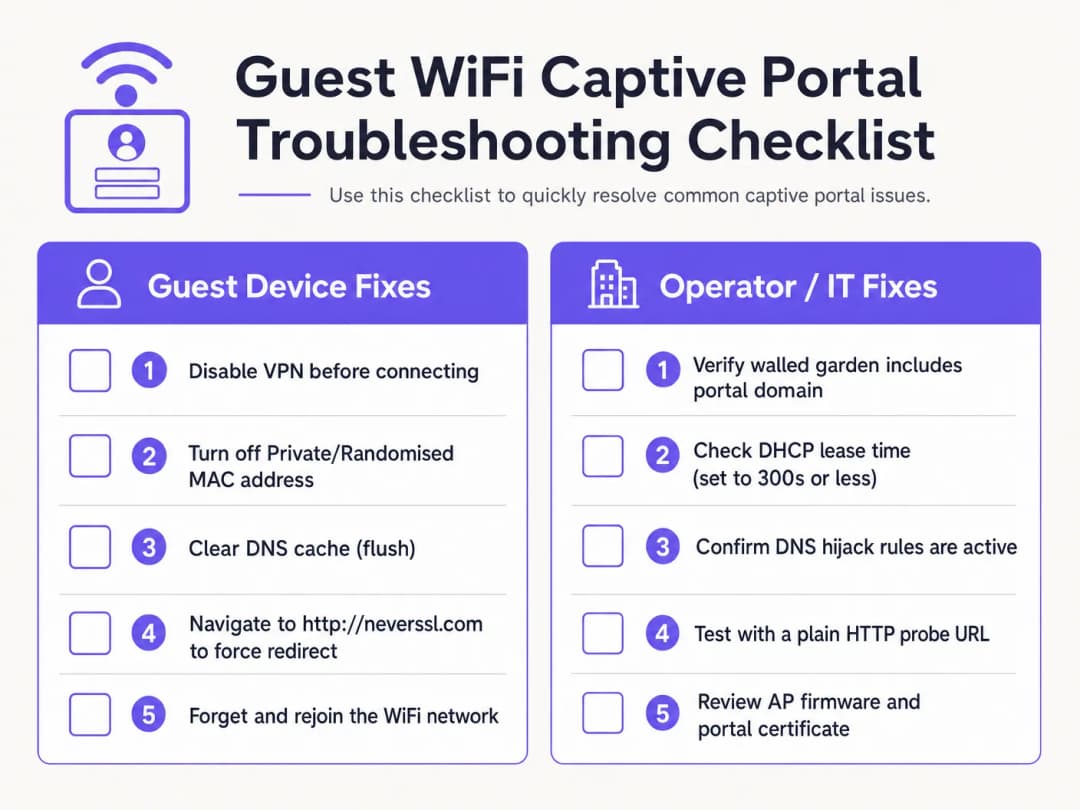
Elenco di controllo diagnostico lato client
- Disattivare le VPN attive. Le VPN crittografano e instradano il traffico immediatamente dopo la connessione, ignorando l'hijacking DNS del gateway e il reindirizzamento HTTP. Gli ospiti devono sospendere temporaneamente la propria VPN per completare l'accesso al portale.
- Disattivare gli indirizzi MAC privati. iOS 14+ e Android 10+ abilitano l'indirizzo WiFi privato per impostazione predefinita. Ciò fa sì che i dispositivi presentino indirizzi MAC dinamici, interrompendo la persistenza della sessione MAC. Istruire gli ospiti a disattivare l'indirizzo privato per l'SSID della sede.
- Ignorare il DNS sicuro (DoH/DoT). Se un ospite utilizza il DNS-over-HTTPS (DoH) personalizzato nelle impostazioni del browser, quest'ultimo rifiuterà le risposte di hijacking DNS locale. Gli ospiti devono sospendere temporaneamente il DNS sicuro per consentire i reindirizzamenti locali.
- Forzare una connessione HTTP non crittografata (NeverSSL). Se l'assistente del Captive Portal non si avvia automaticamente, istruire l'ospite ad aprire una finestra del browser e a navigare su
http://neverssl.com. Poiché questo sito non utilizza mai SSL/TLS, il gateway può intercettare la richiesta HTTP e inserire un reindirizzamento HTTP 302 alla schermata di accesso. - Disassociare e riconnettersi alla rete. Disassociare la rete e riconnettersi forza un handshake DHCP pulito e riavvia il rilevamento del Captive Portal.
Risoluzione dei problemi dell'infrastruttura lato operatore
- Monitorare l'utilizzo del pool DHCP: Ispezionare l'ambito DHCP sul gateway locale. Se l'utilizzo del pool è elevato, ridurre il tempo di lease a 15 - 30 minuti.
- Verificare le regole di reindirizzamento DNS: Eseguire una cattura dei pacchetti (PCAP) sull'interfaccia del gateway per confermare che i client non autenticati ricevano risposte DNS sulla porta 53.3. Verificare la latenza del Walled Garden: Assicurarsi che la risoluzione DNS per i domini del walled garden sia memorizzata correttamente nella cache del controller.
- Controllare la scadenza dei certificati: Verificare che il certificato SSL/TLS installato sul controller wireless sia valido e firmato da una CA fidata.
Elimina i ticket di supporto per il WiFi ospiti con Purple
Smetti di sprecare ore del team IT a risolvere problemi di reindirizzamento dei Captive Portal non funzionanti. La piattaforma per WiFi ospiti gestita in cloud di Purple si integra nativamente con Cisco Meraki, HPE Aruba, Ruckus e Ubiquiti per offrire un onboarding fluido e conforme al GDPR e un accesso Passpoint automatizzato.
Impatto sul business e ROI del supporto
L'investimento in una piattaforma Captive Portal gestita in cloud genera ritorni finanziari e operativi per le sedi aziendali.
Riduzione dei costi di supporto e dell'attrito per gli ospiti
Nelle strutture ricettive e nei punti vendita, il personale di front-office trascorre spesso molto tempo a risolvere i problemi di connettività WiFi degli ospiti. Un tasso elevato di errore del Captive Portal si traduce in recensioni negative, accumulo di ticket di supporto e distrazione del personale. Implementando il meccanismo di reindirizzamento multipiattaforma di Purple, le sedi registrano una riduzione dal 50% al 70% dei reclami di supporto relativi al WiFi.
Massimizzare l'acquisizione dei dati e il ROI del marketing
Un Captive Portal è la porta d'accesso per acquisire dati di prima parte dei clienti, inclusi indirizzi email, numeri di telefono e profili social. Con un portale funzionale, le sedi ottengono tassi di opt-in superiori al 60% per le comunicazioni di marketing. L'integrazione dell'autenticazione con WiFi Analytics offre informazioni approfondite sul comportamento dei visitatori, sui tempi di permanenza e sui tassi di ritorno.
Sbloccare la monetizzazione dei retail media
Per centri commerciali, stadi e centri espositivi, la splash page e le schermate di reindirizzamento post-login rappresentano un vero e proprio spazio pubblicitario digitale. Gli operatori possono mostrare annunci mirati e basati sulla posizione o vendere pacchetti di sponsorizzazione ai brand, trasformando l'infrastruttura IT in una risorsa di reddito.
Riferimenti
[1] Contributori di Wikipedia. "Captive Portal." Wikipedia, l'enciclopedia libera. https://en.wikipedia.org/wiki/Captive_portal
[2] IETF RFC 6797. "HTTP Strict Transport Security (HSTS)." Internet Engineering Task Force. https://datatracker.ietf.org/doc/html/rfc6797
[3] IETF RFC 8910. "Captive-Portal Identification in DHCP and Router Advertisements." Internet Engineering Task Force. https://datatracker.ietf.org/doc/html/rfc8910
[4] Wireless Broadband Alliance. "OpenRoaming." WBA. https://wballiance.com/openroaming/
[5] NeverSSL. "NeverSSL: Helping you get online." NeverSSL. http://neverssl.com/
Definizioni chiave
Captive portal
Una pagina web di atterraggio mostrata agli utenti del WiFi ospiti appena associati prima che venga concesso l'accesso più ampio a Internet, utilizzata per l'autenticazione, l'accettazione dei termini di servizio e l'acquisizione di dati di marketing.
Agisce come porta d'accesso principale sulle reti wireless pubbliche in sedi per eventi, hotel e centri commerciali.
Dirottamento DNS
Una tecnica di intercettazione del traffico in cui un gateway wireless restituisce l'indirizzo IP del server del captive portal per tutte le richieste DNS non autenticate.
Utilizzato per reindirizzare i probe HTTP, ma sempre più aggirato dai protocolli DNS-over-HTTPS (DoH) e DNS-over-TLS (DoT).
HTTP Strict Transport Security (HSTS)
Una policy di sicurezza web (RFC 6797) che costringe i browser a comunicare rigorosamente tramite HTTPS e a rifiutare i certificati SSL non validi.
Causa errori di reindirizzamento del captive portal quando i gateway tentano di intercettare richieste HTTPS verso domini abilitati per HSTS.
Walled garden
Una lista di controllo degli accessi (ACL) pre-autenticazione che consente ai dispositivi degli ospiti non autenticati di raggiungere specifici domini esterni e indirizzi IP.
Essenziale per ospitare le risorse del portale, gli endpoint OAuth del provider di identità e gli URL dei probe di connettività del sistema operativo.
Randomizzazione degli indirizzi MAC
Una funzione di privacy sui dispositivi mobili (iOS 14+, Android 10+) che presenta un indirizzo MAC hardware dinamico alle reti wireless.
Interrompe la persistenza della sessione basata su MAC, costringendo gli ospiti a eseguire nuovamente l'autenticazione quando l'identificatore randomizzato cambia.
RFC 8910 (Captive Portal API)
Uno standard IETF che utilizza l'opzione DHCP 114 o le Router Advertisement IPv6 per comunicare gli endpoint dell'API del Captive Portal direttamente ai dispositivi client.
Sostituisce il dirottamento DNS legacy, risolvendo i conflitti dei certificati HSTS sui moderni sistemi operativi client.
Esempi pratici
Un hotel in centro città da 350 camere che utilizza controller Cisco Catalyst 9800 riceve quotidianamente 20 reclami da parte degli ospiti riguardanti la mancata ricarica della pagina di login del WiFi. Il problema interessa principalmente gli ospiti che utilizzano dispositivi iOS 17 e Android 13. In che modo l'architetto di rete dovrebbe risolvere sistematicamente questo problema?
Eseguire un piano di risoluzione in quattro parti: 1. Controllare il DHCP Scope: ispezionare il pool DHCP sul gateway locale. Se l'utilizzo degli IP supera l'85%, ridurre il lease time da 24 ore a 30 minuti (1800 secondi) per recuperare rapidamente i lease. 2. Verificare l'intercettazione DNS: assicurarsi che le ACL di pre-autenticazione consentano il traffico della porta UDP/TCP 53 verso i resolver DNS pubblici. 3. Verificare le ACL del walled garden: abilitare il DNS snooping sul controller per captive.apple.com, connectivitycheck.gstatic.com e *.purple.ai. 4. Configurare RFC 8910: distribuire la DHCP Option 114 sul server DHCP puntando all'URL del portale, consentendo ai dispositivi iOS 16+ e Android 12+ di interrogare direttamente l'API del portale senza dirottamento DNS.
Un punto vendita che utilizza Aruba Central segnala che il login degli ospiti tramite e-mail funziona, ma l'autenticazione social "Login con Google" si blocca in modo intermittente per il 30% dei visitatori. In che modo gli amministratori di rete dovrebbero diagnosticare la causa principale?
- Riprodurre con DevTools del browser: collegare un dispositivo di test, aprire la scheda Network del browser (F12) e fare clic su Login con Google per identificare i domini bloccati che restituiscono ERR_CONNECTION_REFUSED. 2. Aggiornare il walled garden: assicurarsi che la whitelist di Aruba Central includa tutti gli endpoint Google OAuth: accounts.google.com, ssl.gstatic.com, fonts.gstatic.com e oauth2.googleapis.com. 3. Abilitare il Whitelisting dinamico: configurare la corrispondenza wildcard basata su DNS (*.googleapis.com, *.gstatic.com) per consentire automaticamente gli intervalli IP della CDN di Google che variano frequentemente.
Domande di esercitazione
Q1. Perché la navigazione verso un dominio HTTPS come google.com non riesce a visualizzare la schermata di accesso di un Captive Portal?
Suggerimento: Considera le policy HSTS e la validazione dei certificati SSL/TLS.
Visualizza risposta modello
I principali domini HTTPS impongono l'uso di HTTP Strict Transport Security (HSTS). Quando un gateway tenta di intercettare una connessione HTTPS, il browser del client rileva una mancata corrispondenza del certificato e blocca la richiesta per prevenire attacchi man-in-the-middle. Per attivare manualmente il portale, gli ospiti devono navigare su un sito HTTP non crittografato come http://neverssl.com o consentire l'esecuzione del probe integrato nel sistema operativo.
Q2. In che modo la randomizzazione dell'indirizzo MAC privato influisce sulla persistenza della sessione ospite sulle reti WiFi aziendali?
Suggerimento: Pensa a come i gateway wireless tengono traccia degli endpoint autenticati.
Visualizza risposta modello
I gateway wireless tengono traccia delle sessioni autenticate tramite l'indirizzo MAC del dispositivo. Quando un sistema operativo mobile ruota il proprio indirizzo MAC privato, il gateway tratta l'endpoint come un nuovo client non autenticato e impone una nuova autenticazione. Disabilitare l'opzione Indirizzo Privato per l'SSID della struttura o distribuire profili Passpoint/OpenRoaming consente di mantenere una persistenza della sessione senza interruzioni.
Q3. Qual è il tempo di lease DHCP raccomandato per ambienti WiFi per ospiti pubblici ad alta densità come stadi o centri commerciali?
Suggerimento: Trova il giusto equilibrio tra il rilascio degli indirizzi IP e il volume del traffico DHCP.
Visualizza risposta modello
Le reti WiFi per ospiti in ambienti di transito ad alta densità dovrebbero configurare tempi di lease DHCP compresi tra 15 e 30 minuti (da 900 a 1800 secondi). Questo previene l'esaurimento del pool di indirizzi IP causato da visitatori che si fermano per breve tempo, mantenendo al contempo il traffico di rinnovo DHCP entro limiti gestibili.
Continua a leggere questa serie
Ubiquiti UniFi guest portal non reindirizza: cause e soluzioni
Questa guida isola un errore di reindirizzamento del portale ospiti UniFi analizzando in sequenza lo stato dell'ospite, il reindirizzamento, il percorso di pre-autorizzazione e l'autorizzazione del controller. Fornisce ai team IT locali un metodo collaudato per risolvere i dubbi tra rete ospiti e Hotspot, i passaggi ai portali esterni, i requisiti correnti degli account UniFi OS e i test di isolamento DNS.
Cisco Meraki splash page non funzionante: un diagramma di flusso per la risoluzione dei problemi
Questa guida pratica per il secondo giorno isola il punto in cui un flusso di splash Cisco Meraki ha fallito: autorizzazione del client, avvio del redirect HTTP, raggiungibilità del walled garden o sign-on RADIUS. Fornisce ai team IT delle sedi un percorso di prove controllato per ripristinare il WiFi per gli ospiti senza apportare modifiche estese a un'infrastruttura attiva.
Guida alla configurazione del WiFi ospiti aziendale: segmentazione VLAN, sicurezza e Captive Portals
Questa guida tecnica mostra ai team IT come configurare il WiFi ospiti come servizio di accesso internet controllato, utilizzando la segmentazione VLAN, le policy del firewall e un Captive Portal. Spiega inoltre come i moduli di registrazione e i controlli di onboarding di Purple supportino un'esperienza per i visitatori proporzionata senza indebolire il perimetro che circonda il personale, i pagamenti e i sistemi operativi.
Hai domande sulla tua configurazione specifica?
Il nostro team collabora con gestori di sedi, responsabili IT e ingegneri di rete in 80.000 sedi. Prenota una chiamata di 20 minuti e ti mostreremo come altri professionisti come te hanno risolto il problema.