
Captive Portal 登录问题排查与修复
逐步排查 Captive Portal 登录失败。解决 CNA 弹窗抑制、HSTS 证书错误、NeverSSL 探测和 RADIUS 超时问题。
Video overview
收听本指南
查看播客转录
核心系列的一部分:Captive Portal 指南 →
执行摘要
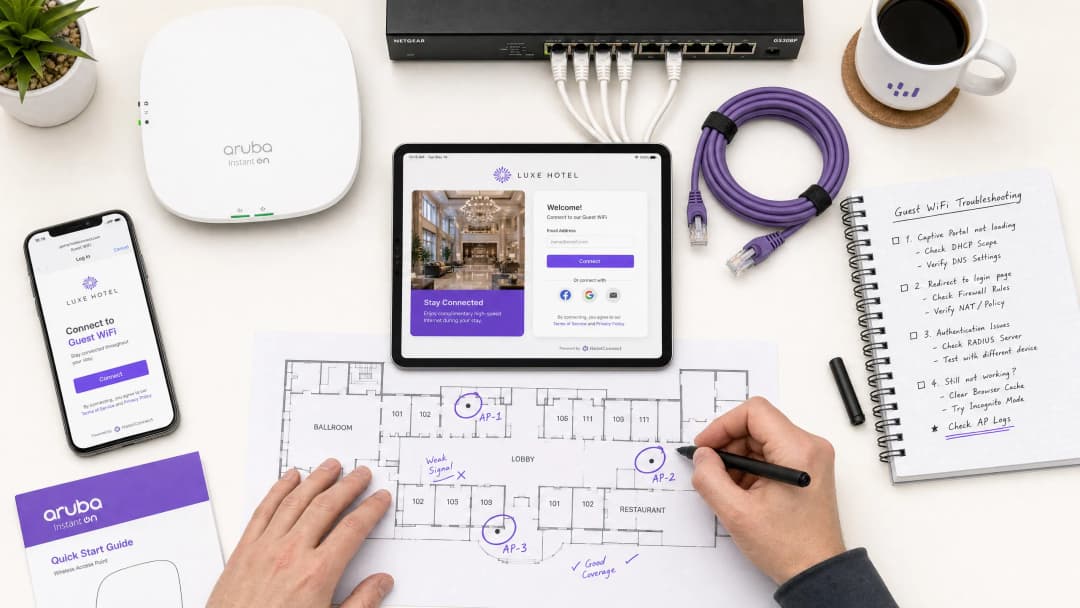
对于现代企业场所而言,访客无线网络是客户互动、运营智能和品牌定位的关键触点。然而,这些网络带来的商业价值完全取决于初始连接体验的可靠性。当访客连接到网络而 captive portal login 页面未能显示时,场所将立即面临前台摩擦增加、技术支持工单激增以及失去数据收集机会等损失。
这些故障的核心在于安全的 Web 标准与 Captive Portal 历史上所使用的网络级拦截技术之间存在着根本性的冲突。现代 Web 浏览器和操作系统旨在检测并阻止未经授权的流量重定向,以保护用户免受安全风险。通过深入理解精确的 HTTP 和 DNS 重定向顺序、HTTP Strict Transport Security (HSTS) 的影响以及会干扰这些机制的客户端设置,IT 组织可以实施强大的配置来确保无缝的网络接入。
本指南详细介绍了 Purple 的云管理 Guest WiFi 平台如何应对这些挑战,从而在所有消费级操作系统上提供高可用的重定向体验,最大限度地减少场所的支持开销,并最大化无线基础设施的投资回报。无论是部署在酒店、零售、医疗还是交通环境中,本指南中的原则和核对清单都普遍适用。
技术深度剖析
为了有效地排查 Captive Portal 故障,网络管理员必须了解当客户端设备连接到开放或预共享密钥 (PSK) 访客无线网络时所发生的精确事件顺序。现代操作系统 - 包括 Apple iOS/macOS、Google Android、Microsoft Windows 和 Linux 发行版 - 不会等待用户打开浏览器来测试互联网连接。相反,它们会在完成关联和 DHCP 阶段后,立即执行自动化的主动探测机制。
Captive Portal 检测顺序
连接和验证过程遵循以下结构化顺序:
| 步骤 | 操作 | 技术描述 | 预期成功指标 |
|---|---|---|---|
| 1 | 关联 | 客户端在第二层 (Layer 2) 与访客 SSID 关联。 | 成功的 802.11 关联帧交换。 |
| 2 | IP 配置 | DHCP 服务器分配 IP 地址、子网掩码、网关和本地 DNS 服务器。 | 客户端收到 DHCP ACK 数据包。 |
| 3 | 主动探测 | 操作系统后台服务向厂商的 Canary URL 发送未加密的 HTTP GET 请求。 | HTTP 200 OK (Apple/Windows) 或 HTTP 204 No Content (Google)。 |
| 5 | 门户渲染 | Captive Portal Assistant (CPA) 引擎打开并渲染 Portal 页面。 | 成功渲染登录界面。 |
+--------+             +------------+             +------------+             +-------------------+
| Client |             | AP/Gateway |             | DNS Server |             | Captive Portal IP |
+--------+             +------------+             +------------+             +-------------------+
    |                        |                          |                              |
    |--- 1. DHCP Request --->|                          |                              |
    |<-- 2. DHCP Ack --------|                          |                              |
    |    (IP & DNS Assigned) |                          |                              |
    |--- 3. DNS Query ------>|------------------------->|                              |
    |    (canary URL)        |                          |                              |
    |<-- 4. DNS Response ----|<-------------------------|                              |
    |    (Resolved IP)       |                          |                              |
    |--- 5. HTTP GET ------->|                          |                              |
    |    (canary URL)        |                          |                              |
    |<-- 6. HTTP 302 --------|                          |                              |
    |    (Redirect to Portal)|                          |                              |
    |--- 7. DNS Query ------>|------------------------->|                              |
    |    (Portal FQDN)       |                          |                              |
    |<-- 8. DNS Response ----|<-------------------------|                              |
    |    (Portal IP)         |                          |                              |
    |--- 9. HTTP/S GET ------>-------------------------------------------------------->|
    |    (Render Splash Page)|                          |                              |
    |<-- 10. Render Page <-------------------------------------------------------------||
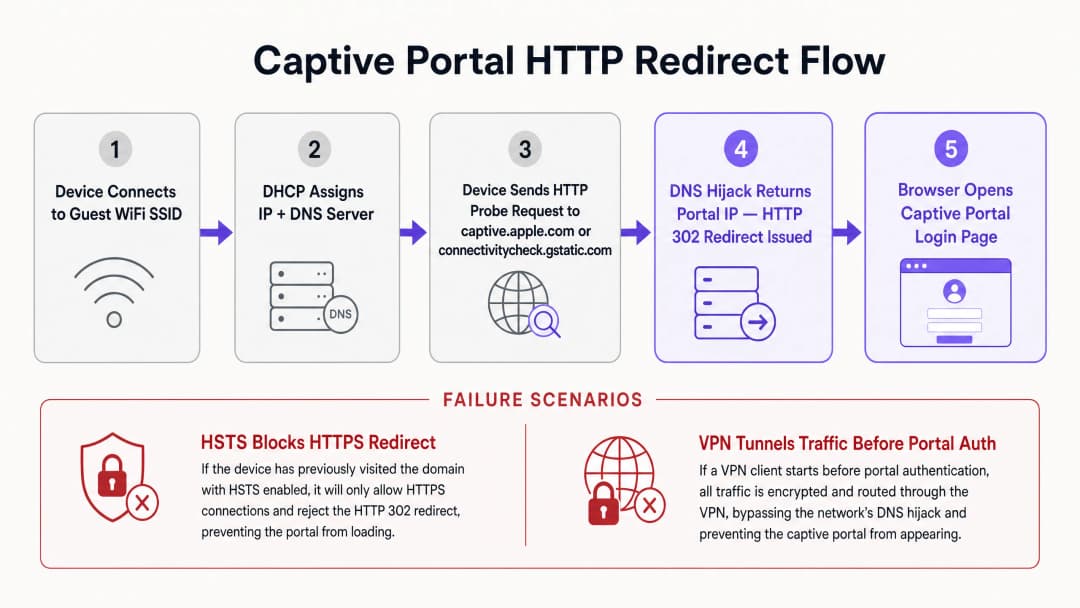
每个操作系统都利用一组不同的 canary URL 和预期响应来确定网络状态。Apple (iOS/macOS) 探测 http://captive.apple.com/hotspot-detect.html,并期望获得一个在标题和正文中仅包含 Success 单词的 HTML 文档。Google (Android/ChromeOS) 探测 http://connectivitycheck.gstatic.com/generate_204,并期望获得一个主体为空的 HTTP 状态码 204 No Content。Microsoft (Windows 10/11) 探测 http://www.msftconnecttest.com/connecttest.txt,并期望获得 Microsoft Connect Test 的纯文本响应。
如果设备收到预期的响应,它会得出网络具有直接互联网访问权限的结论。如果响应被修改(例如收到 HTTP 302 重定向),操作系统的 Captive Portal 助手 (CPA) 将启动一个专用的沙箱浏览器窗口来显示重定向目标:Captive Portal 登录页面。
HSTS 与 HTTPS 重定向冲突
传统的 Captive Portal 重定向方法依赖于 DNS 劫持或 HTTP 拦截。当未授权用户尝试浏览任何网站时,网关会拦截 TCP 端口 80 (HTTP) 或端口 443 (HTTPS) 流量,并代表目标服务器进行响应,注入 HTTP 302 重定向。虽然这在未加密的 HTTP 网页浏览时代有效,但在现代 HTTPS 主导的环境中,它会带来严重的安全和运营挑战。
最主要的障碍是 HTTP Strict Transport Security (HSTS)(在 RFC 6797 中定义)。HSTS 强制浏览器仅使用安全的 HTTPS 连接与网站进行交互。当浏览器尝试连接到已启用 HSTS 的域名(如 Google、Facebook 或网银门户)时,它会严格禁止任何未加密的通信,并强制执行 SSL/TLS 证书验证。
如果 Captive Portal 网关尝试拦截对 HSTS 域名的 HTTPS 请求,它必须向客户端出示自己的 SSL 证书或伪造的证书。由于网关证书与请求的域名不匹配,客户端浏览器会检测到证书错误,并显示无法绕过的安全警告 (NET::ERR_CERT_COMMON_NAME_INVALID)。浏览器会完全阻止重定向,从而阻止 Captive Portal 页面 加载。
为了缓解这一问题,现代企业无线网络利用了两种机制。首先,豁免 OS 探测确保操作系统发送的未加密 HTTP 探测永远不会受到 HTTPS 拦截;网关必须允许使用标准 HTTP 302 响应将未加密的 HTTP 探测重定向到 Portal 的安全完全限定域名 (FQDN)。其次,RFC 8910 (Captive Portal API) 定义了一种机制,通过该机制,DHCP 选项 114 或 IPv6 路由器通告向客户端设备通知 Captive Portal API 端点的确切 URL。兼容的客户端设备直接查询此 API 以获取 Portal URL,从而绕过 HSTS 冲突,而无需依赖暴力 DNS 劫持或 HTTP 重定向。
-
网络管理员直接诊断矩阵
| 观察到的症状 | 主要根本原因 | 即时解决措施 |
|---|---|---|
| Portal 页面无法启动 | HTTPS/HSTS 拦截阻断 | 在浏览器中访问 http://neverssl.com 以触发未加密的 HTTP 探测 |
| 每 15 分钟重复登录请求 | 私有 MAC 地址随机化 | 在客户端设备网络设置中关闭私有 WiFi 地址 |
| 未分配 IP 地址 | DHCP 地址池耗尽 | 在无线网关上将 DHCP 租约时间缩短至 15 - 30 分钟 |
| 社交媒体登录弹窗失败或卡死 | 围墙花园 ACL 不完整 | 将所需的 OAuth 域名 (*.googleapis.com, *.gstatic.com) 添加到允许列表中 |
| VPN 已连接但无法上网 | 加密隧道阻断本地重定向 | 临时暂停 VPN,直到 Captive Portal 身份验证完成 |
-
对您的具体配置有疑问吗?
我们的团队与 80,000 多个场所的运营方、IT 经理和网络工程师保持合作。预约 20 分钟的通话,我们将为您展示同行是如何解决类似问题的。
实施指南
部署可靠的 Captive Portal 需要物理无线基础设施(接入点、控制器、网关)与基于云的 Portal 平台之间的协调。本节提供了与厂商无关的实施指南,以确保跨企业网络的重定向兼容性,并参考了 Cisco、Aruba 和 Ruckus 控制器中的配置。有关相关的访问控制架构,请参阅我们的指南:如何在 Cloud RADIUS 中实施 802.1X 身份验证。
步骤 1:围墙花园 (ACL) 配置
围墙花园或访问控制列表 (ACL) 定义了未通过身份验证的访客设备在登录 之前 允许访问的特定外部域名、IP 地址或子网。如果围墙花园配置不正确,客户端设备将无法解析或加载 Portal 资源,从而导致白屏或超时。
为确保与 Purple 平台的无缝运行,围墙花园必须包括 Portal FQDN(*.purple.ai 或区域变体)、用于社交媒体登录 OAuth 端点的 身份提供商 (IdP),以及托管 CSS、JavaScript、字体或图像的 内容分发网络 (CDN)。许多现代控制器在walled garden配置中支持通配符域名。控制器动态监听未认证客户端的DNS查询;当客户端查询与通配符匹配的域名时,控制器会暂时将返回的IP地址添加到预认证白名单中。
步骤 2:DHCP和DNS优化
由于Captive Portal检测依赖于初始网络握手,因此必须针对高密度环境优化DHCP和DNS配置。在购物中心、交通枢纽或体育场等高客流量场所,IP地址枯竭是导致Portal页面加载失败的常见原因。如果DHCP租期设置过长(例如24小时),IP地址池将迅速耗尽。对于访客网络,DHCP租期应配置在 15至30分钟 之间(900至1800秒)。
必须为访客客户端分配可靠的DNS服务器,使其能够解析公共域名和本地Portal FQDN(例如Cloudflare 1.1.1.1 或 Google 8.8.8.8)。至关重要的是,无线网关必须允许未认证的客户端进行DNS解析。如果防火墙规则阻止了预认证用户的53端口(UDP/TCP)流量,操作系统将无法解析Canary URL,Captive Portal助手将永远无法启动。
步骤 3:SSL/TLS证书管理
当访客设备被重定向到Captive Portal时,浏览器会与Portal FQDN建立安全的HTTPS连接。为了防止出现证书警告屏幕,必须使用有效的、受公共信任的SSL/TLS证书来保护Captive Portal。自签名证书将被移动操作系统拦截,从而导致Portal助手无法渲染页面。
最佳实践
为了维持高性能的访客无线网络、减少支持工单并最大化用户满意度,网络运营商应遵循行业标准最佳实践。
1. 针对社交媒体登录优化walled garden规则
当利用社交媒体登录选项来收集用户画像时,必须细致地维护walled garden。社交媒体平台会定期更新认证子域名和CDN IP范围。如果缺少所需的域名,社交媒体登录弹出窗口将无法加载或无限期挂起。
| 提供商 | 关键walled garden域名 |
|---|---|
accounts.google.com, ssl.gstatic.com, fonts.gstatic.com, lh3.googleusercontent.com |
|
facebook.com, *.facebook.com, *.fbcdn.net, m.facebook.com |
|
| Apple | appleid.apple.com, appleid.cdn-apple.com, gsa.apple.com |
2. 向基于配置文件的认证和OpenRoaming过渡
虽然Captive Portal非常适合初始数据收集和接受服务条款,但每次访问都重复登录过程会增加用户摩擦。现代企业网络正向 基于配置文件的认证 以及诸如 OpenRoaming 等 Passpoint (Hotspot 2.0) 技术过渡。
在 Purple Connect 许可下,Purple 充当 OpenRoaming 服务的免费身份提供商。Passpoint 允许访客在首次访问期间在其设备上安装安全配置文件。在此后访问全球任何参与计划的场所时,设备将自动在第 2 层使用 WPA3-Enterprise 进行身份验证,从而完全绕过 Captive Portal。
3. 确保符合监管框架
访客 WiFi 部署必须符合全球数据隐私和安全标准。对于 GDPR / CCPA 合规性,Captive Portal 必须呈现清晰的服务条款和隐私政策。针对营销传播的同意必须主动勾选加入(不得预先勾选)。对于 PCI-DSS 合规性,如果访客网络基础设施与销售点(POS)系统共存,则必须实施严格的逻辑隔离。实施 WPA3-Transition Mode 以允许较旧的设备使用 WPA2-Personal 进行连接,同时使较新的设备受益于 WPA3 安全保护。
故障排除与风险缓解
当报告访客无线网络问题时,场所运营和前台工作人员需要清晰的诊断流程。
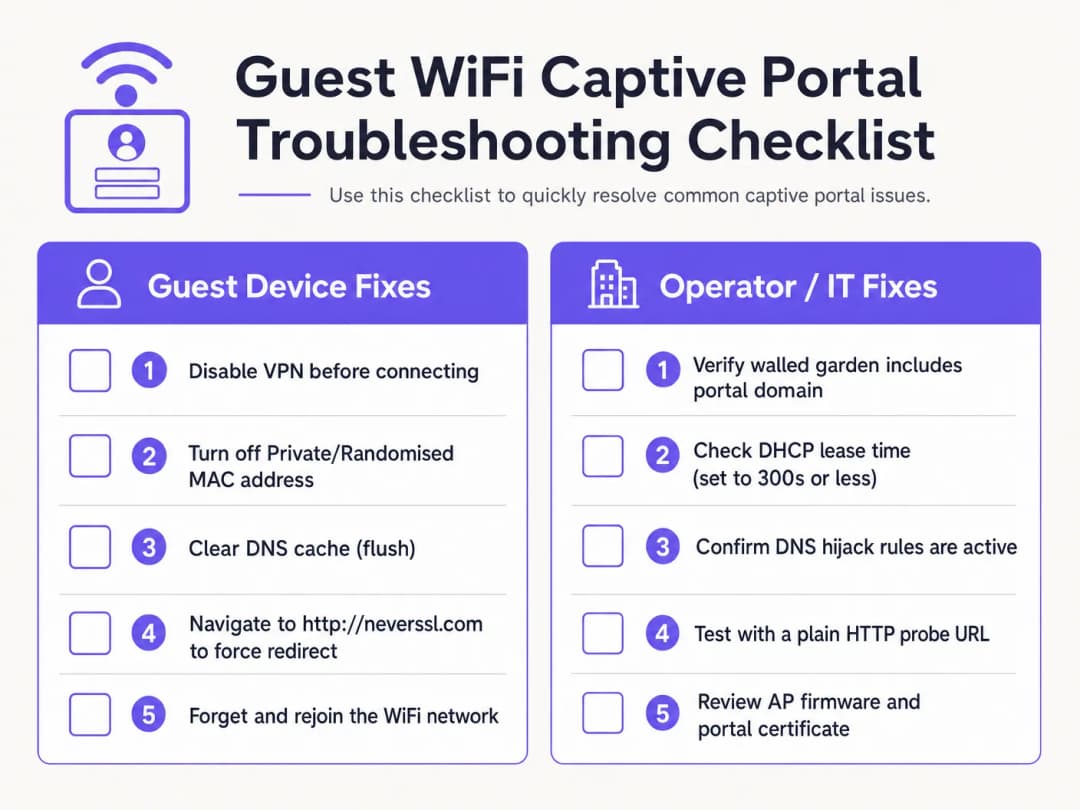
客户端诊断清单
- 禁用活动的 VPN。 VPN 会在连接后立即对流量进行加密和路由,从而绕过网关 DNS 劫持和 HTTP 重定向。访客必须暂时暂停其 VPN 才能完成门户登录。
- 关闭私有 MAC 地址。 iOS 14+ 和 Android 10+ 默认启用私有 WiFi 地址。这会导致设备呈现动态 MAC 地址,从而破坏 MAC 会话持久性。指导访客禁用该场所 SSID 的私有地址。
- 绕过安全 DNS (DoH/DoT)。 如果访客在浏览器设置中使用了自定义的 DNS-over-HTTPS (DoH),浏览器将拒绝本地 DNS 劫持响应。访客必须暂时暂停安全 DNS 以允许本地重定向。
- 强制进行未加密的 HTTP 连接 (NeverSSL)。 如果 Captive Portal 助手未能自动启动,请指导访客打开浏览器窗口并访问
http://neverssl.com。由于此网站从不使用 SSL/TLS,网关可以拦截该 HTTP 请求并注入指向登录页面的 HTTP 302 重定向。 - 忽略并重新加入网络。 忽略网络并重新连接会强制进行干净的 DHCP 握手,并重新启动 Captive Portal 检测。
运营商端基础设施故障排除
- 监控 DHCP 地址池利用率: 检查本地网关上的 DHCP 范围。如果地址池利用率较高,请将租约时间缩短至 15 - 30 分钟。
- 验证 DNS 重定向规则: 在网关接口上进行数据包捕获 (PCAP),以确认未授权的客户端在端口 53 上接收到 DNS 响应。3. 审计围墙花园延迟: 确保围墙花园域名的 DNS 解析在控制器上正确缓存。
- 检查证书过期情况: 验证无线控制器上安装的 SSL/TLS 证书是否有效,且由受信任的 CA 签名。
利用 Purple 消除访客 WiFi 支持工单
无需再花费 IT 时间调试损坏的 Captive Portal 重定向。Purple 的云管理访客 WiFi 平台与 Cisco Meraki、HPE Aruba、Ruckus 和 Ubiquiti 原生集成,提供无缝、符合 GDPR 的引导入网和自动化 Passpoint 接入。
业务影响与支持投资回报率 (ROI)
投资云管理的 Captive Portal 平台可为企业级场所带来可观的财务和运营回报。
减少支持开销与访客摩擦
对于酒店和零售场所,前台员工经常需要花费时间解决访客 WiFi 连接问题。高 Captive Portal 故障率会导致负面评价、支持工单积压和员工分心。通过实施 Purple 的跨平台重定向机制,场所可以减少 50% 至 70% 的 WiFi 相关支持投诉。
最大化数据采集与营销投资回报率 (ROI)
Captive Portal 是捕获第一手客户数据(包括电子邮件地址、电话号码和社交资料)的门户。通过功能完善的门户,场所的营销传播订阅率可达到 60% 以上。将身份验证与 WiFi 运营分析 相结合,可深度洞察访客行为、停留时间和回访率。
释放零售媒体变现潜力
对于购物中心、体育场馆和展览中心,展示页面和登录后重定向页面代表了宝贵的数字资产。运营商可以展示定向的、基于位置的广告,或向品牌商销售赞助套餐,从而将 IT 基础设施转化为收入资产。
参考文献
[1] 维基百科贡献者。"Captive Portal"。维基百科,自由的百科全书。https://en.wikipedia.org/wiki/Captive_portal
[2] IETF RFC 6797。"HTTP Strict Transport Security (HSTS)"。互联网工程任务组。https://datatracker.ietf.org/doc/html/rfc6797
[3] IETF RFC 8910。"Captive-Portal Identification in DHCP and Router Advertisements"。互联网工程任务组。https://datatracker.ietf.org/doc/html/rfc8910
[4] 无线宽带联盟。"OpenRoaming"。WBA。https://wballiance.com/openroaming/
[5] NeverSSL。"NeverSSL: Helping you get online"。NeverSSL。http://neverssl.com/
关键定义
Captive Portal
在向新关联的访客 WiFi 用户授予更广泛的互联网访问权限之前,向其显示的 Web 落地页面,用于认证、接受服务条款和捕获营销数据。
在场馆、酒店和零售中心的公共无线网络中,充当主要的准入网关。
DNS 劫持
一种流量拦截技术,无线网关对所有未认证的 DNS 请求均返回 Captive Portal 服务器的 IP 地址。
用于重定向 HTTP 探测,但越来越多地被 DNS-over-HTTPS (DoH) 和 DNS-over-TLS (DoT) 协议绕过。
HTTP Strict Transport Security (HSTS)
一种 Web 安全策略 (RFC 6797),强制浏览器严格通过 HTTPS 进行通信并拒绝无效的 SSL 证书。
当网关试图拦截发往已启用 HSTS 域名的 HTTPS 请求时,会导致 Captive Portal 重定向失败。
Walled garden
一种认证前访问控制列表 (ACL),允许未认证的访客设备访问指定的外部域名和 IP 地址。
对于托管门户资源、身份提供商 OAuth 端点以及操作系统连接性探测 URL 至关重要。
MAC 地址随机化
移动设备(iOS 14+、Android 10+)上的一种隐私功能,可向无线网络提供动态的硬件 MAC 地址。
干扰基于 MAC 的会话保持,迫使访客在随机标识符发生变化时重新进行认证。
RFC 8910 (Captive Portal API)
一项 IETF 标准,利用 DHCP Option 114 或 IPv6 路由器通告直接向客户端设备通信 Captive Portal API 端点。
替代传统的 DNS 劫持,解决现代客户端操作系统上的 HSTS 证书冲突。
应用实例
一家拥有 350 间客房的市中心酒店使用 Cisco Catalyst 9800 控制器,每天收到 20 起宾客投诉,称 WiFi 登录页面无法加载。该问题主要影响使用 iOS 17 和 Android 13 设备的宾客。网络架构师应如何系统地解决此问题?
执行四个部分的修复计划: 1. 检查 DHCP 作用域:检查本地网关上的 DHCP 地址池。如果 IP 利用率超过 85%,将租约时间从 24 小时缩短至 30 分钟(1800 秒),以快速回收租约。 2. 验证 DNS 拦截:确保认证前 ACL 允许 UDP/TCP 端口 53 流量发送至公共 DNS 解析器。 3. 审核 Walled Garden ACL:在控制器上为 captive.apple.com、connectivitycheck.gstatic.com 和 *.purple.ai 启用 DNS 监听。 4. 配置 RFC 8910:在 DHCP 服务器上部署指向门户 URL 的 DHCP Option 114,允许 iOS 16+ 和 Android 12+ 设备直接查询门户 API,而无需进行 DNS 劫持。
一个使用 Aruba Central 的零售场所报告称,宾客电子邮件登录正常,但 30% 的访客会间歇性出现 “使用 Google 登录” 社交认证卡死。网络管理员应如何诊断根本原因?
- 使用浏览器 DevTools 进行复现:连接测试设备,打开浏览器网络标签页 (F12),点击 “使用 Google 登录” 以识别返回 ERR_CONNECTION_REFUSED 的被阻止域名。 2. 更新 Walled Garden:确保 Aruba Central 白名单包含所有 Google OAuth 端点:accounts.google.com、ssl.gstatic.com、fonts.gstatic.com 和 oauth2.googleapis.com。 3. 启用动态白名单:配置基于 DNS 的通配符匹配(.googleapis.com、.gstatic.com)以自动允许 Google 变动的 CDN IP 范围。
练习题
Q1. 为什么导航到像 google.com 这样的 HTTPS 域名无法触发 Captive Portal 登录页面?
提示:考虑 HSTS 策略和 SSL/TLS 证书验证。
查看标准答案
大型 HTTPS 域名强制执行 HTTP 严格传输安全(HSTS)。当网关尝试拦截 HTTPS 连接时,客户端浏览器会检测到证书不匹配并阻止该请求,以防止中间人攻击。要手动触发门户,访客必须导航到未加密的 HTTP 网站(例如 http://neverssl.com),或让操作系统内置的探测机制执行。
Q2. 私有 MAC 地址随机化如何影响企业 WiFi 网络上的访客会话持久性?
提示:思考无线网关如何跟踪已认证的端点。
查看标准答案
无线网关通过设备 MAC 地址跟踪已认证的会话。当移动操作系统轮换其私有 MAC 地址时,网关会将该端点视为新的未认证客户端,并强制重新进行身份验证。为场所 SSID 禁用私有地址或部署 Passpoint/OpenRoaming 配置文件可保持不间断的会话持久性。
Q3. 对于体育场或购物中心等高密度公共访客 WiFi 场所,推荐的 DHCP 租约时间是多少?
提示:在 IP 地址回收与 DHCP 流量大小之间取得平衡。
查看标准答案
对于人员流动频繁、高密度的访客 WiFi 网络场所,应将 DHCP 租约时间配置在 15 至 30 分钟(900 至 1800 秒)之间。这可以防止因短暂停留的访客导致 IP 地址池耗尽,同时将 DHCP 更新流量保持在可控范围内。
常见问题
Why does the captive portal redirect fail to open automatically on mobile devices?
Mobile operating systems (iOS, Android, Windows) rely on unauthenticated HTTP probes to vendor endpoints (such as captive.apple.com or connectivitycheck.gstatic.com/generate_204). If the network gateway does not intercept port 80 traffic with a clean HTTP 302 redirect, or if DNS queries for those probe domains are dropped before authentication, the Captive Network Assistant (CNA) will not launch.
Why does the 'captive portal login keeps stopping' error occur on Android devices?
The 'captive portal login keeps stopping' error on Android occurs when the system WebView crashes during redirection or when the gateway drops the generate_204 HTTP probe midway through authentication. Clearing the cache of the Android System WebView or Chrome app, disabling randomized MAC addresses for the venue SSID, and navigating manually to an unencrypted HTTP probe address resolves the crash loop.
How do unencrypted HTTP sites like neverssl.com force a captive portal login screen to load?
Because modern browsers enforce HTTP Strict Transport Security (HSTS) on encrypted domains like google.com, wireless gateways cannot intercept HTTPS traffic without triggering browser certificate warnings. Navigating to an unencrypted HTTP destination such as http://neverssl.com or http://1.1.1.1 sends a plaintext request that the gateway can safely intercept with an HTTP 302 redirect to the login splash page.
Why do Android devices show 'Sign into network' errors or fail the generate_204 probe?
Android devices query clients3.google.com/generate_204 and connectivitycheck.gstatic.com. If the wireless controller or walled garden blocks access to Google IP addresses without intercepting the HTTP request with a 302 redirect, Android detects a connection error or assumes an isolated intranet, suppressing the portal prompt. Whitelisting the required probe domains or ensuring transparent HTTP redirection resolves this.
How do you prevent HTTPS certificate warnings when intercepting captive portal traffic?
When a guest browser navigates to an HTTPS domain prior to login, intercepting the TLS handshake triggers severe browser security warnings (such as NET::ERR_CERT_COMMON_NAME_INVALID) due to HSTS and certificate mismatch. Enterprise networks prevent this by leaving HTTPS traffic undisturbed and relying exclusively on plaintext HTTP probe interception to trigger the operating system's native captive portal browser.
What causes RADIUS authentication timeouts during captive portal guest login?
RADIUS timeouts occur when the wireless access point or controller fails to receive a RADIUS Access-Accept packet from the authentication server within the timeout window (typically 5 seconds). Common causes include outbound UDP ports 1812 and 1813 being filtered by perimeter firewalls, mismatched RADIUS shared secrets, or asymmetric routing between the access point and the cloud RADIUS service.
How does RFC 8910 (Captive Portal API) resolve modern captive portal connection issues?
RFC 8910 standardizes captive portal discovery via DHCP Option 114 and IPv6 Router Advertisements. Rather than intercepting DNS queries or HTTP packets, the network directly advertises the captive portal API endpoint URL to connecting client devices. Modern operating systems query this API directly, eliminating HSTS certificate collisions, DNS hijacking latency, and CNA browser rendering bugs.
How does MAC address randomisation affect captive portal reconnection?
iOS 14+ and Android 10+ rotate private MAC addresses periodically or when re-associating with SSIDs. If a guest network tracks sessions solely by physical MAC address, returning visitors are forced to authenticate repeatedly. Enterprise platforms like Purple solve this by tying session authorisation to user identity tokens and Passpoint (Hotspot 2.0) profiles rather than transient hardware MACs.
How does Purple resolve captive portal redirect failures across multi-vendor networks?
Purple operates as a hardware-agnostic cloud overlay across Cisco Meraki, HPE Aruba, Ruckus, Juniper Mist, Fortinet, and UniFi hardware. By automating walled garden configurations, managing trusted SSL redirect domains, and providing high-availability cloud RADIUS clusters with sub-second failover, Purple eliminates captive portal redirect drops and delivers reliable guest onboarding.
继续阅读本系列
Ubiquiti UniFi 访客门户未重定向:原因与解决方法
本指南通过依次分析访客状态、重定向、预授权路由和控制器授权,解决 UniFi 访客门户重定向失败的问题。它为场所 IT 团队提供了一种行之有效的方法,用以解决访客网络与 Hotspot 混淆、外部门户交接、当前 UniFi OS 帐户要求以及 DNS 隔离测试等问题。
Cisco Meraki splash page无法正常工作:问题排查流程图
本实用指南着重于排查 Cisco Meraki splash 流程失败的环节:客户端授权、HTTP 重定向触发、walled-garden 可达性或 RADIUS 登录。它为场所 IT 团队提供了一条受控的证据排查路径,以便在不对现有网络进行大范围更改的情况下恢复 Guest WiFi。
企业级 Guest WiFi 设置指南:VLAN 隔离、安全与 Captive Portal
本技术指南向 IT 团队展示如何使用 VLAN 隔离、防火墙策略和 Captive Portal,将 Guest WiFi 设置为受控的互联网访问服务。它还解释了 Purple 的注册表单和准入控制如何在不削弱员工、支付和业务系统边界安全的前提下,提供恰到好处的访客体验。
对您的具体配置有疑问吗?
我们的团队与 80,000 多个场所的运营方、IT 经理和网络工程师保持合作。预约 20 分钟的通话,我们将为您展示同行是如何解决类似问题的。