
Resolução de problemas e correções de início de sessão em Captive Portal
Resolva falhas de início de sessão em Captive Portal passo a passo. Corrija a supressão de popups CNA, erros de certificado HSTS, sondas NeverSSL e problemas de timeout RADIUS.
Video overview
Ouça este guia
Ver transcrição do podcast
Parte da nossa série principal: Guia de Captive Portal →
Resumo Executivo
Para os recintos empresariais modernos, as redes sem fios para convidados representam um ponto de contacto crítico para a interação com o cliente, inteligência operacional e posicionamento da marca. No entanto, o valor comercial destas redes depende da fiabilidade da experiência de ligação inicial. Quando um convidado se liga a uma rede e a página de captive portal login não aparece, o recinto sofre imediatamente com o aumento de fricção no atendimento ao público, um pico nos pedidos de suporte e a perda de oportunidades de captura de dados.
Na origem destas falhas está uma tensão fundamental entre as normas seguras da web e as técnicas de interceção ao nível da rede historicamente utilizadas pelos portais cativos. Os navegadores web e sistemas operativos modernos foram concebidos para detetar e bloquear redirecionamentos de tráfego não autorizados, com o objetivo de proteger os utilizadores de riscos de segurança. Ao compreender as sequências exatas de redirecionamento HTTP e DNS, o impacto do HTTP Strict Transport Security (HSTS) e as configurações do lado do cliente que perturbam estes mecanismos, as equipas de TI podem implementar configurações robustas que garantem uma adesão sem falhas.
Este guia detalha como a plataforma de Guest WiFi gerida na nuvem da Purple aborda estes desafios para fornecer um redirecionamento de alta disponibilidade em todos os sistemas operativos de consumo, minimizando os custos de suporte do recinto e maximizando o retorno dos investimentos em infraestrutura sem fios. Quer a implementação seja feita em ambientes de hotelaria, retalho, saúde ou transportes, os princípios e listas de verificação deste guia aplicam-se universalmente.
Análise Técnica Detalhada
Para resolver eficazmente as falhas do portal cativo, os administradores de rede devem compreender a sequência exata de eventos que ocorre quando um dispositivo cliente se liga a uma rede sem fios para convidados aberta ou com chave pré-partilhada (PSK). Os sistemas operativos modernos - incluindo Apple iOS/macOS, Google Android, Microsoft Windows e distribuições Linux - não esperam que o utilizador abra um navegador para testar a conectividade à Internet. Em vez disso, executam um mecanismo de teste ativo automatizado imediatamente após a conclusão das fases de associação e DHCP.
Sequência de deteção do Captive Portal
O processo de ligação e verificação segue uma sequência estruturada:
| Passo | Ação | Descrição Técnica | Indicador de Sucesso Esperado |
|---|---|---|---|
| 1 | Associação | O cliente associa-se ao SSID de Guest na Camada 2. | Troca bem-sucedida de tramas de associação 802.11. |
| 2 | Aprovisionamento de IP | O servidor DHCP atribui um endereço IP, máscara de sub-rede, gateway e servidor DNS local. | Pacote DHCP ACK recebido pelo cliente. |
| 3 | Teste Ativo | O serviço de segundo plano do SO envia um pedido HTTP GET não encriptado para um URL canário do fabricante. | HTTP 200 OK (Apple/Windows) ou HTTP 204 No Content (Google). |
| 4 | Interceção e Redirecionamento | O Gateway intercetará o probe HTTP e devolverá um redirecionamento HTTP 302/303 para o portal. | Redirecionamento HTTP 302 para o FQDN do Captive Portal. |
| 5 | Apresentação do Portal | O motor do Captive Portal Assistant (CPA) abre e apresenta a splash page. | Apresentação com sucesso da interface de início de sessão. |
+--------+             +------------+             +------------+             +-------------------+
| Client |             | AP/Gateway |             | DNS Server |             | Captive Portal IP |
+--------+             +------------+             +------------+             +-------------------+
    |                        |                          |                              |
    |--- 1. DHCP Request --->|                          |                              |
    |<-- 2. DHCP Ack --------|                          |                              |
    |    (IP & DNS Assigned) |                          |                              |
    |--- 3. DNS Query ------>|------------------------->|                              |
    |    (canary URL)        |                          |                              |
    |<-- 4. DNS Response ----|<-------------------------|                              |
    |    (Resolved IP)       |                          |                              |
    |--- 5. HTTP GET ------->|                          |                              |
    |    (canary URL)        |                          |                              |
    |<-- 6. HTTP 302 --------|                          |                              |
    |    (Redirect to Portal)|                          |                              |
    |--- 7. DNS Query ------>|------------------------->|                              |
    |    (Portal FQDN)       |                          |                              |
    |<-- 8. DNS Response ----|<-------------------------|                              |
    |    (Portal IP)         |                          |                              |
    |--- 9. HTTP/S GET ------>-------------------------------------------------------->|
    |    (Render Splash Page)|                          |                              |
    |<-- 10. Render Page <-------------------------------------------------------------||
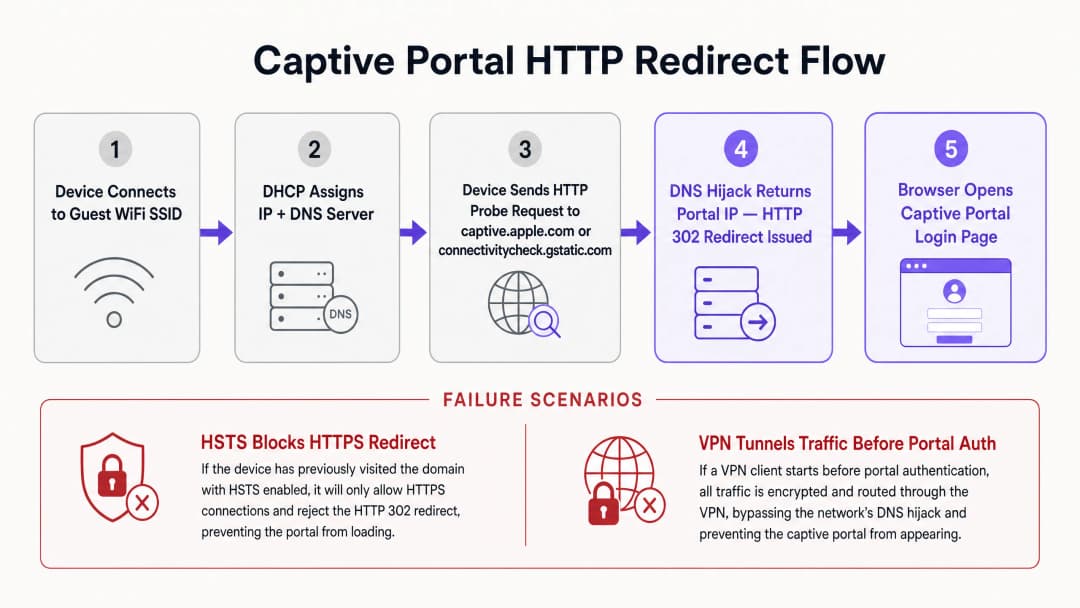
Cada sistema operativo utiliza um conjunto distinto de URLs de teste (canary URLs) e respostas esperadas para determinar o estado da rede. O Apple (iOS/macOS) sonda http://captive.apple.com/hotspot-detect.html esperando um documento HTML que contenha apenas a palavra Success no título e no corpo. O Google (Android/ChromeOS) sonda http://connectivitycheck.gstatic.com/generate_204 esperando um código de estado HTTP 204 No Content com o corpo vazio. O Microsoft (Windows 10/11) sonda http://www.msftconnecttest.com/connecttest.txt esperando uma resposta em texto simples de Microsoft Connect Test.
Se o dispositivo receber a resposta esperada, conclui que a rede tem acesso direto à internet. Se a resposta for modificada - como a receção de um redirecionamento HTTP 302 - o Captive Portal Assistant (CPA) do sistema operativo inicia uma janela de navegador dedicada e isolada (sandbox) para exibir o destino do redirecionamento: a página de início de sessão do Captive Portal.
Conflitos de redirecionamento de HSTS e HTTPS
O método histórico de redirecionamento de Captive Portal depende de desvio de DNS ou de interceção HTTP. Quando um utilizador não autenticado tenta navegar para qualquer website, o gateway intercetará o tráfego da porta TCP 80 (HTTP) ou da porta 443 (HTTPS) e responderá em nome do servidor de destino, injetando um redirecionamento HTTP 302. Embora isto funcionasse numa era de navegação web em HTTP não encriptado, introduz desafios graves de segurança e operacionais nos ambientes modernos dominados por HTTPS.
O principal obstáculo é o HTTP Strict Transport Security (HSTS), especificado no RFC 6797. O HSTS obriga os navegadores web a interagir com os websites utilizando apenas ligações HTTPS seguras. Quando um navegador tenta ligar-se a um domínio com HSTS ativado - como o Google, o Facebook ou portais bancários - proíbe estritamente qualquer comunicação não encriptada e impõe a validação do certificado SSL/TLS.
Se um gateway de Captive Portal tentar intercetar um pedido HTTPS para um domínio HSTS, terá de apresentar o seu próprio certificado SSL ou um certificado forjado ao cliente. Como o certificado do gateway não corresponde ao nome de domínio solicitado, o navegador do cliente deteta um erro de certificado e exibe um aviso de segurança que não pode ser contornado (NET::ERR_CERT_COMMON_NAME_INVALID). O navegador bloqueia totalmente o redirecionamento, impedindo o carregamento da página de Captive Portal.
Para mitigar isto, as redes sem fios empresariais modernas utilizam dois mecanismos. Primeiro, a isenção de sondas do SO garante que as sondas HTTP não encriptadas enviadas pelos sistemas operativos nunca sejam sujeitas a interceção HTTPS; o gateway deve permitir que a sonda HTTP não encriptada seja redirecionada utilizando uma resposta HTTP 302 padrão para o FQDN (fully-qualified domain name) seguro do portal. Segundo, o RFC 8910 (Captive Portal API) define um mecanismo onde a Opção DHCP 114 ou os Router Advertisements IPv6 informam os dispositivos clientes do URL exato do endpoint da API do Captive Portal. Em vez de dependerem de sequestro de DNS por força bruta ou redirecionamento HTTP, os dispositivos clientes compatíveis consultam esta API diretamente para obter o URL do portal, evitando conflitos de HSTS.
-
Matriz de Diagnóstico Direto para Administradores de Rede
| Sintoma Observado | Causa Raiz Primária | Ação de Resolução Instantânea |
|---|---|---|
| Página do portal não abre | Bloqueio por interceção HTTPS/HSTS | Direcione o navegador para http://neverssl.com para acionar a sonda HTTP não encriptada |
| Pedidos de login repetidos a cada 15m | Randomização de endereços MAC privados | Desative o Endereço WiFi Privado nas definições de rede do dispositivo cliente |
| Nenhum endereço IP atribuído | Esgotamento do pool de escopo DHCP | Reduza o tempo de lease do DHCP para 15-30 minutos no gateway sem fios |
| O login social em janela pop-up falha ou bloqueia | ACL de walled garden incompleta | Adicione os domínios OAuth necessários (*.googleapis.com, *.gstatic.com) à lista de permissões |
| VPN ligada mas sem internet | O túnel encriptado está a bloquear o redirecionamento local | Pause temporariamente a VPN até que a autenticação no Captive Portal termine |
-
Tem dúvidas sobre a sua configuração específica?
A nossa equipa trabalha com operadores de espaços, gestores de TI e engenheiros de rede em 80.000 espaços. Agende uma chamada de 20 minutos e mostraremos como outros profissionais na sua área o resolveram.
Guia de Implementação
A implementação de um Captive Portal fiável requer coordenação entre a infraestrutura física sem fios (Access Points, Controladores, Gateways) e a plataforma de portal baseada na nuvem. Esta secção fornece um guia de implementação neutro em termos de fornecedor para garantir a compatibilidade de redirecionamento em redes empresariais, referenciando configurações em controladores Cisco, Aruba e Ruckus. Para arquiteturas de controlo de acessos relacionadas, consulte o nosso guia sobre Como Implementar Autenticação 802.1X com Cloud RADIUS.
Passo 1: Configuração do walled garden (ACL)
Um Walled Garden ou Lista de Controlo de Acesso (ACL) define domínios externos específicos, endereços IP ou sub-redes que um dispositivo de convidado não autenticado tem permissão para aceder antes de iniciar sessão. Se o walled garden estiver configurado incorretamente, o dispositivo cliente não conseguirá resolver ou carregar os recursos do portal, resultando num ecrã em branco ou num timeout.
Para garantir um funcionamento contínuo com a plataforma da Purple, o walled garden deve incluir os FQDNs do Portal (*.purple.ai ou variantes regionais), Fornecedores de Identidade (IdPs) para endpoints OAuth de login social, e Redes de Distribuição de Conteúdo (CDNs) que alojam CSS, JavaScript, tipos de letra ou imagens.
Muitos controladores modernos suportam nomes de domínio com caracteres universais (wildcards) em configurações de walled garden. O controlador monitoriza dinamicamente as consultas de DNS de clientes não autenticados; quando um cliente consulta um domínio que coincide com o wildcard, o controlador adiciona temporariamente o endereço IP devolvido à lista de permissões de pré-autenticação.
Passo 2: Otimização de DHCP e DNS
Como a deteção do Captive Portal depende do handshake de rede inicial, as configurações de DHCP e DNS devem ser otimizadas para ambientes de elevada densidade. Em locais com grande afluência de público, como centros comerciais, interfaces de transporte ou estádios, o esgotamento de endereços IP é uma causa comum de falha no portal. Se o tempo de lease do DHCP for definido para um valor demasiado longo (por exemplo, 24 horas), o pool de IPs esgotar-se-á rapidamente. Para redes de convidados, o tempo de lease do DHCP deve ser configurado entre 15 a 30 minutos (900 a 1800 segundos).
Os clientes convidados devem ter atribuído um servidor DNS fiável, capaz de resolver tanto domínios públicos como o FQDN do portal local (por exemplo, Cloudflare 1.1.1.1 ou Google 8.8.8.8). Fundamentalmente, o gateway sem fios tem de permitir que os clientes não autenticados efetuem a resolução de DNS. Se uma regra de firewall bloquear o tráfego da porta 53 (UDP/TCP) para utilizadores pré-autenticados, o SO não conseguirá resolver os URLs de teste (canary URLs) e o assistente de Captive Portal nunca será iniciado.
Passo 3: Gestão de certificados SSL/TLS
Quando um dispositivo convidado é redirecionado para o Captive Portal, o navegador estabelece uma ligação HTTPS segura para o FQDN do portal. Para evitar ecrãs de aviso de certificado, o Captive Portal tem de ser protegido com um certificado SSL/TLS válido e de confiança pública. Os certificados autoassinados serão bloqueados pelos sistemas operativos móveis, impedindo que o assistente do portal carregue a página.
Melhores Práticas
Para manter uma rede WiFi de convidados de elevado desempenho que minimize os pedidos de suporte e maximize a satisfação do utilizador, os operadores de rede devem aderir às melhores práticas padrão do setor.
1. Otimizar as regras de walled garden para logins sociais
Ao utilizar opções de login social para recolher perfis de utilizadores, o walled garden deve ser meticulosamente mantido. As plataformas de redes sociais atualizam regularmente os subdomínios de autenticação e os intervalos de IPs de CDN. Se um domínio necessário estiver em falta, a janela de login social não carregará ou ficará bloqueada indefinidamente.
| Fornecedor | Domínios Essenciais de Walled Garden |
|---|---|
accounts.google.com, ssl.gstatic.com, fonts.gstatic.com, lh3.googleusercontent.com |
|
facebook.com, *.facebook.com, *.fbcdn.net, m.facebook.com |
|
| Apple | appleid.apple.com, appleid.cdn-apple.com, gsa.apple.com |
2. Transição para autenticação baseada em perfis e OpenRoaming
Embora os captive portals sejam excelentes para a recolha inicial de dados e aceitação dos termos de serviço, repetir o processo de login a cada visita introduz fricção para o utilizador. As redes empresariais modernas estão a transitar para a autenticação baseada em perfis e tecnologias Passpoint (Hotspot 2.0) como o OpenRoaming.Sob a licença Purple Connect, a Purple atua como um fornecedor de identidade gratuito para serviços OpenRoaming. O Passpoint permite que um convidado instale um perfil seguro no seu dispositivo durante a sua primeira visita. Em visitas subsequentes a qualquer local aderente em todo o mundo, o dispositivo autentica-se automaticamente na Camada 2 usando WPA3-Enterprise, contornando totalmente o Captive Portal.
3. Garantir a conformidade com as estruturas regulamentares
As implementações de guest WiFi devem estar em conformidade com as normas globais de privacidade e segurança de dados. Para a Conformidade com o GDPR / CCPA, o Captive Portal deve apresentar termos de serviço e políticas de privacidade claros. O consentimento para comunicações de marketing deve ser ativamente selecionado pelo utilizador (não pré-selecionado). Para a Conformidade com o PCI-DSS, se a infraestrutura da rede de convidados coexistir com sistemas de Ponto de Venda (POS), deve ser aplicada uma segmentação lógica rigorosa. Implemente o Modo de Transição WPA3 para permitir que dispositivos mais antigos se liguem usando WPA2-Personal, enquanto os dispositivos mais recentes beneficiam da segurança do WPA3.
-
Resolução de Problemas e Mitigação de Riscos
Quando são reportados problemas de rede sem fios de convidados, as equipas de operações do local e de receção necessitam de uma sequência de diagnóstico clara.
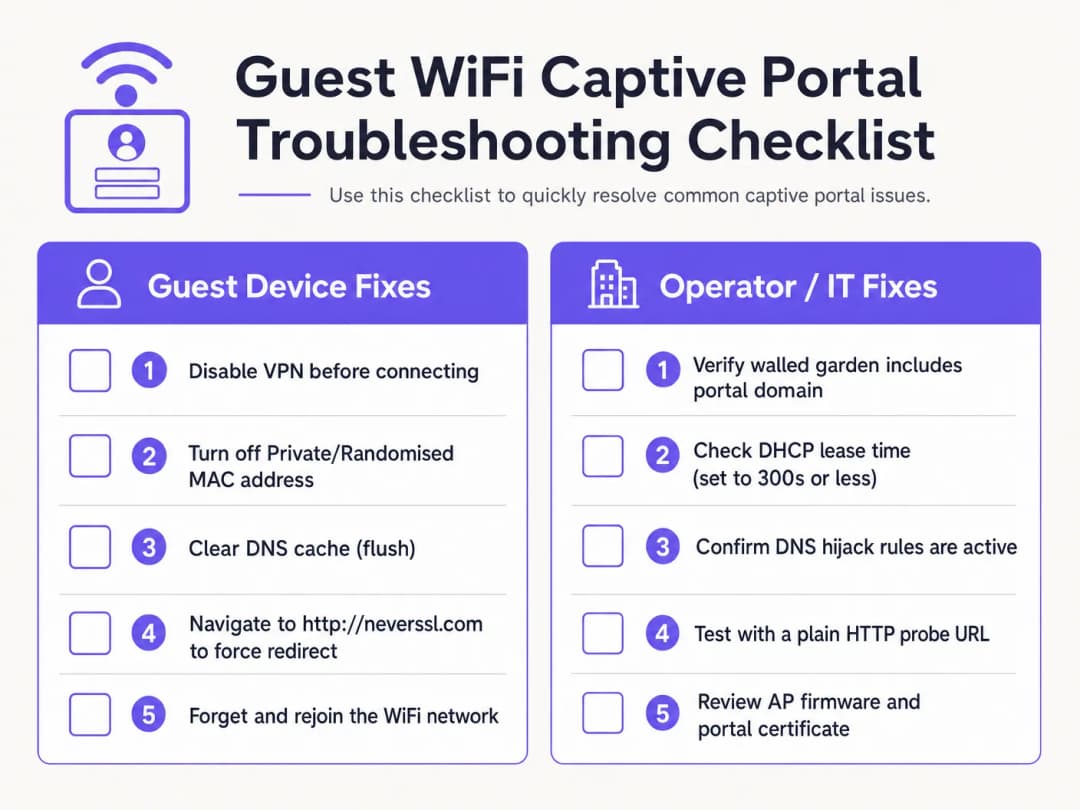
Lista de verificação de diagnóstico do lado do cliente
- Desativar VPNs Ativas. As VPNs encriptam e encaminham o tráfego imediatamente após a ligação, contornando o desvio de DNS do gateway e o redirecionamento HTTP. Os convidados devem pausar temporariamente a sua VPN para concluir o início de sessão no portal.
- Desligar Endereços MAC Privados. O iOS e o Android ativam o Endereço WiFi Privado por predefinição. Isto faz com que os dispositivos apresentem endereços MAC dinâmicos, quebrando a persistência da sessão MAC. Instrua os convidados a desativar o Endereço Privado para o SSID do local.
- Contornar DNS Seguro (DoH/DoT). Se um convidado utilizar DNS-over-HTTPS (DoH) personalizado nas definições do navegador, o navegador rejeitará as respostas locais de desvio de DNS. Os convidados devem pausar temporariamente o DNS seguro para permitir os redirecionamentos locais.
- Forçar uma Ligação HTTP Não Encriptada (NeverSSL). Se o assistente do Captive Portal não iniciar automaticamente, instrua o convidado a abrir uma janela do navegador e a aceder a
http://neverssl.com. Como este site nunca utiliza SSL/TLS, o gateway pode intercetar o pedido HTTP e injetar um redirecionamento HTTP 302 para o ecrã de início de sessão. - Esquecer e Voltar a Entrar na Rede. Esquecer a rede e voltar a ligar força uma nova troca de mensagens DHCP e reinicia a deteção do Captive Portal.
Resolução de problemas de infraestrutura do lado do operador
- Monitorizar a Utilização do Pool DHCP: Inspecione o âmbito do DHCP no gateway local. Se a utilização do pool for elevada, reduza o tempo de concessão para 15-30 minutos.
- Verificar as Regras de Redirecionamento de DNS: Realize uma captura de pacotes (PCAP) na interface do gateway para confirmar se os clientes não autenticados recebem respostas de DNS na porta 53.3. Auditar a Latência do Walled Garden: Garanta que a resolução DNS para os domínios do walled garden está a ser guardada em cache corretamente no controlador.
- Verificar a Expiração do Certificado: Verifique se o certificado SSL/TLS instalado no controlador sem fios é válido e assinado por uma CA fidedigna.
Elimine os pedidos de suporte de WiFi de visitantes com a Purple
Deixe de gastar horas de TI a depurar redirecionamentos de Captive Portal com falhas. A plataforma de WiFi para visitantes gerida na nuvem da Purple integra-se de forma nativa com Cisco Meraki, HPE Aruba, Ruckus e Ubiquiti para fornecer um registo simples, em conformidade com o GDPR, e acesso Passpoint automatizado.
Impacto no Negócio e ROI de Suporte
Investir numa plataforma de Captive Portal gerida na nuvem gera retornos financeiros e operacionais para espaços empresariais.
Redução de custos de suporte e fricção dos visitantes
Nos setores da hotelaria e do retalho, as equipas de atendimento ao público passam frequentemente tempo a resolver problemas de conectividade WiFi dos visitantes. Uma taxa elevada de falha no Captive Portal resulta em avaliações negativas, acumulação de pedidos de suporte e distração da equipa. Ao implementar o mecanismo de redirecionamento multiplataforma da Purple, os espaços registam uma redução de 50% a 70% nas reclamações de suporte relacionadas com WiFi.
Maximizar a recolha de dados e o ROI de marketing
Um Captive Portal é a porta de entrada para recolher dados primários de clientes, incluindo endereços de email, números de telefone e perfis de redes sociais. Com um portal funcional, os espaços alcançam taxas de consentimento (opt-in) superiores a 60% para comunicações de marketing. A integração da autenticação com o WiFi Analytics fornece informações detalhadas sobre o comportamento dos visitantes, tempos de permanência e taxas de retorno.
Desbloquear a monetização de media no retalho
Para centros comerciais, estádios e centros de exposições, a splash page e os ecrãs de redirecionamento pós-login representam propriedade digital valiosa. Os operadores podem exibir anúncios direcionados e baseados na localização ou vender pacotes de patrocínio a marcas, transformando a infraestrutura de TI num ativo gerador de receita.
Referências
[1] Colaboradores da Wikipédia. "Captive Portal." Wikipédia, A Enciclopédia Livre. https://en.wikipedia.org/wiki/Captive_portal
[2] IETF RFC 6797. "HTTP Strict Transport Security (HSTS)." Internet Engineering Task Force. https://datatracker.ietf.org/doc/html/rfc6797
[3] IETF RFC 8910. "Captive-Portal Identification in DHCP and Router Advertisements." Internet Engineering Task Force. https://datatracker.ietf.org/doc/html/rfc8910
[4] Wireless Broadband Alliance. "OpenRoaming." WBA. https://wballiance.com/openroaming/
[5] NeverSSL. "NeverSSL: Helping you get online." NeverSSL. http://neverssl.com/
Definições Principais
Captive portal
Uma página web de destino exibida a utilizadores de WiFi de convidados recém-associados antes de lhes ser concedido acesso geral à internet, utilizada para autenticação, aceitação de termos de serviço e captura de dados de marketing.
Atua como a principal barreira de acesso em redes sem fios públicas em recintos, hotéis e centros comerciais.
Hijacking de DNS
Uma técnica de interceção de tráfego onde um gateway sem fios devolve o endereço IP do servidor do captive portal para todos os pedidos de DNS não autenticados.
Utilizado para redirecionar sondas HTTP, mas cada vez mais contornado pelos protocolos DNS-over-HTTPS (DoH) e DNS-over-TLS (DoT).
HTTP Strict Transport Security (HSTS)
Uma política de segurança web (RFC 6797) que obriga os navegadores a comunicar estritamente através de HTTPS e a rejeitar certificados SSL inválidos.
Provoca falhas de redirecionamento do captive portal quando os gateways tentam intercetar pedidos HTTPS para domínios com HSTS ativado.
Walled garden
Uma lista de controlo de acesso (ACL) de pré-autenticação que permite a dispositivos de convidados não autenticados aceder a domínios externos e endereços IP específicos.
Essencial para alojar recursos do portal, endpoints OAuth de fornecedores de identidade e URLs de sondas de conectividade do sistema operativo.
Aleatorização de endereços MAC
Uma funcionalidade de privacidade em dispositivos móveis (iOS 14+, Android 10+) que apresenta um endereço MAC de hardware dinâmico às redes sem fios.
Interrompe a persistência de sessão baseada em MAC, forçando os convidados a autenticarem-se novamente quando o identificador aleatório é alterado.
RFC 8910 (API de Captive Portal)
Uma norma da IETF que utiliza a Opção DHCP 114 ou IPv6 Router Advertisements para comunicar endpoints de API de Captive Portal diretamente aos dispositivos clientes.
Substitui o legado hijacking de DNS, resolvendo conflitos de certificados HSTS em sistemas operativos clientes modernos.
Exemplos Práticos
Um hotel no centro da cidade com 350 quartos que utiliza controladores Cisco Catalyst 9800 recebe diariamente 20 reclamações de hóspedes que indicam que a página de login do WiFi não carrega. O problema afeta principalmente hóspedes com dispositivos iOS 17 e Android 13. Como deve o arquiteto de rede resolver isto de forma sistemática?
Execute um plano de remediação em quatro partes: 1. Verificar o Escopo DHCP: Inspecione o pool DHCP no gateway local. Se a utilização de IPs exceder 85%, reduza o tempo de concessão (lease time) de 24 horas para 30 minutos (1800 segundos) para recuperar concessões rapidamente. 2. Verificar Interceção de DNS: Garanta que as ACLs de pré-autenticação permitem tráfego das portas UDP/TCP 53 para servidores DNS públicos. 3. Auditar ACLs de Walled Garden: Ative o rastreio de DNS (DNS snooping) no controlador para captive.apple.com, connectivitycheck.gstatic.com e *.purple.ai. 4. Configurar RFC 8910: Implemente a Opção DHCP 114 no servidor DHCP a apontar para o URL do portal, permitindo que dispositivos iOS 16+ e Android 12+ consultem a API do portal diretamente sem necessidade de hijacking de DNS.
Um espaço de retalho que utiliza Aruba Central reporta que o início de sessão de convidados por e-mail funciona, mas a autenticação social "Login com Google" fica bloqueada de forma intermitente para 30% dos visitantes. Como devem os administradores de rede diagnosticar a causa raiz?
- Reproduzir com DevTools do Navegador: Ligue um dispositivo de teste, abra o separador Rede (F12) do navegador e clique em Login com Google para identificar domínios bloqueados que devolvem ERR_CONNECTION_REFUSED. 2. Atualizar o Walled Garden: Certifique-se de que a lista de permissões do Aruba Central inclui todos os endpoints OAuth da Google: accounts.google.com, ssl.gstatic.com, fonts.gstatic.com e oauth2.googleapis.com. 3. Ativar Listas de Permissões Dinâmicas: Configure a correspondência de caracteres universais baseada em DNS (*.googleapis.com, *.gstatic.com) para permitir automaticamente as gamas de IP dinâmicas do CDN da Google.
Perguntas de Prática
Q1. Porque é que navegar para um domínio HTTPS como google.com não consegue acionar um ecrã de início de sessão de Captive Portal?
Dica: Considere as políticas HSTS e a validação de certificados SSL/TLS.
Ver resposta modelo
Os principais domínios HTTPS aplicam HTTP Strict Transport Security (HSTS). Quando um gateway tenta intercetar uma ligação HTTPS, o navegador do cliente deteta uma incompatibilidade de certificado e bloqueia o pedido para evitar ataques de man-in-the-middle. Para acionar o portal manualmente, os convidados devem navegar para um site HTTP não encriptado, como http://neverssl.com, ou deixar que a sonda integrada do sistema operativo seja executada.
Q2. Como é que a aleatorização de endereços MAC privados afeta a persistência da sessão de convidados em redes WiFi corporativas?
Dica: Pense em como os gateways sem fios monitorizam os endpoints autenticados.
Ver resposta modelo
Os gateways sem fios monitorizam as sessões autenticadas pelo endereço MAC do dispositivo. Quando um OS móvel roda o seu endereço MAC privado, o gateway trata o endpoint como um novo cliente não autenticado e força a reautenticação. Desativar o Endereço Privado para o SSID do local ou implementar perfis Passpoint/OpenRoaming mantém a persistência da sessão sem interrupções.
Q3. Qual é o tempo de concessão DHCP recomendado para locais públicos de WiFi de convidados com elevada densidade, como estádios ou centros comerciais?
Dica: Equilibre a recuperação de endereços IP com o volume de tráfego DHCP.
Ver resposta modelo
As redes WiFi de convidados em locais transitórios de elevada densidade devem configurar tempos de concessão DHCP entre 15 e 30 minutos (900 a 1800 segundos). Isto evita o esgotamento do conjunto de IPs causado por visitantes de curta permanência, mantendo o tráfego de renovação DHCP dentro de limites geríveis.
Continue a ler esta série
Portal de convidados Ubiquiti UniFi não redireciona: causas e correções
Este guia isola uma falha de redirecionamento do portal de convidados UniFi ao seguir sequencialmente o estado do convidado, o redirecionamento, a rota de pré-autorização e a autorização do controlador. Oferece às equipas de TI dos recintos um método fundamentado para resolver a confusão entre rede de convidados e Hotspot, transições de portais externos, requisitos atuais de conta do UniFi OS e testes de isolamento de DNS.
Cisco Meraki splash page não funciona: um fluxograma de resolução de problemas
Este guia prático do dia dois isola o ponto de falha num fluxo splash Cisco Meraki: autorização do cliente, início de redirecionamento HTTP, acessibilidade do walled-garden ou início de sessão RADIUS. Disponibiliza às equipas de TI dos locais um caminho de evidências controlado para que possam restaurar o WiFi de convidados sem fazer alterações gerais num parque ativo.
Guia de Configuração de WiFi para Visitantes Empresariais: Segmentação de VLAN, Segurança e Portais Cativos
Este guia técnico mostra às equipas de TI como configurar o WiFi para Visitantes como um serviço controlado de acesso à internet, utilizando segmentação de VLAN, política de firewall e um captive portal. Também explica como os formulários de registo e controlos de adesão do Purple apoiam uma experiência de visitante proporcional sem enfraquecer o limite em torno dos sistemas operacionais, de pagamento e dos funcionários.
Tem dúvidas sobre a sua configuração específica?
A nossa equipa trabalha com operadores de espaços, gestores de TI e engenheiros de rede em 80.000 espaços. Agende uma chamada de 20 minutos e mostraremos como outros profissionais na sua área o resolveram.