
Captive Portal 登入疑難排解與修復
循序漸進排解 Captive Portal 登入失敗問題。修復 CNA 彈出視窗抑制、HSTS 憑證錯誤、NeverSSL 探針以及 RADIUS 逾時問題。
Video overview
收聽此指南
查看播客逐字稿
核心系列的一部分:Captive Portal 指南 →
執行摘要
對於現代企業場所而言,訪客無線網路代表了客戶互動、營運智慧和品牌定位的關鍵接觸點。然而,這些網路的商業價值取決於初始連線體驗的可靠性。當訪客連線到網路,而 captive portal login 頁面未能顯示時,場所會立即面臨前台摩擦增加、支援工單激增以及失去擷取數據機會的困境。
這些失敗的核心在於安全 Web 標準與過去 Captive Portal 所使用的網路層攔截技術之間的根本衝突。現代網頁瀏覽器和作業系統旨在偵測並阻止未授權的流量重導向,以保護使用者免受安全性風險。藉由深入了解精確的 HTTP 與 DNS 重導向序列、HTTP Strict Transport Security (HSTS) 的影響,以及破壞這些機制的用戶端設定,IT 部門可以實作健全的配置以確保無縫上線。
本指南詳細介紹了 Purple 的雲端託管 Guest WiFi 平台如何應對這些挑戰,以便在所有消費型作業系統中提供高可用性的重導向,從而最大限度地減少場所的支援開銷,並最大化無線基礎設施投資的回報。無論是在餐飲旅宿、零售、醫療保健還是交通運輸環境中進行部署,本指南中的原則和檢查表皆普遍適用。
技術深度剖析
為了有效排除 Captive Portal 的故障,網路管理員必須了解用戶端裝置連線到開放式或預共用金鑰 (PSK) 訪客無線網路時所發生的確切事件序列。現代作業系統 - 包括 Apple iOS/macOS、Google Android、Microsoft Windows 以及 Linux 發行版 - 不會等待使用者開啟瀏覽器才去測試網際網路連線能力。相反地,它們會在完成關聯 (association) 和 DHCP 階段後,立即執行自動化的主動探測機制。
Captive portal 偵測序列
連線與驗證程序遵循以下結構化序列:
| 步驟 | 動作 | 技術說明 | 預期的成功指標 |
|---|---|---|---|
| 1 | 關聯 (Association) | 用戶端在 Layer 2 與訪客 SSID 進行關聯。 | 成功的 802.11 關聯訊框交換。 |
| 2 | IP 佈署 (IP Provisioning) | DHCP 伺服器指派 IP 位址、子網路遮罩、閘道器和本機 DNS 伺服器。 | 用戶端收到 DHCP ACK 封包。 |
| 3 | 主動探測 (Active Probing) | OS 背景服務向廠商的 Canary URL 傳送未加密的 HTTP GET 要求。 | HTTP 200 OK (Apple/Windows) 或 HTTP 204 No Content (Google)。 |
| 5 | 入口網站轉譯 | Captive Portal Assistant (CPA) 引擎開啟並轉譯歡迎頁面。 | 成功轉譯登入介面。 |
+--------+             +------------+             +------------+             +-------------------+
| Client |             | AP/Gateway |             | DNS Server |             | Captive Portal IP |
+--------+             +------------+             +------------+             +-------------------+
    |                        |                          |                              |
    |--- 1. DHCP Request --->|                          |                              |
    |<-- 2. DHCP Ack --------|                          |                              |
    |    (IP & DNS Assigned) |                          |                              |
    |--- 3. DNS Query ------>|------------------------->|                              |
    |    (canary URL)        |                          |                              |
    |<-- 4. DNS Response ----|<-------------------------|                              |
    |    (Resolved IP)       |                          |                              |
    |--- 5. HTTP GET ------->|                          |                              |
    |    (canary URL)        |                          |                              |
    |<-- 6. HTTP 302 --------|                          |                              |
    |    (Redirect to Portal)|                          |                              |
    |--- 7. DNS Query ------>|------------------------->|                              |
    |    (Portal FQDN)       |                          |                              |
    |<-- 8. DNS Response ----|<-------------------------|                              |
    |    (Portal IP)         |                          |                              |
    |--- 9. HTTP/S GET ------>-------------------------------------------------------->|
    |    (Render Splash Page)|                          |                              |
    |<-- 10. Render Page <-------------------------------------------------------------||
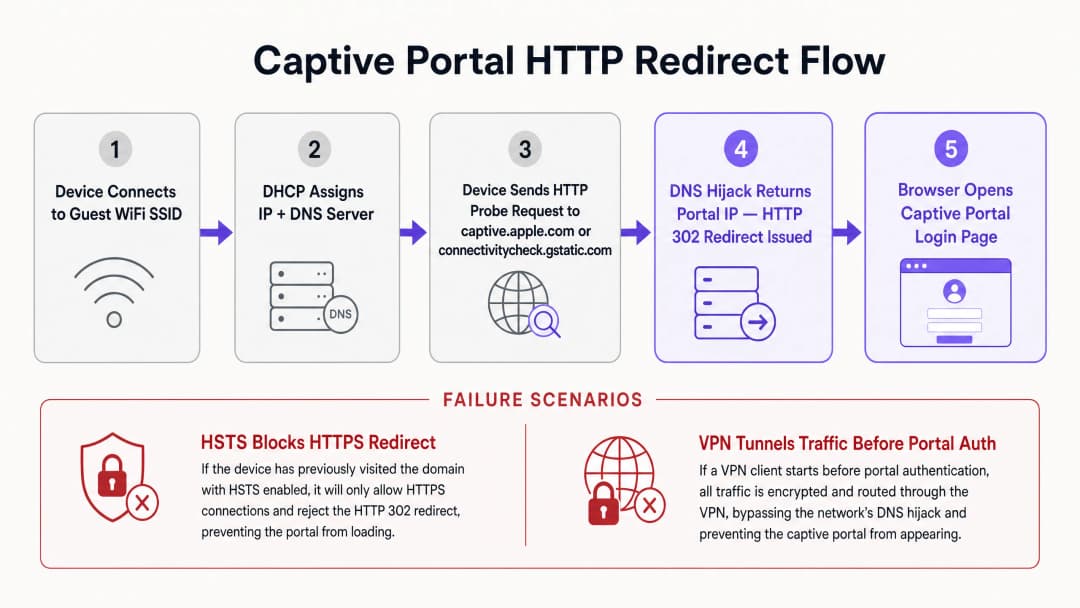 每個作業系統都使用一組特定的 Canary URL 和預期回應來判定網路狀態。Apple (iOS/macOS) 會探測
 http://captive.apple.com/hotspot-detect.html,預期會收到標題與內文僅包含 Success 字樣的 HTML 文件。Google (Android/ChromeOS) 會探測 http://connectivitycheck.gstatic.com/generate_204,預期會收到 HTTP 狀態碼 204 No Content 且內文為空。Microsoft (Windows 10/11) 會探測 http://www.msftconnecttest.com/connecttest.txt,預期會收到純文字回應 Microsoft Connect Test。
如果裝置收到預期的回應,就會判定該網路具有直接網際網路存取權限。如果回應被修改 - 例如收到 HTTP 302 重新導向 - 作業系統的 Captive Portal 助理 (CPA) 就會啟動一個專用的沙盒瀏覽器視窗,以顯示重新導向的目標:Captive Portal 登入頁面。
HSTS 與 HTTPS 重新導向衝突
傳統的 Captive Portal 重新導向方法依賴於 DNS 綁架或 HTTP 攔截。當未驗證的使用者嘗試瀏覽任何網站時,閘道器會攔截 TCP 連接埠 80 (HTTP) 或連接埠 443 (HTTPS) 流量,並代表目的地伺服器進行回應,植入 HTTP 302 重新導向。雖然這在未加密的 HTTP 網頁瀏覽時代行得通,但在現代以 HTTPS 為主的環境中,這會帶來嚴重的安全與營運挑戰。
最主要的障礙是 RFC 6797 中規範的 HTTP Strict Transport Security (HSTS)。HSTS 強制網頁瀏覽器僅能使用安全的 HTTPS 連線與網站互動。當瀏覽器嘗試連線到已啟用 HSTS 的網域時 - 例如 Google、Facebook 或網路銀行入口網站 - 它會嚴格禁止任何未加密的通訊,並強制執行 SSL/TLS 憑證驗證。
如果 Captive Portal 閘道器嘗試攔截對 HSTS 網域的 HTTPS 請求,它必須向用戶端出示自己的 SSL 憑證或偽造的憑證。由於閘道器憑證與所請求的網域名稱不符,用戶端瀏覽器會偵測到憑證錯誤,並顯示無法略過的安全警告 (NET::ERR_CERT_COMMON_NAME_INVALID)。瀏覽器會完全封鎖該重新導向,進而阻止 Captive Portal 頁面載入。
為了減輕此問題,現代企業無線網路利用了兩種機制。首先,豁免 OS 探測可確保作業系統發送的未加密 HTTP 探測永遠不會受到 HTTPS 攔截;閘道器必須允許使用標準 HTTP 302 回應將未加密的 HTTP 探測重新導向至傳送門的安全完全限定網域名稱 (FQDN)。其次,RFC 8910 (Captive Portal API) 定義了一種機制,其中 DHCP Option 114 或 IPv6 路由器公告會通知用戶端裝置 Captive Portal API 端點的確切 URL。相容的用戶端裝置會直接查詢此 API 以取得傳送門 URL,而無需依賴暴力 DNS 劫持或 HTTP 重新導向,從而避開 HSTS 衝突。
-
網路管理員直接診斷矩陣
| 觀察到的症狀 | 主要根本原因 | 即時解決行動 |
|---|---|---|
| 傳送門頁面無法啟動 | HTTPS/HSTS 攔截封鎖 | 將瀏覽器導向至 http://neverssl.com 以觸發未加密的 HTTP 探測 |
| 每 15 分鐘重複登入請求 | 私有 MAC 位址隨機化 | 在用戶端裝置網路設定中關閉「私有 WiFi 位址」 |
| 未分配 IP 位址 | DHCP 範圍集區耗盡 | 在無線閘道器上將 DHCP 租約時間縮短至 15 - 30 分鐘 |
| 社群登入彈出視窗失敗或掛起 | 圍牆花園 ACL 不完整 | 將必要的 OAuth 網域 (*.googleapis.com, *.gstatic.com) 新增至允許清單 |
| VPN 已連線但無網際網路 | 加密通道阻擋本機重新導向 | 暫時暫停 VPN,直到 Captive Portal 驗證完成 |
-
對於您的特定設置有任何疑問嗎?
我們的團隊與超過 80,000 個場域的場域營運商、IT 經理和網路工程師合作。立即預約 20 分鐘的通話,我們將向您展示其他與您相似的用戶是如何解決此問題的。
實作指南
部署可靠的 Captive Portal 需要實體無線基礎設施 (Access Points、控制器、閘道器) 與雲端傳送門平台之間的協調。本節提供與廠商無關的實作指南,以確保跨企業網路的重新導向相容性,並參考了 Cisco、Aruba 和 Ruckus 控制器中的設定。有關相關的存取控制架構,請參閱我們的 如何使用雲端 RADIUS 實作 802.1X 驗證 指南。
步驟 1:圍牆花園 (ACL) 設定
圍牆花園或存取控制清單 (ACL) 定義了未驗證的訪客裝置在登入 之前 被允許存取的特定外部網域、IP 位址或子網路。如果圍牆花園設定不正確,用戶端裝置將無法解析或載入傳送門資產,從而導致空白畫面或逾時。
為了確保與 Purple 平台的無縫運作,圍牆花園必須包含 傳送門 FQDN (*.purple.ai 或區域變體)、用於社群登入 OAuth 端點的 身分識別提供者 (IdP) 以及託管 CSS、JavaScript、字型或圖片的 內容傳遞網路 (CDN)。許多現代控制器在 walled garden 設定中支援萬用字元網域名稱。控制器會動態監聽未驗證用戶端的 DNS 查詢;當用戶端查詢與萬用字元相符的網域時,控制器會暫時將傳回的 IP 位址新增至預先驗證允許清單中。
步驟 2:DHCP 與 DNS 最佳化
由於 Captive Portal 偵測依賴於初始網路交握,因此必須針對高密度環境最佳化 DHCP 和 DNS 設定。在購物中心、交通樞紐或體育場等高人流量的場所中,IP 位址耗盡是導致 portal 失敗的常見原因。如果 DHCP 租約時間設定得太長(例如 24 小時),IP 位址池很快就會枯竭。對於訪客網路,DHCP 租約時間應配置在 15 至 30 分鐘(900 至 1800 秒)之間。
必須為訪客用戶端指派可靠的 DNS 伺服器,以便解析公共網域和本機 portal FQDN(例如 Cloudflare 1.1.1.1 或 Google 8.8.8.8)。關鍵在於,無線閘道器必須允許未驗證的用戶端進行 DNS 解析。如果防火牆規則封鎖了預先驗證使用者的連接埠 53 (UDP/TCP) 流量,作業系統將無法解析 Canary URL,而 Captive Portal 助理也永遠不會啟動。
步驟 3:SSL/TLS 憑證管理
當訪客裝置被重新導向至 Captive Portal 時,瀏覽器會與 portal FQDN 建立安全的 HTTPS 連線。為了防止出現憑證警告畫面,必須使用有效的、受公開信任的 SSL/TLS 憑證來保護 Captive Portal。自我簽署憑證將被行動作業系統封鎖,從而導致 portal 助理無法轉譯網頁。
最佳實踐
為了維護高效能的訪客無線網路,同時減少支援工單並最大化使用者滿意度,網路營運商應遵循產業標準最佳實踐。
1. 針對社群登入最佳化 walled garden 規則
當利用社群登入選項來收集使用者個人檔案時,必須細緻地維護 walled garden。社群媒體平台會定期更新驗證子網域和 CDN IP 範圍。如果缺少必要的網域,社群登入彈出視窗將無法載入或無限期懸置。
| 提供商 | 必要的 Walled Garden 網域 |
|---|---|
accounts.google.com, ssl.gstatic.com, fonts.gstatic.com, lh3.googleusercontent.com |
|
facebook.com, *.facebook.com, *.fbcdn.net, m.facebook.com |
|
| Apple | appleid.apple.com, appleid.cdn-apple.com, gsa.apple.com |
2. 轉換至基於設定檔的驗證與 OpenRoaming
雖然 Captive Portal 非常適合用於初始資料收集和接受服務條款,但在每次造訪時重複登入流程會增加使用者摩擦。現代企業網路正逐步轉向基於設定檔的驗證以及 Passpoint (Hotspot 2.0) 技術,例如 OpenRoaming。 在 Purple Connect 授權下,Purple 可作為 OpenRoaming 服務的免費身分識別提供者。Passpoint 允許訪客在首次造訪時,於其裝置上安裝安全設定檔。隨後造訪全球任何參與的場域時,裝置會自動使用 WPA3-Enterprise 在 Layer 2 進行驗證,完全繞過 Captive Portal。
3. 確保符合法規框架
部署訪客 WiFi 必須符合全球資料隱私與安全標準。為了符合 GDPR / CCPA 規範,Captive Portal 必須呈現清晰的服務條款與隱私權政策。行銷傳播的同意必須由使用者主動勾選(不得預先勾選)。為了符合 PCI-DSS 規範,若訪客網路基礎架構與銷售點(POS)系統並存,則必須強制執行嚴格的邏輯分割。實施 WPA3-Transition Mode 以允許較舊的裝置使用 WPA2-Personal 進行連線,同時讓較新的裝置受益於 WPA3 安全性。
-
疑難排解與風險緩解
當收到訪客無線網路問題回報時,場域營運與第一線工作人員需要一套清晰的診斷順序。
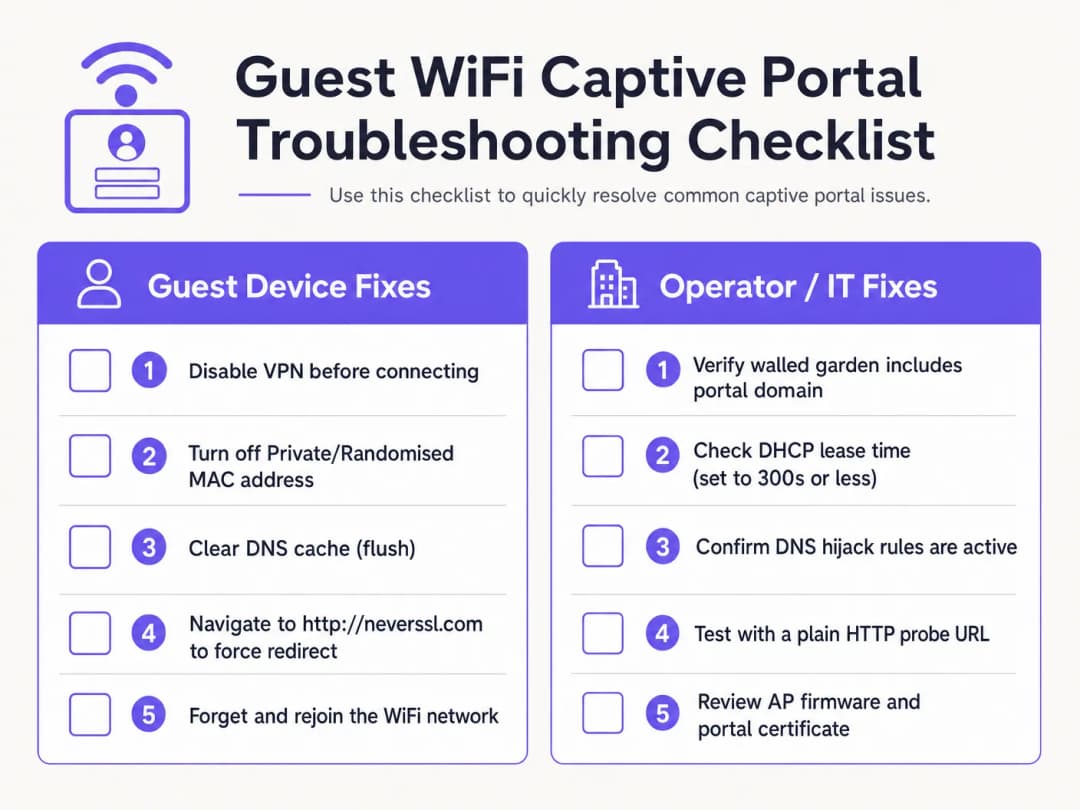
用戶端診斷檢查清單
- 停用啟用中的 VPN。 VPN 在連線後會立即加密並路由流量,從而繞過閘道器 DNS 綁架與 HTTP 重新導向。訪客必須暫時暫停其 VPN 以完成入口網站登入。
- 關閉專用 MAC 位址。 iOS 14+ 與 Android 10+ 預設會啟用專用 WiFi 位址。這會導致裝置呈現動態 MAC 位址,破壞 MAC 工作階段持久性。請引導訪客針對場域 SSID 停用專用位址。
- 繞過安全 DNS (DoH/DoT)。 如果訪客在瀏覽器設定中使用自訂的 DNS-over-HTTPS (DoH),瀏覽器將拒絕本機 DNS 綁架回應。訪客必須暫時暫停安全 DNS 以允許本機重新導向。
- 強制進行未加密的 HTTP 連線 (NeverSSL)。 如果 Captive Portal 助理未能自動啟動,請引導訪客開啟瀏覽器視窗並瀏覽至
http://neverssl.com。由於此網站絕不使用 SSL/TLS,因此閘道器可以攔截該 HTTP 要求,並將 HTTP 302 重新導向植入登入畫面。 - 忘記並重新加入網路。 忘記網路並重新連線可強制執行乾淨的 DHCP 訊號交換,並重新啟動 Captive Portal 偵測。
營運商端基礎架構疑難排解
- 監控 DHCP 傾印集利用率: 檢查本機閘道器上的 DHCP 範圍。如果傾印集利用率偏高,請將租約時間縮短至 15 - 30 分鐘。
- 驗證 DNS 重新導向規則: 在閘道器介面上執行封包擷取 (PCAP),以確認未經驗證的用戶端在連接埠 53 上收到 DNS 回應。3. 審計圍牆花園 (Walled Garden) 延遲: 確保圍牆花園網域的 DNS 解析已在控制器上正確快取。
- 檢查憑證過期: 驗證安裝在無線控制器上的 SSL/TLS 憑證是否有效,且由受信任的 CA 簽署。
使用 Purple 消除訪客 WiFi 支援工單
停止浪費 IT 工時來除錯損壞的 Captive Portal 重新導向。Purple 的雲端管理訪客 WiFi 平台與 Cisco Meraki、HPE Aruba、Ruckus 和 Ubiquiti 原生整合,提供無縫且符合 GDPR 規範的引導流程,以及自動化的 Passpoint 存取。
商業影響與支援投資報酬率 (ROI)
投資雲端管理的 Captive Portal 平台,能為企業場域帶來財務與營運上的回報。
減少支援開銷與顧客摩擦
對於飯店與零售場域而言,前線人員經常需要花費時間排除顧客的 WiFi 連線問題。高 Captive Portal 失敗率會導致負面評論、支援工單積壓以及員工分心。透過導入 Purple 的跨平台重新導向機制,場域能減少 50% 至 70% 的 WiFi 相關支援客訴。
最大化數據收集與行銷投資報酬率 (ROI)
Captive Portal 是收集第一方客戶數據(包括電子郵件地址、電話號碼和社群設定檔)的入口。有了功能完善的入口網站,場域在行銷溝通上的訂閱率(opt-in)可達到 60% 以上。將驗證功能與 WiFi Analytics 整合,可深入洞察訪客行為、停留時間和回訪率。
解鎖零售媒體變現能力
對於購物中心、體育館和展覽中心,登入頁面和登入後重新導向畫面代表了寶貴的數位房地產。營運商可以展示精準的定位廣告,或向品牌銷售贊助方案,將 IT 基礎架構轉化為營收資產。
參考文獻
[1] Wikipedia 貢獻者。"Captive Portal。" 維基百科,自由的百科全書。https://en.wikipedia.org/wiki/Captive_portal
[2] IETF RFC 6797。"HTTP Strict Transport Security (HSTS)。" 網際網路工程任務組。https://datatracker.ietf.org/doc/html/rfc6797
[3] IETF RFC 8910。"Captive-Portal Identification in DHCP and Router Advertisements。" 網際網路工程任務組。https://datatracker.ietf.org/doc/html/rfc8910
[4] Wireless Broadband Alliance。"OpenRoaming。" WBA。https://wballiance.com/openroaming/
[5] NeverSSL。"NeverSSL: Helping you get online。" NeverSSL。http://neverssl.com/
關鍵定義
Captive Portal
在允許新關聯的訪客 WiFi 使用者存取更廣泛的網際網路之前,向其顯示的網頁登入頁面,用於驗證、接受服務條款以及收集行銷數據。
在場館、飯店和零售中心的公共無線網路中,作為主要的存取入口閘門。
DNS 綁架
一種流量攔截技術,無線閘道器會針對所有未經驗證的 DNS 請求,傳回 Captive Portal 伺服器的 IP 地址。
用於重導向 HTTP 探針,但正日益被 DNS-over-HTTPS (DoH) 和 DNS-over-TLS (DoT) 協定所繞過。
HTTP Strict Transport Security (HSTS)
一種網路安全策略(RFC 6797),強制瀏覽器嚴格透過 HTTPS 進行通訊,並拒絕無效的 SSL 憑證。
當閘道器試圖攔截對已啟用 HSTS 網域的 HTTPS 請求時,會導致 Captive Portal 重導向失敗。
Walled Garden
一種驗證前的存取控制清單(ACL),允許未經驗證的訪客裝置存取特定的外部網域和 IP 地址。
對於代管 Portal 資源、身分識別提供商的 OAuth 端點,以及作業系統連線探針 URL 至關重要。
MAC 位址隨機化
行動裝置(iOS 14+, Android 10+)上的一項隱私功能,可向無線網路呈現動態的硬體 MAC 位址。
會干擾基於 MAC 的工作階段持續性,當隨機產生的識別碼變更時,會迫使訪客重新驗證。
RFC 8910 (Captive Portal API)
一項 IETF 標準,使用 DHCP Option 114 或 IPv6 路由器公告(Router Advertisements)直接向用戶端裝置傳達 Captive Portal API 端點。
取代傳統的 DNS 綁架,解決現代用戶端作業系統上的 HSTS 憑證衝突。
範例
一間擁有 350 間客房且使用 Cisco Catalyst 9800 控制器的市中心飯店,每日收到約 20 起房客投訴,反映 WiFi 登入網頁(Splash Page)無法載入。該問題主要影響使用 iOS 17 和 Android 13 裝置的房客。網路架構師應如何系統性地解決此問題?
執行以下四部分處置方案:1. 檢查 DHCP 範圍:檢查本地閘道器上的 DHCP 整合池。如果 IP 使用率超過 85%,將租期(Lease Time)從 24 小時縮短至 30 分鐘(1800 秒),以快速回收租約。2. 驗證 DNS 攔截:確保驗證前的 ACL 允許 UDP/TCP 連接埠 53 的流量傳輸至公用 DNS 解析器。3. 稽核 Walled Garden ACL:在控制器上針對 captive.apple.com、connectivitycheck.gstatic.com 及 *.purple.ai 啟用 DNS 監聽(Snooping)。4. 設定 RFC 8910:在 DHCP 伺服器上部署 DHCP Option 114 並指向 Portal URL,允許 iOS 16+ 和 Android 12+ 裝置直接查詢 Portal API,無需透過 DNS 綁架。
某個使用 Aruba Central 的零售場域回報,訪客可正常使用電子郵件登入,但有 30% 的訪客在進行 "Login with Google" 社群驗證時會出現間歇性卡死。網路管理員應如何診斷根本原因?
- 使用瀏覽器開發者工具重現問題:連接測試裝置,開啟瀏覽器網路(Network)分頁(F12),並點擊 Login with Google,找出傳回 ERR_CONNECTION_REFUSED 的被阻擋網域。2. 更新 Walled Garden:確保 Aruba Central 白名單包含所有 Google OAuth 端點:accounts.google.com、ssl.gstatic.com、fonts.gstatic.com 及 oauth2.googleapis.com。3. 啟用動態白名單:設定基於 DNS 的萬用字元比對(*.googleapis.com, *.gstatic.com),以自動允許 Google 變動的 CDN IP 範圍。
練習題
Q1. 為什麼瀏覽像 google.com 這樣的 HTTPS 網域時,無法觸發 Captive Portal 登入頁面?
提示:請考量 HSTS 政策與 SSL/TLS 憑證驗證。
查看標準答案
主要的 HTTPS 網域強制執行 HTTP Strict Transport Security (HSTS)。當閘道器嘗試攔截 HTTPS 連線時,用戶端瀏覽器會偵測到憑證不符並封鎖該請求,以防止中間人攻擊。若要手動觸發入口網站,訪客必須瀏覽未加密的 HTTP 網站(例如 http://neverssl.com),或讓作業系統內建的探測機制自動執行。
Q2. 私有 MAC 位址隨機化對企業級 WiFi 網路上的訪客工作階段持續性有何影響?
提示:思考無線閘道器如何追蹤已驗證的端點。
查看標準答案
無線閘道器透過裝置的 MAC 位址來追蹤已驗證的工作階段。當行動作業系統輪替其私有 MAC 位址時,閘道器會將該端點視為新的未驗證用戶端,並強制重新驗證。針對場域 SSID 停用私有位址,或部署 Passpoint / OpenRoaming 設定檔,即可保持不中斷的工作階段持續性。
Q3. 對於體育場或購物中心等高密度公共訪客 WiFi 場域,建議的 DHCP 租期時間是多少?
提示:在 IP 位址回收與 DHCP 流量之間取得平衡。
查看標準答案
在流動性高、高密度的場域中,訪客 WiFi 網路應將 DHCP 租期時間配置在 15 至 30 分鐘(900 至 1800 秒)之間。這可防止因短暫停留的訪客導致 IP 池耗盡,同時將 DHCP 更新流量維持在可控範圍內。
常見問題
Why does the captive portal redirect fail to open automatically on mobile devices?
Mobile operating systems (iOS, Android, Windows) rely on unauthenticated HTTP probes to vendor endpoints (such as captive.apple.com or connectivitycheck.gstatic.com/generate_204). If the network gateway does not intercept port 80 traffic with a clean HTTP 302 redirect, or if DNS queries for those probe domains are dropped before authentication, the Captive Network Assistant (CNA) will not launch.
Why does the 'captive portal login keeps stopping' error occur on Android devices?
The 'captive portal login keeps stopping' error on Android occurs when the system WebView crashes during redirection or when the gateway drops the generate_204 HTTP probe midway through authentication. Clearing the cache of the Android System WebView or Chrome app, disabling randomized MAC addresses for the venue SSID, and navigating manually to an unencrypted HTTP probe address resolves the crash loop.
How do unencrypted HTTP sites like neverssl.com force a captive portal login screen to load?
Because modern browsers enforce HTTP Strict Transport Security (HSTS) on encrypted domains like google.com, wireless gateways cannot intercept HTTPS traffic without triggering browser certificate warnings. Navigating to an unencrypted HTTP destination such as http://neverssl.com or http://1.1.1.1 sends a plaintext request that the gateway can safely intercept with an HTTP 302 redirect to the login splash page.
Why do Android devices show 'Sign into network' errors or fail the generate_204 probe?
Android devices query clients3.google.com/generate_204 and connectivitycheck.gstatic.com. If the wireless controller or walled garden blocks access to Google IP addresses without intercepting the HTTP request with a 302 redirect, Android detects a connection error or assumes an isolated intranet, suppressing the portal prompt. Whitelisting the required probe domains or ensuring transparent HTTP redirection resolves this.
How do you prevent HTTPS certificate warnings when intercepting captive portal traffic?
When a guest browser navigates to an HTTPS domain prior to login, intercepting the TLS handshake triggers severe browser security warnings (such as NET::ERR_CERT_COMMON_NAME_INVALID) due to HSTS and certificate mismatch. Enterprise networks prevent this by leaving HTTPS traffic undisturbed and relying exclusively on plaintext HTTP probe interception to trigger the operating system's native captive portal browser.
What causes RADIUS authentication timeouts during captive portal guest login?
RADIUS timeouts occur when the wireless access point or controller fails to receive a RADIUS Access-Accept packet from the authentication server within the timeout window (typically 5 seconds). Common causes include outbound UDP ports 1812 and 1813 being filtered by perimeter firewalls, mismatched RADIUS shared secrets, or asymmetric routing between the access point and the cloud RADIUS service.
How does RFC 8910 (Captive Portal API) resolve modern captive portal connection issues?
RFC 8910 standardizes captive portal discovery via DHCP Option 114 and IPv6 Router Advertisements. Rather than intercepting DNS queries or HTTP packets, the network directly advertises the captive portal API endpoint URL to connecting client devices. Modern operating systems query this API directly, eliminating HSTS certificate collisions, DNS hijacking latency, and CNA browser rendering bugs.
How does MAC address randomisation affect captive portal reconnection?
iOS 14+ and Android 10+ rotate private MAC addresses periodically or when re-associating with SSIDs. If a guest network tracks sessions solely by physical MAC address, returning visitors are forced to authenticate repeatedly. Enterprise platforms like Purple solve this by tying session authorisation to user identity tokens and Passpoint (Hotspot 2.0) profiles rather than transient hardware MACs.
How does Purple resolve captive portal redirect failures across multi-vendor networks?
Purple operates as a hardware-agnostic cloud overlay across Cisco Meraki, HPE Aruba, Ruckus, Juniper Mist, Fortinet, and UniFi hardware. By automating walled garden configurations, managing trusted SSL redirect domains, and providing high-availability cloud RADIUS clusters with sub-second failover, Purple eliminates captive portal redirect drops and delivers reliable guest onboarding.
繼續閱讀本系列
Ubiquiti UniFi 訪客入口網站未重定向:原因與解決方法
本指南循序追蹤訪客狀態、重新導向、預先授權路由及控制器授權,藉此釐清 UniFi guest portal 重新導向失敗的原因。它為場域 IT 團隊提供了一套經過實證的方法,用以解決訪客網路與 Hotspot 之間的混淆、外部 portal 轉接、目前的 UniFi OS 帳戶要求,以及 DNS 隔離測試。
Cisco Meraki splash page 無法正常工作:疑難排解流程圖
這份實用的後期維運指南,旨在隔離 Cisco Meraki splash 流程失敗的環節:用戶端授權、HTTP 重新導向啟動、walled-garden 可達性或 RADIUS 登入。它為場域 IT 團隊提供了一條受控的實證路徑,以便在不對營運中系統進行大範圍變更的情況下恢復 Guest WiFi。
企業級 Guest WiFi 設定指南:VLAN 分段、安全性與 Captive Portal
本技術指南向 IT 團隊展示如何將 Guest WiFi 設定為受控的網際網路存取服務,利用 VLAN 分段、防火牆策略及 Captive Portal 進行管理。同時也說明了 Purple 的註冊表單與上網流程控制如何支援適度的訪客體驗,且不削弱員工、支付和營運系統周邊的安全邊界。
對於您的特定設置有任何疑問嗎?
我們的團隊與超過 80,000 個場域的場域營運商、IT 經理和網路工程師合作。立即預約 20 分鐘的通話,我們將向您展示其他與您相似的用戶是如何解決此問題的。