
How to leverage SMS marketing samples to increase return visits
This guide details how venue operators can deploy SMS marketing campaigns using Guest WiFi data to drive measurable return visits. It covers the full technical architecture - from phone number capture and OTP verification through to GDPR-compliant automation in Purple Engage - with concrete implementation steps for enterprise networks running Cisco Meraki, HPE Aruba, and Juniper Mist hardware. Marketing Directors, CRM Managers, and Retail Venue Operators will find actionable SMS marketing samples, segmentation logic, and ROI measurement frameworks they can deploy this quarter.
Listen to this guide
View podcast transcript
Executive summary
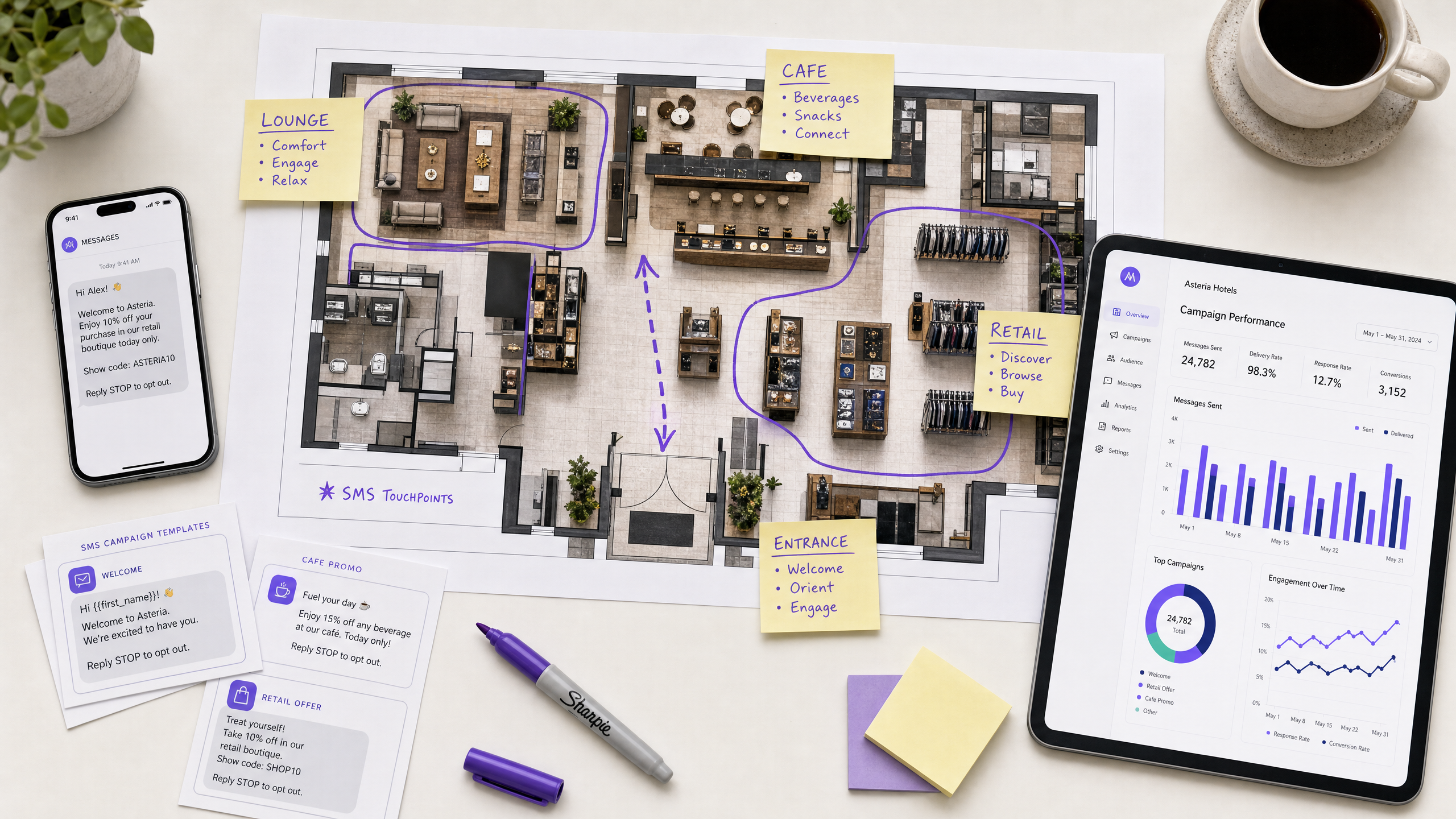
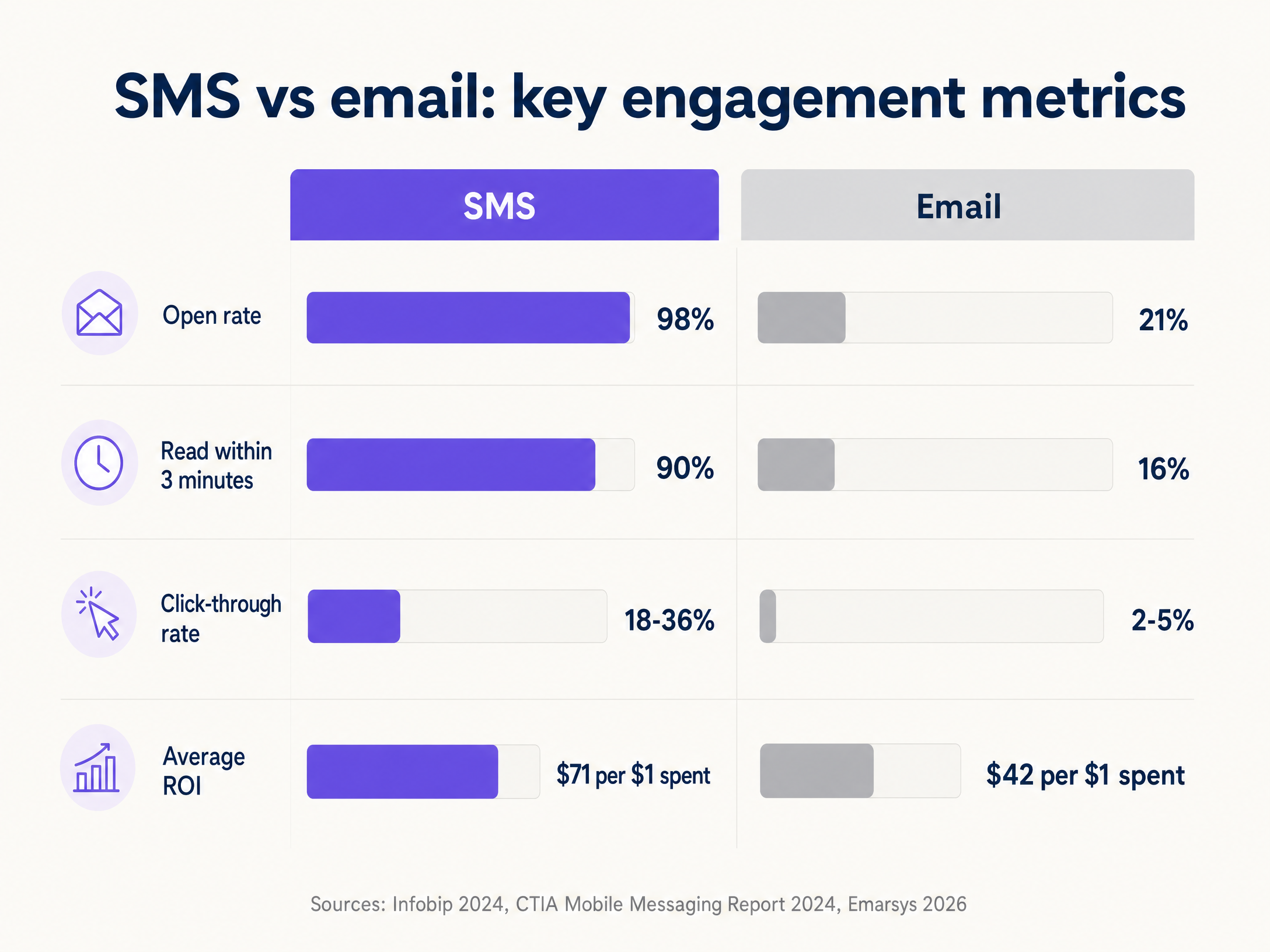
SMS marketing delivers a 98% open rate - the highest of any digital channel - with 90% of messages read within three minutes of delivery (Infobip, 2024). For venue operators, the bottleneck is not the channel itself. It is capturing verified, consented phone numbers at scale without adding friction to the visitor experience. Guest WiFi infrastructure solves this. By integrating phone number capture directly into the captive portal authentication flow, you build a first-party data pipeline that feeds automated, behaviour-based SMS campaigns through Purple Engage. This guide covers the network configuration, compliance architecture, SMS marketing samples, and segmentation logic you need to drive measurable return visits across hospitality , retail , and events environments.
Technical deep-dive
The data capture architecture
Effective SMS marketing starts with a verified phone number. The most scalable mechanism for physical venues is capturing this data through the Guest WiFi captive portal - a web page that intercepts the visitor's HTTP request and requires authentication before granting internet access.
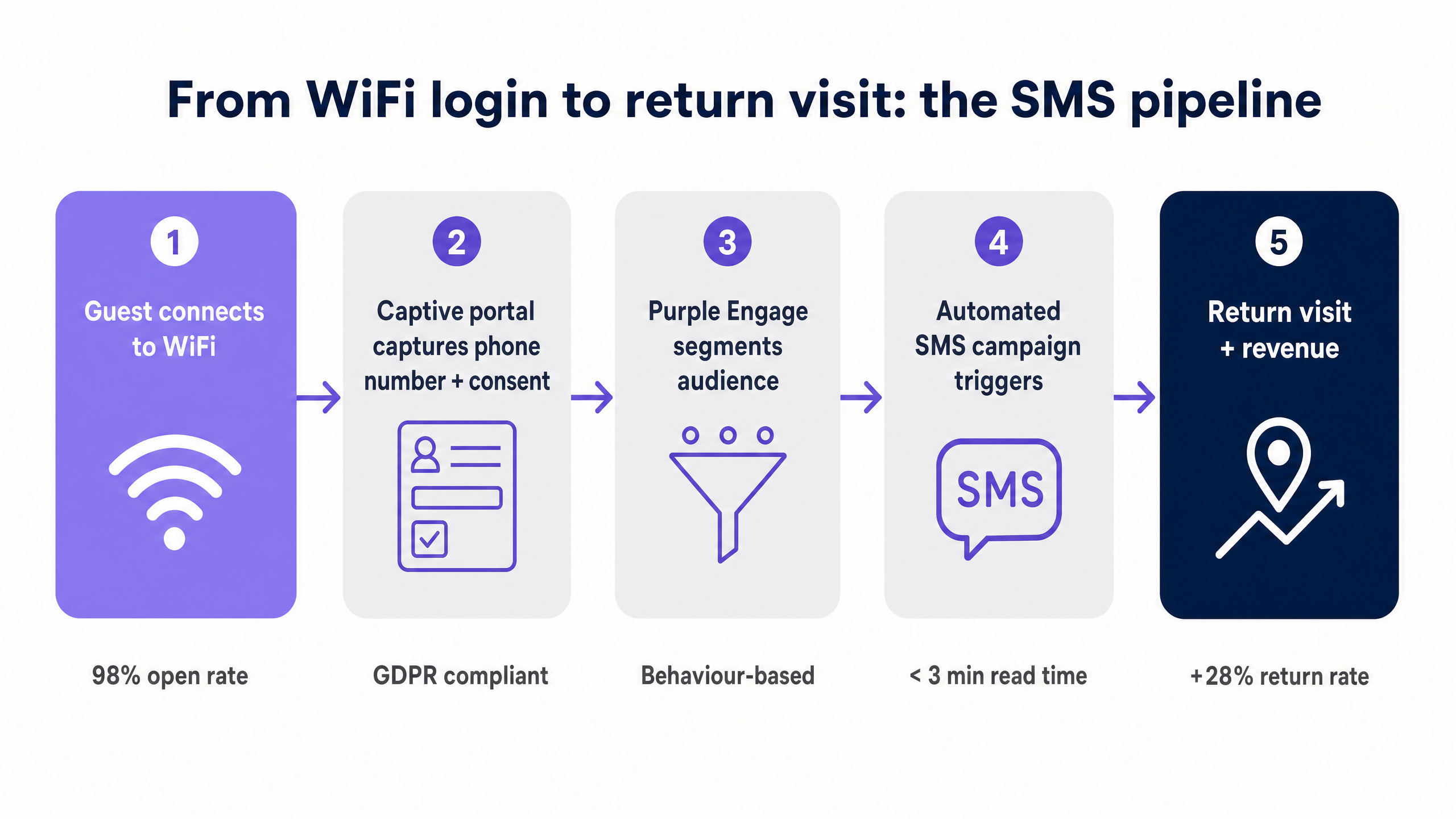
When a visitor connects to an access point running on Cisco Meraki, HPE Aruba, Ruckus, or Juniper Mist hardware, the wireless LAN controller (WLC) or cloud management dashboard redirects unauthenticated devices to a Purple-hosted splash page. The visitor enters their mobile number. The system sends a one-time passcode (OTP) via SMS. The visitor enters the code, confirms their identity, and gains network access.
This OTP verification step is non-negotiable. Without it, visitors enter invalid numbers to bypass the portal, and your CRM fills with unreachable contacts. Purple's platform enforces OTP by default, ensuring every number in the database corresponds to a real, reachable device.
| Authentication method | Data quality | Friction level | Recommended use |
|---|---|---|---|
| Social login (Facebook, Google) | High - email verified | Low | Retail, hospitality |
| Phone number + OTP | High - number verified | Medium | All verticals |
| Email only | Medium - unverified | Low | Events, conferences |
| Click-through only | Low - no identity | Very low | Free public WiFi |
Compliance and consent management
Capturing phone numbers for marketing purposes introduces obligations under GDPR (UK and EU), CCPA (California), and TCPA (United States). The captive portal must present a clear, standalone opt-in checkbox for SMS marketing - separate from the terms of service acceptance. Pre-ticked boxes are non-compliant under GDPR Article 7.
Purple records the exact timestamp, IP address, and MAC address associated with each consent action, providing an immutable audit trail. This data is stored in line with ISO 27001 controls and is accessible for regulatory review.
When a visitor texts STOP in response to any campaign, Purple immediately revokes their marketing permissions across all integrated platforms while preserving their network access profile. This separation matters: a marketing opt-out must not block a guest from the WiFi.
Network integration requirements
Deploying the capture mechanism requires three configuration steps on your wireless infrastructure:
RADIUS server configuration. Point your WLC or cloud dashboard to Purple's primary and secondary RADIUS endpoints. Purple acts as the RADIUS server, authenticating devices and passing session attributes back to the controller. This applies to Cisco Meraki, HPE Aruba, Ruckus, Juniper Mist, Ubiquiti UniFi, Cambium, Extreme Networks, and Fortinet deployments.
Walled Garden definition. A Walled Garden is a restricted network environment that allows specific domains to load before full internet access is granted. You must whitelist Purple's portal domains, the SMS gateway endpoints, and any CDN assets required to render the splash page. Without this, the device cannot receive the OTP before authentication completes - the most common deployment failure we see.
Session timeout configuration. Set session timeouts to force re-authentication at appropriate intervals. For retail environments, a four-hour timeout works well. For hotels, a 24-hour timeout aligned to check-in and check-out cycles is more appropriate. Re-authentication events allow you to update consent status and trigger new engagement workflows on subsequent visits.
Implementation guide
Step 1: Configure the network integration
Begin with a hardware audit. Confirm your access points are running firmware versions compatible with Purple's RADIUS integration. For Cisco Meraki, this requires Dashboard API access and SSID-level RADIUS configuration. For HPE Aruba, configure the Captive Portal profile in Aruba Central or AOS-CX.
Define a dedicated Guest WiFi SSID separate from your staff and IoT networks. This three-SSID architecture - Guest WiFi, Staff WiFi, and IoT - isolates marketing data capture from operational traffic. See Three SSIDs to rule them all: guest, Passpoint, and IoT WiFi for the full architecture rationale.
Step 2: Design the captive portal
The splash page design directly affects opt-in rates. A clear value exchange - "Enter your mobile number to get free WiFi and exclusive offers" - outperforms a generic login form. Purple's portal builder allows you to customise the design to match your brand, add your logo, and configure the consent language to meet local regulatory requirements.
For hospitality venues, include the property name and a brief welcome message. For retail environments, lead with the offer - "Get 10% off today when you connect to our WiFi." The opt-in rate difference between a generic portal and a branded, offer-led portal can exceed 40%, based on Purple's own data across 80,000+ live venues.
Step 3: Build the SMS marketing samples in Purple Engage
Purple Engage is Purple's marketing automation platform. It connects directly to the Guest WiFi data layer, allowing you to trigger SMS campaigns based on network events without manual list exports.
The following SMS marketing samples cover the core use cases for return visit campaigns:
Welcome message - first-time visitor Trigger: 15 minutes after initial login. Sample: "Welcome to [Venue]. Enjoy 10% off your next purchase this week. Show this text at the till. Reply STOP to opt out." Character count: 120. Single message delivery.
Lapsed visitor reactivation Trigger: 30 days since last network association. Sample: "We miss you at [Venue]. Come back this week and get a free [offer]. Show code: [CODE]. Reply STOP to opt out." Character count: 118. Single message delivery.
Post-visit follow-up Trigger: Two hours after network disassociation. Sample: "Thanks for visiting [Venue] today. Rate your experience and get 15% off your next visit: [link]. Reply STOP to opt out." Character count: 142. Single message delivery.
Event-based offer Trigger: Specific date or event flag in Purple Engage. Sample: "[Venue] VIP offer: 20% off this weekend only. Show this text at the door. Reply STOP to opt out." Character count: 100. Single message delivery.
All samples stay under 160 characters to ensure single-message delivery and avoid split-message display on older handsets.
Step 4: Segment the audience
Batch-and-blast campaigns - sending the same message to your entire database - drive opt-out rates above 5% and damage sender reputation with carriers. Segment your audience in Purple Engage using the following criteria:
| Segment | Filter criteria | Recommended campaign |
|---|---|---|
| First-time visitors | Visit count = 1 | Welcome offer |
| Frequent visitors | Visit count > 5 in 30 days | Loyalty reward |
| Lapsed visitors | Last visit > 30 days ago | Reactivation offer |
| High-dwell visitors | Dwell time > 60 minutes | Upsell or upgrade offer |
| Zone-specific visitors | Associated with specific AP group | Zone-relevant offer |
Best practices
Timing matters. Schedule SMS deliveries during peak engagement windows - late morning (10:00-11:30) and early afternoon (13:00-14:30) generate the highest click-through rates. Avoid sending messages after 20:00 or before 08:00; TCPA regulations in the US prohibit this, and GDPR's legitimate interest test is harder to satisfy outside business hours.
One message, one action. Each SMS should contain a single offer and a single call-to-action. Multiple offers in one message reduce conversion rates and increase opt-outs. If you have two offers, send two separate campaigns to two separate segments.
Test before you scale. Send campaigns to a 10% sample of the target segment first. Monitor delivery rates, opt-out rates, and conversion rates before sending to the full list. This prevents a poorly configured campaign from burning your entire database.
Personalise at the variable level. Use Purple Engage's merge fields to insert the visitor's first name, the venue name, and the specific offer code. Personalised messages generate 18.7% higher loyalty scores than generic messages, based on Purple's own platform data.
Respect frequency. No visitor should receive more than two SMS messages per month from a single venue. Purple Engage enforces configurable frequency caps at the contact level, preventing message fatigue regardless of how many campaigns are running simultaneously.
For related guidance on how your Guest WiFi experience sets the tone for these campaigns, see How to make a great first impression with your guest WiFi (and keep your brand consistent) .
Troubleshooting and risk mitigation
High opt-out rates
If opt-out rates exceed 2%, your campaigns are too frequent or irrelevant. The most common cause is poor segmentation - specifically, targeting staff members who connect to the Guest WiFi daily. Filter out devices with daily association counts exceeding eight hours of dwell time, or create a separate Staff WiFi SSID that bypasses the marketing capture flow entirely.
A secondary cause is sending the same offer repeatedly to the same contact. Check your frequency cap configuration in Purple Engage and ensure deduplication logic is active across campaign types.
Low delivery rates
Delivery failures below 90% indicate database quality issues or carrier filtering. Enable mandatory OTP verification on the captive portal to prevent invalid numbers entering the system. For existing databases captured without OTP, run a validation pass using a number verification API before sending campaigns.
Carrier filtering affects messages with excessive capitalisation, multiple special characters, or URL shorteners from shared domains. Use dedicated short codes or branded domains for links, and avoid ALL CAPS in message copy.
OTP not received
If visitors report not receiving the OTP, the Walled Garden is almost certainly misconfigured. Verify that the SMS gateway's IP ranges and domains are whitelisted on the WLC. On Cisco Meraki, check the Firewall and Traffic Shaping rules on the SSID. On HPE Aruba, review the Captive Portal whitelist in the security profile.
GDPR audit request
If you receive a Subject Access Request (SAR) or a request to demonstrate lawful basis for processing, Purple's compliance dashboard exports a full consent record for any individual contact, including the timestamp, IP address, MAC address, and the exact consent language presented at the time of opt-in.
-
ROI and business impact
SMS marketing generates up to £71 for every £1 spent, according to Infobip's 2024 channel ROI analysis. For venue operators, the relevant metric is cost-per-return-visit.
To calculate this:
- Divide the total campaign cost (messaging credits plus platform fee) by the number of return visits attributed to the campaign.
- Compare this figure against your average transaction value for return visitors.
- If the cost-per-return-visit is less than 20% of the average transaction value, the campaign is generating positive ROI.
Purple's WiFi Analytics platform attributes specific transactions to WiFi-driven SMS campaigns by matching offer codes redeemed at point-of-sale against the campaign send log. This closes the attribution loop without requiring third-party cookies or device fingerprinting.
For SMS marketing agencies looking to build these capabilities for their clients, see How to leverage SMS marketing agencies to increase return visits .
Purple operates across 80,000+ live venues with 350 million unique users and 440 million logins recorded in 2024. The platform maintains 99.999% uptime and holds ISO 27001, GDPR, CCPA, Cyber Essentials, and B Corp certification.
Key Definitions
Captive portal
A web page that intercepts a device's HTTP request and requires authentication before granting internet access. The primary mechanism for capturing guest phone numbers and marketing consent in physical venues.
IT teams configure the WLC or cloud dashboard to redirect unauthenticated devices to the Purple-hosted portal. The portal handles identity capture, OTP verification, and consent recording.
OTP verification
One-Time Passcode - a short numeric code sent via SMS to confirm that the visitor owns the phone number they provided. The code expires after a short window, typically five minutes.
Mandatory for maintaining database quality. Without OTP, visitors enter fake numbers to bypass the portal, resulting in a CRM full of invalid contacts that reduce campaign deliverability.
Walled Garden
A restricted network environment on the WLC that allows specific domains and IP ranges to load before full internet access is granted. Required to allow the Captive Portal and SMS gateway to function during authentication.
The most common deployment failure point. If the Walled Garden does not include the SMS gateway endpoints, the OTP cannot be delivered and the authentication flow breaks.
RADIUS
Remote Authentication Dial-In User Service - a networking protocol that provides centralised authentication, authorisation, and accounting for network access. Purple acts as the RADIUS server in Guest WiFi deployments.
IT teams configure the WLC to point to Purple's RADIUS endpoints. This allows Purple to authenticate devices, record session data, and pass attributes back to the controller for policy enforcement.
First-party data
Information collected directly from visitors by the venue, with their explicit consent. Phone numbers captured via Guest WiFi are first-party data, owned by the venue and not subject to third-party platform restrictions.
As third-party cookies are deprecated and social platform data access tightens, first-party data captured via Guest WiFi becomes the most valuable marketing asset a venue controls.
Dwell time
The duration a device remains associated with the Guest WiFi network during a single visit. Measured in minutes from first association to disassociation.
Used in Purple Engage to segment audiences. Visitors with dwell times above 60 minutes are more engaged and convert at higher rates on SMS offers than quick-visit contacts.
Conscious-choice opt-in
A marketing consent mechanism where the visitor actively selects a checkbox or confirms agreement, rather than having consent assumed or pre-selected. Required under GDPR Article 7.
Purple's Captive Portal presents a standalone opt-in checkbox for SMS marketing, separate from the terms of service. The consent record includes the exact language displayed at the time of opt-in.
MAC address
Media Access Control address - a unique identifier assigned to a device's network interface. Used by Purple to track device behaviour, visit frequency, and dwell time across sessions.
MAC address randomisation on iOS 14+ and Android 10+ can affect visit frequency tracking. Purple's platform handles this through probabilistic matching and session continuity logic.
Purple Engage
Purple's marketing automation platform that connects directly to the Guest WiFi data layer. Allows venue operators to build automated SMS, email, and push notification campaigns triggered by network events.
Available on Purple's Engage plan. Integrates with the Captive Portal data pipeline to trigger campaigns based on visit count, dwell time, zone association, and disassociation events.
Worked Examples
A 200-room hotel wants to increase food and beverage revenue from overnight guests who typically dine off-property. The hotel runs HPE Aruba access points and has no existing SMS marketing capability.
The IT team configures the Guest WiFi SSID on HPE Aruba Central to route authentication to Purple's RADIUS servers. The Walled Garden is defined to include Purple's portal domains and the SMS gateway IP ranges. The captive portal is branded with the hotel name and presents a clear opt-in checkbox for SMS marketing offers. OTP verification is enabled. Once the data pipeline is live, the marketing team builds a segment in Purple Engage targeting devices associated with room-zone access points between 17:00 and 20:00. An automated SMS triggers 20 minutes after association: 'Welcome to [Hotel Name]. Enjoy 15% off dinner at our restaurant tonight. Show this text to your server. Reply STOP to opt out.' The offer code is tracked at the point-of-sale system, attributing revenue directly to the campaign.
A stadium with 40,000 capacity wants to drive online merchandise sales in the 24 hours following a match. The venue runs Cisco Meraki infrastructure and already uses Purple for Guest WiFi analytics.
The venue configures a Purple Engage workflow triggered by network disassociation from the stadium WiFi SSID. When a device disconnects at the end of the event window (defined as 21:00 to 23:30 on match days), the system sends an SMS within five minutes: 'Thanks for attending tonight. Get 20% off team merchandise online for the next 24 hours with code MATCH20. Reply STOP to opt out.' The offer code is unique to the campaign and tracked in the e-commerce platform. The segment is filtered to exclude devices that connected for less than 30 minutes, removing passersby and staff. The campaign runs automatically for every home fixture without manual intervention.
Practice Questions
Q1. A retail chain with 50 stores wants to send an SMS offer to shoppers who visit a store but leave without making a purchase. The stores run Ubiquiti UniFi access points. How should the IT team configure the trigger, and what segment filter should they apply?
Hint: Consider the relationship between network disassociation, dwell time, and purchase attribution. Think about what dwell time threshold separates a browsing visit from a passer-by.
View model answer
Configure Purple Engage to trigger an SMS two hours after network disassociation, filtered to contacts with a dwell time between 15 and 90 minutes. The 15-minute floor excludes passers-by who connected briefly near the entrance. The 90-minute ceiling excludes staff. The two-hour delay allows the shopper to leave the area before the message arrives, avoiding the impression of real-time surveillance. The offer should include a unique code trackable at the point-of-sale system to close the attribution loop. On Ubiquiti UniFi, configure the RADIUS profile to point to Purple's servers and define the Walled Garden in the network settings to include Purple's portal and SMS gateway domains.
Q2. A university campus is experiencing opt-out rates of 6% on its SMS campaigns targeting students. The IT team suspects the issue is segmentation-related. What are the three most likely causes, and how should each be resolved?
Hint: Think about the different types of users on a campus network - students, staff, and visitors - and how their connection patterns differ.
View model answer
The three most likely causes are: First, staff and faculty devices are included in the student audience. Resolve by creating a separate Staff WiFi SSID that bypasses the marketing capture flow, or by filtering out devices with daily dwell times exceeding eight hours. Second, the campaign frequency is too high. Students who connect daily are receiving multiple messages per week. Resolve by setting a frequency cap of two messages per contact per month in Purple Engage. Third, the offers are not relevant to the student segment. Generic campus messages generate lower engagement than time-specific offers tied to events, exam periods, or campus services. Resolve by building event-based segments in Purple Engage aligned to the academic calendar.
Q3. During a deployment at a conference centre running Cisco Meraki, visitors report they are not receiving the OTP SMS needed to access the Guest WiFi. The Purple portal loads correctly on their devices. What is the most likely cause, and what is the resolution?
Hint: The portal loads, which means the device can reach Purple's servers. The failure is in the SMS delivery step. What network configuration controls outbound communication from the device before authentication?
View model answer
The Walled Garden is misconfigured. The portal loads because Purple's portal domain is whitelisted, but the SMS gateway's IP ranges and domains are not. The device cannot send or receive the OTP because outbound traffic to the SMS provider is blocked before authentication completes. Resolution: In Cisco Meraki Dashboard, navigate to Wireless > Access Control > Walled Garden and add the IP ranges and domains for Purple's SMS gateway. Purple's support documentation lists the specific ranges for each SMS provider. After saving the configuration, test OTP delivery on a device that has not previously authenticated to confirm the fix.