
Guest WiFi -এ Connected but No Internet ত্রুটি সমাধান করা
এই নির্ভরযোগ্য টেকনিক্যাল রেফারেন্স নির্দেশিকাটি ব্যাখ্যা করে যে কীভাবে কনজেস্টেড নেটওয়ার্কের কারণে ঘটা DNS টাইমআউট গেস্ট WiFi -এ "Connected, No Internet" ত্রুটি তৈরি করে। এটি নেটওয়ার্ক আর্কিটেক্ট এবং IT ম্যানেজারদের এই ধরনের বাধাগুলি দূর করতে এবং গেস্ট অনবোর্ডিং উন্নত করতে এন্টারপ্রাইজ DNS ফিল্টার স্থাপন করার জন্য কার্যকরী পদক্ষেপ প্রদান করে।
এই গাইডটি শুনুন
পডকাস্ট ট্রান্সক্রিপ্ট দেখুন
আমাদের মূল সিরিজের অংশ: Guest WiFi Guide →
Guest WiFi “Connected, No Internet” Root-Cause Diagnostic Tool
Select your venue deployment profile, active connection failure symptom, and wireless infrastructure vendor to calculate probe timeout risks, diagnose DNS/DHCP bottlenecks, and generate multi-vendor remediation steps.
Root-Cause Diagnostic Analysis: Captive portal login popup never appears on mobile devices
Severity: CriticalOS captive portal detection probe DNS queries exceed the 2-5 second timeout window due to upstream resolver latency or dropped UDP packets.
Devices display "Connected, No Internet" and automatically drop the connection or fail back to mobile cellular data.
Deploy a local enterprise DNS caching filter, allowlist probe domains, and ensure UDP port 53 is allowed pre-authentication.
Vendor Implementation Guide: Cisco Meraki (Meraki Dashboard)
- DNS Configuration & Resolver Tuning:Under Wireless > Configure > Access control > Addressing and traffic, set Client IP assignment to "External DHCP server" or "Bridge mode" with reliable public Anycast DNS (1.1.1.1, 8.8.8.8).
- DHCP Scope & Lease Duration:In Security & SD-WAN > Configure > Addressing & VLANs, decrease DHCP lease time on the Guest VLAN to 30 minutes to prevent scope starvation.
- Walled Garden Pre-Authentication Rules:Under Wireless > Access control > Walled garden, enable Walled garden and add: *.purple.ai and the portal hosts only. Leave the OS probe hosts (captive.apple.com, connectivitycheck.gstatic.com, msftconnecttest.com) out, or devices will think they are online.
# Meraki Dashboard Configuration:
# 1. Wireless > Configure > Access Control > Splash Page: "Sign-on splash page"
# 2. Walled Garden ranges: *.purple.ai, fonts.googleapis.com (not the OS probe hosts)
# 3. Client IP assignment: Bridge Mode (NAT mode restricts Layer 2 client isolation)
Experiencing guest WiFi onboarding failures across your venue?
Purple works with Cisco Meraki, HPE Aruba, Ruckus, Juniper Mist, Ubiquiti UniFi, Cambium, Extreme and Fortinet, and manages the pre-auth walled garden and DNS allowances that most of these failures trace back to.
এক্সিকিউটিভ সামারি
Retail, Hospitality, Healthcare, এবং Transport -এর মতো উচ্চ-ঘনত্বের স্থানগুলি তদারকিকারী CTO এবং নেটওয়ার্ক স্থপতিদের জন্য, Guest WiFi নেটওয়ার্কে "Connected, No Internet" ত্রুটিটি একটি অবিরাম অপারেশনাল মাথাব্যথা। যদিও এটি প্রায়শই AP হার্ডওয়্যার ত্রুটি বা অপর্যাপ্ত আপস্ট্রিম ব্যান্ডউইথ হিসাবে ভুল নির্ণয় করা হয়, এন্টারপ্রাইজ পরিবেশে এর মূল কারণটি সাধারণত নেটওয়ার্ক কনজেশনের কারণে DNS টাইমআউট।
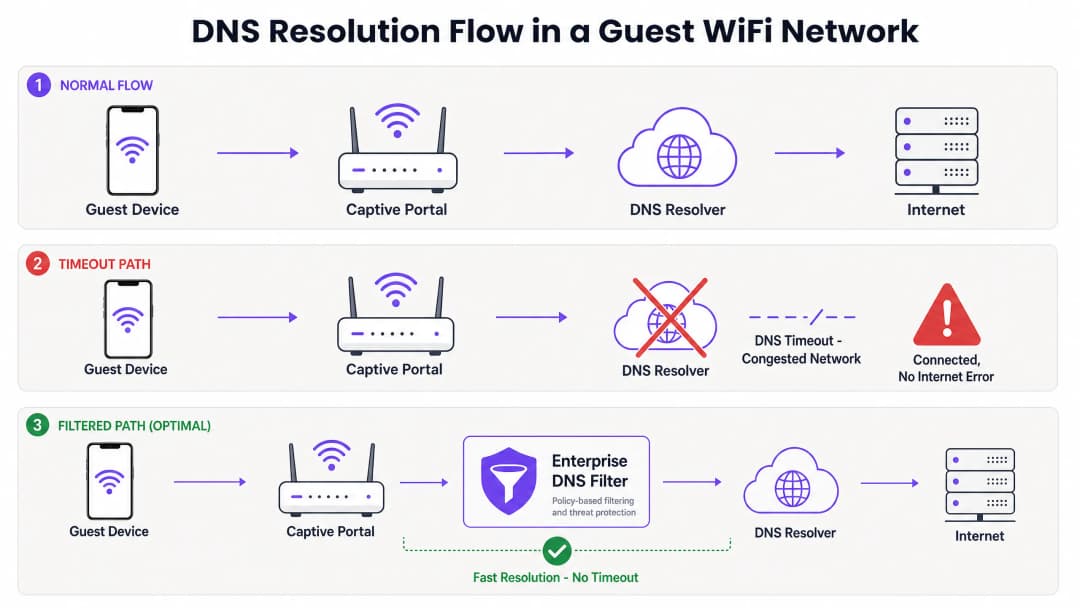
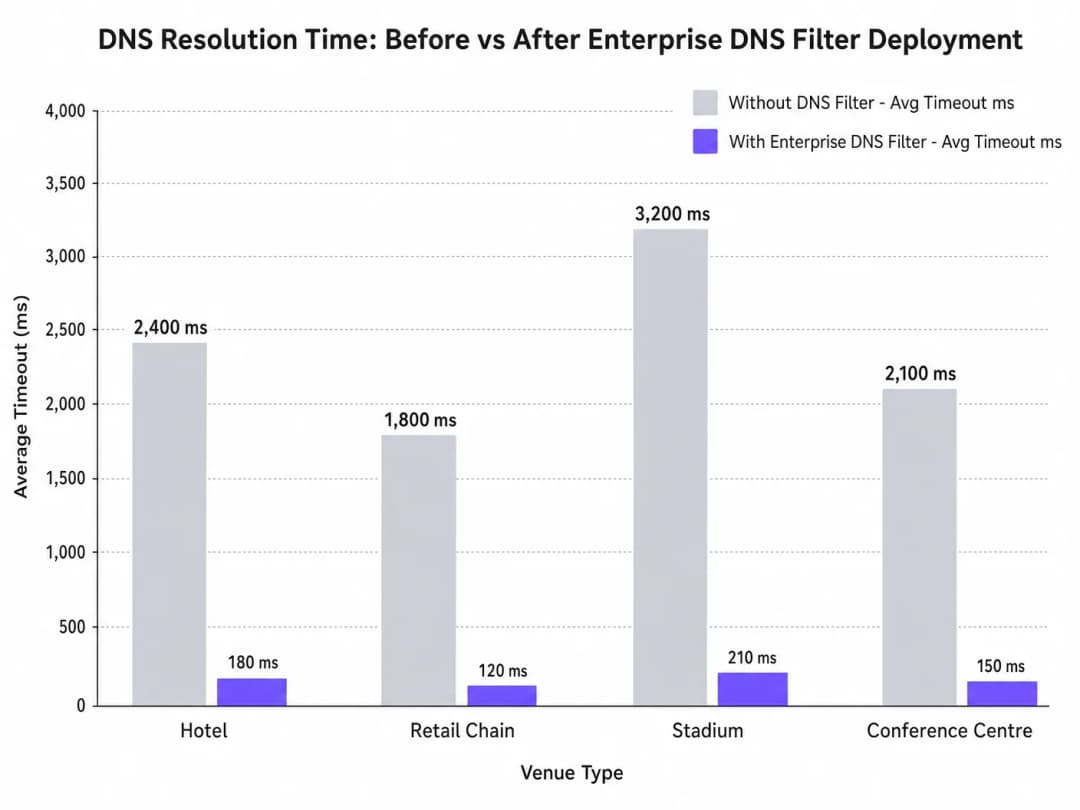
যখন শত শত ডিভাইস একসাথে Captive Portal সনাক্তকরণের (যেমন, captive.apple.com) জন্য অনুসন্ধান করে, তখন ডিফল্ট UDP পোর্ট 53 কোয়েরিগুলি স্ট্যান্ডার্ড আপস্ট্রিম রিজলভারগুলিকে অভিভূত করতে পারে। যদি DNS রেসপন্স OS-স্তরের টাইমআউট উইন্ডো (সাধারণত 1 - 5 সেকেন্ড) অতিক্রম করে, তবে ডিভাইসটি ধরে নেয় যে কোনও ইন্টারনেট সংযোগ নেই, ফলে Captive Portal ট্রিগার করতে ব্যর্থ হয়। এই নির্দেশিকাটি এই ব্যর্থতার মোডের প্রযুক্তিগত আর্কিটেকচারকে বিশদভাবে বর্ণনা করে এবং কীভাবে একটি এন্টারপ্রাইজ DNS ফিল্টার স্থাপন করা এই বাধা দূর করে, কোয়েরি লেটেন্সি হাজার হাজার মিলিসেকেন্ড থেকে কমিয়ে 200ms-এর নিচে নিয়ে আসে, IEEE 802.1X এবং GDPR-এর মতো মানগুলির সাথে সম্মতি নিশ্চিত করে, এবং গেস্ট অনবোর্ডিং অভিজ্ঞতাকে নাটকীয়ভাবে উন্নত করে তা প্রদর্শন করে।
টেকনিক্যাল ডিপ-ডাইভ
Captive Portal সনাক্তকরণ প্রক্রিয়া
যখন একটি ক্লায়েন্ট ডিভাইস একটি অ্যাক্সেস পয়েন্টের সাথে যুক্ত হয় এবং একটি DHCP লিজ পায়, তখন সম্পূর্ণ সংযুক্ত অবস্থায় স্থানান্তরিত হওয়ার আগে এটিকে অবশ্যই ইন্টারনেটের অ্যাক্সেসযোগ্যতা যাচাই করতে হবে। এটি Captive Portal সনাক্তকরণ প্রোবের মাধ্যমে অর্জন করা হয়:
- iOS/macOS:
captive.apple.com-এ HTTP GET - Android:
connectivitycheck.gstatic.com-এ HTTP GET - Windows:
msftconnecttest.com-এ HTTP GET
HTTP GET ইস্যু করার আগে, ডিভাইসটিকে অবশ্যই DNS-এর মাধ্যমে হোস্টনামটি রিজলভ করতে হবে। এই প্রাথমিক DNS কোয়েরিটিই উচ্চ-ঘনত্বের পরিবেশে সবচেয়ে জটিল ব্যর্থতার পয়েন্ট।
কেন কনজেশন DNS টাইমআউট ট্রিগার করে
DNS কোয়েরিগুলি সাধারণত UDP ব্যবহার করে, যা ট্রান্সপোর্ট-লেয়ার রিট্রান্সমিশন ছাড়াই একটি সংযোগহীন প্রোটোকল। একটি কনজেস্টেড নেটওয়ার্কে - যেমন হাফ-টাইমের সময় একটি স্টেডিয়াম বা সকালের ব্যস্ত সময়ে একটি হোটেল - UDP প্যাকেটগুলি সহজেই ড্রপ বা বিলম্বিত হয়।
যদি ভেন্যুটি কোনও স্ট্যান্ডার্ড ISP রিজলভার বা কোনও পাবলিক DNS পরিষেবার (যেমন 8.8.8.8) উপর নির্ভর করে, তবে রাউন্ড-ট্রিপ টাইম (RTT) এবং রিজলভারের প্রসেসিং টাইম মিলে OS-এর হার্ডকোড করা টাইমআউট সীমা অতিক্রম করতে পারে। যখন টাইমআউট শেষ হয়ে যায়, তখন ডিভাইসটি সংযোগটিকে "Connected, No Internet" হিসাবে চিহ্নিত করে এবং Captive Portal রিডাইরেকশন প্রক্রিয়াটি বন্ধ করে দেয়।তাছাড়া, এই প্রোব ডোমেনগুলোতে সংক্ষিপ্ত Time-To-Live (TTL) মান সমস্যাটিকে আরও বাড়িয়ে তোলে। যেহেতু ডিভাইসগুলো ক্রমাগত সংযুক্ত এবং বিচ্ছিন্ন হতে থাকে, তাই ক্যাশ করা এন্ট্রিগুলো দ্রুত শেষ হয়ে যায়, যার ফলে নেটওয়ার্কটি যখন সর্বাধিক লোডের মধ্যে থাকে ঠিক তখনই একসাথে অসংখ্য DNS কুয়েরি জমা হতে থাকে।
এন্টারপ্রাইজ DNS ফিল্টারের ভূমিকা
একটি এন্টারপ্রাইজ DNS ফিল্টার, যেমন Purple-এর WiFi Analytics প্ল্যাটফর্মে একীভূত ফিল্টারটি, একটি হাই-পারফরম্যান্স, লোকাল বা এজ-প্রক্সিমেট রিজলভার হিসেবে কাজ করে। কনজেস্টেড WAN লিঙ্ক অতিক্রম করার আগেই DNS কুয়েরিগুলোকে আটকে দিয়ে এই ফিল্টারটি: ১. উচ্চ-ফ্রিকোয়েন্সি ডোমেন ক্যাশ করে: প্রোব ডোমেনগুলোকে লোকালি পরিবেশন করে, যা RTT-কে সাব-মিলিসেকেন্ড স্তরে কমিয়ে আনে। ২. পলিসি প্রয়োগ: ক্ষতিকারক বা ব্লক করা ডোমেনগুলোর কুয়েরি তাৎক্ষণিকভাবে বাতিল করে, যা WAN ব্যান্ডউইথ সাশ্রয় করে। ৩. অডিট লগিং: IT Security-এর জন্য একটি অডিট ট্রেইল প্রদান করে, যা GDPR কমপ্লায়েন্স এবং ঘটনার প্রতিক্রিয়া জানাতে সাহায্য করে।
আপনার নির্দিষ্ট সেটআপ নিয়ে কোনো প্রশ্ন আছে?
আমাদের টিম ৮০,০০০ ভেন্যুতে ভেন্যু অপারেটর, IT ম্যানেজার এবং নেটওয়ার্ক ইঞ্জিনিয়ারদের সাথে কাজ করে। একটি ২০ মিনিটের কল বুক করুন এবং আপনার মতো অন্যরা কীভাবে এর সমাধান করেছেন তা আমরা আপনাকে দেখাব।
ইমপ্লিমেন্টেশন গাইড
একটি এন্টারপ্রাইজ DNS ফিল্টার ডেপ্লয় করার জন্য সতর্ক আর্কিটেকচারাল পরিকল্পনার প্রয়োজন যাতে কোনো নতুন পয়েন্ট অফ ফেইলিউর তৈরি না হয়।
১. রিজলভার প্লেসমেন্ট এবং লেটেন্সি অপ্টিমাইজেশন
DNS ফিল্টারটিকে নেটওয়ার্ক এজের যতটা সম্ভব কাছাকাছি ডেপ্লয় করুন। ডিস্ট্রিবিউটেড রিটেল চেইনগুলোর জন্য, একটি ক্লাউড-ডেলিভার্ড এজ নোড উপযুক্ত; স্টেডিয়ামের মতো বড় একক-সাইট ভেন্যুগুলোর জন্য, কোর সুইচে একটি লোকাল অ্যাপ্লায়েন্স বা ভার্চুয়াল মেশিন পছন্দনীয়। লক্ষ্য হলো গেস্ট VLAN এবং রিজলভারের মধ্যে রাউটিং হপ-এর সংখ্যা কমিয়ে আনা।
২. Captive Portal হোয়াইটলিস্টিং (পাসথ্রু)
সবচেয়ে গুরুত্বপূর্ণ কনফিগারেশন ধাপ হলো আপনার captive portal ডোমেনটি স্পষ্টভাবে হোয়াইটলিস্ট করা নিশ্চিত করা। যদি DNS ফিল্টারটি অথেন্টিকেশন পোর্টালের রেজোলিউশন বিলম্বিত বা ব্লক করে, তবে আপনি ঠিক সেই সমস্যাটিই তৈরি করবেন যা আপনি সমাধান করার চেষ্টা করছেন।
৩. TTL টিউনিং এবং ক্যাশ ম্যানেজমেন্ট
Captive portal প্রোব ডোমেনগুলোকে অ্যাগ্রেসিভভাবে ক্যাশ করার জন্য লোকাল রিজলভার কনফিগার করুন। যদিও আপস্ট্রিম TTL মান্য করা একটি সাধারণ নিয়ম, তবুও লোকালি captive.apple.com এবং অনুরূপ ডোমেনগুলোর জন্য TTL ন্যূনতম ৬০ সেকেন্ডে ওভাররাইড করলে পিক অ্যাসোসিয়েশন ইভেন্টগুলোর সময় আপস্ট্রিম কুয়েরির পরিমাণ মারাত্মকভাবে হ্রাস পেতে পারে।
৪. বিদ্যমান অবকাঠামোর সাথে একীভবন
নিশ্চিত করুন যে DNS ফিল্টার ডেপ্লয়মেন্ট আপনার বিদ্যমান নেটওয়ার্ক সেগমেন্টেশনের সাথে সামঞ্জস্যপূর্ণ। PCI DSS কমপ্লায়েন্স বজায় রাখতে গেস্ট DNS ট্রাফিককে অবশ্যই কর্পোরেট DNS অবকাঠামো থেকে বিচ্ছিন্ন রাখতে হবে। এই আইসোলেশন অত্যন্ত গুরুত্বপূর্ণ, তা আপনি ব্যবসায়িক ভ্রমণকারীদের জন্য হোটেলের WiFi অপ্টিমাইজ করছেন বা কোনো পাবলিক সেক্টর ডেপ্লয়মেন্ট সুরক্ষিত করছেন।
এই ইমপ্লিমেন্টেশন ধাপগুলো সম্পর্কে আরও বিশদ জানতে আমাদের টেকনিক্যাল ব্রিফিং পডকাস্টটি শুনুন:
সর্বোত্তম অনুশীলনসমূহ
- গেস্ট নেটওয়ার্কের জন্য পাবলিক রিজলভার এড়িয়ে চলুন: হাই-ডেনসিটি গেস্ট নেটওয়ার্কের জন্য প্রাথমিক DHCP-অ্যাসাইনড DNS হিসেবে 8.8.8.8 বা 1.1.1.1 এর উপর নির্ভর করা অগ্রহণযোগ্য লেটেন্সি বৈচিত্র্য তৈরি করে।
- সতর্কতার সাথে DNS over HTTPS (DoH) প্রয়োগ করুন: DoH গোপনীয়তা উন্নত করলেও, এটি সনাতন পোর্ট 53 ফিল্টারিং বাইপাস করে। ভেন্যু পলিসির প্রয়োজন হলে আপনার এন্টারপ্রাইজ DNS সলিউশন যেন DoH ট্রাফিক পরীক্ষা বা পরিচালনা করতে পারে তা নিশ্চিত করুন।
- UDP পোর্ট 53 ড্রপস মনিটর করুন: অতিরিক্ত UDP পোর্ট 53 প্যাকেট ড্রপ হলে সতর্ক করার জন্য আপনার ফায়ারওয়াল বা কোর সুইচ কনফিগার করুন, যা সম্ভাব্য DNS টাইমআউটের একটি প্রধান নির্দেশক।
- নিয়মিত ব্লক তালিকা পর্যালোচনা করুন: অতিরিক্ত আগ্রাসী ফিল্টারিং বৈধ অ্যাপ্লিকেশনগুলোকে ব্যাহত করতে পারে। ভুল পজিটিভ সনাক্ত করতে প্রতি সপ্তাহে DNS কোয়েরি লগ পর্যালোচনা করুন।
পাবলিক সেক্টর ডেপ্লয়মেন্টের জন্য, শক্তিশালী কানেক্টিভিটি নিশ্চিত করা বৃহত্তর ডিজিটাল অন্তর্ভুক্তি উদ্যোগের অংশ, যেমনটি সম্প্রতি হাইলাইট করা হয়েছে যখন Purple Appoints Iain Fox as VP Growth – Public Sector প্রকাশিত হয়।
ট্রাবলশুটিং এবং ঝুঁকি হ্রাসকরণ
যখন "Connected, No Internet" ত্রুটিটি ঘটে, তখন আইটি টিমের সরাসরি ব্যান্ডউইথ শেষ হয়ে গেছে বলে ধরে না নিয়ে একটি সুনির্দিষ্ট ডায়াগনস্টিক পথ অনুসরণ করা উচিত।
- প্যাকেট ক্যাপচার (PCAP):
udp port 53ফিল্টার করে গেস্ট VLAN-এ একটি প্যাকেট ক্যাপচার রান করুন। একটি 2-সেকেন্ডের উইন্ডোর মধ্যে সংশ্লিষ্ট রেসপন্স ছাড়া কোয়েরিগুলো খুঁজুন। - প্রোব সিমুলেট করুন: গেস্ট VLAN-এর একটি টেস্ট ডিভাইস থেকে
http://captive.apple.com/hotspot-detect.html-এ ম্যানুয়ালি হিট করতেcurlবাwgetব্যবহার করুন। HTTP রেসপন্স টাইমের বিপরীতে DNS রেজোলিউশন টাইম পরিমাপ করুন। - ফায়ারওয়াল নিয়ম পরীক্ষা করুন: নিশ্চিত করুন যে গেস্ট সাবনেট থেকে আসা UDP পোর্ট 53 ট্রাফিকের ক্ষেত্রে কোনো রেট-লিমিটিং বা QoS পলিসি অসাবধানতাবশত বাধা সৃষ্টি করছে না।
- অফলাইন সক্ষমতা যাচাই করুন: মাঝে মাঝে ব্যাহত হওয়া WAN কানেক্টিভিটি সম্পন্ন পরিবেশে, আপস্ট্রিম ইন্টারনেট বিঘ্নিত হলেও ব্যবহারকারীর সাথে যোগাযোগ বজায় রাখতে Purple's Offline Maps Mode এর মতো ফিচারগুলো বিবেচনা করুন।
ROI এবং ব্যবসায়িক প্রভাব
DNS টাইমআউট সমস্যার সমাধান সরাসরি ভেন্যু অপারেটরদের আয়ের উপর প্রভাব ফেলে।
- সাপোর্ট ওভারহেড হ্রাস: হসপিটালিটি এবং রিটেল ক্ষেত্রে "Connected, No Internet" ত্রুটিটি লেভেল 1 সাপোর্ট টিকেটের অন্যতম প্রধান কারণ। এটি দূর করলে আইটি অপারেশনাল খরচ কমে যায়।
- ডেটা ক্যাপচার বৃদ্ধি: একটি ব্যর্থ Captive Portal লোড মানে ডেটা ক্যাপচার এবং ব্যবহারকারী অথেনটিকেশনের সুযোগ হারানো। দ্রুত পোর্টাল রেন্ডারিং নিশ্চিত করার মাধ্যমে, ভেন্যুগুলো তাদের WiFi Analytics প্ল্যাটফর্মের ROI সর্বাধিক করতে পারে।
- উন্নত গেস্ট সন্তুষ্টি: নির্বিঘ্ন কানেক্টিভিটি একটি প্রাথমিক প্রত্যাশা। অনবোর্ডিংয়ের জটিলতা কমানো সরাসরি উন্নত নেট প্রমোটার স্কোর (NPS) এবং ইতিবাচক ভেন্যু রিভিউয়ের সাথে সম্পর্কিত।"আমাদের আরও ব্যান্ডউইথ প্রয়োজন" এই দৃষ্টিকোণ থেকে "আমাদের অপ্টিমাইজড DNS রেজোলিউশন প্রয়োজন"-এ স্থানান্তরিত করে, নেটওয়ার্ক স্থপতিরা এন্টারপ্রাইজ-গ্রেডের গেস্ট WiFi সরবরাহ করতে পারেন যা চাপের মধ্যেও মসৃণভাবে স্কেল করে।
মূল সংজ্ঞাসমূহ
Captive Portal Detection Probe
একটি মোবাইল OS দ্বারা নেটওয়ার্ক অ্যাসোসিয়েশনের সাথে সাথেই পাঠানো একটি স্বয়ংক্রিয় HTTP অনুরোধ (যেমন captive.apple.com -এ) যার মাধ্যমে একটি লগইন পেজ প্রয়োজন কিনা তা নির্ধারণ করা হয়।
DNS টাইমআউটের কারণে যদি এই প্রোবটি ব্যর্থ হয়, তবে OS ধরে নেয় যে কোনো ইন্টারনেট অ্যাক্সেস নেই এবং ত্রুটিটি দেখায়।
DNS Timeout
এমন একটি ঘটনা যেখানে ক্লায়েন্ট ডিভাইস একটি DNS কোয়েরি বাতিল করে দেয় কারণ রিজলভারটি প্রতিক্রিয়া জানাতে অনেক বেশি সময় নিয়েছে (সাধারণত ২ - ৫ সেকেন্ডের বেশি)।
উচ্চ-ঘনত্বের পরিবেশে "Connected, No Internet" ত্রুটির প্রধান প্রযুক্তিগত কারণ।
Enterprise DNS Filter
একটি ডেডিকেটেড DNS রিজলভার যা স্থানীয়ভাবে কোয়েরি ক্যাশ করে এবং ক্ষতিকারক বা অবাঞ্ছিত ডোমেনগুলিতে অ্যাক্সেস প্রতিরোধ করতে পলিসি-ভিত্তিক ব্লকিং প্রয়োগ করে।
কনজেস্টেড আপস্ট্রিম রিজলভার থেকে কোয়েরির চাপ কমাতে এবং লেটেন্সি হ্রাস করতে ব্যবহৃত হয়।
UDP Port 53
DNS কোয়েরির জন্য ব্যবহৃত স্ট্যান্ডার্ড কানেকশনলেস ট্রান্সপোর্ট প্রোটোকল এবং পোর্ট।
যেহেতু UDP-তে কোনো নিশ্চিত ডেলিভারি নেই, তাই নেটওয়ার্ক কনজেশনের সময় DNS প্যাকেটগুলি সহজেই ড্রপ হয়ে যায়।
Time-To-Live (TTL)
একটি DNS রেকর্ডের মান যা নির্দেশ করে যে পুনরায় কোয়েরি করার আগে একটি রিজলভার বা ক্লায়েন্ট কতক্ষণ IP অ্যাড্রেসটি ক্যাশ করে রাখবে।
প্রোব ডোমেনগুলিতে সংক্ষিপ্ত TTL ঘন ঘন পুনরায় কোয়েরি করার কারণ হয়, যা কনজেশনকে আরও বাড়িয়ে তোলে।
IEEE 802.1X
পোর্ট-ভিত্তিক নেটওয়ার্ক অ্যাক্সেস কন্ট্রোল (PNAC) এর জন্য একটি স্ট্যান্ডার্ড যা LAN বা WLAN -এ যুক্ত হতে চাওয়া ডিভাইসগুলির জন্য একটি অথেনটিকেশন মেকানিজম প্রদান করে।
নিরাপদ হলেও, 802.1X পরিবেশ পোস্ট-অথেনটিকেশন রাউটিংয়ের জন্য এখনও শক্তিশালী DNS পরিকাঠামোর ওপর নির্ভর করে।
Local Internet Breakout
ইন্টারনেট-গামী ট্রাফিককে একটি কেন্দ্রীয় ডেটা সেন্টারে ব্যাকহল করার পরিবর্তে সরাসরি কোনো ব্রাঞ্চ লোকেশন থেকে ইন্টারনেটে রাউট করা।
ডিস্ট্রিবিউটেড রিটেইল বা হসপিটালিটি নেটওয়ার্কগুলিতে DNS লেটেন্সি কমানোর জন্য অত্যন্ত গুরুত্বপূর্ণ।
WPA3
সর্বাধুনিক WiFi নিরাপত্তা স্ট্যান্ডার্ড যা ওপেন এবং পাসওয়ার্ড-সুরক্ষিত নেটওয়ার্কের জন্য উন্নত এনক্রিপশন প্রদান করে।
WPA3 নিরাপত্তা উন্নত করে কিন্তু মৌলিক DNS রেজোলিউশন পাথ পরিবর্তন করে না বা টাইমআউট সমস্যাগুলি হ্রাস করে না।
সমাধানকৃত উদাহরণসমূহ
একটি ৪০০ রুমের হোটেলে প্রতিদিন সকাল ৭:৩০ থেকে ৮:৩০ এর মধ্যে যখন গেস্টরা ঘুম থেকে উঠে WiFi -এর সাথে কানেক্ট করে, তখন "Connected, No Internet" অভিযোগের তীব্র বৃদ্ধি ঘটে। এই সময়ে ১Gbps WAN লিঙ্কটি মাত্র ৪০% ব্যবহার প্রদর্শন করে।
১. সকালের পিক টাইমে UDP port 53 ফিল্টার করে গেস্ট VLAN -এ একটি প্যাকেট ক্যাপচার রান করুন। ২. চিহ্নিত করুন যে captive portal প্রোব ডোমেনগুলির (যেমন captive.apple.com) DNS কোয়েরি সমাধান করতে ISP -এর ডিফল্ট DNS এর মাধ্যমে ৩০০০ms -এর বেশি সময় লাগছে। ৩. গেস্ট সাবনেটে একটি লোকাল এন্টারপ্রাইজ DNS ফিল্টার স্থাপন করুন। ৪. গেস্ট ডিভাইসগুলিতে লোকাল DNS ফিল্টার IP অ্যাসাইন করার জন্য DHCP সার্ভার কনফিগার করুন। ৫. ফিল্টারে হোটেলের captive portal ডোমেনটি হোয়াইটলিস্ট করুন। ৬. রেজোলিউশন টাইম মনিটর করুন, যা ৫০ms -এর নিচে নেমে আসা উচিত।
একটি বড় রিটেইল চেইন ৫০টি স্টোর জুড়ে একটি নতুন গেস্ট WiFi নেটওয়ার্ক চালু করেছে, কিন্তু বেশি ভিড় থাকা ফ্ল্যাগশিপ স্টোরগুলির ব্যবহারকারীরা captive portal লোড করতে পারছেন না, অথচ ছোট স্টোরগুলির ব্যবহারকারীদের কোনো সমস্যা হচ্ছে না।
১. আর্কিটেকচার বিশ্লেষণ করুন: সবকটি ৫০টি স্টোরই গেস্ট ট্রাফিক একটি সেন্ট্রাল ডেটা সেন্টার ফায়ারওয়ালে টানেল করছে, যা পরবর্তীতে একটি পাবলিক রিজলভারের কাছে DNS কোয়েরি পাঠায়। ২. বেশি ভিড় থাকা স্টোরগুলিতে, সমসাময়িক অ্যাসোসিয়েশন ইভেন্টের বিপুল পরিমাণ সেন্ট্রাল ফায়ারওয়ালের NAT/PAT স্টেট টেবিল শেষ করে দেয়, যার ফলে UDP port 53 প্যাকেটগুলি ড্রপ হয়ে যায়। ৩. একটি ক্লাউড-ডেলিভার্ড এন্টারপ্রাইজ DNS ফিল্টার প্রয়োগ করুন। ৪. লোকাল ব্রাঞ্চ রাউটারগুলিকে ডেটা সেন্টারে ব্যাকহল করার পরিবর্তে সরাসরি লোকাল ইন্টারনেট ব্রেকআউটের মাধ্যমে ক্লাউড ফিল্টারে গেস্ট DNS কোয়েরি ফরোয়ার্ড করার জন্য পুনরায় কনফিগার করুন।
অনুশীলনী প্রশ্নসমূহ
Q1. একটি স্টেডিয়ামের IT ডিরেক্টর লক্ষ্য করেছেন যে হাফ-টাইমের সময় হাজার হাজার ব্যবহারকারী WiFi-এ কানেক্ট করলেও captive portal-এ পৌঁছাতে ব্যর্থ হচ্ছেন। কোর সুইচটি ভারী UDP প্যাকেট ড্রপ প্রদর্শন করছে। তাদের কি WAN ব্যান্ডউইথ 2Gbps থেকে বাড়িয়ে 5Gbps করা উচিত?
ইঙ্গিত: কোন প্রোটোকলটি ড্রপ হচ্ছে এবং এটি পে-লোড ব্যান্ডউইথ নাকি কানেকশন স্টেট লিমিটের সাথে সম্পর্কিত তা বিবেচনা করুন।
মডেল উত্তর দেখুন
না। WAN ব্যান্ডউইথ বাড়ালে সমস্যার সমাধান হবে না। UDP প্যাকেট ড্রপ নির্দেশ করে যে ফায়ারওয়াল বা রিজলভার একই সাথে আসা বিশাল পরিমাণের DNS কুয়েরি হ্যান্ডেল করতে পারছে না (স্টেট টেবিল এক্সহশন বা CPU লিমিট)। সঠিক পদ্ধতি হলো এজ-এ একটি উচ্চ-ক্ষমতাসম্পন্ন লোকাল DNS ফিল্টার স্থাপন করা যাতে এই কুয়েরিগুলি স্থানীয়ভাবে ক্যাশ এবং রেসপন্স করা যায়, যা সম্পূর্ণভাবে WAN বোতলনেককে বাইপাস করে।
Q2. আপনি এইমাত্র একটি হোটেল গেস্ট নেটওয়ার্কে একটি এন্টারপ্রাইজ DNS ফিল্টার স্থাপন করেছেন। গেস্টরা এখন দ্রুত পাবলিক ওয়েবসাইটগুলি রেজলভ করতে পারছেন, কিন্তু যখন তারা প্রথম কানেক্ট করছেন, তখন তারা হোটেলের লগইন পেজে রিডাইরেক্ট হচ্ছেন না। সবচেয়ে সম্ভাব্য কনফিগারেশন ত্রুটি কোনটি?
ইঙ্গিত: লগইন পেজের নিজস্ব ডোমেন নাম সম্পর্কে চিন্তা করুন।
মডেল উত্তর দেখুন
সবচেয়ে সম্ভাব্য ত্রুটি হলো captive portal-এর নিজস্ব ডোমেনটি DNS ফিল্টারে স্পষ্টভাবে হোয়াইটলিস্ট (পাসথ্রু) করা হয়নি। ফিল্টারটি পোর্টাল URL-এর রেজোলিউশন ব্লক বা বিলম্বিত করছে, যার ফলে রিডাইরেকশন সম্পন্ন হতে পারছে না।
Q3. একটি পাবলিক সেক্টর অর্গানাইজেশনের নিরাপত্তা নীতি মেনে চলার জন্য সমস্ত গেস্ট WiFi ট্রাফিক ৯০ দিনের জন্য লগ করা প্রয়োজন। একটি এন্টারপ্রাইজ DNS ফিল্টার স্থাপন করা কীভাবে এই প্রয়োজনীয়তায় সহায়তা করে?
ইঙ্গিত: একটি স্ট্যান্ডার্ড ফায়ারওয়ালের তুলনায় একটি DNS ফিল্টার কী ধরণের ডেটা প্রসেস করে তা বিবেচনা করুন।
মডেল উত্তর দেখুন
একটি এন্টারপ্রাইজ DNS ফিল্টার ক্লায়েন্ট ডিভাইসগুলির দ্বারা করা সমস্ত DNS কুয়েরি নেটিভভাবে লগ করে। এটি কোন ডোমেনগুলি কখন অনুরোধ করা হয়েছিল তার একটি স্পষ্ট, অনুসন্ধানযোগ্য অডিট ট্রেইল সরবরাহ করে, যা সমস্ত এনক্রিপ্টেড HTTPS পে-লোড ট্রাফিকের উপর ডিপ প্যাকেট ইন্সপেকশন করার প্রয়োজন ছাড়াই ৯০ দিনের লগিংয়ের প্রয়োজনীয়তা পূরণ করে।
প্রায়শই জিজ্ঞাসিত প্রশ্নাবলী
Why does guest WiFi say connected but no internet?
The 'Connected, No Internet' status occurs when a client device associates with an access point and receives an IP address, but its operating system detection probe fails to reach the internet. On guest WiFi networks, this is most commonly caused by DNS query timeouts on captive portal detection domains (such as captive.apple.com or connectivitycheck.gstatic.com), DHCP lease scope exhaustion, or firewalls blocking pre-authentication DNS traffic.
How do captive portal detection probes work on guest WiFi across iOS, Android, and Windows?
When connecting to an open or guest WiFi SSID, modern operating systems immediately transmit plaintext HTTP probe requests to vendor test URLs (iOS uses captive.apple.com/hotspot-detect.html, Android queries connectivitycheck.gstatic.com/generate_204, and Windows tests msftconnecttest.com/connecttest.txt). If the network returns an HTTP 200/204, the OS marks the connection as having internet. If it receives an HTTP 302 redirect, it launches the captive portal browser. If the initial DNS query for the probe domain times out, the OS reports 'Connected, No Internet' and drops the link.
How do DNS timeouts trigger guest WiFi connection drops?
In high-density environments, hundreds of devices query upstream DNS resolvers simultaneously over UDP port 53. If the local guest WiFi network forwards raw queries directly to rate-limited ISP resolvers without caching, response latency spikes above 2,000ms. Mobile devices enforce strict 2- to 5-second probe timeouts. Once that threshold is exceeded, the device assumes the network is broken and abandons the connection before the splash page can load.
What walled garden domains must be allowed before guest WiFi captive portal login?
Pre-authentication access control lists (walled gardens) on guest WiFi networks must permit outbound UDP and TCP port 53 to your designated DNS resolvers, DHCP transactions (UDP 67/68), and OS detection probes (captive.apple.com, connectivitycheck.gstatic.com, msftconnecttest.com). If using external captive portal hosting, CDN styling, or social login, you must also allow your portal domain (*.purple.ai), Google Fonts (fonts.googleapis.com), and OAuth endpoints.
How does DHCP pool exhaustion cause connected without internet errors on guest WiFi?
When venues configure long DHCP lease durations (such as 24 hours) on guest WiFi in environments with rapid visitor turnover, the pool of available IP addresses quickly runs out. New arrivals may associate with the access point via 802.11 beacons, but fail to receive a valid DHCPOFFER or default gateway, receiving a self-assigned 169.254.x.x APIPA address instead. Shortening lease times to 30 to 60 minutes and configuring dynamic VLAN pooling prevents scope starvation.
How does Purple prevent captive portal and DNS timeout failures on guest WiFi?
Purple acts as a resilient, hardware-agnostic guest WiFi management platform across Cisco Meraki, HPE Aruba, Ruckus, Ubiquiti UniFi, and Fortinet architectures. By optimizing captive portal redirection flows, automating walled garden rules, and integrating with high-speed Anycast DNS, Purple ensures detection probes succeed instantly, onboarding visitors in under 3 seconds without connection drops.
এই সিরিজে পড়া চালিয়ে যান
ধীরগতির WiFi কর্মক্ষমতা নির্ণয় করতে প্যাকেট ক্যাপচার (PCAP) ব্যবহার করা
এই টেকনিক্যাল রেফারেন্স গাইডটি IT ম্যানেজার, নেটওয়ার্ক আর্কিটেক্ট এবং ভেন্যু অপারেশনস ডিরেক্টরদের প্যাকেট ক্যাপচার (PCAP) বিশ্লেষণের মাধ্যমে ধীরগতির এন্টারপ্রাইজ WiFi কর্মক্ষমতা নির্ণয় এবং সমাধান করার জন্য একটি কাঠামোগত, প্যাকেট-স্তরের পদ্ধতি প্রদান করে। রিট্রান্সমিশন রেট, এয়ারটাইম ব্যবহার এবং ফিজিক্যাল লেয়ার মেটাডেটা সহ র 802.11 ফ্রেমগুলি ব্যবচ্ছেদ করে টিমগুলি নিখুঁতভাবে তারযুক্ত বা অ্যাপ্লিকেশন সমস্যা থেকে RF-লেয়ারের বাধাগুলিকে আলাদা করতে পারে। হোটেল, রিটেল চেইন, স্টেডিয়াম এবং কনফারেন্স সেন্টার সহ উচ্চ-ঘনত্বের ভেন্যুগুলিতে প্রযোজ্য এই গাইডটি নেটওয়ার্কের ক্ষমতা পুনরুদ্ধার করতে এবং গেস্টদের অভিজ্ঞতা সুরক্ষিত করতে কার্যকর ডায়াগনস্টিক ওয়ার্কফ্লো, বাস্তব-ক্ষেত্রের কেস স্টাডি এবং কনফিগারেশন প্রতিকারের পদক্ষেপগুলি সরবরাহ করে।
কেন আপনার স্টেডিয়ামের WiFi স্থবির হয়ে পড়ে (এবং কীভাবে এটি সমাধান করবেন)
এই নির্ভরযোগ্য প্রযুক্তিগত নির্দেশিকাটি স্টেডিয়াম WiFi কনজেশনের মূল কারণ পরীক্ষা করে — ৫০,০০০ ডিভাইসের একসাথে প্রোগ্রাম্যাটিক বিজ্ঞাপন এবং টেলিমেট্রি লোড করার ব্যাকগ্রাউন্ড চ্যাটার — এবং প্রাথমিক প্রশমন কৌশল হিসেবে edge DNS ফিল্টারিং স্থাপনের জন্য একটি বিস্তারিত আর্কিটেকচারাল ব্লুপ্রিন্ট প্রদান করে। IT পরিচালক, CTO এবং নেটওয়ার্ক আর্কিটেক্টদের জন্য ডিজাইন করা এই নির্দেশিকাটি বাস্তবায়নযোগ্য নির্দেশিকা, বাস্তব-জগতের কেস স্টাডি এবং পরিমাপযোগ্য ROI ফ্রেমওয়ার্ক সরবরাহ করে যাতে ভেন্যু অপারেটররা ব্যান্ডউইথ পুনরুদ্ধার করতে পারেন এবং স্কেলে উচ্চ-ক্ষমতাসম্পন্ন সংযোগ প্রদান করতে পারেন।
আমাদের গেস্ট WiFi এত ধীরগতির কেন? নেটওয়ার্ক কনজেশন নির্ণয় করা
এই গাইডটি গেস্ট WiFi কনজেশনের লুকানো চালকগুলো নির্ণয় করে - ব্যাকগ্রাউন্ড টেলিমেট্রি, প্রোগ্রাম্যাটিক অ্যাড নেটওয়ার্ক এবং স্বয়ংক্রিয় OS আপডেট - যা সম্মিলিতভাবে একজন গেস্ট ব্রাউজার খোলার আগেই পাবলিক WiFi ব্যান্ডউইথের ৪০% পর্যন্ত গ্রাস করে। এটি DNS ফিল্টারিং এবং QoS পলিসিগুলোর জন্য একটি পর্যায়ভিত্তিক, ভেন্ডর-নিরপেক্ষ বাস্তবায়ন ফ্রেমওয়ার্ক প্রদান করে যা সেই ব্যান্ডউইথ পুনরুদ্ধার করে, গেস্ট অভিজ্ঞতা উন্নত করে এবং পরিমাপযোগ্য ROI প্রদান করে। এটি হসপিটালিটি, রিটেইল, ইভেন্ট এবং পাবলিক-সেক্টর পরিবেশের IT ডিরেক্টর এবং অপারেশন ম্যানেজারদের লক্ষ্য করে তৈরি।
আপনার নির্দিষ্ট সেটআপ নিয়ে কোনো প্রশ্ন আছে?
আমাদের টিম ৮০,০০০ ভেন্যুতে ভেন্যু অপারেটর, IT ম্যানেজার এবং নেটওয়ার্ক ইঞ্জিনিয়ারদের সাথে কাজ করে। একটি ২০ মিনিটের কল বুক করুন এবং আপনার মতো অন্যরা কীভাবে এর সমাধান করেছেন তা আমরা আপনাকে দেখাব।