
বিশ্ববিদ্যালয় WiFi: কীভাবে একটি ক্যাম্পাস-ব্যাপী ওয়্যারলেস নেটওয়ার্ক তৈরি করবেন
এই বিস্তৃত গাইডটি সিনিয়র আইটি পেশাদারদের একটি শক্তিশালী ক্যাম্পাস-ব্যাপী ওয়্যারলেস নেটওয়ার্ক ডিজাইন, স্থাপন এবং পরিচালনার জন্য কার্যকর কৌশল সরবরাহ করে। এতে হায়ারার্কিক্যাল নেটওয়ার্ক আর্কিটেকচার, সিকিউরিটি স্ট্যান্ডার্ড (IEEE 802.1X, WPA3, GDPR) এবং উচ্চশিক্ষা পরিবেশে ROI বাড়াতে কীভাবে অ্যানালিটিক্স ব্যবহার করা যায় তা আলোচনা করা হয়েছে। আপনি পুরোনো অবকাঠামো আপগ্রেড করছেন বা নতুন করে তৈরি করছেন, এই গাইডটি সাইট সার্ভে থেকে শুরু করে চলমান অপ্টিমাইজেশন পর্যন্ত প্রতিটি সিদ্ধান্ত গ্রহণের ধাপকে নির্দেশ করে।
এই গাইডটি শুনুন
পডকাস্ট ট্রান্সক্রিপ্ট দেখুন
আমাদের মূল সিরিজের অংশ: Guest WiFi Guide →
এক্সিকিউটিভ সামারি
উচ্চশিক্ষা প্রতিষ্ঠানের জন্য, একটি নির্ভরযোগ্য ক্যাম্পাস-ব্যাপী ওয়্যারলেস নেটওয়ার্ক এখন আর কেবল কোনো অতিরিক্ত সুবিধা নয়; এটি বিদ্যুৎ এবং পানির মতোই একটি গুরুত্বপূর্ণ অবকাঠামো। আধুনিক বিশ্ববিদ্যালয়গুলোকে অবশ্যই উচ্চ-ঘনত্বের পরিবেশ, বিশাল এলাকা জুড়ে নির্বিঘ্ন রোমিং এবং শিক্ষার্থী, কর্মী, গবেষক ও দর্শনার্থীসহ বিভিন্ন ব্যবহারকারী গোষ্ঠীর জন্য নিরাপদ অ্যাক্সেস নিশ্চিত করতে হবে। এই গাইডটি আইটি ম্যানেজার, নেটওয়ার্ক আর্কিটেক্ট এবং CTO-দের জন্য উচ্চ-ক্ষমতাসম্পন্ন বিশ্ববিদ্যালয় WiFi নেটওয়ার্ক স্থাপন ও পরিচালনার একটি নির্ভরযোগ্য ব্লুপ্রিন্ট প্রদান করে। একটি শক্তিশালী, স্তরভিত্তিক আর্কিটেকচার, IEEE 802.1X এবং WPA3 Enterprise সহ কঠোর নিরাপত্তা প্রোটোকল এবং কৌশলগত অ্যানালিটিক্স ইন্টিগ্রেশনের ওপর জোর দিয়ে, প্রতিষ্ঠানগুলো ঝুঁকি কমাতে পারে এবং একই সাথে সর্বোত্তম কানেক্টিভিটি নিশ্চিত করে পরিমাপযোগ্য ROI প্রমাণ করতে পারে। আমরা প্রাথমিক সাইট সার্ভে থেকে শুরু করে Purple-এর Guest WiFi এবং WiFi Analytics-এর মতো প্ল্যাটফর্ম ব্যবহার করে ক্রমাগত অপ্টিমাইজেশনের ব্যবহারিক ধাপগুলো আলোচনা করব।
টেকনিক্যাল ডিপ ডাইভ
নেটওয়ার্ক আর্কিটেকচার ও টপোলজি
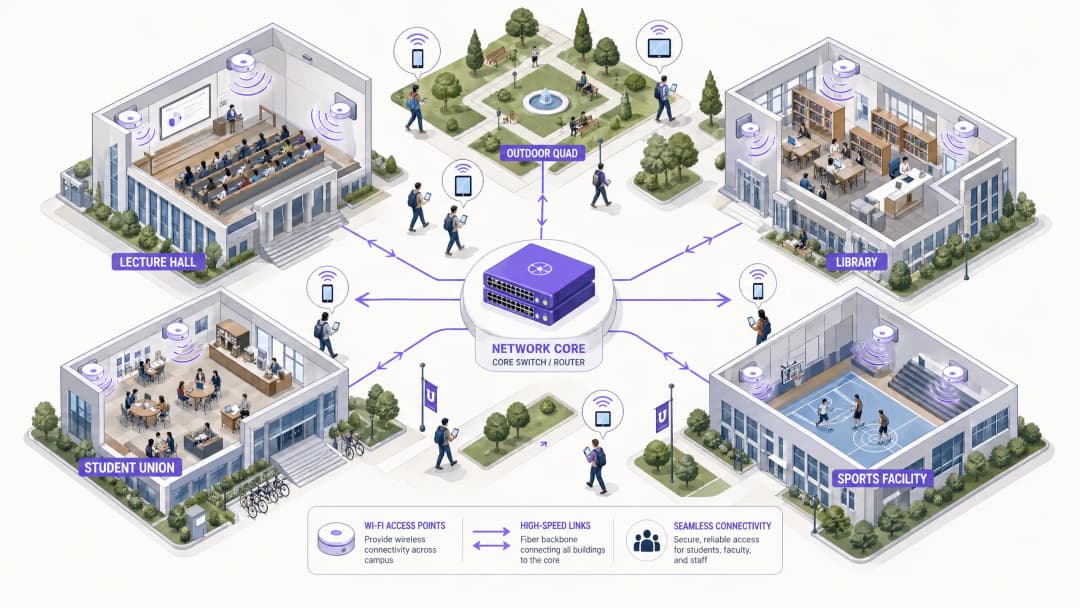
একটি ক্যাম্পাস-ব্যাপী ওয়্যারলেস নেটওয়ার্ক তৈরি করার জন্য একটি স্কেলযোগ্য, স্তরভিত্তিক আর্কিটেকচার প্রয়োজন। সাধারণ অনুশীলনে তিনটি পৃথক স্তর অন্তর্ভুক্ত থাকে: Core, Aggregation এবং Access।
 Core Layer নেটওয়ার্কের উচ্চ-গতির ব্যাকবোন গঠন করে। এটি ক্যাম্পাসের বিভিন্ন জোনের মধ্যে এবং বাইরের ইন্টারনেটে ট্রাফিক রাউটিং করার জন্য দায়ী। এখানে উচ্চ প্রাপ্যতা (high availability) এবং রিডান্ডেন্সি অত্যন্ত গুরুত্বপূর্ণ – কোর রাউটার এবং ফায়ারওয়ালগুলোকে কোনো ল্যাটেন্সি ছাড়াই বিশাল থ্রুপুট পরিচালনা করতে হবে। ডুয়াল-হোমড আপলিংক এবং রিডান্ডেন্ট পাওয়ার সাপ্লাই এখানে সাধারণ অনুশীলন।
Aggregation Layer মধ্যস্থতাকারী হিসেবে কাজ করে, Access স্তরের সুইচগুলো থেকে ট্রাফিক একত্রিত করে এবং নেটওয়ার্ক পলিসিগুলো প্রয়োগ করে। Wireless LAN Controllers (WLCs) সাধারণত এখানে থাকে, যা অ্যাক্সেস পয়েন্ট (AP) বহর পরিচালনা করে, RF ম্যানেজমেন্ট হ্যান্ডেল করে এবং ব্যবহারকারীরা ভবনের মধ্যে চলাচলের সময় নির্বিঘ্ন রোমিং নিশ্চিত করে। এই স্তরটি কোয়ালিটি অফ সার্ভিস (QoS) পলিসিগুলোর প্রয়োগও পরিচালনা করে।
Access Layer হলো নেটওয়ার্কের প্রান্ত (edge), যেখানে ক্লায়েন্ট ডিভাইসগুলো সংযুক্ত হয়। এটি PoE (Power over Ethernet) সুইচ এবং লেকচার থিয়েটার, লাইব্রেরি, ছাত্রাবাস এবং আউটডোর প্লাজা জুড়ে স্থাপিত ফিজিক্যাল AP নিয়ে গঠিত। একই সাথে অনেক ডিভাইস সংযুক্ত হওয়ার মতো উচ্চ-ঘনত্বের এলাকার জন্য WiFi 6 (802.11ax) বা WiFi 6E সমর্থনকারী হাই-ডেনসিটি AP অত্যন্ত গুরুত্বপূর্ণ।
Core Layer নেটওয়ার্কের উচ্চ-গতির ব্যাকবোন গঠন করে। এটি ক্যাম্পাসের বিভিন্ন জোনের মধ্যে এবং বাইরের ইন্টারনেটে ট্রাফিক রাউটিং করার জন্য দায়ী। এখানে উচ্চ প্রাপ্যতা (high availability) এবং রিডান্ডেন্সি অত্যন্ত গুরুত্বপূর্ণ – কোর রাউটার এবং ফায়ারওয়ালগুলোকে কোনো ল্যাটেন্সি ছাড়াই বিশাল থ্রুপুট পরিচালনা করতে হবে। ডুয়াল-হোমড আপলিংক এবং রিডান্ডেন্ট পাওয়ার সাপ্লাই এখানে সাধারণ অনুশীলন।
Aggregation Layer মধ্যস্থতাকারী হিসেবে কাজ করে, Access স্তরের সুইচগুলো থেকে ট্রাফিক একত্রিত করে এবং নেটওয়ার্ক পলিসিগুলো প্রয়োগ করে। Wireless LAN Controllers (WLCs) সাধারণত এখানে থাকে, যা অ্যাক্সেস পয়েন্ট (AP) বহর পরিচালনা করে, RF ম্যানেজমেন্ট হ্যান্ডেল করে এবং ব্যবহারকারীরা ভবনের মধ্যে চলাচলের সময় নির্বিঘ্ন রোমিং নিশ্চিত করে। এই স্তরটি কোয়ালিটি অফ সার্ভিস (QoS) পলিসিগুলোর প্রয়োগও পরিচালনা করে।
Access Layer হলো নেটওয়ার্কের প্রান্ত (edge), যেখানে ক্লায়েন্ট ডিভাইসগুলো সংযুক্ত হয়। এটি PoE (Power over Ethernet) সুইচ এবং লেকচার থিয়েটার, লাইব্রেরি, ছাত্রাবাস এবং আউটডোর প্লাজা জুড়ে স্থাপিত ফিজিক্যাল AP নিয়ে গঠিত। একই সাথে অনেক ডিভাইস সংযুক্ত হওয়ার মতো উচ্চ-ঘনত্বের এলাকার জন্য WiFi 6 (802.11ax) বা WiFi 6E সমর্থনকারী হাই-ডেনসিটি AP অত্যন্ত গুরুত্বপূর্ণ।
সিকিউরিটি স্ট্যান্ডার্ড ও অথেন্টিকেশন
একটি বিশ্ববিদ্যালয়ের নেটওয়ার্ক সুরক্ষিত করার জন্য একটি জটিল মাল্টি-টেন্যান্ট পরিবেশে শক্তিশালী সুরক্ষার সাথে ব্যবহারকারীর অ্যাক্সেসযোগ্যতার ভারসাম্য বজায় রাখা প্রয়োজন।
WPA3 Enterprise এবং IEEE 802.1X কর্মী এবং শিক্ষার্থীদের কানেকশন সুরক্ষিত করার জন্য অপরিহার্য। 802.1X পোর্ট-ভিত্তিক নেটওয়ার্ক অ্যাক্সেস কন্ট্রোল (NAC) প্রদান করে, যা নিশ্চিত করে যে কেবল অথেন্টিকেটেড ব্যবহারকারী এবং ডিভাইসগুলোই নেটওয়ার্কে অ্যাক্সেস করতে পারে। এটি বিশ্ববিদ্যালয়ের Active Directory বা LDAP ডিরেক্টরির সাথে যুক্ত কেন্দ্রীয় RADIUS সার্ভারের (যেমন FreeRADIUS বা Microsoft NPS) সাথে একীভূত হয়। এর অর্থ হলো শিক্ষার্থীদের ক্রেডেনশিয়াল তাদের বিশ্ববিদ্যালয়ের লগইনের সাথে মিলে যায়, যা সার্ভিস ডেস্কের কাজের চাপ নাটকীয়ভাবে কমিয়ে দেয়।
গেস্ট অ্যাক্সেস এবং ক্যাপটিভ পোর্টাল দর্শনার্থী, সেমিনারে অংশগ্রহণকারী এবং সম্ভাব্য শিক্ষার্থীদের সেবা দেয়। একটি নিরাপদ ক্যাপটিভ পোর্টাল একটি নিয়ন্ত্রিত অনবোর্ডিং অভিজ্ঞতা প্রদানের পাশাপাশি GDPR সম্মতি নিশ্চিত করে। Purple-এর মতো সলিউশনের সাথে ইন্টিগ্রেশন নির্বিঘ্ন গেস্ট অ্যাক্সেসের সুবিধা দেয় এবং একই সাথে মার্কেটিং ও অপারেশনের জন্য মূল্যবান ফার্স্ট-পার্টি ডেটা সংগ্রহ করে। আপনার নেটওয়ার্কের ভিত্তি সুরক্ষিত করার বিষয়ে আরও জানতে, Protecting Your Network with Strong DNS and Security দেখুন।
VLAN Segmentation ট্রাফিকের ধরন আলাদা করার জন্য অত্যন্ত গুরুত্বপূর্ণ। শিক্ষার্থীদের ট্রাফিক, কর্মীদের রিসোর্স, IoT ডিভাইস (স্মার্ট বিল্ডিং সেন্সর, HVAC কন্ট্রোলার) এবং গেস্ট অ্যাক্সেস অবশ্যই আলাদা VLAN-এ থাকতে হবে। এটি সম্ভাব্য নিরাপত্তা লঙ্ঘন প্রতিরোধ করে, ব্রডকাস্ট স্টর্ম রোধ করে এবং ব্যবহারকারীর ক্লাসের ওপর ভিত্তি করে সুনির্দিষ্ট ব্যান্ডউইথ পরিচালনার সুবিধা দেয়।
ইমপ্লিমেন্টেশন গাইড
ধাপ ১: সাইট সার্ভে এবং RF প্ল্যানিং
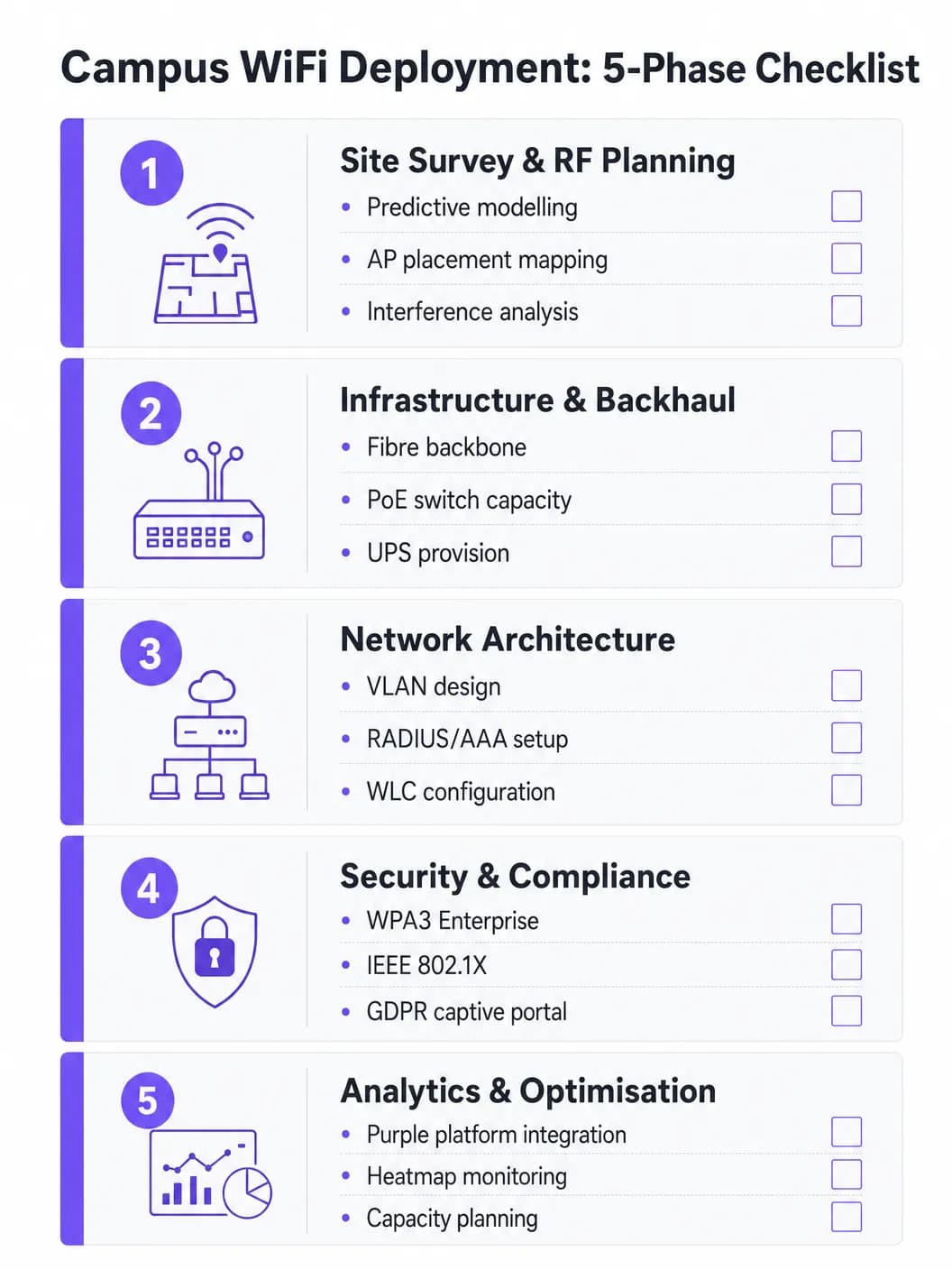
কখনোই অনুমানের ওপর ভিত্তি করে AP স্থাপন করবেন না। একটি বিস্তৃত প্রেডিক্টিভ এবং অ্যাক্টিভ সাইট সার্ভে হলো এই প্রকল্পের সবচেয়ে গুরুত্বপূর্ণ বিনিয়োগ। ভৌত পরিবেশের মানচিত্র তৈরি করতে Ekahau বা AirMagnet-এর মতো টুল ব্যবহার করা উচিত, যা ভবনের নির্মাণ সামগ্রী (কংক্রিট, কাচ, ধাতু), ইন্টারফারেন্সের উৎস (পুরোনো Bluetooth, মাইক্রোওয়েভ, পার্শ্ববর্তী নেটওয়ার্ক) এবং প্রতি জোনে প্রত্যাশিত ব্যবহারকারীর ঘনত্ব বিবেচনা করে। লক্ষ্য হলো কো-চ্যানেল ইন্টারফারেন্স না ঘটিয়ে পর্যাপ্ত কভারেজ এবং ক্যাপাসিটি নিশ্চিত করা। প্রাথমিক AP স্থাপনের পর অ্যাক্টিভ সার্ভে দিয়ে প্রেডিক্টিভ মডেলগুলো যাচাই করা উচিত।
ধাপ ২: ইনফ্রাস্ট্রাকচার এবং ব্যাকহল আপগ্রেড
নতুন AP স্থাপন করার আগে, অন্তর্নিহিত তারযুক্ত (wired) অবকাঠামো মূল্যায়ন করতে হবে এবং যেখানে প্রয়োজন সেখানে আপগ্রেড করতে হবে। আধুনিক WiFi 6/6E AP-গুলোর জন্য প্রয়োজনীয় মাল্টি-গিগাবিট ইথারনেট (mGig) সমর্থন করতে CAT6A ক্যাবলিং করা হয়েছে কিনা তা নিশ্চিত করুন। এজ সুইচগুলো নতুন AP মডেলগুলোর জন্য পর্যাপ্ত PoE+ বা PoE++ পাওয়ার বাজেট সরবরাহ করে কিনা তা যাচাই করুন। কোর নেটওয়ার্কে অবশ্যই পর্যাপ্ত ব্যান্ডউইথ থাকতে হবে – স্থিতিশীলতার জন্য একটি ডেডিকেটেড বিজনেস ইন্টারনেট কানেকশনের কথা বিবেচনা করুন। ব্যাকহল অপশনগুলোর বিশদ জানতে, What is a Leased Line? Dedicated Business Internet পড়ুন।
ধাপ ৩: নেটওয়ার্ক কনফিগারেশন
পরিকল্পিত আর্কিটেকচার অনুযায়ী WLC এবং AP-গুলো কনফিগার করুন। বাল্ক ডাউনলোড এবং স্ট্রিমিংয়ের চেয়ে গুরুত্বপূর্ণ ট্রাফিককে (VoIP, ভিডিও কনফারেন্সিং, গবেষণা ডেটা স্থানান্তর) অগ্রাধিকার দিতে QoS পলিসিগুলো প্রয়োগ করুন। নির্বিঘ্ন রোমিং প্রোটোকলগুলো (Fast BSS Transition-এর জন্য 802.11r, Neighbor Reports-এর জন্য 802.11k এবং BSS Transition Management-এর জন্য 802.11v) সঠিকভাবে কনফিগার করা হয়েছে কিনা তা নিশ্চিত করুন যাতে ডিভাইসগুলো কানেকশন বিচ্ছিন্ন না করেই AP-গুলোর মধ্যে স্থানান্তরিত হতে পারে।
ধাপ ৪: সিকিউরিটি এবং কমপ্লায়েন্স হার্ডেনিং
কর্মী এবং শিক্ষার্থীদের SSID-তে WPA3 Enterprise স্থাপন করুন। ডিভাইস ম্যানেজমেন্ট ক্ষমতার ওপর ভিত্তি করে EAP-TLS বা PEAP-MSCHAPv2 ব্যবহার করে IEEE 802.1X কনফিগার করুন। গেস্ট SSID-এর জন্য একটি GDPR-compliant ক্যাপটিভ পোর্টাল প্রয়োগ করুন। সমস্ত ম্যানেজমেন্ট ইন্টারফেস শক্তিশালী পাসওয়ার্ড এবং সার্টিফিকেট-ভিত্তিক অথেন্টিকেশন দ্বারা সুরক্ষিত তা নিশ্চিত করুন। চূড়ান্ত অনুমোদনের আগে পেনিট্রেশন টেস্টিং পরিচালনা করুন।### ধাপ ৫: অ্যানালিটিক্যাল ইন্টিগ্রেশন এবং চলমান অপ্টিমাইজেশন
AP-এর কার্যকারিতা, ক্লায়েন্টের ঘনত্ব, রোমিং প্যাটার্ন এবং ব্যান্ডউইথ ব্যবহারের স্পষ্ট ধারণা পেতে নেটওয়ার্কটিকে একটি অ্যানালিটিক্স প্ল্যাটফর্মের সাথে একীভূত করুন। Purple-এর WiFi Analytics প্ল্যাটফর্ম অপারেশনাল ড্যাশবোর্ড সরবরাহ করে যা আইটি টিম এবং ভেন্যু অপারেশন উভয় পক্ষকেই উপকৃত করে। এটি কোনো এককালীন কাজ নয়—ভবনগুলো সংস্কার করার সাথে সাথে এবং ডিভাইসের ধরন পরিবর্তনের সাথে সাথে RF পরিবেশ পরিবর্তিত হয়।
আপনার নির্দিষ্ট সেটআপ নিয়ে কোনো প্রশ্ন আছে?
আমাদের টিম ৮০,০০০ ভেন্যুতে ভেন্যু অপারেটর, IT ম্যানেজার এবং নেটওয়ার্ক ইঞ্জিনিয়ারদের সাথে কাজ করে। একটি ২০ মিনিটের কল বুক করুন এবং আপনার মতো অন্যরা কীভাবে এর সমাধান করেছেন তা আমরা আপনাকে দেখাব।
বেস্ট প্র্যাকটিস
কেবল কভারেজ নয়, ক্যাপাসিটির জন্য ডিজাইন করুন। উচ্চশিক্ষার ক্ষেত্রে কভারেজ সহজ; কিন্তু ক্যাপাসিটি কঠিন। একটি লেকচার থিয়েটারের সব জায়গায় শক্তিশালী সিগন্যাল থাকতে পারে, তবে ৩০০ জন শিক্ষার্থী যদি একই সাথে একটি মাত্র AP-তে সংযুক্ত হয়, তবে নেটওয়ার্কটি অচল হয়ে পড়বে। হাই-ডেনসিটি AP স্থাপন করুন এবং সামঞ্জস্যপূর্ণ ক্লায়েন্টদের কম ভিড় থাকা 5 GHz বা 6 GHz ব্যান্ডে পাঠাতে ব্যান্ড স্টিয়ারিংয়ের মতো ফিচারগুলো ব্যবহার করুন। স্টিকি ক্লায়েন্টদের কাছাকাছি কোনো AP-তে রোম করতে বাধ্য করতে পুরোনো ডেটা রেট (১, ২, ৫.৫ এবং ১১ Mbps) নিষ্ক্রিয় করুন।
ক্রমাগত মনিটরিংয়ের ব্যবস্থা করুন। একটি নেটওয়ার্ক স্থাপন করে "ভুলে যাওয়ার" মতো বিষয় নয়। রিয়েল-টাইমে AP-এর কার্যকারিতা, ক্লায়েন্টের ঘনত্ব এবং রোমিং প্যাটার্ন পর্যবেক্ষণ করতে অ্যানালিটিক্স প্ল্যাটফর্মগুলো ব্যবহার করুন। Purple-এর অ্যানালিটিক্স কীভাবে জায়গাগুলো ব্যবহার করা হচ্ছে সে সম্পর্কে ধারণা দেয়, যা ভবিষ্যতের অবকাঠামোগত সিদ্ধান্ত এবং স্থান ব্যবহারের কৌশল নির্ধারণে সাহায্য করে।
অনবোর্ডিংয়ের জন্য OpenRoaming ব্যবহার করুন। অংশীদার প্রতিষ্ঠানের অতিথি শিক্ষাবিদ এবং শিক্ষার্থীদের জন্য, OpenRoaming প্রয়োগ করা ম্যানুয়াল নেটওয়ার্ক লগইনের ঝামেলা দূর করে। Purple Connect লাইসেন্সের অধীনে OpenRoaming-এর জন্য একটি ফ্রি আইডেন্টিটি প্রোভাইডার হিসেবে কাজ করে, যা অংশগ্রহণকারী প্রতিষ্ঠানের ব্যবহারকারীদের স্বয়ংক্রিয়ভাবে এবং নিরাপদে সংযুক্ত হতে সাহায্য করে—যা দর্শনার্থীদের অভিজ্ঞতাকে ব্যাপকভাবে উন্নত করে।
ব্যাপকভাবে পৃথকীকরণ করুন। অভ্যন্তরীণ রিসোর্সের মতো একই VLAN-এ গেস্ট ট্রাফিকের অনুমতি কখনই দেবেন না। প্রতিটি ব্যবহারকারী বিভাগের জন্য আলাদা SSID, VLAN এবং ফায়ারওয়াল নিয়ম ব্যবহার করুন। ব্যস্ত সময়ে কোনো একক ব্যবহারকারী যাতে পুরো আপলিংক দখল করতে না পারে সেজন্য গেস্ট VLAN-এ ব্যান্ডউইথ ক্যাপ প্রয়োগ করুন।
ট্রাবলশুটিং এবং ঝুঁকি হ্রাস
Co-Channel Interference (CCI) ঘটে যখন একই চ্যানেলে থাকা একাধিক AP একে অপরকে সনাক্ত করতে পারে, যার ফলে তারা পর্যায়ক্রমে ট্রান্সমিট করে এবং কার্যক্ষমতা মারাত্মকভাবে হ্রাস পায়। ঘন স্থাপনার ক্ষেত্রে দুর্বল WiFi পারফরম্যান্সের এটিই সবচেয়ে সাধারণ কারণ। এটি দূর করার উপায়ের মধ্যে রয়েছে সঠিক RF প্ল্যানিং, WLC-তে ডায়নামিক চ্যানেল অ্যালোকেশন (DCA) ফিচার ব্যবহার করা এবং ঘনবসতিপূর্ণ এলাকায় AP ট্রান্সমিট পাওয়ার কমানো।
Sticky Clients হলো এমন ডিভাইস যা কাছাকাছি কোনো AP-তে রোম করতে অস্বীকৃতি জানায় এবং দূরের কোনো AP-এর সাথে দুর্বল কানেকশন বজায় রাখে। এটি বিশেষ করে পুরোনো স্মার্টফোন এবং ল্যাপটপের ক্ষেত্রে বেশি দেখা যায়। এটি দূর করার উপায়ের মধ্যে রয়েছে সর্বনিম্ন বাধ্যতামুলক ডেটা রেট সমন্বয় করা—কম রেটগুলো নিষ্ক্রিয় করলে ক্লায়েন্ট ড্রাইভার একটি ভালো কানেকশন খুঁজতে বাধ্য হয়।
DHCP Exhaustion হলো আউটডোর প্লাজা এবং স্টুডেন্ট ইউনিয়নের মতো উচ্চ-প্রবাহের এলাকায় একটি আশ্চর্যজনকভাবে সাধারণ ব্যর্থতার ধরন। যখন DHCP পুলে IP অ্যাড্রেস শেষ হয়ে যায়, তখন শক্তিশালী সিগন্যাল থাকা সত্ত্বেও নতুন ডিভাইসগুলো সংযুক্ত হতে পারে না। এটি দূর করার উপায়ের মধ্যে রয়েছে গেস্ট এবং স্টুডেন্ট VLAN-এর জন্য কম DHCP লিজ টাইম (এক থেকে দুই ঘণ্টা) প্রয়োগ করা এবং ব্যস্ত সময়ে সর্বোচ্চ সংখ্যক ডিভাইসের জন্য DHCP রেঞ্জ সঠিকভাবে নির্ধারণ করা।
Rogue Access Points একটি বড় ধরনের নিরাপত্তা ঝুঁকি তৈরি করে। কর্মী বা শিক্ষার্থীরা সাধারণ মানের রাউটার প্লাগ ইন করলে তা অরক্ষিত এন্ট্রি পয়েন্ট তৈরি করে। এটি দূর করার উপায়ের মধ্যে রয়েছে WLC-তে রোগ AP সনাক্তকরণ সক্রিয় করা এবং নিয়মিত ফিজিক্যাল অডিট পরিচালনা করা।
ROI এবং ব্যবসায়িক প্রভাব
একটি শক্তিশালী ক্যাম্পাস WiFi নেটওয়ার্ক সাধারণ কানেক্টিভিটির বাইরেও পরিমাপযোগ্য রিটার্ন প্রদান করে। Purple-এর মতো প্ল্যাটফর্মগুলোকে একীভূত করে, বিশ্ববিদ্যালয়গুলো তাদের ফলাফল পরিমাপ করতে পারে:
| মেট্রিক | পরিমাপের পদ্ধতি | সাধারণ ফলাফল |
|---|---|---|
| শিক্ষার্থীর সন্তুষ্টি | NPS সার্ভে, আইটি হেল্পডেস্ক টিকিট ভলিউম | WiFi-সংক্রান্ত অভিযোগ হ্রাস |
| স্থান ব্যবহার | হিটম্যাপ, ডোয়েল টাইম ডেটা | লাইব্রেরি এবং স্টাডি স্পেসের সর্বোত্তম বরাদ্দ |
| আইটি অপারেশনাল দক্ষতা | হেল্পডেস্ক টিকিট ভলিউম, আপটাইম | ম্যানুয়াল কনফিগারেশনের ঝামেলা হ্রাস |
| দর্শনার্থীর ডেটা সংগ্রহ | ক্যাপটিভ পোর্টাল রেজিস্ট্রেশন | ফার্স্ট-পার্টি মার্কেটিং ডেটাবেসের প্রবৃদ্ধি |
| নেটওয়ার্ক আপটাইম | SLA মনিটরিং, ইনসিডেন্ট রিপোর্ট | SLA মেনে চলার হার বৃদ্ধি |
Purple প্ল্যাটফর্মের অ্যানালিটিক্স এবং ভিজিটর ডেটা ক্ষমতা আয়ের সুযোগও তৈরি করে, বিশেষ করে যখন ক্যাম্পাসে বড় আকারের পাবলিক ইভেন্ট আয়োজন করা হয় যেখানে স্তরভিত্তিক অ্যাক্সেস মডেল স্থাপন করা যেতে পারে। একই ধরনের ROI ফ্রেমওয়ার্ক Retail, Hospitality, Healthcare এবং Transport সেটিংসে Purple অপারেশনের ক্ষেত্রেও প্রযোজ্য। বড় ভেন্যুতে WiFi স্থাপনের বিষয়ে আরও বিস্তারিত জানতে, Airport WiFi: How Operators Provide Connectivity Across Terminals এবং WiFi Aeroportuale: Come gli Operatori Forniscono Connettività tra i Terminal দেখুন।
মূল সংজ্ঞাসমূহ
IEEE 802.1X
পোর্ট-ভিত্তিক নেটওয়ার্ক অ্যাক্সেস কন্ট্রোল (NAC)-এর একটি স্ট্যান্ডার্ড যা LAN বা WLAN-এ সংযুক্ত হতে ইচ্ছুক ডিভাইসগুলোর জন্য একটি অথেন্টিকেশন মেকানিজম প্রদান করে। এর জন্য একটি সাপ্লিক্যান্ট (ক্লায়েন্ট ডিভাইস), একটি অথেন্টিকেটর (AP বা সুইচ) এবং একটি অথেন্টিকেশন সার্ভার (RADIUS) প্রয়োজন।
নেটওয়ার্কে প্রবেশের অনুমতি দেওয়ার আগে শিক্ষার্থী এবং কর্মীদের অথেন্টিকেট করতে ব্যবহৃত হয়, যা ক্রেডেনশিয়াল যাচাইকরণের জন্য একটি RADIUS সার্ভার এবং Active Directory-এর সাথে একীভূত হয়। এটি শেয়ার্ড PSK পাসওয়ার্ডের প্রয়োজনীয়তা দূর করে এবং প্রতি ব্যবহারকারীর জন্য পলিসি প্রয়োগের সুবিধা দেয়।
WLC (Wireless LAN Controller)
একটি কেন্দ্রীভূত হার্ডওয়্যার বা সফটওয়্যার অ্যাপ্লায়েন্স যা নিয়ন্ত্রণের একটি একক বিন্দু থেকে একাধিক অ্যাক্সেস পয়েন্ট পরিচালনা এবং কনফিগার করে। এটি AP বহর জুড়ে RF ম্যানেজমেন্ট, রোমিং, ফার্মওয়্যার আপডেট এবং পলিসি প্রয়োগের কাজ পরিচালনা করে।
ক্যাম্পাস জুড়ে সামঞ্জস্যপূর্ণ পলিসি প্রয়োগ, ডায়নামিক চ্যানেল অ্যাসাইনমেন্ট এবং নির্বিঘ্ন রোমিং নিশ্চিত করতে বড় ধরনের স্থাপনার জন্য অপরিহার্য। এটি ফিজিক্যাল হার্ডওয়্যার বা ক্লাউড-পরিচালিত ভার্চুয়াল ইনস্ট্যান্স হতে পারে।
Co-Channel Interference (CCI)
ইন্টারফারেন্স যা ঘটে যখন একই ফ্রিকোয়েন্সি চ্যানেলে কাজ করা দুটি বা ততোধিক AP একে অপরের সীমার মধ্যে থাকে। ট্রান্সমিট করার আগে উভয় AP-কে চ্যানেলটি খালি হওয়ার জন্য অপেক্ষা করতে হয়, যা থ্রুপুট মারাত্মকভাবে হ্রাস করে।
ঘন স্থাপনার ক্ষেত্রে দুর্বল পারফরম্যান্সের প্রাথমিক কারণ। সতর্ক চ্যানেল প্ল্যানিং, WLC-তে ডায়নামিক চ্যানেল অ্যাসাইনমেন্ট (DCA) এবং AP ট্রান্সমিট পাওয়ার কমানোর মাধ্যমে এটি দূর করা যায়।
Band Steering
দ্বৈত-ব্যান্ড সক্ষম ক্লায়েন্ট ডিভাইসগুলোকে তুলনামূলকভাবে বেশি ভিড় থাকা 2.4 GHz ব্যান্ডের পরিবর্তে 5 GHz বা 6 GHz ব্যান্ডের সাথে সংযুক্ত হতে উৎসাহিত করার জন্য AP দ্বারা ব্যবহৃত একটি কৌশল, যা 2.4 GHz-এ প্রোব রেসপন্স বিলম্বিত বা দমন করার মাধ্যমে করা হয়।
উচ্চ-ঘনত্বের এলাকায় ক্যাপাসিটি এবং থ্রুপুট সর্বাধিক করার জন্য অত্যন্ত গুরুত্বপূর্ণ। 5 GHz এবং 6 GHz ব্যান্ডগুলো আরও বেশি নন-ওভারল্যাপিং চ্যানেল এবং উচ্চতর থ্রুপুট প্রদান করে, তবে এর রেঞ্জ কম।
Captive Portal
একটি ওয়েব পেজ যেখানে ব্যবহারকারীদের সম্পূর্ণ নেটওয়ার্ক অ্যাক্সেস পাওয়ার আগে রিডাইরেক্ট করা হয়। ফায়ারওয়ালের মাধ্যমে ব্যবহারকারীর MAC অ্যাড্রেস অনুমোদিত হওয়ার আগে সাধারণত পরিষেবার শর্তাবলী গ্রহণ, অথেন্টিকেশন বা ডেটা সংগ্রহের প্রয়োজন হয়।
গেস্ট অ্যাক্সেস ম্যানেজমেন্ট, GDPR-compliant ডেটা সংগ্রহ এবং ব্র্যান্ডেড অনবোর্ডিং অভিজ্ঞতার জন্য ব্যবহৃত হয়। Purple-এর মতো প্ল্যাটফর্মগুলো অ্যানালিটিক্স ইন্টিগ্রেশন সহ কাস্টমাইজযোগ্য ক্যাপটিভ পোর্টাল সলিউশন সরবরাহ করে।
VLAN (Virtual Local Area Network)
নেটওয়ার্ক ডিভাইসগুলোর একটি লজিক্যাল গ্রুপিং যা তাদের প্রকৃত ভৌত অবস্থান নির্বিশেষে এমনভাবে আচরণ করে যেন তারা একই ফিজিক্যাল নেটওয়ার্কে রয়েছে। VLAN-গুলো Layer 2-এ সংজ্ঞায়িত করা হয় এবং ব্রডকাস্ট ডোমেনগুলোকে বিভক্ত করতে ব্যবহৃত হয়।
নিরাপত্তা এবং পারফরম্যান্সের জন্য বিভিন্ন ব্যবহারকারী শ্রেণীকে (শিক্ষার্থী, কর্মী, অতিথি, IoT ডিভাইস) আলাদা করতে ব্যবহৃত হয়। এটি গেস্ট ট্রাফিককে অভ্যন্তরীণ রিসোর্সে পৌঁছাতে বাধা দেয় এবং প্রতি VLAN-এ ব্যান্ডউইথ পলিসির অনুমতি দেয়।
PoE (Power over Ethernet)
একটি প্রযুক্তি যা টুইস্টেড-পেয়ার ইথারনেট ক্যাবলিংয়ে ডেটার সাথে বৈদ্যুতিক শক্তি প্রেরণ করে, যার ফলে একটি একক ক্যাবল AP-এর মতো ডিভাইসগুলোতে ডেটা কানেকশন এবং বৈদ্যুতিক শক্তি উভয়ই সরবরাহ করতে পারে।
ডেডিকেটেড পাওয়ার আউটলেট ছাড়াই বিভিন্ন স্থানে AP ইনস্টল করার অনুমতি দেয়। আইটি টিমগুলোকে অবশ্যই যাচাই করতে হবে যে এজ সুইচগুলোতে সমস্ত সংযুক্ত AP-কে পাওয়ার দেওয়ার জন্য পর্যাপ্ত PoE বাজেট (মোট ওয়াট) রয়েছে, বিশেষ করে অধিক বিদ্যুৎ সাশ্রয়ী WiFi 6E মডেলগুলোর জন্য যার PoE++ (802.3bt) প্রয়োজন।
OpenRoaming
Hotspot 2.0 (Passpoint) স্ট্যান্ডার্ডের ওপর ভিত্তি করে তৈরি একটি বৈশ্বিক WiFi রোমিং ফেডারেশন, যা ব্যবহারকারীদের তাদের বিদ্যমান আইডেন্টিটি ক্রেডেনশিয়াল ব্যবহার করে কোনো ম্যানুয়াল লগইন ছাড়াই অংশগ্রহণকারী নেটওয়ার্কগুলোর সাথে স্বয়ংক্রিয়ভাবে এবং নিরাপদে সংযুক্ত হতে সাহায্য করে।
অংশীদার প্রতিষ্ঠানের অতিথি শিক্ষাবিদ এবং শিক্ষার্থীদের অভিজ্ঞতা উন্নত করে। Purple Connect লাইসেন্সের অধীনে OpenRoaming-এর জন্য একটি আইডেন্টিটি প্রোভাইডার হিসেবে কাজ করতে পারে, যা যোগ্য ব্যবহারকারীদের জন্য স্বয়ংক্রিয় নিরাপদ কানেকশন সক্ষম করে।
WPA3 Enterprise
এন্টারপ্রাইজ নেটওয়ার্কের জন্য WiFi Protected Access সিকিউরিটি প্রোটোকলের সর্বশেষ প্রজন্ম। এটি ১৯২-বিট ন্যূনতম-শক্তির সিকিউরিটি প্রোটোকল ব্যবহার করে এবং Protected Management Frames (PMF) ব্যবহার বাধ্যতামূলক করে, যা অফলাইন ডিকশনারি অ্যাটাকের বিরুদ্ধে শক্তিশালী সুরক্ষা প্রদান করে।
সমস্ত কর্মী এবং শিক্ষার্থীদের SSID-এর জন্য প্রস্তাবিত সিকিউরিটি স্ট্যান্ডার্ড। এটি WPA2 Enterprise-কে প্রতিস্থাপন করে এবং ওয়্যারলেস নেটওয়ার্কের মাধ্যমে প্রেরিত সংবেদনশীল গবেষণা এবং ব্যক্তিগত ডেটার জন্য উল্লেখযোগ্যভাবে শক্তিশালী সুরক্ষা প্রদান করে।
RADIUS (Remote Authentication Dial-In User Service)
একটি নেটওয়ার্কিং প্রোটোকল যা কোনো নেটওয়ার্ক পরিষেবা সংযুক্ত এবং ব্যবহারকারী ব্যবহারকারীদের জন্য কেন্দ্রীভূত Authentication, Authorisation, and Accounting (AAA) ব্যবস্থাপনা প্রদান করে।
ক্যাম্পাস নেটওয়ার্কে 802.1X অথেন্টিকেশনের ব্যাকবোন। RADIUS সার্ভার Active Directory-এর বিপরীতে ক্রেডেনশিয়াল যাচাই করে এবং প্রতিটি অথেন্টিকেটেড ব্যবহারকারীর জন্য উপযুক্ত VLAN অ্যাসাইনমেন্ট এবং অ্যাক্সেস পলিসি প্রদান করে।
সমাধানকৃত উদাহরণসমূহ
একটি বড় বিশ্ববিদ্যালয় তার প্রধান লেকচার থিয়েটার (ধারণক্ষমতা ৫০০) WiFi 6-এ আপগ্রেড করছে। পূর্ববর্তী স্থাপনায় উঁচু ছাদে ৪টি AP মাউন্ট করা হয়েছিল, যার ফলে ব্যস্ত সময়ে দুর্বল পারফরম্যান্স এবং ঘন ঘন কানেকশন বিচ্ছিন্ন হওয়ার সমস্যা হতো। সঠিক পদ্ধতিটি কী?
আইটি টিমকে অবশ্যই কভারেজ-কেন্দ্রিক ডিজাইন থেকে ক্যাপাসিটি-কেন্দ্রিক ডিজাইনে স্থানান্তরিত হতে হবে। প্রথমত, লেকচার থিয়েটারের জন্য বিশেষভাবে একটি নতুন সাইট সার্ভে পরিচালনা করুন, যেখানে প্রত্যাশিত ডিভাইসের সংখ্যা নির্ধারণ করা হবে (প্রতি শিক্ষার্থীর জন্য ২টি করে ডিভাইস ধরে ১,০০০+ ডিভাইস অনুমান করুন)। ছাদ-মাউন্ট করা ওমনি-ডাইরেকশনাল AP-গুলোকে সিটের নিচে AP স্থাপন অথবা পাশের দেয়ালে মাউন্ট করা ডাইরেকশনাল (প্যাচ) অ্যান্টেনা অ্যারে দিয়ে প্রতিস্থাপন করুন, যা ছোট ও সুনির্দিষ্ট মাইক্রো-সেল তৈরি করবে। AP-এর সংখ্যা বাড়িয়ে ৮-১২টি WiFi 6 AP করুন, যার প্রতিটি আসনের একটি নির্দিষ্ট অংশে সেবা দেবে। কো-চ্যানেল ইন্টারফারেন্স কমাতে পর্যায়ক্রমে AP-গুলোতে 2.4 GHz রেডিও নিষ্ক্রিয় করুন এবং মূলত 5 GHz ও 6 GHz ব্যান্ডের ওপর নির্ভর করুন। কঠোর ব্যান্ড স্টিয়ারিং প্রয়োগ করুন এবং 12 Mbps-এর নিচের পুরোনো ডেটা রেটগুলো নিষ্ক্রিয় করুন। আরও বেশি নন-ওভারল্যাপিং চ্যানেল পাওয়ার জন্য এবং ইন্টারফারেন্স কমাতে 5 GHz ব্যান্ডে (40 বা 80 MHz-এর পরিবর্তে) 20 MHz চ্যানেল উইডথ ব্যবহার করতে WLC কনফিগার করুন।
একটি ক্যাম্পাস নেটওয়ার্কের আউটডোর কোয়াড এলাকায় মাঝে মাঝে কানেক্টিভিটি সমস্যা হচ্ছে। ব্যবহারকারীরা দুপুরের খাবারের সময়ে (১২:০০-১৩:৩০) শক্তিশালী সিগন্যাল থাকা সত্ত্বেও ওয়েব পেজ লোড করতে না পারার অভিযোগ করছেন। ডায়াগনস্টিক পদ্ধতিটি কী হবে?
কানেক্টিভিটি ছাড়া শক্তিশালী সিগন্যাল থাকা একটি Layer 2/3 সমস্যা, কোনো RF সমস্যা নয়। ডায়াগনস্টিক ধাপগুলো হওয়া উচিত: (১) আউটডোর VLAN-এর জন্য DHCP স্কোপ পরীক্ষা করুন - স্কোপ ব্যবহারের জন্য DHCP সার্ভার কোয়েরি করুন। এটি ৮০%-এর বেশি হলে, DHCP exhaustion হওয়ার সম্ভাবনা বেশি। লিজ টাইম কমিয়ে ১ ঘণ্টা করুন এবং সম্ভব হলে স্কোপটি প্রসারিত করুন। (২) DHCP ঠিক থাকলে, আউটডোর ডিস্ট্রিবিউশন সুইচের আপলিংক ক্যাপাসিটি পরীক্ষা করুন। AP-গুলো যদি কোনো জ্যামযুক্ত আপলিংকের মাধ্যমে সংযুক্ত থাকে, তবে সমস্যাটি তারযুক্ত (wired) নেটওয়ার্কের, ওয়্যারলেসের নয়। (৩) একটি স্পেকট্রাম অ্যানালাইজার ব্যবহার করে বাহ্যিক ইন্টারফারেন্সের জন্য RF পরিবেশ বিশ্লেষণ করুন - পৌরসভার WiFi নেটওয়ার্ক বা কাছাকাছি ব্যবসা প্রতিষ্ঠানগুলো নয়েজ ফ্লোর বৃদ্ধির কারণ হতে পারে। (৪) ব্যস্ত সময়ে সেশন শেষ হয়ে যাওয়ার জন্য ফায়ারওয়াল এবং NAT টেবিল পর্যালোচনা করুন।
অনুশীলনী প্রশ্নসমূহ
Q1. একটি বিশ্ববিদ্যালয় ৮,০০০ দর্শক ধারণক্ষমতার একটি নবনির্মিত আউটডোর স্পোর্টস স্টেডিয়ামে WiFi স্থাপন করার পরিকল্পনা করছে। স্টেডিয়ামটির কোনো ছাদ নেই এবং এটি একটি ওপেন বোল ডিজাইনের। সবচেয়ে গুরুত্বপূর্ণ RF বিবেচনা কী এবং AP স্থাপনের ক্ষেত্রে কীভাবে অগ্রসর হওয়া উচিত?
ইঙ্গিত: ভৌত সীমানার অভাব, উন্মুক্ত পরিবেশে সিগন্যাল প্রচার এবং ইভেন্টের সময় চরম ডিভাইসের ঘনত্ব বিবেচনা করুন।
মডেল উত্তর দেখুন
সবচেয়ে গুরুত্বপূর্ণ বিবেচনা হলো কোনো প্রাকৃতিক RF অ্যাটেনুয়েশন না থাকা পরিবেশে সিগন্যাল প্রচার নিয়ন্ত্রণ করা এবং Co-Channel Interference কমানো। ইনডোর পরিবেশের বিপরীতে, ওপেন বোল ডিজাইনের অর্থ হলো সিগন্যালগুলো অবাধে চলাচল করে, যার ফলে AP-গুলো সম্পূর্ণ স্থান জুড়ে একে অপরের সাথে ইন্টারফেয়ার করে। সঠিক পদ্ধতিটি হলো বসার স্তরের নিচে মাউন্ট করা ডাইরেকশনাল (সেক্টর) অ্যান্টেনা ব্যবহার করা, যা বসার সারির দিকে নিচের দিকে নির্দেশ করে অত্যন্ত ফোকাসড মাইক্রো-সেল তৈরি করবে। সেলের আকার সীমিত করতে ট্রান্সমিট পাওয়ার সাবধানে টিউন করতে হবে। চরম ডিভাইসের ঘনত্ব পরিচালনা করতে OFDMA এবং BSS Colouring ফিচার সহ WiFi 6 AP নির্ধারণ করা উচিত। ইভেন্ট স্টাফ, মিডিয়া এবং সাধারণ দর্শকদের জন্য আলাদা SSID এবং VLAN কনফিগার করা উচিত।
Q2. একটি নেটওয়ার্ক আপগ্রেডের সময়, আইটি টিম লক্ষ্য করে যে WPA3 Enterprise-এ সিকিউরিটি আপগ্রেড করার পরে পুরোনো IoT ডিভাইসগুলো (পুরোনো HVAC সেন্সর এবং ডোর অ্যাক্সেস কন্ট্রোলার) নতুন ক্যাম্পাস WiFi নেটওয়ার্কের সাথে সংযুক্ত হতে ব্যর্থ হচ্ছে।
ইঙ্গিত: পুরোনো এমবেডেড ডিভাইসগুলোর সিকিউরিটি প্রোটোকল সামঞ্জস্যতা এবং অন্যান্য ব্যবহারকারী শ্রেণীর জন্য নিরাপত্তা বজায় রাখার প্রয়োজনীয়তা বিবেচনা করুন।
মডেল উত্তর দেখুন
WPA3 Enterprise প্রয়োগকারী নতুন নেটওয়ার্কটি পুরোনো IoT ডিভাইসগুলোর সাথে সামঞ্জস্যপূর্ণ নয় যা কেবল WPA2 বা পূর্ববর্তী প্রোটোকল সমর্থন করে। সমাধান হলো বিশেষভাবে পুরোনো IoT ডিভাইসগুলোর জন্য একটি ডেডিকেটেড, আইসোলেটেড SSID এবং VLAN তৈরি করা, যেখানে একটি শক্তিশালী, রোটেটেড পাসফ্রেজ সহ WPA2-PSK ব্যবহার করা হবে, অথবা কোনো EAP পদ্ধতি সমর্থন করতে পারে না এমন ডিভাইসগুলোর জন্য MAC Authentication Bypass (MAB) ব্যবহার করা হবে। এই VLAN-টিকে অবশ্যই কঠোরভাবে ফায়ারওয়াল করতে হবে - IoT ডিভাইসগুলো কেবল তাদের নির্দিষ্ট ম্যানেজমেন্ট সার্ভারের সাথে যোগাযোগ করতে পারবে, সাধারণ ক্যাম্পাস নেটওয়ার্কের সাথে নয়। প্রধান শিক্ষার্থী এবং কর্মীদের SSID-গুলো WPA3 Enterprise-েই থাকবে, যা প্রাথমিক ব্যবহারকারী গোষ্ঠীর জন্য নিরাপত্তা বজায় রাখবে।
Q3. বিশ্ববিদ্যালয়টি GDPR-compliant থেকে বড় ধরনের পাবলিক ইভেন্টের (ওপেন ডে, সমাবর্তন অনুষ্ঠান, পাবলিক লেকচার) সময় তার গেস্ট WiFi নেটওয়ার্ক থেকে অর্থ উপার্জন করতে চায়। প্রস্তাবিত আর্কিটেকচারটি কী?
ইঙ্গিত: ডেটা সংগ্রহের প্রয়োজনীয়তা, সম্মতি প্রক্রিয়া এবং ফ্রি ও প্রিমিয়াম অ্যাক্সেস স্তরের মধ্যে পার্থক্য বিবেচনা করুন।
মডেল উত্তর দেখুন
গেস্ট VLAN-এর সাথে একীভূত Purple-এর মতো একটি ক্যাপটিভ পোর্টাল সリューション স্থাপন করুন। একটি স্তরভিত্তিক অ্যাক্সেস মডেল কনফিগার করুন: একটি ফ্রি স্তর যা ইমেল ঠিকানা এবং স্পষ্ট GDPR-compliant মার্কেটিং সম্মতির বিনিময়ে মৌলিক ইন্টারনেট অ্যাক্সেস (ব্যান্ডউইথ ক্যাপ সহ) প্রদান করে এবং একটি ঐচ্ছিক প্রিমিয়াম স্তর যা ফির বিনিময়ে উচ্চতর ব্যান্ডউইথ প্রদান করে (একটি পেমেন্ট গেটওয়ে ইন্টিগ্রেশনের মাধ্যমে প্রক্রিয়াজাত করা হয়)। GDPR Article 7-এর প্রয়োজনীয়তা পূরণের জন্য ক্যাপটিভ পোর্টাল-এ অবশ্যই একটি স্পষ্ট গোপনীয়তা নোটিশ প্রদর্শন করতে হবে এবং সম্মতির টাইমস্ট্যাম্প রেকর্ড করতে হবে। সংগৃহীত ফার্স্ট-পার্টি ডেটা ইভেন্ট-পরবর্তী মার্কেটিংয়ের জন্য বিশ্ববিদ্যালয়ের CRM-এ যুক্ত হবে। সমস্ত গেস্ট ট্রাফিক ফায়ারওয়াল নিয়মের মাধ্যমে বিশ্ববিদ্যালয়ের অভ্যন্তরীণ সিস্টেম থেকে আলাদা রাখতে হবে এবং ডেটা সংরক্ষণের নীতিগুলো নথিভুক্ত ও প্রয়োগ করতে হবে।
Q4. আইটি টিম অভিযোগ পাচ্ছে যে ম্যানেজমেন্ট কনসোলে নেটওয়ার্কটি ভালো AP স্ট্যাটাস দেখানো সত্ত্বেও সপ্তাহের দিনগুলোতে ১০:০০ থেকে ১৪:০০ টার মধ্যে প্রধান লাইব্রেরিতে WiFi পারফরম্যান্স দুর্বল থাকে। টিমের কীভাবে রোগ নির্ণয় করা উচিত?
ইঙ্গিত: সময়-ভিত্তিক প্যাটার্ন এবং অফ-পিক ও পিক আওয়ারের মধ্যে কী পরিবর্তন হয় তা বিবেচনা করুন।
মডেল উত্তর দেখুন
সময়-ভিত্তিক প্যাটার্নটি হলো মূল ডায়াগনস্টিক সূত্র - সমস্যাটি কেবল ব্যস্ত সময়ে ঘটে, যা হার্ডওয়্যার বা কনফিগারেশন ত্রুটির পরিবর্তে একটি ক্যাপাসিটি সমস্যার ইঙ্গিত দেয়। ডায়াগনস্টিক ধাপগুলো হওয়া উচিত: (১) সমস্যা চলাকালীন প্রতি AP-তে ক্লায়েন্ট অ্যাসোসিয়েশনের সংখ্যা পরীক্ষা করুন - যদি কোনো AP একই সাথে ৩০-৪০টির বেশি ক্লায়েন্টকে সেবা দেয়, তবে এটি ওভারলোডেড। (২) লাইব্রেরি VLAN-এর জন্য DHCP স্কোপ ব্যবহার পর্যালোচনা করুন। (৩) লাইব্রেরিতে সেবা প্রদানকারী ডিস্ট্রিবিউশন সুইচের আপলিংক ব্যবহার পরীক্ষা করুন - তারযুক্ত (wired) ব্যাকহল স্যাচুরেটেড হতে পারে। (৪) WLC-এর RF পরিসংখ্যান ব্যবহার করে AP-গুলোর চ্যানেল ব্যবহার এবং রিট্রাই রেট পর্যালোচনা করুন। সম্ভাব্য সমাধান হলো ক্লায়েন্টের লোড ভাগ করার জন্য অতিরিক্ত AP স্থাপন করা, অথবা প্রতি ক্লায়েন্টের থ্রুপুট উন্নত করতে কঠোর ব্যান্ড স্টিয়ারিং এবং ন্যূনতম ডেটা রেট পলিসি প্রয়োগ করা।
এই সিরিজে পড়া চালিয়ে যান
Staff WiFi বনাম Guest WiFi: কর্পোরেট নেটওয়ার্ক সেগমেন্টেশনের সেরা অনুশীলনসমূহ
স্টাফ এবং গেস্ট WiFi নেটওয়ার্ক পৃথকীকরণের বিষয়ে IT লিডারদের জন্য একটি ব্যাপক প্রযুক্তিগত নির্দেশিকা। এতে VLAN আর্কিটেকচার, 802.1X অথেনটিকেশন, ফায়ারওয়াল পলিসি এবং নিরাপদ নেটওয়ার্ক ডিজাইনের ব্যবসায়িক প্রভাব অন্তর্ভুক্ত রয়েছে।
হোটেল গেস্ট WiFi ম্যানেজমেন্ট: PMS, পোর্টাল, এবং ব্র্যান্ড স্ট্যান্ডার্ডের একীকরণ
এই প্রযুক্তিগত নির্দেশিকাতে এন্টারপ্রাইজ-গ্রেড হোটেল WiFi নেটওয়ার্কগুলি কীভাবে আর্কিটেক্ট করা যায় সে সম্পর্কে বিস্তারিত জানানো হয়েছে, যেখানে VLAN সেগমেন্টেশন, স্বয়ংক্রিয় সেশন ম্যানেজমেন্টের জন্য PMS ইন্টিগ্রেশন এবং GDPR-সম্মত ডেটা সংগ্রহের জন্য Captive Portal অপ্টিমাইজেশানের উপর ফোকাস করা হয়েছে।
কীভাবে Guest WiFi সেট আপ করবেন: একটি সুরক্ষিত এন্টারপ্রাইজ কনফিগারেশন গাইড
এই নির্ভরযোগ্য গাইডটি IT লিডার এবং নেটওয়ার্ক আর্কিটেক্টদের সুরক্ষিত এন্টারপ্রাইজ guest WiFi স্থাপনের জন্য একটি সুনির্দিষ্ট ব্লুপ্রিন্ট প্রদান করে। এটি কমপ্লায়েন্ট ফার্স্ট-পার্টি ডেটা সংগ্রহ করার সাথে সাথে অভ্যন্তরীণ সিস্টেমগুলিকে সুরক্ষিত রাখতে প্রয়োজনীয় আর্কিটেকচার, WPA3 মাইগ্রেশন, VLAN সেগমেন্টেশন এবং captive portal ইন্টিগ্রেশন কভার করে।
আপনার নির্দিষ্ট সেটআপ নিয়ে কোনো প্রশ্ন আছে?
আমাদের টিম ৮০,০০০ ভেন্যুতে ভেন্যু অপারেটর, IT ম্যানেজার এবং নেটওয়ার্ক ইঞ্জিনিয়ারদের সাথে কাজ করে। একটি ২০ মিনিটের কল বুক করুন এবং আপনার মতো অন্যরা কীভাবে এর সমাধান করেছেন তা আমরা আপনাকে দেখাব।