
University WiFi: How to Build a Campus-Wide Wireless Network
This comprehensive guide provides senior IT professionals with actionable strategies for designing, deploying, and managing a robust campus-wide wireless network. It covers hierarchical network architecture, security standards (IEEE 802.1X, WPA3, CCPA/CPRA), and how to leverage analytics to drive ROI in higher education environments. Whether you are upgrading legacy infrastructure or building from scratch, this guide maps every decision point from site survey to ongoing optimization.
Listen to this guide
View podcast transcript
Part of our core series: Guest WiFi Guide →
Executive Summary
For higher education institutions, a reliable campus-wide wireless network is no longer an amenity; it is critical infrastructure equivalent to electricity and water. Modern universities must support high-density environments, seamless roaming across expansive physical footprints, and secure access for diverse user groups, including students, staff, researchers, and visitors. This guide provides an authoritative blueprint for IT managers, network architects, and CTOs to deploy and manage high-performance university WiFi networks. By focusing on a robust, tiered architecture, rigorous security protocols including IEEE 802.1X and WPA3 Enterprise, and strategic analytics integration, institutions can mitigate risk while ensuring optimal connectivity and proving measurable ROI. We explore the practical stages of deployment from initial site surveys through to continuous optimization using platforms like Purple's Guest WiFi and WiFi Analytics.
Technical Deep Dive
Network Architecture & Topology
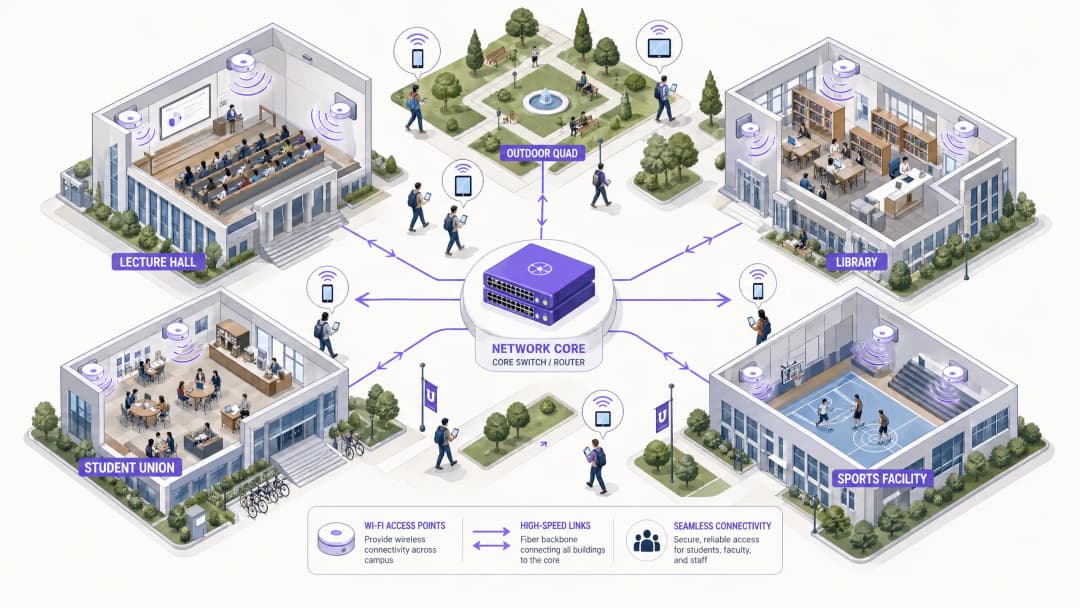
Building a campus-wide wireless network requires a scalable, tiered architecture. Standard practice involves three distinct tiers: Core, Aggregation, and Access.
 Core Layer forms the high-speed backbone of the network. It is responsible for routing traffic between different campus zones and out to the wider internet. High availability and redundancy are paramount here - core routers and firewalls must handle immense throughput without introducing latency. Dual-homed uplinks and redundant power supplies are standard practice.
Aggregation Layer acts as the intermediary, aggregating traffic from Access layer switches and enforcing network policies. Wireless LAN Controllers (WLCs) typically sit here, managing the access point (AP) fleet, handling RF management, and ensuring seamless roaming as users move between buildings. This layer also manages the application of Quality of Service (QoS) policies.
Access Layer is the network edge, where client devices connect. It consists of PoE (Power over Ethernet) switches and physical APs deployed across lecture halls, libraries, Student Housing, and outdoor plazas. High-density APs supporting WiFi 6 (802.11ax) or WiFi 6E are critical for areas with high simultaneous device counts.
Core Layer forms the high-speed backbone of the network. It is responsible for routing traffic between different campus zones and out to the wider internet. High availability and redundancy are paramount here - core routers and firewalls must handle immense throughput without introducing latency. Dual-homed uplinks and redundant power supplies are standard practice.
Aggregation Layer acts as the intermediary, aggregating traffic from Access layer switches and enforcing network policies. Wireless LAN Controllers (WLCs) typically sit here, managing the access point (AP) fleet, handling RF management, and ensuring seamless roaming as users move between buildings. This layer also manages the application of Quality of Service (QoS) policies.
Access Layer is the network edge, where client devices connect. It consists of PoE (Power over Ethernet) switches and physical APs deployed across lecture halls, libraries, Student Housing, and outdoor plazas. High-density APs supporting WiFi 6 (802.11ax) or WiFi 6E are critical for areas with high simultaneous device counts.
Security Standards & Authentication
Securing a university network requires balancing robust protection with user accessibility in a complex multi-tenant environment.
WPA3 Enterprise and IEEE 802.1X are non-negotiable for securing staff and student connections. 802.1X provides port-based Network Access Control (NAC), ensuring only authenticated users and devices can access the network. It integrates with central RADIUS servers (such as FreeRADIUS or Microsoft NPS) linked to the university's Active Directory or LDAP directories. This means student credentials match their university login, dramatically reducing service desk overhead.
Guest Access & Captive Portals serve visitors, conference attendees, and prospective students. A secure Captive Portal ensures CCPA/CPRA compliance while providing a controlled onboarding experience. Integrating with solutions like Purple allows for seamless guest access while capturing valuable first-party data for marketing and operations. For more on securing the foundation of your network, see Protecting Your Network with Strong DNS and Security.
VLAN Segmentation is vital to isolate traffic types. Student traffic, staff resources, IoT devices (smart building sensors, HVAC controllers), and guest access must reside on separate VLANs. This contains potential security breaches, prevents broadcast storms, and allows granular bandwidth management based on user class.
Got questions about your specific setup?
Our team works with venue operators, IT managers, and network engineers across 80,000 venues. Book a 20-minute call and we will show you how others like you solved it.
Implementation Guide
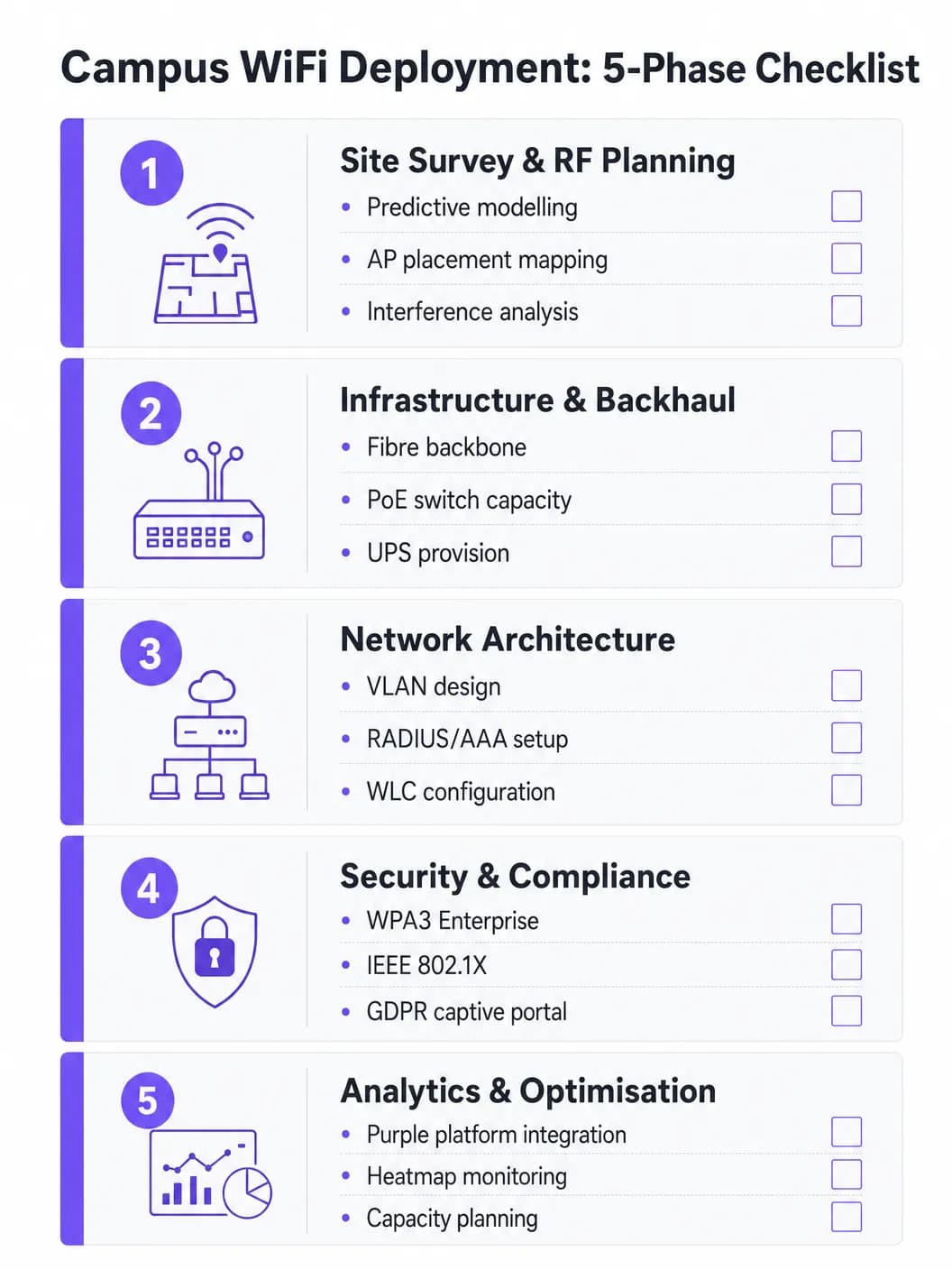
Phase 1: Site Survey & RF Planning
Never guess AP placement. A comprehensive predictive and active site survey is the most important investment in the project. Tools like Ekahau or AirMagnet should be used to map the physical environment, accounting for building materials (concrete, glass, metal), interference sources (legacy Bluetooth, microwaves, neighboring networks), and expected user density per zone. The goal is to ensure adequate coverage and capacity without causing co-channel interference. Predictive models should be validated with active surveys post-initial AP deployment.
Phase 2: Infrastructure & Backhaul Upgrades
Before deploying new APs, the underlying wired infrastructure must be assessed and upgraded where necessary. Ensure CAT6A cabling is deployed to support the multi-gigabit Ethernet (mGig) required by modern WiFi 6/6E APs. Verify that edge switches provide adequate PoE+ or PoE++ power budgets for the new AP models. The core network must have sufficient bandwidth - consider a dedicated business internet connection for resilience. For context on backhaul options, read What is a Leased Line? Dedicated Business Internet.
Phase 3: Network Configuration
Configure WLCs and APs according to the designed architecture. Implement QoS policies to prioritize critical traffic (VoIP, video conferencing, research data transfers) over bulk downloads and streaming. Ensure seamless roaming protocols (802.11r for Fast BSS Transition, 802.11k for Neighbor Reports, and 802.11v for BSS Transition Management) are correctly configured so devices transition between APs without dropping connection.
Phase 4: Security & Compliance Hardening
Deploy WPA3 Enterprise on staff and student SSIDs. Configure IEEE 802.1X using EAP-TLS or PEAP-MSCHAPv2 depending on device management capabilities. Implement a CCPA/CPRA-compliant Captive Portal for the guest SSID. Ensure all management interfaces are secured with strong passwords and certificate-based authentication. Conduct penetration testing prior to sign-off.### Phase 5: Analytical Integration & Ongoing Optimization
Integrate the network with an analytics platform to gain visibility into AP health, client density, roaming patterns, and bandwidth utilization. Purple's WiFi Analytics platform provides operational dashboards that benefit both IT teams and venue operations. This is not a one-time job - the RF environment changes as buildings are refurbished and device types evolve.
Best Practices
Design for capacity, not just coverage. In higher education, coverage is easy; capacity is difficult. A lecture theater may have strong signal everywhere, but if 300 students connect to a single AP simultaneously, the network will fail. Deploy high-density APs and leverage features like band steering to direct compatible clients to the less congested 5 GHz or 6 GHz bands. Disable legacy data rates (1, 2, 5.5, and 11 Mbps) to force sticky clients to roam to a closer AP.
Implement continuous monitoring. A network is not a "set and forget" deployment. Utilize analytics platforms to monitor AP health, client density, and roaming patterns in real time. Purple's analytics provide insights into how spaces are used, informing future infrastructure decisions and space utilization strategies.
Leverage OpenRoaming for seamless onboarding. For visiting academics and students from partner institutions, implementing OpenRoaming removes the friction of manual network logins. Purple acts as a free identity provider for OpenRoaming under the Connect license, allowing users from participating institutions to connect automatically and securely - vastly improving the visitor experience.
Segregate comprehensively. Never allow guest traffic on the same VLAN as internal resources. Use separate SSIDs, VLANs, and firewall rules for each user category. Apply bandwidth caps to guest VLANs to prevent a single user from saturating the uplink during peak hours.
Troubleshooting & Risk Mitigation
Co-Channel Interference (CCI) occurs when multiple APs on the same channel can detect each other, causing them to take turns transmitting and severely degrading performance. This is the most common cause of poor WiFi performance in dense deployments. Mitigation includes proper RF planning, utilizing Dynamic Channel Allocation (DCA) features on the WLC, and reducing AP transmit power in dense areas.
Sticky Clients are devices that refuse to roam to a closer AP, maintaining a weak connection to a distant one. This is particularly common with older smartphones and laptops. Mitigation includes adjusting the minimum mandatory data rates - disabling lower rates forces the client driver to seek a better connection.
DHCP Exhaustion is a surprisingly common failure mode in high-flow areas like outdoor plazas and student unions. When the DHCP pool runs out of IP addresses, new devices cannot connect despite having a strong signal. Mitigation includes implementing shorter DHCP lease times (one to two hours) for guest and student VLANs and ensuring the DHCP range is correctly sized for peak concurrent devices.
Rogue Access Points pose a major security risk. Staff or students plugging in consumer-grade routers create unsecured entry points. Mitigation includes enabling rogue AP detection on the WLC and conducting regular physical audits.
ROI & Business Impact
A robust campus WiFi network delivers measurable returns beyond basic connectivity. By integrating platforms like Purple, universities can quantify outcomes:
| Metric | Measurement Method | Typical Outcome |
|---|---|---|
| Student Satisfaction | NPS Surveys, IT Helpdesk Ticket Volume | Reduced WiFi-related complaints |
| Space Utilization | Heatmaps, Dwell Time Data | Optimized library and study space allocation |
| IT Operational Efficiency | Helpdesk Ticket Volume, Uptime | Reduced manual configuration overhead |
| Visitor Data Capture | Captive Portal Registrations | Growth of first-party marketing database |
| Network Uptime | SLA Monitoring, Incident Reports | Increased SLA adherence |
Analytics and visitor data capabilities on the Purple platform also present revenue opportunities, particularly when hosting large-scale public events on campus where tiered access models can be deployed. Similar ROI frameworks apply to Purple operations in Retail, Hospitality, Healthcare, and Transport settings. For a broader perspective on large venue WiFi deployments, see Airport WiFi: How Operators Provide Connectivity Across Terminals.
Key Definitions
IEEE 802.1X
A standard for port-based Network Access Control (NAC) that provides an authentication mechanism for devices wishing to connect to a LAN or WLAN. It requires a supplicant (client device), an authenticator (the AP or switch), and an authentication server (RADIUS).
Used to authenticate students and staff before they are allowed onto the network, integrating with a RADIUS server and Active Directory for credential validation. Eliminates shared PSK passwords and enables per-user policy enforcement.
WLC (Wireless LAN Controller)
A centralized hardware or software appliance that manages and configures multiple Access Points from a single point of control. It handles RF management, roaming, firmware updates, and policy enforcement across the AP fleet.
Essential for large deployments to ensure consistent policy enforcement, dynamic channel assignment, and seamless roaming across the campus. Can be physical hardware or a cloud-managed virtual instance.
Co-Channel Interference (CCI)
Interference that occurs when two or more APs operating on the same frequency channel are within range of each other. Both APs must wait for the channel to be clear before transmitting, severely reducing throughput.
The primary cause of poor performance in dense deployments. Mitigated by careful channel planning, dynamic channel assignment (DCA) on the WLC, and reducing AP transmit power.
Band Steering
A technique used by APs to encourage dual-band capable client devices to connect to the 5 GHz or 6 GHz band rather than the more congested 2.4 GHz band, by delaying or suppressing probe responses on 2.4 GHz.
Critical for maximizing capacity and throughput in high-density areas. The 5 GHz and 6 GHz bands offer more non-overlapping channels and higher throughput, but shorter range.
Captive Portal
A web page that users are redirected to before gaining full network access. It typically requires acceptance of terms of service, authentication, or data capture before the user's MAC address is permitted through the firewall.
Used for guest access management, CCPA/CPRA-compliant data collection, and branded onboarding experiences. Platforms like Purple provide customizable captive portal solutions with analytics integration.
VLAN (Virtual Local Area Network)
A logical grouping of network devices that behave as if they are on the same physical network, regardless of their actual physical location. VLANs are defined at Layer 2 and are used to segment broadcast domains.
Used to isolate different user classes (students, staff, guests, IoT devices) for security and performance. Prevents guest traffic from reaching internal resources and allows per-VLAN bandwidth policies.
PoE (Power over Ethernet)
A technology that passes electrical power along with data on twisted-pair Ethernet cabling, allowing a single cable to provide both data connection and electrical power to devices such as APs.
Allows APs to be installed in locations without dedicated power outlets. IT teams must verify that edge switches have sufficient PoE budget (total watts) to power all connected APs, particularly with power-hungry WiFi 6E models requiring PoE++ (802.3bt).
OpenRoaming
A global WiFi roaming federation built on the Hotspot 2.0 (Passpoint) standard, allowing users to automatically and securely connect to participating networks without manual login, using their existing identity credentials.
Improves the experience for visiting academics and students from partner institutions. Purple can act as an identity provider for OpenRoaming under the Connect license, enabling automatic secure connections for eligible users.
WPA3 Enterprise
The latest generation of the WiFi Protected Access security protocol for enterprise networks. It uses 192-bit minimum-strength security protocols and mandates the use of Protected Management Frames (PMF), providing stronger protection against offline dictionary attacks.
The recommended security standard for all staff and student SSIDs. Replaces WPA2 Enterprise and provides significantly stronger protection for sensitive research and personal data transmitted over the wireless network.
RADIUS (Remote Authentication Dial-In User Service)
A networking protocol that provides centralized Authentication, Authorization, and Accounting (AAA) management for users who connect and use a network service.
The backbone of 802.1X authentication on campus networks. The RADIUS server validates credentials against Active Directory and returns the appropriate VLAN assignment and access policy for each authenticated user.
Worked Examples
A large university is upgrading its main lecture hall (capacity 500) to WiFi 6. The previous deployment used 4 APs mounted on the high ceiling, resulting in poor performance and frequent disconnects during peak times. What is the correct approach?
The IT team must shift from a coverage-centric design to a capacity-centric one. First, conduct a new site survey specifically for the lecture hall, modeling the expected device count (assume 1,000+ devices given 2+ devices per student). Replace the ceiling-mounted omnidirectional APs with either under-seat AP deployments or directional (patch) antenna arrays mounted on the side walls, creating smaller, focused micro-cells. Increase the AP count to 8 - 12 WiFi 6 APs, each serving a defined section of seating. Disable 2.4 GHz radios on alternating APs to reduce co-channel interference, relying primarily on 5 GHz and 6 GHz bands. Implement strict band steering and disable legacy data rates below 12 Mbps. Configure the WLC to use 20 MHz channel widths in the 5 GHz band (rather than 40 or 80 MHz) to allow more non-overlapping channels and reduce interference.
A campus network is experiencing intermittent connectivity issues in the outdoor quad area. Users report strong signal but inability to load web pages during the lunch period (12:00 - 13:30). What is the diagnostic approach?
Strong signal with no connectivity is a Layer 2/3 issue, not an RF problem. The diagnostic sequence should be: (1) Check the DHCP scope for the outdoor VLAN - query the DHCP server for scope utilization. If it is above 80%, DHCP exhaustion is the likely cause. Reduce lease times to 1 hour and expand the scope if possible. (2) If DHCP is healthy, check the uplink capacity of the outdoor distribution switch. If the APs are connected via a congested uplink, the bottleneck is wired, not wireless. (3) Analyze the RF environment for external interference using a spectrum analyzer - municipal WiFi networks or nearby businesses may be causing noise floor elevation. (4) Review the firewall and NAT table for session exhaustion during peak periods.
Practice Questions
Q1. A university is planning to deploy WiFi in a newly constructed outdoor sports stadium with a capacity of 8,000 spectators. The stadium has no roof and an open bowl design. What is the most critical RF consideration and how should AP placement be approached?
Hint: Consider the lack of physical boundaries, signal propagation in an open environment, and the extreme device density during events.
View model answer
The most critical consideration is controlling signal propagation and minimizing Co-Channel Interference in an environment with no natural RF attenuation. Unlike indoor environments, the open bowl means signals travel freely, causing APs to interfere with each other across the entire space. The correct approach is to use directional (sector) antennas mounted under the seating tiers, pointing downward into the seating rows to create highly focused micro-cells. Transmit power must be carefully tuned to limit cell size. WiFi 6 APs with OFDMA and BSS Color schemes should be specified to handle the extreme device density. Separate SSIDs and VLANs should be configured for event staff, media, and public attendees.
Q2. During a network upgrade, the IT team notices that older IoT devices (legacy HVAC sensors and door access controllers) are failing to connect to the new campus WiFi network after the security upgrade to WPA3 Enterprise.
Hint: Consider the security protocol compatibility of legacy embedded devices and the need to maintain security for other user classes.
View model answer
The new network enforcing WPA3 Enterprise is incompatible with older IoT devices that only support WPA2 or earlier protocols. The solution is to create a dedicated, isolated SSID and VLAN specifically for legacy IoT devices, utilizing WPA2-PSK with a strong, rotated passphrase, or MAC Authentication Bypass (MAB) for devices that cannot support any EAP method. This VLAN must be tightly firewalled - IoT devices should only be able to communicate with their specific management servers, not the broader campus network. The main student and staff SSIDs remain on WPA3 Enterprise, maintaining security for the primary user population.
Q3. The university wants to monetize its guest WiFi network during large public events (open houses, graduation ceremonies, public lectures) while remaining CCPA/CPRA-compliant. What is the recommended architecture?
Hint: Consider data capture requirements, consent mechanisms, and the difference between free and premium access tiers.
View model answer
Deploy a Captive Portal solution such as Purple integrated with the guest VLAN. Configure a tiered access model: a free tier offering basic internet access (with bandwidth caps) in exchange for email address and explicit CCPA/CPRA-compliant marketing consent, and an optional premium tier offering higher bandwidth for a fee (processed via a payment gateway integration). The Captive Portal must display a clear privacy notice and record consent timestamps to satisfy regulatory requirements. Captured first-party data feeds into the university's CRM for post-event marketing. All guest traffic must be isolated from internal university systems via firewall rules, and data retention policies must be documented and enforced.
Q4. The IT team receives complaints that WiFi performance in the main library is poor between 10:00 AM and 2:00 PM on weekdays, despite the network showing healthy AP status in the management console. How should the team approach diagnosis?
Hint: Consider time-based patterns and what changes between off-peak and peak hours.
View model answer
The time-based pattern is the key diagnostic clue - the issue only occurs during peak occupancy hours, suggesting a capacity problem rather than a hardware or configuration fault. The diagnostic sequence should be: (1) Check per-AP client association counts during the problem window - if any AP is serving more than 30-40 clients simultaneously, it is overloaded. (2) Review DHCP scope utilization for the library VLAN. (3) Check uplink utilization on the distribution switch serving the library - the wired backhaul may be saturated. (4) Review the channel utilization and retry rates on the APs using the WLC's RF statistics. The likely resolution is either deploying additional APs to distribute the client load, or implementing stricter band steering and minimum data rate policies to improve per-client throughput.
Continue reading in this series
Staff WiFi vs. Guest WiFi: Best Practices for Corporate Network Segmentation
A comprehensive technical guide for IT leaders on segmenting staff and guest WiFi networks. It covers VLAN architecture, 802.1X authentication, firewall policies, and the business impact of secure network design.
Hotel Guest WiFi Management: Integrating PMS, Portals, and Brand Standards
This technical guide details how to architect enterprise-grade hotel WiFi networks, focusing on VLAN segmentation, PMS integration for automated session management, and captive portal optimisation for GDPR-compliant data capture.
How to Set Up Guest WiFi: A Secure Enterprise Configuration Guide
This authoritative guide provides IT leaders and network architects with a definitive blueprint for deploying secure enterprise guest WiFi. It covers essential architecture, WPA3 migration, VLAN segmentation, and captive portal integration to protect internal systems while capturing compliant first-party data.
Got questions about your specific setup?
Our team works with venue operators, IT managers, and network engineers across 80,000 venues. Book a 20-minute call and we will show you how others like you solved it.